基于OpenCV库的动态链接库(DLL)制作+测试程序(以HSV识别为例)
本文将详细介绍:如何将自己基于C++编写的程序打包为动态链接库(DLL),并在其中集成OpenCV库的调用;以图片HSV值识别功能为例,文中还将同步提供对应的测试程序供实践验证。
1 准备知识
1.1 什么是动态链接库(.lib和.dll)
在使用动态库的时候,编译后往往提供两个文件:一个引入库(.lib)文件(也称“导入库文件”,非必需)和一个DLL(.dll)文件。编译时仅记录函数位置信息,程序运行时由动态链接器根据这些信息从动态链接库中加载所需代码。
1.2 什么是静态链接库(.lib)
函数和数据被编译进一个二进制文件(通常扩展名为.lib)。在使用静态库的情况下,在编译链接可执行文件时,链接器从库中复制这些函数和数据并把它们和应用程序的其他模块组合起来创建最终的可执行文件(.EXE文件)。当发布产品时,只需要发布这个可执行文件,并不需要发布被使用的静态库。
1.3 引入库lib和静态库lib的区别
引入库和静态库是不一样的东西。静态库本身就包含了实际执行代码、符号表等等,而对于引入库而言,其实际的执行代码位于动态库中,引入库(lib)只包含了地址符号表等,确保程序找到对应函数的一些基本地址信息。但是引入库文件的引入方式和静态库一样,要在链接路径上添加找到这些.lib的路径。引入库只有当EXE程序确实要调用这些DLL模块的情况下,系统才会将它们装载到内存空间中。
更详细的介绍参考:windows中静态库lib和动态dll的区别及使用方法_windoiws 静态库区分调试版本不-CSDN博客
2 安装visual studio和opencv
2.1 安装visual studio
参考Microsoft Visual Studio2022下载安装详细教程(图文)_visual studio 2022-CSDN博客
2.2 安装opencv
opencv官网OpenCV download | SourceForge.net,选择版本下载(这里以4.12.0为例)
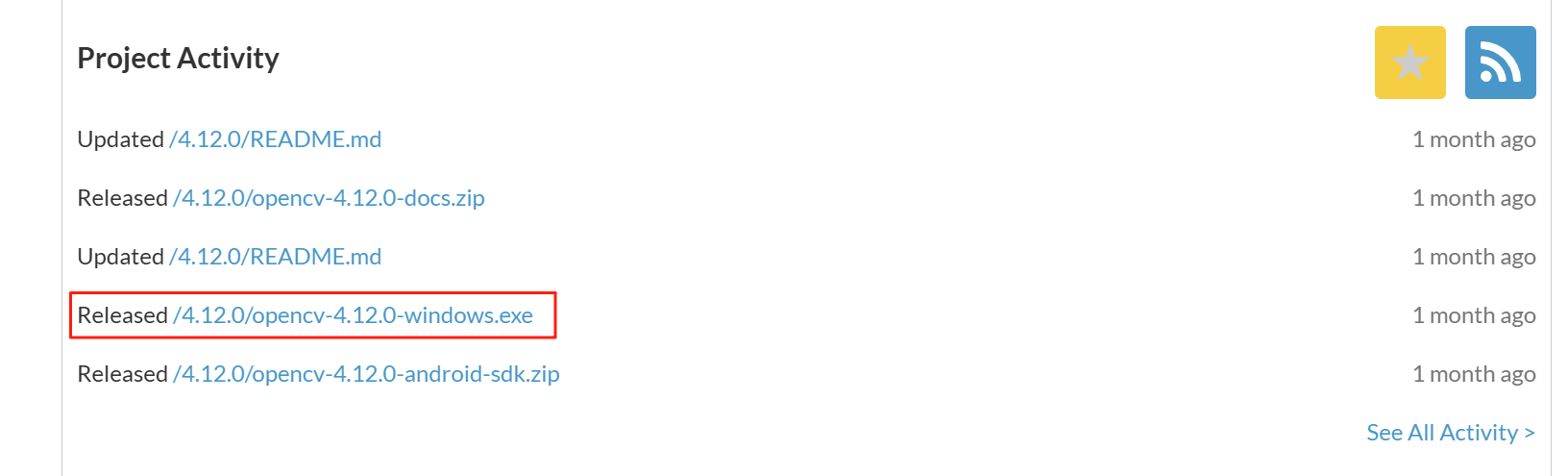
双击安装:

自定义安装路径(要记住):
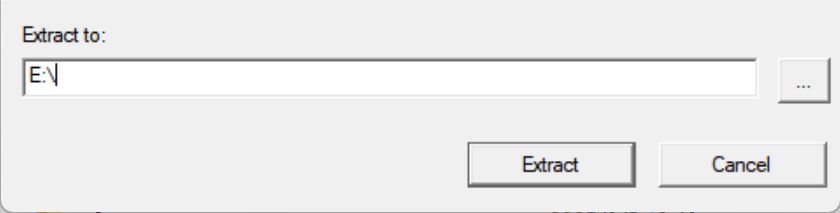
opencv库安装完成!
3 编译自己写的程序
这里以识别图片的HSV值和识别HSV区域两个任务为例:TEST.cpp和TEST.h
3.1 HSV识别程序内容
TEST.h文件内容如下:
#ifndef TEST_H
#define TEST_H

#include <opencv2/opencv.hpp>
#include <vector>

// Define API macro for DLL export
#ifdef BUILDING_DLL
#define API __declspec(dllexport)
#else
#define API __declspec(dllimport)
#endif

using namespace std;
using namespace cv;

/*
对一张纯色或主色调明显的图像进行颜色分析,返回 HSV 空间下的主颜色值

输入图像,要求为 BGR 彩色图(CV_8UC3),建议背景纯色或主色显著
输出颜色的 HSV 值数组,长度为 3(hsv_co1or[0]=H,hsv_co1or[1]=S,hsv_color[2]=V)

true 表示识别成功,false 表示失败(如图像为空或格式不对)

-图像必须是 BGR 格式的彩色图(非灰度),函数内部将图像转换为 HSV 空间
-推荐图像尽量避免大面积黑色或白色背景,以提高准确度
-返回的 HSV 值用于后续颜色分类、分析或阈值匹配

*/
extern "C" API bool RecognizeDominantColorHSV(Mat* image, double* hsv_color);

/*
@param image            输入图像(BGR 格式,CV 8UC3)
@param target_hsv       目标颜色的 HSV 值数组,长度为 3(hsv_color[0]=H,hsv_color[1]=S,hsv_color[2]=V)
@param tolerance_hsv    HSV 容差范围数组,长度为3(±H,±S,±V)
@param mask             输出掩膜图(255 表示目标颜色区域,0 表示非目标区域)
@param contours         输出颜色区域的轮廓(可选,如不需要可传空指针)

@return                 返回 true 表示成功识别颜色区域,false 表示失败或图像无效

@note
-输入图像必须为 BGR 格式(CV 8UC3)
-HSV 更适合颜色识别,建议将 BGR 图像转换后在 HSV 中设定颜色范围
-tolerance_hsv 可适当调整以适配不同光照条件或相机色彩漂移

*/
extern "C" API bool FindColorRegionHSV(Mat* image,
    const double* target_hsv,
    const double* tolerance_hsv,
    Mat* mask,
    std::vector<std::vector<Point>>* contours = nullptr);


#endif
TEST.cpp文件如下:
#define BUILDING_DLL
#include "TEST.h"
#include <cstdlib>
#include <ctime>
#include <algorithm>
#include <cstring>
#include <string>
#include <cmath>

// 定义数学常量
#ifndef M_PI
#define M_PI 3.14159265358979323846
#endif

// 全局变量声明
Mat cameraMatrix;
Mat distCoeffs;

// UTF-8安全的字符串复制函数
static void safe_utf8_copy(char* dest, const std::string& src, int max_length) {
    if (max_length <= 0) return;

    int bytes_copied = 0;
    int src_index = 0;

    while (src_index < static_cast<int>(src.length()) && bytes_copied < max_length - 1) {
        unsigned char byte = static_cast<unsigned char>(src[src_index]);

        // 计算UTF-8字符的字节数
        int char_bytes = 1;
        if (byte >= 0xC0) {
            if (byte >= 0xF0) char_bytes = 4;
            else if (byte >= 0xE0) char_bytes = 3;
            else if (byte >= 0xC0) char_bytes = 2;
        }

        // 检查是否有足够空间复制完整的UTF-8字符
        if (bytes_copied + char_bytes >= max_length) break;

        // 复制UTF-8字符的所有字节
        for (int i = 0; i < char_bytes && src_index < static_cast<int>(src.length()); ++i) {
            dest[bytes_copied++] = src[src_index++];
        }
    }

    dest[bytes_copied] = '\0';
}

extern "C" {

/* 3.1 颜色识别算法 */
bool RecognizeDominantColorHSV(Mat *image, double *hsv_color) {
    // 检查输入有效性
    if (!image || image->empty() || image->channels() != 3) return false;

    // 计算图像中心25%区域的范围
    int width = image->cols;
    int height = image->rows;
    int center_width = static_cast<int>(width * 0.5);  // 50%宽度
    int center_height = static_cast<int>(height * 0.5); // 50%高度
    int start_x = (width - center_width) / 2;
    int start_y = (height - center_height) / 2;

    // 提取中心区域
    Rect center_roi(start_x, start_y, center_width, center_height);
    Mat center_region = (*image)(center_roi);

    // BGR转HSV
    Mat hsv;
    cvtColor(center_region, hsv, COLOR_BGR2HSV);

    // 排除黑白背景(低饱和度和低亮度区域)
    Mat mask;
    inRange(hsv, Scalar(0, 30, 30), Scalar(180, 255, 255), mask);

    // 检查掩码是否有效(至少有一些有效像素)
    Scalar mean_hsv;
    if (countNonZero(mask) == 0) {
        // 如果没有有效像素,使用整个中心区域计算平均值
        mean_hsv = mean(hsv);
    } else {
        // 计算掩码区域的平均HSV值
        mean_hsv = mean(hsv, mask);
    }

    hsv_color[0] = mean_hsv[0]; // H
    hsv_color[1] = mean_hsv[1]; // S
    hsv_color[2] = mean_hsv[2]; // V

    return true;
}

/* 3.2 颜色查找算法 */
bool FindColorRegionHSV(Mat *image, const double *target_hsv, const double *tolerance_hsv, Mat *mask, vector<vector<Point>>* contours)
{
    // 检查输入有效性
    if (!image || image->empty() || image->channels() != 3) return false;
    // BGR转HSV
    Mat hsv;
    cvtColor(*image, hsv, COLOR_BGR2HSV);

    double h = target_hsv[0];
    double s = target_hsv[1];
    double v = target_hsv[2];
    double h_tolerance = tolerance_hsv[0];
    double s_tolerance = tolerance_hsv[1];
    double v_tolerance = tolerance_hsv[2];

    // 处理红色HSV环绕问题
    if (h - h_tolerance < 0 || h + h_tolerance > 180) {
        // 红色区域,需要分两段检测
        Mat mask1, mask2;

        if (h - h_tolerance < 0) {
            // 跨越0边界:检测 [0, h+tolerance] 和 [180+h-tolerance, 180]
            Scalar lower1(0, max(0.0, s - s_tolerance), max(0.0, v - v_tolerance));
            Scalar upper1(h + h_tolerance, min(255.0, s + s_tolerance), min(255.0, v + v_tolerance));
            inRange(hsv, lower1, upper1, mask1);

            Scalar lower2(180 + h - h_tolerance, max(0.0, s - s_tolerance), max(0.0, v - v_tolerance));
            Scalar upper2(180, min(255.0, s + s_tolerance), min(255.0, v + v_tolerance));
            inRange(hsv, lower2, upper2, mask2);
        } else {
            // 跨越180边界:检测 [h-tolerance, 180] 和 [0, h+tolerance-180]
            Scalar lower1(h - h_tolerance, max(0.0, s - s_tolerance), max(0.0, v - v_tolerance));
            Scalar upper1(180, min(255.0, s + s_tolerance), min(255.0, v + v_tolerance));
            inRange(hsv, lower1, upper1, mask1);

            Scalar lower2(0, max(0.0, s - s_tolerance), max(0.0, v - v_tolerance));
            Scalar upper2(h + h_tolerance - 180, min(255.0, s + s_tolerance), min(255.0, v + v_tolerance));
            inRange(hsv, lower2, upper2, mask2);
        }

        // 合并两个掩膜
        *mask = mask1 | mask2;
    } else {
        // 普通颜色,直接范围检测
        Scalar lower(h - h_tolerance,
                    max(0.0, s - s_tolerance),
                    max(0.0, v - v_tolerance));
        Scalar upper(h + h_tolerance,
                    min(255.0, s + s_tolerance),
                    min(255.0, v + v_tolerance));
        inRange(hsv, lower, upper, *mask);
    }

    // 查找掩膜中的轮廓
    if (contours) {
        vector<vector<Point>> temp_contours;
        findContours(*mask, temp_contours, RETR_EXTERNAL, CHAIN_APPROX_SIMPLE);
        *contours = temp_contours;
    }
    // 返回是否找到目标区域
    return countNonZero(*mask) > 0;
}

} // extern "C"
将以上文件保存为TEST.cpp和TEST.h
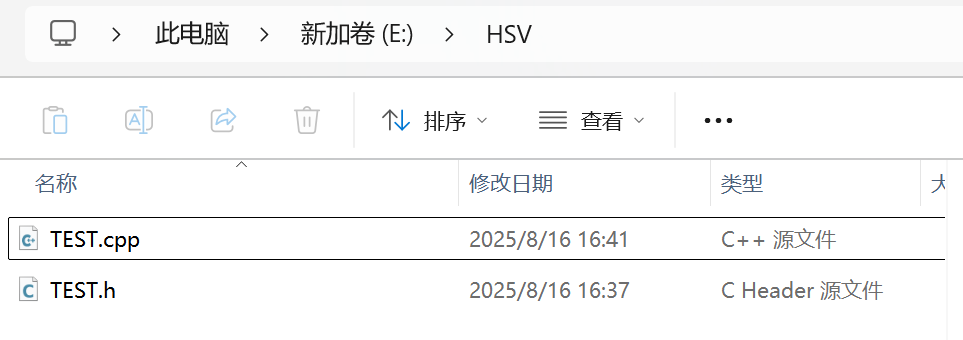
3.2 编译为DLL文件
开始界面搜索x64 Native Tools Command Prompt for VS 2022命令行(前提是已经装好了visual studio2022)

输入以下命令进行编译TEST.cpp
cl /LD /EHsc /utf-8 /I"E:\opencv\build\include" TEST.cpp /link /LIBPATH:"E:\opencv\build\x64\vc16\lib" opencv_world4120.lib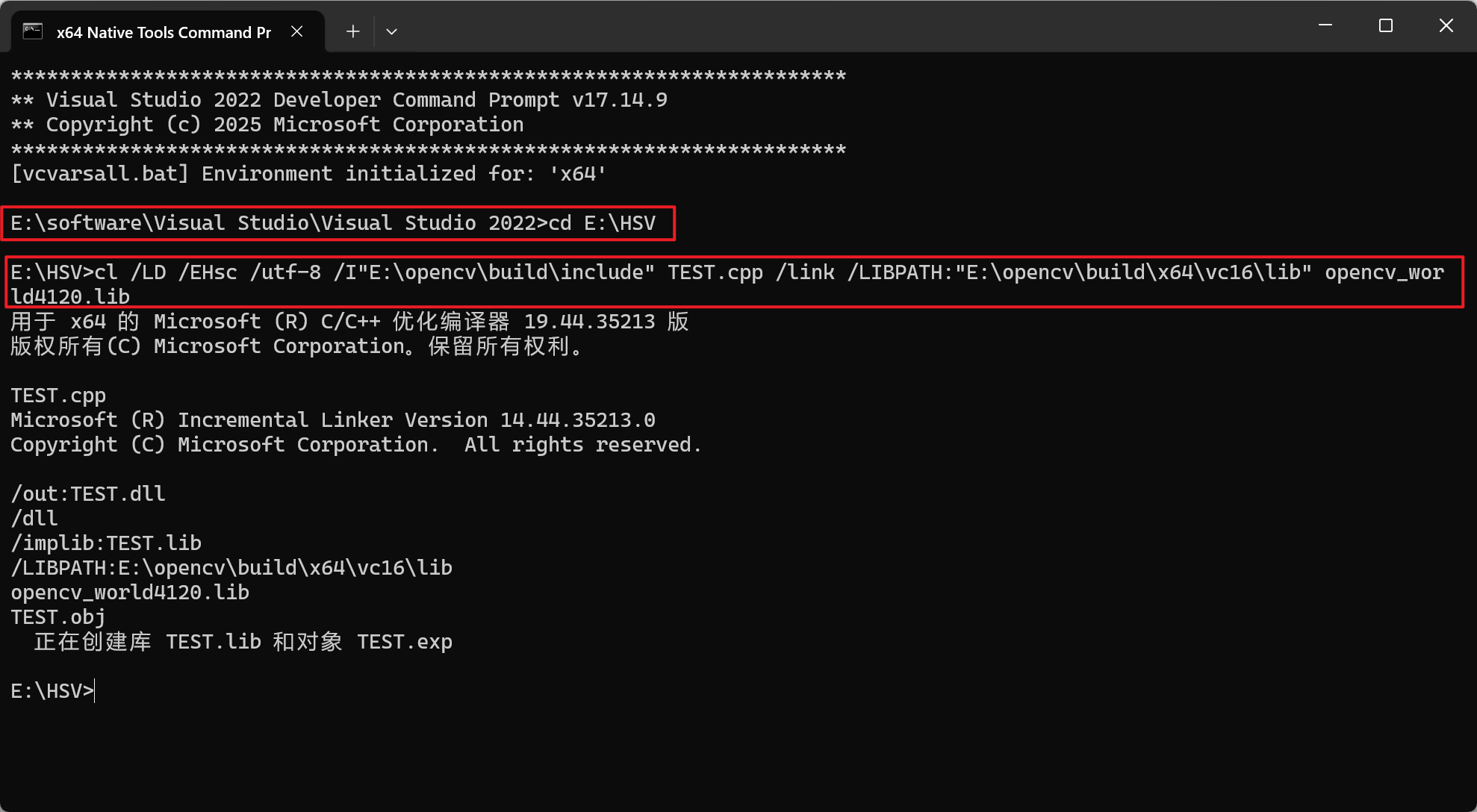
如上图所示就是编译成功了,可以看到出现了dll文件
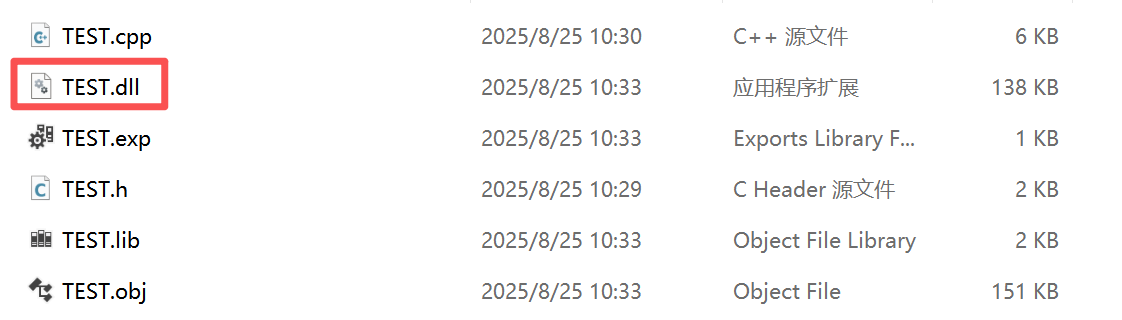
但是我们还不知道这个dll文件的具体功能如何,需要写一个测试程序方便验证效果。
4 编译测试程序
4.1 测试程序内容
测试程序test_hsv_app.cpp如下:
#include <iostream>
#include <string>
#include <vector>
#include <limits>
#include <windows.h>

#include <opencv2/opencv.hpp>
#include "TEST.h"

// 动态加载 DLL 函数指针类型
using RecognizeDominantColorHSV_t = bool (__cdecl*)(cv::Mat*, double*);
using FindColorRegionHSV_t       = bool (__cdecl*)(cv::Mat*, const double*, const double*, cv::Mat*, std::vector<std::vector<cv::Point>>*);

// 安全读取一整行(兼容含空格的路径)
static std::string read_line_trim() {
    std::string s;
    std::getline(std::cin, s);
    // 去掉首尾空白
    size_t start = s.find_first_not_of(" \t\r\n");
    size_t end   = s.find_last_not_of(" \t\r\n");
    if (start == std::string::npos) return "";
    return s.substr(start, end - start + 1);
}

// 加载DLL并获取函数指针
HMODULE loadTestDll(RecognizeDominantColorHSV_t* pRecognize, FindColorRegionHSV_t* pFindRegion) {
    HMODULE hDll = LoadLibraryA("TEST.dll");
    if (!hDll) {
        std::cerr << "Failed to load TEST.dll. Please ensure TEST.dll is in the same directory as this program or added to system PATH.\n";
        return nullptr;
    }

    *pRecognize = reinterpret_cast<RecognizeDominantColorHSV_t>(
        GetProcAddress(hDll, "RecognizeDominantColorHSV")
    );

    *pFindRegion = reinterpret_cast<FindColorRegionHSV_t>(
        GetProcAddress(hDll, "FindColorRegionHSV")
    );

    if (!*pRecognize) {
        std::cerr << "Failed to get RecognizeDominantColorHSV entry point from TEST.dll.\n";
        FreeLibrary(hDll);
        return nullptr;
    }

    return hDll;
}

// HSV值识别功能
void recognizeHsvValue(const std::string& image_path) {
    // 读取图像(BGR)
    cv::Mat image = cv::imread(image_path, cv::IMREAD_COLOR);
    if (image.empty()) {
        std::cerr << "Cannot read image: " << image_path << "\n";
        std::cerr << "Please check if the path is correct or if the image exists.\n";
        return;
    }

    // 加载DLL
    RecognizeDominantColorHSV_t pRecognizeDominantColorHSV = nullptr;
    FindColorRegionHSV_t pFindColorRegionHSV = nullptr;
    HMODULE hDll = loadTestDll(&pRecognizeDominantColorHSV, &pFindColorRegionHSV);
    if (!hDll) return;

    // 调用主色 HSV 识别
    double hsv_color[3] = {0, 0, 0};
    bool ok = pRecognizeDominantColorHSV(&image, hsv_color);
    if (!ok) {
        std::cerr << "Recognition failed: Invalid input image or incorrect format.\n";
        FreeLibrary(hDll);
        return;
    }

    std::cout << "Recognition successful! Main color HSV values:\n";
    std::cout << "H = " << hsv_color[0] << ", S = " << hsv_color[1] << ", V = " << hsv_color[2] << "\n";

    FreeLibrary(hDll);
}

// HSV区域识别功能
void recognizeHsvRegion(const std::string& image_path) {
    // 读取图像(BGR)
    cv::Mat image = cv::imread(image_path, cv::IMREAD_COLOR);
    if (image.empty()) {
        std::cerr << "Cannot read image: " << image_path << "\n";
        std::cerr << "Please check if the path is correct or if the image exists.\n";
        return;
    }

    // 加载DLL
    RecognizeDominantColorHSV_t pRecognizeDominantColorHSV = nullptr;
    FindColorRegionHSV_t pFindColorRegionHSV = nullptr;
    HMODULE hDll = loadTestDll(&pRecognizeDominantColorHSV, &pFindColorRegionHSV);
    if (!hDll) return;

    if (!pFindColorRegionHSV) {
        std::cerr << "Failed to get FindColorRegionHSV entry point from TEST.dll.\n";
        FreeLibrary(hDll);
        return;
    }

    // 获取用户输入的HSV值
     double hsv_color[3] = {0, 0, 0};
     std::cout << "Please enter HSV values:\n";

     try {
         std::cout << "H (0-180): ";
         std::string input = read_line_trim();
         hsv_color[0] = std::stod(input);
         if (hsv_color[0] < 0 || hsv_color[0] > 180) {
             std::cout << "Warning: H value should be between 0-180, clamping to valid range.\n";
             hsv_color[0] = std::max(0.0, std::min(180.0, hsv_color[0]));
         }

         std::cout << "S (0-255): ";
         input = read_line_trim();
         hsv_color[1] = std::stod(input);
         if (hsv_color[1] < 0 || hsv_color[1] > 255) {
             std::cout << "Warning: S value should be between 0-255, clamping to valid range.\n";
             hsv_color[1] = std::max(0.0, std::min(255.0, hsv_color[1]));
         }

         std::cout << "V (0-255): ";
         input = read_line_trim();
         hsv_color[2] = std::stod(input);
         if (hsv_color[2] < 0 || hsv_color[2] > 255) {
             std::cout << "Warning: V value should be between 0-255, clamping to valid range.\n";
             hsv_color[2] = std::max(0.0, std::min(255.0, hsv_color[2]));
         }
     } catch (const std::exception& e) {
         std::cerr << "Error parsing input: " << e.what() << "\n";
         std::cerr << "Using default HSV values (0, 0, 0)\n";
     }

    // 获取容差
    double tolerance[3] = {10.0, 50.0, 50.0}; // 默认值
    std::cout << "\nUse default tolerance (H:10, S:50, V:50)? (y/n): ";
    std::string input = read_line_trim();

    if (input.empty() || (input[0] != 'y' && input[0] != 'Y' && input[0] != '1')) {
        std::cout << "Enter custom tolerance values:\n";

        try {
             std::cout << "H tolerance (0-180): ";
             input = read_line_trim();
             tolerance[0] = std::stod(input);
             if (tolerance[0] < 0 || tolerance[0] > 180) {
                 std::cout << "Warning: H tolerance should be between 0-180, clamping to valid range.\n";
                 tolerance[0] = std::max(0.0, std::min(180.0, tolerance[0]));
             }

             std::cout << "S tolerance (0-255): ";
             input = read_line_trim();
             tolerance[1] = std::stod(input);
             if (tolerance[1] < 0 || tolerance[1] > 255) {
                 std::cout << "Warning: S tolerance should be between 0-255, clamping to valid range.\n";
                 tolerance[1] = std::max(0.0, std::min(255.0, tolerance[1]));
             }

             std::cout << "V tolerance (0-255): ";
             input = read_line_trim();
             tolerance[2] = std::stod(input);
             if (tolerance[2] < 0 || tolerance[2] > 255) {
                 std::cout << "Warning: V tolerance should be between 0-255, clamping to valid range.\n";
                 tolerance[2] = std::max(0.0, std::min(255.0, tolerance[2]));
             }
         } catch (const std::exception& e) {
             std::cerr << "Error parsing input: " << e.what() << "\n";
             std::cerr << "Using default tolerance values (10, 50, 50)\n";
             tolerance[0] = 10.0;
             tolerance[1] = 50.0;
             tolerance[2] = 50.0;
         }
    }

    // 执行区域识别
    cv::Mat mask;
    bool found = pFindColorRegionHSV(&image, hsv_color, tolerance, &mask, nullptr);

    if (!found) {
        std::cout << "No matching color regions found in the image (under current tolerance).\n";
    } else {
        std::cout << "Color regions found, displaying mask window. Press any key to close.\n";
        cv::imshow("Original Image", image);
        cv::imshow("Mask (255=Target Color)", mask);
        cv::waitKey(0);
        cv::destroyAllWindows();
    }

    FreeLibrary(hDll);
}

int main(int argc, char** argv) {
    std::string image_path;
    bool first_run = true;

    while (true) {
        // 清屏并显示菜单
        system("cls");
        std::cout << "===== HSV Color Recognition Tool =====\n";
        std::cout << "1. HSV Color Value Recognition\n";
        std::cout << "2. HSV Color Region Recognition\n";
        std::cout << "3. Exit\n";
        std::cout << "Please select an option (1-3): ";

        std::string choice = read_line_trim();

        // 验证用户输入
        if (choice.empty() || (choice[0] != '1' && choice[0] != '2' && choice[0] != '3')) {
            std::cout << "Invalid option. Please press Enter to continue...";
            std::cin.ignore(std::numeric_limits<std::streamsize>::max(), '\n');
            continue;
        }

        if (choice[0] == '3') {
            std::cout << "Exiting program. Goodbye!\n";
            break;
        }

        // 首次运行时,尝试从命令行获取图像路径
        if (first_run && argc > 1) {
            image_path = argv[1];
            first_run = false;
        } else {
            // 获取图像路径
            std::cout << "Enter image path (or type 'back' to return to menu): ";
            image_path = read_line_trim();

            // 允许用户返回主菜单
            if (image_path == "back" || image_path == "BACK") {
                continue;
            }

            // 验证图像路径是否为空
            if (image_path.empty()) {
                std::cerr << "No valid image path provided.\n";
                std::cout << "Press Enter to continue...";
                std::cin.ignore(std::numeric_limits<std::streamsize>::max(), '\n');
                continue;
            }

            // 验证图像文件是否存在
            FILE* file = fopen(image_path.c_str(), "r");
            if (!file) {
                std::cerr << "Error: Image file does not exist or cannot be accessed.\n";
                std::cout << "Press Enter to continue...";
                std::cin.ignore(std::numeric_limits<std::streamsize>::max(), '\n');
                continue;
            }
            fclose(file);
        }

        try {
            if (choice[0] == '1') {
                recognizeHsvValue(image_path);
            } else if (choice[0] == '2') {
                recognizeHsvRegion(image_path);
            }
        } catch (const std::exception& e) {
            std::cerr << "Error during processing: " << e.what() << "\n";
        }

        std::cout << "\nPress Enter to return to main menu...";
        std::cin.ignore(std::numeric_limits<std::streamsize>::max(), '\n');
    }
    return 0;
}
4.2 编译测试程序
在x64 Native Tools Command Prompt for VS 2022中运行
cl /EHsc /utf-8 /I"E:\opencv\build\include" test_hsv_app.cpp TEST.cpp /link /LIBPATH:"E:\opencv\build\x64\vc16\lib" opencv_world4120.lib 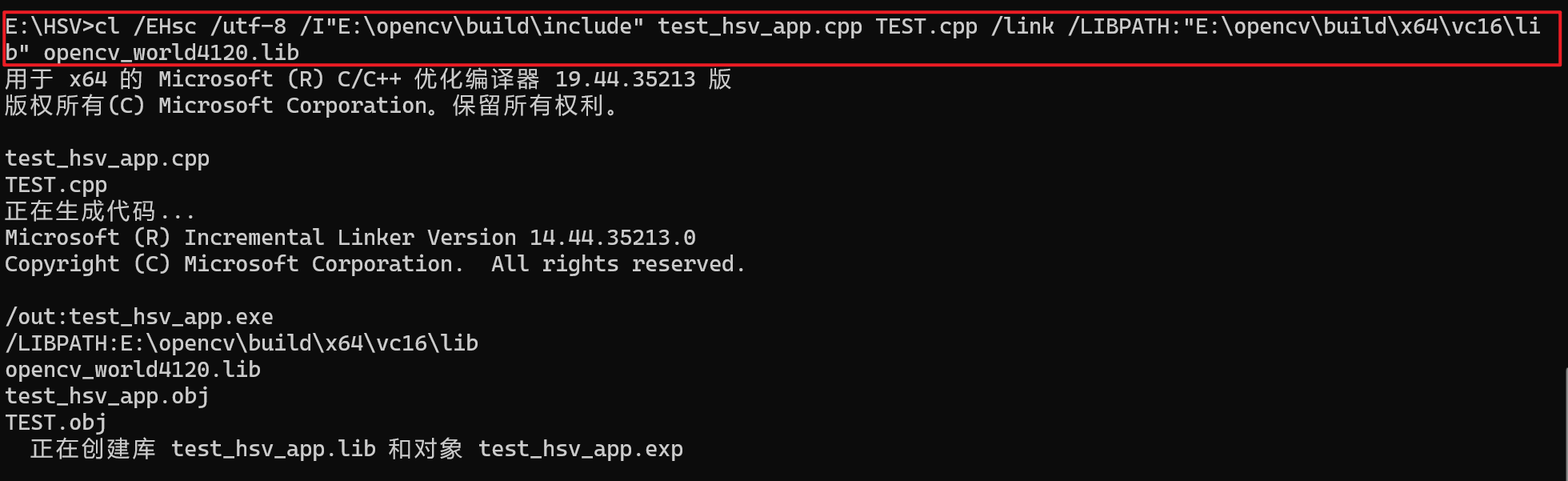
编译成功,出现test_hsv_app.exe文件。
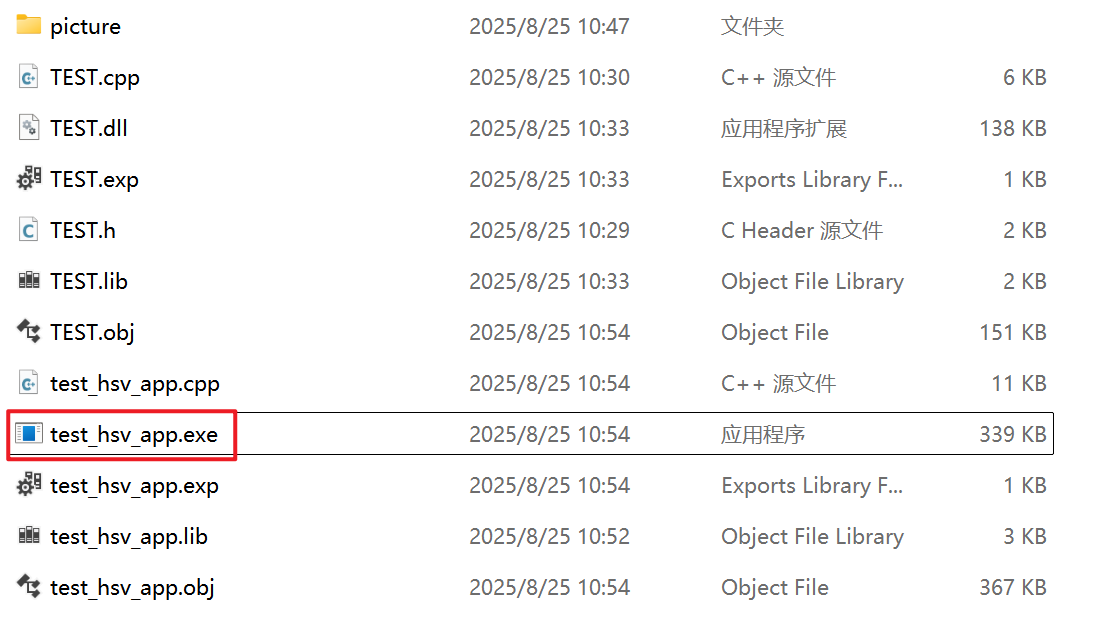
4.3 运行测试程序
双击test_hsv_app.exe运行,以识别红色(0,255,255)区域为例,依次输入以下内容
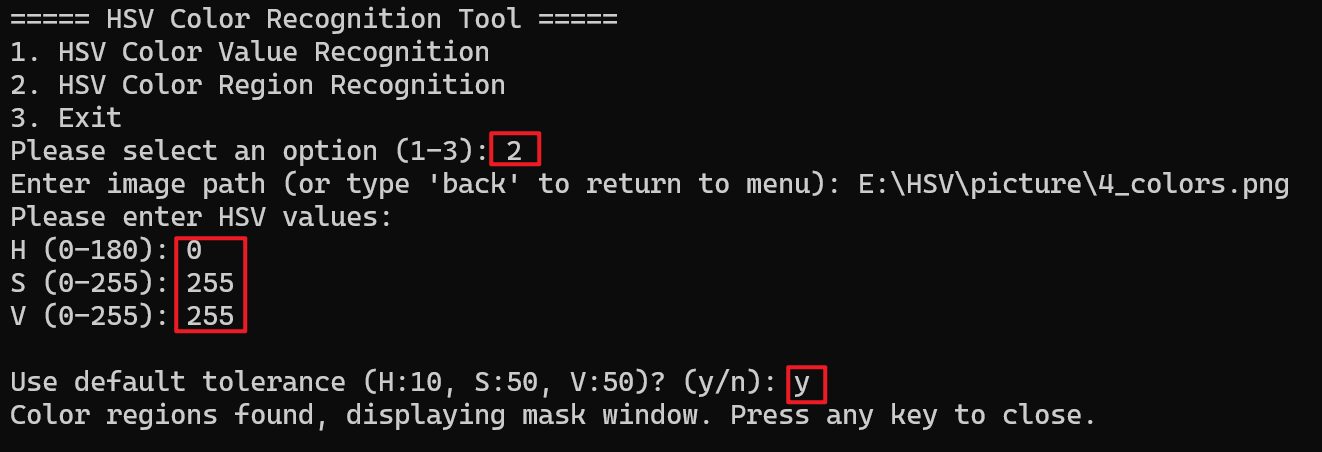
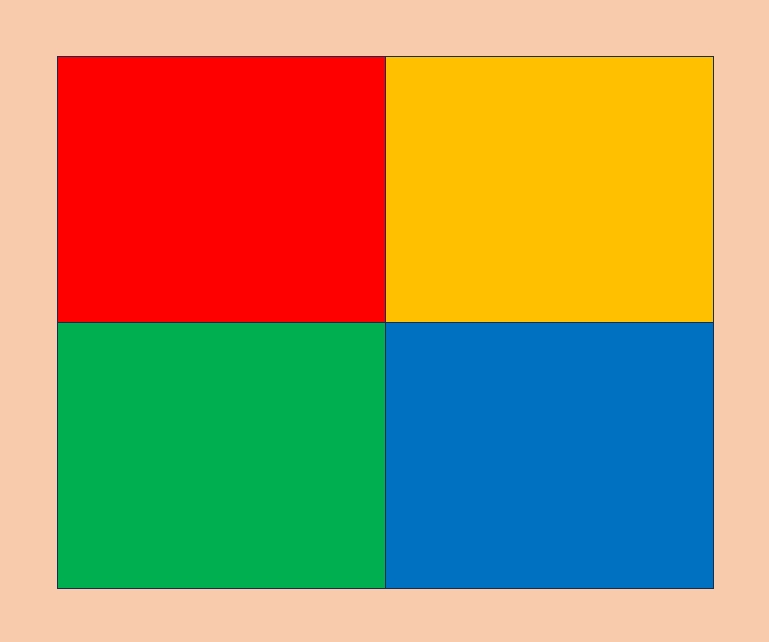

识别区域正确,说明TEST.dll文件可以使用并正确运行。
5 在其他电脑/设备上运行
方法一:在其他电脑/设备上安装opencv并添加环境路径(不推荐)
方法二:根据以下路径找到opencv_world4120.dll文件,并复制到dll同个目录下
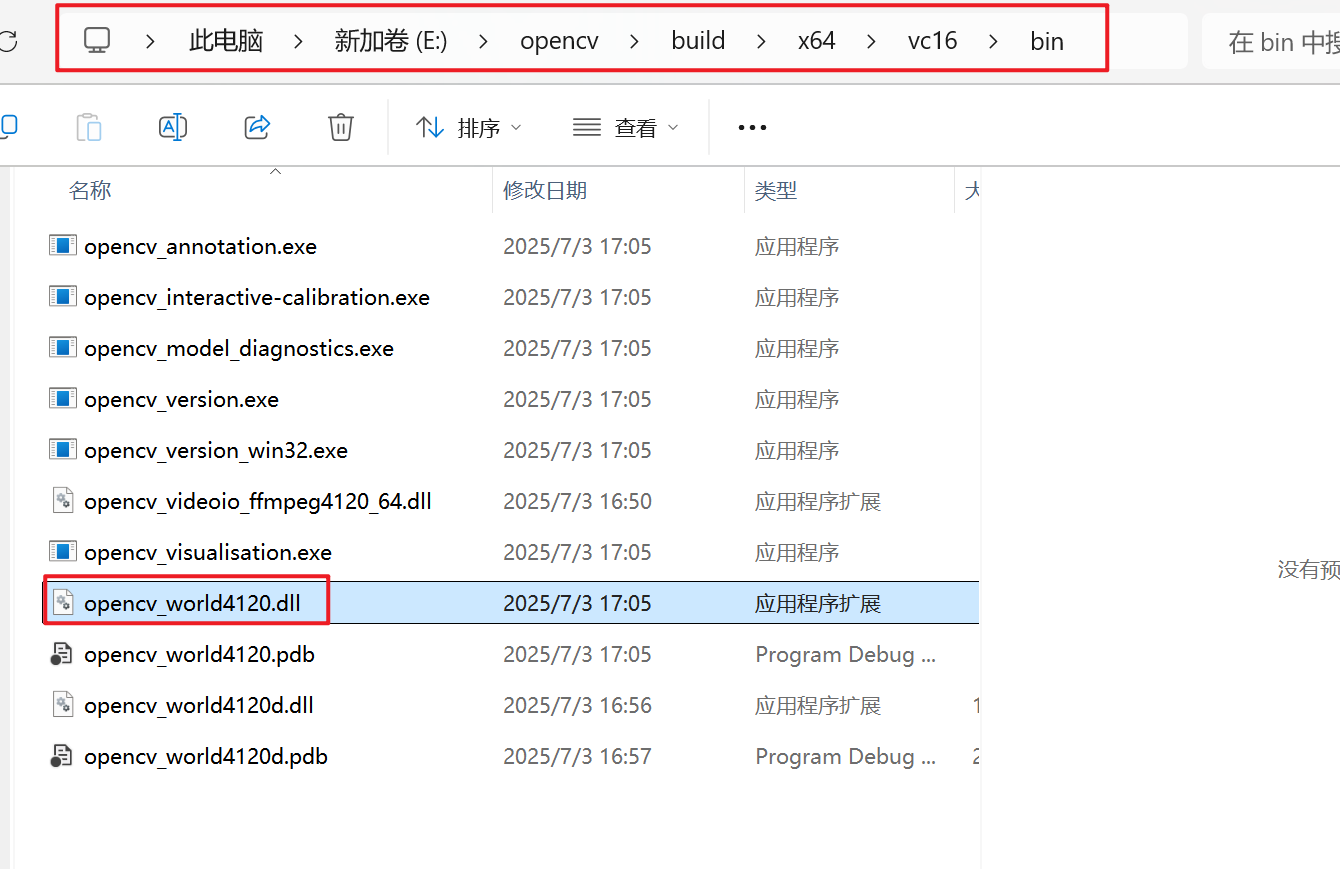
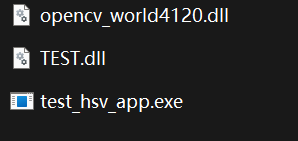
只需保持opencv_world4120.dll文件与TEST.dll文件在同个目录下,程序就会自动寻找当前目录的opencv库,在其他电脑上无需安装opencv也可以使用了。

中国智能体开发者社区,聚焦智能体与大模型开发,提供前沿资讯、实用工具链、开源项目及行业案例。通过技术沙龙、开发者大赛等活动,促进经验交流与协作,助力开发者快速构建创新智能应用。
更多推荐



 44
44 0
0- 0


 已为社区贡献1条内容

所有评论(0)