PHP创建webSocket客户端与服务器保持链接并监听消息
·
解决需求:在thinkphp6项目中,需要用PHP来实现webSocket客户端与服务的的交互,以前我们是通过浏览或器者JS来作为客户端来与wenscoket服务端的交互,现在的需要是直接使用PHP来实现webSocket客户端并与其他的服务器交互,以下是开发教程和步骤。
1. 安装 textalk/websocket
# 进入thinkphp6项目的根目录执行
composer require textalk/websocket
2. 创建WebSocket客户端命令
# WebsocketClient 名称自定义即可 执行这个条命令会在 app/command 目录下生成一个 WebsocketClient.php 文件。
php think make:command WebsocketClient
3. 编写客户端逻辑
打开 app/command/WebsocketClient.php 文件,将其内容替换为以下代码:
<?php

declare(strict_types=1);

namespace app\command;

use think\console\Command;
use think\console\Input;
use think\console\input\Argument;
use think\console\input\Option;
use think\console\Output;
use WebSocket\Client;

class WebsocketClient extends Command
{
    protected function configure()
    {
        $this->setName('websocket:client')
            ->setDescription('启动WebSocket客户端以监听服务端消息')
            ->addArgument('url', Argument::OPTIONAL, '服务端地址描述', '这里填写ws的服务端地址和端口')
            ->addOption('timeout', 't', Option::VALUE_OPTIONAL, '接收超时时间(秒)', 50);
    }

    protected function execute(Input $input, Output $output)
    {
        $url = $input->getArgument('url');
        $timeout = (int)$input->getOption('timeout');

        $output->writeln("正在连接到: {$url}");
        $output->writeln("超时设置: {$timeout}秒");

        try {
            $client = new Client($url, [
                'timeout' => $timeout
            ]);

            $output->writeln('已成功连接到WebSocket服务器');
            $output->writeln('开始监听消息 (按 Ctrl+C 退出)...');

            // 发送初始消息
            // $client->send(json_encode([
            //     'type' => 'connect',
            //     'message' => 'Hello from ThinkPHP6 Client',
            //     'timestamp' => time()
            // ]));

            $messageCount = 0;

            while (true) {
                try {
                    $message = $client->receive();
                    $messageCount++;

                    $output->writeln("[{$messageCount}]  收到消息: " . $message);
                    $output->writeln("收到服务器消息: " . $message);
                    // 可选:处理业务逻辑
                    $this->processMessage($message, $output);

                    // 保持连接活跃
                    if ($messageCount % 5 === 0) {
                        $client->send(json_encode([
                            'type' => 'ping',
                            'timestamp' => time()
                        ]));
                    }

                    sleep(1); // 避免过于频繁的请求

                } catch (\WebSocket\TimeoutException $e) {
                    // 超时是正常的,发送心跳保持连接
                    $client->send('ping');
                    continue;
                } catch (\Exception $e) {
                    if (strpos($e->getMessage(), 'Connection closed') !== false) {
                        $output->writeln(' 连接已关闭');
                        break;
                    }
                    $output->writeln(" 错误: " . $e->getMessage());
                    break;
                }
            }
        } catch (\Exception $e) {
            $output->writeln("连接失败: " . $e->getMessage());
            return 1;
        }

        return 0;
    }

    /**
     * 处理接收到的消息
     */
    protected function processMessage($message, Output $output)
    {
        // 这里可以添加你的业务逻辑
        // 如果是JSON消息,解析并处理
        $data = json_decode($message, true);
        // 消息处理类
        \extend\huairuzn\WebSocket::onMessage($data);
    }
}
4. 注册think命令
要让ThinkPHP识别这个新命令,需要在 config/console.php 文件中的 command 数组里注册它(如果文件不存在,可以创建它)。
<?php
return [
    'commands' => [
        'websocket:client' => \app\command\WebsocketClient::class,
    ],
];
5. 运行命令
# 在项目根目录
# 基本用法
php think websocket:client

# 指定自定义服务器
php think websocket:client ws://你的服务器地址:端口

# 设置超时时间
php think websocket:client --timeout=30
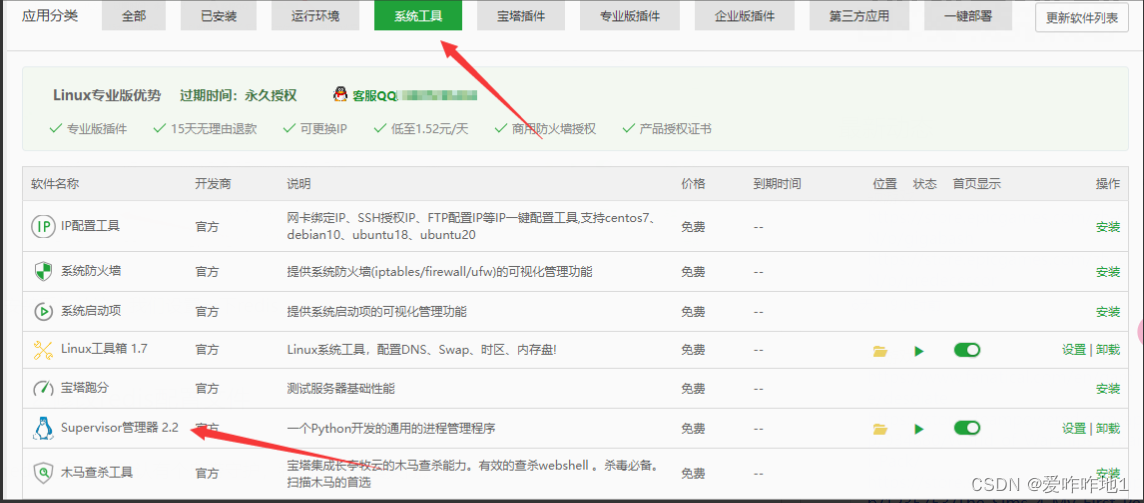
6.在生产环境中使用 supervisor 来管理这个常驻进程
6.1 安装Supervisor
6.2创建Supervisor守护进程
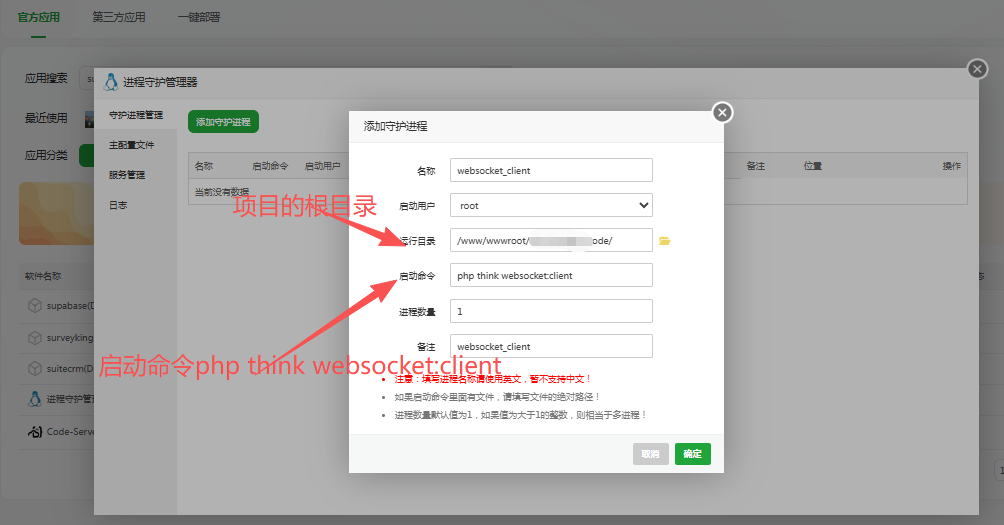
这样,thinkphp6项目中实现用PHP来创建webSocket客户端完成

中国智能体开发者社区,聚焦智能体与大模型开发,提供前沿资讯、实用工具链、开源项目及行业案例。通过技术沙龙、开发者大赛等活动,促进经验交流与协作,助力开发者快速构建创新智能应用。
更多推荐


 4
4 0
0- 0


 已为社区贡献3条内容

所有评论(0)