云服务器免费体验自由 FramePack-Studio 图生视频的方法
FramePack 是由斯坦福大学张吕敏(Lvmin Zhang)团队开源的最新 AI 视频 生成 工具 ,它通过帧上下文压缩和抗漂移采样技术,打破了AI视频生成的高硬件壁垒。可以在低显存上连续生成长达一分钟的 高清视频。FramePack Studio 是 github 作者colinurbs 对 FramePack 打包的易操作网页界面版,支持加入混元 LoRA 来生成特定风格的视频。
github地址:https://github.com/colinurbs/FramePack-Studio
目前在趋动云上配置了 FramePack Studio 项目可以一键运行,可以免实名注册并送算力点试用。
注册地址:https://growthdata.virtaicloud.com/t/xK
登陆后进入项目链接:
https://open.virtaicloud.com/web/project/detail/577804926466936832
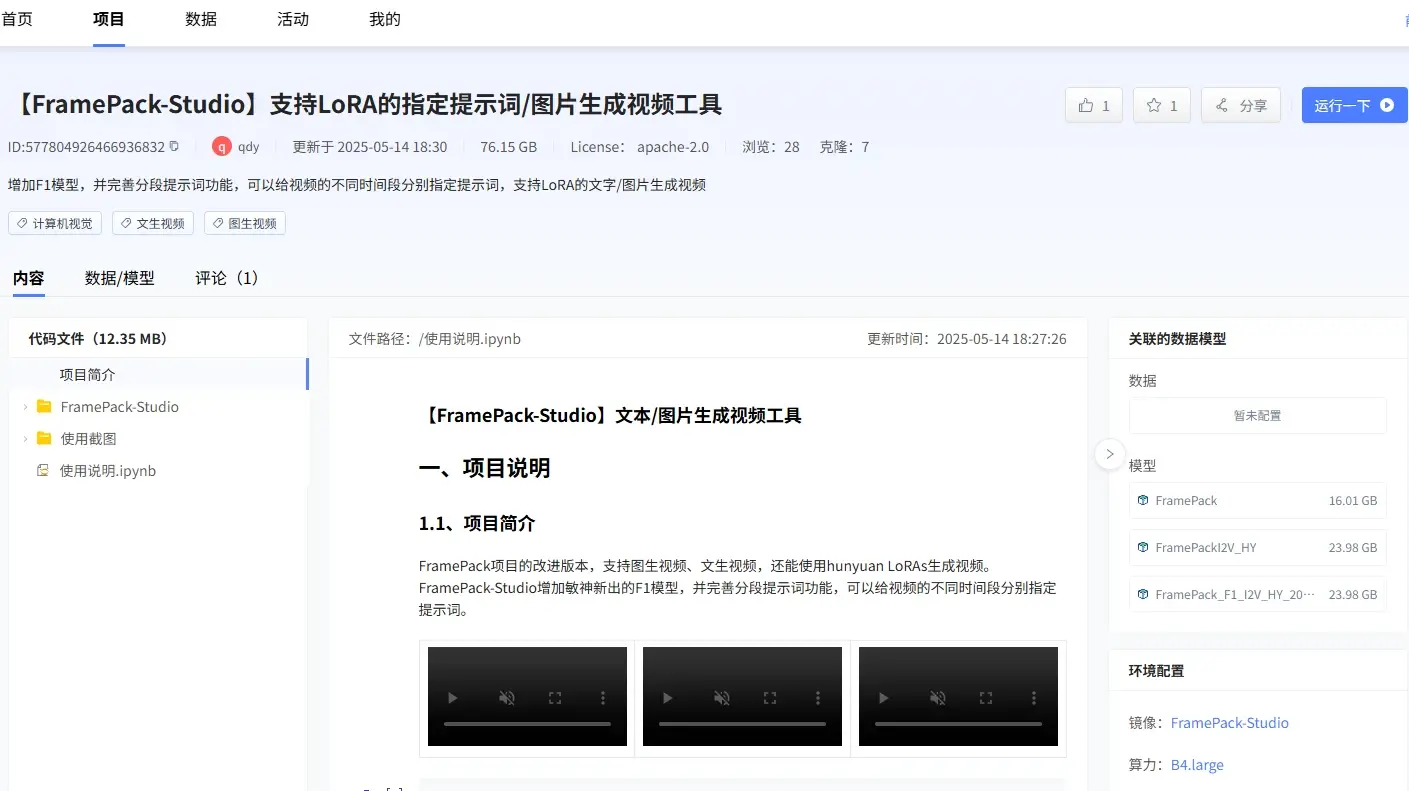
点击右上角运行一下,确定克隆项目到自己空间(也可以修改算力规格为B1.large),点击立即运行,启动开发环境后点右上角进入开发环境。
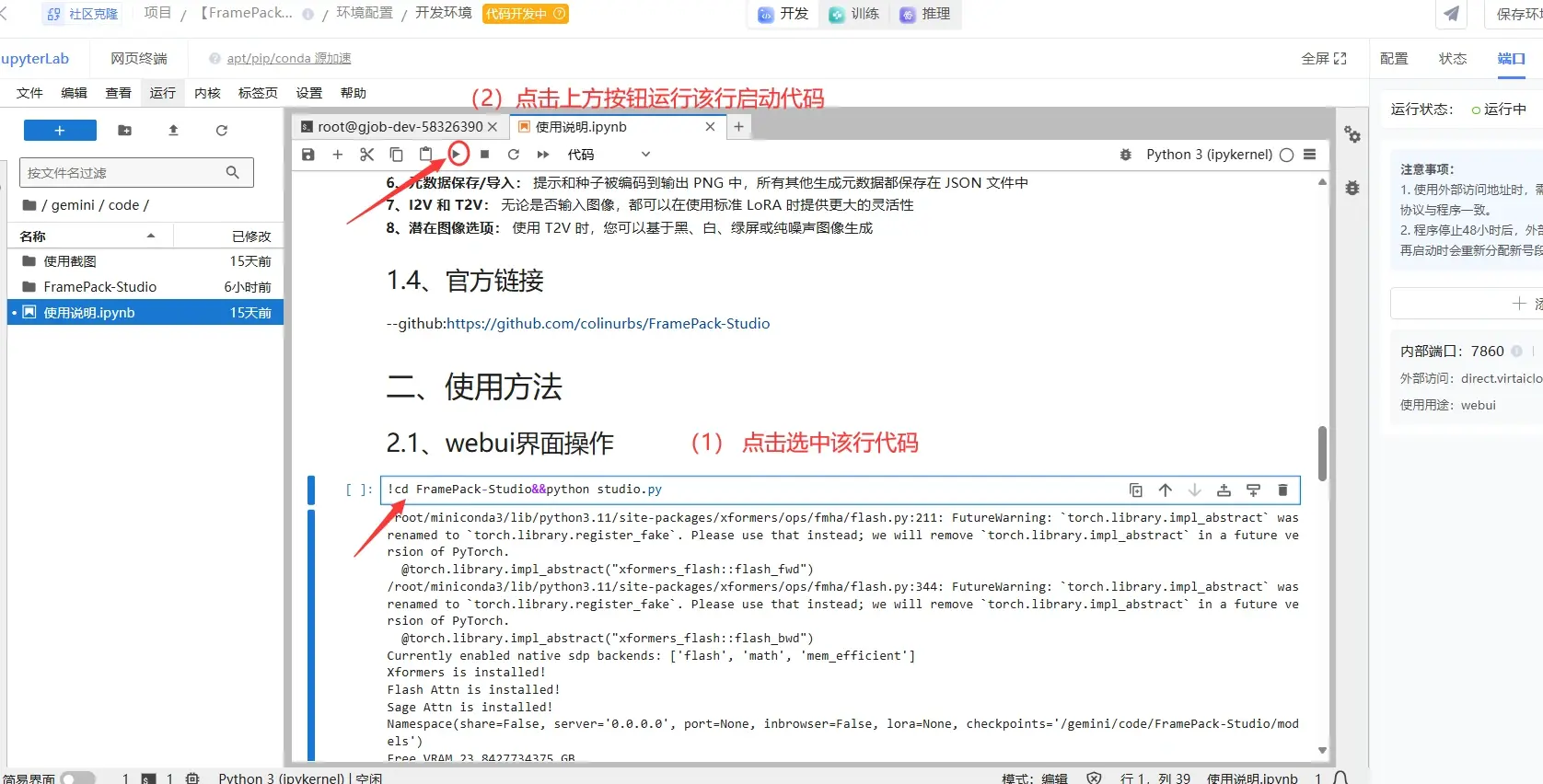
双击打开左侧的项目说明文件,找到 !cd FramePack-Studio&&python studio.py命令行,然后直接点上面的运行图标运行该命令,启动 FramePack-Studio :
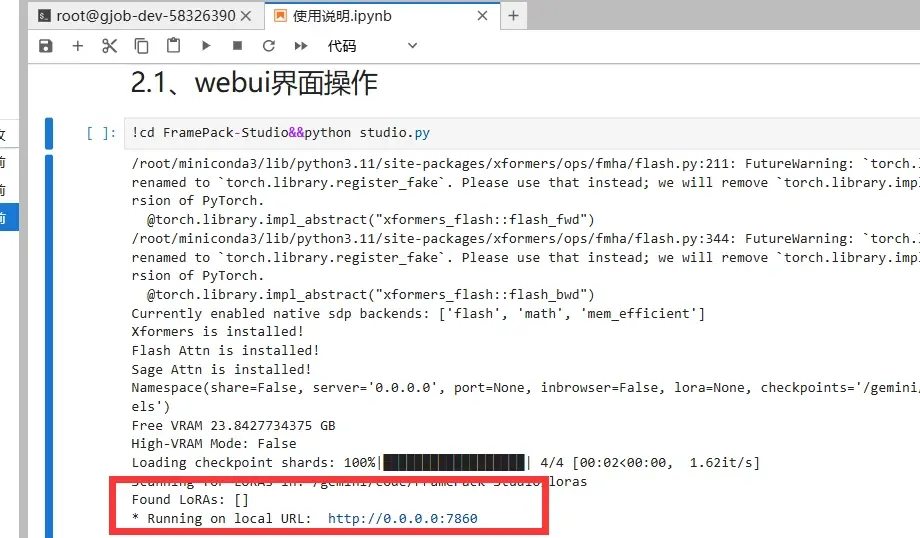
启动不到半分钟,直到出现如下 To see the GUI go to: http://0.0.0.0:7860 表示启动完成:
然后在右上方的端口处,添加一个端口 7860 即可外部访问。


复制该外部访问的连接,在浏览器新界面打开,即可进入 FramePack-Studio 的界面:
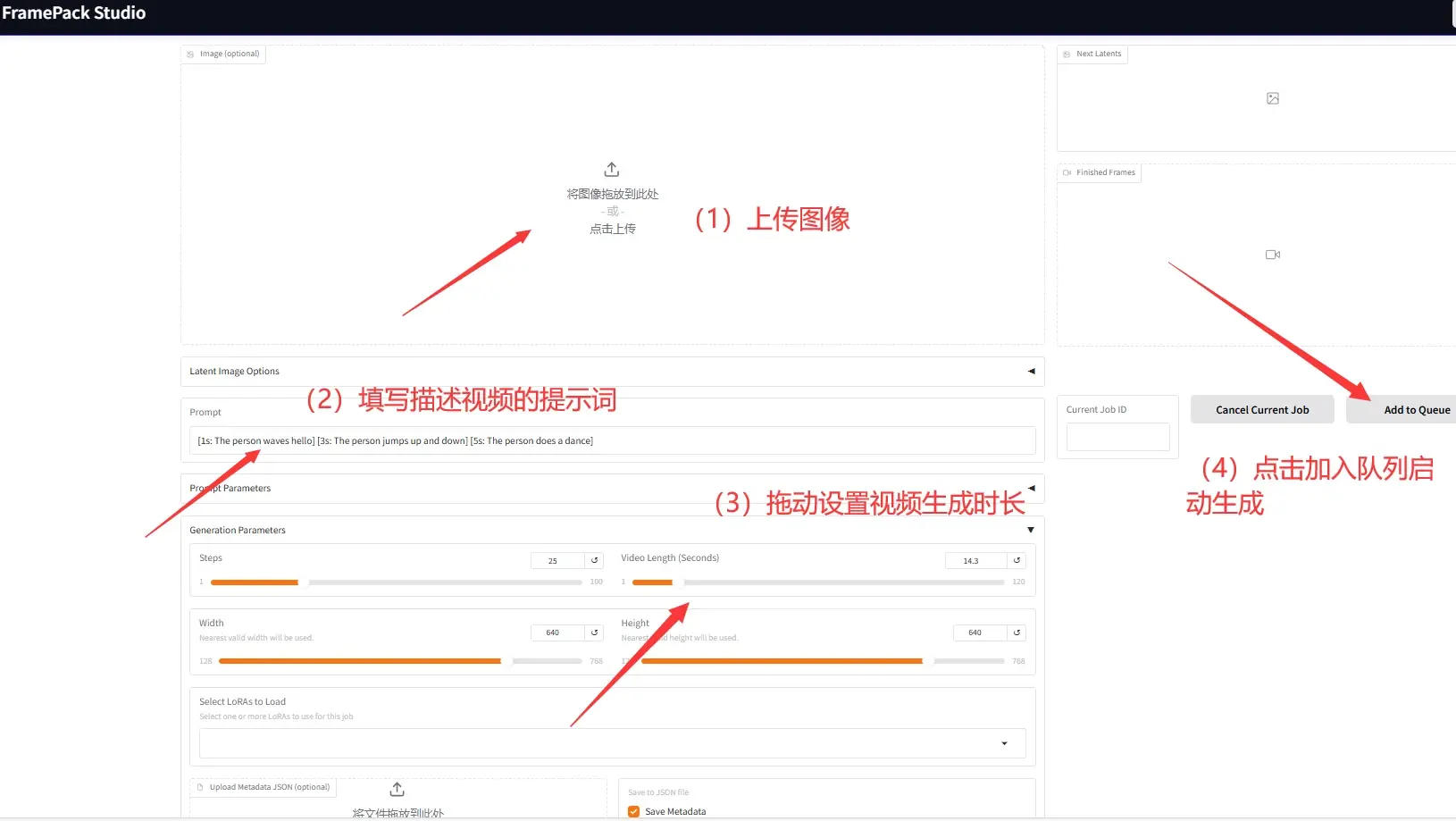
(1)在Image 图像框上传图像,然后
(2)在Prompt 栏填写描述视频的提示词
(3)在 Video Length 设置一下要生成多长的视频(最长是120s)
即可点击右边 Add to Queue 按钮启动生成了!
也可以选择上方的 Generate(F1) 模型选项来生成视频,据说比原始的混元模型效果更好一点。
如何加入 Lora 模型:
将 LoRA 模型文件上传到目录 FramePack-Studio/loras/ 文件夹中。然后重新启动在界面下方的 Select LoRAs 栏选择你想要加载的 LoRA 。
注:使用LoRA 需要重装一下 peft库:pip install peft -i https://pypi.tuna.tsinghua.edu.cn/simple 且目前该功能还不稳定,运行慢容易崩。
如何只用文字生成视频:
使用黑色、白色、绿幕或纯噪点图像作为初始图像上传到 Image 图像框,即可实现文本转视频(T2V)
如何写提示词:
可以使用以下语法创建随时间变化提示词的视频:
[0s: A serene forest with sunlight filtering through the trees ] [5s: A deer appears in the clearing ] [10s: The deer drinks from a small stream ]
生成好的 mp4 视频会保存在服务中的 FramePack-Studio/outputs/ 文件夹下。
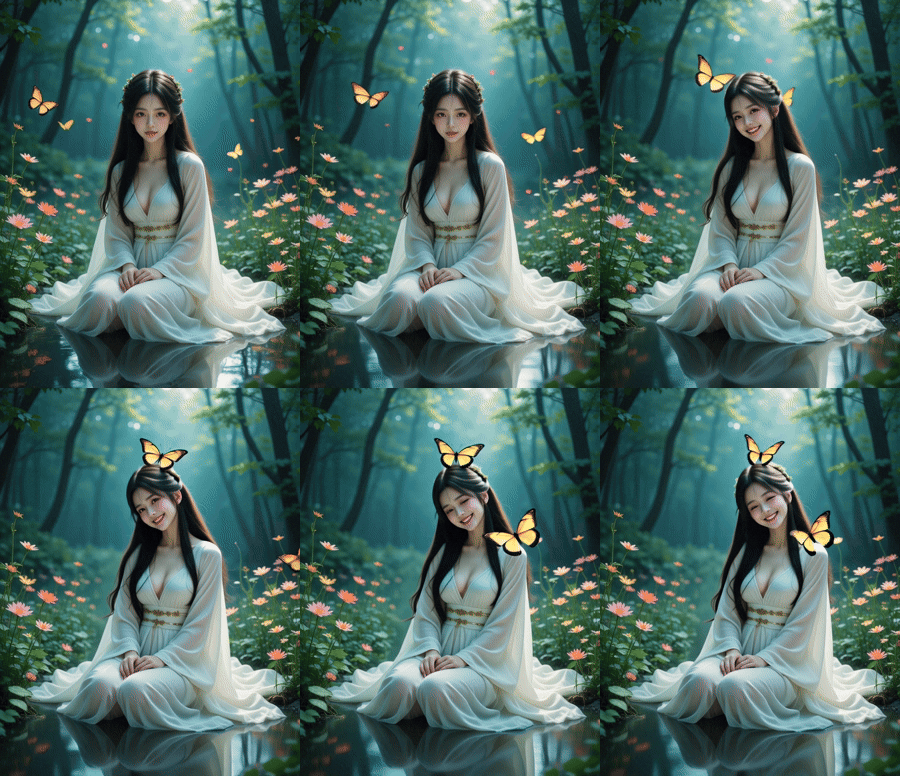
生成效果展示:
[0s: A beautiful woman in a flowing white dress sits gracefully among vibrant flowers ] [5s: Colorful butterflies begin to flutter around her, landing gently on the petals ] [10s: The woman smiles and reaches out to touch a butterfly, creating a playful interaction ] [15s: She laughs softly as more butterflies join, surrounding her in a magical scene ]
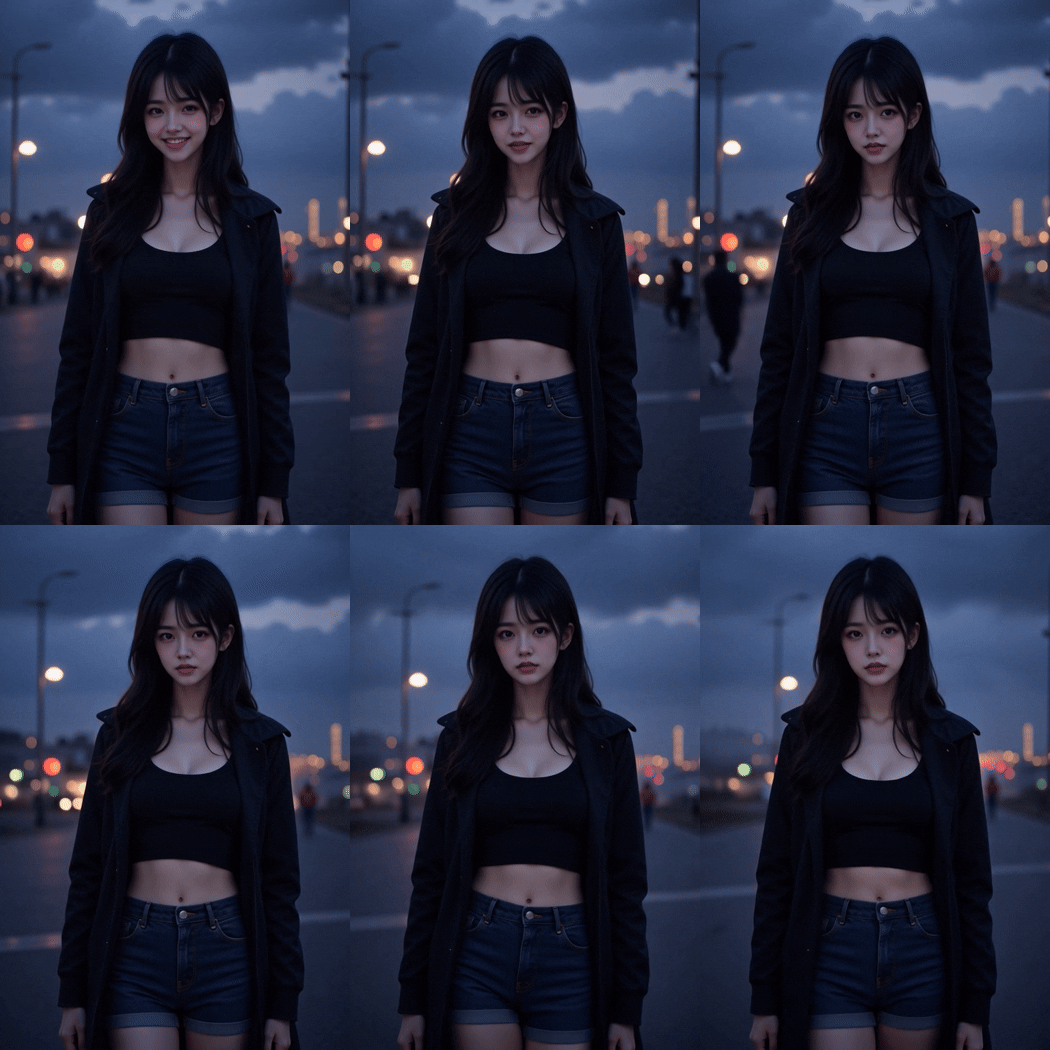
A young woman stands on a dimly lit street at dusk, her expression a mix of curiosity and apprehension. The scene is set in the 1920s, with the atmosphere evoking the eerie silence of early horror films. The woman wears a modern outfit—a black crop top and denim shorts—contrasting sharply with the vintage setting. Her long, dark hair flows freely, adding to the mysterious aura.
[0s: The woman looks around nervously, her eyes scanning the shadowy street. The background features old-fashioned street lamps casting an ominous glow. "20s_horror" ]
[5s: A faint mist begins to roll in, enveloping the street in a thick fog. The woman's breath is visible in the cold air, and she shivers slightly. "1920s", "black and white", "silent movie" ]
[10s: In the distance, a figure emerges from the shadows, moving slowly towards her. The woman's heart races as she takes a step back, her face a mask of fear. The figure is indistinct, adding to the suspense. "20s_horror" ]

中国智能体开发者社区,聚焦智能体与大模型开发,提供前沿资讯、实用工具链、开源项目及行业案例。通过技术沙龙、开发者大赛等活动,促进经验交流与协作,助力开发者快速构建创新智能应用。
更多推荐
 24
24 0
0- 0


 已为社区贡献5条内容

所有评论(0)