uniapp实现菜单拖拽排序drag
·
项目中拆分出来的静态模板,微信小程序没测试过,H5和APP是没问题的,有点小bug
代码为 vue2
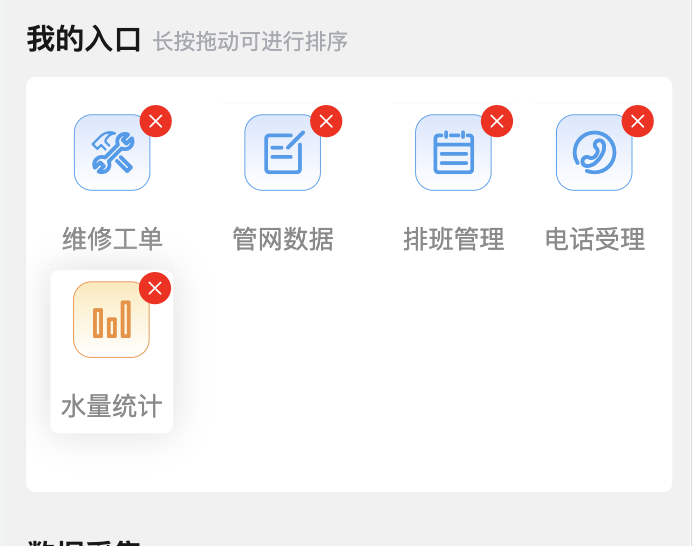
先上图
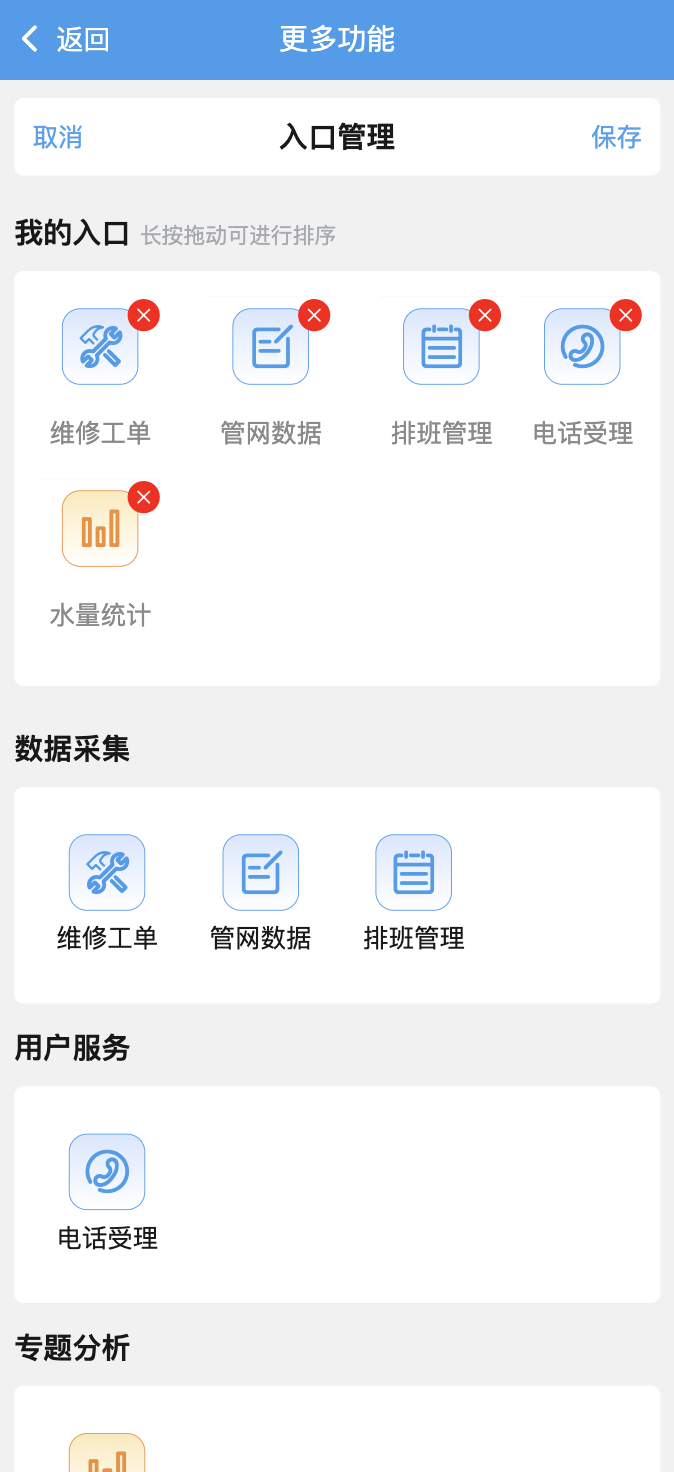
长按的效果可拖动菜单
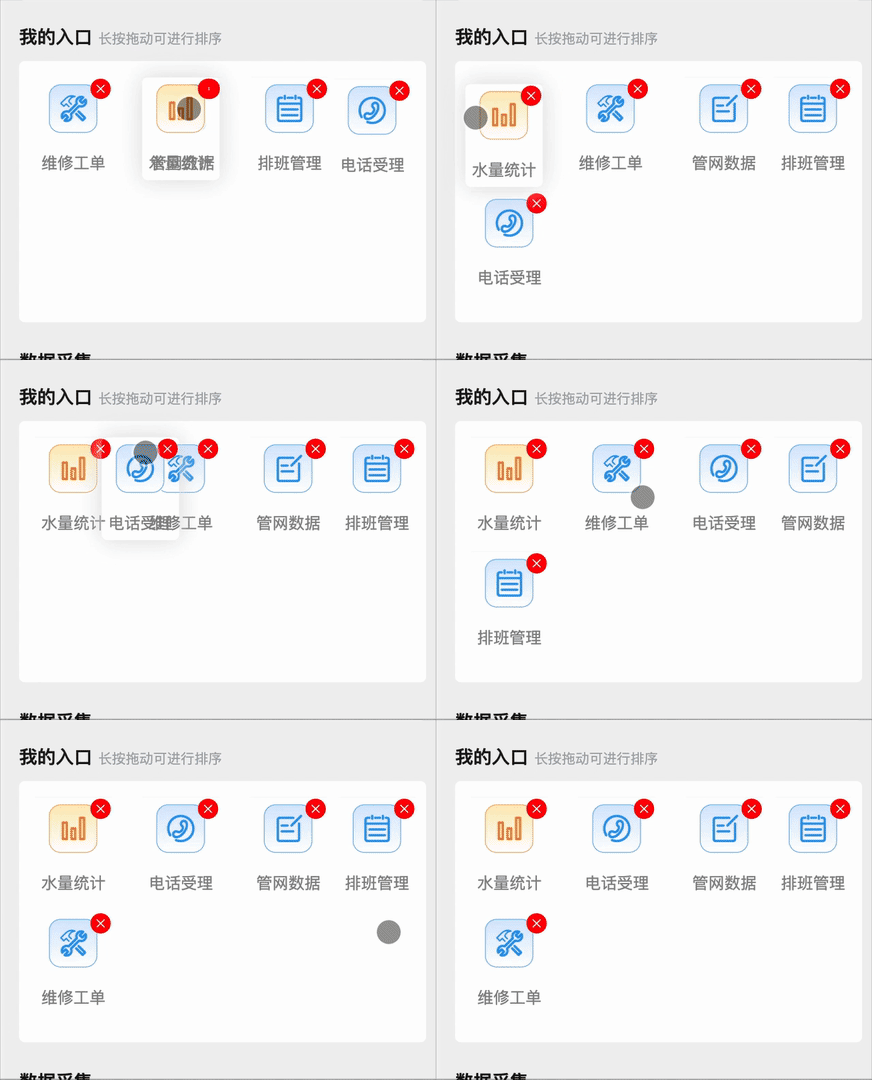
git图生成的有些卡顿,实际效果不卡顿
废话不多说了,上代码
drag-sorts.vue
<template>
	<view class="">
		<view v-if="currentList.length > 0">
			<movable-area class="drag-sort" :style="{ height: boxHeight }" id="drag">
				<movable-view v-for="(item, index) in currentList" :key="index" :x="item.x" v-if="item.isShow === 1"
					:data-index="index" @touchstart="touchstart" @touchmove.stop.prevent="touchmove"
					@touchend="touchend" :y="item.y" :direction="direction" disabled damping="40"
					:animation="item.animation" class="drag-sort-item"
					:class="{ 'active': active == index, 'vh-1px-t': item.index > 0, width: gridItemHeight + 'rpx' }">
					<view class="grid-item-box1" :style="{ width: gridItemHeight + 'rpx' }">
						<view class="item-img">
							<myIcon :iconName="item.iconName" :backgroundColor="item.backgroundColor"
								:borderColor="item.borderColor" :iconImg="item.iconImg || ''"></myIcon>
						</view>
						<text class="text">{{ item.title }}</text>
						<view class="closeBtn" @click="close(index)" style="width: 50rpx;height: 50rpx;">
							<view class="cuIcon-roundclosefill" style="color: red; font-size: 40rpx;"></view>
						</view>
					</view>
				</movable-view>
			</movable-area>
		</view>
		<view v-else class="deag-empty-box">
			<view class="drag-empty">
				暂无内容
			</view>
		</view>
	</view>

</template>

<script>
import myIcon from '@/components/my-icon/my-icon.vue'
export default {
	name: 'drag-sort',
	mixins: [],
	components: {
		myIcon
	},
	data () {
		return {
			direction: "all",
			windowWidth: 100, //屏幕宽度
			height: 100, // 高度
			currentList: [],
			active: -1, // 当前激活的item
			index: 0, // 当前激活的item的原index
			topY: 0, // 距离顶部的距离
			topX: 0, // 距离左侧偏移位置
			deviationX: 0,
			deviationY: 0,// 偏移量
			gridItemHeight: 710 / 4
		}
	},
	computed: {
		boxHeight () {
			return (Math.ceil((Number(this.list.length) ) / 4)) * this.height + 'px'
		}
	},
	props: {
		list: {
			type: Array,
			default: () => {
				return []
			}
		},
		boxStyle: {
			type: Object,
			default: () => {
				return {}
			}
		},
		props: {
			type: Object,
			default: () => {
				return {
					label: 'label',
					value: 'value'
				}
			}
		}
	},
	watch: {
		list: {
			handler () {
				this.onUpdateCurrentList()
			},
			deep: true

		}
	},
	created () {
		const res = uni.getSystemInfoSync();
		this.windowWidth = res.windowWidth
		this.onUpdateCurrentList()
	},
	mounted () { },
	updated () { },
	filters: {},
	methods: {
		onUpdateCurrentList (list = this.list) {
			const windowWidth = this.windowWidth || 0;
			const itemWidth = windowWidth / 4; // 每个图标的宽度(自动适应)
			const paddingX = itemWidth * 0.05; // 内边距,控制左右留白
			const usableWidth = itemWidth - paddingX * 2; // 可用宽度

			let arr = [];

			list.forEach((item, index) => {
				const row = Math.floor(index / 4); // 行号
				const col = index % 4; // 列号

				const x = col * itemWidth + paddingX;
				const y = row * this.height;

				arr.push({
					...item,
					isShow: 1,
					index,
					SortNumber: index,
					x,
					y,
					animation: true
				});
			});

			this.currentList = arr;
		},
		// 根据排序进行重新计算位置
		moveUpdateCurrentList (index) {
			const COLUMN_COUNT = 4;

			// 防止 currentList 不存在或为空
			if (!Array.isArray(this.currentList) || this.currentList.length === 0) {
				return;
			}

			this.currentList.forEach((item, i) => {
				// 确保 SortNumber 合法
				let sortNum = parseInt(item.SortNumber, 10);
				if (isNaN(sortNum) || sortNum < 0) {
					console.warn(`Invalid SortNumber: ${item.SortNumber}`);
					sortNum = 0; // 默认值或根据业务设定
				}
				const row = Math.floor(sortNum / COLUMN_COUNT);
				const col = sortNum % COLUMN_COUNT;
				// 使用 $set 确保 Vue 正确响应 x/y 的变化(适用于 Vue 2)
				this.$set(item, 'y', row * this.height);
				this.$set(item, 'x', col * (this.windowWidth / COLUMN_COUNT) + (this.windowWidth / COLUMN_COUNT) * 0.05);
			});
			// 先序列化,便于后续扩展或调试
			const serializedList = JSON.stringify(this.currentList);

			this.$emit('change', serializedList, index);
		},
		touchstart (e) {
			// 阻止事件冒泡到父级
			e.stopPropagation();

			// 计算 x y 轴点击位置
			var query = uni.createSelectorQuery().in(this)
			query.select('#drag').boundingClientRect()
			query.exec((res) => {
				this.topY = res[0].top
				this.topX = res[0].left
				let touchY = e.mp.touches[0].clientY - res[0].top
				let touchX = e.mp.touches[0].clientX - res[0].left
				this.deviationY = touchY % this.height
				this.deviationX = touchX % (this.windowWidth * 0.2)
				this.active = Number(e.currentTarget.dataset.index)
				this.index = Number(e.currentTarget.dataset.index)
			})
		},
		touchmove (e) {
			if (this.active < 0) return
			// 阻止事件冒泡到父级
			e.stopPropagation();

			let temY = e.mp.touches[0].clientY - this.topY
			let temX = e.mp.touches[0].clientX - this.topX
			let touchY = temY - 30
			let touchX = temX - this.windowWidth * 0.1
			this.currentList[this.active].y = touchY
			this.currentList[this.active].x = touchX
			this.currentList[this.active].animation = false
			this.currentList.every((res, index) => {
				let absX = Math.abs(touchX - res.x)
				let absY = Math.abs(touchY - res.y)
				// 设置元素定点距离多少进行重排
				if (res.isShow == 0) {
					return true
				}
				if (0 < absX && absX <= 20 && absY > 0 && absY <= 40 && this.active != index) {
					// debugger
					let temNumber = this.currentList[index].SortNumber
					this.currentList.every((_res, _index) => {
						// 判断从大像小移还是从小向大移
						if (this.currentList[this.active].SortNumber < this.currentList[index].SortNumber) {
							// 移动元素比目标元素所在位置小,之间元素排序--
							if (this.currentList[_index].SortNumber > this.currentList[this.active].SortNumber && this.currentList[
								_index].SortNumber <= this.currentList[index].SortNumber) {
								_res.SortNumber--
							}
						} else {
							// 反之++
							if (this.currentList[_index].SortNumber < this.currentList[this.active].SortNumber && this.currentList[
								_index].SortNumber >= this.currentList[index].SortNumber) {
								_res.SortNumber++
							}
						}
						return true
					}, this)
					this.currentList[this.active].SortNumber = temNumber
					this.moveUpdateCurrentList(temNumber)
					return false
				} else {
					return true
				}
			}, this)
		},
		touchend (e) {
			if (this.currentList[this.active]) {
				this.currentList[this.active].animation = true
			}
			this.moveUpdateCurrentList(-1)
			this.active = -1
		},
		// 关闭按钮
		close (index) {
			// debugger
			this.currentList.forEach((item, i) => {
				if (this.currentList[i].SortNumber > this.currentList[index].SortNumber) {
					item.SortNumber--
				}
			})
			this.moveUpdateCurrentList(-1)
			this.currentList[index].isShow = 0
			// console.log(this.currentList)
			this.$emit('delImgIdx', { index: index, list: JSON.stringify(this.currentList) });
		}
	}
}
</script>

<style lang='less' scoped>
@import "~./1px.less";

.drag-sort {
	width: 100%;
}

.zy-grid {
	width: 100%;
	position: absolute;
	top: 550rpx;
	/* #ifndef APP-NVUE */
	display: block;
	/* #endif */
	padding: 10rpx 20rpx;
}

.imgBox {
	width: 100%;
	height: 100%;
	// background-color: #09BB07;
	display: flex;
	flex-direction: row;
	flex-wrap: wrap;
	padding: 10rpx 20rpx;

	.imgItem {
		position: relative;

		image {
			width: 60rpx;
			height: 60rpx;
			transition: all 0.5s;
			vertical-align: top;
		}

		.closeBtn {
			background-color: red;
			border-radius: 50%;
			text-align: center;
			position: absolute;
			top: 0;
			right: 0;
			line-height: 20px;
			z-index: 3;
			transform: translate(50%, -50%);
		}
	}
}

.grid-item-box1 {
	padding: 20rpx 0rpx;
	display: flex;
	flex-direction: column;
	align-items: center;
	justify-content: center;
	position: relative;

	.item-img {
		display: flex;
		flex-direction: row;
		background-color: #FFFFFF;
		border-radius: 50%;
		width: 100rpx;
		height: 100rpx;
		align-items: center;
		justify-content: center;
	}

	image {
		width: 60rpx;
		height: 60rpx;
	}

	text {
		margin-top: 20rpx;
		color: #8A8A8A;
		font-size: 28rpx;
	}

	.closeBtn {
		border-radius: 50%;
		text-align: center;
		position: absolute;
		top: 36rpx;
		right: 20rpx;
		line-height: 20px;
		z-index: 3;
		transform: translate(50%, -50%);
	}
}

.drag-sort-item {
	position: absolute !important;
	display: flex;
	align-items: center;
	height: 180rpx;
	width: 20%;
	text-align: center;
	/* border-radius: 5px; */
	box-sizing: border-box;
}

.touch {
	height: 100%;
	width: 50px;
}

.active {
	box-shadow: 0 0 40rpx #DDDDDD;
	z-index: 99;
	border-radius: 10rpx;
}

.deag-empty-box {
	width: 100%;
	height: 200rpx;
	display: flex;
	justify-content: center;
	align-items: center;
}

.drag-empty {
	text-align: center;
	font-size: 28rpx;
	color: #999;
}
</style>
1px.less
.setLine(@c: #eee) {
  content: " ";
  position: absolute;
  left: 0;
  top: 0;
  width: 200%;
  border: 1rpx solid @c;
  color: @c;
  height: 200%;
  transform-origin: left top;
  transform: scale(0.5);
}

.vh-1px, .vh-1px-t, .vh-1px-b, .vh-1px-tb, .vh-1px-l, .vh-1px-r {
  position: relative;
}

.vh-1px {
  &:before {
    .setLine();
  }
}

.vh-1px-t {
  &:before {
    .setTopLine();
  }
}

.vh-1px-b {
  &:after {
    .setBottomLine();
  }
}

.vh-1px-tb {
  &:before {
    .setTopLine();
  }
  &:after {
    .setBottomLine();
  }
}

.vh-1px-l {
  &:before {
    .setLeftLine();
  }
}

.vh-1px-r {
  &:after {
    .setRightLine();
  }
}

.setTopLine(@c: #eee) {
  content: " ";
  position: absolute;
  left: 0;
  top: 0;
  right: 0;
  height: 1rpx;
  border-top: 1rpx solid @c;
  color: @c;
  transform-origin: 0 0;
  transform: scaleY(0.5);
}

.setBottomLine(@c: #eee) {
  content: " ";
  position: absolute;
  left: 0;
  bottom: 0;
  right: 0;
  height: 1rpx;
  border-bottom: 1rpx solid @c;
  color: @c;
  transform-origin: 0 100%;
  transform: scaleY(0.5);
}

.setLeftLine(@c: #eee) {
  content: " ";
  position: absolute;
  left: 0;
  top: 0;
  width: 1rpx;
  bottom: 0;
  border-left: 1rpx solid @c;
  color: @c;
  transform-origin: 0 0;
  transform: scaleX(0.5);
}

.setRightLine(@c: #eee) {
  content: " ";
  position: absolute;
  right: 0;
  top: 0;
  width: 1rpx;
  bottom: 0;
  border-right: 1rpx solid @c;
  color: @c;
  transform-origin: 100% 0;
  transform: scaleX(0.5);
}
使用方法
<drag-sorts :list="dragMenuList" @change="onDragSortChange"
                                @delImgIdx="delMenuIdxHandle"></drag-sorts>
菜单模版 (字段可自定义)
/**
 * 数据采集
 */
export const menuList = [
  {
    auth: "home:repair",
    iconName: "cuIcon-repair",
    backgroundColor: "#d9e7fe",
    borderColor: "#3E9BED",
    title: "维修工单",
    pagesPath: "/pages/eventReport/eventReportList?title=事件列表",
  },
  {
    auth: "home:pipe",
    iconName: "cuIcon-edit",
    backgroundColor: "#d9e7fe",
    borderColor: "#3E9BED",
    title: "管网数据",
    pagesPath: "/pages/lineMap/lineMarker",
  },
  {
    auth: "home:scheduling",
    iconName: "cuIcon-calendar",
    backgroundColor: "#d9e7fe",
    borderColor: "#3E9BED",
    title: "排班管理",
    pagesPath: "/pages/urws/urwsDutyScheduling",
  },
];
初始化菜单列表
  computed: {
        menuListWithAddedFlag () {
            return this.menuList.map(item => ({
                ...item,
                added: this.dragMenuList.some(dragItem => dragItem.title === item.title)
            }));
        },
        menuListUHFWWithAddedFlag () {
            return this.menuListUHFW.map(item => ({
                ...item,
                added: this.dragMenuList.some(dragItem => dragItem.title === item.title)
            }));
        },
        menuListTJFXWithAddedFlag () {
            return this.menuListTJFX.map(item => ({
                ...item,
                added: this.dragMenuList.some(dragItem => dragItem.title === item.title)
            }));
        }
    },
监听事件
         // 拖拽菜单
        onDragSortChange (list) {
            let currentList = JSON.parse(list);
            const sortedList = [...currentList].sort((a, b) => a.SortNumber - b.SortNumber);
            this.sortDragMeenList = sortedList;
            this.isDrag = true;
            // console.log('排序后菜单===>', this.sortDragMeenList);
        },

        // 删除菜单
        delMenuIdxHandle (data) {
            // console.log('删除菜单===>', data.list);
            let list = JSON.parse(data.list);
            let menuItem = list[data.index];
            menuItem.added = false;
            this.dragMenuList = this.dragMenuList.filter(
                item => item.title !== menuItem.title
            );
            // 还原状态
            this.refreeshMenuAddedFlags(this.menuList, menuItem)
            this.refreeshMenuAddedFlags(this.menuListUHFW, menuItem)
            this.refreeshMenuAddedFlags(this.menuListTJFX, menuItem)
            this.isDleMenu = true;
            // console.log('菜单===>', this.dragMenuList);
        },
以上就是实现所有代码 测试 H5和App可用, 微信小程序没有测试

中国智能体开发者社区,聚焦智能体与大模型开发,提供前沿资讯、实用工具链、开源项目及行业案例。通过技术沙龙、开发者大赛等活动,促进经验交流与协作,助力开发者快速构建创新智能应用。
更多推荐

 2
2 0
0- 0


 已为社区贡献1条内容

所有评论(0)