C# OpenCVSharp使用yolo11n人脸关键点检测模型进行人脸检测
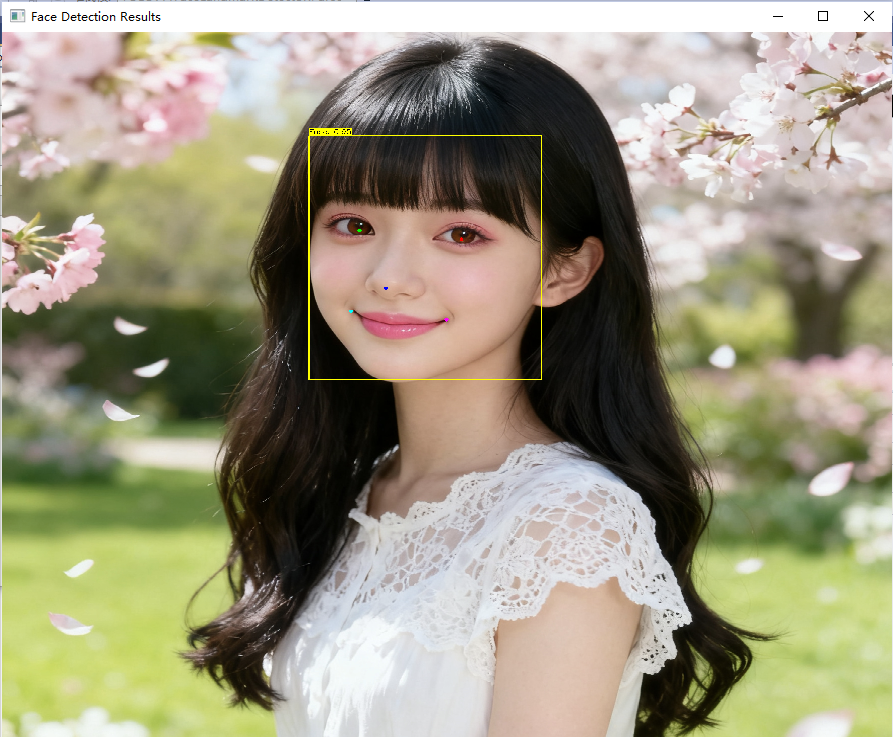
效果:
人脸检测+5个关键点 (左眼,右眼,鼻子,左嘴角,右嘴角)
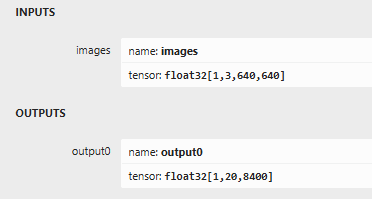
模型信息:
全部代码如下:
using OpenCvSharp;
using OpenCvSharp.Dnn;
using System;
using System.Collections.Generic;
using System.Linq;
using System.Runtime.InteropServices;
public class YOLOv11FaceLandmarkDetector
{
private Net _net;
private float _confidenceThreshold = 0.5f;
private float _nmsThreshold = 0.4f;
private int _inputSize = 640;
// 5个脸部关键点名称
private readonly string[] _landmarkNames = { "left_eye", "right_eye", "nose", "left_mouth", "right_mouth" };
// 关键点颜色
private readonly Scalar[] _landmarkColors =
{
new Scalar(0, 255, 0), // 左眼 - 绿色
new Scalar(0, 0, 255), // 右眼 - 红色
new Scalar(255, 0, 0), // 鼻子 - 蓝色
new Scalar(255, 255, 0), // 左嘴角 - 青色
new Scalar(255, 0, 255) // 右嘴角 - 粉色
};
public YOLOv11FaceLandmarkDetector(string modelPath)
{
// 加载模型
_net = CvDnn.ReadNetFromOnnx(modelPath);
// 尝试使用CUDA(如果可用)
_net.SetPreferableBackend(Backend.OPENCV);
_net.SetPreferableTarget(Target.CPU);
}
public class DetectionResult
{
public Rect BoundingBox { get; set; }
public float Confidence { get; set; }
public Point2f[] Landmarks { get; set; } = new Point2f[5];
}
public class LetterBoxInfo
{
public Mat Image { get; set; }
public float Ratio { get; set; }
public int PadWidth { get; set; }
public int PadHeight { get; set; }
}
private LetterBoxInfo LetterBoxResize(Mat image, int targetSize = 640)
{
int width = image.Width;
int height = image.Height;
// 计算缩放比例
float scale = Math.Min((float)targetSize / width, (float)targetSize / height);
int newWidth = (int)(width * scale);
int newHeight = (int)(height * scale);
// 创建新的图像
Mat resized = new Mat();
Cv2.Resize(image, resized, new Size(newWidth, newHeight));
// 计算填充
int padWidth = targetSize - newWidth;
int padHeight = targetSize - newHeight;
int padLeft = padWidth / 2;
int padTop = padHeight / 2;
int padRight = padWidth - padLeft;
int padBottom = padHeight - padTop;
// 添加填充
Mat padded = new Mat();
Cv2.CopyMakeBorder(resized, padded, padTop, padBottom, padLeft, padRight,
BorderTypes.Constant, new Scalar(114, 114, 114));
return new LetterBoxInfo
{
Image = padded,
Ratio = scale,
PadWidth = padLeft,
PadHeight = padTop
};
}
public List<DetectionResult> Detect(Mat image)
{
// 使用letterbox预处理
var letterBoxInfo = LetterBoxResize(image, _inputSize);
// 准备输入blob
Mat blob = CvDnn.BlobFromImage(letterBoxInfo.Image, 1.0 / 255.0,
new Size(_inputSize, _inputSize), new Scalar(0, 0, 0), true, false);
// 设置输入
_net.SetInput(blob);
// 前向推理
Mat output = _net.Forward();
// 解析输出并映射回原图坐标
var results = ParseOutput(output, image.Width, image.Height, letterBoxInfo);
// 释放资源
letterBoxInfo.Image.Dispose();
blob.Dispose();
output.Dispose();
return results;
}
private List<DetectionResult> ParseOutput(Mat output, int originalWidth, int originalHeight, LetterBoxInfo letterBoxInfo)
{
var results = new List<DetectionResult>();
// 获取输出数据
// output shape: [1, 20, 8400]
// 20 = 4(bbox) + 1(conf) + 10(5个关键点 * 2) + 5(关键点置信度)
int numAnchors = output.Size(2); // 8400
// 获取输出数据指针
var outputData = new float[output.Total()];
Marshal.Copy(output.Data,outputData,0,outputData.Length);
// 重新组织数据为 [8400, 20]
var reshapedData = new float[numAnchors, 20];
for (int i = 0; i < numAnchors; i++)
{
for (int j = 0; j < 20; j++)
{
reshapedData[i, j] = outputData[j * numAnchors + i];
}
}
var bboxes = new List<Rect>();
var confidences = new List<float>();
var landmarksList = new List<Point2f[]>();
for (int i = 0; i < numAnchors; i++)
{
float confidence = reshapedData[i, 4];
if (confidence > _confidenceThreshold)
{
// 解析边界框 (cx, cy, w, h 格式)
float cx = reshapedData[i, 0];
float cy = reshapedData[i, 1];
float w = reshapedData[i, 2];
float h = reshapedData[i, 3];
// 转换为 (x1, y1, x2, y2) 格式并映射回原图坐标
float x1 = (cx - w / 2 - letterBoxInfo.PadWidth) / letterBoxInfo.Ratio;
float y1 = (cy - h / 2 - letterBoxInfo.PadHeight) / letterBoxInfo.Ratio;
float x2 = (cx + w / 2 - letterBoxInfo.PadWidth) / letterBoxInfo.Ratio;
float y2 = (cy + h / 2 - letterBoxInfo.PadHeight) / letterBoxInfo.Ratio;
// 确保坐标在图像范围内
x1 = Math.Max(0, Math.Min(x1, originalWidth));
y1 = Math.Max(0, Math.Min(y1, originalHeight));
x2 = Math.Max(0, Math.Min(x2, originalWidth));
y2 = Math.Max(0, Math.Min(y2, originalHeight));
var bbox = new Rect((int)x1, (int)y1, (int)(x2 - x1), (int)(y2 - y1));
// 解析关键点并映射回原图坐标
var landmarks = new Point2f[5];
for (int j = 0; j < 5; j++)
{
float lx = (reshapedData[i, 5 + j * 3] - letterBoxInfo.PadWidth) / letterBoxInfo.Ratio;
float ly = (reshapedData[i, 5 + j * 3 + 1] - letterBoxInfo.PadHeight) / letterBoxInfo.Ratio;
// 确保关键点在图像范围内
lx = Math.Max(0, Math.Min(lx, originalWidth));
ly = Math.Max(0, Math.Min(ly, originalHeight));
landmarks[j] = new Point2f(lx, ly);
}
bboxes.Add(bbox);
confidences.Add(confidence);
landmarksList.Add(landmarks);
}
}
// 应用非极大值抑制
int[] indices;
CvDnn.NMSBoxes(bboxes, confidences, _confidenceThreshold, _nmsThreshold, out indices);
// 构建最终结果
foreach (int index in indices)
{
results.Add(new DetectionResult
{
BoundingBox = bboxes[index],
Confidence = confidences[index],
Landmarks = landmarksList[index]
});
}
return results;
}
public void VisualizeResults(Mat image, List<DetectionResult> results)
{
// 创建原图的副本,避免修改原图
Mat displayImage = image.Clone();
// 绘制边界框和关键点
foreach (var result in results)
{
// 绘制边界框
Cv2.Rectangle(displayImage, result.BoundingBox, new Scalar(0, 255, 255), 2);
// 绘制置信度
string label = $"Face: {result.Confidence:F2}";
var labelSize = Cv2.GetTextSize(label, HersheyFonts.HersheySimplex, 0.5, 1, out int baseline);
Cv2.Rectangle(displayImage,
new Point(result.BoundingBox.X, result.BoundingBox.Y - labelSize.Height - baseline),
new Point(result.BoundingBox.X + labelSize.Width, result.BoundingBox.Y),
new Scalar(0, 255, 255), -1);
Cv2.PutText(displayImage, label,
new Point(result.BoundingBox.X, result.BoundingBox.Y - baseline),
HersheyFonts.HersheySimplex, 0.5, new Scalar(0, 0, 0), 1);
// 绘制关键点
for (int i = 0; i < result.Landmarks.Length; i++)
{
var point = result.Landmarks[i];
Cv2.Circle(displayImage, new Point((int)point.X, (int)point.Y), 4, _landmarkColors[i], -1);
// 显示关键点名称
//Cv2.PutText(displayImage, _landmarkNames[i],
// new Point((int)point.X + 5, (int)point.Y - 5),
// HersheyFonts.HersheySimplex, 0.4, _landmarkColors[i], 1);
}
}
// 显示结果
Cv2.NamedWindow("Face Detection Results",WindowFlags.Normal);
Cv2.ImShow("Face Detection Results", displayImage);
displayImage.Dispose();
}
public void ProcessImage(string imagePath, string outputPath)
{
// 读取图像
var image = Cv2.ImRead(imagePath);
if (image.Empty())
{
Console.WriteLine($"无法读取图像: {imagePath}");
return;
}
// 检测
var results = Detect(image);
Console.WriteLine($"检测到 {results.Count} 个人脸");
// 可视化结果
VisualizeResults(image, results);
// 保存结果
Cv2.ImWrite(outputPath, image);
Console.WriteLine($"结果已保存到: {outputPath}");
Cv2.WaitKey(0);
Cv2.DestroyAllWindows();
}
}
使用方法示例:
string modelPath = "face_5kp_yolo11n.onnx";
string imagePath = "D:\\1762524023651.png";
string outputPath = "output.jpg";
var detector = new YOLOv11FaceLandmarkDetector(modelPath);
detector.ProcessImage(imagePath, outputPath);

中国智能体开发者社区,聚焦智能体与大模型开发,提供前沿资讯、实用工具链、开源项目及行业案例。通过技术沙龙、开发者大赛等活动,促进经验交流与协作,助力开发者快速构建创新智能应用。
更多推荐

 16
16 0
0- 0


 已为社区贡献5条内容

所有评论(0)