从0到1掌握 MCP:模型上下文协议(Model Context Protocol)原理与端到端实践
从0到1掌握 MCP:模型上下文协议(Model Context Protocol)原理与端到端实践
关键词:MCP, Claude, LangChain, Function Calling, State, Context Window, Tool Registry, Multi-Agent, Server, SSE
一句话总结
MCP 将 「上下文定义、工具注册、状态持久化、可插拔 Agent」 抽象成一套 HTTP/SSE 协议,让大模型与本地或远程“世界”无缝交互;写一次 MCP Server,所有符合协议的 LLM 都可即插即用,相当于给 LLM 装上了“USB-C 超能力”。
1. 为什么需要 MCP?
传统 RAG + Function-Calling 遇到的困境
| 场景 | 痛点 |
|---|---|
| 长对话 | 反复传输完整 history,token bill & 延迟飙升 |
| 复杂调用 | function name/schema hard-code,修改一次发版一次 |
| 跨 Agent 协作 | 每个 Agent 自建 tool & state,无法互通 |
| 私有数据/能力 | 只能在 prompt 里泄露敏感信息,无法按需鉴权 |
MCP 通过 “会话隔离 + 显式工具”,让 LLM 在“沙盒”里访问外部能力,同时不暴露 prompt。
2. 核心概念一图读懂
| 术语 | 解释 |
|---|---|
| MCP Host | 运行 LLM 的主进程(Claude Desktop/IDE 插件) |
| MCP Server | 用任何语言编写的独立进程/容器,暴露 tool |
| Session | 一次完整的对话生命周期 |
| Resource | 供模型读取的只读数据(文件、数据库表) |
| Tool | 可带副作用的函数(写文件、发送消息) |
| Prompt | 可复用的提示模板 / System Msg |
3. 协议剖析(基于 2024.11 草案)
3.1 传输层
- stdio(本地,零依赖)
- HTTP Streaming/SSE(远端,支持鉴权、SSL、无状态)
3.2 消息结构
JSON-RPC 2.0 兼容,关键 method 一览
// 1. Server 启动 hello
{"jsonrpc":"2.0","id":1,"method":"initialize","params":{"protocolVersion":"2024-11","capabilities":{}}}

// 2. Host 获取能力
{"jsonrpc":"2.0","id":2,"method":"tools/list"}

// 3. Host 调用
{"jsonrpc":"2.0","id":3,"method":"tools/call","params":{"name":"write_file","arguments":{"path":"/tmp/demo.txt","content":"hello MCP"}}}

// 4. Server 响应
{"jsonrpc":"2.0","id":3,"result":{"content":[{"type":"text","text":"OK"}]}}
3.3 生命周期图
4. 动手实战:用 Python 写一个远程 MCP Server(SSE 版)
目标:做一个天气 & 汇率 MCP Server,让 LLM 能查询北京天气 & 把美元换算成 CNY。
4.1 环境
python -m venv venv
source venv/bin/activate
pip install mcp fastapi uvicorn httpx sse-starlette
4.2 代码
# server.py
from mcp.server import Server
from mcp.server.sse import SseServerTransport
from mcp.types import Tool, TextContent
import httpx

app = Server("weather-exchange")

@app.list_tools()
async def list_tools():
    return [
        Tool(name="get_weather",
             description="返回地点的天气",
             inputSchema={
                 "type": "object",
                 "properties": {
                     "city": {"type": "string", "description": "城市英文"}
                 },
                 "required": ["city"]
             }),
        Tool(name="usd_to_cny",
             description="美元转人民币",
             inputSchema={
                 "type": "object",
                 "properties": {"usd": {"type": "number"}},
                 "required": ["usd"]
             })
    ]

@app.call_tool()
async def call_tool(name: str, arguments: dict):
    if name == "get_weather":
        city = arguments["city"]
        async with httpx.AsyncClient() as c:
            r = await c.get(f"https://wttr.in/{city}?format=j1")
        data = r.json()
        temp = data["current_condition"][0]["temp_C"]
        return [TextContent(type="text", text=f"{city} 当前 {temp}°C")]
    if name == "usd_to_cny":
        usd = arguments["usd"]
        # mock rate
        cny = usd * 7.25
        return [TextContent(type="text", text=f"{usd} USD ≈ {cny:.2f} CNY")]
    raise ValueError(f"unknown tool: {name}")

# ------------ SSE 启动 ----------
from fastapi import FastAPI
from starlette.routing import Route

transport = SseServerTransport("/sse")
app.starlette = transport.start_server(app)

api = FastAPI(routes=[Route("/sse", endpoint=app.starlette)])
if __name__ == "__main__":
    import uvicorn
    uvicorn.run(api, host="0.0.0.0", port=8000)
4.3 本地验证
curl -N http://localhost:8000/sse
# 然后开第二个窗口
curl -X POST http://localhost:8000/sse/mcp -d '
{"jsonrpc":"2.0","id":1,"method":"tools/call","params":{"name":"get_weather","arguments":{"city":"beijing"}}}'
收到:
{"jsonrpc":"2.0","id":1,"result":{"content":[{"type":"text","text":"beijing 当前 12°C"}]}}
4.4 接入 Claude Desktop(可选)
在你的 claude_desktop_config.json 加入:
{
  "mcpServers": {
    "weather-exchange": {
      "url": "http://localhost:8000/sse",
      "headers": { "Authorization": "Bearer my-token" }
    }
  }
}
重启 Claude Desktop,输入:
“帮我把 100 美元换成人民币再告诉我北京天气”。
Claude 会直接内部调用 MCP Server,全程不暴露 tool 代码或敏感 prompt。
5. 把 State 用起来
某些 tool 需要 保持上下文,如分页浏览、编辑会话。
MCP 没有强制 state 方式,最简方案:
- 用 Session ID(随机 uuid) 作为 key,写入本地 SQLite/Redis
- 在
initialize返回的capabilities.experimental.state里声明支持
示例:实现一个分页查看 GitHub issues 的 server。
6. MCP 与 LangChain / OpenAI Functions 的差异
| 维度 | LangChain Tool | OpenAI Functions | MCP |
|---|---|---|---|
| 传输 | Python 对象 | REST | 协议 |
| 实现语言 | Python only | Any (via REST) | Any |
| 会话状态 | Chain Memory | 无 | 可自定义 |
| 代码耦合 | 深度耦合 | 半耦合 | 零耦合 |
| 复用 | 仅 LangChain | 仅 openai | 跨 Host |
因此,MCP ≈ LangChain Tools 的“跨语言、跨 LLM、跨运行时”继任者。
7. 进阶主题
- 权限与审计
每个 tool 返回带extra={"cost":0.002,"http_calls":1},Host SDK 统一统计。 - 多 Server 合并
Host 可以动态add_server(),构建“插件市场”。 - 双向流式
在 SSE 之上用POST /sse/mcp推送 client events(打字指示器、心跳)。 - 与 RAG 融合
把向量检索封装成 MCP tool,把检索出来的文本塞进 context,实现“Agent 级 RAG”。
8. 小结 & 下一步
- 协议简单,但 “工具即服务” 带来巨大想象空间。
- 下一步 官方 SDK 会补全 Node/Go/Java,方便在企业网关、IDE、BotFramework 里落地。
- 用 MCP 把公司内部微服务能力快速 LLM 化(CI/CD、工单、数据库、监控),将是 2025 年的主要落地场景。
9. 集成硅基流动API
生成API密钥:在 硅基流动 控制台创建API密钥。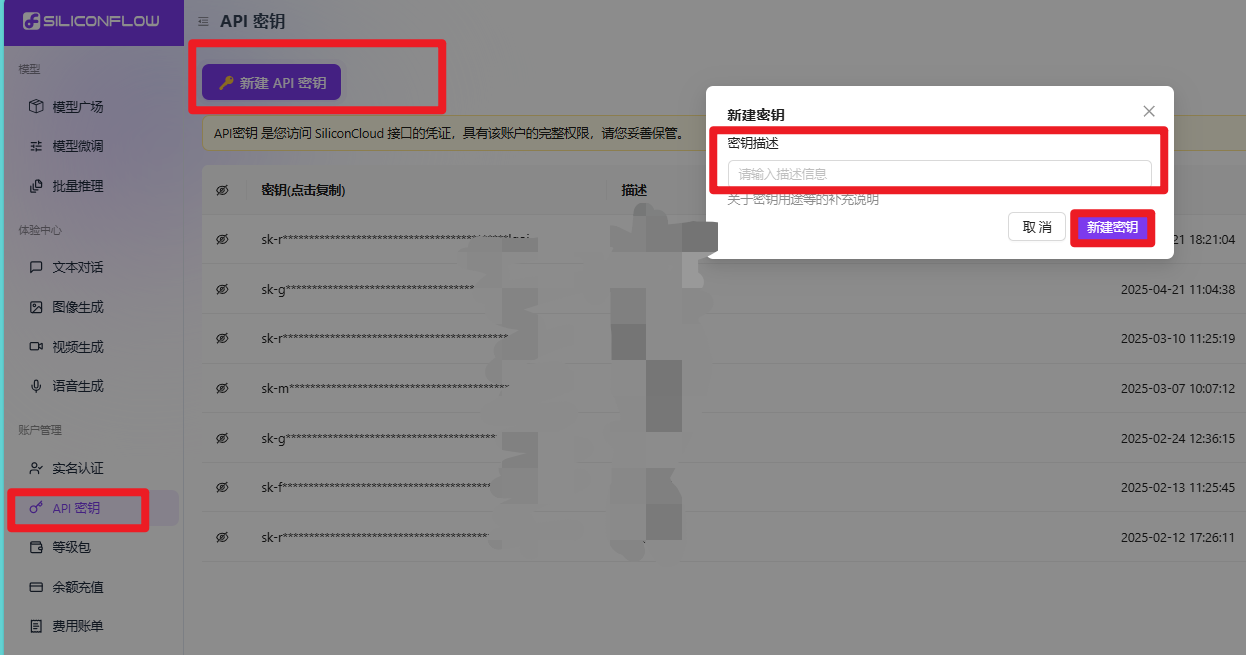
调用DeepSeek模型:
private static String callSiliconFlowAPI(String query) {
    String apiKey = "YOUR_SILICONFLOW_API_KEY";
    String endpoint = "https://api.siliconflow.cn/v1/chat/completions";

    // 构建请求体
    String jsonBody = String.format("{\n"
            + "  \"model\": \"deepseek-ai/DeepSeek-R1\",\n"
            + "  \"messages\": [{\"role\": \"user\", \"content\": \"%s\"}]\n"
            + "}", query);

    // 使用HttpClient发送POST请求
    // (需添加Java 11+的HttpClient依赖或使用Apache HttpClient)
    return "AI响应内容"; // 实际应解析API返回结果
}

中国智能体开发者社区,聚焦智能体与大模型开发,提供前沿资讯、实用工具链、开源项目及行业案例。通过技术沙龙、开发者大赛等活动,促进经验交流与协作,助力开发者快速构建创新智能应用。
更多推荐
 31
31 0
0- 0


 已为社区贡献6条内容

所有评论(0)