Ceph 18 (Reef) Storage Cluster Installation Guide on VirtualBox Machine of Ubuntu 22.04
Ceph v18(Reef) storage cluster
Ceph 18 (Reef) Storage Cluster Installation Guide on VirtualBox Machine of Ubuntu 22.04
Today marks the delivery of my technical article detailing the deployment of a Ceph 18 (Reef) Storage Cluster on Ubuntu 22.04 LTS servers. Ceph is a robust, open-source, software-defined storage (SDS) platform engineered to deliver scalable and highly available distributed storage using commodity hardware. The specific system requirements and deployment architecture for Ceph 18 (Reef) on Ubuntu 22.04 will vary depending on the intended use case—be it block storage (RBD), object storage (RGW), or shared file systems (CephFS).
Our Ceph Storage Cluster Deployment Architecture
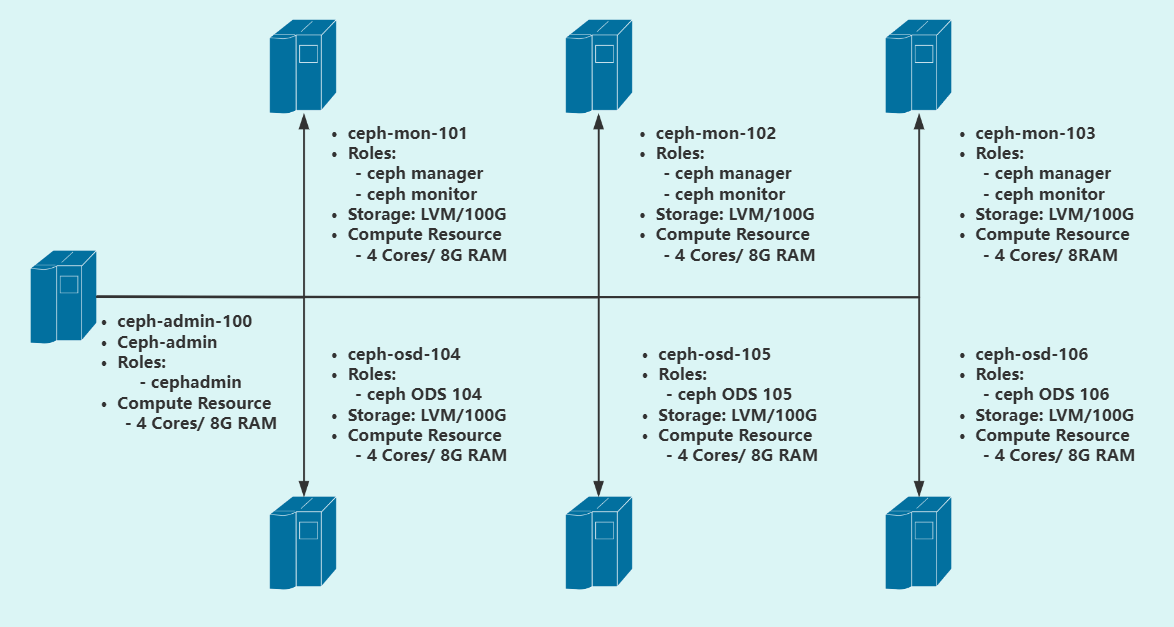
The following diagram illustrates the deployment architecture of our Ceph storage cluster. In a typical LAB-Grade environment, it is recommended to provision a minimum of three Monitor (MON) nodes to maintain quorum and ensure high availability, along with at least three Object Storage Daemons (OSDs) to achieve data redundancy and fault tolerance through replication or erasure coding.
Prerequisites for Deploying a Ceph Storage Cluster with cephadm
To deploy a Ceph storage cluster using cephadm, the following components and system configurations are required:
-
Python 3 – Required for running Ceph’s orchestration and CLI tools.
-
Systemd – Used by cephadm to manage services on host systems.
-
Container Runtime – Either Podman or Docker must be installed to run Ceph daemons as containers. In this guide, Docker is used.
-
Time Synchronization – Consistent timekeeping across nodes is critical; tools like chrony or NTP should be configured to ensure time synchronization.
-
LVM2 – Necessary for provisioning and managing storage devices. Alternatively, raw disks or partitions (without a filesystem) can also be used as OSD backing devices.
Install Ceph 18 (Reef) Storage Cluster on Ubuntu 22.04
Before you begin the deployment of Ceph 18 (Reef) Storage Cluster on Linux 22.04 Ubuntu servers you need to prepare the servers needed. Below is a picture of my servers ready for setup.
Lab Environments:
| No. | Host Name | IP Address | Linux OS | Ceph Version | CPU/RAM | Software |
|---|---|---|---|---|---|---|
| #1 | ceph-admin-100 | 192.168.1.100 | Ubuntu 22.04 LTS | 18.2.5 | 4Cores/8G | Ceph |
| #2 | ceph-mon-101 | 192.168.1.101 | Ubuntu 22.04 LTS | 18.2.5 | 4Cores/8G | Ceph |
| #3 | ceph-mon-102 | 192.168.1.102 | Ubuntu 22.04 LTS | 18.2.5 | 4Cores/8G | Ceph |
| #4 | ceph-mon-103 | 192.168.1.103 | Ubuntu 22.04 LTS | 18.2.5 | 4Cores/8G | Ceph |
| #5 | ceph-osd-104 | 192.168.1.104 | Ubuntu 22.04 LTS | 18.2.5 | 4Cores/8G | Ceph |
| #6 | ceph-osd-105 | 192.168.1.105 | Ubuntu 22.04 LTS | 18.2.5 | 4Cores/8G | Ceph |
| #7 | ceph-osd-106 | 192.168.1.106 | Ubuntu 22.04 LTS | 18.2.5 | 4Cores/8G | Ceph |
Part 1: Prepare the Admin Management Node
1.Prepare the following entries in advance to update the hostnames.
- All hosts in the cluster
- The Ceph components to be deployed use Cephadm. Cephadm connects to hosts from the manager daemon via SSH to add, remove, or update Ceph daemon containers, thereby deploying and managing the Ceph cluster.
Here, we will use the Ansible automation tool to update all IP addresses and hostname entries in the /etc/hosts file.
Please prepare the following entries in advance to update the hostnames:
- all those node servers
# all those node servers
# vim /etc/hosts
127.0.0.1 localhost
192.168.1.100  ceph-admin-100
192.168.1.101  ceph-mon-101
192.168.1.102  ceph-mon-102
192.168.1.103  ceph-mon-103
192.168.1.104  ceph-osd-104
192.168.1.105  ceph-osd-105
192.168.1.106  ceph-osd-106
2. Update and Upgrade the Operating System:
- all these node servers
# all those node servers
root@ceph-admin-100:~# sudo apt update && sudo apt -y upgrade
root@ceph-admin-100:~# sudo systemctl reboot
3. Install Ansible and Other Essential Utilities
- Install Ansible and other basic utilities on all these node servers.
root@ceph-admin-100:~# sudo apt update
root@ceph-admin-100:~# sudo apt -y install software-properties-common git curl vim bash-completion ansible sshpass

# Verify Ansible installation
root@ceph-admin-100:~# ansible --version

# Ensure /usr/local/bin is included in the PATH
root@ceph-admin-100:~# echo "PATH=\$PATH:/usr/local/bin" >>~/.bashrc
root@ceph-admin-100:~# source ~/.bashrc

# Check the current PATH
root@ceph-admin-100:~# echo $PATH
4. Generate SSH Key
root@ceph-admin-100:~# ssh-keygen -t rsa -b 4096 -N '' -f ~/.ssh/id_rsa
Generating public/private rsa key pair.
Your identification has been saved in /root/.ssh/id_rsa
Your public key has been saved in /root/.ssh/id_rsa.pub
The key fingerprint is:
SHA256:TzG3TIWJ9yXjJUjKnKAvmzZ4NFEBo6b3UPrplagDo8E root@ceph-admin-100
The key's randomart image is:
+---[RSA 4096]----+
|      o.+. o.+.  |
|     . + +.o=.+ o|
|    o +   B.oo * |
|   o o o   * .o  |
|. . + + S . o    |
|.Eo. * B +       |
| o o. @ o .      |
|.   .= o         |
|    ...          |
+----[SHA256]-----+
root@ceph-admin-100:~# ll /root/.ssh/
total 16
drwx------ 2 root root 4096 Apr 15 12:31 ./
drwx------ 5 root root 4096 Apr 15 12:28 ../
-rw------- 1 root root    0 Apr 15 10:42 authorized_keys
-rw------- 1 root root 3389 Apr 15 12:31 id_rsa
-rw-r--r-- 1 root root  745 Apr 15 12:31 id_rsa.pub
5. Allow Root Password Login
If you’re using a password-protected key, be sure to save it:
$ eval `ssh-agent -s` && ssh-add ~/.ssh/id_rsa_jmutai
Agent pid 3275
Enter passphrase for /root/.ssh/id_rsa_jmutai:
Identity added: /root/.ssh/id_rsa_jmutai (/root/.ssh/id_rsa_jmutai)
Alternatively, you can copy your SSH key to all target hosts. Before that, ensure root login is enabled on all hosts:
$ sudo vim /etc/ssh/sshd_config
...
PermitRootLogin yes
PasswordAuthentication yes
...
If you must allow root password login temporarily (e.g., for debugging):
Step 1: Allow root password login on the target host
# all these node servers
sudo sed -i 's/#PermitRootLogin prohibit-password/PermitRootLogin yes/' /etc/ssh/sshd_config
sudo sed -i 's/#PasswordAuthentication.*/PasswordAuthentication yes/' /etc/ssh/sshd_config

# restart ssh service
sudo systemctl restart sshd
Note: After finishing, revert the settings back to prohibit-password for better security.
Step 2: Set or reset the root password
# all of these node servers
sudo passwd root  # Example password: pass@1234
Step 3: Verify SSH connection manually
# only verify SSH connection manually
ssh root@ceph-mon-101
Step 4: Copy SSH key to all nodes
# copy SSH key to MON and OSD node servers
root@ceph-admin-100:~/.ssh# for host in ceph-mon-101 ceph-mon-102 ceph-mon-103 ceph-osd-104 ceph-osd-105 ceph-osd-106; do
  sshpass -p 'pass@1234' ssh-copy-id -o StrictHostKeyChecking=no root@$host
done
Part 2: Preparing Other Nodes Using Ansible
1. How to Create the Project Directory
root@ceph-admin-100:~# mkdir ansible && cd ansible
2. Configure Ansible Playbook
After configuring the first Mon node, create an Ansible playbook to update all nodes, push the SSH public key, and update the /etc/hosts file.
Create a hosts.ini or inventory.ini file under the Ansible project directory (e.g., ~/ansible/):
[ceph_nodes]
ceph-mon-101
ceph-mon-102
ceph-mon-103
ceph-osd-104
ceph-osd-105
ceph-osd-106
3. How to Run the Playbook
Create prepare-ceph-nodes.yml:
---
- name: Prepare ceph nodes
  hosts: ceph_nodes
  become: yes
  become_method: sudo
  vars:
    ceph_admin_user: cephadmin
  tasks:
    - name: Set timezone
      timezone:
        name: Asia/Shanghai

    - name: Update system
      apt:
        name: "*"
        state: latest
        update_cache: yes

    - name: Install common packages
      apt:
        name: [vim, git, bash-completion, lsb-release, wget, curl, chrony, lvm2]
        state: present
        update_cache: yes

    - name: Create user if absent
      user:
        name: "{{ ceph_admin_user }}"
        state: present
        shell: /bin/bash
        home: /home/{{ ceph_admin_user }}

    - name: Add sudo access for the user
      lineinfile:
        path: /etc/sudoers
        line: "{{ ceph_admin_user }} ALL=(ALL:ALL) NOPASSWD:ALL"
        state: present
        validate: visudo -cf %s

    - name: Set authorized key taken from file to Cephadmin user
      authorized_key:
        user: "{{ ceph_admin_user }}"
        state: present
        key: "{{ lookup('file', '~/.ssh/id_rsa.pub') }}"

    - name: Install Docker
      shell: |
        curl -fsSL https://download.docker.com/linux/ubuntu/gpg | sudo apt-key add -
        echo "deb [arch=amd64] https://download.docker.com/linux/ubuntu $(lsb_release -cs) stable" > /etc/apt/sources.list.d/docker-ce.list
        apt update
        apt install -qq -y docker-ce docker-ce-cli containerd.io

    - name: Reboot server after update and configs
      reboot:
Sample Output
root@ceph-admin-100:~/ansible# ansible-playbook -i hosts prepare-ceph-nodes.yml

PLAY [Prepare ceph nodes] **************************************************************************************************************************************************************

TASK [Gathering Facts] *****************************************************************************************************************************************************************
ok: [ceph-mon-101]
ok: [ceph-mon-103]
ok: [ceph-mon-102]
ok: [ceph-osd-104]
ok: [ceph-osd-105]
ok: [ceph-osd-106]

TASK [Set timezone] ********************************************************************************************************************************************************************
changed: [ceph-osd-104]
changed: [ceph-mon-101]
changed: [ceph-mon-103]
changed: [ceph-mon-102]
changed: [ceph-osd-105]
changed: [ceph-osd-106]

TASK [Update system] *******************************************************************************************************************************************************************
ok: [ceph-mon-101]
ok: [ceph-osd-104]
ok: [ceph-mon-102]
ok: [ceph-mon-103]
ok: [ceph-osd-105]
ok: [ceph-osd-106]

TASK [Install common packages] *********************************************************************************************************************************************************
changed: [ceph-mon-102]
changed: [ceph-mon-103]
changed: [ceph-osd-104]
changed: [ceph-mon-101]
changed: [ceph-osd-105]
changed: [ceph-osd-106]

TASK [Create user if absent] ***********************************************************************************************************************************************************
changed: [ceph-mon-103]
changed: [ceph-mon-101]
changed: [ceph-osd-105]
changed: [ceph-osd-104]
changed: [ceph-mon-102]
changed: [ceph-osd-106]

TASK [Add sudo access for the user] ****************************************************************************************************************************************************
changed: [ceph-mon-103]
changed: [ceph-mon-101]
changed: [ceph-mon-102]
changed: [ceph-osd-105]
changed: [ceph-osd-104]
changed: [ceph-osd-106]

TASK [Set authorized key taken from file to Cephadmin user] ****************************************************************************************************************************
changed: [ceph-mon-101]
changed: [ceph-mon-102]
changed: [ceph-osd-105]
changed: [ceph-osd-104]
changed: [ceph-mon-103]
changed: [ceph-osd-106]

TASK [Install Docker] ******************************************************************************************************************************************************************
[WARNING]: Consider using the get_url or uri module rather than running 'curl'.  If you need to use command because get_url or uri is insufficient you can add 'warn: false' to this
command task or set 'command_warnings=False' in ansible.cfg to get rid of this message.
changed: [ceph-mon-101]
changed: [ceph-mon-102]
changed: [ceph-osd-104]
changed: [ceph-mon-103]
changed: [ceph-osd-105]
changed: [ceph-osd-106]

TASK [Reboot server after update and configs] ******************************************************************************************************************************************
changed: [ceph-osd-104]
changed: [ceph-osd-105]
changed: [ceph-mon-102]
changed: [ceph-mon-101]
changed: [ceph-osd-106]
changed: [ceph-mon-103]

PLAY RECAP *****************************************************************************************************************************************************************************
ceph-mon-101               : ok=9    changed=7    unreachable=0    failed=0    skipped=0    rescued=0    ignored=0
ceph-mon-102               : ok=9    changed=7    unreachable=0    failed=0    skipped=0    rescued=0    ignored=0
ceph-mon-103               : ok=9    changed=7    unreachable=0    failed=0    skipped=0    rescued=0    ignored=0
ceph-osd-104               : ok=9    changed=7    unreachable=0    failed=0    skipped=0    rescued=0    ignored=0
ceph-osd-105               : ok=9    changed=7    unreachable=0    failed=0    skipped=0    rescued=0    ignored=0
ceph-osd-106               : ok=9    changed=7    unreachable=0    failed=0    skipped=0    rescued=0    ignored=0
4.Test SSH with the Created Ceph Admin User
# only for testing SSH connection with using the new cephadmin user
root@ceph-admin-100:~# ssh cephadmin@ceph-mon-101
Welcome to Ubuntu 22.04.5 LTS...
Last login: ...
cephadmin@ceph-mon-101:~$
5.Update /etc/hosts
If no active DNS is configured for the cluster servers, update the /etc/hosts file on all nodes. Use the following playbook:
---
- name: Prepare ceph nodes
  hosts: ceph_nodes
  become: yes
  become_method: sudo
  tasks:
    - name: Clean /etc/hosts file
      copy:
        content: ""
        dest: /etc/hosts

    - name: Update /etc/hosts file
      blockinfile:
        path: /etc/hosts
        block: |
           127.0.0.1     localhost
           192.168.1.101  ceph-mon-101
           192.168.1.102  ceph-mon-102
           192.168.1.103  ceph-mon-103
           192.168.1.104  ceph-osd-104
           192.168.1.105  ceph-osd-105
           192.168.1.106  ceph-osd-106
Sample Output
root@ceph-admin-100:~/ansible# ansible-playbook -i hosts update-hosts.yml

PLAY [Prepare ceph nodes] *****************************************************************************************************************************

TASK [Gathering Facts] ********************************************************************************************************************************
ok: [ceph-osd-104]
ok: [ceph-mon-102]
ok: [ceph-osd-105]
ok: [ceph-mon-101]
ok: [ceph-mon-103]
ok: [ceph-osd-106]

TASK [Clean /etc/hosts file] **************************************************************************************************************************
changed: [ceph-osd-105]
changed: [ceph-mon-102]
changed: [ceph-mon-101]
changed: [ceph-osd-104]
changed: [ceph-mon-103]
changed: [ceph-osd-106]

TASK [Update /etc/hosts file] *************************************************************************************************************************
changed: [ceph-mon-102]
changed: [ceph-osd-105]
changed: [ceph-mon-101]
changed: [ceph-osd-104]
changed: [ceph-mon-103]
changed: [ceph-osd-106]

PLAY RECAP ********************************************************************************************************************************************
ceph-mon-101               : ok=3    changed=2    unreachable=0    failed=0    skipped=0    rescued=0    ignored=0
ceph-mon-102               : ok=3    changed=2    unreachable=0    failed=0    skipped=0    rescued=0    ignored=0
ceph-mon-103               : ok=3    changed=2    unreachable=0    failed=0    skipped=0    rescued=0    ignored=0
ceph-osd-104               : ok=3    changed=2    unreachable=0    failed=0    skipped=0    rescued=0    ignored=0
ceph-osd-105               : ok=3    changed=2    unreachable=0    failed=0    skipped=0    rescued=0    ignored=0
ceph-osd-106               : ok=3    changed=2    unreachable=0    failed=0    skipped=0    rescued=0    ignored=0
Part 3: Deploying Ceph MON Cluster on Ubuntu 22.04
3.1 Initializing the Ceph Cluster
To initialize a new Ceph cluster on Ubuntu 22.04, you need the first monitor address, either by IP or hostname.
1. Install Cephadm on the Management Node
There are two methods to install Cephadm. This guide will use the curl-based installation method. First, fetch the latest release version from the official release page.
# Install only on the ceph-admin-100 management node
root@ceph-admin-100:~# CEPH_RELEASE=18.2.5
root@ceph-admin-100:~# curl --silent --remote-name --location https://download.ceph.com/rpm-${CEPH_RELEASE}/el9/noarch/cephadm
root@ceph-admin-100:~# chmod +x cephadm
root@ceph-admin-100:~# sudo mv cephadm /usr/local/bin/
Verify that cephadm is installed correctly and available locally:
root@ceph-admin-100:~# cephadm --help
2. SSH into ceph-mon-101
# SSH into ceph-mon-101 (192.168.1.101)
root@ceph-admin-100:~/ansible# ssh root@ceph-mon-101

# Ensure that Docker is installed correctly. You can verify this by running the following command:
root@ceph-mon-101:~# systemctl status docker
3. Install Cephadm Management Tool
Before executing the bootstrap command, you need to install the cephadm management tool on the ceph-mon-101 node (refer to the previous installation steps).
root@ceph-mon-101:~# cephadm bootstrap \
  --mon-ip 192.168.1.101 \
  --initial-dashboard-user admin \
  --initial-dashboard-password AdminP@ssw0rd
Execution Output:
root@ceph-admin-100:~/ansible# ssh root@ceph-mon-101
Welcome to Ubuntu 22.04.5 LTS (GNU/Linux 5.15.0-136-generic x86_64)

 * Documentation:  https://help.ubuntu.com
 * Management:     https://landscape.canonical.com
 * Support:        https://ubuntu.com/pro

 System information as of Tue Apr 15 09:35:25 PM CST 2025

  System load:  0.13               Processes:              247
  Usage of /:   46.8% of 18.53GB   Users logged in:        1
  Memory usage: 5%                 IPv4 address for ens33: 192.168.1.101
  Swap usage:   0%


Expanded Security Maintenance for Applications is not enabled.

0 updates can be applied immediately.

1 additional security update can be applied with ESM Apps.
Learn more about enabling ESM Apps service at https://ubuntu.com/esm

Failed to connect to https://changelogs.ubuntu.com/meta-release-lts. Check your Internet connection or proxy settings


Last login: Tue Apr 15 21:32:11 2025 from 192.168.1.102
root@ceph-mon-101:~#
root@ceph-mon-101:~# cephadm bootstrap \
  --mon-ip 192.168.1.101 \
  --initial-dashboard-user admin \
  --initial-dashboard-password AdminP@ssw0rd
Verifying podman|docker is present...
Verifying lvm2 is present...
Verifying time synchronization is in place...
Unit chrony.service is enabled and running
Repeating the final host check...
docker (/usr/bin/docker) is present
systemctl is present
lvcreate is present
Unit chrony.service is enabled and running
Host looks OK
Cluster fsid: 7f4fdcfe-19fe-11f0-8877-ad2789c2ef6f
Verifying IP 192.168.1.101 port 3300 ...
Verifying IP 192.168.1.101 port 6789 ...
Mon IP `192.168.1.101` is in CIDR network `192.168.1.0/24`
Mon IP `192.168.1.101` is in CIDR network `192.168.1.0/24`
Internal network (--cluster-network) has not been provided, OSD replication will default to the public_network
Pulling container image quay.io/ceph/ceph:v18...
Ceph version: ceph version 18.2.5 (a5b0e13f9c96f3b45f596a95ad098f51ca0ccce1) reef (stable)
Extracting ceph user uid/gid from container image...
Creating initial keys...
Creating initial monmap...
Creating mon...
Waiting for mon to start...
Waiting for mon...
mon is available
Assimilating anything we can from ceph.conf...
Generating new minimal ceph.conf...
Restarting the monitor...
Setting public_network to 192.168.1.0/24 in global config section
Wrote config to /etc/ceph/ceph.conf
Wrote keyring to /etc/ceph/ceph.client.admin.keyring
Creating mgr...
Verifying port 0.0.0.0:9283 ...
Verifying port 0.0.0.0:8765 ...
Verifying port 0.0.0.0:8443 ...
Waiting for mgr to start...
Waiting for mgr...
mgr not available, waiting (1/15)...
mgr not available, waiting (2/15)...
mgr not available, waiting (3/15)...
mgr not available, waiting (4/15)...
mgr not available, waiting (5/15)...
mgr not available, waiting (6/15)...
mgr not available, waiting (7/15)...
mgr not available, waiting (8/15)...
mgr not available, waiting (9/15)...
mgr not available, waiting (10/15)...
mgr is available
Enabling cephadm module...
Waiting for the mgr to restart...
Waiting for mgr epoch 5...
mgr epoch 5 is available
Setting orchestrator backend to cephadm...
Generating ssh key...
Wrote public SSH key to /etc/ceph/ceph.pub
Adding key to root@localhost authorized_keys...
Adding host ceph-mon-101...
Deploying mon service with default placement...
Deploying mgr service with default placement...
Deploying crash service with default placement...
Deploying ceph-exporter service with default placement...
Deploying prometheus service with default placement...
Deploying grafana service with default placement...
Deploying node-exporter service with default placement...
Deploying alertmanager service with default placement...
Enabling the dashboard module...
Waiting for the mgr to restart...
Waiting for mgr epoch 9...
mgr epoch 9 is available
Generating a dashboard self-signed certificate...
Creating initial admin user...
Fetching dashboard port number...
Ceph Dashboard is now available at:

             URL: https://ceph-mon-101:8443/
            User: admin
        Password: AdminP@ssw0rd

Enabling client.admin keyring and conf on hosts with "admin" label
Saving cluster configuration to /var/lib/ceph/7f4fdcfe-19fe-11f0-8877-ad2789c2ef6f/config directory
Enabling autotune for osd_memory_target
You can access the Ceph CLI as following in case of multi-cluster or non-default config:

        sudo /usr/local/bin/cephadm shell --fsid 7f4fdcfe-19fe-11f0-8877-ad2789c2ef6f -c /etc/ceph/ceph.conf -k /etc/ceph/ceph.client.admin.keyring

Or, if you are only running a single cluster on this host:

        sudo /usr/local/bin/cephadm shell

Please consider enabling telemetry to help improve Ceph:

        ceph telemetry on

For more information see:

        https://docs.ceph.com/en/latest/mgr/telemetry/

Bootstrap complete.
Ceph Dashboard is now available at:
- URL: https://ceph-mon-101:8443/
- User: admin
- Password: AdminP@ssw0rd
3.2 Accessing the Dashboard via Browser:
[https://ceph-mon-101:8443/](https://192.168.1.101:8443)
Username: admin
Password: AdminP@ssw0rd#
3.3 Install Ceph Tools
1. Add the repository for the desired Ceph version (e.g., version 18.*):
This step should be performed on both ceph-mon-101 and ceph-admin-100 nodes.
# For version 18.*, use the Reef release:
root@ceph-mon-101:~# cephadm add-repo --release reef
2. After adding the repository, install the required tools:
root@ceph-mon-101:~# cephadm install ceph-common
3. Verify that the tools were installed successfully:
root@ceph-mon-101:~# ceph -v
ceph version 18.2.5 (a5b0e13f9c96f3b45f596a95ad098f51ca0ccce1) reef (stable)
3.4 SSH Public Key for the Ceph Cluster
These two commands are used to copy the Ceph cluster’s SSH public key (/etc/ceph/ceph.pub) to the authorized_keys file of the root user on ceph-mon-102 and ceph-mon-103.
This setup enables passwordless SSH access between the nodes.
## Copy Ceph SSH key ##

root@ceph-mon-101:~# ll /etc/ceph/ceph.pub
-rw-r--r-- 1 root root 595 Apr 15 21:39 /etc/ceph/ceph.pub

root@ceph-mon-101:~# ssh-copy-id -f -i /etc/ceph/ceph.pub root@ceph-mon-102
root@ceph-mon-101:~# ssh-copy-id -f -i /etc/ceph/ceph.pub root@ceph-mon-103
3.5 Check configure the ceph.conf File
-
On both nodes: ceph-mon-100 and ceph-mon-101
-
Check the configuration file path:
- Ensure that the ceph.conf configuration file is located in the correct directory, typically /etc/ceph/ceph.conf.
If the file does not exist, try copying it from another node or regenerate it.
root@ceph-mon-101:~# ll /etc/ceph/ceph.conf
-rw-r--r-- 1 root root 181 Apr 15 21:43 /etc/ceph/ceph.conf

root@ceph-admin-100:~/ansible# ll /etc/ceph/ceph.conf
ls: cannot access '/etc/ceph/ceph.conf': No such file or directory
3.6 Sync to the ceph-admin Management Node
Retrieve the configuration file from a Ceph monitor node:
- You can copy the ceph.conf file from another node that has already been configured.
- Typically, the Ceph monitor node contains this configuration file. Assuming you have successfully initialized the Ceph cluster on ceph-mon-101, you can copy the configuration file from that node:
root@ceph-mon-101:~# scp /etc/ceph/ceph.conf root@192.168.1.100:/etc/ceph/ceph.conf
Check the cluster status:
root@ceph-admin-100:~/ansible# ceph -s
2025-04-15T13:56:32.463+0000 7f5e3aa7b640 -1 auth: unable to find a keyring on /etc/ceph/ceph.client.admin.keyring,/etc/ceph/ceph.keyring,/etc/ceph/keyring,/etc/ceph/keyring.bin: (2) No such file or directory
2025-04-15T13:56:32.463+0000 7f5e3aa7b640 -1 AuthRegistry(0x7f5e34067450) no keyring found at /etc/ceph/ceph.client.admin.keyring,/etc/ceph/ceph.keyring,/etc/ceph/keyring,/etc/ceph/keyring.bin, disabling cephx
2025-04-15T13:56:32.463+0000 7f5e3aa7b640 -1 auth: unable to find a keyring on /etc/ceph/ceph.client.admin.keyring,/etc/ceph/ceph.keyring,/etc/ceph/keyring,/etc/ceph/keyring.bin: (2) No such file or directory
2025-04-15T13:56:32.463+0000 7f5e3aa7b640 -1 AuthRegistry(0x7f5e3aa79f60) no keyring found at /etc/ceph/ceph.client.admin.keyring,/etc/ceph/ceph.keyring,/etc/ceph/keyring,/etc/ceph/keyring.bin, disabling cephx
2025-04-15T13:56:32.467+0000 7f5e33fff640 -1 monclient(hunting): handle_auth_bad_method server allowed_methods [2] but I only support [1]
2025-04-15T13:56:32.467+0000 7f5e3aa7b640 -1 monclient: authenticate NOTE: no keyring found; disabled cephx authentication
[errno 13] RADOS permission denied (error connecting to the cluster)
3.7 Generate the Keyring File on the Ceph Monitor Node
# Since the ceph.client.admin.keyring file is missing, you need to obtain an admin key from the Ceph cluster.
# You can generate the key on a management node or a monitor node within the cluster.

# On one of the nodes in the cluster (e.g., ceph-mon-101), run the following command:
root@ceph-mon-101:~# sudo ceph auth get-or-create client.admin mon 'allow *' osd 'allow *' mgr 'allow *' -o /etc/ceph/ceph.client.admin.keyring
root@ceph-mon-101:~# ll /etc/ceph/ceph.client.admin.keyring
-rw------- 1 root root 63 Apr 15 21:58 /etc/ceph/ceph.client.admin.keyring
Copy the generated keyring file to the ceph-admin node using scp or any other file transfer tool:
root@ceph-admin-100:~/ansible# scp root@ceph-mon-101:/etc/ceph/ceph.client.admin.keyring /etc/ceph/
ceph.client.admin.keyring                                                                                            100%   63    75.0KB/s   00:00

root@ceph-admin-100:~/ansible# ll /etc/ceph/
total 20
drwxr-xr-x  2 root root 4096 Apr 15 13:58 ./
drwxr-xr-x 98 root root 4096 Apr 15 13:48 ../
-rw-------  1 root root   63 Apr 15 13:58 ceph.client.admin.keyring
-rw-r--r--  1 root root  181 Apr 15 13:56 ceph.conf
-rw-r--r--  1 root root   92 Apr  7 19:34 rbdmap


# After completing the steps above, try running ceph -s again to check the cluster
root@ceph-admin-100:~/ansible# ceph -s
  cluster:
    id:     7f4fdcfe-19fe-11f0-8877-ad2789c2ef6f
    health: HEALTH_WARN
            OSD count 0 < osd_pool_default_size 3

  services:
    mon: 1 daemons, quorum ceph-mon-101 (age 21m)
    mgr: ceph-mon-101.llshhd(active, since 16m)
    osd: 0 osds: 0 up, 0 in

  data:
    pools:   0 pools, 0 pgs
    objects: 0 objects, 0 B
    usage:   0 B used, 0 B / 0 B avail
    pgs:
3.8 Add More Mon/Mgr Nodes (for High Availability)
Before deploying MON/MGR on additional nodes, make sure the following two files exist on ceph-mon-102 and ceph-mon-103:
/etc/ceph/ceph.conf
/etc/ceph/ceph.client.admin.keyring
You can copy them from ceph-mon-101 using the following commands:
root@ceph-mon-101:~# scp /etc/ceph/ceph.conf root@ceph-mon-102:/etc/ceph/ceph.conf
root@ceph-mon-101:~# scp /etc/ceph/ceph.client.admin.keyring root@ceph-mon-102:/etc/ceph/ceph.client.admin.keyring

root@ceph-mon-101:~# scp /etc/ceph/ceph.conf root@ceph-mon-103:/etc/ceph/ceph.conf
root@ceph-mon-101:~# scp /etc/ceph/ceph.client.admin.keyring root@ceph-mon-103:/etc/ceph/ceph.client.admin.keyring
Then, from the cluster’s admin node (e.g., ceph-admin-100), add the new nodes to the cluster:
## On node: ceph-admin-100 to add other nodes to the cluster ##
root@ceph-admin-100:~/ansible# ceph orch host add ceph-mon-102
Added host 'ceph-mon-102' with addr '192.168.1.102'

root@ceph-admin-100:~/ansible# ceph orch host add ceph-mon-103
Added host 'ceph-mon-103' with addr '192.168.1.103'
3.9 Assign the mon Label to All Three Nodes
root@ceph-admin-100:~/ansible# ceph orch host label add ceph-mon-101 mon
Added label mon to host ceph-mon-101
root@ceph-admin-100:~/ansible# ceph orch host label add ceph-mon-102 mon
Added label mon to host ceph-mon-102
root@ceph-admin-100:~/ansible# ceph orch host label add ceph-mon-103 mon
Added label mon to host ceph-mon-103
⛳️ Adding labels helps the orchestrator understand which nodes are eligible for MON service deployment.
4.0 Check the Hosts and Their Labels
root@ceph-admin-100:~/ansible# ceph orch host ls
HOST          ADDR             LABELS      STATUS
ceph-mon-101  192.168.1.101  _admin,mon
ceph-mon-102  192.168.1.102  mon
ceph-mon-103  192.168.1.103  mon
3 hosts in cluster
The output shows the label assignments for each node.
ceph-mon-101 has the _admin label, indicating that it also functions as the administration node.
ceph orch apply mon --placement="ceph-mon-101,ceph-mon-102,ceph-mon-103"
or

root@ceph-admin-100:~/ansible# ceph orch apply mon ceph-mon-101
Scheduled mon update...
root@ceph-admin-100:~/ansible# ceph orch apply mon ceph-mon-102
Scheduled mon update...
root@ceph-admin-100:~/ansible# ceph orch apply mon ceph-mon-103
Scheduled mon update...
🔄 Ceph will automatically deploy MON services in containers on these three nodes, enabling high availability.
- If the automatic deployment fails, you can try deploying MONs manually:
ceph orch daemon add mon ceph-mon-102
ceph orch daemon add mon ceph-mon-103
4.1 View MON Service Status
root@ceph-admin-100:~# ceph orch ps --service_name=mon
NAME              HOST          PORTS  STATUS        REFRESHED  AGE  MEM USE  MEM LIM  VERSION  IMAGE ID      CONTAINER ID
mon.ceph-mon-101  ceph-mon-101         running (3h)     4m ago   3h     116M    2048M  18.2.5   94179acded1b  0be1f9c1d3cb
mon.ceph-mon-102  ceph-mon-102         running (3h)    98m ago   3h    76.9M    2048M  18.2.5   94179acded1b  6688ef23b384
mon.ceph-mon-103  ceph-mon-103         running (3h)     4m ago   3h     109M    2048M  18.2.5   94179acded1b  504445f28cd7
The output shows that all three MON services are running, with a status of “running.” Memory usage is normal, and the containers have started successfully.
4.2 Check the overall cluster health status:
root@ceph-admin-100:~# ceph -s
  cluster:
    id:     947421dc-1a6a-11f0-9acb-6dad906cde98
    health: HEALTH_WARN
            OSD count 0 < osd_pool_default_size 3

  services:
    mon: 3 daemons, quorum ceph-mon-101,ceph-mon-103,ceph-mon-102 (age 8m)
    mgr: ceph-mon-101.mdgwwg(active, since 21m), standbys: ceph-mon-102.ybntyg
    osd: 0 osds: 0 up, 0 in

  data:
    pools:   0 pools, 0 pgs
    objects: 0 objects, 0 B
    usage:   0 B used, 0 B / 0 B avail
    pgs:
The output shows:
- The number of MONs is 3, and they have entered a quorum consensus state.
- The cluster also shows a warning indicating that there are currently zero OSDs configured — resolving this is the next task.
🔜 Next step suggestions: Now that your MON high availability is deployed, it’s time to move on to adding OSDs to the cluster. Follow these steps:
Add OSD nodes: For example, you can first check available disks using:
ceph orch device ls # List available devices
Then, apply OSDs to all available devices:
ceph orch apply osd --all-available-devices
Part4:Deply Ceph OSD Cluster on Ubuntu 22.04
- Install the cluster’s public SSH key into the authorized_keys file of the root user on the new OSD nodes:
root@ceph-mon-101:~# ssh-copy-id -f -i /etc/ceph/ceph.pub root@ceph-osd-104
root@ceph-mon-101:~# ssh-copy-id -f -i /etc/ceph/ceph.pub root@ceph-osd-105
root@ceph-mon-101:~# ssh-copy-id -f -i /etc/ceph/ceph.pub root@ceph-osd-106
- Before deploying the OSD, these three files must exist on ceph-osd-104, ceph-osd-105, and ceph-osd-106:
/etc/ceph/ceph.conf
/etc/ceph/ceph.client.admin.keyring
/var/lib/ceph/bootstrap-osd/ceph.keyring
root@ceph-mon-101:~# scp /etc/ceph/ceph.conf root@ceph-mon-104:/etc/ceph/ceph.conf
root@ceph-mon-101:~# scp /etc/ceph/ceph.conf root@ceph-mon-105:/etc/ceph/ceph.conf
root@ceph-mon-101:~# scp /etc/ceph/ceph.conf root@ceph-mon-106:/etc/ceph/ceph.conf

root@ceph-mon-101:~# scp /etc/ceph/bootstrap-osd.keyring root@ceph-mon-104:/etc/ceph/ceph.client.admin.keyring
root@ceph-mon-101:~# scp /etc/ceph/bootstrap-osd.keyring root@ceph-mon-105:/etc/ceph/ceph.client.admin.keyring
root@ceph-mon-101:~# scp /etc/ceph/bootstrap-osd.keyring root@ceph-mon-106:/etc/ceph/ceph.client.admin.keyring
- Update the permissions of the existing client.bootstrap-osd key:
# This command will update the permissions of the client.bootstrap-osd key, setting mon permissions to allow profile osd, and osd permissions to allow *
root@ceph-mon-101:~# ceph auth caps client.bootstrap-osd mon 'allow profile osd' osd 'allow *'

# If you want to save the updated key to a file, you can export the key using ceph auth export:
root@ceph-mon-101:~# ceph auth export client.bootstrap-osd > /etc/ceph/bootstrap-osd.keyring

root@ceph-mon-101:~# scp /etc/ceph/bootstrap-osd.keyring root@ceph-osd-104:/var/lib/ceph/bootstrap-osd/ceph.keyring
root@ceph-mon-101:~# scp /etc/ceph/bootstrap-osd.keyring root@ceph-osd-105:/var/lib/ceph/bootstrap-osd/ceph.keyring
root@ceph-mon-101:~# scp /etc/ceph/bootstrap-osd.keyring root@ceph-osd-106:/var/lib/ceph/bootstrap-osd/ceph.keyring
- Add OSD nodes to the cluster
root@ceph-admin-100:~/ansible# ceph orch host add ceph-osd-104
root@ceph-admin-100:~/ansible# ceph orch host add ceph-osd-105
root@ceph-admin-100:~/ansible# ceph orch host add ceph-osd-106
- Label the three nodes with the osd label
root@ceph-admin-100:~# ceph orch host label add  ceph-osd-104 osd
root@ceph-admin-100:~# ceph orch host label add  ceph-osd-105 osd
root@ceph-admin-100:~# ceph orch host label add  ceph-osd-106 osd
- Deploy OSD daemons
# Deploy new OSD daemons
root@ceph-admin-100:~# ceph orch daemon add osd ceph-osd-104:/dev/sdb
root@ceph-admin-100:~# ceph orch daemon add osd ceph-osd-105:/dev/sdb
root@ceph-admin-100:~# ceph orch daemon add osd ceph-osd-106:/dev/sdb
- If you encounter this issue, such as “Has a FileSystem, Insufficient space (<10 extents) on vgs, LVM detected,” you can execute the following command; otherwise, skip it.
# Clear the disk data
root@ceph-admin-100:~# ceph orch device zap ceph-osd-104 /dev/sdb --force
root@ceph-admin-100:~# ceph orch device zap ceph-osd-105 /dev/sdb --force
root@ceph-admin-100:~# ceph orch device zap ceph-osd-106 /dev/sdb --force
- After deployment, wait for a few minutes and then you can execute:
# ceph status (or ceph -s) displays the current overall health and status of the Ceph cluster, including monitor quorum, OSD status, data usage, and placement groups (PGs).

root@ceph-admin-100:~# ceph -s
  cluster:
    id:     510103f4-1c20-11f0-80eb-11dfb734890b
    health: HEALTH_OK

  services:
    mon: 3 daemons, quorum ceph-mon-101,ceph-mon-103,ceph-mon-102 (age 16m)
    mgr: ceph-mon-101.bzbwvn(active, since 105m), standbys: ceph-mon-102.qeyydb
    osd: 6 osds: 6 up (since 16m), 6 in (since 16m)

  data:
    pools:   1 pools, 1 pgs
    objects: 2 objects, 577 KiB
    usage:   162 MiB used, 600 GiB / 600 GiB avail
    pgs:     1 active+clean

# ceph orch ps lists all Ceph daemons currently managed by the orchestrator along with their status.
root@ceph-admin-100:~# ceph orch ps
NAME                        HOST          PORTS             STATUS          REFRESHED  AGE  MEM USE  MEM LIM  VERSION  IMAGE ID      CONTAINER ID
alertmanager.ceph-mon-101   ceph-mon-101  *:9093,9094       running (3h)     115s ago   3h    34.2M        -  0.25.0   c8568f914cd2  c8664ddcd821
ceph-exporter.ceph-mon-101  ceph-mon-101                    running (3h)     115s ago   3h    12.6M        -  18.2.5   94179acded1b  cd6e6311b2d4
ceph-exporter.ceph-mon-102  ceph-mon-102                    running (3h)       8m ago   3h    16.3M        -  18.2.5   94179acded1b  167acfd69f70
ceph-exporter.ceph-mon-103  ceph-mon-103                    running (3h)     117s ago   3h    21.4M        -  18.2.5   94179acded1b  d9296724137a
ceph-exporter.ceph-osd-104  ceph-osd-104                    running (3h)     117s ago   3h    11.4M        -  18.2.5   94179acded1b  c44726bc7cae
ceph-exporter.ceph-osd-105  ceph-osd-105                    running (3h)     117s ago   3h    11.3M        -  18.2.5   94179acded1b  b140ce2c5bb7
ceph-exporter.ceph-osd-106  ceph-osd-106                    running (3h)     117s ago   3h    9667k        -  18.2.5   94179acded1b  13b7baa763a4
crash.ceph-mon-101          ceph-mon-101                    running (3h)     115s ago   3h    24.4M        -  18.2.5   94179acded1b  15a3ef32feed
crash.ceph-mon-102          ceph-mon-102                    running (3h)       8m ago   3h    28.6M        -  18.2.5   94179acded1b  f0a21f317e92
crash.ceph-mon-103          ceph-mon-103                    running (3h)     117s ago   3h    24.8M        -  18.2.5   94179acded1b  e8bd391075f7
crash.ceph-osd-104          ceph-osd-104                    running (3h)     117s ago   3h    10.7M        -  18.2.5   94179acded1b  5245187ec776
crash.ceph-osd-105          ceph-osd-105                    running (3h)     117s ago   3h    10.6M        -  18.2.5   94179acded1b  cbda1ff4e160
crash.ceph-osd-106          ceph-osd-106                    running (3h)     117s ago   3h    12.1M        -  18.2.5   94179acded1b  e28b27a99dd2
grafana.ceph-mon-101        ceph-mon-101  *:3000            running (3h)     115s ago   3h     150M        -  9.4.7    954c08fa6188  5073afdf6725
mgr.ceph-mon-101.bzbwvn     ceph-mon-101  *:9283,8765,8443  running (3h)     115s ago   3h     585M        -  18.2.5   94179acded1b  85711ae51ccb
mgr.ceph-mon-102.qeyydb     ceph-mon-102  *:8443,9283,8765  running (3h)       8m ago   3h     532M        -  18.2.5   94179acded1b  1932087dbfc2
mon.ceph-mon-101            ceph-mon-101                    running (3h)     115s ago   3h     125M    2048M  18.2.5   94179acded1b  0be1f9c1d3cb
mon.ceph-mon-102            ceph-mon-102                    running (3h)       8m ago   3h    90.3M    2048M  18.2.5   94179acded1b  6688ef23b384
mon.ceph-mon-103            ceph-mon-103                    running (3h)     117s ago   3h     126M    2048M  18.2.5   94179acded1b  504445f28cd7
node-exporter.ceph-mon-101  ceph-mon-101  *:9100            running (3h)     115s ago   3h    19.3M        -  1.5.0    0da6a335fe13  c7f01a2a68af
node-exporter.ceph-mon-102  ceph-mon-102  *:9100            running (3h)       8m ago   3h    18.5M        -  1.5.0    0da6a335fe13  e6f9c82e7acc
node-exporter.ceph-mon-103  ceph-mon-103  *:9100            running (3h)     117s ago   3h    19.1M        -  1.5.0    0da6a335fe13  43abb57ca697
node-exporter.ceph-osd-104  ceph-osd-104  *:9100            running (3h)     117s ago   3h    9115k        -  1.5.0    0da6a335fe13  301ad00336cb
node-exporter.ceph-osd-105  ceph-osd-105  *:9100            running (3h)     117s ago   3h    9031k        -  1.5.0    0da6a335fe13  9bf2338e224e
node-exporter.ceph-osd-106  ceph-osd-106  *:9100            running (3h)     117s ago   3h    9071k        -  1.5.0    0da6a335fe13  61414040f4f5
osd.0                       ceph-mon-101                    running (3h)     115s ago   3h    70.8M    4096M  18.2.5   94179acded1b  57d05b6c39d3
osd.1                       ceph-mon-102                    running (3h)       8m ago   3h    74.9M    4096M  18.2.5   94179acded1b  1f88351f7d8f
osd.2                       ceph-mon-103                    running (3h)     117s ago   3h    68.5M    2356M  18.2.5   94179acded1b  0b719434071f
osd.3                       ceph-osd-104                    running (3h)     117s ago   3h    63.2M    3380M  18.2.5   94179acded1b  a457b9e89d2e
osd.4                       ceph-osd-105                    running (3h)     117s ago   3h    62.4M    3380M  18.2.5   94179acded1b  fefa184bd526
osd.5                       ceph-osd-106                    running (3h)     117s ago   3h    61.0M    3380M  18.2.5   94179acded1b  67e9385ee43a
prometheus.ceph-mon-101     ceph-mon-101  *:9095            running (107m)   115s ago   3h    82.8M        -  2.43.0   a07b618ecd1d  6c79ddbf20d8


# View the list of existing cluster hosts
root@ceph-admin-100:~# ceph orch host ls
HOST          ADDR           LABELS          STATUS
ceph-mon-101  192.168.1.101  _admin,mon,mgr
ceph-mon-102  192.168.1.102  mon,mgr
ceph-mon-103  192.168.1.103  mon,mgr
ceph-osd-104  192.168.1.104  osd
ceph-osd-105  192.168.1.105  osd
ceph-osd-106  192.168.1.106  osd


# List the physical storage devices (disks) on all hosts in the cluster
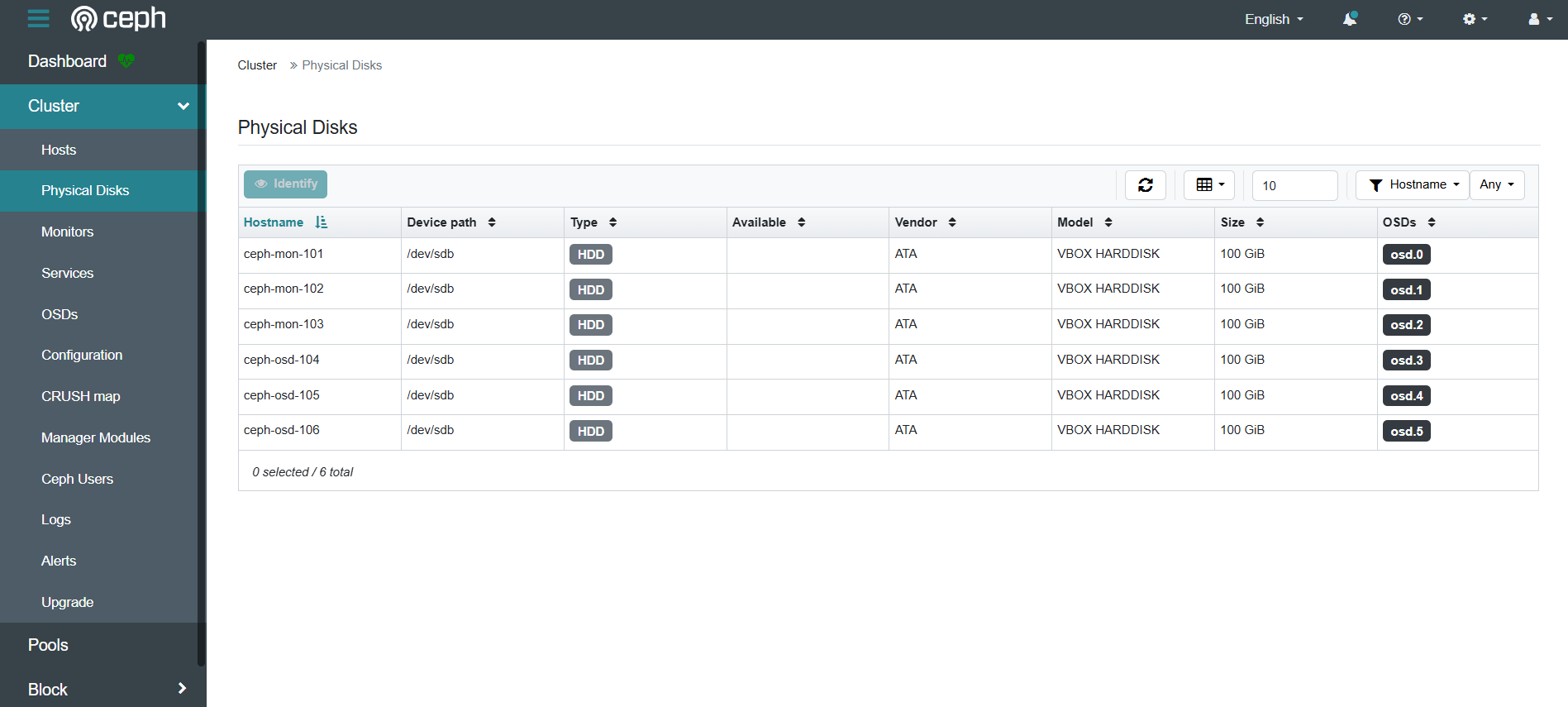
root@ceph-admin-100:~# ceph orch device ls
HOST          PATH      TYPE  DEVICE ID                               SIZE  AVAILABLE  REFRESHED  REJECT REASONS
ceph-mon-101  /dev/sdb  hdd   ATA_VBOX_HARDDISK_VBd7cbb329-a1d87112   100G  YES         3m ago
ceph-mon-102  /dev/sdb  hdd   ATA_VBOX_HARDDISK_VB55b72cad-9501b48d   100G  YES         19m ago
ceph-mon-103  /dev/sdb  hdd   ATA_VBOX_HARDDISK_VB8d5f5240-f22a9b86   100G  YES         3m ago
ceph-osd-104  /dev/sdb  hdd   ATA_VBOX_HARDDISK_VBfab3b9a6-bcdb5976   100G  YES                  3m ago
ceph-osd-105  /dev/sdb  hdd   ATA_VBOX_HARDDISK_VB574186eb-bbcd4714   100G  YES         3m ago
ceph-osd-106  /dev/sdb  hdd   ATA_VBOX_HARDDISK_VB9c9a10bb-919f570e   100G  YES         3m ago


# Check the total OSD capacity of the cluster
root@ceph-admin-100:~# ceph osd tree
ID   CLASS  WEIGHT   TYPE NAME              STATUS  REWEIGHT  PRI-AFF
 -1         0.58612  root default
 -3         0.09769      host ceph-mon-101
  0    hdd  0.09769          osd.0              up   1.00000  1.00000
 -7         0.09769      host ceph-mon-102
  1    hdd  0.09769          osd.1              up   1.00000  1.00000
 -5         0.09769      host ceph-mon-103
  2    hdd  0.09769          osd.2              up   1.00000  1.00000
 -9         0.09769      host ceph-osd-104
  3    hdd  0.09769          osd.3              up   1.00000  1.00000
-11         0.09769      host ceph-osd-105
  4    hdd  0.09769          osd.4              up   1.00000  1.00000
-13         0.09769      host ceph-osd-106
  5    hdd  0.09769          osd.5              up   1.00000  1.00000
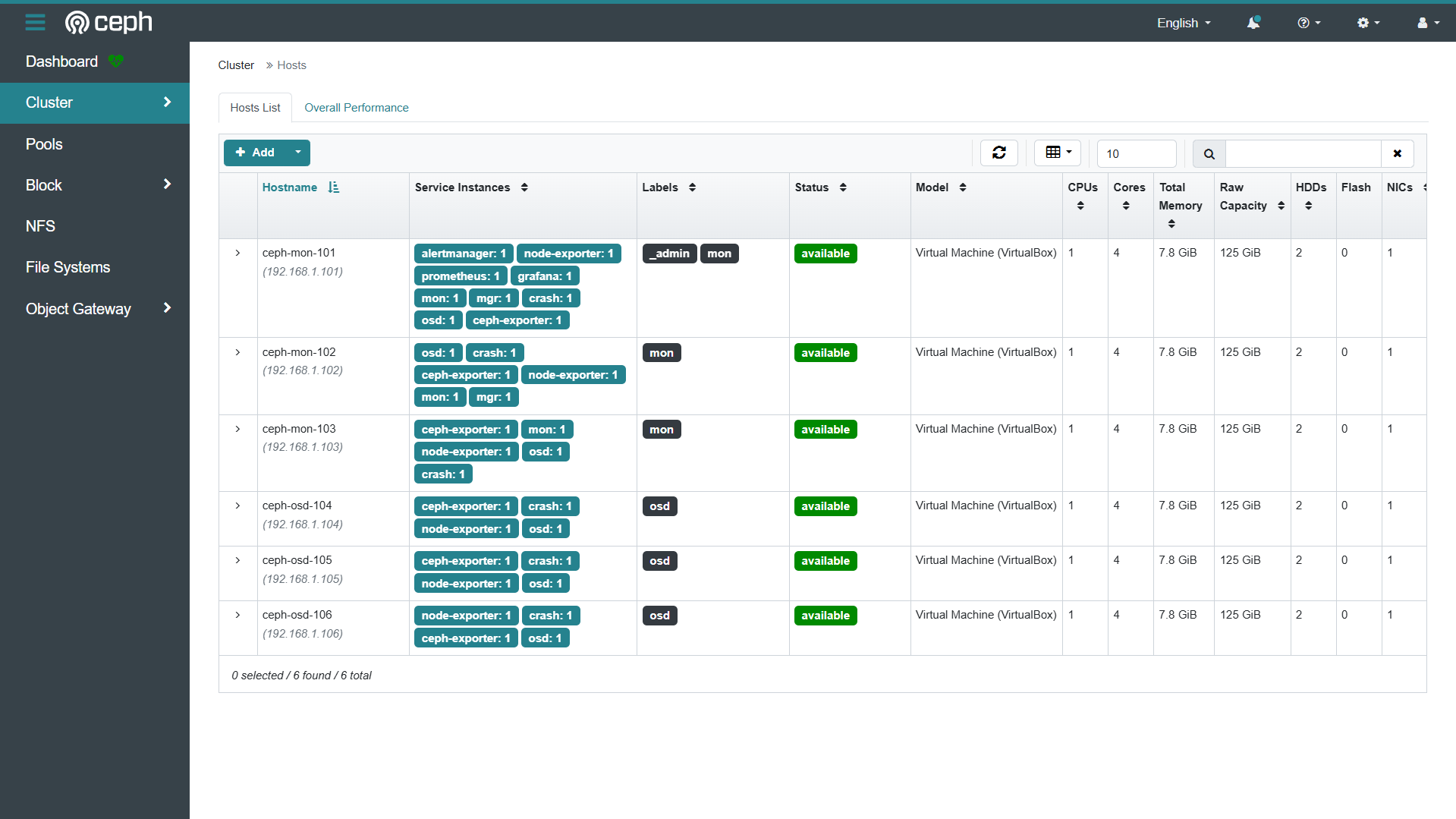
- Accessing the Dashboard via Browser:
- https://ceph-mon-101:8443/
- Username: admin
- Password: AdminP@ssw0rd#

火山引擎开发者社区是火山引擎打造的AI技术生态平台,聚焦Agent与大模型开发,提供豆包系列模型(图像/视频/视觉)、智能分析与会话工具,并配套评测集、动手实验室及行业案例库。社区通过技术沙龙、挑战赛等活动促进开发者成长,新用户可领50万Tokens权益,助力构建智能应用。
更多推荐
 46
46 0
0- 0


 已为社区贡献2条内容

所有评论(0)