Ollama+RLAMA搭建本地文档智能问答系统_20250321
RLAMA是一款强大的AI驱动的文档问答工具,可与本地Ollama模型无缝集成。它使您能够创建、管理检索增强生成(RAG)系统并与之交互,这些系统是根据您的文档需求量身定制的。优先顺序为:命令行标志>环境变量>默认位置。官网: https://rlama.dev/要显示的最大区块数(默认值:20)RLAMA默认将数据存储在。按文档ID或名称过滤块。
·
一,安装Ollama
二,RLAMA是什么?
RLAMA是一款强大的AI驱动的文档问答工具,可与本地Ollama模型无缝集成。它使您能够创建、管理检索增强生成(RAG)系统并与之交互,这些系统是根据您的文档需求量身定制的。
三,技术栈与架构
- 核心语言:Go(高性能、跨平台、单二进制分发)。
- CLI框架:Cobra(命令行接口结构)。
- LLM集成:Ollama API(用于嵌入生成和文本补全)。
- 存储:基于本地文件系统的JSON存储。
- 向量搜索:自定义余弦相似度实现。
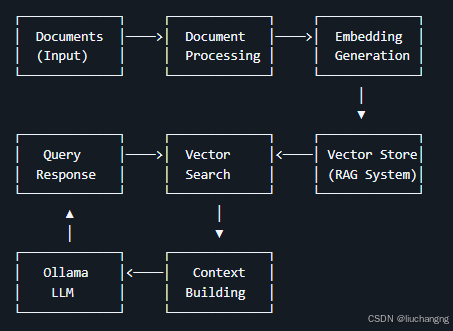
四,数据流
- 文档处理:从文件系统加载文档,根据其类型进行解析,并转换为纯文本。
- 嵌入生成:将文档文本发送到Ollama以生成矢量嵌入。
- 存储:RAG系统(文档+嵌入)存储在用户的主目录(~/.rlama)中。
- 查询过程:当用户提出问题时,它被转换为嵌入,与存储的文档嵌入进行比较,并检索相关内容。
- 响应生成:检索到的内容和问题被发送到Ollama以生成上下文相关的响应。
五,安装RLAMA
- 1,Linux / Mac OS安装
curl -fsSL https://raw.githubusercontent.com/dontizi/rlama/main/install.sh | sh
- 2,Windows安装
iwr -useb https://raw.githubusercontent.com/dontizi/rlama/main/install.ps1 | iex

- 3,验证

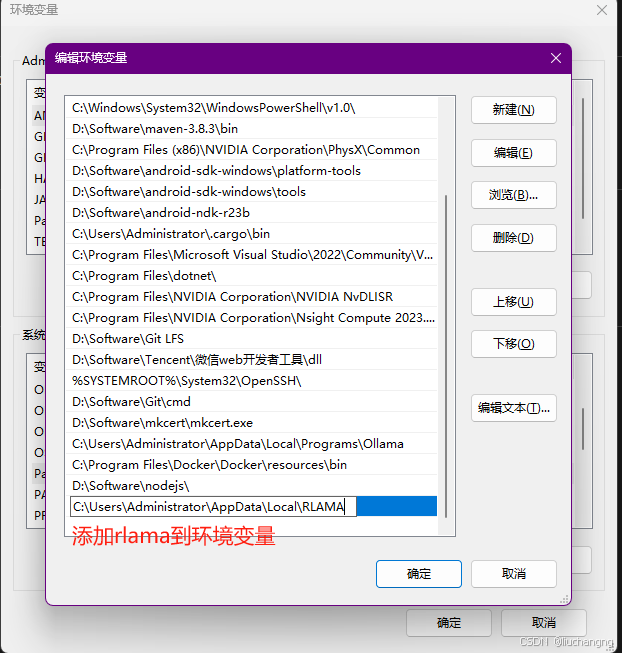
配置环境变量

- 4,自定义数据目录
RLAMA默认将数据存储在~/.rlama中。要使用其他位置,请执行以下操作:
-
命令行标志(最高优先级):
# Use with any command rlama --data-dir /path/to/custom/directory run my-rag -
环境变量:
# Set the environment variable
export RLAMA_DATA_DIR=/path/to/custom/directory
rlama run my-rag
优先顺序为:命令行标志>环境变量>默认位置。
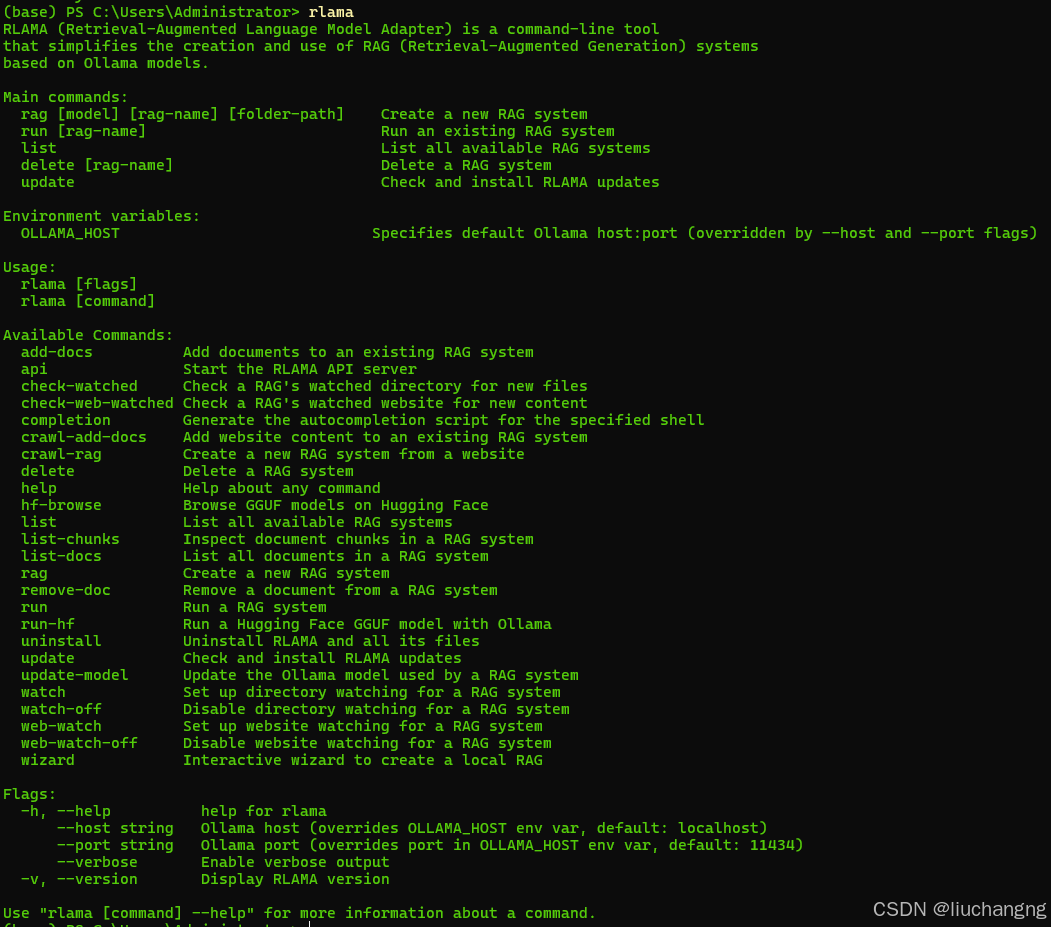
六,常用命令
1,rag 创建RAG系统
rlama rag [model] [rag-name] [folder-path] [options]
参数
- model
要使用的Ollama模型的名称(例如:llama3、mistral、gemma) - rag-name
RAG系统的名称 - folder-path
包含文档的文件夹的路径
选项
- –exclude-dir
要排除的目录(例如:–exclude-dir=node_modules,dist) - –process-ext
处理的文件扩展名(例如:–process-ext=.md,.txt) - –exclude-ext
要排除的文件扩展名(例如:–exclude-ext=.tmp)
示例
rlama rag llama3 documentation ./docs

rlama rag gemma law-project ./laws --exclude-dir=archives,temp --process-ext=.md,.txt,.pdf
2,crawl-rag 从网站创建RAG系统
rlama crawl-rag [model] [rag-name] [website-url]
参数
model:要使用的Ollama模型的名称(例如,llama3,mistral,gemma)。rag-name:用于标识RAG系统的唯一名称。website-url:要抓取和索引的网站的URL。
选项
--max-depth:最大抓取深度(默认值:2)--concurrency:并发爬虫的数量(默认值:5)--exclude-path:从爬网中排除的路径(逗号分隔)--chunk-size:每个块的字符数(默认值:1000)--chunk-overlap:字符块之间的重叠(默认值:200)
示例
# Create a new RAG from a documentation website
rlama crawl-rag llama3 docs-rag https://docs.example.com

# Customize crawling behavior
rlama crawl-rag llama3 blog-rag https://blog.example.com --max-depth=3 --exclude-path=/archive,/tags
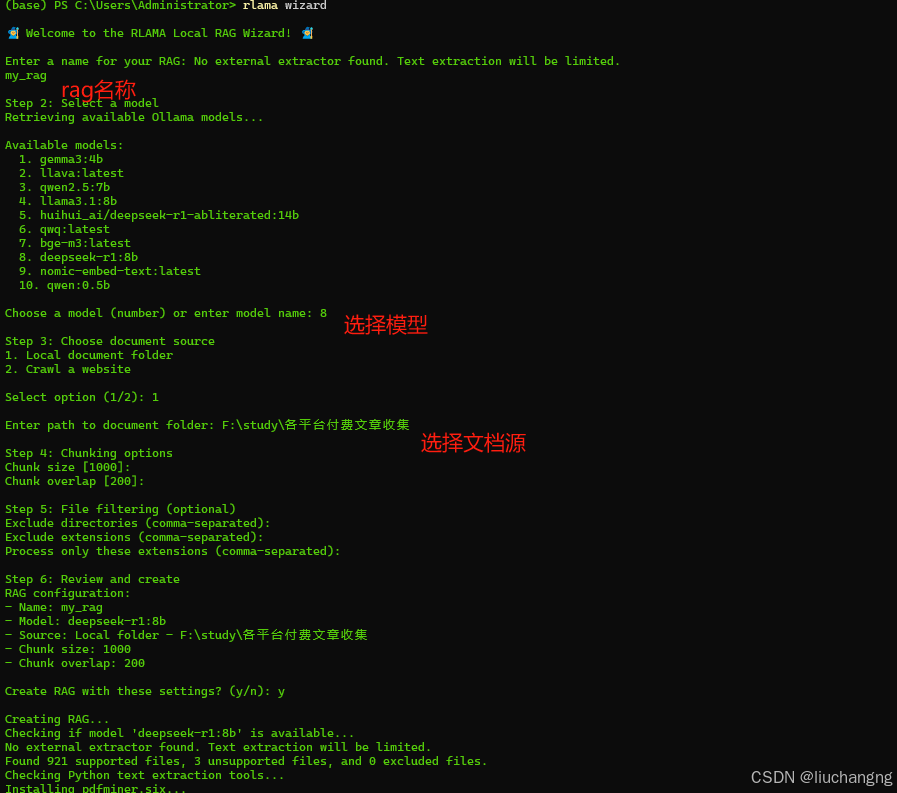
3,wizard 向导-使用交互式设置创建RAG系统
rlama wizard
向导将引导您完成以下操作:
- RAG名称
- 选择Ollama模型
- 选择文档源(本地文件夹或网站)
- 配置分块参数
- 设置文件过滤
示例
4,run 使用RAG系统
rlama run [rag-name] [options]
参数
- rag-name
要使用的RAG系统的名称
选项
- –context-size
要检索的上下文块的数量(默认值:20)
上下文大小提示:
- 值越小(5-15),对关键信息的响应越快
- 平衡性能的中值(20-40)
- 需要广泛背景的复杂问题的较大值(50+)
- 考虑模型的上下文窗口限制
示例
rlama run documentation

rlama run my-docs --context-size=50
5,watch 为RAG系统设置目录监视
rlama watch [rag-name] [directory-path] [interval] [options]
参数
- rag-name
要监视的RAG系统的名称 - directory-path
要监视的目录的路径 - interval
检查新文件的时间(以分钟为单位)(0表示仅在使用RAG时检查)
选项
- –exclude-dir
要排除的目录(例如:–exclude-dir=node_modules,tmp) - –process-ext
处理的文件扩展名(例如:–process-ext=.md,.txt)
示例
rlama watch my-docs ./watched-folder 60

rlama watch my-docs ./watched-folder 0

rlama watch my-docs ./watched-folder 30 --exclude-dir=node_modules,tmp --process-ext=.md,.txt
6,watch-off 禁用RAG系统的目录监视
rlama watch-off [rag-name]
参数
- rag-name
要禁用监视的RAG系统的名称
示例
rlama watch-off documentation
7,check-watched 检查RAG的监视目录是否有新文件
rlama check-watched [rag-name]
参数
- rag-name
要检查的RAG系统的名称
示例
rlama check-watched documentation
8,api 启动REST API服务器
rlama api [options]
选项
- –port
运行API服务器的端口号(默认值:11249)
示例
rlama api

rlama api --port 8080
API Endpoints
POST /rag 查询RAG系统
请求字段:
rag_name*:要查询的RAG系统的名称prompt*:发送给RAG的问题或提示context_size:上下文中包含的块数model:查看RAG使用的模型
请求示例:
curl -X POST http://localhost:11249/rag -H "Content-Type: application/json" -d '{"rag_name": "documentation", "prompt": "How do I install the project?", "context_size": 20}'
GET /health 检查服务器健康
curl http://localhost:11249/health
9,list 列出所有RAG系统
rlama list
10,delete 删除RAG系统
rlama delete [rag-name] [options]
参数
- rag-name
要删除的RAG系统的名称
选项
- –force, -f
删除而不确认
示例
rlama delete documentation

rlama delete documentation --force
11,list-docs 列出RAG中索引的文档
rlama list-docs [rag-name]
参数
- rag-name
要列出其文档的RAG系统的名称
示例
rlama list-docs documentation
12,list-chunks 检查RAG中的文档块
rlama list-chunks [rag-name] [options]
参数
- rag-name
要检查其块的RAG系统的名称
选项
-
–limit
要显示的最大区块数(默认值:20) -
–doc
按文档ID或名称过滤块
示例
rlama list-chunks documentation

rlama list-chunks documentation --limit=50
13,view-chunk 查看区块详细信息
rlama view-chunk [rag-name] [chunk-id]
参数
- rag-name
RAG系统名称 - chunk-id
要查看的区块的ID
示例
rlama view-chunk documentation chunk_123
14,add-docs 将文档添加到现有RAG
rlama add-docs [rag-name] [folder-path] [options]
参数
- rag-name
要添加文档的RAG系统的名称 - folder-path
包含新文档的文件夹的路径
选项
- –exclude-dir
要排除的目录(例如:–exclude-dir=drafts) - –process-ext
处理的文件扩展名(例如:–process-ext=.md,.txt) - –exclude-ext
要排除的文件扩展名(例如:–exclude-ext=.tmp)
示例
rlama add-docs documentation ./new-docs

rlama add-docs documentation ./new-docs --exclude-dir=drafts --process-ext=.md,.txt
15,update-model 更改RAG使用的LLM模型
rlama update-model [rag-name] [new-model]
参数
- rag-name
要更新的RAG系统的名称 - new-model
要使用的新Ollama模型的名称
示例
rlama update-model documentation llama3
16,update 将RLAMA更新到最新版本
rlama update [options]
选项
- –force, -f
强制更新而不确认
示例
rlama update

rlama update --force
17,version 显示RLAMA的当前版本
rlama --version
rlama -v
七,RLAMA支持多种文件格式
- 文本:
.txt、.md、.html、.json、.csv、.yaml、.yml、.xml、.org - 代码:
.go,.py,.js,.java,.c,.cpp,.cxx,.h,.rb,.php,.rs,.swift,.kt,.ts,.tsx,.f,.F,. F90,.el,.svelte - 文档:
.pdf,.docx,.doc,.rtf,.odt,.pptx,.ppt,.xlsx,.xls,.epub
八,参考资料
官网: https://rlama.dev/
github: (https://github.com/dontizi/rlama

火山引擎开发者社区是火山引擎打造的AI技术生态平台,聚焦Agent与大模型开发,提供豆包系列模型(图像/视频/视觉)、智能分析与会话工具,并配套评测集、动手实验室及行业案例库。社区通过技术沙龙、挑战赛等活动促进开发者成长,新用户可领50万Tokens权益,助力构建智能应用。
更多推荐
 11
11 0
0- 0


 已为社区贡献1条内容

所有评论(0)