在java中的springboot项目中如何操作Redis(基于苍穹外卖项目)
本文介绍了在Java项目中集成和使用Redis的方法。主要内容包括:1)Redis服务安装与启动步骤(Windows环境);2)Spring Boot项目中配置Redis连接及依赖添加;3)Redis五种数据类型(String、Hash、List、Set、Sorted Set)的基本操作命令;4)通过RedisTemplate实现各类数据操作的Java代码示例;5)通用操作方法如过期时间设置、键存
·
在 Java 开发体系中,Redis 作为高性能的键值对存储中间件,为应用提供了低延迟的数据读写、灵活的缓存策略与分布式场景下的核心支撑,是打通 Java 应用高性能与高可用的关键一环。
📚 目录(点击跳转对应章节)
1. 在Java中操作Redis的前置条件
2. 每种数据类型和通用操作的对应操作语句
3. 在苍穹外卖项目中的具体应用
1. 在Java中操作Redis的前置条件
1.1 先在windows中或者linux中安装redis服务(以下基于windows进行演示(Linux我不会))
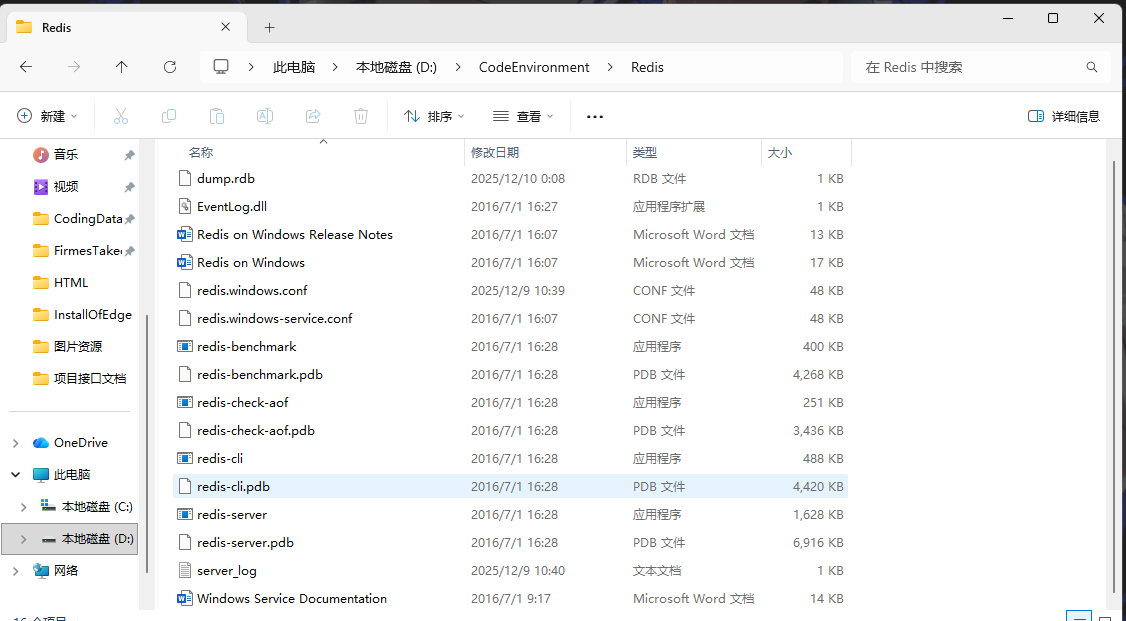
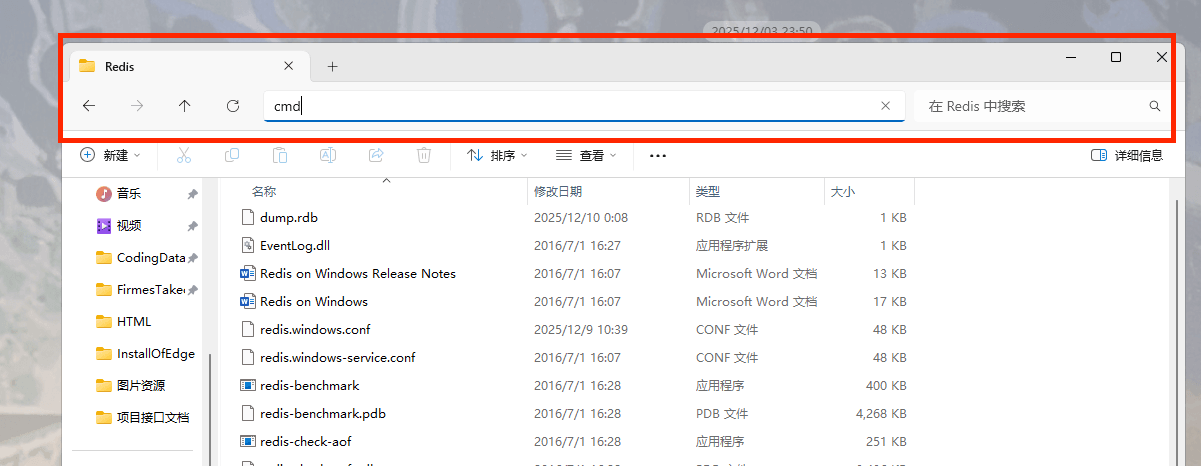
1.2 找到磁盘中安装redis的位置找到包含上图文件的位置在最上排输入框输入cmd打开终端
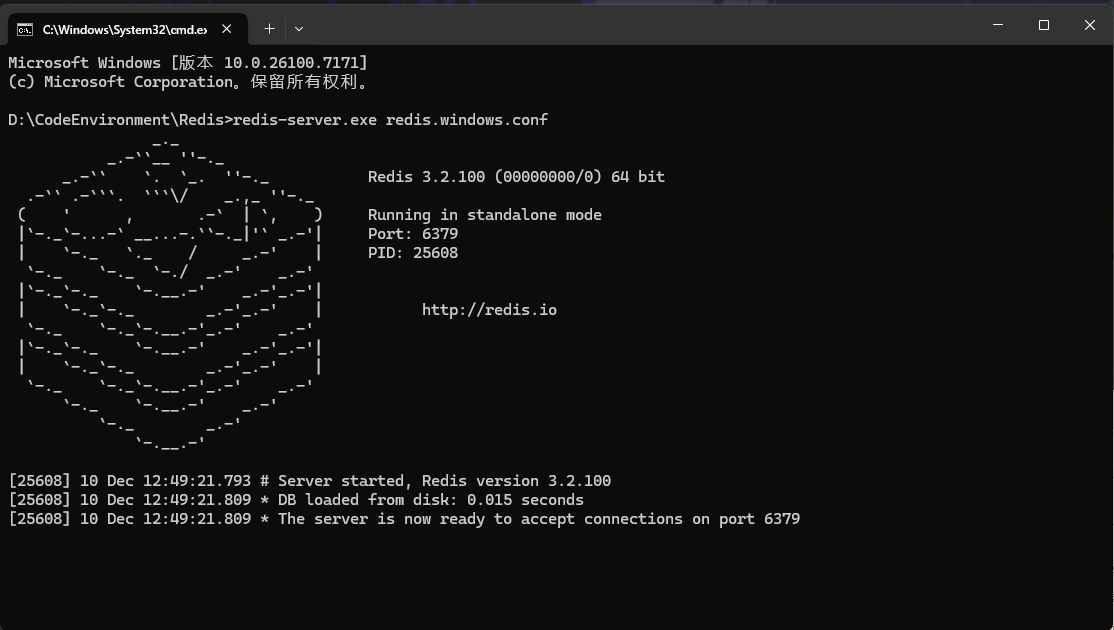
1.3按照如图中的操作启动redis(在进行redis操作时该终端不能关闭)
终端中启动操作命令:
redis-server.exe redis.windows.conf
1.4 配置Springboot项目连接Redis
添加依赖:
<!--redis依赖-->
<dependency>
    <groupId>org.springframework.boot</groupId>
    <artifactId>spring-boot-starter-data-redis</artifactId>
</dependency>
<!--连接池依赖(可选,用于提高连接效率)-->
<dependency>
    <groupId>org.apache.commons</groupId>
    <artifactId>commons-pool2</artifactId>
</dependency>
2. 每种数据类型和通用操作的对应操作语句
2.1 直接使用redis提供的数据类型和通用操作
| 数据类型 | 存储数据 | 获取数据 | 删除数据 |
|---|---|---|---|
| String | set key value | get key | del key |
| Hash | hset key field value | hget key field | hdel key field |
| List | lpush key value | lrange key 0 -1 | del key |
| Set | sadd key member | smembers key | del key |
| Sorted Set | zadd key score member | zrange key 0 -1 | del key |
2.2 使用RedisTemplate操作Redis
2.2.1 具体数据类型大致操作语句
| 数据类型 | 存储数据 | 获取数据 | 删除数据 |
|---|---|---|---|
| String | redisTemplate.opsForValue().set(key, value) | redisTemplate.opsForValue().get(key) | redisTemplate.delete(key) |
| Hash | redisTemplate.opsForHash().put(key, field, value) | redisTemplate.opsForHash().get(key, field) | redisTemplate.opsForHash().delete(key, field) |
| List | redisTemplate.opsForList().leftPush(key, value) | redisTemplate.opsForList().range(key, 0, -1) | redisTemplate.delete(key) |
| Set | redisTemplate.opsForSet().add(key, member) | redisTemplate.opsForSet().members(key) | redisTemplate.delete(key) |
| Sorted Set | redisTemplate.opsForZSet().add(key, member, score) | redisTemplate.opsForZSet().range(key, 0, -1) | redisTemplate.delete(key) |
2.2.2 通用操作大致操作语句
| 通用操作 | 描述 |
|---|---|
| 过期时间设置 | redisTemplate.expire(key, timeout, TimeUnit.SECONDS) |
| 键是否存在 | redisTemplate.hasKey(key) |
| 删除键 | redisTemplate.delete(key) |
| 批量删除键 | redisTemplate.delete(keys) |
| 键的类型 | redisTemplate.type(key) |
| 键的过期时间 | redisTemplate.getExpire(key) |
| 匹配键 | redisTemplate.keys(pattern) |
2.2.3 具体对应到每种数据类型
- String 数据类型
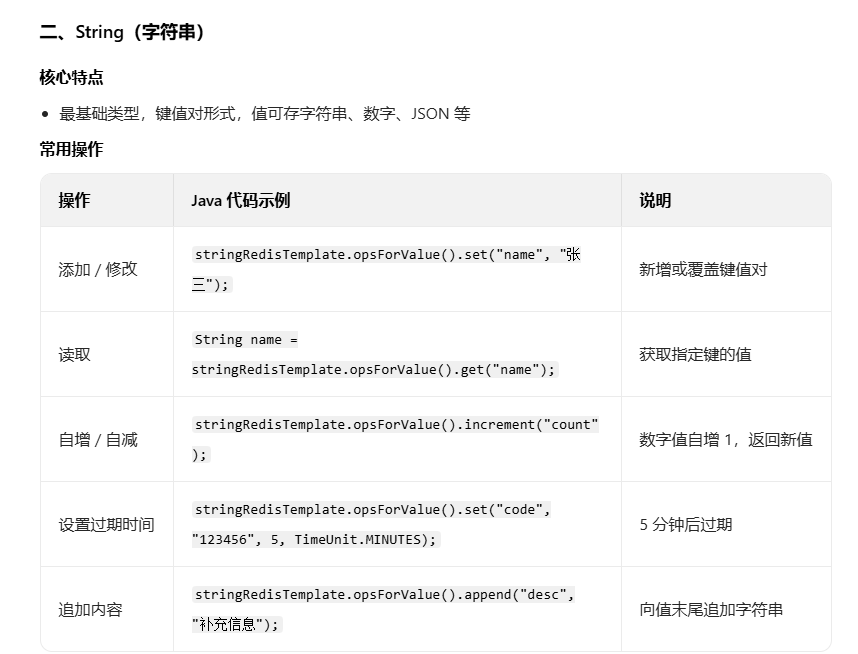
在Java中操作String数据类型的代码示例:
@Test
public void testString() {
    // 存储/修改字符串
    stringRedisTemplate.opsForValue().set("stringKey", "stringValue");
    // 获取字符串
    String stringValue = stringRedisTemplate.opsForValue().get("stringKey").toString();
    System.out.println(stringValue);
    // 删除字符串
    stringRedisTemplate.delete("stringKey");
    //自增自减字符串
    stringRedisTemplate.opsForValue().increment("stringKey", 1);
    stringRedisTemplate.opsForValue().decrement("stringKey", 1);
    //设置过期时间
    stringRedisTemplate.expire("stringKey", 10, TimeUnit.SECONDS);
     //获取过期时间
    long expire = stringRedisTemplate.getExpire("stringKey");
    System.out.println(expire);
    //追加内容
    stringRedisTemplate.opsForValue().append("stringKey", "appendValue");


}
- Hash 数据类型
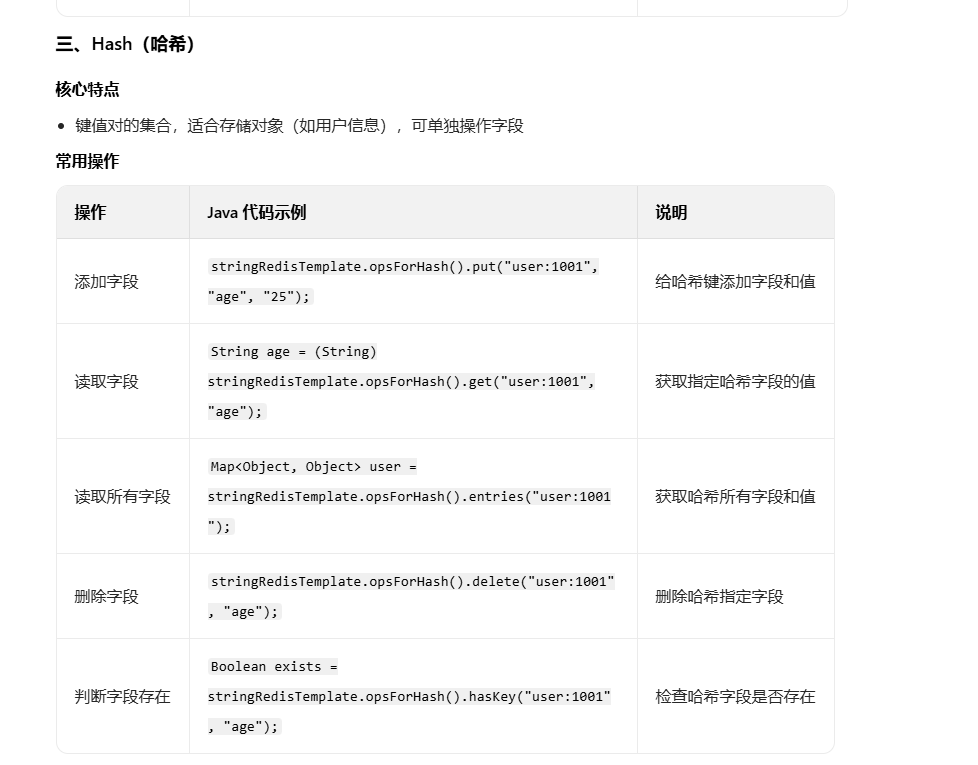
在Java中操作Hash数据类型的代码示例:
@Test
public void testHash() {
    // 存储/修改哈希字段
    hashRedisTemplate.opsForHash().put("hashKey", "hashField", "hashValue");
    // 获取哈希字段
    String hashValue = hashRedisTemplate.opsForHash().get("hashKey", "hashField").toString();
    System.out.println(hashValue);
    // 删除哈希字段
    hashRedisTemplate.opsForHash().delete("hashKey", "hashField");
    //读取所有哈希字段
    Map<Object, Object> hashMap = hashRedisTemplate.opsForHash().entries("hashKey");
    System.out.println(hashMap);
    //判断哈希字段是否存在
    boolean exists = hashRedisTemplate.opsForHash().hasKey("hashKey", "hashField");
    System.out.println(exists);

}
- List 数据类型
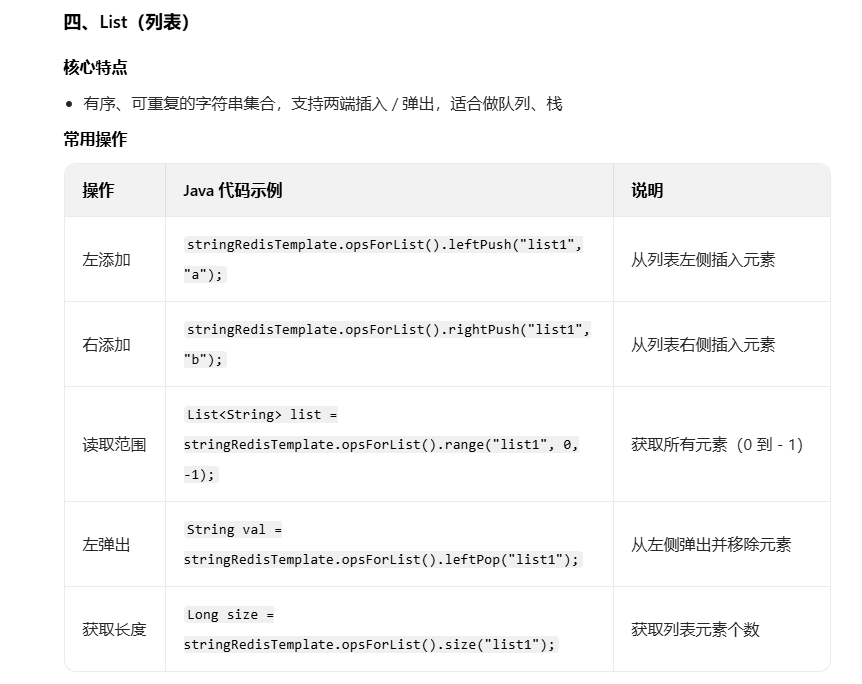
在Java中操作List数据类型的代码示例:
@Test
public void testList() {
    // 存储/修改列表
    // 从列表左侧插入元素
    listRedisTemplate.opsForList().leftPush("listKey", "listValue");
    // 从列表右侧插入元素
    listRedisTemplate.opsForList().rightPush("listKey", "listValue");
    // 获取列表所有元素
    List<Object> list = listRedisTemplate.opsForList().range("listKey", 0, -1);
    System.out.println(list);
    //读取范围元素
    List<Object> list = listRedisTemplate.opsForList().range("listKey", 0, -1);
    System.out.println(list);//获取列表所有元素
    //获取长度
    long size = listRedisTemplate.opsForList().size("listKey");
    System.out.println(size);
    //左弹出元素
    String leftPop = listRedisTemplate.opsForList().leftPop("listKey").toString();
    System.out.println(leftPop);//从列表左侧弹出元素并且删除
    //右弹出元素
    String rightPop = listRedisTemplate.opsForList().rightPop("listKey").toString();
    System.out.println(rightPop);//从列表右侧弹出元素并且删除
}
- Set 数据类型
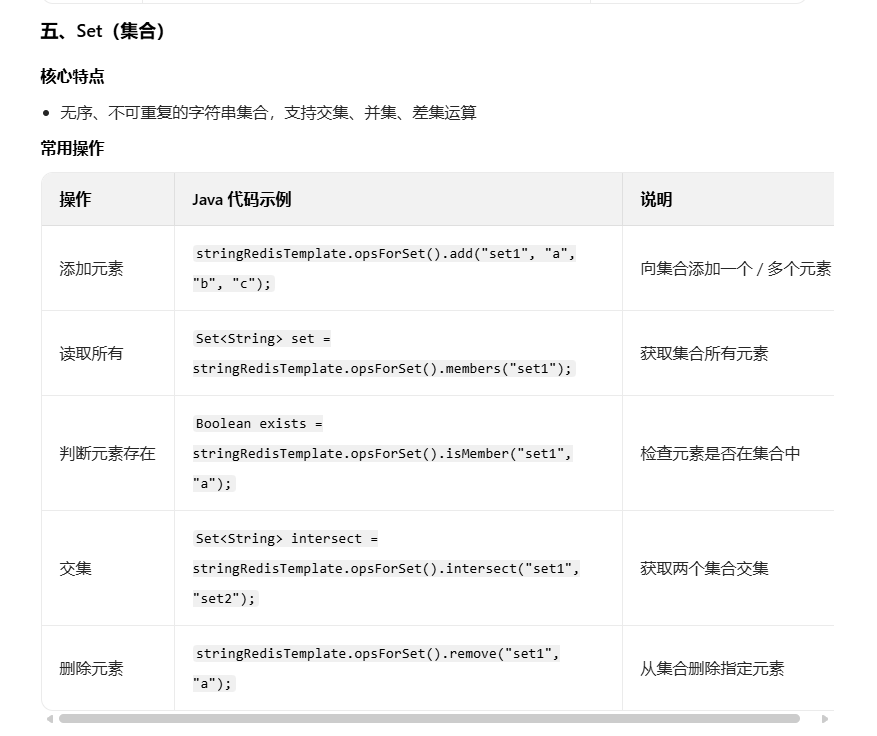
在Java中操作Set数据类型的代码示例:
@Test
public void testSet() {
    // 存储/修改集合元素
    setRedisTemplate.opsForSet().add("setKey", "setValue");
    // 获取集合所有元素
    Set<Object> set = setRedisTemplate.opsForSet().members("setKey");
    System.out.println(set);
    //判断元素是否存在
    boolean exists = setRedisTemplate.opsForSet().isMember("setKey", "setValue");
    System.out.println(exists);
    // 交集
    Set<Object> intersection = setRedisTemplate.opsForSet().intersect("setKey", "setKey2");
    System.out.println(intersection);
    // 并集
    Set<Object> union = setRedisTemplate.opsForSet().union("setKey", "setKey2");
    System.out.println(union);
    //删除元素
    setRedisTemplate.opsForSet().remove("setKey", "setValue");
}
- ZSet 数据类型
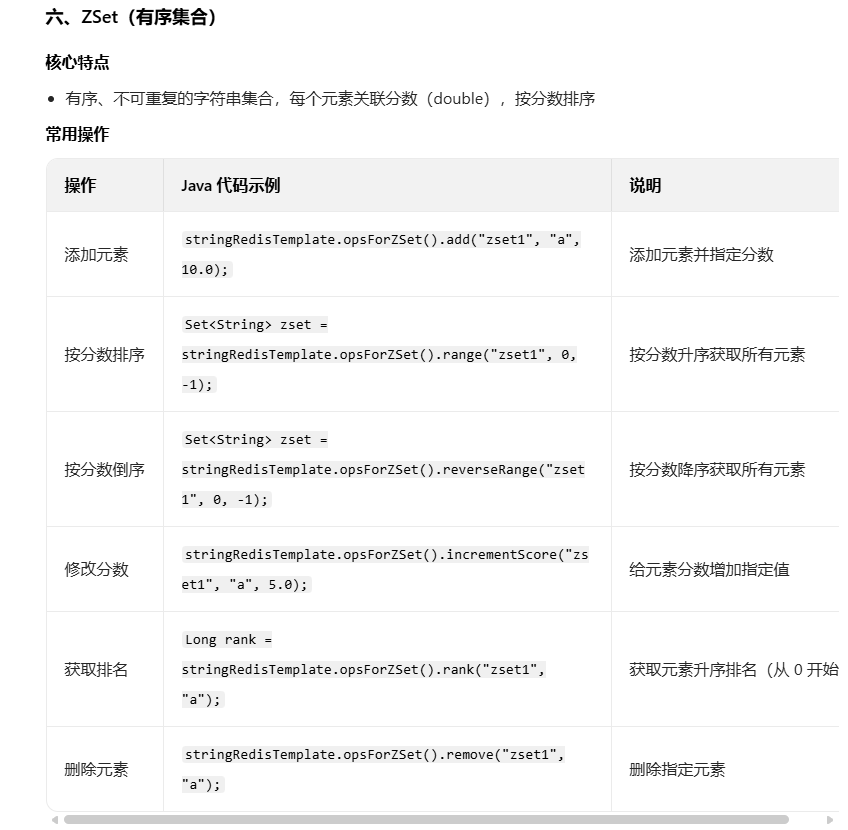
在Java中操作ZSet数据类型的代码示例:
@Test
public void testZSet() {
    // 存储/修改有序集合元素
    zSetRedisTemplate.opsForZSet().add("zSetKey", "zSetValue", 1.0);
    // 获取有序集合所有元素
    Set<Object> zSet = zSetRedisTemplate.opsForZSet().range("zSetKey", 0, -1);
    System.out.println(zSet);
    //判断元素是否存在
    boolean exists = zSetRedisTemplate.opsForZSet().isMember("zSetKey", "zSetValue");
    System.out.println(exists);
    //删除元素
    zSetRedisTemplate.opsForZSet().remove("zSetKey", "zSetValue");
    //交集
    Set<Object> intersection = zSetRedisTemplate.opsForZSet().intersect("zSetKey", "zSetKey2");
    System.out.println(intersection);
    //并集
    Set<Object> union = zSetRedisTemplate.opsForZSet().union("zSetKey", "zSetKey2");
    System.out.println(union);
}
- 通用操作
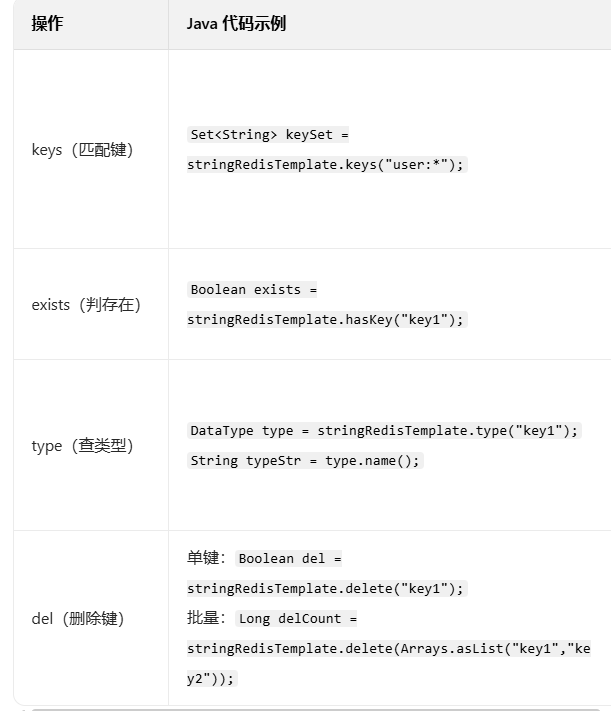
在Java中操作通用操作的代码示例:
@Test
public void testCommon() {
    //匹配键
    Set<String> keys = stringRedisTemplate.keys("*");
    System.out.println(keys);
    // 检查键是否存在
    boolean exists = stringRedisTemplate.hasKey("stringKey");
    System.out.println(exists);
    // 删除键
    stringRedisTemplate.delete("stringKey");
    // 设置过期时间
    stringRedisTemplate.expire("stringKey", 10, TimeUnit.SECONDS);
    // 获取过期时间
    long expire = stringRedisTemplate.getExpire("stringKey");
    System.out.println(expire);
    // 查找类型
    DataType dataType = stringRedisTemplate.type("stringKey");
    System.out.println(dataType);
}
3. Redis在苍穹外卖项目中的具体应用

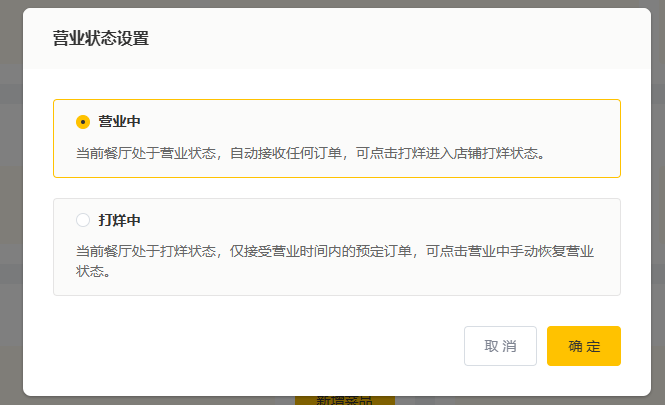
3.1管理端操作店铺是否打烊以及开业和查询店铺是否营业
功能实现:
package com.sky.controller.admin;

import com.sky.result.Result;
import io.swagger.v3.oas.annotations.Operation;
import io.swagger.v3.oas.annotations.tags.Tag;
import lombok.extern.slf4j.Slf4j;
import org.springframework.beans.factory.annotation.Autowired;
import org.springframework.data.redis.core.RedisTemplate;
import org.springframework.web.bind.annotation.*;

@RestController("adminShopController")
@RequestMapping("/admin/shop")
@Tag(name = "管理端-店铺相关接口")
@Slf4j
public class ShopController {

    public static final String KEY="SHOP_STATUS";

    @Autowired
    private RedisTemplate redisTemplate;

    /**
     * 设置店铺的营业状态
     * @param status
     * @return
     */
    @PutMapping("/{status}")
    @Operation(summary = "设置店铺的营业状态")
    public Result setStatus(@PathVariable Integer status){
        log.info("设置店铺的营业状态为:{}",status==1?"营业中":"打烊中");
        redisTemplate.opsForValue().set(KEY,status);

        // 添加返回信息确认状态已设置
        Integer currentStatus = (Integer) redisTemplate.opsForValue().get(KEY);
        log.info("确认店铺状态已设置为:{}", currentStatus == 1 ? "营业中" : "打烊中");
        return Result.success();
    }

    /**
     * 获取店铺的营业状态
     * @return
     */
    @GetMapping("/status")
    @Operation(summary = "获取店铺的营业状态")
    public Result<Integer> getStatus(){
        Integer status = (Integer) redisTemplate.opsForValue().get(KEY);
        log.info("获取到店铺的营业状态为:{}",status==1?"营业中":"打烊中");
        return Result.success(status);
    }
}
3.2客户端查询店铺是否开业
功能实现:
package com.sky.controller.user;

import io.swagger.v3.oas.annotations.Operation;
import io.swagger.v3.oas.annotations.tags.Tag;
import lombok.extern.slf4j.Slf4j;
import org.springframework.beans.factory.annotation.Autowired;
import org.springframework.data.redis.core.RedisTemplate;
import org.springframework.web.bind.annotation.GetMapping;
import org.springframework.web.bind.annotation.RequestMapping;
import org.springframework.web.bind.annotation.RestController;
import com.sky.result.Result;

@RestController("userShopController")
@RequestMapping("/user/shop")
@Slf4j
@Tag(name = "用户端-店铺相关接口")
public class ShopController {

    public static final String KEY = "SHOP_STATUS";

    @Autowired
    private RedisTemplate redisTemplate;

    /**
     * 获取店铺的营业状态
     * @return
     */
    @GetMapping("/status")
    @Operation(summary = "获取店铺的营业状态")
    public Result<Integer> getStatus(){
        Integer status = (Integer) redisTemplate.opsForValue().get(KEY);
        log.info("获取到店铺的营业状态为:{}",status == 1 ? "营业中" : "打烊中");

        // 添加额外的日志帮助调试
        if (status == null) {
            log.warn("店铺状态未设置,默认返回打烊中");
            status = 0; // 默认状态为打烊中
        }

        return Result.success(status);
    }
}

火山引擎开发者社区是火山引擎打造的AI技术生态平台,聚焦Agent与大模型开发,提供豆包系列模型(图像/视频/视觉)、智能分析与会话工具,并配套评测集、动手实验室及行业案例库。社区通过技术沙龙、挑战赛等活动促进开发者成长,新用户可领50万Tokens权益,助力构建智能应用。
更多推荐
 11
11 0
0- 0


 已为社区贡献6条内容

所有评论(0)