Function Call 深入解析笔记
·
🧠 Function Call 深入解析笔记
核心认知:我们的请求包含"问题+工具箱",模型只有两个选择:自己给答案或调用工具(
tool_calls),我们执行工具后再将结果返回模型获取最终答案
📂 完整流程与接口规范
1️⃣ 我们发送给模型的请求结构
{
  "messages": [
    {
      "role": "user",
      "content": "明天纽约天气怎么样?"  // 用户问题
    }
  ],
  "tools": [  // 可用工具列表
    {
      "name": "search",
      "description": "联网搜索信息",
      "parameters": {
        "type": "object",
        "properties": {
          "query": {
            "type": "string",  // 参数类型必须是字符串
            "description": "搜索关键词"
          }
        },
        "required": ["query"]  // 必填字段
      }
    }
  ]
}
2️⃣ 模型返回的两种结果(关键!)
情况1️⃣: 直接回答(模型自己解决)
{
  "choices": [{
    "message": {
      "role": "assistant",
      "content": "明天纽约多云,气温22-28℃"
    }
  }]
}
情况2️⃣: 工具调用(图片中的真实案例 👇)
{
  "choices": [{
    "message": {
      "role": "assistant",
      "content": "",           // 内容空表示需工具
      "refusal": null,         // 拒绝标记为null
      "reasoning": null,       // 推理标记为null
      "tool_calls": [          // 关键调用信号!
        {
          "id": "call_6wAqOpwRVz4D21U7I1g2pTBR",  // 调用ID
          "type": "function",   // 调用类型
          "function": {
            "name": "search",  // 指定工具名称
            "arguments": "{\"query\":\"New York weather forecast tomorrow\"}" // 参数
          }
        }
      ]
    }
  }]
}
🔧 工具调用处理流程
步骤1: 解析工具调用
import json

# 提取工具调用信息
tool_call = response['choices'][0]['message']['tool_calls'][0]

# 获取关键信息
tool_id = tool_call['id']  # "call_6wAqOpwRVz4D21U7I1g2pTBR"
tool_name = tool_call['function']['name']  # "search"
tool_args = json.loads(tool_call['function']['arguments'])  # {"query":"..."}
步骤2: 执行工具
# 根据工具名称调用对应功能
if tool_name == "search":
    search_query = tool_args['query']  # "New York weather forecast tomorrow"
    result = execute_search(search_query)  # 调用搜索API
步骤3: 包装结果返回模型
{
  "role": "tool",  // 固定角色
  "tool_call_id": "call_6wAqOpwRVz4D21U7I1g2pTBR",  // 必须匹配原始ID
  "name": "search",  // 工具名称
  "content": "{\"temperature\":26,\"conditions\":\"sunny\"}"  // 执行结果
}
步骤4: 获取最终回答
{
  "choices": [{
    "message": {
      "role": "assistant",
      "content": "纽约明天晴天☀️,气温26℃,适合户外活动!"
    }
  }]
}
📊 核心调用流程图

💡 关键学习点(按图片信息总结)
-
tool_calls 是黄金信号
content为空字符串:表示需要调用工具refusal和reasoning为null:表示无拒绝理由- 绿色参数字符串:在JSON中以
\"形式转义双引号
-
参数解析特别注意
# 参数是双重转义的JSON字符串! arguments = "{\"query\":\"New York weather forecast tomorrow\"}" # 正确解析方式: params = json.loads(arguments) # 得到字典:{'query': 'New York weather...'} -
调用链必须完整
- 返回工具结果时:
tool_call_id必须匹配原始调用ID - 工具名称:必须和请求中定义的一致(区分大小写)
- 返回工具结果时:
-
真实案例标识符
"id": "call_6wAqOpwRVz4D21U7I1g2pTBR"  // 实际调用ID的格式
"arguments": "{\"query\":\"...\"}"     // 参数的标准格式
总结:理解
tool_calls结构 → 精确提取参数 → 正确返回工具结果 → 获得最终答案
这就是Function Call的完整循环!
Function call 概括
调用外部接口
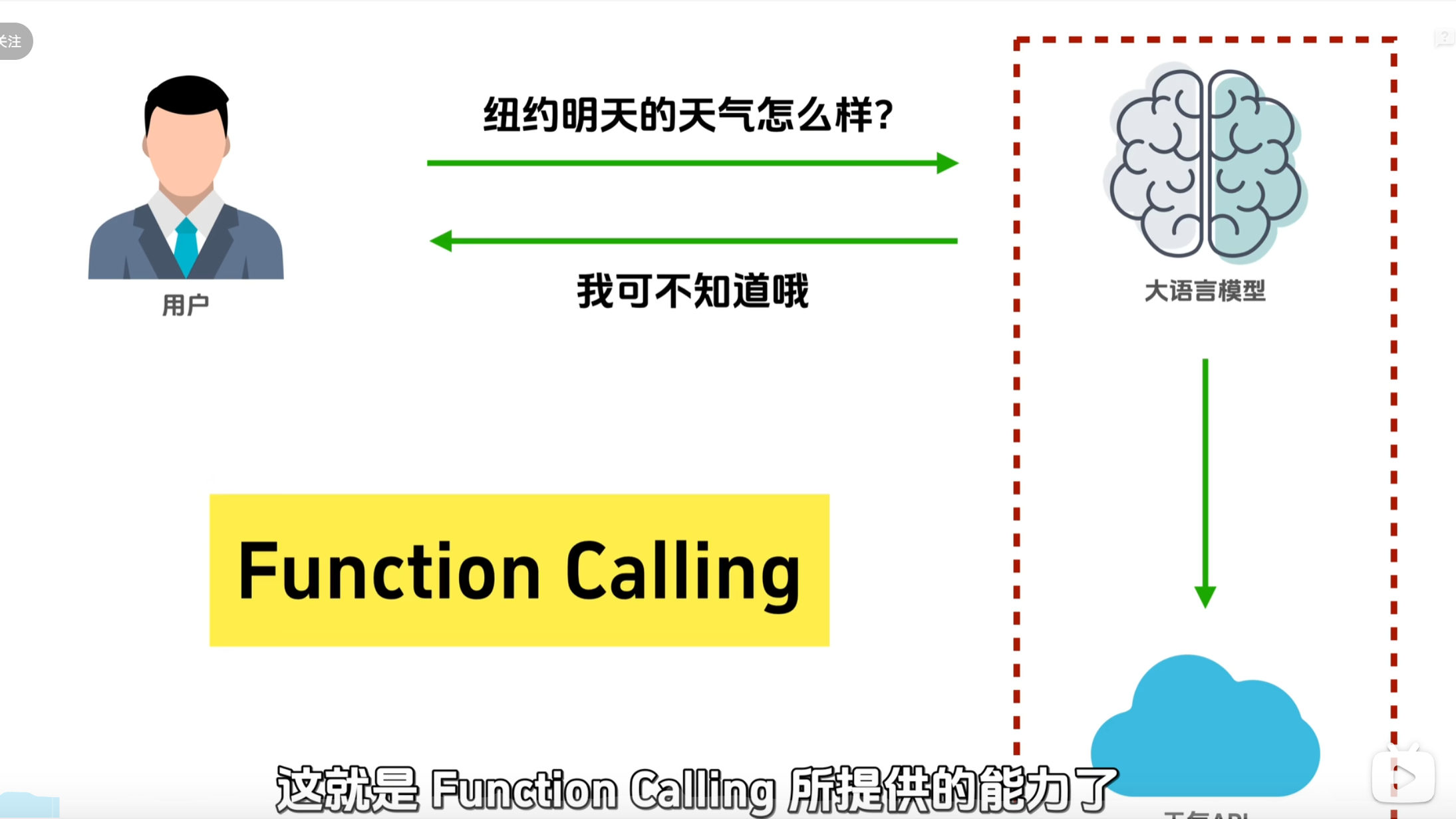
参考链接:https://www.bilibili.com/video/BV15YJTzkENC/?spm_id_from=333.1007.tianma.1-2-2.click&vd_source=82dc2acb60a90c43a2ac0d4023a2cd34
Function call和MCP 位于不同的位置
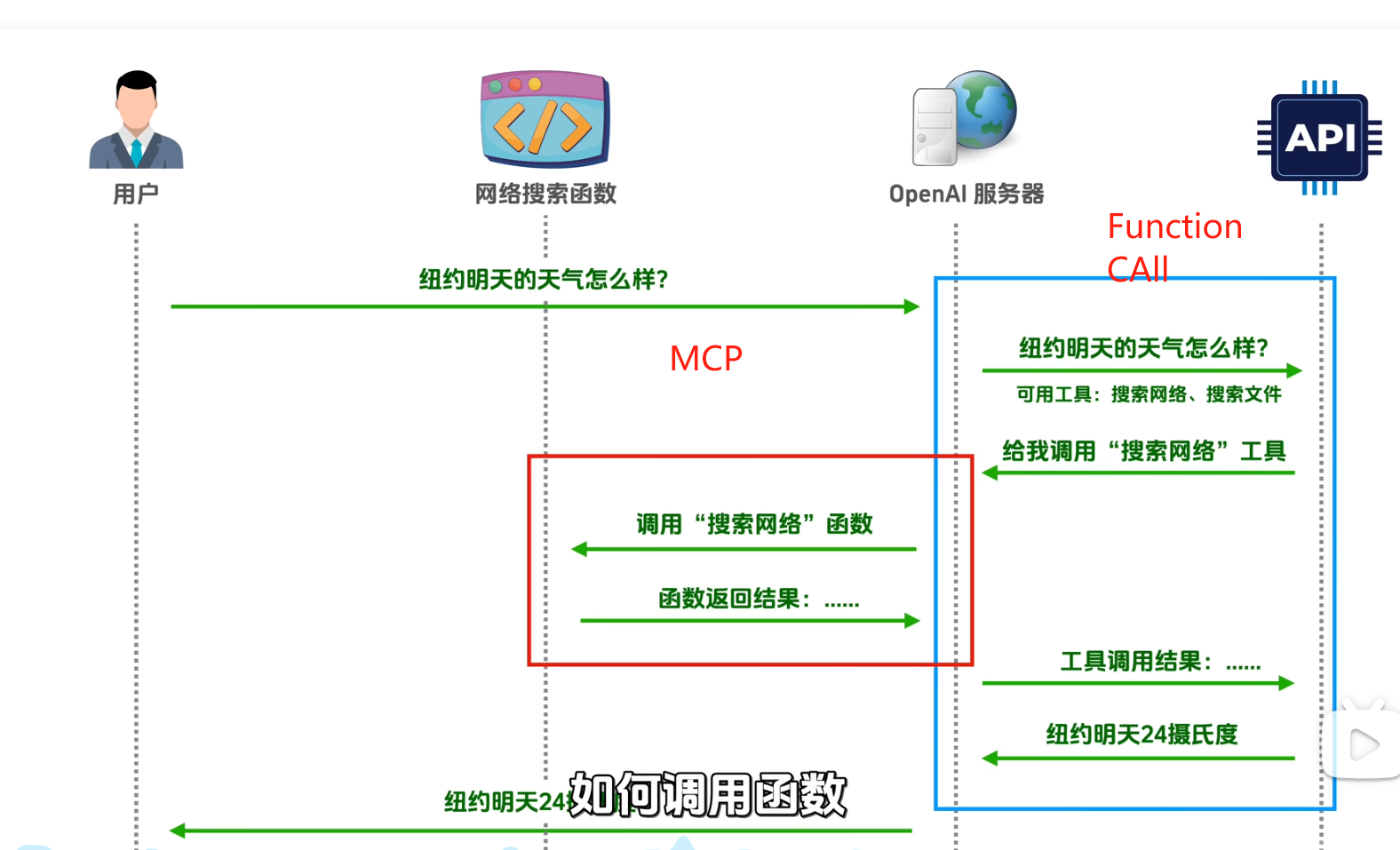
🌐 Function Call 工具调用全流程指南
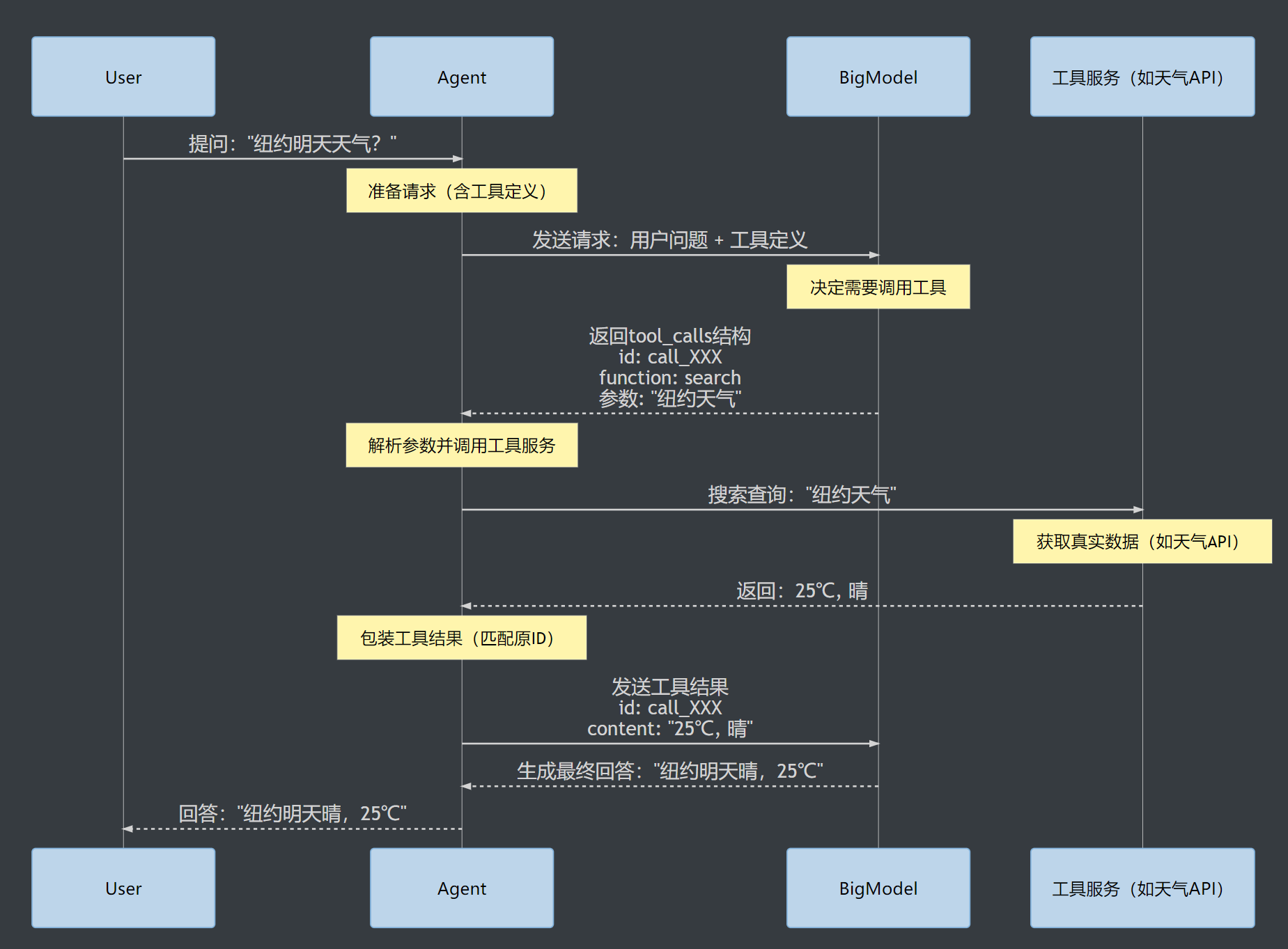
🧩 关键要素说明
1️⃣ 工具定义规范(来自您图片中的search工具)
{
  "name": "search",
  "description": "搜索天气信息",
  "parameters": {
    "type": "object",
    "properties": {
      "query": {"type": "string"}
    },
    "required": ["query"]
  }
}
2️⃣ 工具调用参数解析(重点!)
import json

# 从大模型响应中提取参数
response_data = {
    "tool_calls": [{
        "function": {
            "arguments": "{\\"query\\":\\"纽约天气\\"}"  # 双引号转义格式
        }
    }]
}

# 双重解析过程
arguments_str = response_data["tool_calls"][0]["function"]["arguments"]
arguments_dict = json.loads(arguments_str)  # {"query": "纽约天气"}

print(arguments_dict["query"])  # 输出: 纽约天气
3️⃣ 工具结果返回规范
# 必须包含原始调用ID
tool_response = {
    "role": "tool",
    "tool_call_id": "call_XXX",  # 与原始调用ID匹配
    "content": json.dumps({      # 结果序列化为字符串
        "temperature": 25,
        "conditions": "晴"
    })
}
🔧 完整实现代码
import requests
import json

class FunctionCallAgent:
    def __init__(self, api_key):
        self.api_key = api_key
        self.base_url = "https://api.example.com/v1/chat/completions"
        self.history = []

    # 请求大模型(包含您图片中的工具定义)
    def call_big_model(self, messages, tools=None):
        headers = {
            "Authorization": f"Bearer {self.api_key}",
            "Content-Type": "application/json"
        }

        payload = {
            "model": "gpt-4-turbo",
            "messages": messages,
            "tools": tools  # 携带工具列表
        }

        try:
            response = requests.post(
                self.base_url,
                json=payload,
                headers=headers,
                timeout=10
            )
            return response.json()
        except Exception as e:
            print(f"API请求失败: {str(e)}")
            return None

    # 处理用户查询(完整流程)
    def process_query(self, query):
        # 1. 添加用户消息
        self.history.append({"role": "user", "content": query})

        # 2. 准备工具定义(匹配图片中的search工具)
        tools = [{
            "type": "function",
            "function": {
                "name": "search",
                "description": "搜索天气信息",
                "parameters": {
                    "type": "object",
                    "properties": {
                        "query": {"type": "string"}
                    },
                    "required": ["query"]
                }
            }
        }]

        # 3. 首次调用大模型(携带工具列表)
        response = self.call_big_model(self.history, tools)
        if not response:
            return "服务不可用"

        # 4. 获取响应消息
        message = response["choices"][0]["message"]
        self.history.append(message)  # 添加到历史

        # 5. 检查是否需要工具调用
        if "tool_calls" in message:
            tool_call = message["tool_calls"][0]
            call_id = tool_call["id"]
            func_name = tool_call["function"]["name"]

            # 6. 解析参数(双重解析)
            args_str = tool_call["function"]["arguments"]
            try:
                args_dict = json.loads(args_str)  # {"query": "纽约天气"}
            except json.JSONDecodeError:
                args_dict = {"query": "解析失败"}

            # 7. 执行工具调用
            if func_name == "search":
                # 实际调用天气API
                weather = self.execute_search(args_dict["query"])
            else:
                weather = {"error": "未知工具"}

            # 8. 包装工具结果(匹配原始ID)
            tool_response = {
                "role": "tool",
                "tool_call_id": call_id,
                "content": json.dumps(weather)
            }
            self.history.append(tool_response)

            # 9. 第二次调用大模型(获取最终答案)
            final_response = self.call_big_model(self.history)
            answer = final_response["choices"][0]["message"]["content"]
            return answer

        # 无工具调用直接返回答案
        return message["content"]

    # 工具执行函数
    def execute_search(self, query):
        """实际查询天气API的代码"""
        # 这里只是一个模拟实现
        return {"temperature": 25, "conditions": "晴"}

# 使用示例
agent = FunctionCallAgent(api_key="your-api-key")
result = agent.process_query("纽约明天天气?")
print("最终回答:", result)
📚 完整文档使用说明
- 使用时序图:
- 复制上方Mermaid代码到支持Mermaid的Markdown编辑器
- 推荐使用VS Code + Mermaid插件 或 Typora
- 使用代码:
- 替换
api_key="your-api-key"为您的大模型API密钥 - 根据实际需求实现
execute_search方法
- 替换
- 适配您图片中的信息:
- 严格遵循黄色标记的工具列表结构
- 正确处理arguments的双重转义格式
- 保持ID匹配机制

中国智能体开发者社区,聚焦智能体与大模型开发,提供前沿资讯、实用工具链、开源项目及行业案例。通过技术沙龙、开发者大赛等活动,促进经验交流与协作,助力开发者快速构建创新智能应用。
更多推荐



 25
25 0
0- 0


 已为社区贡献3条内容

所有评论(0)