【Git】git 操作远程仓库命令超时报错
在使用 Git 进行远程仓库操作时,如 clone、push 或 pull,可能会遇到 443 端口超时的问题,尽管 ping github.com 是通的。这通常与代理设置有关。为了解决这个问题,可以通过设置 Git 的 https.proxy 和 `http.proxy
·
配置代理端口
这种方式在很多情况下,即使配置了也没有用,只是提供一个思路。
使用ping github.com是可以ping通的,但是 clone/push/pull 等远程仓库就会卡住 443 timeout 超时。
git 在使用代理后需要设置 git https.proxy 属性来添加 git 的代理端口。
查看 https.proxy 属性:
git config --global --get https.proxy
查看代理使用的端口,打开配置文件,找到 http 的代理端口
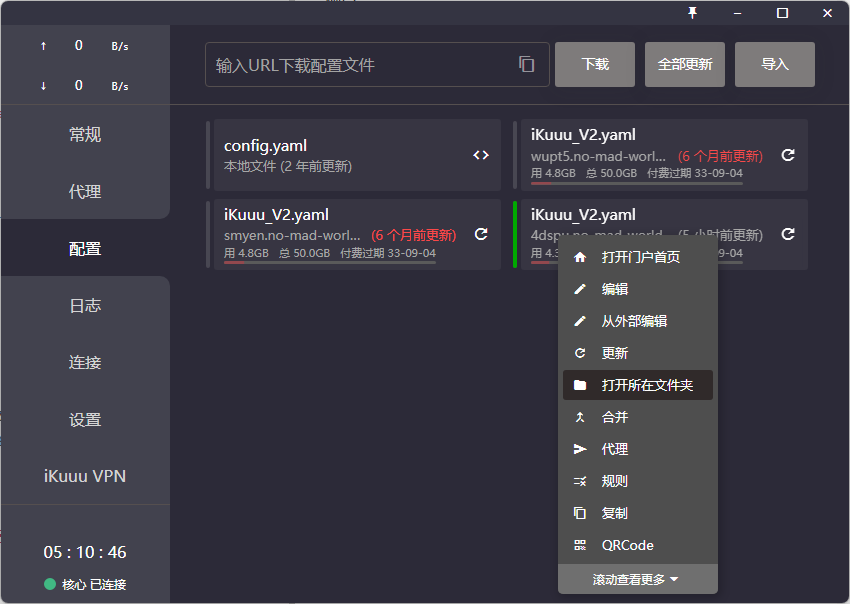
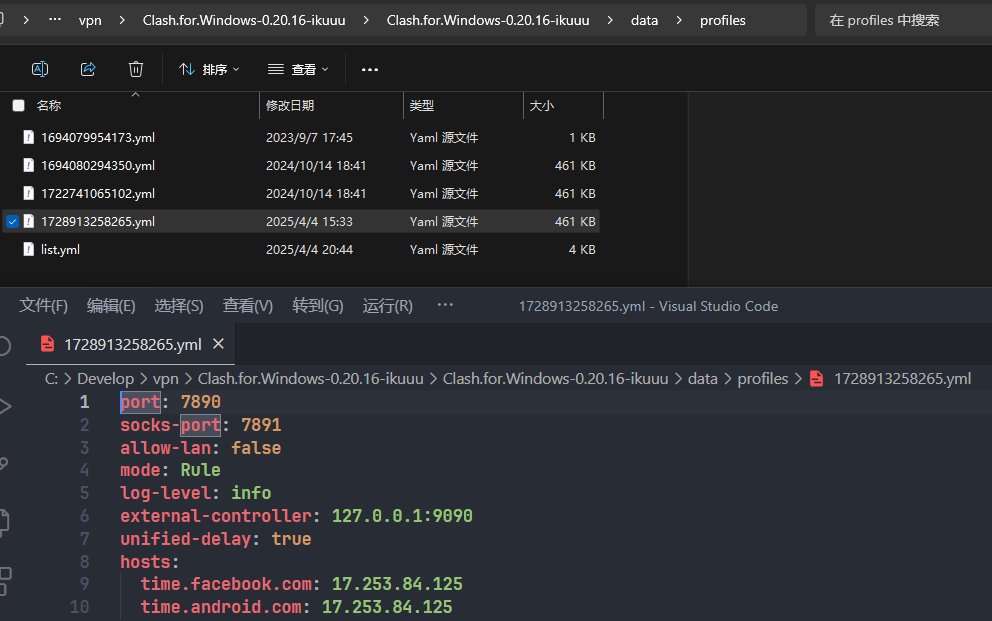
设置 https.proxy 属性,设置全局代理属性
git config --global https.proxy '127.0.0.1:7890'
git config --global http.proxy '127.0.0.1:7890'
注意使用 webstorm 等自带的 git 工具,proxy 代理选项可能出问题,最保险的方式是使用在 git bash 使用 git 命令。
SSH 连接
用这种方式一定可以解决!!!
还有一种方式是,我们在本地和远程 github 仓库的交互,比如 clone 时候,可以使用 ssh 进行连接,详情见:https://blog.csdn.net/XiugongHao/article/details/134273363。
超时分析过程总结
🔍 问题诊断步骤
-
检查网络连通性
ping -c 3 github.com- 确认基本网络连接是否正常
-
检查Git配置
git remote -v git status- 确认远程仓库地址正确
- 查看当前分支状态
-
测试HTTPS连接
curl -I https://github.com --max-time 10- 验证GitHub网站可访问性
🛠️ 解决方案
方案1:优化Git网络配置
# 增加HTTP缓冲区大小
git config --global http.postBuffer 524288000

# 禁用低速传输限制
git config --global http.lowSpeedLimit 0
git config --global http.lowSpeedTime 999999

# 增加超时时间
git config --global http.timeout 300

# 使用HTTP/1.1协议
git config --global http.version HTTP/1.1
方案2:使用详细模式诊断
# 启用详细输出查看连接过程
GIT_CURL_VERBOSE=1 git push origin main
方案3:协议切换(备选)
# 如果HTTPS有问题,尝试SSH
git remote set-url origin git@github.com:username/repo.git

# 如果SSH有问题,切换回HTTPS
git remote set-url origin https://github.com/username/repo.git
🔧 预防措施
# 设置合理的默认配置
git config --global http.postBuffer 1048576000
git config --global http.timeout 300
git config --global http.lowSpeedLimit 1000
git config --global http.lowSpeedTime 300

火山引擎开发者社区是火山引擎打造的AI技术生态平台,聚焦Agent与大模型开发,提供豆包系列模型(图像/视频/视觉)、智能分析与会话工具,并配套评测集、动手实验室及行业案例库。社区通过技术沙龙、挑战赛等活动促进开发者成长,新用户可领50万Tokens权益,助力构建智能应用。
更多推荐
 2
2 0
0- 0


 已为社区贡献3条内容

所有评论(0)