在Trae中使用Claude-3.7编写鼠标自动点击工具,助力战盟桌面精灵主线任务升级。
用python语言写一个鼠标自动点击工具,能控制鼠标的左键右键和中间滚轮的点击设置,能根据时长进行点击。要实现快捷键的自定义,根据快捷键开始和结束点击。这次用的是Claude-3.7,TraeCN里没有Claude,只有DeepSeek。战盟桌面精灵很好玩的一款私人助理小软件,里面有的主线任务需要频繁点击鼠标才能搞定,我就想到了鼠标自动点击。有了AI编程工具都是小case。在Trae中使用Clau
·
在Trae中使用Claude-3.7编写鼠标自动点击工具,助力战盟桌面精灵主线任务升级。
战盟桌面精灵很好玩的一款私人助理小软件,里面有的主线任务需要频繁点击鼠标才能搞定,我就想到了鼠标自动点击。有了AI编程工具都是小case。
提示语1:用python语言写一个鼠标自动点击工具,能控制鼠标的左键右键和中间滚轮的点击设置,能根据时长进行点击。要实现快捷键的自定义,根据快捷键开始和结束点击。
提示语2:实现能设置点击次数,够次数后自动停止。
这次用的是Claude-3.7,TraeCN里没有Claude,只有DeepSeek。用Claude-3.7可能会遇到排队的情况,不过等待时间不会太长。
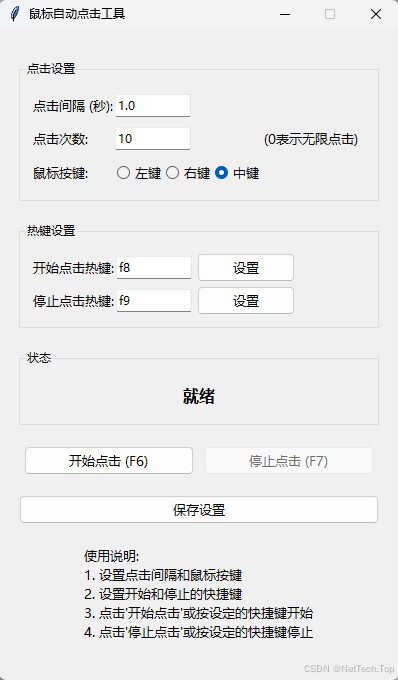
以下是代码:
import tkinter as tk
from tkinter import ttk, messagebox
import threading
import time
import pyautogui
import keyboard
import json
import os

class AutoClickerApp:
    def __init__(self, root):
        self.root = root
        self.root.title("鼠标自动点击工具")
        self.root.geometry("400x650")  # 将高度从500改为600
        self.root.resizable(False, False)

        # 设置样式
        self.style = ttk.Style()
        self.style.configure("TButton", font=("微软雅黑", 10))
        self.style.configure("TLabel", font=("微软雅黑", 10))
        self.style.configure("TRadiobutton", font=("微软雅黑", 10))

        # 初始化变量
        self.clicking = False
        self.click_thread = None
        self.start_hotkey = "f6"
        self.stop_hotkey = "f7"
        self.click_interval = 1.0
        self.click_button = "left"
        self.config_file = "config.json"
        self.click_count = 0  # 当前点击次数
        self.max_clicks = 0  # 最大点击次数,0表示无限点击

        # 加载配置
        self.load_config()

        # 注册热键
        self.register_hotkeys()

        # 创建UI
        self.create_widgets()

    def create_widgets(self):
        # 主框架
        main_frame = ttk.Frame(self.root, padding="20")
        main_frame.pack(fill=tk.BOTH, expand=True)

        # 点击设置区域
        click_frame = ttk.LabelFrame(main_frame, text="点击设置", padding="10")
        click_frame.pack(fill=tk.X, pady=10)

        # 点击间隔
        ttk.Label(click_frame, text="点击间隔 (秒):").grid(row=0, column=0, sticky=tk.W, pady=5)
        self.interval_var = tk.StringVar(value=str(self.click_interval))
        interval_entry = ttk.Entry(click_frame, textvariable=self.interval_var, width=10)
        interval_entry.grid(row=0, column=1, sticky=tk.W, pady=5)

        # 点击次数设置
        ttk.Label(click_frame, text="点击次数:").grid(row=1, column=0, sticky=tk.W, pady=5)
        self.max_clicks_var = tk.StringVar(value=str(self.max_clicks))
        max_clicks_entry = ttk.Entry(click_frame, textvariable=self.max_clicks_var, width=10)
        max_clicks_entry.grid(row=1, column=1, sticky=tk.W, pady=5)
        ttk.Label(click_frame, text="(0表示无限点击)").grid(row=1, column=2, sticky=tk.W, pady=5)

        # 鼠标按键选择
        ttk.Label(click_frame, text="鼠标按键:").grid(row=2, column=0, sticky=tk.W, pady=5)
        self.button_var = tk.StringVar(value=self.click_button)

        button_frame = ttk.Frame(click_frame)
        button_frame.grid(row=2, column=1, sticky=tk.W, pady=5)

        ttk.Radiobutton(button_frame, text="左键", variable=self.button_var, value="left").pack(side=tk.LEFT)
        ttk.Radiobutton(button_frame, text="右键", variable=self.button_var, value="right").pack(side=tk.LEFT)
        ttk.Radiobutton(button_frame, text="中键", variable=self.button_var, value="middle").pack(side=tk.LEFT)

        # 热键设置区域
        hotkey_frame = ttk.LabelFrame(main_frame, text="热键设置", padding="10")
        hotkey_frame.pack(fill=tk.X, pady=10)

        # 开始热键
        ttk.Label(hotkey_frame, text="开始点击热键:").grid(row=0, column=0, sticky=tk.W, pady=5)
        self.start_hotkey_var = tk.StringVar(value=self.start_hotkey)
        self.start_hotkey_entry = ttk.Entry(hotkey_frame, textvariable=self.start_hotkey_var, width=10)
        self.start_hotkey_entry.grid(row=0, column=1, sticky=tk.W, pady=5)
        ttk.Button(hotkey_frame, text="设置", command=lambda: self.set_hotkey("start")).grid(row=0, column=2, padx=5)

        # 停止热键
        ttk.Label(hotkey_frame, text="停止点击热键:").grid(row=1, column=0, sticky=tk.W, pady=5)
        self.stop_hotkey_var = tk.StringVar(value=self.stop_hotkey)
        self.stop_hotkey_entry = ttk.Entry(hotkey_frame, textvariable=self.stop_hotkey_var, width=10)
        self.stop_hotkey_entry.grid(row=1, column=1, sticky=tk.W, pady=5)
        ttk.Button(hotkey_frame, text="设置", command=lambda: self.set_hotkey("stop")).grid(row=1, column=2, padx=5)

        # 状态区域
        status_frame = ttk.LabelFrame(main_frame, text="状态", padding="10")
        status_frame.pack(fill=tk.X, pady=10)

        self.status_var = tk.StringVar(value="就绪")
        status_label = ttk.Label(status_frame, textvariable=self.status_var, font=("微软雅黑", 12, "bold"))
        status_label.pack(pady=5)

        # 控制按钮
        control_frame = ttk.Frame(main_frame)
        control_frame.pack(fill=tk.X, pady=10)

        self.start_button = ttk.Button(control_frame, text="开始点击 (F6)", command=self.start_clicking)
        self.start_button.pack(side=tk.LEFT, padx=5, expand=True, fill=tk.X)

        self.stop_button = ttk.Button(control_frame, text="停止点击 (F7)", command=self.stop_clicking, state=tk.DISABLED)
        self.stop_button.pack(side=tk.LEFT, padx=5, expand=True, fill=tk.X)

        # 保存设置按钮
        save_button = ttk.Button(main_frame, text="保存设置", command=self.save_config)
        save_button.pack(fill=tk.X, pady=10)

        # 帮助信息
        help_text = "使用说明:\n1. 设置点击间隔和鼠标按键\n2. 设置开始和停止的快捷键\n3. 点击'开始点击'或按设定的快捷键开始\n4. 点击'停止点击'或按设定的快捷键停止"
        help_label = ttk.Label(main_frame, text=help_text, justify=tk.LEFT, wraplength=360)
        help_label.pack(pady=10)

    def set_hotkey(self, hotkey_type):
        dialog = tk.Toplevel(self.root)
        dialog.title("设置热键")
        dialog.geometry("300x150")
        dialog.transient(self.root)
        dialog.grab_set()

        # 计算对话框位置,使其紧靠主窗体左边
        root_x = self.root.winfo_rootx()
        root_y = self.root.winfo_rooty()
        dialog_x = root_x - 310  # 对话框宽度300 + 10像素间隔
        dialog_y = root_y + 50   # 稍微向下偏移一点

        # 确保对话框不会超出屏幕左边界
        if dialog_x < 0:
            dialog_x = 0

        dialog.geometry(f"300x150+{dialog_x}+{dialog_y}")

        ttk.Label(dialog, text="请按下您想要设置的热键", font=("微软雅黑", 12)).pack(pady=20)

        key_var = tk.StringVar(value="等待按键...")
        key_label = ttk.Label(dialog, textvariable=key_var, font=("微软雅黑", 14, "bold"))
        key_label.pack(pady=10)

        def on_key_press(e):
            # 修复: 使用keysym而不是name属性
            key = e.keysym.lower()
            key_var.set(key)

            # 更新热键
            if hotkey_type == "start":
                self.start_hotkey_var.set(key)
                self.start_hotkey = key
                self.start_button.config(text=f"开始点击 ({key.upper()})")
            else:
                self.stop_hotkey_var.set(key)
                self.stop_hotkey = key
                self.stop_button.config(text=f"停止点击 ({key.upper()})")

            # 重新注册热键
            self.register_hotkeys()

            dialog.after(500, dialog.destroy)

        dialog.bind("<Key>", on_key_press)
        dialog.focus_set()

    def register_hotkeys(self):
        # 清除现有热键
        keyboard.unhook_all()

        # 注册新热键
        keyboard.add_hotkey(self.start_hotkey, self.start_clicking)
        keyboard.add_hotkey(self.stop_hotkey, self.stop_clicking)

    def start_clicking(self):
        if self.clicking:
            return

        try:
            self.click_interval = float(self.interval_var.get())
            if self.click_interval <= 0:
                raise ValueError("点击间隔必须大于0")

            # 获取并验证最大点击次数
            self.max_clicks = int(self.max_clicks_var.get())
            if self.max_clicks < 0:
                raise ValueError("点击次数不能为负数")
        except ValueError as e:
            messagebox.showerror("错误", f"请输入有效的数值: {str(e)}")
            return

        self.click_button = self.button_var.get()
        self.clicking = True
        self.click_count = 0  # 重置点击计数
        self.status_var.set("点击中...")
        self.start_button.config(state=tk.DISABLED)
        self.stop_button.config(state=tk.NORMAL)

        # 启动点击线程
        self.click_thread = threading.Thread(target=self.click_loop)
        self.click_thread.daemon = True
        self.click_thread.start()

    def click_loop(self):
        while self.clicking:
            try:
                if self.click_button == "left":
                    pyautogui.click()
                elif self.click_button == "right":
                    pyautogui.rightClick()
                elif self.click_button == "middle":
                    pyautogui.middleClick()

                self.click_count += 1
                self.status_var.set(f"点击中... (已点击 {self.click_count} 次)")

                # 检查是否达到最大点击次数
                if self.max_clicks > 0 and self.click_count >= self.max_clicks:
                    # 在主线程中调用stop_clicking
                    self.root.after(0, self.stop_clicking)
                    break

                time.sleep(self.click_interval)
            except Exception as e:
                print(f"点击出错: {e}")
                self.root.after(0, self.stop_clicking)
                break

    # 删除重复的click_loop_thread函数

    def stop_clicking(self):
        if not self.clicking:
            return

        self.clicking = False
        self.status_var.set("已停止")
        self.start_button.config(state=tk.NORMAL)
        self.stop_button.config(state=tk.DISABLED)

    def save_config(self):
        config = {
            "start_hotkey": self.start_hotkey,
            "stop_hotkey": self.stop_hotkey,
            "click_interval": float(self.interval_var.get()),
            "click_button": self.button_var.get(),
            "max_clicks": int(self.max_clicks_var.get())
        }

        try:
            with open(self.config_file, "w") as f:
                json.dump(config, f)
            messagebox.showinfo("成功", "设置已保存")
        except Exception as e:
            messagebox.showerror("错误", f"保存设置失败: {e}")

    def load_config(self):
        try:
            if os.path.exists(self.config_file):
                with open(self.config_file, "r") as f:
                    config = json.load(f)

                self.start_hotkey = config.get("start_hotkey", self.start_hotkey)
                self.stop_hotkey = config.get("stop_hotkey", self.stop_hotkey)
                self.click_interval = config.get("click_interval", self.click_interval)
                self.click_button = config.get("click_button", self.click_button)
                self.max_clicks = config.get("max_clicks", self.max_clicks)
        except Exception as e:
            print(f"加载配置失败: {e}")

if __name__ == "__main__":
    # 设置PyAutoGUI的安全特性
    pyautogui.FAILSAFE = True

    root = tk.Tk()
    app = AutoClickerApp(root)
    root.mainloop()
火山引擎开发者社区是火山引擎打造的AI技术生态平台,聚焦Agent与大模型开发,提供豆包系列模型(图像/视频/视觉)、智能分析与会话工具,并配套评测集、动手实验室及行业案例库。社区通过技术沙龙、挑战赛等活动促进开发者成长,新用户可领50万Tokens权益,助力构建智能应用。
更多推荐
 3
3 0
0- 0


 已为社区贡献4条内容

所有评论(0)