使用.NET Core MCP SDK开发Server+Client实现Tools\Resources\Sampling
什么是MCP?
参考文档:Introduction - Model Context Protocol
我的理解是可以让AI更好的获取定制化数据,如获取本地数据库数据,可以通过MCP封装起来给大模型处理,其他概念性问题可以自行查看官方文档,废话不多说,直接开始代码环节。
安装MCP SDK
sdk github
C# MCP SDK 接口文档
Namespace ModelContextProtocol | MCP C# SDK
截至目前,C#版本SDK处于预览版情况,本文所有代码都是基于预览版+.net9.0
1、创建控制台项目
2、安装SDK nuget包
dotnet add package ModelContextProtocol --prereleaseMCP Server端
using ModelContextProtocol.Server;
using System.Text;

namespace WehosMcpServer
{

    public class Program
    {
        //定义资源,返回二进制资源
        public static Func<Microsoft.Extensions.AI.DataContent> func = () => { return new Microsoft.Extensions.AI.DataContent(Encoding.UTF8.GetBytes("资源1"), "application/octet-stream");  };

        public static Func<Microsoft.Extensions.AI.DataContent> func2 = () => { return new Microsoft.Extensions.AI.DataContent(Encoding.UTF8.GetBytes("资源2"), "application/octet-stream"); };

        public static void Main(string[] args)
        {
            //builder
            var builder = WebApplication.CreateBuilder(args);

            builder.Logging.AddConsole(consoleLogOptions =>
            {
                // Configure all logs to go to stderr
                consoleLogOptions.LogToStandardErrorThreshold = LogLevel.Information;
            });


           var bu =  builder.Services
            .AddMcpServer()
            //使用Streamable HTTP传输
            .WithHttpTransport()
            //暴露服务端资源
            .WithResources(new McpServerPrimitiveCollection<McpServerResource>
            {
                McpServerResource.Create(func, new McpServerResourceCreateOptions {UriTemplate ="1",Name ="资源1" ,MimeType = "application/octet-stream" , Description="获取资源"}),
                McpServerResource.Create(func2,new McpServerResourceCreateOptions { UriTemplate ="2",Name ="资源2" ,MimeType = "application/octet-stream" , Description="获取资源2"}),
            })
            //扫描程序集,注入Tools
            .WithToolsFromAssembly();

            // Add services to the container.

            builder.Services.AddHttpClient();

            builder.Services.AddControllers();
            // Learn more about configuring OpenAPI at https://aka.ms/aspnet/openapi
            builder.Services.AddOpenApi();

            var app = builder.Build();

            // Configure the HTTP request pipeline.
            if (app.Environment.IsDevelopment())
            {
                app.MapOpenApi();
            }

            //暴露mcp服务
            app.MapMcp("mcp");

            app.MapControllers();

            app.Run("http://192.168.200.6:6868");
        }
    }
}
目前有Stdio、SSE、Streamable HTTP几种方式,具体差别自行查询
其中WithToolsFromAssembly会扫描程序集中包含McpServerToolType特性的类作为MCP工具
定义MCP工具类
using Microsoft.Extensions.AI;
using ModelContextProtocol.Client;
using ModelContextProtocol.Server;
using System.ComponentModel;

namespace WehosMcpServer.McpTools
{
    [McpServerToolType]
    public class HelloTool
    {
        [McpServerTool(Name = "SummarizeDownloadedContent")]
        public static async Task<string> SummarizeDownloadedContent(IMcpServer thisServer
            ,HttpClient httpClient
            ,[Description("The url from which to download the content to summarize")] string url
            ,CancellationToken cancellationToken)
        {
            string content = await httpClient.GetStringAsync(url);

            ChatMessage[] messages =
            [
                new(ChatRole.User, "怎么降低AI幻觉率?"),
            ];

            ChatOptions options = new()
            {
                MaxOutputTokens = 25000,
                Temperature = 0.3f,
            };

            return $"Summary: {await thisServer.AsSamplingChatClient().GetResponseAsync(messages, options, cancellationToken)}";
        }

    }

}
这里参照官方例子新建了一个HelloTool工具,方法签名包含了参数,注入项等,注意这里await thisServer.AsSamplingChatClient().GetResponseAsync(messages, options, cancellationToken)返回的是采用请求,即服务端会向客户端发送采样请求,客户端可以接收到,并作出相应处理!如果不想用采用直接返回字符串即可!还有如果客户端不支持采样请求的化会提示Client does not support sampling,后续客户端需要配置采样请求才可以
运行Server端
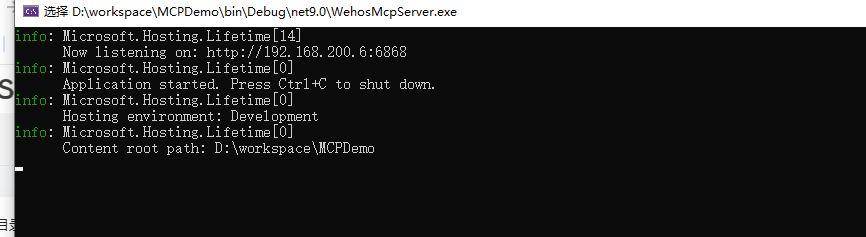
MCP Client
客户端只是演示调用,通常客户端都是大模型,再由大模型调用MCP Server的工具
这里引用的OpenAI类库,创建OpenAI的ChatClient,自己填入对应参数
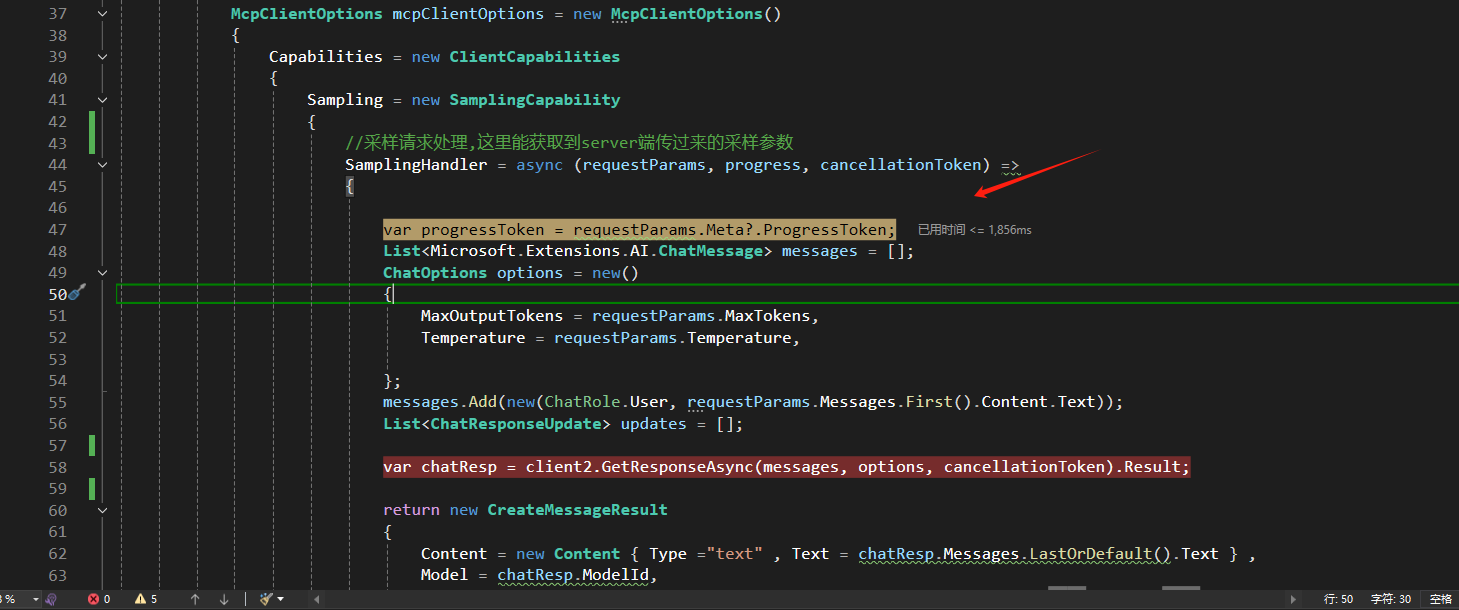
McpClientOptions这里配置了一个采样处理SamplingHandler,接收服务端传过来的参数再进入大模型获取响应
ListToolsAsync可以获取MCP 服务的工具,CallToolAsync就是调用服务端工具
ListResourcesAsync获取服务端资源,服务端我定义的是二进制(Base64字符串),客户端获取时需要转换BlobResourceContents类型,还有其他类型可参考API 文档
using Microsoft.Extensions.AI;
using ModelContextProtocol.Client;
using Microsoft.AspNetCore.OpenApi;
using OpenAI.Chat;
using OpenAI;
using ModelContextProtocol.Protocol;
using ModelContextProtocol;
using System.Text;


namespace McpClientDemo
{
    public class Program
    {
        public static void Main(string[] args)
        {

            var builder = WebApplication.CreateBuilder(args);

            // Add services to the container.

            builder.Services.AddControllers();
            // Learn more about configuring OpenAPI at https://aka.ms/aspnet/openapi
            builder.Services.AddOpenApi();

            var clientTransport = new SseClientTransport(new SseClientTransportOptions
            {
                Endpoint = new Uri("http://192.168.200.6:6868/mcp"),
                UseStreamableHttp = true
            });

            var s= new ChatClient("QwQ-32B", credential: new System.ClientModel.ApiKeyCredential("sk-53xTlkVvpDka8TXo73E6Ca683b464a78Bb7d2eB6B1C5F05d"), new OpenAIClientOptions { Endpoint = new Uri("http://192.168.15.86:3000/v1") });

            IChatClient client2 = s.AsIChatClient();

            McpClientOptions mcpClientOptions = new McpClientOptions()
            {
                Capabilities = new ClientCapabilities
                {
                    Sampling = new SamplingCapability
                    {
                        //采样请求处理,这里能获取到server端传过来的采样参数
                        SamplingHandler = async (requestParams, progress, cancellationToken) =>
                        {

                            var progressToken = requestParams.Meta?.ProgressToken;
                            List<Microsoft.Extensions.AI.ChatMessage> messages = [];
                            ChatOptions options = new()
                            {
                                MaxOutputTokens = requestParams.MaxTokens,
                                Temperature = requestParams.Temperature,

                            };
                            messages.Add(new(ChatRole.User, requestParams.Messages.First().Content.Text));
                            List<ChatResponseUpdate> updates = [];

                            var chatResp = client2.GetResponseAsync(messages, options, cancellationToken).Result;

                            return new CreateMessageResult
                            {
                                Content = new Content { Type ="text" , Text = chatResp.Messages.LastOrDefault().Text } ,
                                Model = chatResp.ModelId,
                                Role = chatResp.Messages.LastOrDefault()?.Role == ChatRole.User ? Role.User : Role.Assistant,
                            };


                        }
                    }
                }
            };
            var client =  McpClientFactory.CreateAsync(clientTransport, mcpClientOptions).Result;

            // Print the list of tools available from the server.
            foreach (var tool in  client.ListToolsAsync().Result)
            {
                Console.WriteLine($"{tool.Name} ({tool.Description})");
            }
            var resources = client.ListResourcesAsync().Result;
            foreach (var item in resources)
            {
                Console.WriteLine(item.Name);

                var resourceResult = item.ReadAsync().Result;

                var blob = resourceResult.Contents.FirstOrDefault() as BlobResourceContents;

                var bytes = Convert.FromBase64String(blob.Blob);

                var sx = Encoding.UTF8.GetString(bytes);

                Console.WriteLine($"MCP资源二进制资源:{sx}");

            }

            // Execute a tool (this would normally be driven by LLM tool invocations).
            var result = client.CallToolAsync(
                "SummarizeDownloadedContent",
                new Dictionary<string, object?>() { ["url"] = "http://baidu.com" },
                cancellationToken: CancellationToken.None).Result;

            // echo always returns one and only one text content object
            Console.WriteLine(result.Content.First(c => c.Type == "text").Text);

            var app = builder.Build();

            // Configure the HTTP request pipeline.
            if (app.Environment.IsDevelopment())
            {
                app.MapOpenApi();
            }

            app.UseHttpsRedirection();

            app.UseAuthorization();


            app.MapControllers();

            app.Run();
        }
    }
}
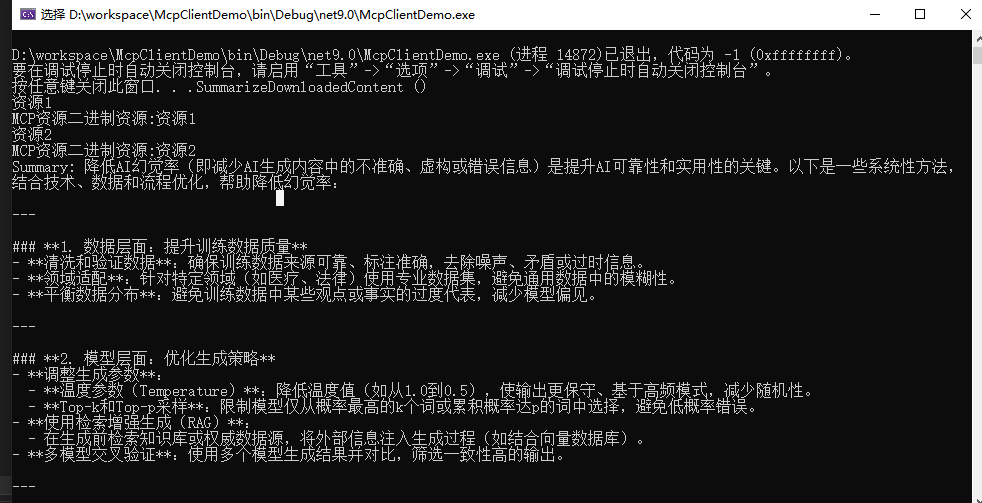
客户端运行
服务端发送采样请求,客户端成功接收
总结
至此,一个简单的MCP Server Client的demo就好了,截至目前官方有些文档不是很齐全,需要自己查看下API文档用法

中国智能体开发者社区,聚焦智能体与大模型开发,提供前沿资讯、实用工具链、开源项目及行业案例。通过技术沙龙、开发者大赛等活动,促进经验交流与协作,助力开发者快速构建创新智能应用。
更多推荐


 8
8 0
0- 0


 已为社区贡献1条内容

所有评论(0)