基于深度学习的皮肤病识别检测系统(web界面+YOLOv8/v10/v11/v12+DeepSeek智能分析 +前后端分离)
本论文介绍了一个基于深度学习的综合性皮肤病识别与检测系统,该系统集成了最新的YOLO系列目标检测算法、DeepSeek智能分析引擎和现代化的Web交互界面。系统实现了对七种常见皮肤病变的自动识别和分类,包括鲍温氏病、基底细胞癌、良性角化病变、皮肤纤维瘤、黑色素瘤、黑色素细胞痣和血管病变。通过构建前后端分离的架构,系统提供了用户友好的Web界面,支持图片、视频和实时摄像头检测等多种输入方式。系统采用
摘要
本论文介绍了一个基于深度学习的综合性皮肤病识别与检测系统,该系统集成了最新的YOLO系列目标检测算法、DeepSeek智能分析引擎和现代化的Web交互界面。系统实现了对七种常见皮肤病变的自动识别和分类,包括鲍温氏病、基底细胞癌、良性角化病变、皮肤纤维瘤、黑色素瘤、黑色素细胞痣和血管病变。通过构建前后端分离的架构,系统提供了用户友好的Web界面,支持图片、视频和实时摄像头检测等多种输入方式。系统采用MySQL数据库进行数据存储和管理,实现了用户认证、模型切换、检测记录管理和可视化分析等核心功能模块。实验结果表明,基于YOLO系列的深度学习模型在皮肤病变检测任务上表现出良好的性能,结合DeepSeek的智能分析功能,为皮肤病辅助诊断提供了高效、准确的技术支持。
关键词:深度学习,皮肤病识别,YOLO系列,目标检测,Web应用,智能医疗,计算机视觉
目录
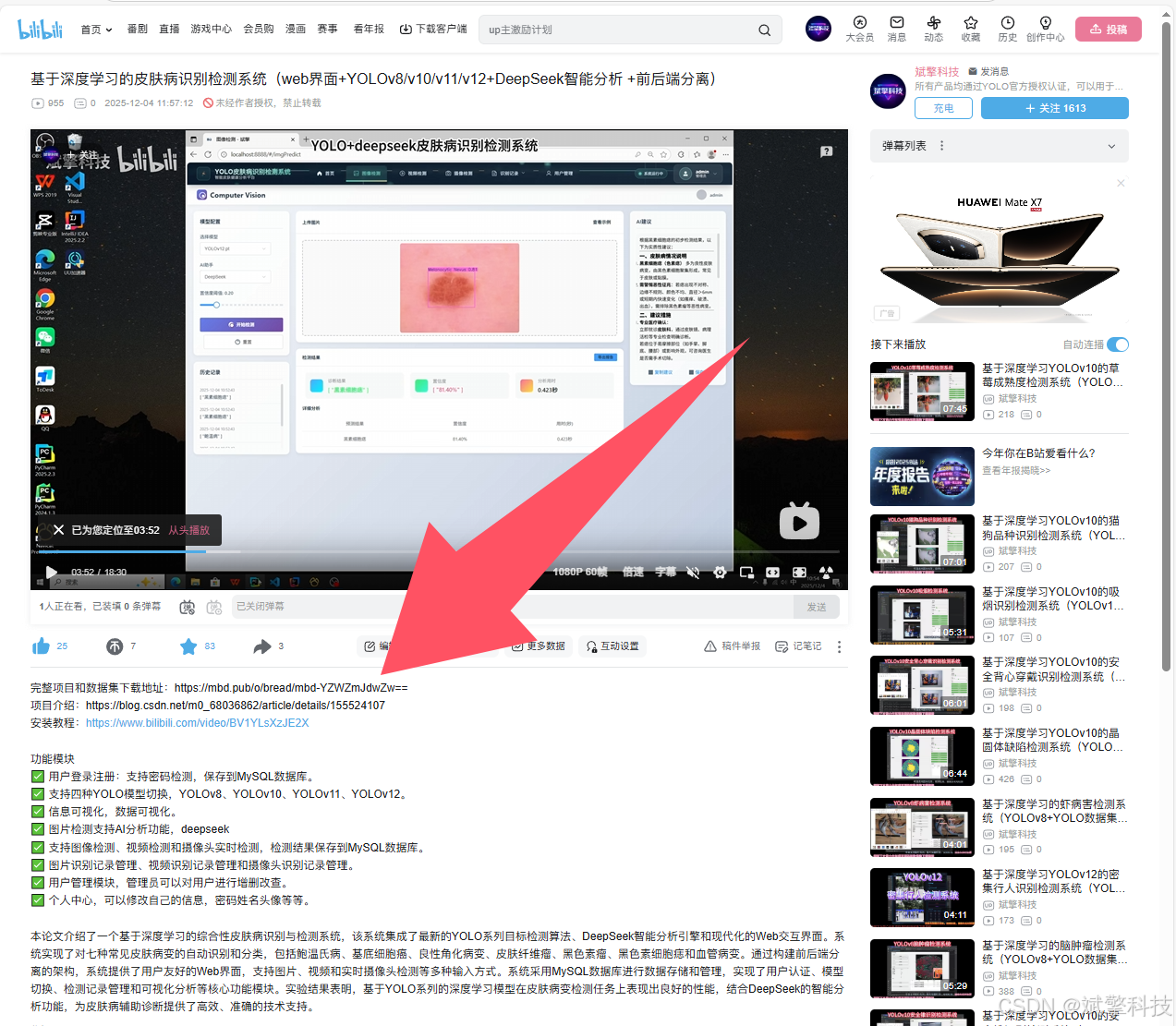
项目源码+数据集下载链接
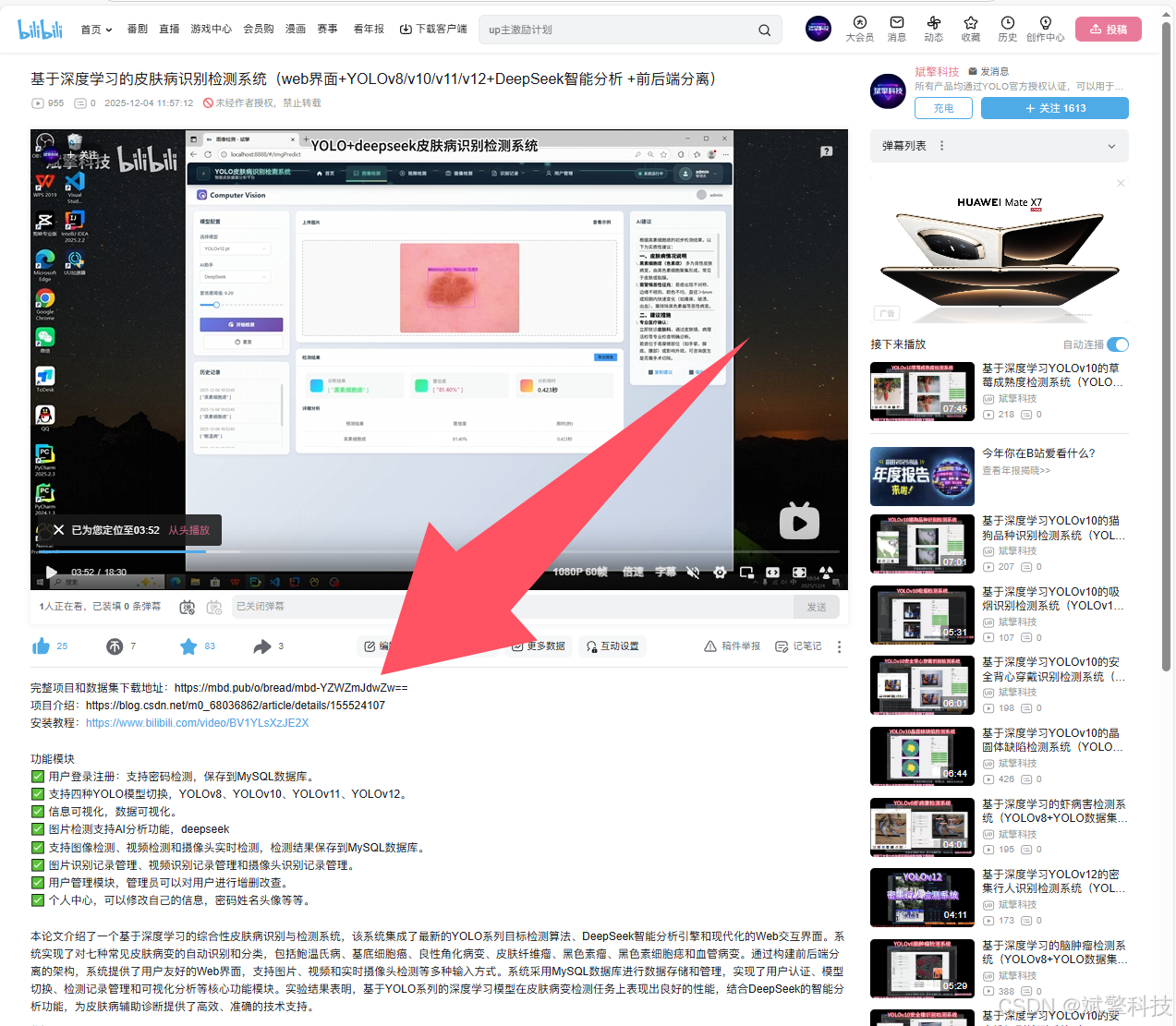
完整代码在哔哩哔哩视频下方简介内获取:
基于深度学习的皮肤病识别检测系统(web界面+YOLOv8/v10/v11/v12+DeepSeek智能分析 +前后端分离)_哔哩哔哩_bilibili
基于深度学习的皮肤病识别检测系统(web界面+YOLOv8/v10/v11/v12+DeepSeek智能分析 +前后端分离)_哔哩哔哩_bilibili https://www.bilibili.com/video/BV1vt2YBKEhT/?vd_source=549d0b4e2b8999929a61a037fcce3b0fhttps://www.bilibili.com/video/BV1vt2YBKEhT
引言
1.1 研究背景与意义
皮肤癌是全球范围内最常见的癌症类型之一,每年有数百万人被诊断出患有各种皮肤病变。早期准确诊断对于提高皮肤癌治愈率至关重要,但传统的皮肤病诊断方法依赖于皮肤科医生的视觉检查和病理活检,这一过程既耗时又容易受到主观判断的影响。特别是在医疗资源匮乏的地区,专业的皮肤科医生数量有限,导致许多患者无法及时获得准确的诊断。
近年来,随着人工智能和深度学习技术的快速发展,计算机辅助诊断系统在医疗影像分析领域取得了显著进展。基于深度学习的皮肤病识别系统能够自动分析和识别皮肤病变特征,为医生提供客观、一致的诊断建议,有望成为改善皮肤病诊断效率和准确性的有力工具。
1.2 研究现状
目前,已有多种基于深度学习的皮肤病识别方法被提出。早期的研究多采用CNN(卷积神经网络)进行皮肤病分类,如ResNet、Inception、DenseNet等架构在ISIC数据集上取得了良好的分类效果。然而,这些方法通常只能对整张图像进行分类,无法定位病变的具体位置。
目标检测技术的发展为皮肤病识别提供了新的解决方案。YOLO(You Only Look Once)系列算法因其高效的检测速度和良好的准确率平衡,在实时目标检测任务中表现出色。从YOLOv1到最新的YOLOv12,每一代都在模型架构、训练策略和性能优化方面进行了创新改进。将YOLO系列模型应用于皮肤病检测任务,不仅可以识别病变类型,还能精确定位病变区域,为临床诊断提供更丰富的信息。
1.3 本文贡献
本文的主要贡献包括:
-
多模型集成系统:开发了一个支持YOLOv8、v10、v11、v12四种最新版本切换的皮肤病识别系统,用户可以灵活选择最适合其需求的模型。
-
智能分析增强:集成DeepSeek智能分析引擎,为检测结果提供详细的病理学解释和临床建议,增强了系统的实用性和可解释性。
-
全功能Web平台:设计并实现了一个功能完备的Web应用平台,支持多种输入方式(图片、视频、摄像头实时检测)和全面的用户管理功能。
-
完整数据管理:实现了检测记录的全面管理,包括图片识别记录、视频识别记录和摄像头识别记录,所有数据均存储在MySQL数据库中,便于后续分析和研究。
背景
2.1 皮肤病学基础
皮肤是人体最大的器官,也是最容易受到各种疾病影响的器官之一。本文系统识别的七种皮肤病变具有不同的临床特征和病理机制:
-
鲍温氏病(Bowen's Disease):一种表皮内鳞状细胞癌,被认为是皮肤鳞状细胞癌的早期阶段。
-
基底细胞癌(Basal Cell Carcinoma):最常见的皮肤癌类型,起源于皮肤基底细胞,通常生长缓慢,转移风险低。
-
良性角化病变(Benign Keratosis Lesions):包括脂溢性角化病、日光性角化病等良性皮肤病变。
-
皮肤纤维瘤(Dermatofibroma):一种常见的良性皮肤肿瘤,由成纤维细胞和胶原纤维组成。
-
黑色素瘤(Melanoma):最危险的皮肤癌类型,起源于黑色素细胞,具有较高的转移和死亡率。
-
黑色素细胞痣(Melanocytic Nevus):俗称痣,是黑色素细胞的良性聚集。
-
血管病变(Vascular Lesions):包括血管瘤、血管畸形等血管相关皮肤病变。
2.2 深度学习在医学影像中的应用
深度学习技术在医学影像分析中的应用已经成为研究热点。在皮肤病学领域,深度学习模型通过学习大量标注的皮肤病变图像,能够提取和识别病变的关键特征,如颜色、形状、纹理和边界不规则性等。与传统的计算机视觉方法相比,深度学习不需要手工设计特征,能够自动学习更加复杂和抽象的表示,因此在皮肤病识别任务上具有显著优势。
2.3 YOLO系列算法演进
YOLO系列算法自2015年首次提出以来,经历了多次重要更新:
-
YOLOv8:引入了新的骨干网络和特征金字塔结构,改进了训练策略和数据增强方法。
-
YOLOv10:在模型效率和准确率之间取得了更好的平衡,优化了模型结构和后处理流程。
-
YOLOv11:进一步改进了特征融合机制和多尺度预测策略。
-
YOLOv12:最新的版本,集成了最新的神经网络架构设计理念和训练优化技术。
这些版本的演进主要体现在模型架构优化、训练策略改进、推理速度提升和准确率提高等方面。
系统设计与架构
3.1 总体架构设计
本系统采用前后端分离的架构设计,前端负责用户交互界面,后端提供数据处理和模型推理服务。整体架构分为以下四个层次:
-
表示层(Presentation Layer):基于现代Web技术构建的用户界面,提供直观的操作体验。
-
业务逻辑层(Business Logic Layer):处理用户请求,协调各个功能模块的工作流程。
-
数据处理层(Data Processing Layer):负责图像预处理、模型推理和后处理操作。
-
数据持久层(Data Persistence Layer):基于MySQL数据库的数据存储和管理。
3.2 功能模块详细设计
3.2.1 用户认证与管理系统
用户认证模块采用安全的密码存储机制,所有用户密码均存储在数据库中。系统支持用户注册、登录、密码重置等功能,并实现了以下安全特性:
-
密码强度检测:要求用户设置足够复杂的密码
-
会话管理:安全的用户会话创建和维护
-
权限控制:区分普通用户和管理员权限
管理员用户具有特殊权限,可以对系统用户进行全面的管理操作,包括添加新用户、修改用户信息、删除用户账户等。
3.2.2 多模型切换与管理系统
系统集成了四种YOLO模型(v8、v10、v11、v12),用户可以根据具体需求选择合适的模型。模型切换模块实现了以下功能:
-
模型动态加载:无需重启系统即可切换模型
-
模型性能对比:记录不同模型在相同任务上的表现
-
模型版本管理:支持不同版本的模型共存和调用
3.2.3 图像处理与检测模块
系统支持三种输入模式的皮肤病检测:
-
图像检测:用户上传皮肤病变图片,系统返回检测结果和详细分析
-
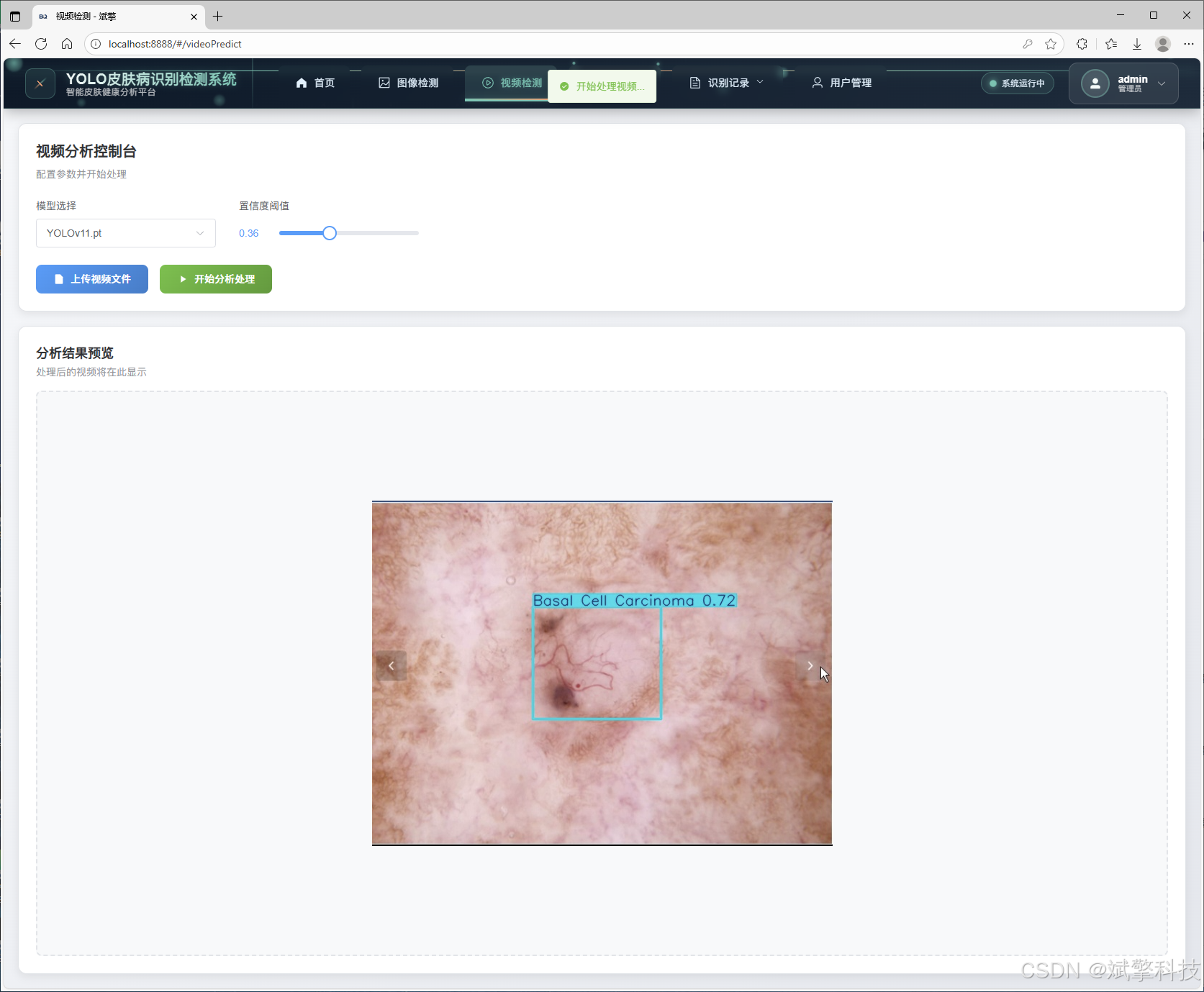
视频检测:对上传的视频文件进行逐帧分析,识别其中的皮肤病变
-
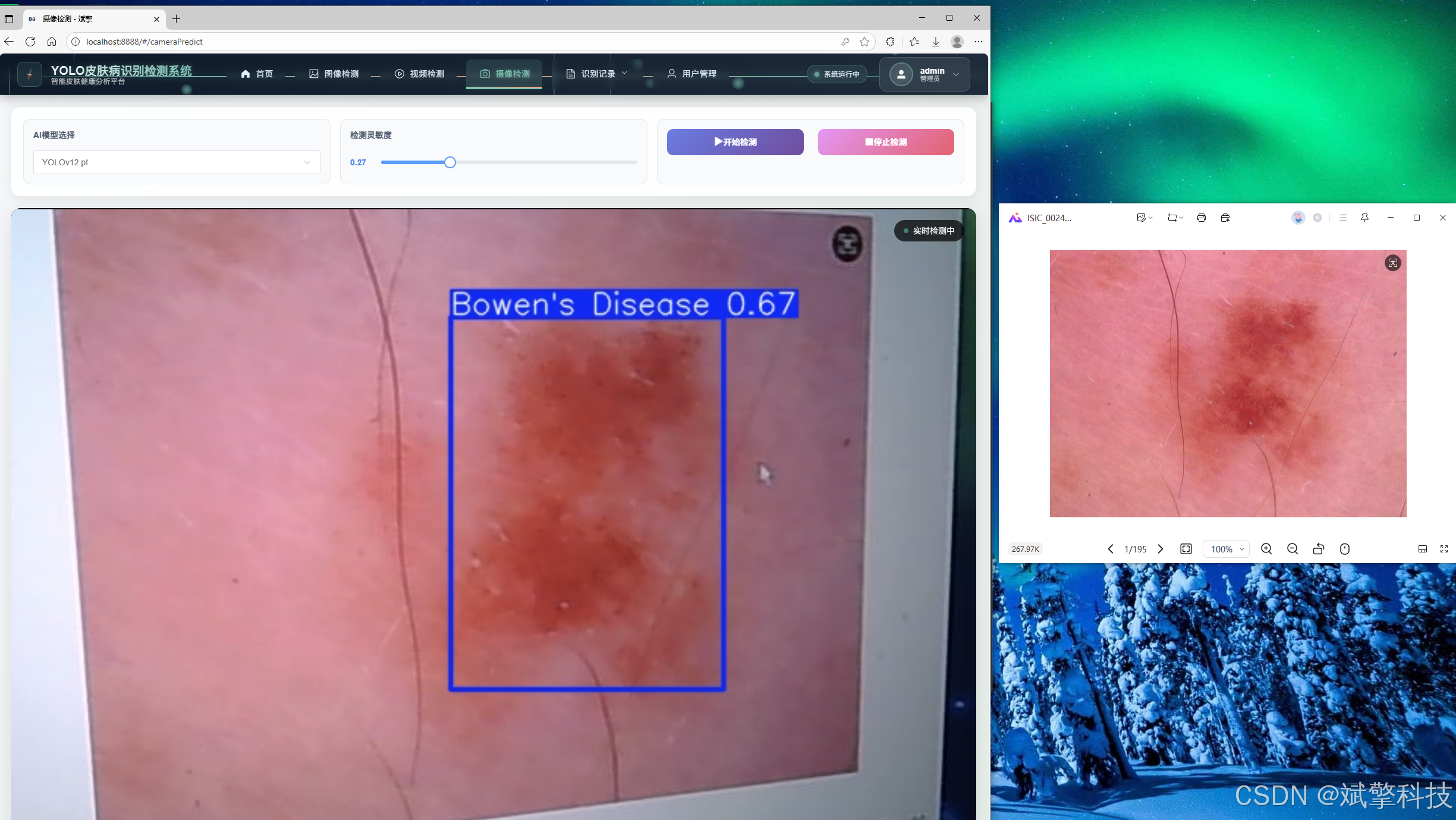
实时摄像头检测:通过摄像头实时捕捉视频流,进行实时分析和预警
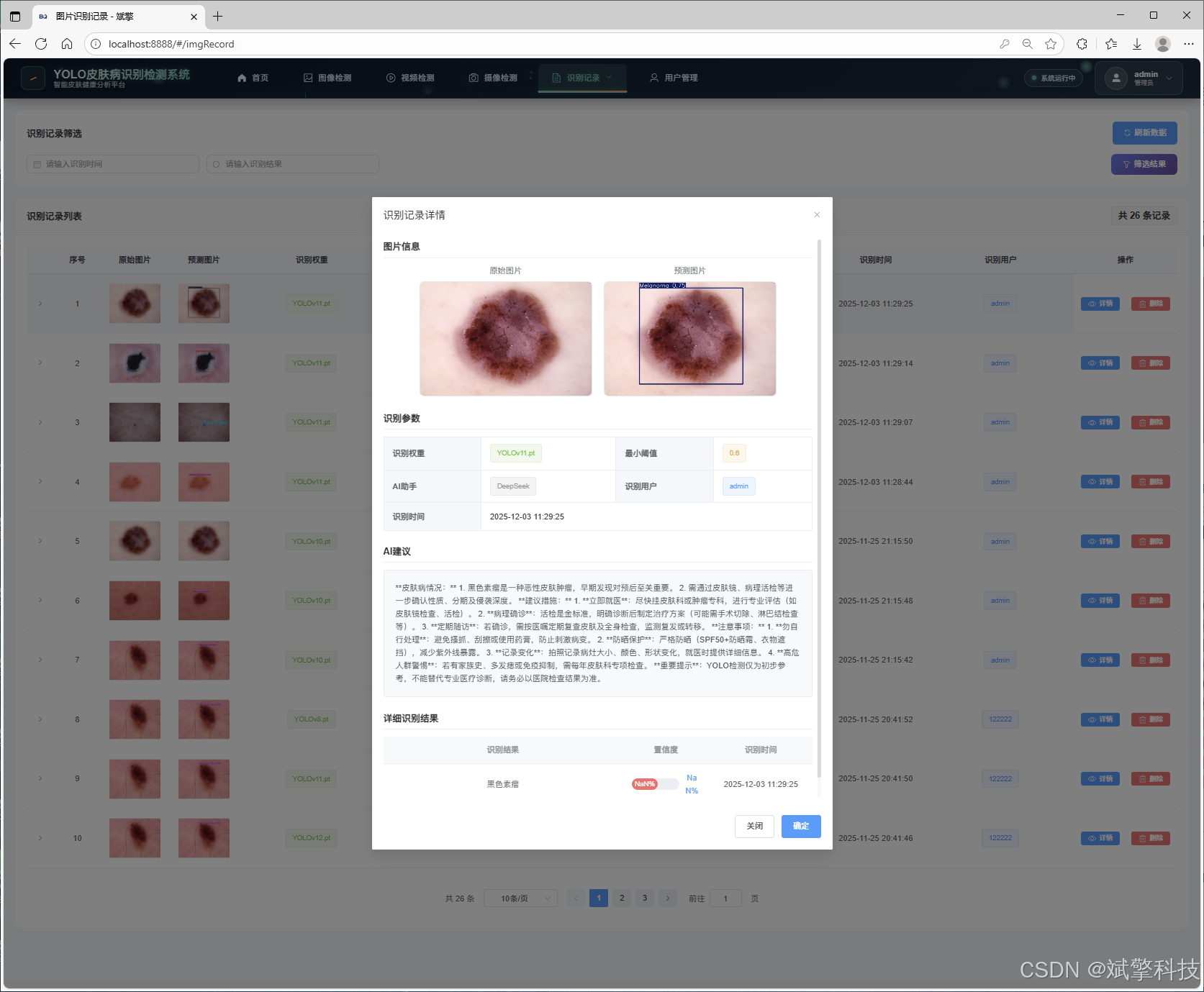
所有检测结果均包含病变类型、置信度、位置信息等,并自动保存到数据库中。
3.2.4 DeepSeek智能分析模块
DeepSeek智能分析模块是本系统的特色功能之一,它在基础检测结果之上,提供以下增强分析:
-
病理学解释:详细说明检测到的病变类型的医学特征
-
风险评估:基于病变类型和特征评估潜在风险等级
-
临床建议:提供初步的诊疗建议和就医指导
-
鉴别诊断:提示需要鉴别的其他相似病变
3.2.5 数据可视化与分析模块
系统提供多种数据可视化方式,帮助用户更好地理解检测结果:
-
检测结果可视化:在原图上标注病变区域和类型
-
统计图表:展示各类病变的分布情况和趋势变化
-
用户行为分析:分析用户的使用模式和偏好
3.2.6 记录管理与查询模块
系统全面记录所有检测操作,包括:
-
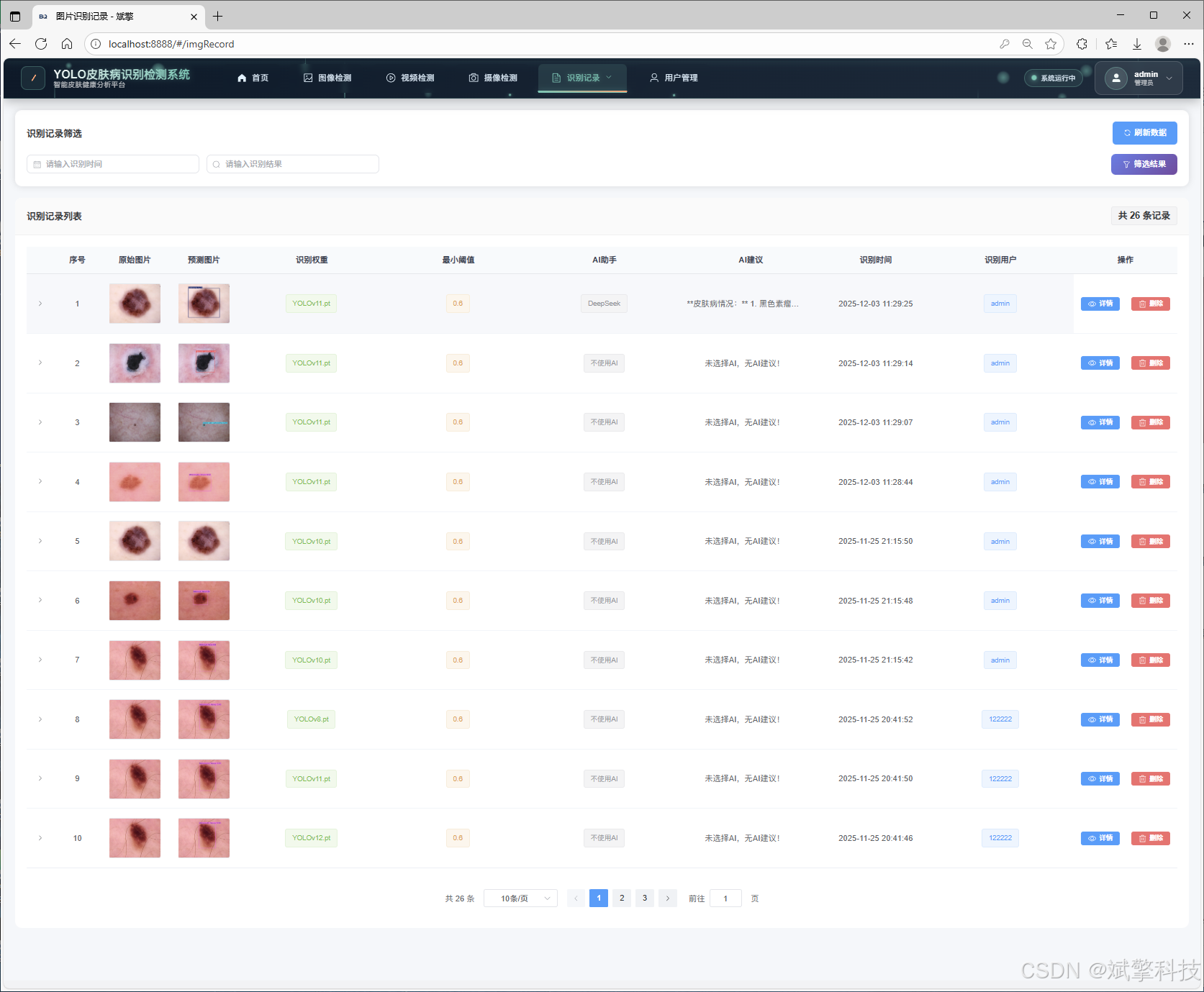
图像检测记录:保存每张检测图片的原图、结果图和分析报告
-
视频检测记录:保存视频检测的摘要信息和关键帧结果
-
实时检测记录:记录摄像头检测的统计结果和异常发现
-
高级查询功能:支持按时间、病变类型、置信度等多种条件查询
3.3 数据库设计
系统使用MySQL数据库存储所有数据,主要数据表包括:
-
用户表(users):存储用户基本信息、权限设置和登录凭证
-
图片检测记录表
-
视频检测记录表
-
摄像头检测记录表
数据集介绍
4.1 数据集构成
本系统使用的皮肤病数据集共包含973张高质量皮肤病变图像,按照医学标准进行专业标注。数据集详细划分如下:
-
训练集:681张图像,用于模型训练和参数优化
-
验证集:97张图像,用于训练过程中的模型评估和超参数调整
-
测试集:195张图像,用于最终模型性能评估
4.2 数据类别与分布
数据集涵盖七种常见皮肤病变类型,每类病变的医学特征和临床意义如下:
-
鲍温氏病(Bowen's Disease)
-
特征:红色或棕红色的鳞屑性斑片,边界清晰但不规则
-
临床意义:表皮内鳞状细胞癌,有潜在恶变风险
-
-
基底细胞癌(Basal Cell Carcinoma)
-
特征:珍珠样丘疹或结节,表面可见毛细血管扩张
-
临床意义:最常见的皮肤癌,局部侵袭性强但转移罕见
-
-
良性角化病变(Benign Keratosis Lesions)
-
特征:界限清楚的褐色或黑色斑块,表面粗糙
-
临床意义:良性病变,通常无需治疗
-
-
皮肤纤维瘤(Dermatofibroma)
-
特征:坚硬的丘疹或结节,颜色从粉红到棕褐色不等
-
临床意义:良性纤维组织增生,无需特殊处理
-
-
黑色素瘤(Melanoma)
-
特征:不对称、边界不规则、颜色不均匀、直径较大
-
临床意义:恶性程度最高的皮肤癌,早期诊断至关重要
-
-
黑色素细胞痣(Melanocytic Nevus)
-
特征:圆形或椭圆形,颜色均匀,边界清晰
-
临床意义:常见的良性色素性病变
-
-
血管病变(Vascular Lesions)
-
特征:红色或紫色皮损,按压可褪色
-
临床意义:包括血管瘤、血管畸形等多种类型
-
功能模块
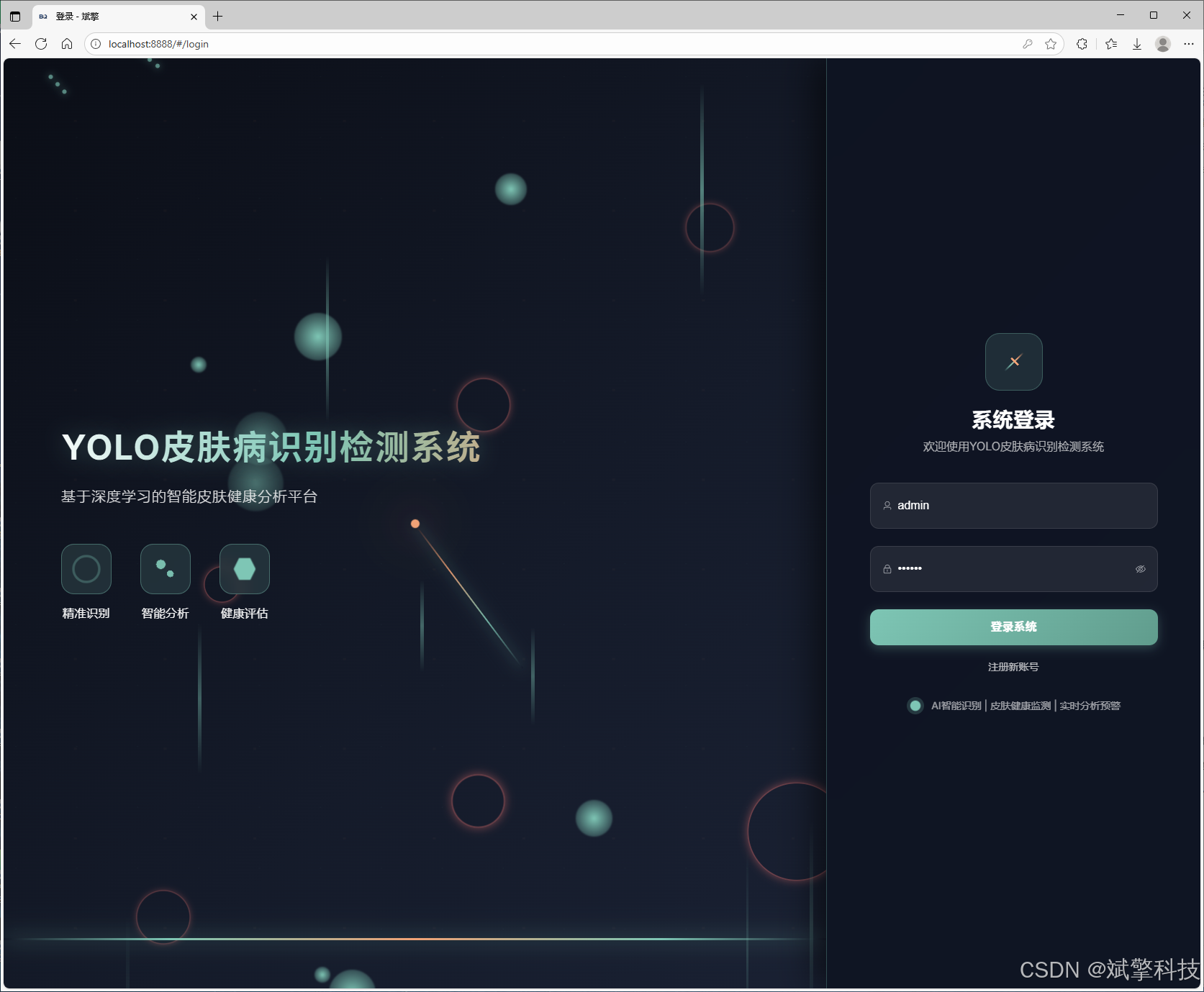
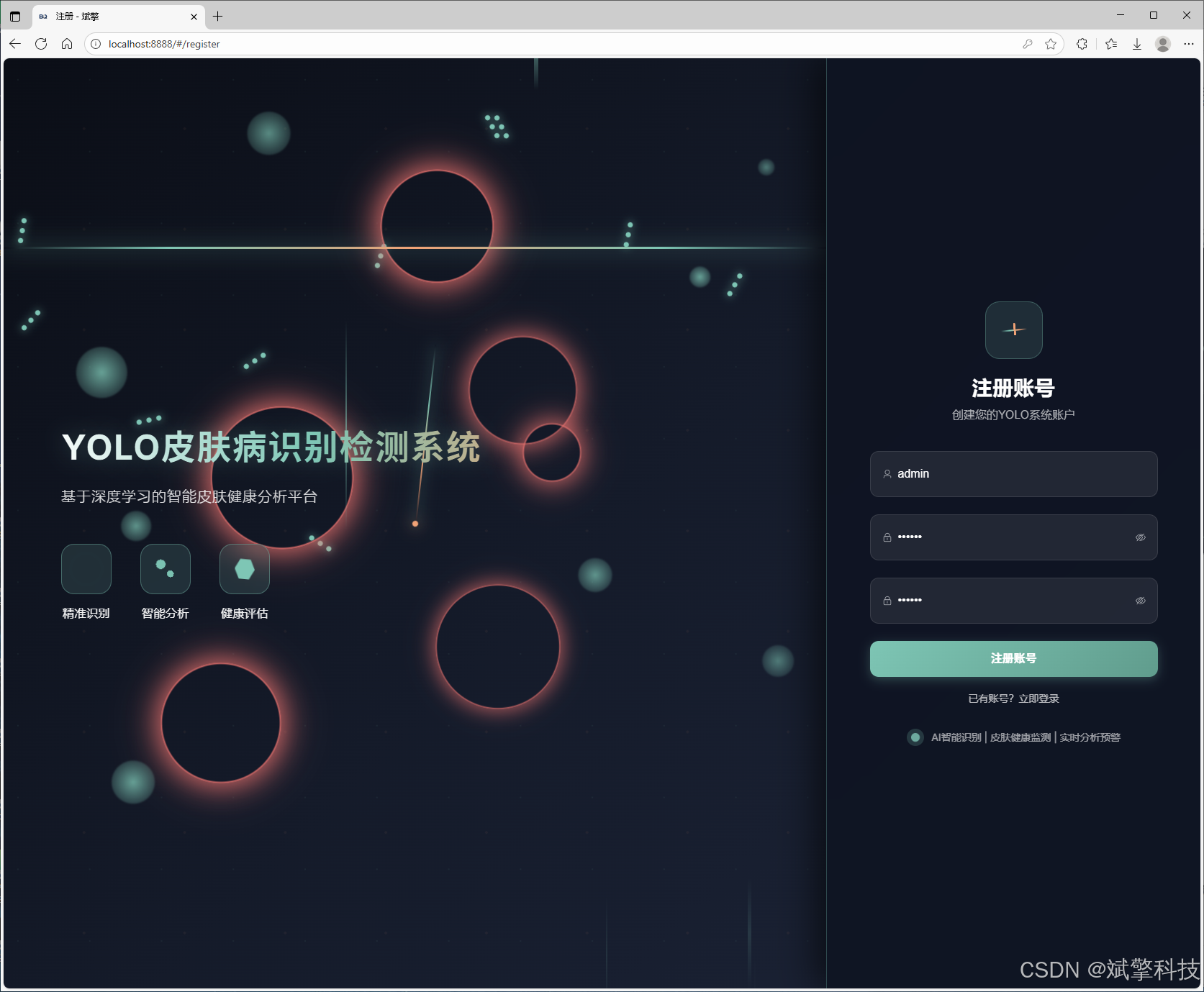
✅ 用户登录注册:支持密码检测,保存到MySQL数据库。
✅ 支持四种YOLO模型切换,YOLOv8、YOLOv10、YOLOv11、YOLOv12。
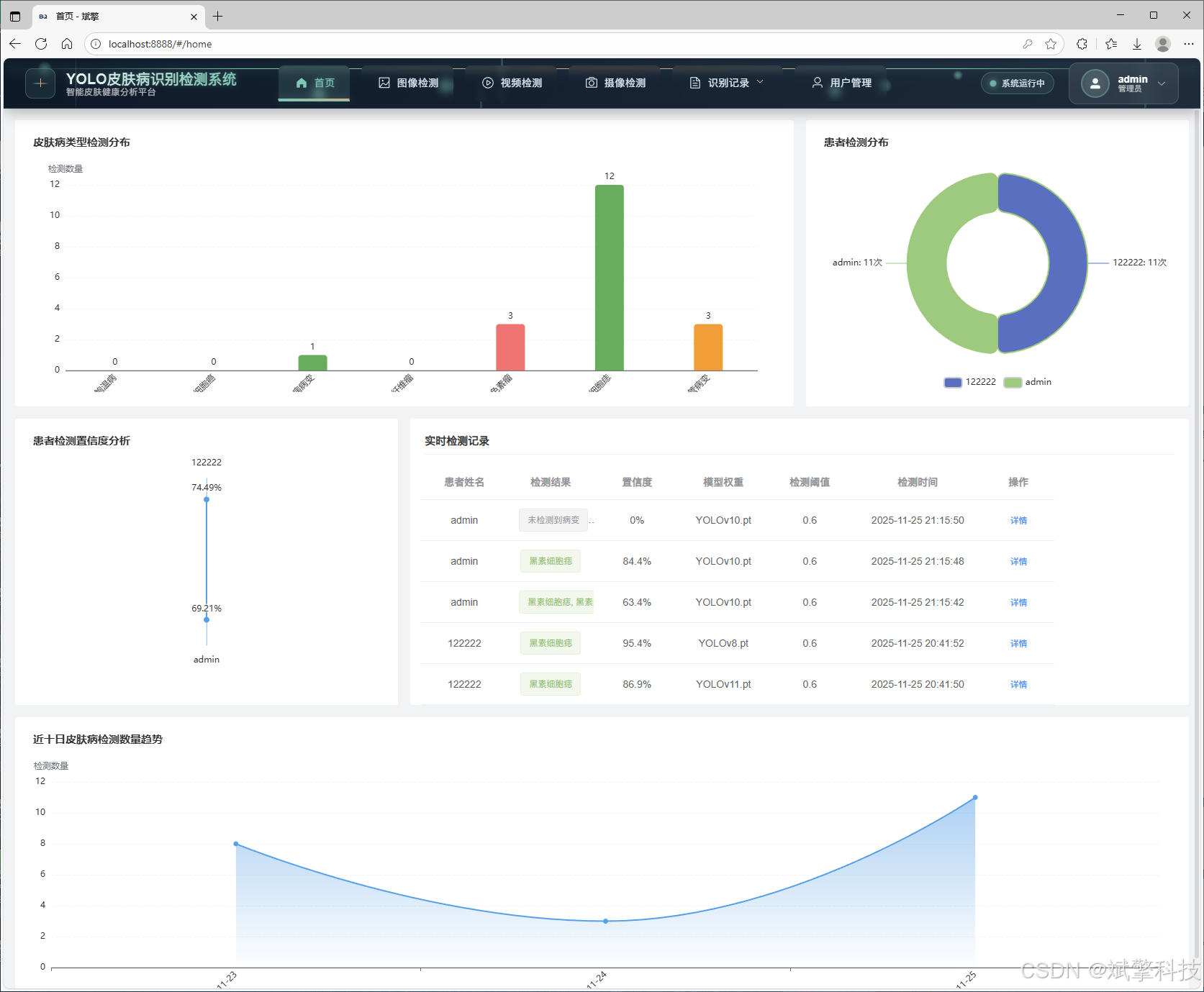
✅ 信息可视化,数据可视化。
✅ 图片检测支持AI分析功能,deepseek
✅ 支持图像检测、视频检测和摄像头实时检测,检测结果保存到MySQL数据库。
✅ 图片识别记录管理、视频识别记录管理和摄像头识别记录管理。
✅ 用户管理模块,管理员可以对用户进行增删改查。
✅ 个人中心,可以修改自己的信息,密码姓名头像等等。
登录注册模块
可视化模块
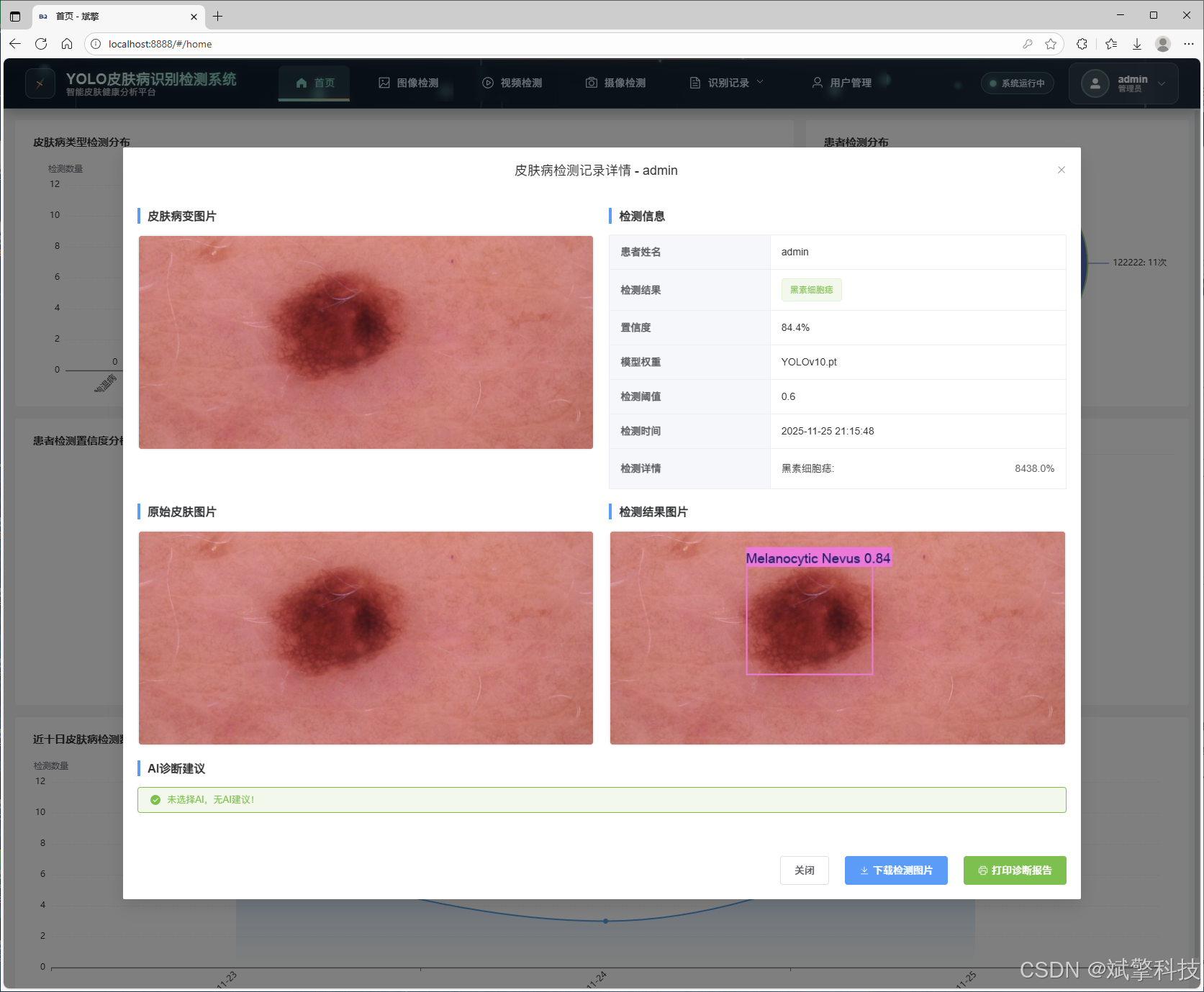
图像检测模块
-
YOLO模型集成 (v8/v10/v11/v12)
-
DeepSeek多模态分析
-
支持格式:JPG/PNG/MP4/RTSP
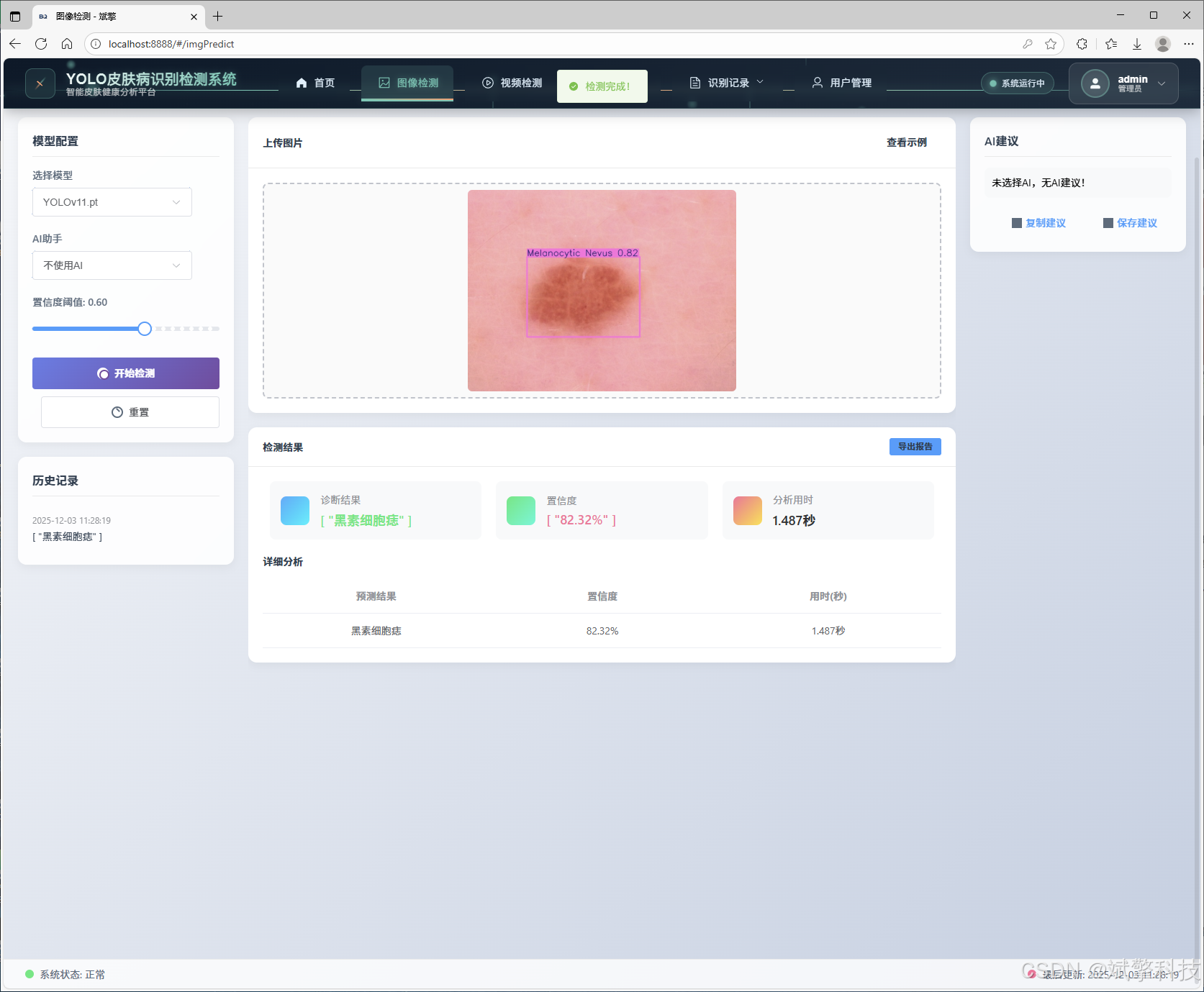
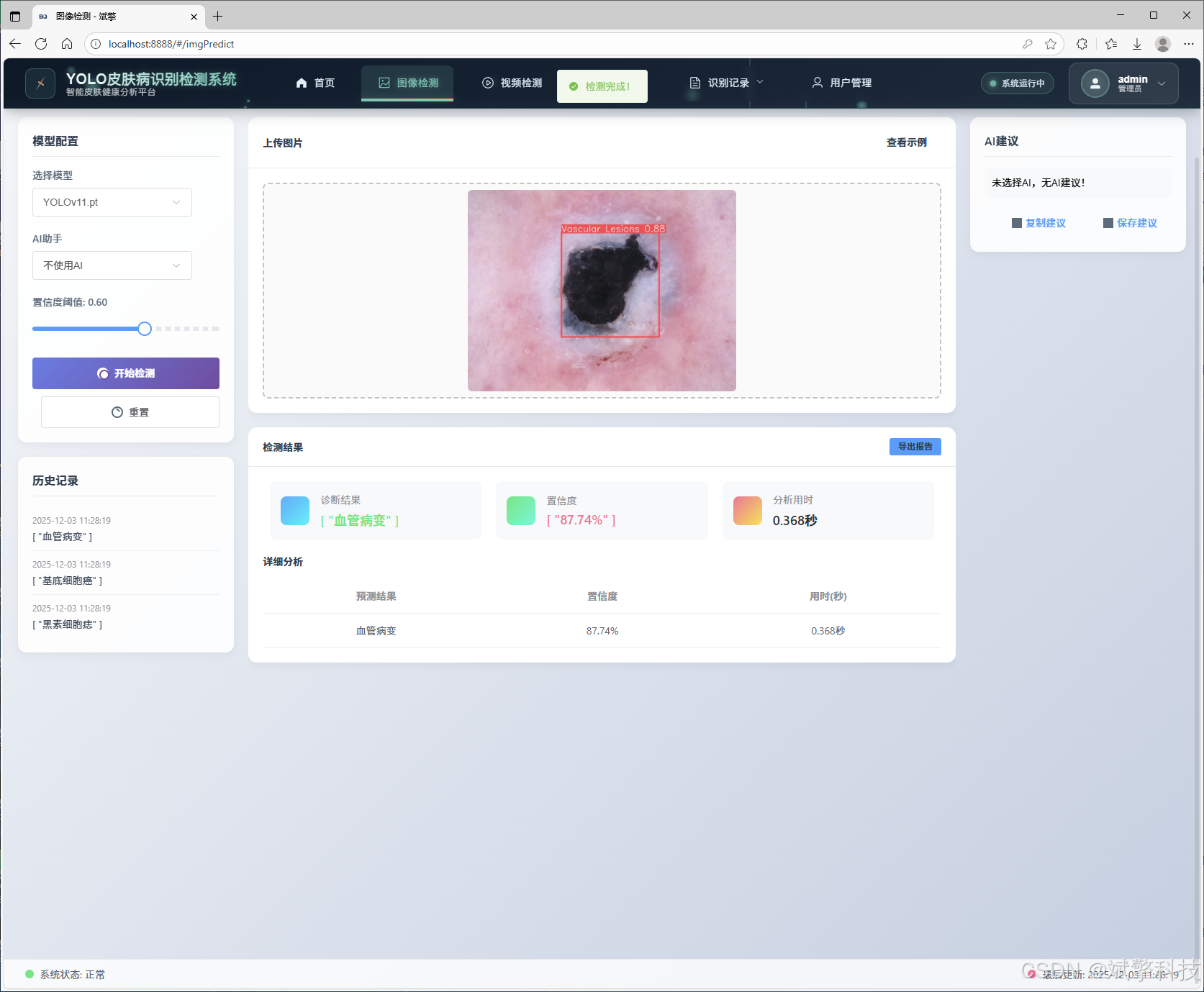
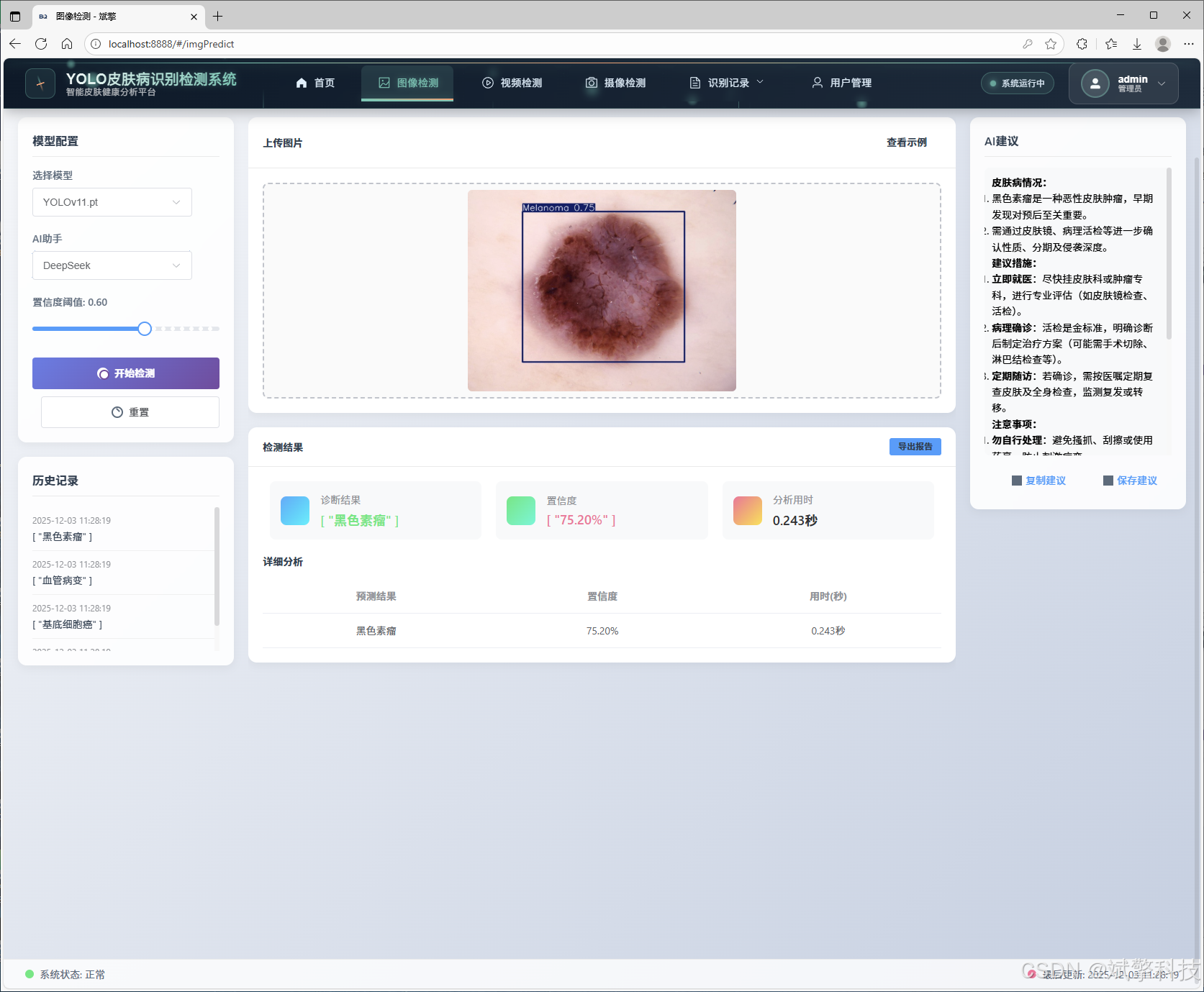
视频检测模块
实时检测模块
图片识别记录管理
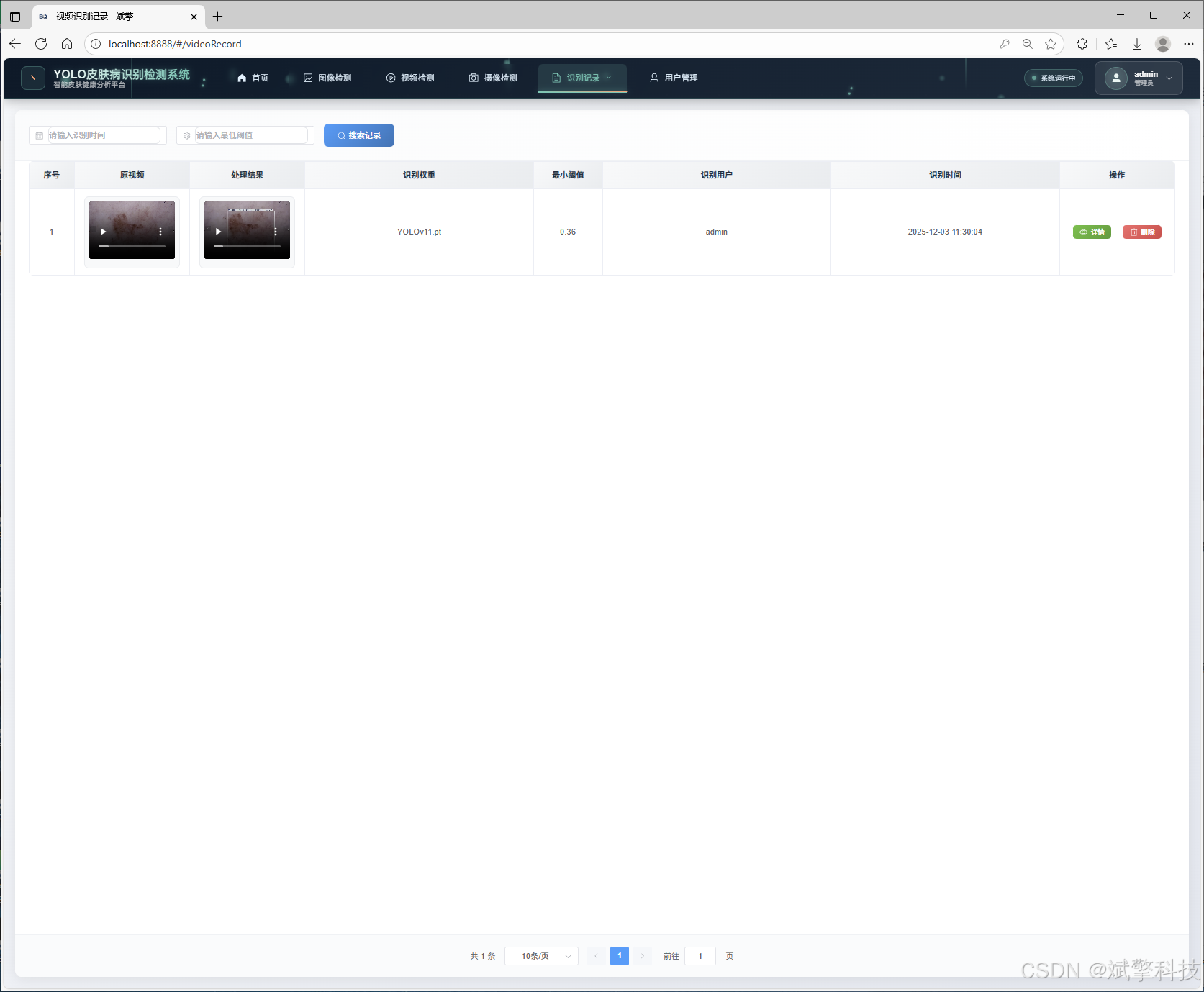
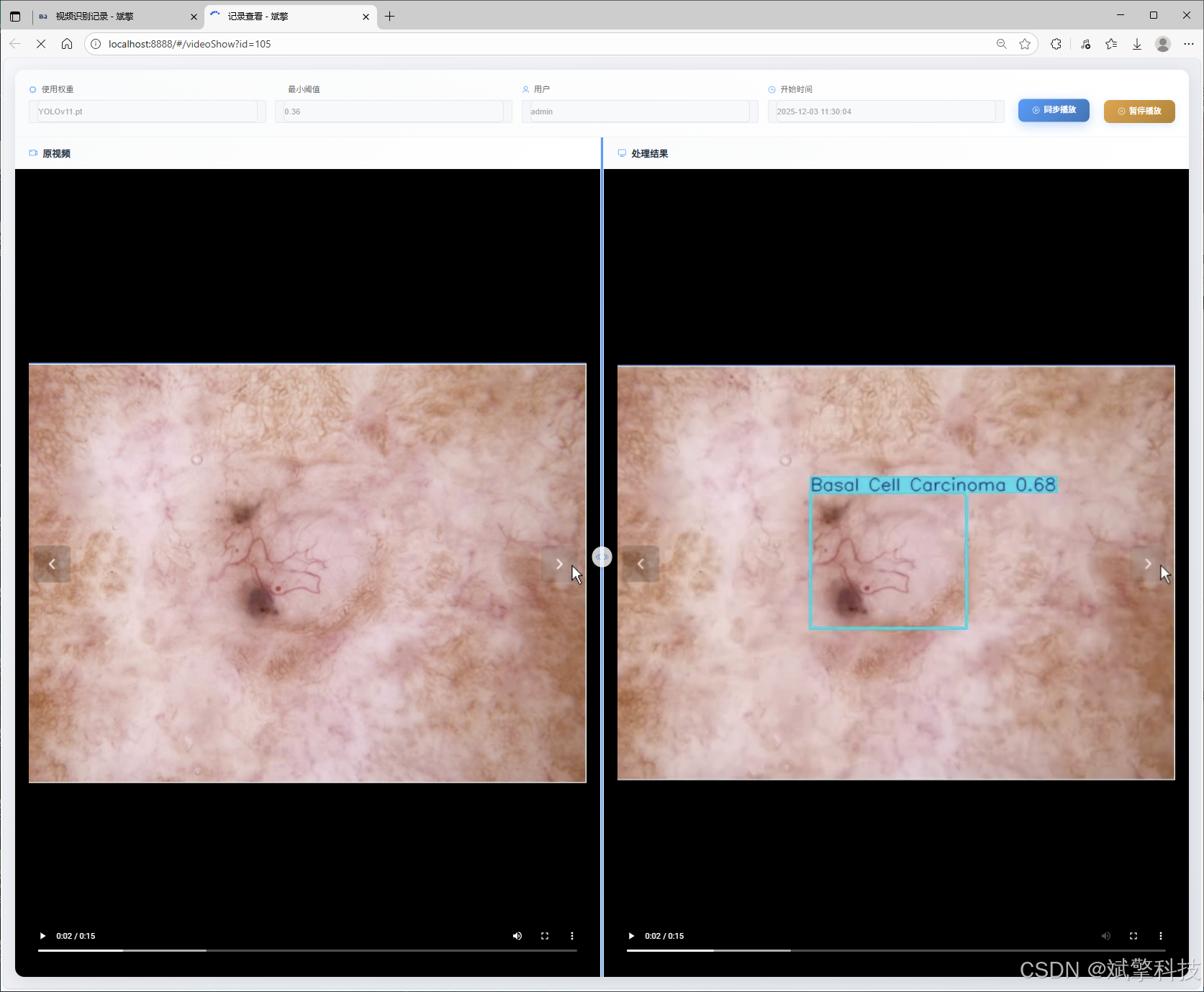
视频识别记录管理
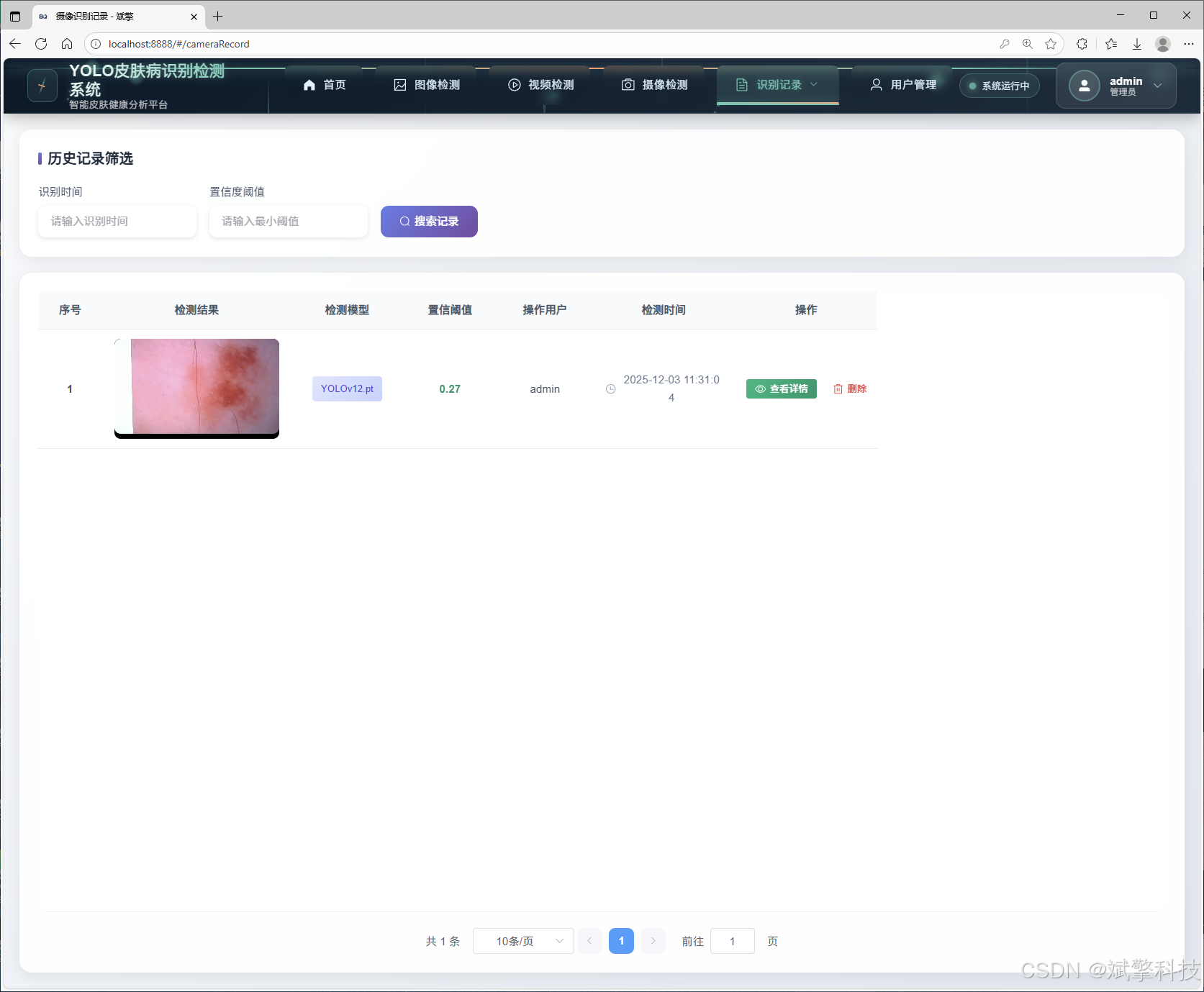
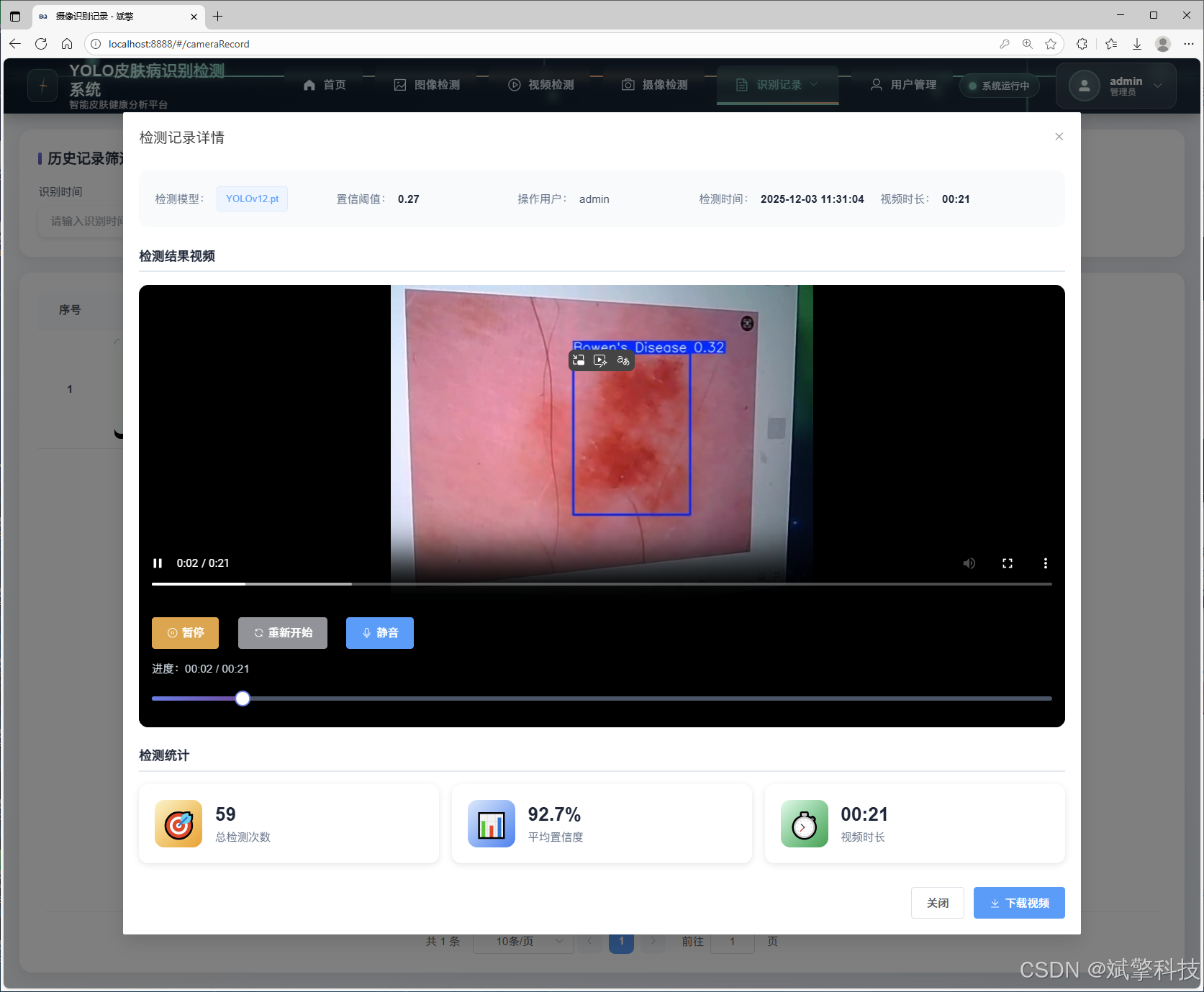
摄像头识别记录管理
用户管理模块
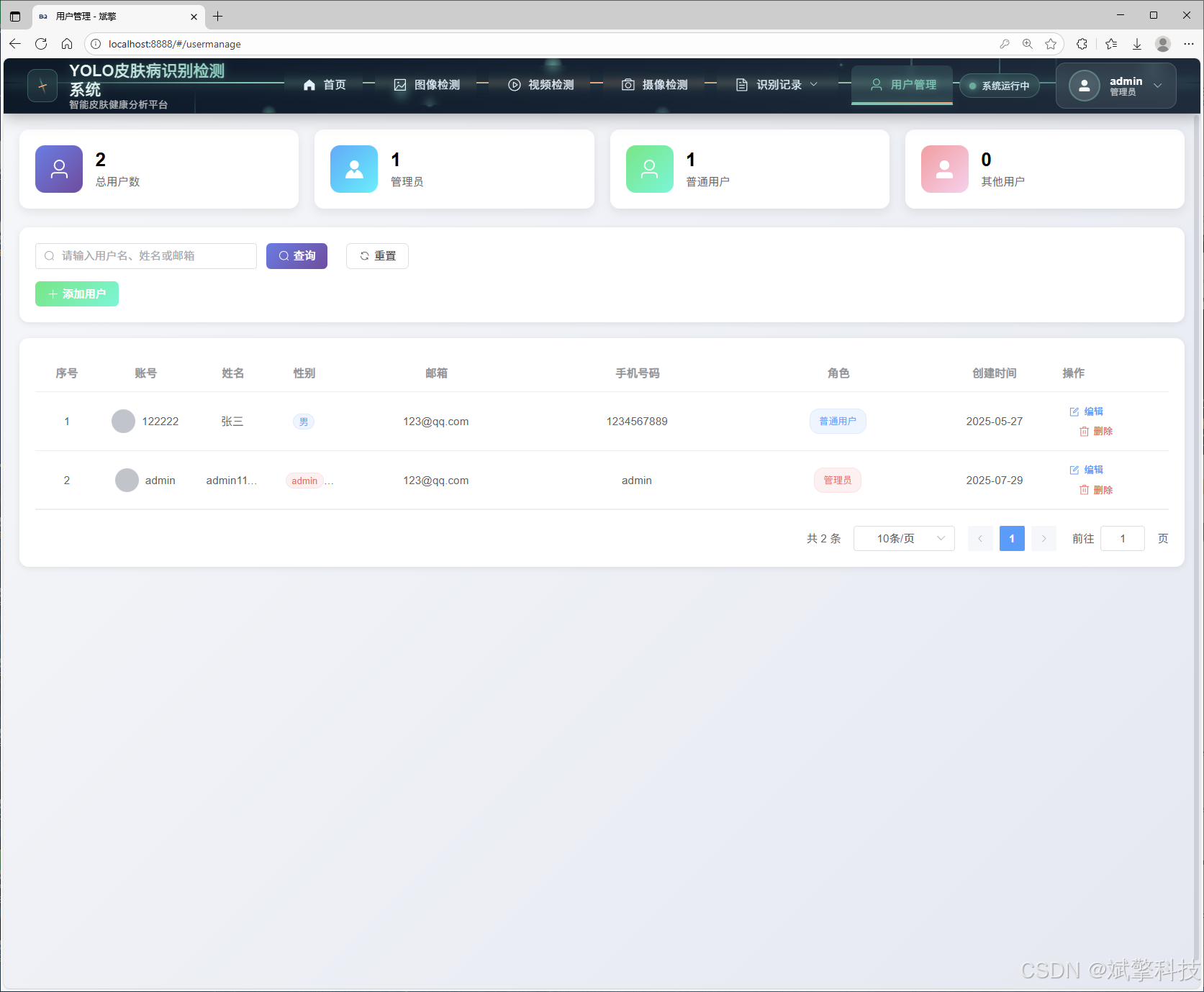
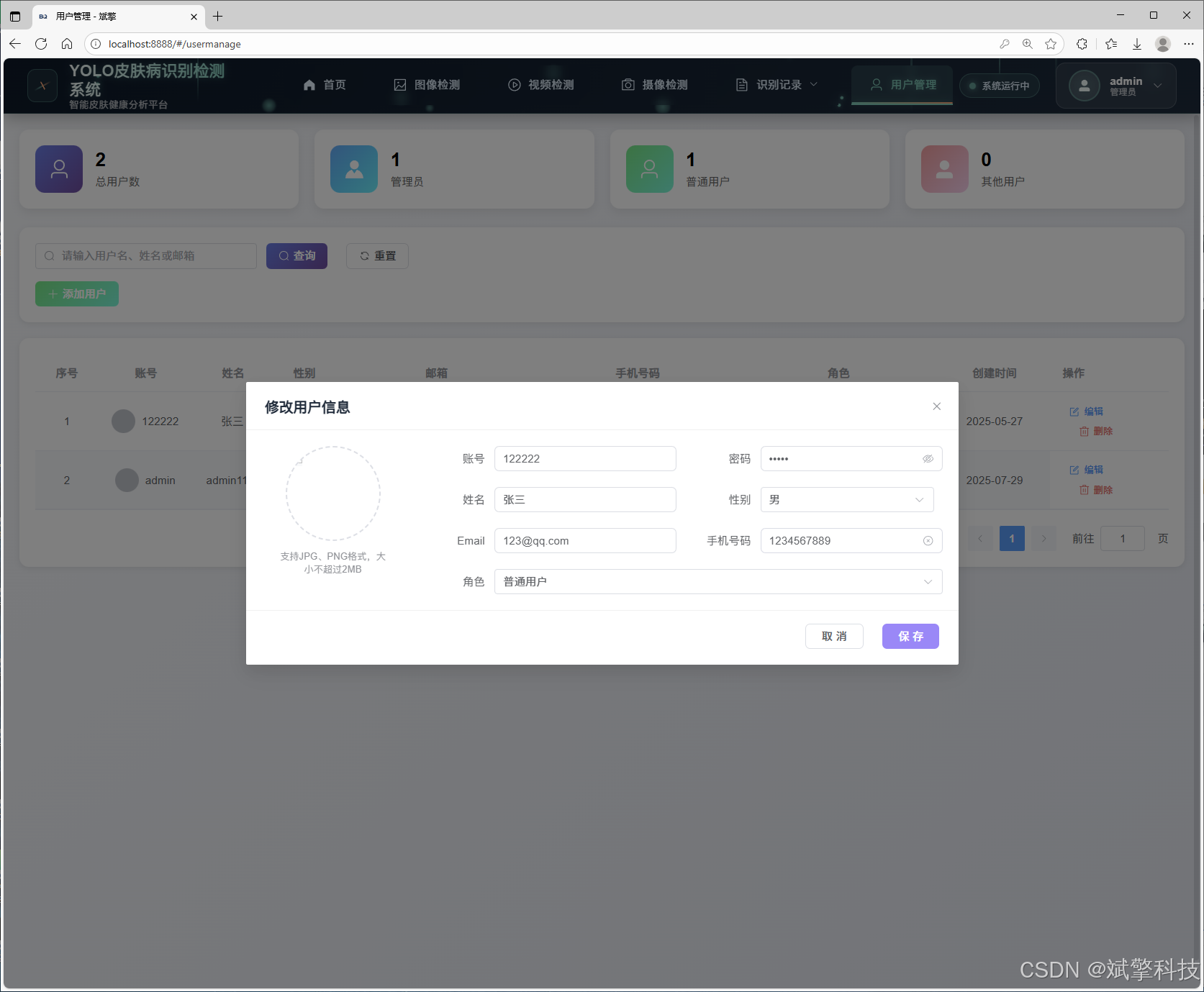
数据管理模块(MySQL表设计)
-
users- 用户信息表

-
imgrecords- 图片检测记录表
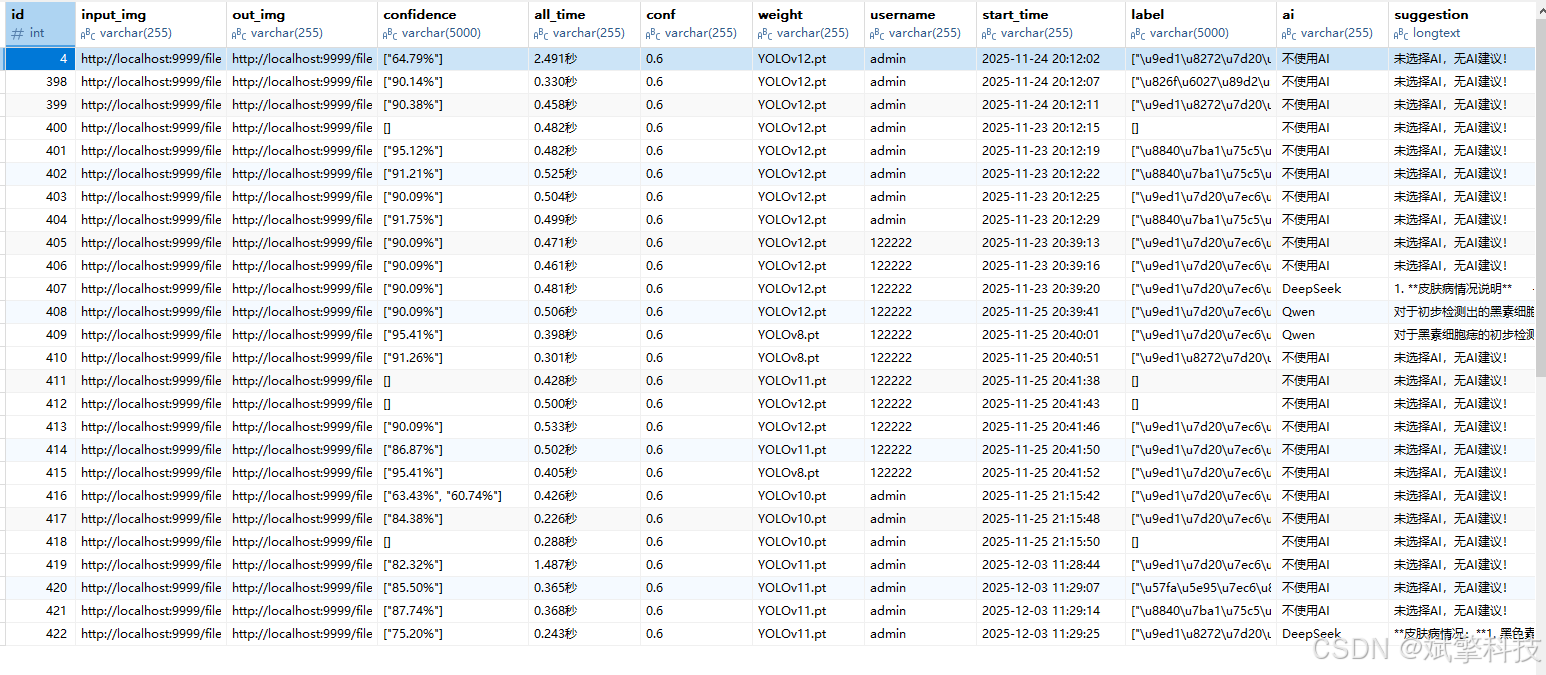
-
videorecords- 视频检测记录表

-
camerarecords- 摄像头检测记录表

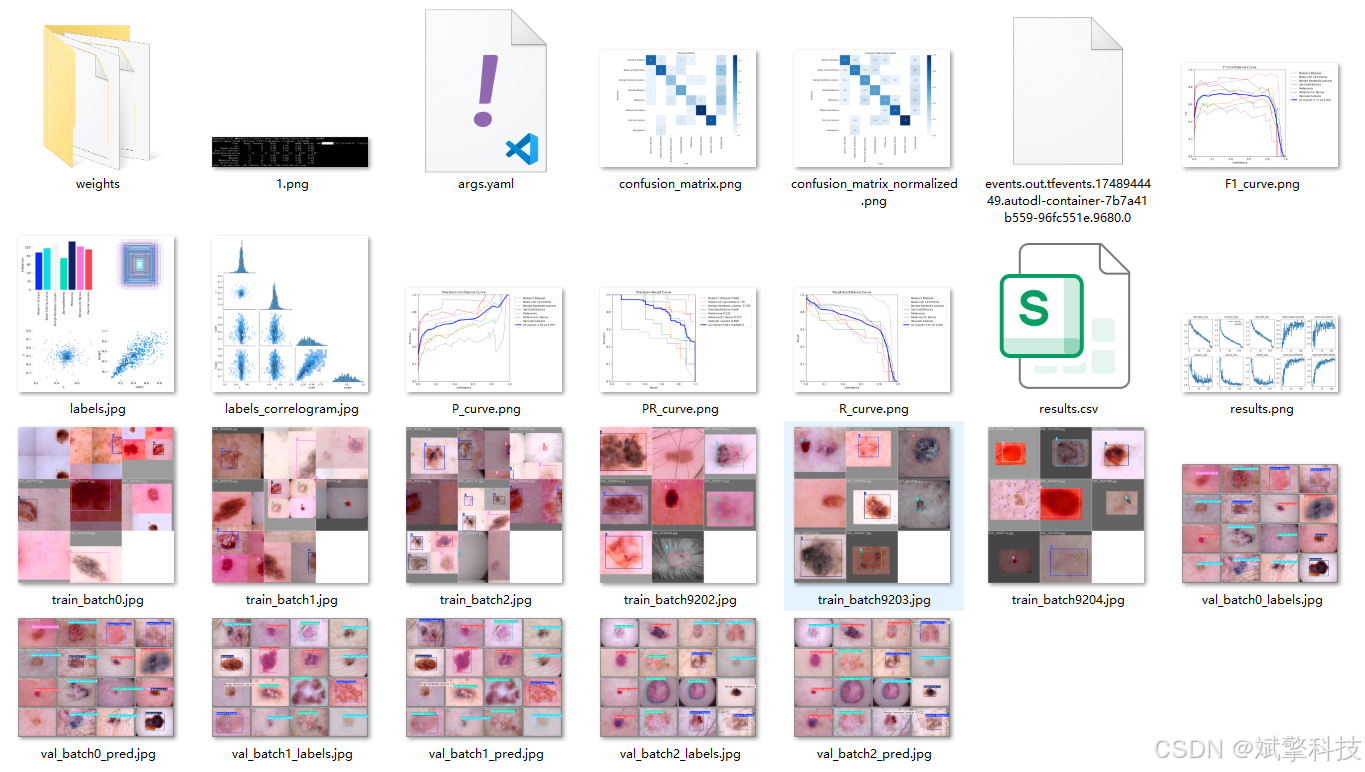
模型训练结果
#coding:utf-8
#根据实际情况更换模型
# yolon.yaml (nano):轻量化模型,适合嵌入式设备,速度快但精度略低。
# yolos.yaml (small):小模型,适合实时任务。
# yolom.yaml (medium):中等大小模型,兼顾速度和精度。
# yolob.yaml (base):基本版模型,适合大部分应用场景。
# yolol.yaml (large):大型模型,适合对精度要求高的任务。

from ultralytics import YOLO

model_path = 'pt/yolo12s.pt'
data_path = 'data.yaml'

if __name__ == '__main__':
    model = YOLO(model_path)
    results = model.train(data=data_path,
                          epochs=500,
                          batch=64,
                          device='0',
                          workers=0,
                          project='runs',
                          name='exp',
                          )
YOLOv8
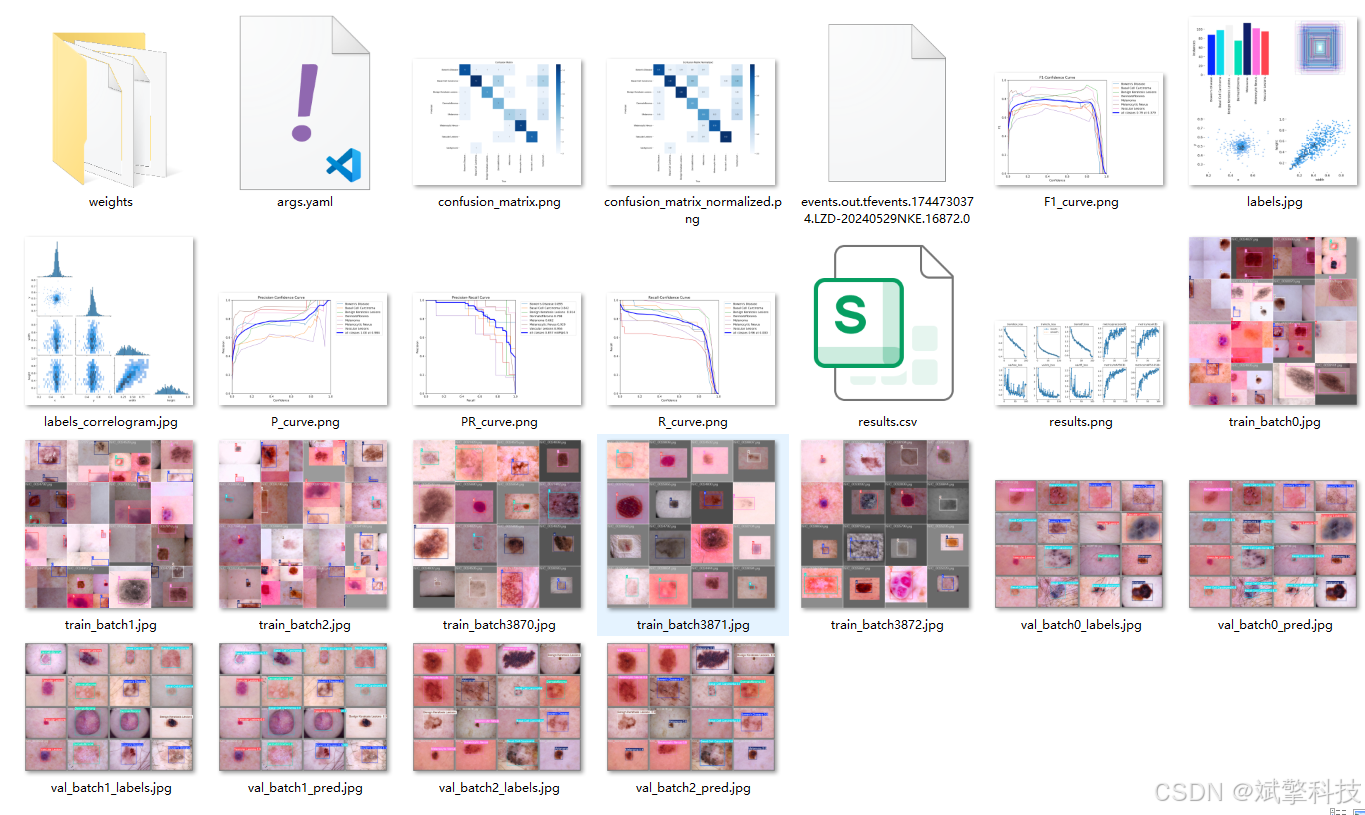
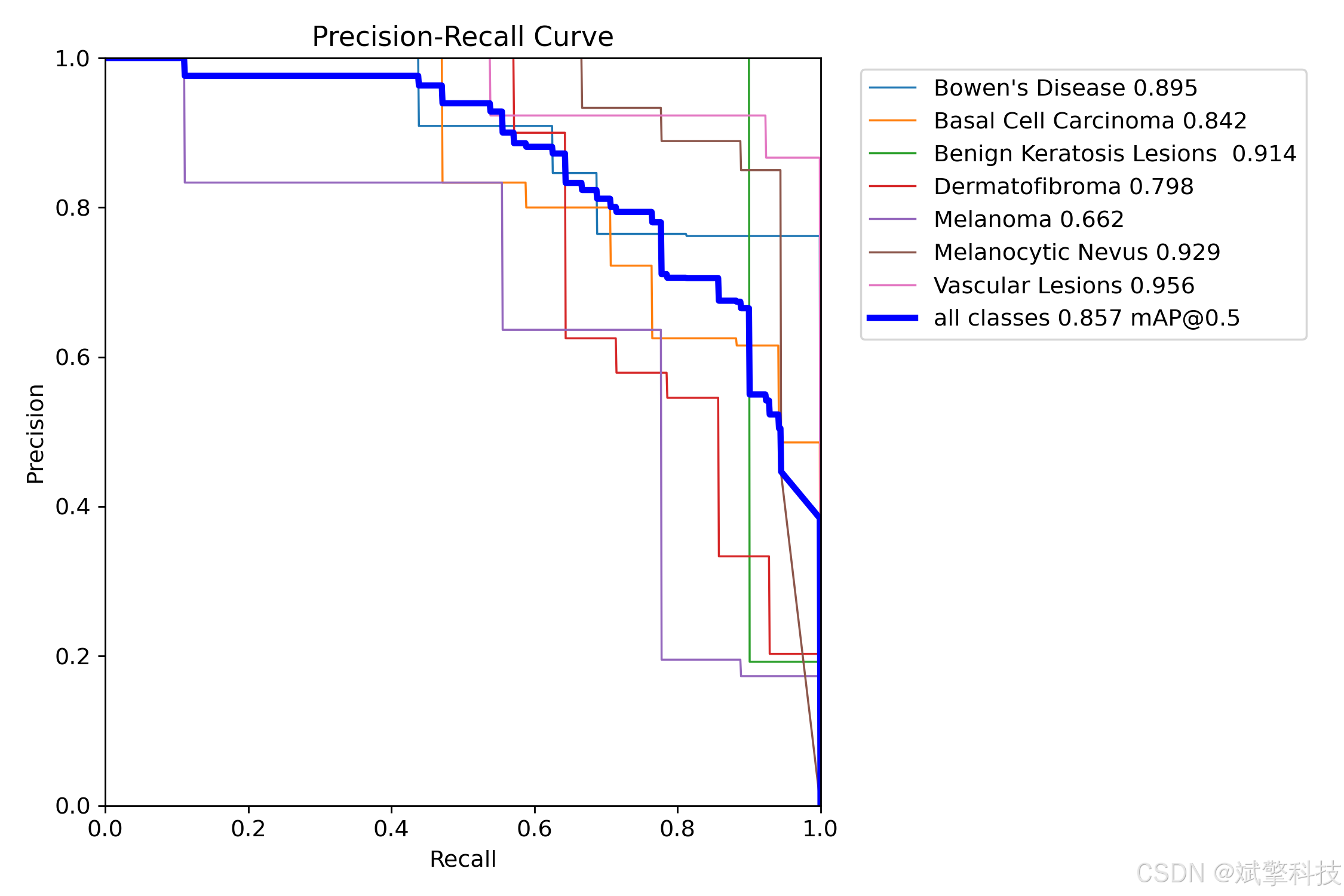
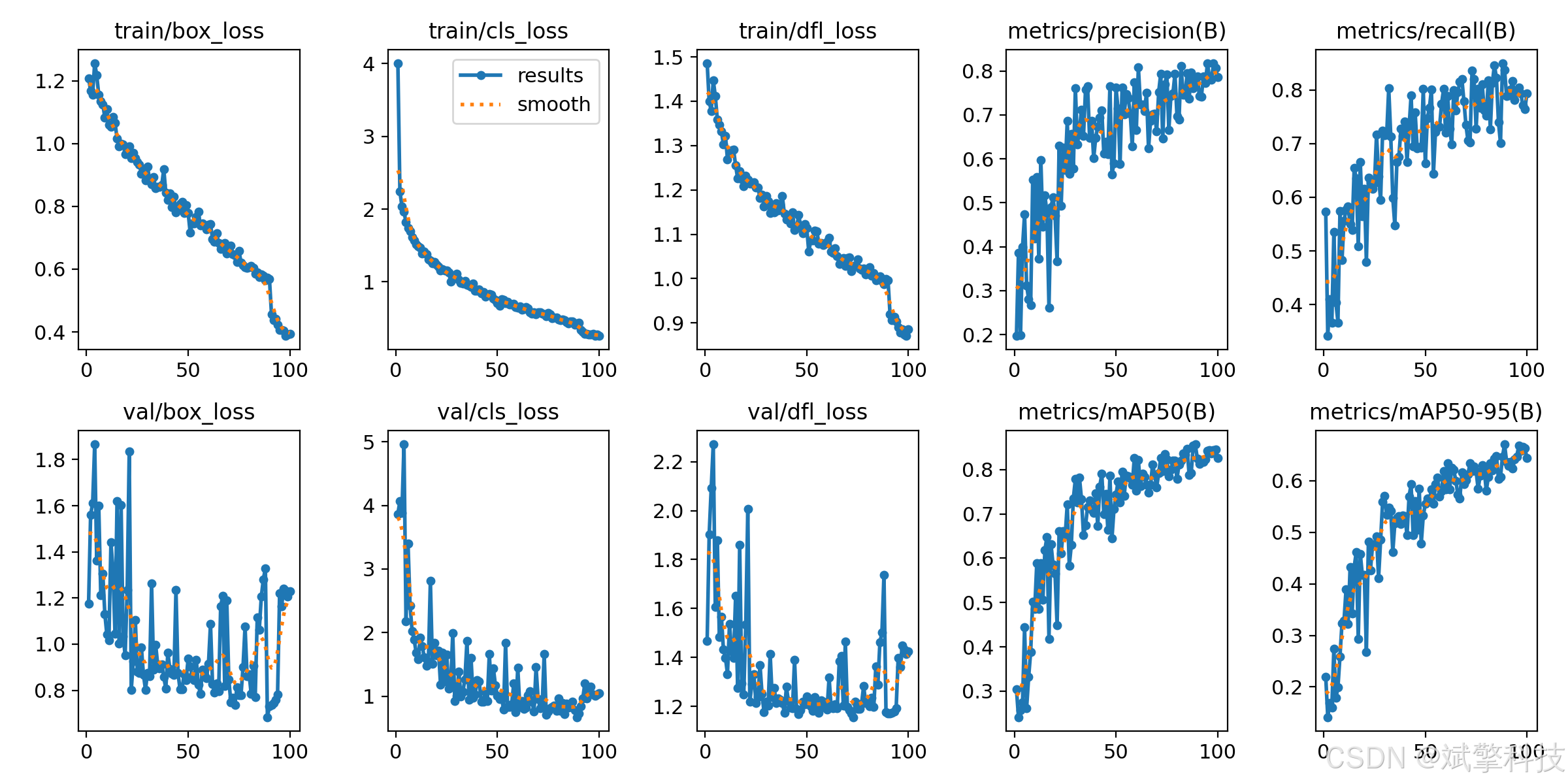
YOLOv10
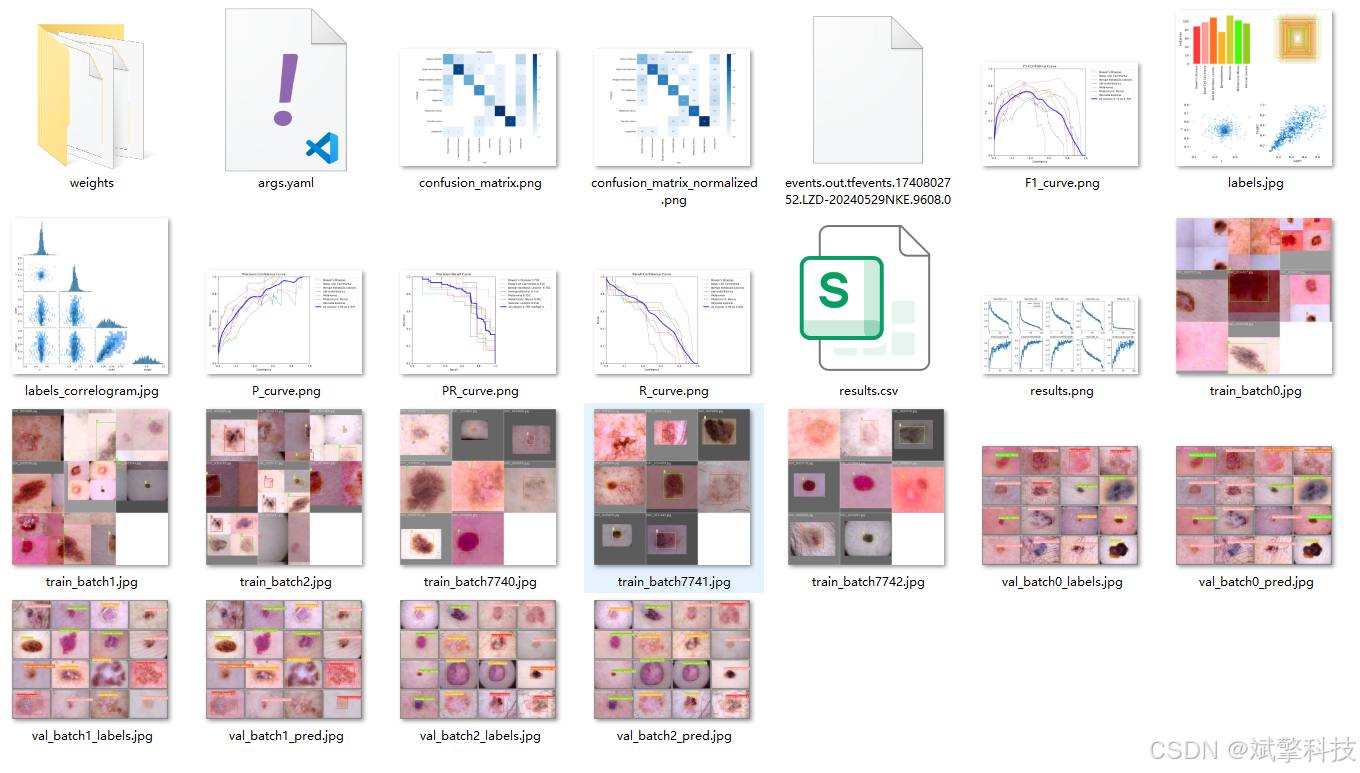
YOLOv11
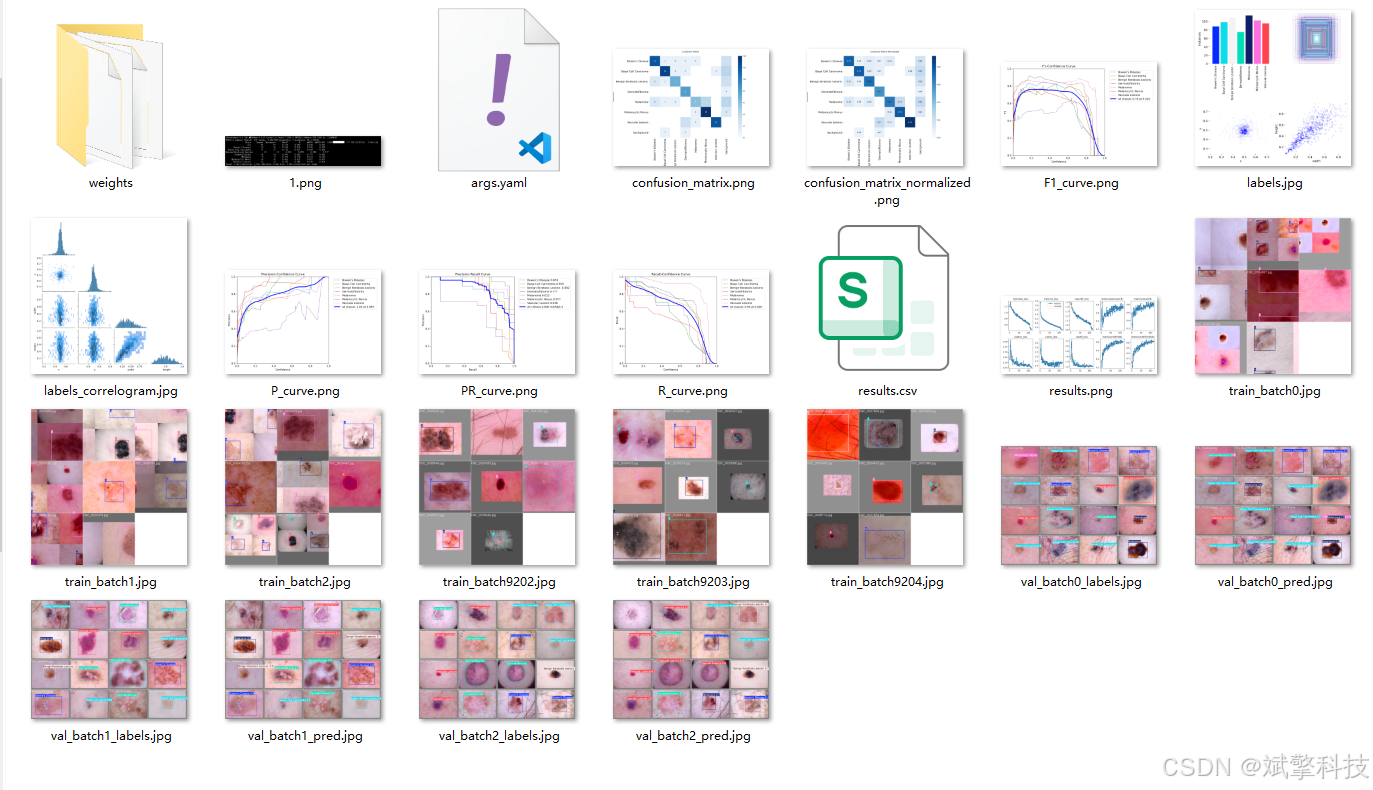
YOLOv12

前端代码展示
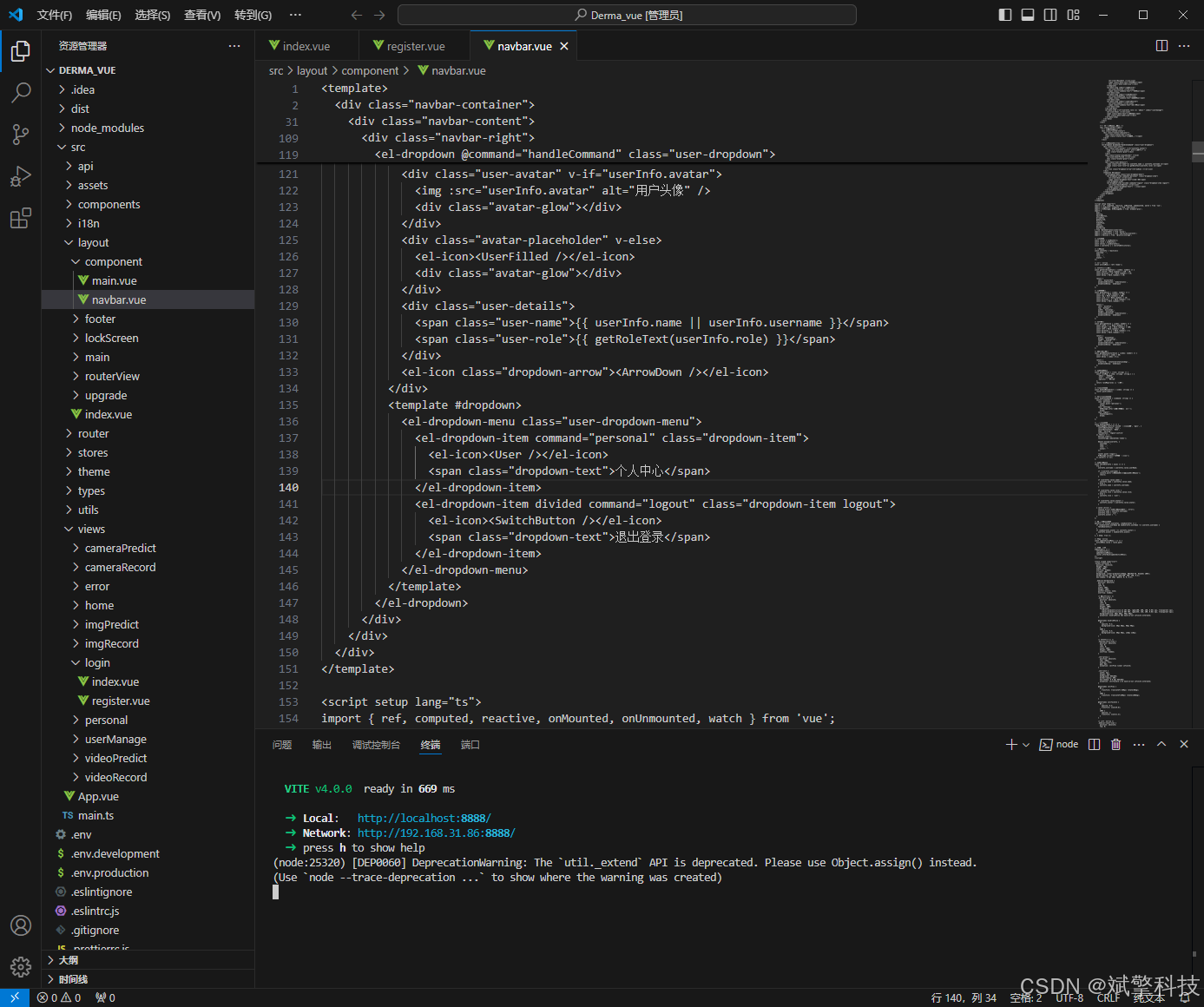
部分代码
<template>
	<div class="home-container layout-pd">
		<el-row :gutter="15" class="home-card-two mb15">
			<el-col :xs="24" :sm="14" :md="14" :lg="16" :xl="16">
				<div class="home-card-item">
					<div style="height: 100%" ref="homeBarRef"></div>
				</div>
			</el-col>
			<el-col :xs="24" :sm="10" :md="10" :lg="8" :xl="8" class="home-media">
				<div class="home-card-item">
					<div style="height: 100%" ref="homePieRef"></div>
				</div>
			</el-col>
		</el-row>
		<el-row :gutter="15" class="home-card-three">
			<el-col :xs="24" :sm="14" :md="14" :lg="8" :xl="8" class="home-media">
				<div class="home-card-item">
					<div style="height: 100%" ref="homeradarRef"></div>
				</div>
			</el-col>
			<el-col :xs="24" :sm="10" :md="10" :lg="16" :xl="16">
				<div class="home-card-item">
					<div class="home-card-item-title">实时检测记录</div>
					<div class="home-monitor">
						<div class="flex-warp">
							<el-table :data="state.paginatedData" style="width: 100%" height="360" v-loading="state.loading">
								<el-table-column prop="patientName" label="患者姓名" align="center" width="120" />
								<el-table-column prop="label" label="检测结果" align="center" width="120">
									<template #default="scope">
										<el-tag
											:type="getResultType(scope.row.label)"
											effect="light"
										>
											{{ formatLabel(scope.row.label) }}
										</el-tag>
									</template>
								</el-table-column>
								<el-table-column prop="confidence" label="置信度" align="center" width="120">
									<template #default="scope">
										{{ formatConfidence(scope.row.confidence) }}
									</template>
								</el-table-column>
								<el-table-column prop="weight" label="模型权重" align="center" width="120" />
								<el-table-column prop="conf" label="检测阈值" align="center" width="120" />
								<el-table-column prop="startTime" label="检测时间" align="center" width="180" />
								<el-table-column label="操作" align="center" width="100">
									<template #default="scope">
										<el-button link type="primary" size="small" @click="handleViewDetail(scope.row)">
											详情
										</el-button>
									</template>
								</el-table-column>
							</el-table>
							<div class="pagination-container">
								<el-pagination
									v-model:current-page="state.currentPage"
									v-model:page-size="state.pageSize"
									:page-sizes="[10, 20, 50, 100]"
									:small="true"
									:layout="layout"
									:total="state.total"
									@size-change="handleSizeChange"
									@current-change="handleCurrentChange"
								/>
							</div>
						</div>
					</div>
				</div>
			</el-col>
		</el-row>
		<el-row :gutter="15" class="home-card-three" style="margin-top: 15px;">
			<el-col :xs="24" :sm="24" :md="24" :lg="24" :xl="24">
				<div class="home-card-item">
					<div style="height: 100%" ref="homeLineRef"></div>
				</div>
			</el-col>
		</el-row>

		<!-- 详情弹窗 -->
		<el-dialog
			v-model="state.detailDialogVisible"
			:title="`皮肤病检测记录详情 - ${state.selectedRecord?.patientName || ''}`"
			width="80%"
			:close-on-click-modal="false"
			:close-on-press-escape="false"
			center
		>
			<div class="detail-container" v-loading="state.detailLoading">
				<el-row :gutter="20">
					<!-- 检测图片 -->
					<el-col :xs="24" :sm="12" :md="12" :lg="12" :xl="12">
						<div class="detail-section">
							<h3 class="detail-title">皮肤病变图片</h3>
							<div class="image-container">
								<div class="img-wrapper" @click="previewImage(getImageUrl(state.selectedRecord?.inputImg), '皮肤病变图片')">
									<img
										:src="getImageUrl(state.selectedRecord?.inputImg)"
										alt="皮肤病变图片"
										class="detection-image"
										v-if="state.selectedRecord?.inputImg"
									/>
									<div class="img-overlay" v-if="state.selectedRecord?.inputImg">
										<el-icon><View /></el-icon>
									</div>
									<div v-else class="image-placeholder">
										<el-icon><Picture /></el-icon>
										<span>暂无皮肤病变图片</span>
									</div>
								</div>
							</div>
						</div>
					</el-col>

					<!-- 检测信息 -->
					<el-col :xs="24" :sm="12" :md="12" :lg="12" :xl="12">
						<div class="detail-section">
							<h3 class="detail-title">检测信息</h3>
							<el-descriptions :column="1" border>
								<el-descriptions-item label="患者姓名">
									{{ state.selectedRecord?.patientName || '未知' }}
								</el-descriptions-item>

								<el-descriptions-item label="检测结果">
									<el-tag
										:type="getResultType(state.selectedRecord?.label || '')"
										effect="light"
									>
										{{ formatLabel(state.selectedRecord?.label || '') }}
									</el-tag>
								</el-descriptions-item>

								<el-descriptions-item label="置信度">
									{{ formatConfidence(state.selectedRecord?.confidence || '') }}
								</el-descriptions-item>

								<el-descriptions-item label="模型权重">
									{{ state.selectedRecord?.weight || '未知' }}
								</el-descriptions-item>

								<el-descriptions-item label="检测阈值">
									{{ state.selectedRecord?.conf || '未知' }}
								</el-descriptions-item>

								<el-descriptions-item label="检测时间">
									{{ state.selectedRecord?.startTime || '未知' }}
								</el-descriptions-item>

								<el-descriptions-item label="患者年龄" v-if="state.selectedRecord?.patientAge">
									{{ state.selectedRecord.patientAge }} 岁
								</el-descriptions-item>

								<el-descriptions-item label="病变部位" v-if="state.selectedRecord?.bodyPart">
									{{ state.selectedRecord.bodyPart }}
								</el-descriptions-item>

								<el-descriptions-item label="检测详情" v-if="hasDetectionDetails">
									<div class="detection-details">
										<div
											v-for="(item, index) in getDetectionDetails()"
											:key="index"
											class="detail-item"
										>
											<span class="detail-label">{{ item.label }}:</span>
											<span class="detail-value">{{ item.confidence }}</span>
										</div>
									</div>
								</el-descriptions-item>
							</el-descriptions>
						</div>
					</el-col>
				</el-row>

				<!-- 原图与检测结果对比 -->
				<el-row :gutter="20" v-if="state.selectedRecord?.inputImg || state.selectedRecord?.outImg">
					<el-col :xs="24" :sm="12" :md="12" :lg="12" :xl="12">
						<div class="detail-section">
							<h3 class="detail-title">原始皮肤图片</h3>
							<div class="image-container">
								<div class="img-wrapper" @click="previewImage(getImageUrl(state.selectedRecord.inputImg), '原始皮肤图片')">
									<img
										:src="getImageUrl(state.selectedRecord.inputImg)"
										alt="原始皮肤图片"
										class="detection-image"
										v-if="state.selectedRecord?.inputImg"
									/>
									<div class="img-overlay" v-if="state.selectedRecord?.inputImg">
										<el-icon><View /></el-icon>
									</div>
									<div v-else class="image-placeholder">
										<el-icon><Picture /></el-icon>
										<span>暂无原始皮肤图片</span>
									</div>
								</div>
							</div>
						</div>
					</el-col>
					<el-col :xs="24" :sm="12" :md="12" :lg="12" :xl="12">
						<div class="detail-section">
							<h3 class="detail-title">检测结果图片</h3>
							<div class="image-container">
								<div class="img-wrapper" @click="previewImage(getImageUrl(state.selectedRecord.outImg), '检测结果图片')">
									<img
										:src="getImageUrl(state.selectedRecord.outImg)"
										alt="检测结果图片"
										class="detection-image"
										v-if="state.selectedRecord?.outImg"
									/>
									<div class="img-overlay" v-if="state.selectedRecord?.outImg">
										<el-icon><View /></el-icon>
									</div>
									<div v-else class="image-placeholder">
										<el-icon><Picture /></el-icon>
										<span>暂无检测结果图片</span>
									</div>
								</div>
							</div>
						</div>
					</el-col>
				</el-row>

				<!-- AI诊断建议 -->
				<el-row :gutter="20" v-if="state.selectedRecord?.suggestion">
					<el-col :xs="24" :sm="24" :md="24" :lg="24" :xl="24">
						<div class="detail-section">
							<h3 class="detail-title">AI诊断建议</h3>
							<div class="suggestion-content">
								<el-alert
									:type="getSuggestionAlertType(state.selectedRecord?.label)"
									:title="state.selectedRecord.suggestion"
									:closable="false"
									show-icon
								/>
							</div>
						</div>
					</el-col>
				</el-row>
			</div>

			<template #footer>
				<span class="dialog-footer">
					<el-button @click="state.detailDialogVisible = false">关闭</el-button>
					<el-button type="primary" @click="handleDownloadImage" :disabled="!state.selectedRecord?.inputImg">
						<el-icon><Download /></el-icon>
						下载检测图片
					</el-button>
					<el-button type="success" @click="handlePrintReport" :disabled="!state.selectedRecord">
						<el-icon><Printer /></el-icon>
						打印诊断报告
					</el-button>
				</span>
			</template>
		</el-dialog>

		<!-- 图片预览弹窗 -->
		<el-dialog
			v-model="state.previewDialog.visible"
			:title="state.previewDialog.title"
			width="60%"
			align-center
			class="image-preview-dialog">
			<div class="preview-content">
				<img :src="state.previewDialog.imageUrl" :alt="state.previewDialog.title" class="preview-image" />
			</div>
		</el-dialog>
	</div>
</template>

<script setup lang="ts" name="home">
import { reactive, onMounted, ref, watch, nextTick, onActivated, markRaw, computed } from 'vue';
import * as echarts from 'echarts';
import { storeToRefs } from 'pinia';
import { useThemeConfig } from '/@/stores/themeConfig';
import { useTagsViewRoutes } from '/@/stores/tagsViewRoutes';
import { ElMessage, ElMessageBox } from 'element-plus';
import { Picture, Download, View, Printer } from '@element-plus/icons-vue';
import request from '/@/utils/request';

// 定义变量内容
const homeLineRef = ref();
const homePieRef = ref();
const homeBarRef = ref();
const homeradarRef = ref();
const storesTagsViewRoutes = useTagsViewRoutes();
const storesThemeConfig = useThemeConfig();
const { themeConfig } = storeToRefs(storesThemeConfig);
const { isTagsViewCurrenFull } = storeToRefs(storesTagsViewRoutes);

// 皮肤病类别
const SKIN_DISEASE_TYPES = ['鲍温病', '基底细胞癌', '良性角化病病变', '皮肤纤维瘤', '黑色素瘤', '黑素细胞痣', '血管病变'];

const state = reactive({
	data: [] as any,
	paginatedData: [] as any,
	loading: false,
	currentPage: 1,
	pageSize: 10,
	total: 0,
	global: {
		homeChartOne: null,
		homeChartTwo: null,
		homeCharThree: null,
		homeCharFour: null,
		dispose: [null, '', undefined],
	} as any,
	myCharts: [] as EmptyArrayType,
	charts: {
		theme: '',
		bgColor: '',
		color: '#303133',
	},
	// 详情弹窗相关
	detailDialogVisible: false,
	detailLoading: false,
	selectedRecord: null as any,
	// 图片预览弹窗
	previewDialog: {
		visible: false,
		title: '',
		imageUrl: '',
	},
});

// 响应式分页数据
const layout = computed(() => {
	return window.innerWidth < 768 ? 'prev, pager, next' : 'total, sizes, prev, pager, next, jumper';
});

// 获取图片URL
const getImageUrl = (imagePath: string) => {
	if (!imagePath) return '';
	// 如果已经是完整URL,直接返回
	if (imagePath.startsWith('http')) return imagePath;
	// 否则拼接基础URL
	return `/api${imagePath.startsWith('/') ? '' : '/'}${imagePath}`;
};

// 是否有检测详情
const hasDetectionDetails = computed(() => {
	if (!state.selectedRecord) return false;
	try {
		const labels = JSON.parse(state.selectedRecord.label || '[]');
		const confidences = JSON.parse(state.selectedRecord.confidence || '[]');
		return labels.length > 0 && confidences.length > 0;
	} catch {
		return false;
	}
});

// 获取检测详情
const getDetectionDetails = () => {
	if (!state.selectedRecord) return [];
	try {
		const labels = JSON.parse(state.selectedRecord.label || '[]');
		const confidences = JSON.parse(state.selectedRecord.confidence || '[]');

		return labels.map((label: string, index: number) => ({
			label,
			confidence: confidences[index] ? `${(parseFloat(confidences[index]) * 100).toFixed(1)}%` : '0%'
		}));
	} catch {
		return [];
	}
};

// 图片预览
const previewImage = (imageUrl: string, title: string) => {
	if (!imageUrl) {
		ElMessage.warning('没有可预览的图片');
		return;
	}
	state.previewDialog.imageUrl = imageUrl;
	state.previewDialog.title = title;
	state.previewDialog.visible = true;
};

// 分页处理
const handleSizeChange = (val: number) => {
	state.pageSize = val;
	state.currentPage = 1;
	updatePaginatedData();
};

const handleCurrentChange = (val: number) => {
	state.currentPage = val;
	updatePaginatedData();
};

const updatePaginatedData = () => {
	const start = (state.currentPage - 1) * state.pageSize;
	const end = start + state.pageSize;
	state.paginatedData = state.data.slice(start, end);
};

// 格式化标签显示
const formatLabel = (label: string) => {
	try {
		const labels = JSON.parse(label);
		return labels.length > 0 ? labels.join(', ') : '未检测到病变';
	} catch {
		return label || '未检测到病变';
	}
};

// 根据检测结果设置标签类型
const getResultType = (label: string) => {
	try {
		const labels = JSON.parse(label);
		// 恶性病变 - 高风险
		if (labels.includes('黑色素瘤') || labels.includes('基底细胞癌') || labels.includes('鲍温病')) {
			return 'danger';
		}
		// 良性病变 - 中等风险
		if (labels.includes('血管病变') || labels.includes('皮肤纤维瘤')) {
			return 'warning';
		}
		// 良性病变 - 低风险
		if (labels.includes('良性角化病病变') || labels.includes('黑素细胞痣')) {
			return 'success';
		}
		// 未检测到病变
		if (labels.length === 0) {
			return 'info';
		}
		return 'warning';
	} catch {
		return 'info';
	}
};

// 获取诊断建议的警告类型
const getSuggestionAlertType = (label: string) => {
	try {
		const labels = JSON.parse(label);
		// 恶性病变 - 高风险
		if (labels.includes('黑色素瘤') || labels.includes('基底细胞癌') || labels.includes('鲍温病')) {
			return 'error';
		}
		// 良性病变 - 中等风险
		if (labels.includes('血管病变') || labels.includes('皮肤纤维瘤')) {
			return 'warning';
		}
		// 良性病变 - 低风险
		if (labels.includes('良性角化病病变') || labels.includes('黑素细胞痣')) {
			return 'success';
		}
		return 'info';
	} catch {
		return 'info';
	}
};

// 格式化置信度显示
const formatConfidence = (confidence: string) => {
	try {
		const confidences = JSON.parse(confidence);
		if (confidences.length === 0) return '0%';

		const maxConfidence = Math.max(...confidences.map((conf: any) => {
			if (typeof conf === 'number') return conf * 100;
			if (typeof conf === 'string') {
				const num = parseFloat(conf.replace('%', ''));
				return isNaN(num) ? 0 : num;
			}
			return 0;
		}));
		return `${maxConfidence.toFixed(1)}%`;
	} catch {
		// 如果解析失败,尝试直接显示
		if (typeof confidence === 'number') {
			return `${(confidence * 100).toFixed(1)}%`;
		}
		return confidence || '0%';
	}
};

// 查看详情
const handleViewDetail = async (row: any) => {
	state.selectedRecord = row;
	state.detailDialogVisible = true;
	state.detailLoading = true;

	// 如果需要从服务器获取更详细的数据
	try {
		const res = await request.get(`/api/imgRecords/${row.id}`);
		if (res.code == 0) {
			// 确保数据格式一致
			const record = res.data;
			state.selectedRecord = {
				...record,
				// 确保图片字段正确
				inputImg: record.inputImg || record.imagePath,
				outImg: record.outImg || record.resultImagePath,
				// 确保患者姓名字段正确
				patientName: record.patientName || record.username
			};
		}
	} catch (error) {
		console.error('获取详情失败:', error);
		// 如果API调用失败,使用已有数据
		state.selectedRecord = row;
	} finally {
		state.detailLoading = false;
	}
};

// 下载图片
const handleDownloadImage = async () => {
	if (!state.selectedRecord?.inputImg) {
		ElMessage.warning('没有可下载的图片');
		return;
	}

	try {
		const imageUrl = getImageUrl(state.selectedRecord.inputImg);
		const response = await fetch(imageUrl);
		const blob = await response.blob();

		const url = window.URL.createObjectURL(blob);
		const a = document.createElement('a');
		a.href = url;

		// 从路径中提取文件名,如果没有则使用默认名称
		const filename = state.selectedRecord.inputImg.split('/').pop() ||
			`skin_disease_${state.selectedRecord.patientName}_${state.selectedRecord.startTime?.replace(/[: ]/g, '-') || 'unknown'}.jpg`;

		a.download = filename;
		document.body.appendChild(a);
		a.click();
		window.URL.revokeObjectURL(url);
		document.body.removeChild(a);

		ElMessage.success('图片下载成功');
	} catch (error) {
		console.error('下载图片失败:', error);
		ElMessage.error('图片下载失败');
	}
};

// 打印诊断报告
const handlePrintReport = () => {
	if (!state.selectedRecord) {
		ElMessage.warning('没有可打印的记录');
		return;
	}

	ElMessageBox.confirm(
		'确定要打印诊断报告吗?',
		'打印诊断报告',
		{
			confirmButtonText: '确定',
			cancelButtonText: '取消',
			type: 'warning',
		}
	).then(() => {
		// 这里可以调用打印功能
		ElMessage.success('诊断报告打印功能开发中');
	}).catch(() => {
		// 用户取消
	});
};

// 折线图 - 近十日预测数量
const initLineChart = () => {
	if (!state.global.dispose.some((b: any) => b === state.global.homeChartOne)) state.global.homeChartOne?.dispose();
	state.global.homeChartOne = markRaw(echarts.init(homeLineRef.value, state.charts.theme));

	// 统计每天的预测数量
	const counts: Record<string, number> = {};
	state.data.forEach((prediction: any) => {
		if (prediction.startTime) {
			const date = prediction.startTime.split(' ')[0];
			counts[date] = (counts[date] || 0) + 1;
		}
	});

	const sortedDatesDesc = Object.keys(counts).sort((a, b) => b.localeCompare(a));
	const latestDatesDesc = sortedDatesDesc.slice(0, 10);
	const latestDates = latestDatesDesc.sort((a, b) => a.localeCompare(b));

	const result = {
		dateData: latestDates,
		valueData: latestDates.map(date => counts[date])
	};

	const option = {
		backgroundColor: state.charts.bgColor,
		title: {
			text: '近十日皮肤病检测数量趋势',
			x: 'left',
			textStyle: { fontSize: 15, color: state.charts.color },
		},
		grid: { top: 70, right: 20, bottom: 30, left: 30 },
		tooltip: {
			trigger: 'axis',
			formatter: (params: any) => {
				const data = params[0];
				return `${data.name}<br/>检测数量: ${data.value}`;
			}
		},
		xAxis: {
			data: result.dateData,
			axisLabel: {
				color: state.charts.color,
				rotate: 45
			},
		},
		yAxis: [
			{
				type: 'value',
				name: '检测数量',
				splitLine: { show: true, lineStyle: { type: 'dashed', color: state.charts.theme === 'dark' ? '#444' : '#f5f5f5' } },
				axisLabel: {
					color: state.charts.color,
				},
			},
		],
		series: [
			{
				name: '检测数量',
				type: 'line',
				symbolSize: 6,
				symbol: 'circle',
				smooth: true,
				data: result.valueData,
				lineStyle: { color: '#36A2EB' },
				itemStyle: { color: '#36A2EB', borderColor: '#36A2EB' },
				areaStyle: {
					color: new echarts.graphic.LinearGradient(0, 0, 0, 1, [
						{ offset: 0, color: '#36A2EBb3' },
						{ offset: 1, color: '#36A2EB03' },
					]),
				},
			},
		],
	};

	state.global.homeChartOne.setOption(option);
	state.myCharts.push(state.global.homeChartOne);
};

// 饼图 - 患者检测分布
const initPieChart = () => {
	if (!state.global.dispose.some((b: any) => b === state.global.homeChartTwo)) state.global.homeChartTwo?.dispose();
	state.global.homeChartTwo = markRaw(echarts.init(homePieRef.value, state.charts.theme));

	const patientNameCounts: Record<string, number> = {};
	state.data.forEach((prediction: any) => {
		const patientName = prediction.patientName || prediction.username || '未知患者';
		patientNameCounts[patientName] = (patientNameCounts[patientName] || 0) + 1;
	});

	const sortedPatientNames = Object.keys(patientNameCounts).sort((a, b) => patientNameCounts[b] - patientNameCounts[a]);
	const topPatientNames = sortedPatientNames.slice(0, 6);
	const topValues = topPatientNames.map(u => patientNameCounts[u]);

	const pieData = topPatientNames.map((patientName, i) => ({
		name: patientName,
		value: topValues[i]
	}));

	const option = {
		backgroundColor: state.charts.bgColor,
		title: {
			text: '患者检测分布',
			x: 'left',
			textStyle: { fontSize: '15', color: state.charts.color },
		},
		legend: {
			top: 'bottom',
			textStyle: {
				color: state.charts.color
			}
		},
		tooltip: {
			trigger: 'item',
			formatter: '{a} <br/>{b}: {c} ({d}%)'
		},
		series: [
			{
				type: 'pie',
				radius: ['40%', '70%'],
				center: ['50%', '50%'],
				avoidLabelOverlap: true,
				itemStyle: {
					borderRadius: 10,
					borderColor: state.charts.bgColor,
					borderWidth: 2
				},
				label: {
					show: true,
					formatter: '{b}: {c}次',
					color: state.charts.color
				},
				emphasis: {
					label: {
						show: true,
						fontSize: '14',
						fontWeight: 'bold'
					}
				},
				data: pieData
			}
		]
	};

	state.global.homeChartTwo.setOption(option);
	state.myCharts.push(state.global.homeChartTwo);
};

// 雷达图 - 患者置信度分析
const initradarChart = () => {
	if (!state.global.dispose.some((b: any) => b === state.global.homeCharFour)) state.global.homeCharFour?.dispose();
	state.global.homeCharFour = markRaw(echarts.init(homeradarRef.value, state.charts.theme));

	const confStatsByUser: Record<string, { total: number, count: number }> = {};

	state.data.forEach((prediction: any) => {
		const patientName = prediction.patientName || prediction.username || '未知患者';
		let confidenceValue = 0;

		try {
			const confidences = JSON.parse(prediction.confidence || '[]');
			if (confidences.length > 0) {
				// 取最大置信度
				confidenceValue = Math.max(...confidences.map((conf: any) => {
					if (typeof conf === 'number') return conf;
					if (typeof conf === 'string') {
						const num = parseFloat(conf.replace('%', '')) / 100;
						return isNaN(num) ? 0 : num;
					}
					return 0;
				}));
			}
		} catch {
			// 如果解析失败,尝试直接使用数值
			if (typeof prediction.confidence === 'number') {
				confidenceValue = prediction.confidence;
			}
		}

		if (!confStatsByUser[patientName]) {
			confStatsByUser[patientName] = { total: confidenceValue, count: 1 };
		} else {
			confStatsByUser[patientName].total += confidenceValue;
			confStatsByUser[patientName].count += 1;
		}
	});

	const avgConfData = Object.keys(confStatsByUser).map(patientName => ({
		patientName,
		avgConf: confStatsByUser[patientName].total / confStatsByUser[patientName].count,
	}));

	const topAvgConfData = avgConfData.slice(0, 7);
	const data = topAvgConfData.map(item => Number((item.avgConf * 100).toFixed(2)));
	const indicatorNames = topAvgConfData.map(item => item.patientName);

	const indicator = indicatorNames.map((name) => ({
		name,
		max: 100
	}));

	const option = {
		backgroundColor: state.charts.bgColor,
		title: {
			text: '患者检测置信度分析',
			x: 'left',
			textStyle: { fontSize: '15', color: state.charts.color },
		},
		tooltip: {
			formatter: (params: any) => {
				return `${params.name}: ${params.value}%`;
			}
		},
		radar: {
			radius: '65%',
			splitNumber: 4,
			indicator: indicator,
			axisName: {
				color: state.charts.color,
				fontSize: 12
			},
			splitArea: {
				areaStyle: {
					color: ['rgba(54,162,235,0.1)', 'rgba(54,162,235,0.05)'],
				}
			},
			splitLine: {
				lineStyle: {
					color: 'rgba(54,162,235,0.3)'
				}
			},
			axisLine: {
				lineStyle: {
					color: 'rgba(54,162,235,0.5)'
				}
			}
		},
		series: [{
			type: 'radar',
			data: [{
				value: data,
				name: '置信度',
				areaStyle: {
					color: 'rgba(54,162,235,0.3)'
				},
				lineStyle: {
					color: '#36A2EB'
				},
				itemStyle: {
					color: '#36A2EB'
				},
				label: {
					show: true,
					formatter: (params: any) => {
						return params.value + '%';
					}
				}
			}]
		}]
	};

	state.global.homeCharFour.setOption(option);
	state.myCharts.push(state.global.homeCharFour);
};

// 柱状图 - 检测结果统计
const initBarChart = () => {
	if (!state.global.dispose.some((b: any) => b === state.global.homeCharThree)) state.global.homeCharThree?.dispose();
	state.global.homeCharThree = markRaw(echarts.init(homeBarRef.value, state.charts.theme));

	const categories = SKIN_DISEASE_TYPES;
	const counts: Record<string, number> = {};
	categories.forEach(cat => counts[cat] = 0);

	state.data.forEach((item: any) => {
		let detectedDiseases: string[] = [];

		try {
			const labels: string[] = JSON.parse(item.label || '[]');
			detectedDiseases = labels;
		} catch {
			// 如果解析失败,检查原始label字段
			const label = item.label || '';
			if (label) {
				detectedDiseases = [label];
			}
		}

		// 统计每种皮肤病的出现次数
		detectedDiseases.forEach((disease: string) => {
			if (categories.includes(disease)) {
				counts[disease]++;
			}
		});
	});

	const countStrings = categories.map(cat => counts[cat]);
	// 定义颜色:恶性病变用红色,良性病变用绿色,其他用橙色
	const colors = ['#FF6B6B', '#FF6B6B', '#4CAF50', '#4CAF50', '#FF6B6B', '#4CAF50', '#FF9800'];

	const option = {
		backgroundColor: state.charts.bgColor,
		title: {
			text: '皮肤病类型检测分布',
			x: 'left',
			textStyle: { fontSize: '15', color: state.charts.color },
		},
		tooltip: {
			trigger: 'axis',
			formatter: (params: any) => {
				const data = params[0];
				return `${data.name}<br/>数量: ${data.value}`;
			}
		},
		grid: { top: 70, right: 30, bottom: 30, left: 50 },
		xAxis: [
			{
				type: 'category',
				data: categories,
				axisTick: { show: false },
				axisLabel: {
					color: state.charts.color,
					rotate: 45
				},
			},
		],
		yAxis: [
			{
				type: 'value',
				name: '检测数量',
				splitLine: {
					show: true,
					lineStyle: {
						type: 'dashed',
						color: state.charts.theme === 'dark' ? '#444' : '#f5f5f5'
					}
				},
				axisLabel: {
					color: state.charts.color,
				},
			},
		],
		series: [
			{
				name: '检测数量',
				type: 'bar',
				barWidth: 40,
				itemStyle: {
					color: (params: any) => colors[params.dataIndex],
					borderRadius: [4, 4, 0, 0],
				},
				label: {
					show: true,
					position: 'top',
					color: state.charts.color
				},
				data: countStrings,
			},
		],
	};

	state.global.homeCharThree.setOption(option);
	state.myCharts.push(state.global.homeCharThree);
};

// 批量设置 echarts resize
const initEchartsResizeFun = () => {
	nextTick(() => {
		for (let i = 0; i < state.myCharts.length; i++) {
			setTimeout(() => {
				state.myCharts[i]?.resize();
			}, i * 1000);
		}
	});
};

const initEchartsResize = () => {
	window.addEventListener('resize', initEchartsResizeFun);
};

// 加载数据
const loadData = async () => {
	state.loading = true;
	try {
		const res = await request.get('/api/imgRecords/all');
		if (res.code == 0) {
			// 转换数据格式,确保与图片记录页面一致
			state.data = res.data.map((record: any, index: number) => {
				// 统一数据格式
				const transformedRecord = {
					id: record.id,
					num: index + 1,
					// 图片字段统一
					inputImg: record.inputImg || record.imagePath,
					outImg: record.outImg || record.resultImagePath,
					// 患者信息字段
					patientName: record.patientName || record.username,
					patientAge: record.patientAge,
					bodyPart: record.bodyPart,
					// 其他字段
					weight: record.weight,
					conf: record.conf,
					ai: record.ai,
					suggestion: record.suggestion,
					startTime: record.startTime,
					label: record.label,
					confidence: record.confidence,
					// 确保family字段存在
					family: record.family || []
				};

				// 如果没有family字段,尝试从label和confidence构建
				if (!transformedRecord.family || transformedRecord.family.length === 0) {
					try {
						const labels = JSON.parse(record.label || '[]');
						const confidences = JSON.parse(record.confidence || '[]');
						transformedRecord.family = labels.map((label: string, idx: number) => ({
							label: label,
							confidence: confidences[idx] || 0,
							startTime: record.startTime
						}));
					} catch (error) {
						console.error('构建family字段失败:', error);
						transformedRecord.family = [];
					}
				}

				return transformedRecord;
			}).reverse();

			state.total = state.data.length;
			updatePaginatedData();

			// 初始化图表
			setTimeout(() => {
				initLineChart();
				initradarChart();
				initPieChart();
				initBarChart();
			}, 100);
		} else {
			ElMessage.error(res.msg || '加载数据失败');
		}
	} catch (error) {
		console.error('加载数据失败:', error);
		ElMessage.error('加载数据失败,请检查网络连接');
	} finally {
		state.loading = false;
	}
};

// 页面加载时
onMounted(() => {
	loadData();
	initEchartsResize();
});

// 由于页面缓存原因,keep-alive
onActivated(() => {
	initEchartsResizeFun();
});

// 监听相关状态变化
watch(
	() => isTagsViewCurrenFull.value,
	() => {
		initEchartsResizeFun();
	}
);

watch(
	() => themeConfig.value.isIsDark,
	(isIsDark) => {
		nextTick(() => {
			state.charts.theme = isIsDark ? 'dark' : '';
			state.charts.bgColor = isIsDark ? 'transparent' : '';
			state.charts.color = isIsDark ? '#dadada' : '#303133';
			setTimeout(() => {
				initLineChart();
				initradarChart();
				initPieChart();
				initBarChart();
			}, 500);
		});
	},
	{
		deep: true,
		immediate: true,
	}
);
</script>

<style scoped lang="scss">
$homeNavLengh: 8;

.home-container {
	overflow: hidden;

	.home-card-one,
	.home-card-two,
	.home-card-three {
		.home-card-item {
			width: 100%;
			height: 130px;
			border-radius: 4px;
			transition: all ease 0.3s;
			padding: 20px;
			overflow: hidden;
			background: var(--el-color-white);
			color: var(--el-text-color-primary);
			border: 1px solid var(--next-border-color-light);

			&:hover {
				box-shadow: 0 2px 12px var(--next-color-dark-hover);
				transition: all ease 0.3s;
			}

			&-icon {
				width: 70px;
				height: 70px;
				border-radius: 100%;
				flex-shrink: 1;

				i {
					color: var(--el-text-color-placeholder);
				}
			}

			&-title {
				font-size: 15px;
				font-weight: bold;
				height: 30px;
				margin-bottom: 15px;
				color: var(--el-text-color-primary);
				border-bottom: 1px solid var(--next-border-color-light);
				padding-bottom: 10px;
			}
		}
	}

	.home-card-two,
	.home-card-three {
		.home-card-item {
			height: 400px;
			width: 100%;
			overflow: hidden;

			.home-monitor {
				height: 100%;

				.flex-warp-item {
					width: 25%;
					height: 111px;
					display: flex;

					.flex-warp-item-box {
						margin: auto;
						text-align: center;
						color: var(--el-text-color-primary);
						display: flex;
						border-radius: 5px;
						background: var(--next-bg-color);
						cursor: pointer;
						transition: all 0.3s ease;

						&:hover {
							background: var(--el-color-primary-light-9);
							transition: all 0.3s ease;
						}
					}

					@for $i from 0 through $homeNavLengh {
							.home-animation#{$i} {
							opacity: 0;
							animation-name: error-num;
							animation-duration: 0.5s;
							animation-fill-mode: forwards;
							animation-delay: calc($i/10) + s;
						}
					}
				}
			}
		}
	}
}

.pagination-container {
	display: flex;
	justify-content: flex-end;
	margin-top: 15px;
	padding: 10px 0;
}

/* 详情弹窗样式 */
.detail-container {
	padding: 10px 0;
}

.detail-section {
	margin-bottom: 20px;
}

.detail-title {
	font-size: 16px;
	font-weight: bold;
	margin-bottom: 15px;
	color: var(--el-text-color-primary);
	border-left: 4px solid var(--el-color-primary);
	padding-left: 10px;
}

.image-container {
	width: 100%;
	height: 300px;
	display: flex;
	justify-content: center;
	align-items: center;
	border: 1px solid var(--next-border-color-light);
	border-radius: 8px;
	overflow: hidden;
	background-color: var(--el-fill-color-light);
	margin-bottom: 10px;
}

.img-wrapper {
	position: relative;
	display: flex;
	justify-content: center;
	align-items: center;
	cursor: pointer;
	border-radius: 6px;
	overflow: hidden;
	height: 100%;
	width: 100%;

	&:hover {
		.img-overlay {
			opacity: 1;
		}

		.detection-image {
			transform: scale(1.05);
		}
	}

	.detection-image {
		width: 100%;
		height: 100%;
		object-fit: cover;
		border-radius: 4px;
		border: 1px solid var(--next-border-color-light);
		transition: transform 0.3s ease;
	}

	.img-overlay {
		position: absolute;
		top: 0;
		left: 0;
		right: 0;
		bottom: 0;
		background: rgba(0, 0, 0, 0.5);
		display: flex;
		justify-content: center;
		align-items: center;
		opacity: 0;
		transition: opacity 0.3s ease;

		.el-icon {
			color: white;
			font-size: 24px;
		}
	}
}

.image-error,
.image-placeholder {
	display: flex;
	flex-direction: column;
	align-items: center;
	justify-content: center;
	color: var(--el-text-color-secondary);

	.el-icon {
		font-size: 48px;
		margin-bottom: 10px;
	}
}

.image-actions {
	display: flex;
	gap: 10px;
	justify-content: center;
}

.detection-details {
	display: flex;
	flex-direction: column;
	gap: 8px;
}

.detail-item {
	display: flex;
	justify-content: space-between;
	align-items: center;
	padding: 4px 0;
}

.detail-label {
	font-weight: 500;
	color: var(--el-text-color-primary);
}

.detail-value {
	color: var(--el-text-color-regular);
}

.suggestion-content {
	margin-top: 10px;
}

.dialog-footer {
	display: flex;
	justify-content: flex-end;
	gap: 10px;
}

// 图片预览弹窗样式
.image-preview-dialog {
	.preview-content {
		display: flex;
		justify-content: center;
		align-items: center;

		.preview-image {
			max-width: 100%;
			max-height: 70vh;
			object-fit: contain;
			border-radius: 8px;
		}
	}
}

/* 响应式调整 */
@media (max-width: 768px) {
	.home-media {
		margin-top: 15px;
	}

	.pagination-container {
		justify-content: center;
	}

	.image-container {
		height: 250px;
	}

	.detail-section {
		margin-bottom: 15px;
	}

	.image-actions {
		flex-direction: column;
	}

	.dialog-footer {
		flex-direction: column;
	}
}

@keyframes error-num {
	0% {
		opacity: 0;
		transform: translateY(20px);
	}
	100% {
		opacity: 1;
		transform: translateY(0);
	}
}
</style>
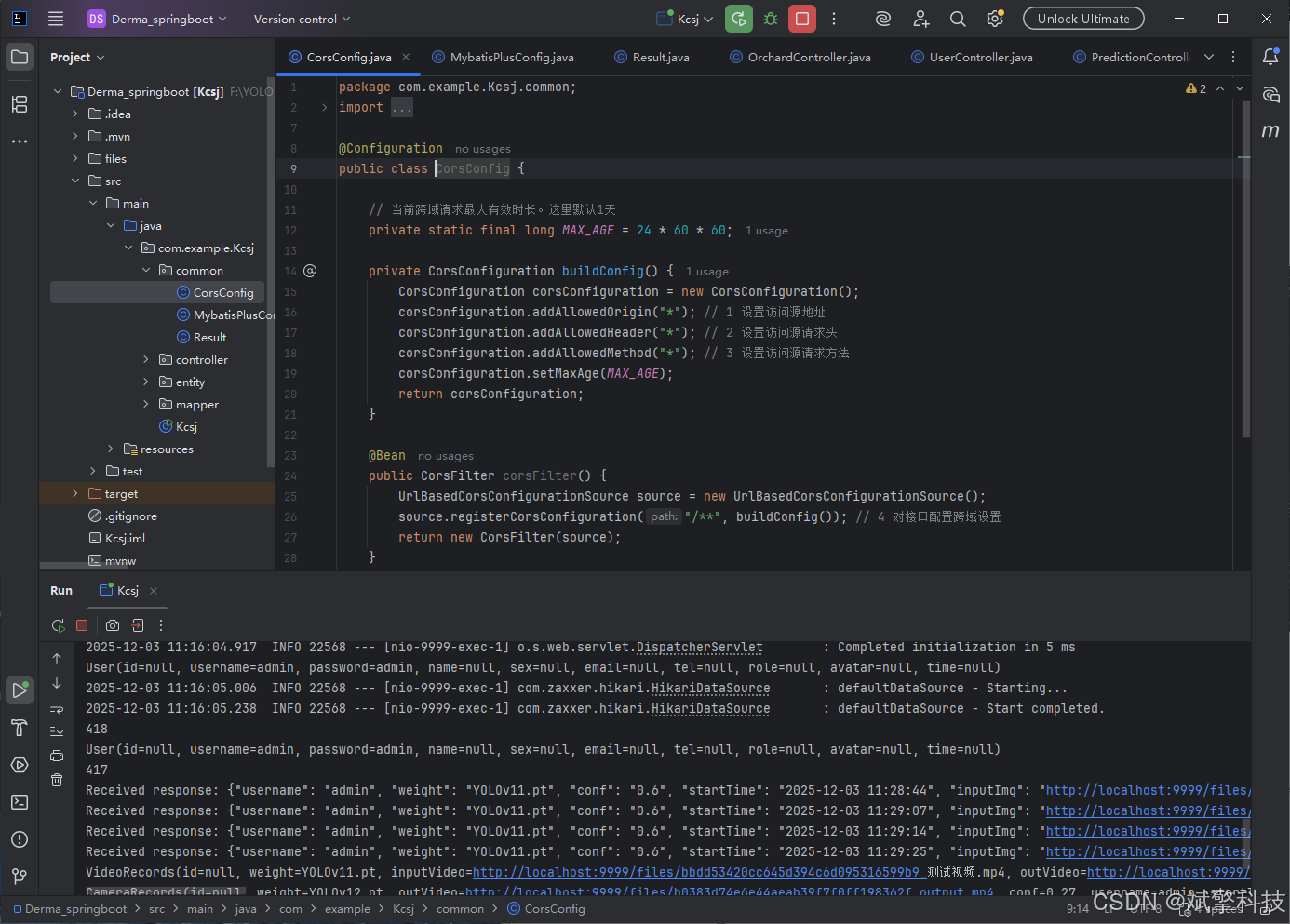
后端代码展示
项目源码+数据集下载链接
完整代码在哔哩哔哩视频下方简介内获取:
基于深度学习的皮肤病识别检测系统(web界面+YOLOv8/v10/v11/v12+DeepSeek智能分析 +前后端分离)_哔哩哔哩_bilibili
基于深度学习的皮肤病识别检测系统(web界面+YOLOv8/v10/v11/v12+DeepSeek智能分析 +前后端分离)_哔哩哔哩_bilibilihttps://www.bilibili.com/video/BV1vt2YBKEhT/?vd_source=549d0b4e2b8999929a61a037fcce3b0fhttps://www.bilibili.com/video/BV1vt2YBKEhT
项目安装教程
https://www.bilibili.com/video/BV1YLsXzJE2X/?spm_id_from=333.1387.homepage.video_card.click

火山引擎开发者社区是火山引擎打造的AI技术生态平台,聚焦Agent与大模型开发,提供豆包系列模型(图像/视频/视觉)、智能分析与会话工具,并配套评测集、动手实验室及行业案例库。社区通过技术沙龙、挑战赛等活动促进开发者成长,新用户可领50万Tokens权益,助力构建智能应用。
更多推荐
 11
11 0
0- 0



 已为社区贡献38条内容

所有评论(0)