两种方法解决IDEA系的编译器使用git时报fatal: could not read Username for ‘*‘: No such file or directory的错误
本文介绍两种方法解决IDEA 系使用git时遇到的错误bash: line 1: /dev/tty: No such device or addresserror: failed to execute prompt script (exit code 1)fatal: could not read Username for *': No such file or directory
当我们使用 IDEA 系的软件的时候,例如 Android Studio 等软件,我们使用 Git 管理本地仓库的时候,有时候在 pull 或 push 的时候,即拉去远程分支和推送本地分支的时候,会抛类似以下的异常:
error: cannot spawn C:\Users\*\AppData\Local\Google\AndroidStudio2025.1.4\tmp\intellij-git-askpass-local.sh: No such file or directory
bash: line 1: /dev/tty: No such device or address
error: failed to execute prompt script (exit code 1)
fatal: could not read Username for '*': No such file or directory
从这个错误提示中,可以看到是因为 AS 的数据目录下的 C:\Users\*\AppData\Local\Google\AndroidStudio2025.1.4\tmp\intellij-git-askpass-local.sh 的文件不存在导致的,但是去这个目录下查看,是存在 intellij-git-askpass-local.sh 文件的,因此,根本原因不是因为 No such file or directory,我们也可以看一下这个文件的内容:
#!/bin/sh
"Android Studio/jbr/bin/java" -cp "Android Studio/plugins/vcs-git/lib/git4idea-rt.jar;Android Studio/lib/externalProcess-rt.jar" git4idea.http.GitAskPassApp "$@"
可以看到,这个脚本是去执行 git4idea-rt.jar 中的 git4idea.http.GitAskPassApp 的类,并传递了 $@ 参数,从这个类名可以看出,其实检查是否可以正常访问 git 的校验类,我们也可以从最后一句报错 fatal: could not read Username for '*': No such file or directory,可以知道其在校验的时候,无法找到 Username,从而导致校验失败。
而为了解决这个问题,有两种解决方法:
1. 使用凭证缓存(推荐)
第一种方法就是使用 Git 的凭证缓存,可以将输入的用户名和密码保存在本地,等下次使用 git 的时候,就可以直接使用了。 而在 IDEA 中,可以使用 GUI 进行设置打开凭证缓存:
勾选 File > Settings > Version Control > Git > Update > Use credential helper 即可
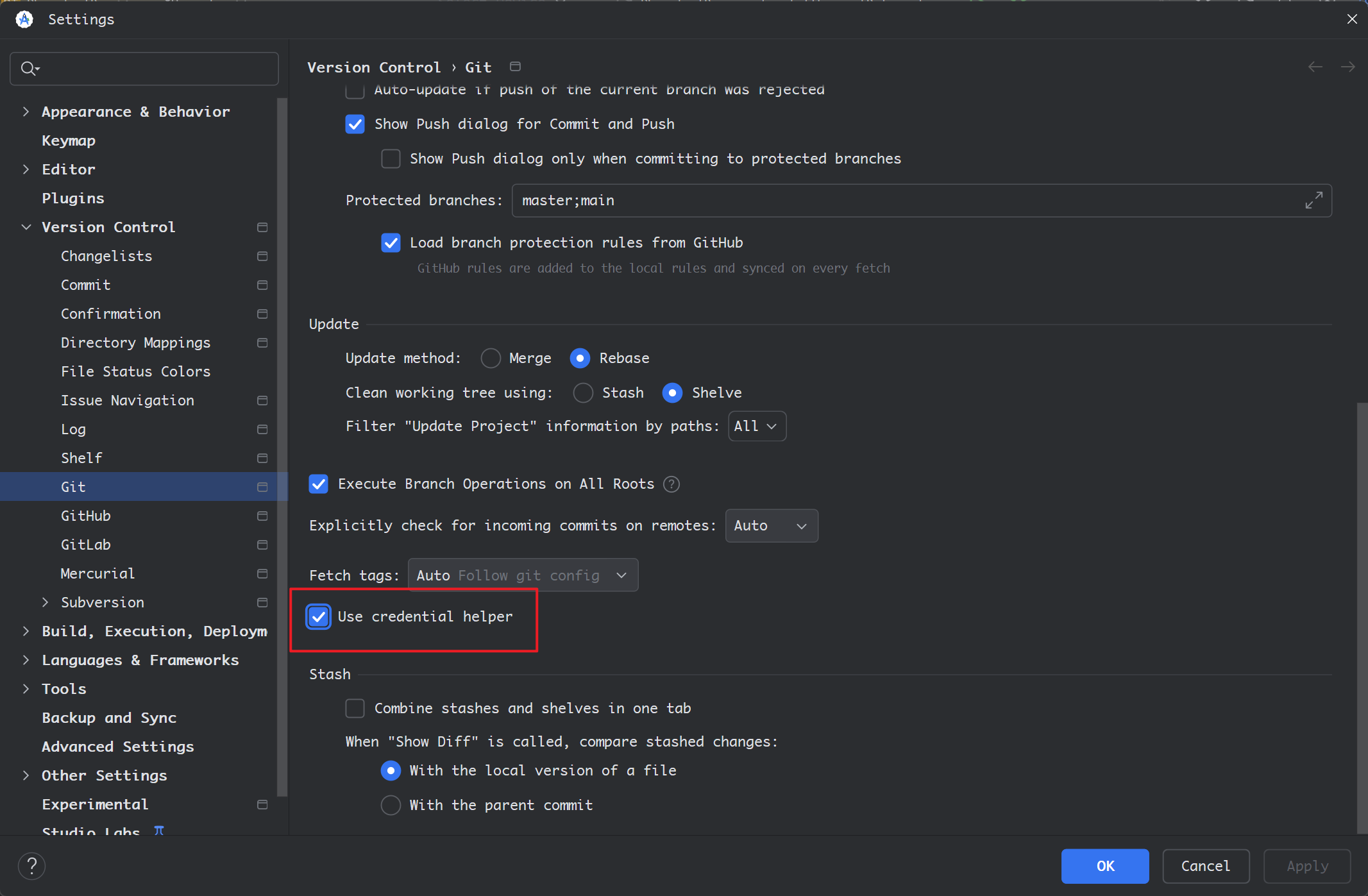
此时重新拉去或推送分支的时候,会提示输入用户名和密码,正确输入后即可正常使用。
2. 在链接中加上用户名和密码
另一种方法,我们可以编辑 git 的链接,在其链接上加上用户名和密码,形如以下格式:
https://username:password@git.com/user/repo.git
但注意,如果用户名和密码含有特殊字符,则需要对其进行Url编码,转义特殊字符。例如密码为:myP@ss#word?,那么需要转义 @#? 这三个字符,转义后的结果为 myP%40ss%23word%3F,则完整的链接如下:
https://username:myP%40ss%23word%3F@github.com/user/repo.git
这里使用 git remote 命令修改链接即可:
git remote set-url origin https://username:myP%40ss%23word%3F@github.com/user/repo.git
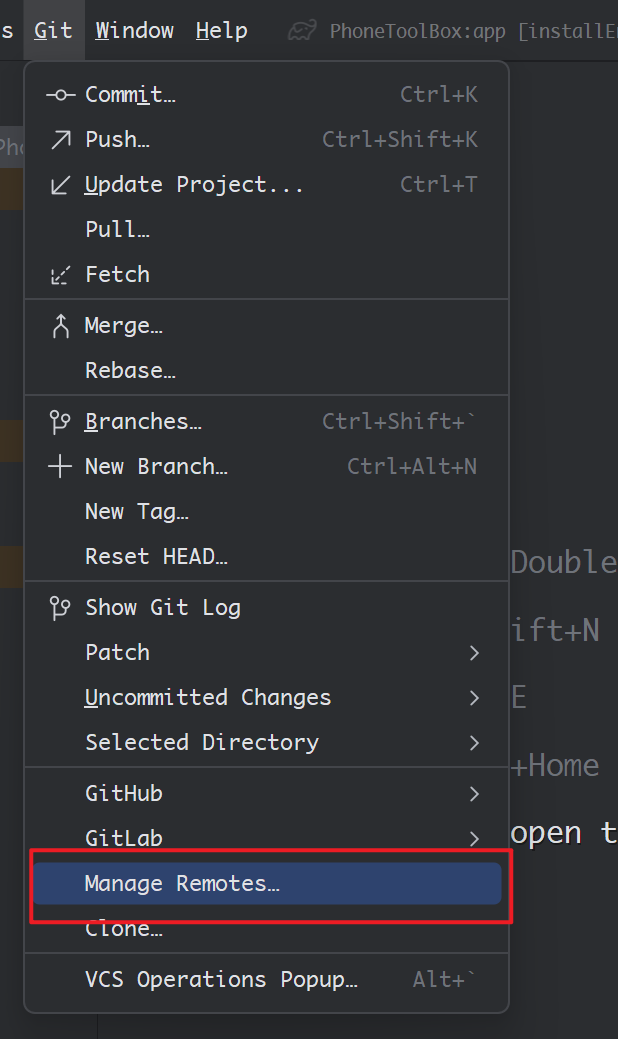
也可以用 Git > Manage Remote 进行编辑 git 的链接

火山引擎开发者社区是火山引擎打造的AI技术生态平台,聚焦Agent与大模型开发,提供豆包系列模型(图像/视频/视觉)、智能分析与会话工具,并配套评测集、动手实验室及行业案例库。社区通过技术沙龙、挑战赛等活动促进开发者成长,新用户可领50万Tokens权益,助力构建智能应用。
更多推荐
 5
5 0
0- 0


 已为社区贡献3条内容

所有评论(0)