使用树莓派5基于python系统环境驱动ST7735S
·
在树莓派上使用ST7735S的TFT屏,网上的资料大多是基于树莓派3/4B的。使用树莓派5在调试初期遇到了不少问题。
以下所有的操作都是在最新版的Raspberry Pi OS ( Debian Trixie)下执行的。
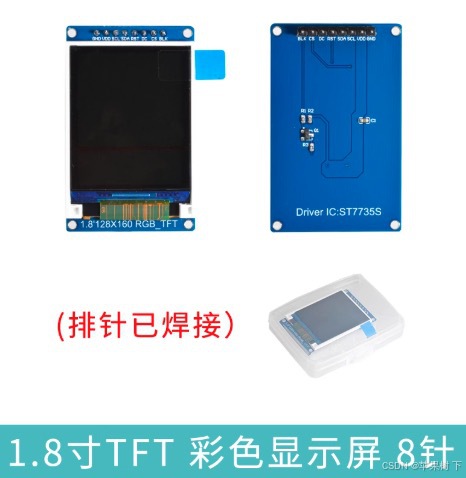
现将驱动方法整理如下,供参考:
1. SPI硬件配置
$ sudo raspi-config
> 3 Interface Options > I4 SPI > YES


$ ls -l /dev/spi*

#你应该看到如下的信息:
crw-rw---- 1 root spi 153, 0 11月23日 01:50 /dev/spidev0.0
crw-rw---- 1 root spi 153, 1 11月23日 01:50 /dev/spidev0.1
crw-rw---- 1 root spi 153, 2 11月23日 01:50 /dev/spidev10.0
2. python环境设置:
$ sudo apt-get update

$ sudo apt-get install python3 python3-pip python3-pil libjpeg-dev zlib1g-dev libfreetype6-dev liblcms2-dev libopenjp2-7 libtiff6 -y
3. 安装 luma.lcd 驱动包
$ sudo apt install python3-luma.lcd4. 权限设置
luma.lcd使用需要权限才能访问的硬件接口。请先 成功安装后,你可能需要添加一个用户账户 你的程序会运行给哪些组允许访问这些内容接口。
$ sudo usermod -a -G spi,gpio,i2c pi
# pi用你的用户名代替
5. 接线
| ST7735引脚 | Raspberry Pi引脚 |
| SCL | GPIO11 (Pin 23) |
| SDA | GPIO10 (Pin 19) |
| CS | GPIO8 (Pin 24) |
| DC | GPIO24 (Pin 18) |
| RST | GPIO25 (Pin 22) |
| BLK | 直接连3.3V或GPIO18(Pin 12),如果需要控制背光的话 |
| VCC | 3.3V (Pin 1 or 17) |
| GND | Ground (e.g., Pin 6) |
6. 运行测试代码
# luma_demo_st7735.py
from luma.core.interface.serial import spi
from luma.core.render import canvas
from luma.lcd.device import st7735
from PIL import Image,ImageDraw, ImageFont
import time

serial = spi(
    port=0,
    device=0,
    gpio_DC=24,
    gpio_RST=25,
    gpio_LIGHT=18
)

device = st7735(
    serial,
    width=160,
    height=128,
    rotate=0,
    h_offset=0,
    v_offset=0
)

# 主循环:防止程序退出
try:
    while True:
        with canvas(device) as draw:
            draw.rectangle(device.bounding_box, outline="white", fill="green")
            draw.text((10, 10), "Hello, ST7735!", fill="white", font_size=16)
            draw.text((10, 40), "Temp: 25°C", fill="white", font_size=16)
            draw.text((10, 60), "Humidity: 60%", fill="white", font_size=16)
        time.sleep(5)
except KeyboardInterrupt:
    pass
finally:
    print("Exiting...")
7. 效果
运行代码:
$ python luma_demo_st7735.py 
8. 参考资料
https://luma-lcd.readthedocs.io/en/latest/hardware.html
https://github.com/rm-hull/luma.lcd
B站:作者“卖海参的物理李老师”的视频https://www.bilibili.com/video/BV176kUBBE28/?spm_id_from=333.337.search-card.all.click&vd_source=a39e51b09d3a0c8846ab5317c6e44fb3

中国智能体开发者社区,聚焦智能体与大模型开发,提供前沿资讯、实用工具链、开源项目及行业案例。通过技术沙龙、开发者大赛等活动,促进经验交流与协作,助力开发者快速构建创新智能应用。
更多推荐

 4
4 0
0- 0


 已为社区贡献2条内容

所有评论(0)