3 搜索功能代码实现
本文详细介绍了基于Elasticsearch 7.8.0实现的文件搜索功能开发过程。主要内容包括:1) 项目准备工作,配置了Spring Data Elasticsearch 4.1.14和相关依赖;2) 文件内容提取工具类实现,使用Apache Tika解析多种文档格式;3) 自定义分词器配置,解决特殊字符连接词、大小写敏感等问题;4) ES实体类设计,包含多字段分词策略;5) 搜索服务实现,支
目录
对于搜索功能的介绍,技术栈的选用等见snapan搜索功能的实现
3 代码实现
3.1 准备工作
下面只针对snapan这个项目里搜索功能的实现。想要无障碍阅读,需要去简单学习一下elasticSearch。但是如果只是想快速实现功能,套模板,不会学也行。这个用的elasticSearch的版本是7.8.0,其他的版本见下。不同版本的的方法有些地方不一样,如果只是套模板,最好保证版本一直。
pom.xml文件
<!-- 给第三方库(Tika/POI)提供 Log4j2 API,避免 ClassNotFound -->
<dependency>
    <groupId>org.apache.logging.log4j</groupId>
    <artifactId>log4j-api</artifactId>
    <version>2.17.2</version>
</dependency>
<!-- Spring Data Elasticsearch:SSM 集成 ES 的核心 -->
<dependency>
    <groupId>org.springframework.data</groupId>
    <artifactId>spring-data-elasticsearch</artifactId>
    <version>4.1.14</version>
</dependency>

<!-- ES 高级 REST 客户端(版本必须与 ES 服务器 7.8.0 完全一致) -->
<dependency>
    <groupId>org.elasticsearch.client</groupId>
    <artifactId>elasticsearch-rest-high-level-client</artifactId>
    <version>7.8.0</version>
    <exclusions>
        <!-- 排除 ES 内置的 log4j 依赖,避免与项目 logback 冲突 -->
        <exclusion>
            <groupId>org.apache.logging.log4j</groupId>
            <artifactId>log4j-api</artifactId>
        </exclusion>
        <exclusion>
            <groupId>org.apache.logging.log4j</groupId>
            <artifactId>log4j-core</artifactId>
        </exclusion>
        <exclusion>
            <groupId>org.apache.logging.log4j</groupId>
            <artifactId>log4j-slf4j-impl</artifactId>
        </exclusion>
    </exclusions>
</dependency>

<!-- ES 核心库(与 REST 客户端版本一致,底层依赖) -->
<dependency>
    <groupId>org.elasticsearch</groupId>
    <artifactId>elasticsearch</artifactId>
    <version>7.8.0</version>
    <exclusions>
        <!-- 排除 ES 内置的 log4j 依赖 -->
        <exclusion>
            <groupId>org.apache.logging.log4j</groupId>
            <artifactId>log4j-api</artifactId>
        </exclusion>
        <exclusion>
            <groupId>org.apache.logging.log4j</groupId>
            <artifactId>log4j-core</artifactId>
        </exclusion>
        <exclusion>
            <groupId>org.apache.logging.log4j</groupId>
            <artifactId>log4j-slf4j-impl</artifactId>
        </exclusion>
    </exclusions>
</dependency>
<!-- ES 依赖的 Jackson 版本对齐(避免与项目现有 Jackson 冲突) -->
<dependency>
    <groupId>com.fasterxml.jackson.dataformat</groupId>
    <artifactId>jackson-dataformat-cbor</artifactId>
    <version>2.13.3</version> <!-- 与项目现有 jackson-databind 2.13.3 版本一致 -->
</dependency>
<!-- Apache Tika:提取文件文本内容(兼容 JDK 1.8,适配 Snapan 多格式文件搜索) -->
<dependency>
    <groupId>org.apache.tika</groupId>
    <artifactId>tika-core</artifactId>
    <version>1.28.5</version> <!-- 稳定版本,无兼容性问题 -->
</dependency>
<dependency>
    <groupId>org.apache.tika</groupId>
    <artifactId>tika-parsers</artifactId>
    <version>1.28.5</version> <!-- 与 core 版本一致,支持多格式解析 -->
    <exclusions>
        <!-- 排除与项目现有依赖冲突的包 -->
        <exclusion>
            <groupId>ch.qos.logback</groupId>
            <artifactId>logback-classic</artifactId>
        </exclusion>
        <exclusion>
            <groupId>com.fasterxml.jackson.core</groupId>
            <artifactId>jackson-databind</artifactId>
        </exclusion>
        <exclusion>
            <groupId>org.apache.logging.log4j</groupId>
            <artifactId>log4j-api</artifactId>
        </exclusion>
        <exclusion>
            <groupId>org.apache.logging.log4j</groupId>
            <artifactId>log4j-core</artifactId>
        </exclusion>
        <exclusion>
            <groupId>log4j</groupId>
            <artifactId>log4j</artifactId>
        </exclusion>
    </exclusions>
</dependency>
3.2 代码实现
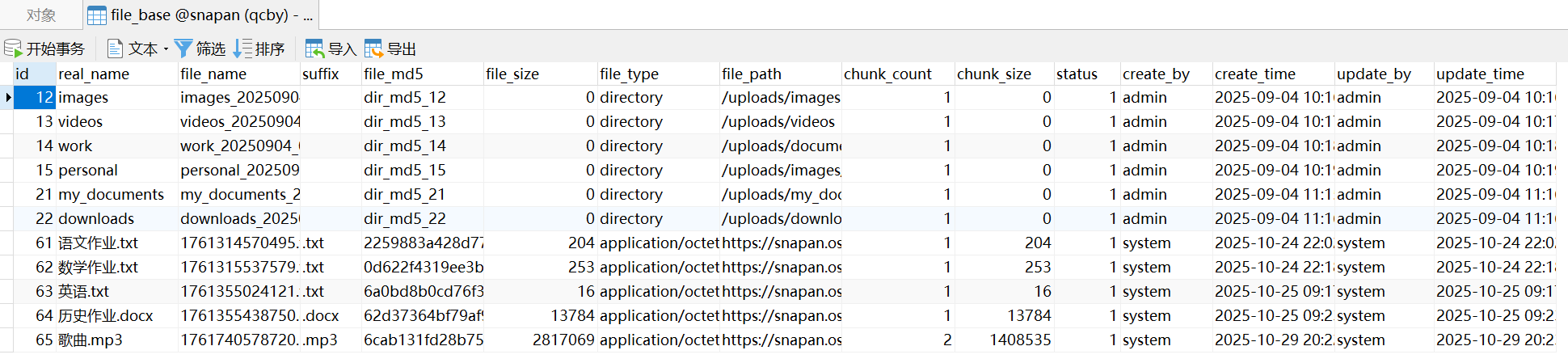
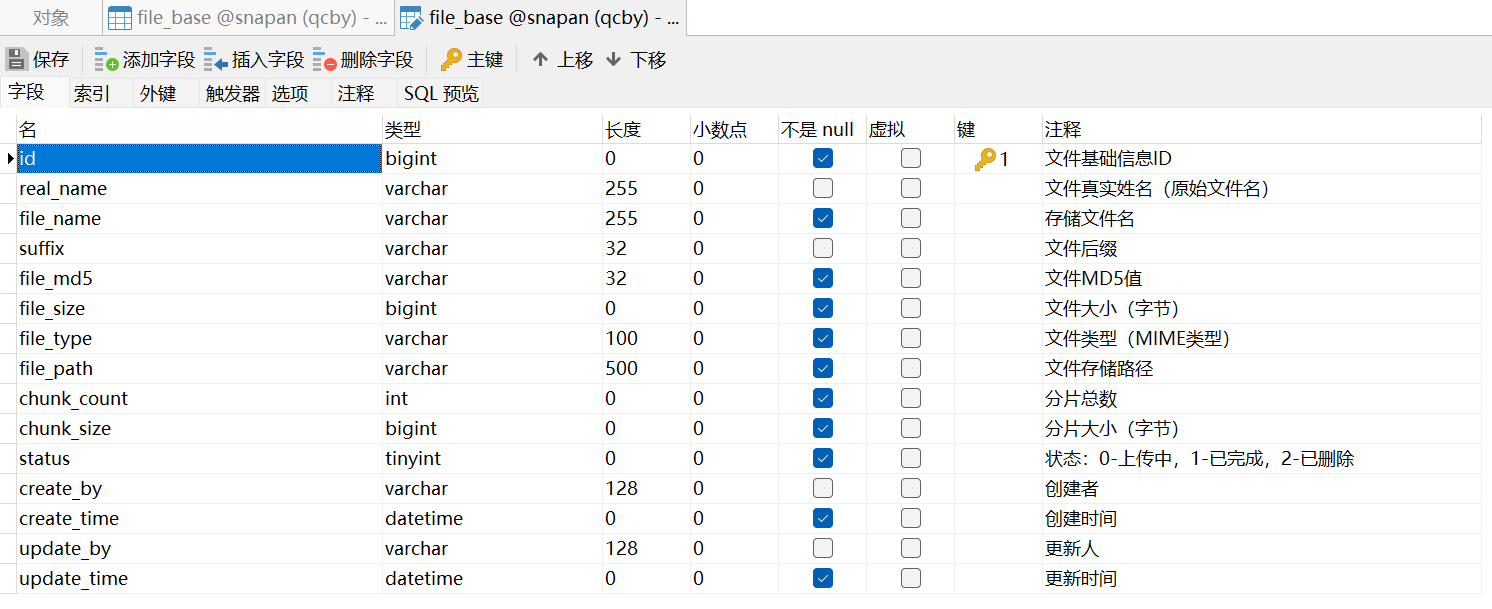
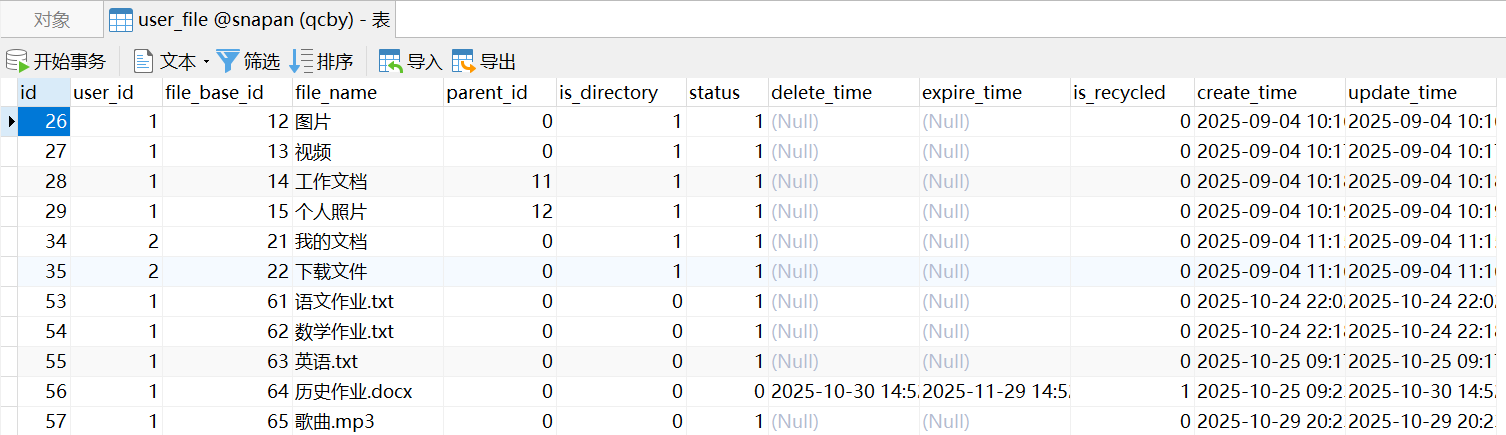
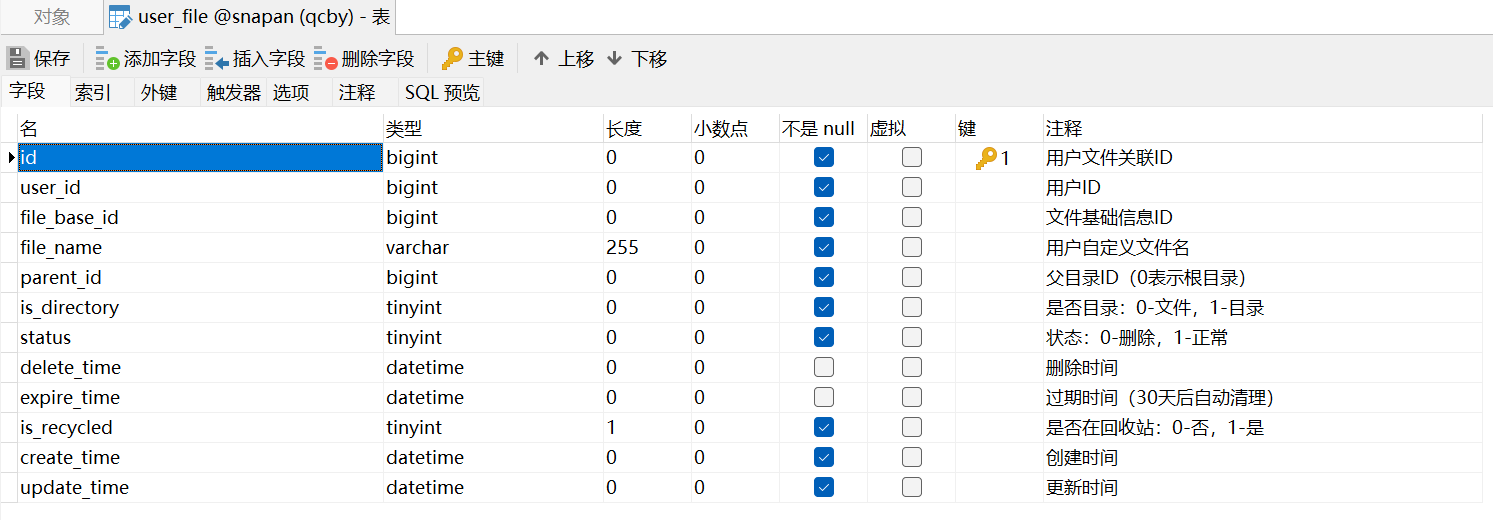
3.2.1 提取文件内容
package com.snapan.util;

import com.aliyun.oss.OSS;
import com.aliyun.oss.OSSClientBuilder;
import com.aliyun.oss.model.OSSObject;
import org.apache.tika.Tika;
import org.apache.tika.exception.TikaException;
import org.springframework.core.io.ClassPathResource;
import org.springframework.core.io.Resource;
import org.springframework.core.io.support.PropertiesLoaderUtils;

import java.io.BufferedInputStream;
import java.io.IOException;
import java.io.InputStream;
import java.net.MalformedURLException;
import java.net.URL;
import java.util.Arrays;
import java.util.HashSet;
import java.util.Properties;
import java.util.Set;

public class FileContentExtractor {
    private static final Tika tika = new Tika();

    // 仅需提取内容的文档类后缀(直接通过后缀判断,不依赖外部类型字段)
    private static final Set<String> NEED_EXTRACT_SUFFIXES = new HashSet<>(Arrays.asList(
            "pdf", "doc", "docx", "xls", "xlsx", "ppt", "pptx", "txt", "md", "rtf"
    ));

    // OSS配置(静态变量,通过静态代码块初始化)
    private static String OSS_ACCESS_KEY_ID;
    private static String OSS_ACCESS_KEY_SECRET;
    private static String OSS_ENDPOINT;
    private static OSS ossClient; // 延迟初始化,避免空指针

    // 静态代码块:手动加载配置文件并初始化OSS客户端
    static {
        try {
            // 读取配置文件(假设配置在 src/main/resources/oss.properties)
            Resource resource = new ClassPathResource("application.properties"); // 路径根据实际调整
            Properties props = PropertiesLoaderUtils.loadProperties(resource);

            // 赋值配置
            OSS_ACCESS_KEY_ID = props.getProperty("oss.access-key-id");
            OSS_ACCESS_KEY_SECRET = props.getProperty("oss.access-key-secret");
            OSS_ENDPOINT = props.getProperty("oss.endpoint");

            // 初始化OSS客户端
            ossClient = new OSSClientBuilder().build(OSS_ENDPOINT, OSS_ACCESS_KEY_ID, OSS_ACCESS_KEY_SECRET);
        } catch (Exception e) {
            e.printStackTrace();
            throw new RuntimeException("OSS配置加载失败,请检查oss.properties文件");
        }
    }

    /**
     * 提取文件内容(仅对文档类后缀有效)
     * @param filePath OSS文件路径(如"https://bucket.oss-cn-beijing.aliyuncs.com/test.pdf")
     * @param isDirectory 是否为文件夹(1=是,0=否)
     * @return 提取的内容(非文档类后缀返回说明)
     */
    public static String extractContent(String filePath, Integer isDirectory) {
        // 文件夹直接返回空
        if (isDirectory == 1) {
            return "";
        }

        // 获取文件后缀(如"pdf"、"mp3",不含".")
        String fileSuffix = getFileSuffix(filePath).toLowerCase();

        // 仅对文档类后缀提取内容,其他后缀直接返回说明
        if (NEED_EXTRACT_SUFFIXES.contains(fileSuffix)) {
            return extractDocumentContent(filePath);
        } else {
            // 非文档类后缀(如mp3、jpg等)返回说明,避免解析异常
            return "";
        }
    }

    /**
     * 提取文档类文件的内容(仅被NEED_EXTRACT_SUFFIXES包含的后缀调用)
     */
    private static String extractDocumentContent(String filePath) {
        // 使用try-with-resources自动关闭流,避免资源泄漏
        try (InputStream inputStream = getOssInputStream(filePath)) {
            if (inputStream == null) {
                return "";
            }
            // 缓冲流提升效率,限制解析长度(100KB)避免大文件超时
            BufferedInputStream bufferedInputStream = new BufferedInputStream(inputStream);
            return tika.parseToString(bufferedInputStream);
        } catch (MalformedURLException e) {
            return "";
        } catch (IOException | TikaException e) {
            return "";
        }
    }

    /**
     * 从文件路径中提取后缀(不含".",如"mp3"、"txt")
     */
    private static String getFileSuffix(String filePath) {
        if (filePath == null || filePath.isEmpty()) {
            return "";
        }
        // 找到最后一个"."的位置(处理URL中可能的参数,如"?x-oss-process=...")
        int lastDotIndex = filePath.lastIndexOf(".");
        int lastQuestionIndex = filePath.lastIndexOf("?"); // 排除URL参数干扰
        // 如果存在参数,后缀截止到"?"之前
        if (lastQuestionIndex != -1 && lastQuestionIndex > lastDotIndex) {
            return "";
        }
        // 提取后缀(如"test.mp3" -> "mp3")
        if (lastDotIndex != -1 && lastDotIndex < filePath.length() - 1) {
            return filePath.substring(lastDotIndex + 1);
        }
        return ""; // 无后缀
    }

    /**
     * 获取OSS文件输入流
     */
    private static InputStream getOssInputStream(String filePath) {
        try {
            URL ossUrl = new URL(filePath);
            String host = ossUrl.getHost();
            String bucketName = host.split("\\.")[0]; // 从域名提取bucket名
            String objectKey = ossUrl.getPath().substring(1); // 去掉路径中的第一个"/"
            OSSObject ossObject = ossClient.getObject(bucketName, objectKey);
            return ossObject.getObjectContent();
        } catch (Exception e) {
            e.printStackTrace();
            return null;
        }
    }
}
3.2.2 分词器
- 无法处理特殊字符连接的词
- 直接用 ik_max_word 分词,可能会把 project-management 拆成 project、management(因为 - 是特殊字符),但无法保留 project-management 这个完整词;
- 而用户可能既想搜索 project 匹配,也想搜索 project-management 精确匹配,直接用 ik 做不到。
- 大小写、格式不一致导致匹配失败
- 直接用 ik 分词会保留原始大小写,FileShare 和 fileshare 会被当作不同词,导致搜索不到;
- 而实际需求是 “大小写不敏感匹配”。
- 分词粒度固定,无法兼顾 “全匹配” 和 “部分匹配”
{
  "analysis": {
    "analyzer": {

      "file_name_analyzer": {
        "type": "custom",
        "tokenizer": "ik_max_word",
        "filter": ["lowercase", "word_delimiter", "hyphenation_filter"]
      },
      "file_name_search_analyzer": {
        "type": "custom",
        "tokenizer": "ik_smart",
        "filter": ["lowercase", "word_delimiter", "hyphenation_filter"]
      },

      "fileName_light_analyzer": {
        "type": "custom",
        "tokenizer": "ik_max_word",
        "filter": ["lowercase"]
      },
      "fileName_light_search_analyzer": {
        "type": "custom",
        "tokenizer": "ik_smart",
        "filter": ["lowercase"]
      }
    },
    "filter": {
      "hyphenation_filter": {
        "type": "word_delimiter",
        "split_on_numerics": true,
        "split_on_case_change": true,
        "preserve_original": true
      }
    }
  }
}
上面的配置通过 “自定义分词逻辑 + 读写时分词器分离”,解决了 “文件名包含特殊字符、大小写、格式混乱,且需要同时支持精确匹配和模糊匹配” 的问题。
|
配置细节 |
解决的问题 |
|
用 ik_max_word 做索引分词 |
索引时尽可能细粒度拆分(比如 项目管理计划.docx 拆成多个小词),支持 “模糊搜索”(搜 项目 能匹配); |
|
用 ik_smart 做搜索分词 |
搜索时粗粒度拆分(比如用户输入 项目管理计划 只拆成 项目管理计划 ),优先匹配完整词,提升精确搜索效率; |
|
加 lowercase 过滤器 |
把所有字符转小写( FileShare → fileshare ),实现 “大小写不敏感搜索”; |
|
自定义 hyphenation_filter (word_delimiter) |
拆分特殊字符连接的词( project-management → project 、 management ),同时保留原始词( project-management ),支持两种匹配方式; |
3.2.3 Es实体类
实体类要写get/set方法,这里因为字数问题省略
package com.snapan.es.entity;

import org.springframework.data.annotation.Id;
import org.springframework.data.elasticsearch.annotations.*;

import java.util.Date;

/**
 * ES 索引实体:对应user_file 索引(关联 user_file + file_base 分表)
 */
@Document(indexName = "snapan_user_file", createIndex = true)
// 通过 @Setting 定义自定义分词器(解决中文后缀、特殊符号拆分问题)
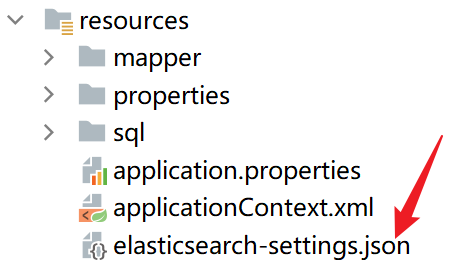
@Setting(settingPath = "elasticsearch-settings.json")
public class UserFileDocument {
    @Id // 与 user_file.id 一致,唯一标识
    private Long id;

    @Field(type = FieldType.Long) // 对应 user_file.user_id(用户隔离)
    private Long userId;

    @Field(type = FieldType.Long) // 对应 user_file.file_base_id(关联 file_base)
    private Long fileBaseId;

    // 子字段名:fileName.en
    // 子字段:英文分词(拆分单词和字母)
    // 对应 user_file.file_name(用户自定义文件名搜索)
    // 文件名:中文主字段(IK 分词) + 英文子字段(standard 分词)
    @MultiField(
            mainField = @Field(
                    type = FieldType.Text,
                    analyzer = "fileName_light_analyzer", // 新增的轻量分词器(索引时)
                    searchAnalyzer = "fileName_light_search_analyzer", // 新增的轻量搜索分词器
                    norms = false
            ),
            otherFields = {
                    @InnerField(
                            suffix = "en",
                            type = FieldType.Text,
                            analyzer = "standard",
                            searchAnalyzer = "standard",
                            norms = false
                    )
            }
    )
    private String fileName;

    @Field(type = FieldType.Long) // 对应 user_file.parent_id(筛选目录下文件)
    private Long parentId;

    @Field(type = FieldType.Boolean) // 对应 user_file.is_directory(0-文件,1-目录)
    private Boolean isDirectory;

    @Field(type = FieldType.Boolean) // 对应 user_file.status(0-不是,1-是)
    private Boolean isRecycled;

    // 对应 file_base.real_name(文件真实名搜索)
    // 真实名:中文主字段(IK 分词) + 英文子字段(standard 分词)
    @MultiField(
            mainField = @Field(
                    type = FieldType.Text,
                    analyzer = "ik_max_word",
                    searchAnalyzer = "ik_smart"
            ),
            otherFields = {
                    @InnerField(
                            suffix = "en", // 子字段名:realName.en
                            type = FieldType.Text,
                            analyzer = "standard"
                    )
            }
    )
    private String realName;

    @Field(type = FieldType.Long) // 对应 file_base.file_size(大小筛选)
    private Long fileSize;

    @Field(type = FieldType.Keyword) // 对应 file_base.suffix(后缀筛选,如 .txt)
    private String fileSuffix;

    @Field(type = FieldType.Keyword) // 对应 file_base.file_path(提取内容用)
    private String filePath;

    // 服务器文件内容(全文搜索)
    @MultiField(
            mainField = @Field(
                    type = FieldType.Text,
                    analyzer = "ik_max_word",
                    searchAnalyzer = "ik_smart"
            ),
            otherFields = {
                    @InnerField(
                            suffix = "en", // 子字段名:fileContent.en
                            type = FieldType.Text,
                            analyzer = "standard"
                    )
            }
    )
    private String fileContent;

    @Field(type = FieldType.Date, pattern = "yyyy-MM-dd HH:mm:ss") // 对应 user_file.update_time(用户关联时间筛选)
    private Date userFileUpdateTime;

    @Field(type = FieldType.Date, pattern = "yyyy-MM-dd HH:mm:ss") // 对应 user_file.delete_time(用户关联时间筛选)
    private Date userFileDeleteTime;


    @Field(type = FieldType.Date, pattern = "yyyy-MM-dd HH:mm:ss") // 对应 user_file.expire_time(用户关联时间筛选)
    private Date userFileExpireTime;

    @Field(type = FieldType.Date, pattern = "yyyy-MM-dd HH:mm:ss") // 对应 file_base.update_time(文件基础创建时间筛选)
    private Date fileBaseUpdateTime;
3.2.4 Repository 层接口
这个 UserFileDocumentRepository 接口在 Spring Data Elasticsearch 中的角色,和在 SSM(Spring + Spring MVC + MyBatis) 项目中的 Dao 层 是完全对应的。
package com.snapan.es.repository;

import com.snapan.es.entity.UserFileDocument;
import org.springframework.data.elasticsearch.repository.ElasticsearchRepository;

/**
 * ES 操作接口:自动继承 CRUD 方法
 */
public interface UserFileDocumentRepository extends ElasticsearchRepository<UserFileDocument, Long> {
    // 基础 CRUD 方法自动实现,无需额外定义
}
3.2.5 具体搜索方法
multiConditionSearch和getMatchContent本质都是一样,只是返回值不同,作用于不同的场景,第一个是搜索后再列表里显示完整数据,第二个是在搜索时的实时搜索,只显示部分数据 ,类似于使用浏览器搜索的时候,会在搜索框下显示匹配记录。
package com.snapan.es.service.Impl;
import com.snapan.entity.FileHistory;
import com.snapan.es.entity.FileShareDocument;
import com.snapan.es.entity.UserFileDocument;
import com.snapan.es.service.EsSearchService;
import com.snapan.service.FileHistoryService;
import org.apache.http.entity.FileEntity;
import org.elasticsearch.index.query.BoolQueryBuilder;
import org.elasticsearch.index.query.QueryBuilders;
import org.elasticsearch.search.builder.SearchSourceBuilder;
import org.elasticsearch.search.fetch.subphase.highlight.HighlightBuilder;
import org.elasticsearch.search.sort.SortBuilders;
import org.elasticsearch.search.sort.SortOrder;
import org.springframework.beans.factory.annotation.Autowired;
import org.springframework.data.domain.PageRequest;
import org.springframework.data.domain.Pageable;
import org.springframework.data.elasticsearch.core.ElasticsearchRestTemplate;
import org.springframework.data.elasticsearch.core.SearchHit;
import org.springframework.data.elasticsearch.core.SearchHits;
import org.springframework.data.elasticsearch.core.query.NativeSearchQuery;
import org.springframework.data.elasticsearch.core.query.NativeSearchQueryBuilder;
import org.springframework.stereotype.Service;
import java.util.*;
import java.util.stream.Collectors;
@Service
public class EsSearchServiceImpl implements EsSearchService {
@Autowired
private ElasticsearchRestTemplate esTemplate;
// 在 EsSearchServiceImpl 类中添加映射常量
private static final Map<String, List<String>> FILE_TYPE_SUFFIX_MAP = new HashMap<>();
static {
// 图片类型后缀
FILE_TYPE_SUFFIX_MAP.put("image",
Arrays.asList(".jpg", ".jpeg", ".png", ".gif", ".bmp", ".webp", ".svg"));
// 文档类型后缀
FILE_TYPE_SUFFIX_MAP.put("document",
Arrays.asList(".pdf", ".doc", ".docx", ".xls", ".xlsx", ".ppt", ".pptx", ".txt", ".md", ".rtf"));
// 视频类型后缀
FILE_TYPE_SUFFIX_MAP.put("video",
Arrays.asList(".mp4", ".avi", ".mov", ".wmv", ".flv", ".mkv", ".webm"));
// 音频类型后缀
FILE_TYPE_SUFFIX_MAP.put("audio",
Arrays.asList(".mp3", ".wav", ".aac", ".flac", ".ogg", ".m4a"));
// 其他类型(无匹配后缀时)
FILE_TYPE_SUFFIX_MAP.put("other", new ArrayList<>());
}
@Override
public List<Map<String, Object>> multiConditionSearch(Long userId, FileHistory history) {
// 1. 构建布尔查询(所有条件可选填,默认查有效文件)
BoolQueryBuilder boolQuery = QueryBuilders.boolQuery()
.must(QueryBuilders.termQuery("userId", userId)) // 必选:用户隔离
.must(QueryBuilders.termQuery("isDirectory", false)); // 必选:默认搜索文件
// 可选条件1:关键词搜索(保留英文子字段,添加minimum_should_match)
if (history.getKeyword() != null && !history.getKeyword().trim().isEmpty()) {
String keyword = history.getKeyword().trim();
// 核心:如果关键词以 . 开头,自动去掉 .(如 .txt → txt)
if (keyword.startsWith(".")) {
keyword = keyword.substring(1);
}
// 构建查询:同时匹配拆分后的词条和整体词条
boolQuery.should(QueryBuilders.matchQuery("fileName", keyword)) // 利用 IK 分词匹配(支持中文整体)
.should(QueryBuilders.wildcardQuery("fileName", "*" + keyword + "*")) // 通配符匹配(兼容特殊场景)
.should(QueryBuilders.wildcardQuery("realName", "*" + keyword + "*"))
.should(QueryBuilders.matchQuery("fileContent", keyword))
.should(QueryBuilders.wildcardQuery("fileName.en", "*" + keyword + "*"))
.should(QueryBuilders.wildcardQuery("realName.en", "*" + keyword + "*"))
.should(QueryBuilders.wildcardQuery("fileContent.en", "*" + keyword + "*"))
.minimumShouldMatch(1); // 至少匹配一个条件
}
// 可选条件2:用户自定义文件名筛选(精确模糊匹配)
if (history.getFileName() != null && !history.getFileName().trim().isEmpty()) {
boolQuery.filter(QueryBuilders.wildcardQuery("fileName", "*" + history.getFileName() + "*"));
}
// 可选条件3:文件类型筛选(根据类型匹配对应后缀列表)
if (history.getFileType() != null && !history.getFileType().trim().isEmpty()) {
String fileType = history.getFileType().trim();
List<String> suffixList = FILE_TYPE_SUFFIX_MAP.get(fileType);
if (suffixList != null && !suffixList.isEmpty()) {
// 若有后缀列表,匹配 fileSuffix 属于该列表
boolQuery.filter(QueryBuilders.termsQuery("fileSuffix", suffixList));
} else if ("other".equals(fileType)) {
// 若为“其他”类型,匹配 fileSuffix 不属于所有已知后缀
List<String> allKnownSuffixes = new ArrayList<>();
FILE_TYPE_SUFFIX_MAP.forEach((type, suffixes) -> allKnownSuffixes.addAll(suffixes));
boolQuery.filter(QueryBuilders.boolQuery()
.mustNot(QueryBuilders.termsQuery("fileSuffix", allKnownSuffixes))
.should(QueryBuilders.boolQuery().mustNot(QueryBuilders.existsQuery("fileSuffix")))
.minimumShouldMatch(1));
}
}
// 可选条件4:文件大小范围筛选
if (history.getMinSize() != null || history.getMaxSize() != null) {
BoolQueryBuilder sizeQuery = QueryBuilders.boolQuery();
if (history.getMinSize() != null) {
sizeQuery.must(QueryBuilders.rangeQuery("fileSize").gte(history.getMinSize()));
}
if (history.getMaxSize() != null) {
sizeQuery.must(QueryBuilders.rangeQuery("fileSize").lte(history.getMaxSize()));
}
boolQuery.filter(sizeQuery);
}
// 可选条件5:时间范围筛选(修复时间格式,用时间戳查询)
String timeField = "userFileUpdateTime"; // 默认时间字段
if (history.getSortField() != null && "fileBaseUpdateTime".equals(history.getSortField())) {
timeField = "fileBaseUpdateTime";
}
if (history.getStartTime() != null || history.getEndTime() != null) {
BoolQueryBuilder timeQuery = QueryBuilders.boolQuery();
if (history.getStartTime() != null) {
// 直接传入时间戳(毫秒),无需格式化
timeQuery.must(QueryBuilders.rangeQuery(timeField).gte(history.getStartTime().getTime()));
}
if (history.getEndTime() != null) {
timeQuery.must(QueryBuilders.rangeQuery(timeField).lte(history.getEndTime().getTime()));
}
boolQuery.filter(timeQuery);
}
// 可选条件6:是否目录筛选(0-文件,1-目录,未选则默认文件)
if (history.getIsDirectory() != null) {
boolQuery.filter(QueryBuilders.termQuery("isDirectory", history.getIsDirectory() == 1));
}
// 可选条件7:真实名筛选(精确模糊匹配)
if (history.getRealName() != null && !history.getRealName().trim().isEmpty()) {
boolQuery.filter(QueryBuilders.wildcardQuery("realName", "*" + history.getRealName() + "*"));
}
// 2. 构建高亮配置(包含英文子字段)
HighlightBuilder highlightBuilder = new HighlightBuilder()
// 文件名:主字段 + 英文子字段
.field(new HighlightBuilder.Field("fileName")
.preTags("<span class='highlight-keyword'>")
.postTags("</span>")
.fragmentSize(100))
.field(new HighlightBuilder.Field("fileName.en")
.preTags("<span class='highlight-keyword'>")
.postTags("</span>")
.fragmentSize(100))
// 真实名:主字段 + 英文子字段
.field(new HighlightBuilder.Field("realName")
.preTags("<span class='highlight-keyword'>")
.postTags("</span>")
.fragmentSize(100))
.field(new HighlightBuilder.Field("realName.en")
.preTags("<span class='highlight-keyword'>")
.postTags("</span>")
.fragmentSize(100))
// 文件内容:主字段 + 英文子字段
.field(new HighlightBuilder.Field("fileContent")
.preTags("<span class='highlight-keyword'>")
.postTags("</span>")
.fragmentSize(200))
.field(new HighlightBuilder.Field("fileContent.en")
.preTags("<span class='highlight-keyword'>")
.postTags("</span>")
.fragmentSize(200))
.requireFieldMatch(false); // 允许跨字段高亮
// 3. 构建排序(默认按用户关联时间降序)
String sortField = history.getSortField() == null ? "userFileUpdateTime" : history.getSortField();
SortOrder sortOrder = "ASC".equalsIgnoreCase(history.getSortOrder()) ? SortOrder.ASC : SortOrder.DESC;
NativeSearchQuery searchQuery = new NativeSearchQueryBuilder()
.withQuery(boolQuery)
.withHighlightBuilder(highlightBuilder)
.withSort(SortBuilders.fieldSort(sortField).order(sortOrder))
.build();
// 4. 执行查询并处理结果
SearchHits<UserFileDocument> searchHits = esTemplate.search(searchQuery, UserFileDocument.class);
List<Map<String, Object>> resultList = new ArrayList<>();
searchHits.forEach(hit -> {
UserFileDocument doc = hit.getContent();
Map<String, Object> resultMap = new HashMap<>();
// 基础信息
resultMap.put("id", doc.getId());
resultMap.put("filePath", doc.getFilePath());
resultMap.put("isDirectory", doc.getDirectory());
resultMap.put("fileName", doc.getFileName());
resultMap.put("realName", doc.getRealName());
resultMap.put("fileSize", formatFileSize(doc.getFileSize()));
resultMap.put("fileType", doc.getFileSuffix());
resultMap.put("fileSuffix", doc.getFileSuffix());
resultMap.put("updateTime", doc.getUserFileUpdateTime());
// 高亮信息(优先子字段,再主字段)
resultMap.put("highlightFileName", getHighlight(hit, "fileName", doc.getFileName()));
resultMap.put("highlightRealName", getHighlight(hit, "realName", doc.getRealName()));
resultMap.put("highlightContent", getHighlight(hit, "fileContent", doc.getFileContent()));
resultList.add(resultMap);
});
return resultList;
}
/**
* 工具:获取高亮内容(优先英文子字段,再主字段)
*/
private String getHighlight(SearchHit<UserFileDocument> hit, String field, String defaultVal) {
if (defaultVal == null) {
return "";
}
Map<String, List<String>> highlightFields = hit.getHighlightFields();
// 先查英文子字段(如fileName.en)
String enField = field + ".en";
if (highlightFields.containsKey(enField) && !highlightFields.get(enField).isEmpty()) {
return highlightFields.get(enField).get(0);
}
// 再查主字段(如fileName)
if (highlightFields.containsKey(field) && !highlightFields.get(field).isEmpty()) {
return highlightFields.get(field).get(0);
}
// 无高亮则返回原始内容(超长截取)
return defaultVal.length() > 200 ? defaultVal.substring(0, 200) : defaultVal;
}
private String getHighlight2(SearchHit<FileShareDocument> hit, String field, String defaultVal) {
if (defaultVal == null) {
return "";
}
Map<String, List<String>> highlightFields = hit.getHighlightFields();
// 先查英文子字段(如fileName.en)
String enField = field + ".en";
if (highlightFields.containsKey(enField) && !highlightFields.get(enField).isEmpty()) {
return highlightFields.get(enField).get(0);
}
// 再查主字段(如fileName)
if (highlightFields.containsKey(field) && !highlightFields.get(field).isEmpty()) {
return highlightFields.get(field).get(0);
}
// 无高亮则返回原始内容(超长截取)
return defaultVal.length() > 200 ? defaultVal.substring(0, 200) : defaultVal;
}
/**
* 工具:格式化文件大小
*/
private String formatFileSize(Long fileSize) {
if (fileSize == null) return "0B";
if (fileSize < 1024) return fileSize + "B";
if (fileSize < 1024 * 1024) return String.format("%.1fKB", fileSize / 1024.0);
return String.format("%.1fMB", fileSize / (1024.0 * 1024.0));
}
@Override
public List<Map<String, Object>> getMatchContent(Long userId,FileHistory history) {
// 1. 构建布尔查询(所有条件可选填,默认查有效文件)
BoolQueryBuilder boolQuery = QueryBuilders.boolQuery()
.must(QueryBuilders.termQuery("userId", userId)) // 必选:用户隔离
.must(QueryBuilders.termQuery("isDirectory", false)); // 必选:默认搜索文件
// 可选条件1:关键词搜索(保留英文子字段,添加minimum_should_match)
if (history.getKeyword() != null && !history.getKeyword().trim().isEmpty()) {
String keyword = history.getKeyword().trim();
// 核心:如果关键词以 . 开头,自动去掉 .(如 .txt → txt)
if (keyword.startsWith(".")) {
keyword = keyword.substring(1);
}
// 构建查询:同时匹配拆分后的词条和整体词条
boolQuery.should(QueryBuilders.matchQuery("fileName", keyword)) // 利用 IK 分词匹配(支持中文整体)
.should(QueryBuilders.wildcardQuery("fileName", "*" + keyword + "*")) // 通配符匹配(兼容特殊场景)
.should(QueryBuilders.wildcardQuery("realName", "*" + keyword + "*"))
.should(QueryBuilders.matchQuery("fileContent", keyword))
.should(QueryBuilders.wildcardQuery("fileName.en", "*" + keyword + "*"))
.should(QueryBuilders.wildcardQuery("realName.en", "*" + keyword + "*"))
.should(QueryBuilders.wildcardQuery("fileContent.en", "*" + keyword + "*"))
.minimumShouldMatch(1); // 至少匹配一个条件
}
// 可选条件2:用户自定义文件名筛选(精确模糊匹配)
if (history.getFileName() != null && !history.getFileName().trim().isEmpty()) {
boolQuery.filter(QueryBuilders.wildcardQuery("fileName", "*" + history.getFileName() + "*"));
}
// 可选条件3:文件类型筛选(精确匹配 MIME 类型)
if (history.getFileType() != null && !history.getFileType().trim().isEmpty()) {
boolQuery.filter(QueryBuilders.termQuery("fileSuffix", history.getFileType()));
}
// 可选条件4:文件大小范围筛选
if (history.getMinSize() != null || history.getMaxSize() != null) {
BoolQueryBuilder sizeQuery = QueryBuilders.boolQuery();
if (history.getMinSize() != null) {
sizeQuery.must(QueryBuilders.rangeQuery("fileSize").gte(history.getMinSize()));
}
if (history.getMaxSize() != null) {
sizeQuery.must(QueryBuilders.rangeQuery("fileSize").lte(history.getMaxSize()));
}
boolQuery.filter(sizeQuery);
}
// 可选条件5:时间范围筛选(修复时间格式,用时间戳查询)
String timeField = "userFileUpdateTime"; // 默认时间字段
if (history.getSortField() != null && "fileBaseUpdateTime".equals(history.getSortField())) {
timeField = "fileBaseUpdateTime";
}
if (history.getStartTime() != null || history.getEndTime() != null) {
BoolQueryBuilder timeQuery = QueryBuilders.boolQuery();
if (history.getStartTime() != null) {
// 直接传入时间戳(毫秒),无需格式化
timeQuery.must(QueryBuilders.rangeQuery(timeField).gte(history.getStartTime().getTime()));
}
if (history.getEndTime() != null) {
timeQuery.must(QueryBuilders.rangeQuery(timeField).lte(history.getEndTime().getTime()));
}
boolQuery.filter(timeQuery);
}
// 可选条件6:是否目录筛选(0-文件,1-目录,未选则默认文件)
if (history.getIsDirectory() != null) {
boolQuery.filter(QueryBuilders.termQuery("isDirectory", history.getIsDirectory() == 1));
}
// 可选条件7:真实名筛选(精确模糊匹配)
if (history.getRealName() != null && !history.getRealName().trim().isEmpty()) {
boolQuery.filter(QueryBuilders.wildcardQuery("realName", "*" + history.getRealName() + "*"));
}
// 2. 构建高亮配置(包含英文子字段)
HighlightBuilder highlightBuilder = new HighlightBuilder()
// 文件名:主字段 + 英文子字段
.field(new HighlightBuilder.Field("fileName")
.preTags("<span class='highlight-keyword'>")
.postTags("</span>")
.fragmentSize(100))
.field(new HighlightBuilder.Field("fileName.en")
.preTags("<span class='highlight-keyword'>")
.postTags("</span>")
.fragmentSize(100))
// 真实名:主字段 + 英文子字段
.field(new HighlightBuilder.Field("realName")
.preTags("<span class='highlight-keyword'>")
.postTags("</span>")
.fragmentSize(100))
.field(new HighlightBuilder.Field("realName.en")
.preTags("<span class='highlight-keyword'>")
.postTags("</span>")
.fragmentSize(100))
// 文件内容:主字段 + 英文子字段
.field(new HighlightBuilder.Field("fileContent")
.preTags("<span class='highlight-keyword'>")
.postTags("</span>")
.fragmentSize(200))
.field(new HighlightBuilder.Field("fileContent.en")
.preTags("<span class='highlight-keyword'>")
.postTags("</span>")
.fragmentSize(200))
.requireFieldMatch(false); // 允许跨字段高亮
// 3. 构建排序(默认按用户关联时间降序)
String sortField = history.getSortField() == null ? "userFileUpdateTime" : history.getSortField();
SortOrder sortOrder = "ASC".equalsIgnoreCase(history.getSortOrder()) ? SortOrder.ASC : SortOrder.DESC;
Pageable pageable = PageRequest.of(0, 10); // 第0页,每页10条(即最多返回10条)
NativeSearchQuery searchQuery = new NativeSearchQueryBuilder()
.withQuery(boolQuery) // 设置查询条件
.withHighlightBuilder(highlightBuilder) // 设置高亮
.withSort(SortBuilders.fieldSort(sortField).order(sortOrder)) // 设置排序
.withPageable(pageable) // 用分页限制结果数量(替代size)
.build();
// 4. 执行查询并处理结果
SearchHits<UserFileDocument> searchHits = esTemplate.search(searchQuery, UserFileDocument.class);
List<Map<String, Object>> resultList = new ArrayList<>();
searchHits.forEach(hit -> {
UserFileDocument doc = hit.getContent();
Map<String, Object> resultMap = new HashMap<>();
// 仅保留:文件名(优先高亮)、文件内容(优先高亮)
resultMap.put("fileName", getHighlight(hit, "fileName", doc.getFileName())); // 高亮文件名(前端左侧显示)
// 截取文件内容前100字符,避免前端面板变形
String content = getHighlight(hit, "fileContent", doc.getFileContent());
resultMap.put("fileContent", content.length() > 100 ? content.substring(0, 100) + "..." : content); // 高亮内容(前端右侧显示)
resultList.add(resultMap);
});
return resultList;
}
//回收站的全局搜索
public List<Map<String, Object>> multiConditionRecycleSearch(Long userId, FileHistory history) {
// 1. 构建布尔查询(所有条件可选填,默认查有效文件)
BoolQueryBuilder boolQuery = QueryBuilders.boolQuery()
.must(QueryBuilders.termQuery("userId", userId)) // 必选:用户隔离
.must(QueryBuilders.termQuery("isDirectory", false))// 必选:默认搜索文件
.must(QueryBuilders.termQuery("isRecycled", true))
.must(QueryBuilders.rangeQuery("userFileExpireTime").gt(new Date()));//过滤过期文件(当前时间 < 过期时间)
// 可选条件1:关键词搜索(保留英文子字段,添加minimum_should_match)
if (history.getKeyword() != null && !history.getKeyword().trim().isEmpty()) {
String keyword = history.getKeyword().trim();
// 核心:如果关键词以 . 开头,自动去掉 .(如 .txt → txt)
if (keyword.startsWith(".")) {
keyword = keyword.substring(1);
}
// 构建查询:同时匹配拆分后的词条和整体词条
boolQuery.should(QueryBuilders.matchQuery("fileName", keyword)) // 利用 IK 分词匹配(支持中文整体)
.should(QueryBuilders.wildcardQuery("fileName", "*" + keyword + "*")) // 通配符匹配(兼容特殊场景)
.should(QueryBuilders.wildcardQuery("realName", "*" + keyword + "*"))
.should(QueryBuilders.wildcardQuery("fileName.en", "*" + keyword + "*"))
.should(QueryBuilders.wildcardQuery("realName.en", "*" + keyword + "*"))
.minimumShouldMatch(1); // 至少匹配一个条件
}
// 可选条件2:用户自定义文件名筛选(精确模糊匹配)
if (history.getFileName() != null && !history.getFileName().trim().isEmpty()) {
boolQuery.filter(QueryBuilders.wildcardQuery("fileName", "*" + history.getFileName() + "*"));
}
// 可选条件3:文件类型筛选(根据类型匹配对应后缀列表)
if (history.getFileType() != null && !history.getFileType().trim().isEmpty()) {
String fileType = history.getFileType().trim();
List<String> suffixList = FILE_TYPE_SUFFIX_MAP.get(fileType);
if (suffixList != null && !suffixList.isEmpty()) {
// 若有后缀列表,匹配 fileSuffix 属于该列表
boolQuery.filter(QueryBuilders.termsQuery("fileSuffix", suffixList));
} else if ("other".equals(fileType)) {
// 若为“其他”类型,匹配 fileSuffix 不属于所有已知后缀
List<String> allKnownSuffixes = new ArrayList<>();
FILE_TYPE_SUFFIX_MAP.forEach((type, suffixes) -> allKnownSuffixes.addAll(suffixes));
boolQuery.filter(QueryBuilders.boolQuery()
.mustNot(QueryBuilders.termsQuery("fileSuffix", allKnownSuffixes))
.should(QueryBuilders.boolQuery().mustNot(QueryBuilders.existsQuery("fileSuffix")))
.minimumShouldMatch(1));
}
}
// 可选条件4:文件大小范围筛选
if (history.getMinSize() != null || history.getMaxSize() != null) {
BoolQueryBuilder sizeQuery = QueryBuilders.boolQuery();
if (history.getMinSize() != null) {
sizeQuery.must(QueryBuilders.rangeQuery("fileSize").gte(history.getMinSize()));
}
if (history.getMaxSize() != null) {
sizeQuery.must(QueryBuilders.rangeQuery("fileSize").lte(history.getMaxSize()));
}
boolQuery.filter(sizeQuery);
}
// 可选条件5:时间范围筛选(修复时间格式,用时间戳查询)
String timeField = "userFileDeleteTime"; // 默认时间字段
if (history.getStartTime() != null || history.getEndTime() != null) {
BoolQueryBuilder timeQuery = QueryBuilders.boolQuery();
if (history.getStartTime() != null) {
// 直接传入时间戳(毫秒),无需格式化
timeQuery.must(QueryBuilders.rangeQuery(timeField).gte(history.getStartTime().getTime()));
}
if (history.getEndTime() != null) {
timeQuery.must(QueryBuilders.rangeQuery(timeField).lte(history.getEndTime().getTime()));
}
boolQuery.filter(timeQuery);
}
// 可选条件6:是否目录筛选(0-文件,1-目录,未选则默认文件)
if (history.getIsDirectory() != null) {
boolQuery.filter(QueryBuilders.termQuery("isDirectory", history.getIsDirectory() == 1));
}
// 可选条件7:真实名筛选(精确模糊匹配)
if (history.getRealName() != null && !history.getRealName().trim().isEmpty()) {
boolQuery.filter(QueryBuilders.wildcardQuery("realName", "*" + history.getRealName() + "*"));
}
// 2. 构建高亮配置(包含英文子字段)
HighlightBuilder highlightBuilder = new HighlightBuilder()
// 文件名:主字段 + 英文子字段
.field(new HighlightBuilder.Field("fileName")
.preTags("<span class='highlight-keyword'>")
.postTags("</span>")
.fragmentSize(100))
.field(new HighlightBuilder.Field("fileName.en")
.preTags("<span class='highlight-keyword'>")
.postTags("</span>")
.fragmentSize(100))
// 真实名:主字段 + 英文子字段
.field(new HighlightBuilder.Field("realName")
.preTags("<span class='highlight-keyword'>")
.postTags("</span>")
.fragmentSize(100))
.field(new HighlightBuilder.Field("realName.en")
.preTags("<span class='highlight-keyword'>")
.postTags("</span>")
.fragmentSize(100))
.requireFieldMatch(false); // 允许跨字段高亮
// 3. 构建排序(默认按用户关联时间降序)
String sortField = history.getSortField() == null ? "userFileDeleteTime" : history.getSortField();
SortOrder sortOrder = "ASC".equalsIgnoreCase(history.getSortOrder()) ? SortOrder.ASC : SortOrder.DESC;
NativeSearchQuery searchQuery = new NativeSearchQueryBuilder()
.withQuery(boolQuery)
.withHighlightBuilder(highlightBuilder)
.withSort(SortBuilders.fieldSort(sortField).order(sortOrder))
.build();
// 4. 执行查询并处理结果
SearchHits<UserFileDocument> searchHits = esTemplate.search(searchQuery, UserFileDocument.class);
List<Map<String, Object>> resultList = new ArrayList<>();
searchHits.forEach(hit -> {
UserFileDocument doc = hit.getContent();
Map<String, Object> resultMap = new HashMap<>();
// 基础信息
resultMap.put("id", doc.getId());
resultMap.put("filePath", doc.getFilePath());
resultMap.put("isDirectory", doc.getDirectory());
resultMap.put("fileName", doc.getFileName());
resultMap.put("fileSize", formatFileSize(doc.getFileSize()));
resultMap.put("fileType", doc.getFileSuffix());
resultMap.put("fileSuffix", doc.getFileSuffix());
resultMap.put("deleteTime", doc.getUserFileDeleteTime());
resultMap.put("expireTime", doc.getUserFileExpireTime());
// 高亮信息(优先子字段,再主字段)
resultMap.put("highlightFileName", getHighlight(hit, "fileName", doc.getFileName()));
resultList.add(resultMap);
});
return resultList;
}
public List<Map<String, Object>> getMatchContentRecycled(Long userId,FileHistory history) {
// 1. 构建布尔查询(所有条件可选填,默认查有效文件)
BoolQueryBuilder boolQuery = QueryBuilders.boolQuery()
.must(QueryBuilders.termQuery("userId", userId)) // 必选:用户隔离
.must(QueryBuilders.termQuery("isDirectory", false)) // 必选:默认搜索文件
.must(QueryBuilders.termQuery("isRecycled", true))
.must(QueryBuilders.rangeQuery("userFileExpireTime").gt(new Date()));//过滤过期文件(当前时间 < 过期时间)
// 可选条件1:关键词搜索(保留英文子字段,添加minimum_should_match)
if (history.getKeyword() != null && !history.getKeyword().trim().isEmpty()) {
String keyword = history.getKeyword().trim();
// 核心:如果关键词以 . 开头,自动去掉 .(如 .txt → txt)
if (keyword.startsWith(".")) {
keyword = keyword.substring(1);
}
// 构建查询:同时匹配拆分后的词条和整体词条
boolQuery.should(QueryBuilders.matchQuery("fileName", keyword)) // 利用 IK 分词匹配(支持中文整体)
.should(QueryBuilders.wildcardQuery("fileName", "*" + keyword + "*")) // 通配符匹配(兼容特殊场景)
.should(QueryBuilders.wildcardQuery("realName", "*" + keyword + "*"))
.should(QueryBuilders.wildcardQuery("fileName.en", "*" + keyword + "*"))
.should(QueryBuilders.wildcardQuery("realName.en", "*" + keyword + "*"))
.minimumShouldMatch(1); // 至少匹配一个条件
}
// 可选条件2:用户自定义文件名筛选(精确模糊匹配)
if (history.getFileName() != null && !history.getFileName().trim().isEmpty()) {
boolQuery.filter(QueryBuilders.wildcardQuery("fileName", "*" + history.getFileName() + "*"));
}
// 可选条件3:文件类型筛选(精确匹配 MIME 类型)
if (history.getFileType() != null && !history.getFileType().trim().isEmpty()) {
boolQuery.filter(QueryBuilders.termQuery("fileSuffix", history.getFileType()));
}
// 可选条件4:文件大小范围筛选
if (history.getMinSize() != null || history.getMaxSize() != null) {
BoolQueryBuilder sizeQuery = QueryBuilders.boolQuery();
if (history.getMinSize() != null) {
sizeQuery.must(QueryBuilders.rangeQuery("fileSize").gte(history.getMinSize()));
}
if (history.getMaxSize() != null) {
sizeQuery.must(QueryBuilders.rangeQuery("fileSize").lte(history.getMaxSize()));
}
boolQuery.filter(sizeQuery);
}
// 可选条件5:时间范围筛选(修复时间格式,用时间戳查询)
String timeField = "userFileDeleteTime"; // 默认时间字段
if (history.getStartTime() != null || history.getEndTime() != null) {
BoolQueryBuilder timeQuery = QueryBuilders.boolQuery();
if (history.getStartTime() != null) {
// 直接传入时间戳(毫秒),无需格式化
timeQuery.must(QueryBuilders.rangeQuery(timeField).gte(history.getStartTime().getTime()));
}
if (history.getEndTime() != null) {
timeQuery.must(QueryBuilders.rangeQuery(timeField).lte(history.getEndTime().getTime()));
}
boolQuery.filter(timeQuery);
}
// 可选条件6:是否目录筛选(0-文件,1-目录,未选则默认文件)
if (history.getIsDirectory() != null) {
boolQuery.filter(QueryBuilders.termQuery("isDirectory", history.getIsDirectory() == 1));
}
// 可选条件7:真实名筛选(精确模糊匹配)
if (history.getRealName() != null && !history.getRealName().trim().isEmpty()) {
boolQuery.filter(QueryBuilders.wildcardQuery("realName", "*" + history.getRealName() + "*"));
}
// 2. 构建高亮配置(包含英文子字段)
HighlightBuilder highlightBuilder = new HighlightBuilder()
// 文件名:主字段 + 英文子字段
.field(new HighlightBuilder.Field("fileName")
.preTags("<span class='highlight-keyword'>")
.postTags("</span>")
.fragmentSize(100))
.field(new HighlightBuilder.Field("fileName.en")
.preTags("<span class='highlight-keyword'>")
.postTags("</span>")
.fragmentSize(100))
// 真实名:主字段 + 英文子字段
.field(new HighlightBuilder.Field("realName")
.preTags("<span class='highlight-keyword'>")
.postTags("</span>")
.fragmentSize(100))
.field(new HighlightBuilder.Field("realName.en")
.preTags("<span class='highlight-keyword'>")
.postTags("</span>")
.fragmentSize(100))
.requireFieldMatch(false); // 允许跨字段高亮
// 3. 构建排序(默认按用户关联时间降序)
String sortField = history.getSortField() == null ? "userFileDeleteTime" : history.getSortField();
SortOrder sortOrder = "ASC".equalsIgnoreCase(history.getSortOrder()) ? SortOrder.ASC : SortOrder.DESC;
Pageable pageable = PageRequest.of(0, 10); // 第0页,每页10条(即最多返回10条)
NativeSearchQuery searchQuery = new NativeSearchQueryBuilder()
.withQuery(boolQuery) // 设置查询条件
.withHighlightBuilder(highlightBuilder) // 设置高亮
.withSort(SortBuilders.fieldSort(sortField).order(sortOrder)) // 设置排序
.withPageable(pageable) // 用分页限制结果数量(替代size)
.build();
// 4. 执行查询并处理结果
SearchHits<UserFileDocument> searchHits = esTemplate.search(searchQuery, UserFileDocument.class);
List<Map<String, Object>> resultList = new ArrayList<>();
searchHits.forEach(hit -> {
UserFileDocument doc = hit.getContent();
Map<String, Object> resultMap = new HashMap<>();
// 仅保留:文件名(优先高亮)、文件内容(优先高亮)
resultMap.put("fileName", getHighlight(hit, "fileName", doc.getFileName())); // 高亮文件名(前端左侧显示)
resultMap.put("deleteTime", doc.getUserFileDeleteTime());
resultList.add(resultMap);
});
return resultList;
}
//文件分享全局搜索
public List<Map<String, Object>> multiConditionShareSearch(Long userId, FileHistory history) {
// 1. 构建布尔查询(所有条件可选填,默认查有效文件)
BoolQueryBuilder boolQuery = QueryBuilders.boolQuery()
.must(QueryBuilders.termQuery("userId", userId)); // 必选:用户隔离
// .must(QueryBuilders.rangeQuery("expireTime").gt(new Date()));//过滤过期文件(当前时间 < 过期时间)
// 可选条件1:关键词搜索(保留英文子字段,添加minimum_should_match)
// 可选条件1:关键词搜索(优化语法和性能)
if (history.getKeyword() != null && !history.getKeyword().trim().isEmpty()) {
String keyword = history.getKeyword().trim();
if (keyword.startsWith(".")) {
keyword = keyword.substring(1);
}
// 构建“should”查询的子布尔查询,确保语法正确
BoolQueryBuilder shouldQuery = QueryBuilders.boolQuery()
.should(QueryBuilders.matchQuery("fileName", keyword).analyzer("ik_max_word")) // 显式指定IK分词器
.should(QueryBuilders.wildcardQuery("fileName", "*" + keyword + "*").boost(0.5f)) // 降低通配符权重
.should(QueryBuilders.wildcardQuery("fileName.en", "*" + keyword + "*").boost(0.3f))
.minimumShouldMatch(1);
// 将shouldQuery作为must子句,确保查询生效
boolQuery.must(shouldQuery);
}
// 可选条件2:用户自定义文件名筛选(精确模糊匹配)
if (history.getFileName() != null && !history.getFileName().trim().isEmpty()) {
boolQuery.filter(QueryBuilders.wildcardQuery("fileName", "*" + history.getFileName() + "*"));
}
// 可选条件3:文件类型筛选(根据类型匹配对应后缀列表)
if (history.getFileType() != null && !history.getFileType().trim().isEmpty()) {
String fileType = history.getFileType().trim();
List<String> suffixList = FILE_TYPE_SUFFIX_MAP.get(fileType);
if (suffixList != null && !suffixList.isEmpty()) {
// 若有后缀列表,匹配 fileSuffix 属于该列表
boolQuery.filter(QueryBuilders.termsQuery("fileSuffix", suffixList));
} else if ("other".equals(fileType)) {
// 若为“其他”类型,匹配 fileSuffix 不属于所有已知后缀
List<String> allKnownSuffixes = new ArrayList<>();
FILE_TYPE_SUFFIX_MAP.forEach((type, suffixes) -> allKnownSuffixes.addAll(suffixes));
boolQuery.filter(QueryBuilders.boolQuery()
.mustNot(QueryBuilders.termsQuery("fileSuffix", allKnownSuffixes))
.should(QueryBuilders.boolQuery().mustNot(QueryBuilders.existsQuery("fileSuffix")))
.minimumShouldMatch(1));
}
}
// 可选条件4:文件大小范围筛选
if (history.getMinSize() != null || history.getMaxSize() != null) {
BoolQueryBuilder sizeQuery = QueryBuilders.boolQuery();
if (history.getMinSize() != null) {
sizeQuery.must(QueryBuilders.rangeQuery("fileSize").gte(history.getMinSize()));
}
if (history.getMaxSize() != null) {
sizeQuery.must(QueryBuilders.rangeQuery("fileSize").lte(history.getMaxSize()));
}
boolQuery.filter(sizeQuery);
}
// 可选条件5:时间范围筛选(修复时间格式,用时间戳查询)
String timeField = "createTime"; // 默认时间字段
if (history.getStartTime() != null || history.getEndTime() != null) {
BoolQueryBuilder timeQuery = QueryBuilders.boolQuery();
if (history.getStartTime() != null) {
// 直接传入时间戳(毫秒),无需格式化
timeQuery.must(QueryBuilders.rangeQuery(timeField).gte(history.getStartTime().getTime()));
}
if (history.getEndTime() != null) {
timeQuery.must(QueryBuilders.rangeQuery(timeField).lte(history.getEndTime().getTime()));
}
boolQuery.filter(timeQuery);
}
// 2. 构建高亮配置(包含英文子字段)
HighlightBuilder highlightBuilder = new HighlightBuilder()
// 文件名:主字段 + 英文子字段
.field(new HighlightBuilder.Field("fileName")
.preTags("<span class='highlight-keyword'>")
.postTags("</span>")
.fragmentSize(100))
.field(new HighlightBuilder.Field("fileName.en")
.preTags("<span class='highlight-keyword'>")
.postTags("</span>")
.fragmentSize(100))
.requireFieldMatch(false); // 允许跨字段高亮
// 3. 构建排序(默认按用户关联时间降序)
String sortField = history.getSortField() == null ? "createTime" : history.getSortField();
SortOrder sortOrder = "ASC".equalsIgnoreCase(history.getSortOrder()) ? SortOrder.ASC : SortOrder.DESC;
NativeSearchQuery searchQuery = new NativeSearchQueryBuilder()
.withQuery(boolQuery)
.withHighlightBuilder(highlightBuilder)
.withSort(SortBuilders.fieldSort(sortField).order(sortOrder))
.build();
// 4. 执行查询并处理结果
SearchHits<FileShareDocument> searchHits = esTemplate.search(searchQuery, FileShareDocument.class);
List<Map<String, Object>> resultList = new ArrayList<>();
searchHits.forEach(hit -> {
FileShareDocument doc = hit.getContent();
Map<String, Object> resultMap = new HashMap<>();
// 基础信息
resultMap.put("id", doc.getId());
resultMap.put("fileName", doc.getFileName());
resultMap.put("fileSize", formatFileSize(doc.getFileSize()));
resultMap.put("fileType", doc.getFileSuffix());
resultMap.put("fileSuffix", doc.getFileSuffix());
resultMap.put("createTime", doc.getCreateTime());
resultMap.put("expireTime", doc.getExpireTime());
// 高亮信息(优先子字段,再主字段)
resultMap.put("highlightFileName", getHighlight2(hit, "fileName", doc.getFileName()));
resultList.add(resultMap);
});
return resultList;
}
public List<Map<String, Object>> getMatchContentShare(Long userId,FileHistory history) {
// 1. 构建布尔查询(所有条件可选填,默认查有效文件)
BoolQueryBuilder boolQuery = QueryBuilders.boolQuery()
.must(QueryBuilders.termQuery("userId", userId)); // 必选:用户隔离
// .must(QueryBuilders.rangeQuery("expireTime").gt(new Date()));//过滤过期文件(当前时间 < 过期时间)
// 可选条件1:关键词搜索(保留英文子字段,添加minimum_should_match)
if (history.getKeyword() != null && !history.getKeyword().trim().isEmpty()) {
String keyword = history.getKeyword().trim();
// 核心:如果关键词以 . 开头,自动去掉 .(如 .txt → txt)
if (keyword.startsWith(".")) {
keyword = keyword.substring(1);
}
// 构建查询:同时匹配拆分后的词条和整体词条
boolQuery.should(QueryBuilders.matchQuery("fileName", keyword)) // 利用 IK 分词匹配(支持中文整体)
.should(QueryBuilders.wildcardQuery("fileName", "*" + keyword + "*")) // 通配符匹配(兼容特殊场景)
.should(QueryBuilders.wildcardQuery("fileName.en", "*" + keyword + "*"))
.minimumShouldMatch(1); // 至少匹配一个条件
}
// 可选条件2:用户自定义文件名筛选(精确模糊匹配)
if (history.getFileName() != null && !history.getFileName().trim().isEmpty()) {
boolQuery.filter(QueryBuilders.wildcardQuery("fileName", "*" + history.getFileName() + "*"));
}
// 可选条件3:文件类型筛选(根据类型匹配对应后缀列表)
if (history.getFileType() != null && !history.getFileType().trim().isEmpty()) {
String fileType = history.getFileType().trim();
List<String> suffixList = FILE_TYPE_SUFFIX_MAP.get(fileType);
if (suffixList != null && !suffixList.isEmpty()) {
// 若有后缀列表,匹配 fileSuffix 属于该列表
boolQuery.filter(QueryBuilders.termsQuery("fileSuffix", suffixList));
} else if ("other".equals(fileType)) {
// 若为“其他”类型,匹配 fileSuffix 不属于所有已知后缀
List<String> allKnownSuffixes = new ArrayList<>();
FILE_TYPE_SUFFIX_MAP.forEach((type, suffixes) -> allKnownSuffixes.addAll(suffixes));
boolQuery.filter(QueryBuilders.boolQuery()
.mustNot(QueryBuilders.termsQuery("fileSuffix", allKnownSuffixes))
.should(QueryBuilders.boolQuery().mustNot(QueryBuilders.existsQuery("fileSuffix")))
.minimumShouldMatch(1));
}
}
// 可选条件4:文件大小范围筛选
if (history.getMinSize() != null || history.getMaxSize() != null) {
BoolQueryBuilder sizeQuery = QueryBuilders.boolQuery();
if (history.getMinSize() != null) {
sizeQuery.must(QueryBuilders.rangeQuery("fileSize").gte(history.getMinSize()));
}
if (history.getMaxSize() != null) {
sizeQuery.must(QueryBuilders.rangeQuery("fileSize").lte(history.getMaxSize()));
}
boolQuery.filter(sizeQuery);
}
// 可选条件5:时间范围筛选(修复时间格式,用时间戳查询)
String timeField = "createTime"; // 默认时间字段
if (history.getStartTime() != null || history.getEndTime() != null) {
BoolQueryBuilder timeQuery = QueryBuilders.boolQuery();
if (history.getStartTime() != null) {
// 直接传入时间戳(毫秒),无需格式化
timeQuery.must(QueryBuilders.rangeQuery(timeField).gte(history.getStartTime().getTime()));
}
if (history.getEndTime() != null) {
timeQuery.must(QueryBuilders.rangeQuery(timeField).lte(history.getEndTime().getTime()));
}
boolQuery.filter(timeQuery);
}
// 2. 构建高亮配置(包含英文子字段)
HighlightBuilder highlightBuilder = new HighlightBuilder()
// 文件名:主字段 + 英文子字段
.field(new HighlightBuilder.Field("fileName")
.preTags("<span class='highlight-keyword'>")
.postTags("</span>")
.fragmentSize(100))
.field(new HighlightBuilder.Field("fileName.en")
.preTags("<span class='highlight-keyword'>")
.postTags("</span>")
.fragmentSize(100))
.requireFieldMatch(false); // 允许跨字段高亮
// 3. 构建排序(默认按用户关联时间降序)
String sortField = history.getSortField() == null ? "createTime" : history.getSortField();
SortOrder sortOrder = "ASC".equalsIgnoreCase(history.getSortOrder()) ? SortOrder.ASC : SortOrder.DESC;
NativeSearchQuery searchQuery = new NativeSearchQueryBuilder()
.withQuery(boolQuery)
.withHighlightBuilder(highlightBuilder)
.withSort(SortBuilders.fieldSort(sortField).order(sortOrder))
.build();
// 4. 执行查询并处理结果
SearchHits<FileShareDocument> searchHits = esTemplate.search(searchQuery, FileShareDocument.class);
List<Map<String, Object>> resultList = new ArrayList<>();
searchHits.forEach(hit -> {
FileShareDocument doc = hit.getContent();
Map<String, Object> resultMap = new HashMap<>();
// 基础信息
resultMap.put("createTime", doc.getCreateTime());
// 高亮信息(优先子字段,再主字段)
resultMap.put("fileName", getHighlight2(hit, "fileName", doc.getFileName()));
resultList.add(resultMap);
});
return resultList;
}
}3.2.6 记录同步到实体类
因篇幅问题,这个略
3.2.7 批量同步数据到Es库
因篇幅问题,这里略
3.2.8 配置文件
对于Es为什么会重新写一个配置类来扫描ES Repository 接口所在的包,是因为写在xml文件中会不报错
package com.snapan.config;

import org.elasticsearch.client.RestHighLevelClient;
import org.springframework.context.annotation.Bean;
import org.springframework.context.annotation.Configuration;
import org.springframework.data.elasticsearch.client.ClientConfiguration;
import org.springframework.data.elasticsearch.client.RestClients;
import org.springframework.data.elasticsearch.core.ElasticsearchRestTemplate;
import org.springframework.data.elasticsearch.repository.config.EnableElasticsearchRepositories;

@Configuration
// 扫描 ES Repository 接口所在的包
@EnableElasticsearchRepositories(basePackages = "com.snapan.es.repository")
public class ElasticsearchConfig {

    @Bean
    public RestHighLevelClient restHighLevelClient() {
        // 构建客户端配置
        ClientConfiguration clientConfiguration = ClientConfiguration.builder()
                .connectedTo("localhost:9200") // ES 服务器地址
                .withConnectTimeout(5000) // 连接超时时间(毫秒)
                .withSocketTimeout(30000) // Socket 读写超时时间(毫秒)
                .build();
        // 创建 RestHighLevelClient
        return RestClients.create(clientConfiguration).rest();
    }

    @Bean(name = "elasticsearchTemplate")
    public ElasticsearchRestTemplate elasticsearchRestTemplate(RestHighLevelClient restHighLevelClient) {
        // 创建 ElasticsearchRestTemplate,用于操作 ES
        return new ElasticsearchRestTemplate(restHighLevelClient);
    }
}
只放和Es有关的部分
<!-- 扫描service包与配置包(加载 ElasticsearchConfig 等) -->
<context:component-scan base-package="com.snapan.service"/>
<context:component-scan base-package="com.snapan.config"/>
<context:component-scan base-package="com.snapan.es.service"/>
<context:component-scan base-package="com.snapan.es.entity"/>
3.2.9 Controller方法
因篇幅问题,这里略

火山引擎开发者社区是火山引擎打造的AI技术生态平台,聚焦Agent与大模型开发,提供豆包系列模型(图像/视频/视觉)、智能分析与会话工具,并配套评测集、动手实验室及行业案例库。社区通过技术沙龙、挑战赛等活动促进开发者成长,新用户可领50万Tokens权益,助力构建智能应用。
更多推荐
 43
43 0
0- 0


 已为社区贡献6条内容

所有评论(0)