微信小程序实现列表拖动排序以及勾选、增、删、改、查,附源码
·
功能演示
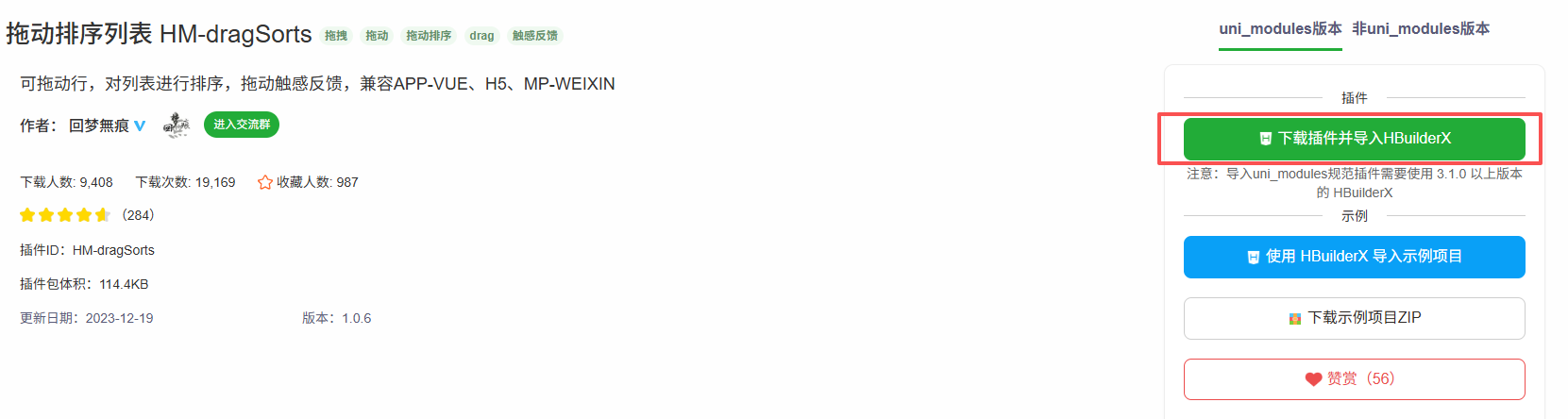
一、uniapp 插件市场下载 拖动排序列表 HM-dragSorts
 二、页面使用
可将插件放在主包,也可直接放到到对应分包引入使用 分包使用 如图:
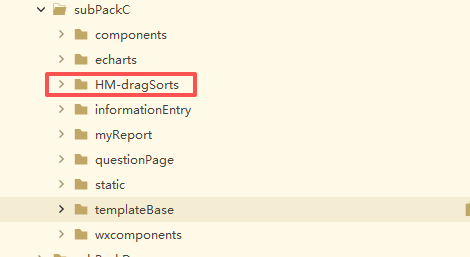
再要使用的页面引入使用 HM-dragSorts---components---HM-dragSorts---HM-dragSorts.vue
HM-dragSorts.vue
此页面为 HM-dragSorts 插件页面修改
<template>
	<view class="HM-drag-sort" :style="{'height': ListHeight+'px'}">
		<!-- 拖拽中显示的行 -->
		<view class="rowBox-shadow" id="shadowRowBox">
			<view class="hm-row-shadow move" id="shadowRow">
				<view class="modules">
					<!-- 内容  -->
					<view class="row-content">
						<view class="row" :style="{'height': rowHeight+'px'}">
							<image v-if="shadowRow.icon" class="icon" :src="shadowRow.icon"></image>
							<text class="text">{{shadowRow.name}}</text>
						</view>
					</view>
					<!-- 拖拽图标 -->
					<view class="drag-content">
						<view class="drag-icon" :style="{'height': rowHeight+'px'}">
							<text class="iconfont icon-drag"></text>
						</view>
					</view>
				</view>
			</view>
		</view>
		<!-- 拖拽列表 -->
		<scroll-view class="color scroll-view" :id="'scrollView_'+guid" :scroll-y="true"
			:style="{'height': ListHeight+'px'}" :scroll-top="scrollViewTop" @scroll="drag.scroll"
			:scroll-with-animation="scrollAnimation">
			<view class="list">
				<checkbox-group @change="handleCheckboxChange">
					<label v-for="(row,index) in dragList" :key="row.HMDrag_id" >

						<view style="position: relative;" >
							<view class="rowBox ani">
								<!-- 注意,这里的style只有在行首次渲染出来才有效,后面拖动列表,style会被wxs修改,这里的style就不会再生效了 -->
								<view class="hm-row"
									:style="{'transform': 'translate3d(0,' + (row.HMDrag_sort-index)*100 + '%,-1px)'}"
									:data-sort="row.HMDrag_sort" :data-id="row.HMDrag_id" :id="row.HMDrag_id">
									<view class="modules">
										<!-- 内容  -->
										<view class="row-content">
											<view class="row" @tap="triggerClick(row.HMDrag_sort, row)"
												:style="{'height': rowHeight+'px'}">
												<!-- <image v-if="row.icon" class="icon" :src="row.icon"></image> -->
												<view class="flex-align-center" style="width: 100%;">
													<checkbox color="#FFFFFF" :value="row.name"
														:checked="row.isShown==1" style="transform: scale(0.8);"
														class="check-box" />
													<view class="text" style="margin-left: 10rpx;">{{ row.name }}</view>
												</view>

												<image class="gd-icon" @click.stop.self="gdChange(row,index)"
													v-if="row.isCustom!=0"
													src="/subPackages/subPackC/static/imgC/gd-icon.svg" mode=""></image>

												<!-- <view class="edit-clos" v-if="item.show && item.isCustom!=0"> -->
											</view>


										</view>


										<view></view>


										<!-- 拖拽图标 -->

										<view v-if="row.disabled" class="drag-content">

											<view class="drag-icon" :style="{'height': rowHeight+'px'}">
												<text class="iconfont icon-drag disabled"></text>
											</view>
										</view>

										<view v-else class="drag-content" :data-id="row.HMDrag_id"
											@touchstart="drag.touchstart" @touchmove="drag.touchmove"
											@touchend="drag.touchend">
											<view class="drag-icon" :style="{'height': rowHeight+'px'}">
												<text class="iconfont icon-drag"></text>
											</view>
										</view>
									</view>
								</view>
							</view>
							<view class="edit-clos" v-if="row.show && row.isCustom!=0">
								<view class="edit-box" @click.stop.self="editIndicator(row)" v-if="row.isCustom==1">编辑
								</view>
								<view class="del-box" @click.stop.self='deleteBtn(row,index)'>删除</view>
							</view>
						</view>
					</label>
				</checkbox-group>
			</view>
		</scroll-view>

		<!-- 数据跳板 -->
		<view id="dataView" style="display: none !important;" :data-guid="guid" :prop="wxsDataStr"
			:change:prop="drag.receiveData">触发wxs跳板,请勿删除</view>
		<!-- #ifdef APP-VUE || H5 -->
		<view style="display: none !important;" :prop="scrollCommand" :change:prop="renderjs.runCommand">
			触发renderjs跳板,请勿删除</view>
			<!-- #endif -->

	</view>
</template>
<script src="./drag.wxs" module="drag" lang="wxs"></script>
<script module="renderjs" lang="renderjs">
	// APP or H5端 renderjs 实现拖拽中的自动滚动列表
	export default {
		data() {
			return {
				e: null,
				ScrollView: null,
			}
		},
		methods: {
			runCommand(e) {
				if (e == null) {
					return
				}
				this.e = e;
				this.getScrollView(document.getElementById('scrollView_' + this.e.guid))
				window.cancelAnimationFrame(this.AnimationFrameID);
				this.AnimationFrameID = window.requestAnimationFrame(this.Animation);
				if (e.command == "stop") {
					window.cancelAnimationFrame(this.AnimationFrameID);
					return;
				}
			},
			Animation() {
				if (this.e.command == "stop") {
					window.cancelAnimationFrame(this.AnimationFrameID);
					return;
				}
				// 计算最大滚动高度
				let maxScrollTop = this.e.rowLength * this.e.rowHeight - this.e.ListHeight;
				if (this.e.command == "up") {
					this.ScrollView.scrollTop -= 3
				} else if (this.e.command == "down") {
					this.ScrollView.scrollTop += 3;
				}
				if (this.ScrollView.scrollTop < 0) {
					this.ScrollView.scrollTop = 0;
					window.cancelAnimationFrame(this.AnimationFrameID);
				}
				if (this.ScrollView.scrollTop > maxScrollTop) {
					this.ScrollView.scrollTop = maxScrollTop;
					window.cancelAnimationFrame(this.AnimationFrameID);
				}
				this.AnimationFrameID = window.requestAnimationFrame(this.Animation);
			},
			getScrollView(DOM) {

				if (this.ScrollView != null) {
					return this.ScrollView;
				}
				let styleStr = DOM.getAttribute('style');

				if (DOM.className == 'uni-scroll-view' && styleStr != null && styleStr.indexOf('overflow') > -1 && styleStr
					.indexOf(
						'auto') > -1) {
					this.ScrollView = DOM;
					return DOM;
				} else {
					this.getScrollView(DOM.firstChild);
				}
			}
		}
	}
</script>
<script>
	/**
	 * 拖拽排序组件 HM-dragSort
	 * @description 拖拽排序组件 HM-dragSort
	 * @property {ObjectArray} list = [] 列表数据,数据格式[{"name": "花呗","icon": "/static/img/1.png",}]
	 * @property {Boolean} feedbackGenerator = [true|false] 是否拖动触感反馈
	 * @property {Boolean} longTouch = [true|false] 是否长按拖动
	 * @property {Boolean} autoScroll = [true|false] 是否拖拽至边缘自动滚动列表
	 * @property {Number} longTouchTime = [] 选填,触发长按时长,单位:ms,默认350ms,不支持微信小程序
	 * @property {Number} listHeight = 0 选填,可拖动列表整体的高度,单位:px,默认等于窗口高度
	 * @property {Number} rowHeight = 44 选填,行高,单位:px,默认44px
	 * @property {String} listBackgroundColor  选填,列表底色,注意是列表的底色,不是行的底色,默认#FFFFFF
	 * @event {Function} change 行位置发生改变时触发事件 返回值:{index:'原始下标',moveTo:'被拖动到的下标',moveRow:'拖动行数据'}
	 * @event {Function} confirm 拖拽结束且行位置发生了改变触发事件 返回值:{index:'原始下标',moveTo:'被拖动到的下标',moveRow:'拖动行数据',list:'整个列表拖动后的数据'}
	 */
	export default {
		name: 'HM-dragSort',
		data() {
			return {
				guid: "",
				isAppH5: true, //是否APPH5 无需手动配置
				shadowRow: {}, // 存放被拖拽行数据
				// 列表数据
				dragList: [],
				ListHeight: this.listHeight, // scroll-view列表高度

				// 控制滑动
				scrollViewTop: 0, // 滚动条位置
				scrollCommand: null, //传递renderjs数据
				isHoldTouch: false, //是否正在拖拽
				isScrolling: false, //是否正在滚动视图
				scrollAnimation: false, //滚动动画 在微信端开启
				scrollTimer: null, //定时器-控制滚动 微信小程序端使用 实现类似requestAnimationFrame效果
				wxsDataObj: [],
				wxsDataStr: "[]"
			}
		},
		// #ifdef VUE3
		emits: ['change', 'confirm'],
		// #endif
		props: {
			//是否开启拖动震动反馈
			feedbackGenerator: {
				value: Boolean,
				default: true
			},
			// 是否开启长按拖动
			longTouch: {
				value: Boolean,
				default: false
			},
			autoScroll: {
				value: Boolean,
				default: true
			},
			longTouchTime: {
				value: Number,
				default: 300
			},
			// 列表数据
			list: {
				value: Array,
				default: []
			},
			// 行高度 默认44行高
			rowHeight: {
				value: Number,
				default: 44
			},
			// 组件高度 默认windowHeight满屏
			listHeight: {
				value: Number,
				default: 0
			},
			listBackgroundColor: {
				value: String,
				default: "#fff"
			}
		},
		watch: {
			longTouch(val) {
				// #ifdef VUE3
				if (!val) {
					console.error('vue3目前仅支持长按拖拽!');
				}
				// #endif

				this.pushWxsData('longTouch', val);
			},
			longTouchTime(val) {
				this.pushWxsData('longTouchTime', val);
			},
			feedbackGenerator(val) {
				this.pushWxsData('feedbackGenerator', val);
			},
			autoScroll(val) {
				this.pushWxsData('autoScroll', val);
			},
			list: {
				handler(val) {
					this.initList(val); //数据变化重新初始化list
				},
				immediate: true,
				deep: true
			},
			listHeight: {
				handler(val) {

					this.ListHeight = val;
					this.pushWxsData('ListHeight', this.ListHeight);
				},
				immediate: true
			}
		},
		mounted() {
			this.guid = this.getGuid();

			const res = uni.getSystemInfoSync();
			// #ifdef MP-WEIXIN
			let state = this.compareVersion(res.hostVersion, '2.14.2');
			if (state < 0) {
				console.error('当前微信基础库:' + res.hostVersion + ',HM-dragSorts组件仅支持微信基础库2.14.2+,请切换基础库!');
			}
			this.scrollAnimation = true;
			this.isAppH5 = false;
			// #endif
			if (this.listHeight == 0) {
				this.ListHeight = res.windowHeight;
				// #ifdef VUE3
				// vue3 要减去导航栏和状态栏高度
				if (res.windowHeight == res.screenHeight) {
					this.ListHeight = res.windowHeight - 45 - res.statusBarHeight;
				}
				// #endif
			}
			this.pushWxsData('isAppH5', this.isAppH5);
			this.pushWxsData('ListHeight', this.ListHeight);
			this.pushWxsData('longTouch', this.longTouch);
		},
		methods: {
			/**
			 * 选中不选中
			 * @param {Object} e
			 */
			handleCheckboxChange(e) {
				this.dragList.forEach(row => {
					row.isShown = e.detail.value.includes(row.name) ? 1 : 0;
				});
				// this.dragList = this.dragList.sort((a, b) => b.isShown - a.isShown);
				//点击之后将最新选中数据排在前面
				/*                 this.$nextTick(() => {
				                    this.dragList = [...this.dragList].sort((a, b) => b.isShown - a.isShown);
				                }) */
				console.log(this.dragList, 'shuju')
			},


			/**
			 * 点击更多
			 * @param {Object} item
			 * @param {Object} index
			 */
			gdChange(item, index) {
				console.log(item, this.dragList, 'item')
				this.activeIndex = index;
				this.dragList.forEach(i => {
					if (i.id == item.id) {
						this.$nextTick(() => {
							i.show = !i.show
						})
					} else {
						this.$nextTick(() => {
							i.show = false
						})
					}
				})

			},

			/**
			 * 父组件触发点击空白区域关闭更多的弹框
			 */
			childMethod() {
				this.dragList.forEach(item => {
					item.show = false
				})
			},

			/**
			 * 父组件点击模板切换的时候触发选中的排序
			 */
			selectByPreset(presetKey) {
				const selectedNames = this.presets[presetKey];
				this.dragList.forEach(item => {
					item.isShown = selectedNames.includes(item.name) ? 1 : 0;
				});

				// 重新排序:选中的排前面,未选中的排后面
				this.dragList.sort((a, b) => {
					if (a.isShown === b.isShown) return 0;
					return b.isShown - a.isShown; // 降序排列,1在前,0在后
				});
				/*             for (let i = 0; i < this.dragList.length; i++) {
				                this.dragList[i].HMDrag_sort = i + 1; // 从1开始分配新ID
				            } */

			},


			/**
			 * 点击更多弹框中的编辑
			 */
			editIndicator(item) {
				item.show = false
				this.$emit('childEvent', item)
			},

			/**
			 * 点击更多弹框中的删除
			 */
			deleteBtn(item, index) {
				// this.dragList.splice(index,1)
				this.$emit('deleteIndex', index)
			},


			getGuid() {
				function S4() {
					return (((1 + Math.random()) * 0x10000) | 0).toString(16).substring(1);
				}
				return (S4() + S4() + "_" + S4() + "_" + S4() + "_" + S4() + "_" + S4() + S4() + S4());
			},

			initList() {
				let tmpList = JSON.parse(JSON.stringify(this.list));
				for (let i = 0, len = tmpList.length; i < len; i++) {
					// 组件内赋予临时id和sort
					if (!tmpList[i].hasOwnProperty('HMDrag_id')) {
						tmpList[i].HMDrag_id = 'HMDragId_' + this.getGuid();
					}
					tmpList[i].HMDrag_sort = i;
				}
				if (this.dragList.length > 0) {
					setTimeout(() => {
						this.dragList.splice(0, this.dragList.length, ...tmpList);
					}, 50)
				} else {
					this.dragList = JSON.parse(JSON.stringify(tmpList));
				}
				this.pushWxsData('lastInitTime', (new Date()).valueOf());
			},
			loadShadowRow(e) {

				this.shadowRow = this.getMoveRow(e.rowSort);
			},

			//兼容微信小程序震动
			vibrate() {
				uni.vibrateShort()
			},
			// 控制自动滚动视图
			pageScroll(e) {
				// 滚动 up-上滚动 down-下滚动
				if (e.command == "up" || e.command == "down") {
					if (!this.isHoldTouch) {
						this.isHoldTouch = true;
						this.scrollViewTop = e.scrollTop;
					}
					if (this.isScrolling) {
						return;
					};
					this.isScrolling = true;

					if (this.isAppH5) {
						// APP端和H5端 执行renderjs的滚动
						e.ListHeight = this.ListHeight;
						e.rowHeight = this.rowHeight;
						e.rowLength = this.dragList.length;
						this.scrollCommand = e;
						return;
					}

					// 微信小程序执行以下逻辑
					this.scrollTimer != null && clearInterval(this.scrollTimer);
					let maxHeight = this.rowHeight * this.dragList.length + 1 - this.ListHeight;
					let runTick = true;
					// 逻辑层传递到视图层需要时间,可能会出现滚动不流畅现象
					this.scrollTimer = setInterval(() => {
						if (!runTick) {
							return;
						}
						this.runScroll(e.command, maxHeight);
						runTick = false;
						this.$nextTick(function() {
							runTick = true;
						})
					}, 16.6)
				}
				// 停止滚动
				if (e.command == "stop") {
					// #ifdef APP-PLUS || H5
					// 停止指定传递到renderjs
					this.scrollCommand = e;
					// #endif
					this.isScrolling && this.stopScroll();
				}
			},
			// 微信端的滚动
			runScroll(command, maxHeight) {
				if (command == "up") {
					this.scrollViewTop -= 5
				}
				if (command == "down") {
					this.scrollViewTop += 5;
				}
				if (this.scrollViewTop < 0) {
					this.scrollViewTop = 0;
					clearInterval(this.scrollTimer);
				}
				if (this.scrollViewTop > maxHeight) {
					this.scrollViewTop = maxHeight;
					clearInterval(this.scrollTimer);
				}
			},
			//停止滚动
			stopScroll() {
				this.scrollTimer != null && clearInterval(this.scrollTimer);
				this.isScrolling = false;
				this.scrollingtop = 0;
			},
			//
			getMoveRow(HMDrag_sort) {
				for (let i = 0, len = this.dragList.length; i < len; i++) {
					if (this.dragList[i].HMDrag_sort == HMDrag_sort) {
						return JSON.parse(JSON.stringify(this.dragList[i]));
					}
				}
			},
			//
			triggerClick(index, row) {
				let tmpRow = JSON.parse(JSON.stringify(row));
				// 清除临时id和sort
				delete tmpRow.HMDrag_id;
				delete tmpRow.HMDrag_sort;
				this.$emit('onclick', {
					index: index,
					row: JSON.parse(JSON.stringify(tmpRow))
				});
			},
			change(e) {
				e.moveRow = this.getMoveRow(e.index);
				// 清除组件临时赋予的id
				delete e.moveRow.HMDrag_id;
				delete e.moveRow.HMDrag_sort;
				this.$emit('change', e);
			},
			sort(e) {
				this.stopScroll();
				this.isHoldTouch = false;
				let moveRow = this.getMoveRow(e.index);
				// 检测清除临时id和sort
				delete moveRow.HMDrag_id;
				delete moveRow.HMDrag_sort;

				let list = JSON.parse(JSON.stringify(this.dragList));
				let tmpList = [];
				for (let i = 0, len = list.length; i < len; i++) {
					// 检测清除临时id和sort
					delete list[i].HMDrag_id;
					delete list[i].HMDrag_sort;
					let index = e.sortArray[i];
					this.dragList[i].HMDrag_sort = index;
					tmpList[index] = list[i];
				}
				// 触发组件confirm 并传递数据
				this.$emit('confirm', {
					list: tmpList,
					index: e.index,
					moveTo: e.offset,
					moveRow: moveRow
				});

			},
			getNowList() {
				let list = JSON.parse(JSON.stringify(this.dragList));
				let tmpList = [];
				for (let i = 0, len = list.length; i < len; i++) {
					let tmpSotr = list[i].HMDrag_sort;
					tmpList[tmpSotr] = list[i];
					// 检测清除临时id和sort
					delete tmpList[tmpSotr].HMDrag_id;
					delete tmpList[tmpSotr].HMDrag_sort;
				}
				return tmpList;
			},
			splice() {
				let deleteIndex = arguments[0];
				let deleteLength = arguments[1];
				let len = arguments.length;
				let waitPushList = [];
				for (let i = 2; i < len; i++) {
					let newRow = arguments[i]
					newRow.HMDrag_id = 'HMDragId_' + this.getGuid();
					newRow.HMDrag_sort = deleteIndex + i - 2;
					waitPushList.push(newRow);
				}
				let minDeleteSort = deleteIndex;
				let maxDeleteSort = deleteLength > 0 ? deleteIndex + deleteLength - 1 : deleteIndex;
				let offsetSort = waitPushList.length - deleteLength;
				let deleteIndexArray = [];

				for (let i = this.dragList.length - 1; i >= 0; i--) {
					let row = this.dragList[i];
					let rowSort = row.HMDrag_sort;
					// 跳过
					if (rowSort < minDeleteSort) {
						continue;
					}
					// 删除
					if (deleteLength > 0 && rowSort >= minDeleteSort && rowSort <= maxDeleteSort) {
						this.dragList.splice(i, 1);
						continue;
					}
					if (offsetSort != 0 && rowSort >= maxDeleteSort) {
						let newSort = rowSort + offsetSort;
						this.dragList[i].HMDrag_sort = newSort;

					}
				}
				this.dragList.push(...waitPushList);
				this.pushNewSort();

				let list = JSON.parse(JSON.stringify(this.dragList));
				let tmpList = this.getNowList();
				return tmpList;
			},
			push() {
				let len = arguments.length;
				let waitPushList = [];
				let startSotr = this.dragList.length;
				for (let i = 0; i < len; i++) {
					let newRow = arguments[i]
					newRow.HMDrag_id = 'HMDragId_' + this.getGuid();
					newRow.HMDrag_sort = startSotr + i;
					waitPushList.push(newRow);
				}
				this.dragList.push(...waitPushList);
				this.pushNewSort();
				let tmpList = this.getNowList();
				return tmpList;
			},
			unshift() {
				let len = arguments.length;
				let waitPushList = [];
				for (let i = 0; i < len; i++) {
					let newRow = arguments[i]
					newRow.HMDrag_id = 'HMDragId_' + this.getGuid();
					newRow.HMDrag_sort = i;
					waitPushList.push(newRow);
				}
				for (let i = this.dragList.length - 1; i >= 0; i--) {
					let row = this.dragList[i];
					let rowSort = row.HMDrag_sort;
					let newSort = rowSort + len;
					this.dragList[i].HMDrag_sort = newSort;
				}
				this.dragList.push(...waitPushList);
				this.pushNewSort();
				let tmpList = this.getNowList();
				return tmpList;
			},
			pushNewSort() {
				let sortArray = [];
				for (let i = 0, len = this.dragList.length; i < len; i++) {
					sortArray.push(this.dragList[i].HMDrag_sort);
				}
				this.pushWxsData('sortArray', sortArray);
				this.pushWxsData('lastInitTime', (new Date()).valueOf());
			},
			pushWxsData(key = null, val = null) {
				this.wxsDataObj.splice(0, 8, ['guid', this.guid],
					['listLength', this.dragList.length],
					['ListHeight', this.ListHeight],
					['isAppH5', this.isAppH5],
					['longTouch', this.longTouch],
					['longTouchTime', this.longTouchTime],
					['feedbackGenerator', this.feedbackGenerator],
					['autoScroll', this.autoScroll]);
				let index = -1;
				let sotrArrayIndex = -1;
				for (let i = 0; i < this.wxsDataObj.length; i++) {
					if (this.wxsDataObj[i][0] == key) {
						index = i;
						break;
					}
				}
				if (index > -1) {
					this.wxsDataObj[index][1] = val;
					if (key == 'sortArray') {
						sotrArrayIndex = index;
					}
				} else {
					this.wxsDataObj.push([key, val]);
					if (key == 'sortArray') {
						sotrArrayIndex = this.wxsDataObj.length - 1;
					}
				}

				if (this.guid == "") {
					return;
				}
				this.wxsDataStr = JSON.stringify(this.wxsDataObj);
			},
			compareVersion(v1, v2) {
				v1 = v1.split('.')
				v2 = v2.split('.')
				const len = Math.max(v1.length, v2.length)

				while (v1.length < len) {
					v1.push('0')
				}
				while (v2.length < len) {
					v2.push('0')
				}
				for (let i = 0; i < len; i++) {
					const num1 = parseInt(v1[i])
					const num2 = parseInt(v2[i])

					if (num1 > num2) {
						return 1
					} else if (num1 < num2) {
						return -1
					}
				}
				return 0
			}

		}
	}
</script>

<style lang="scss" scoped>
	//默认
	$row-background-color: #fff;
	$border-color :#c8c7cb;
	$shadow-color-moveing :rgba(0, 0, 0, 0.5);
	$drag-icon-color: #c7c7cb;
	$drag-icon-color-disabled: #e7e7eb;
	//Dark模式
	$Dark-row-background-color: #000;
	$Dark-border-color :#3d3d40;
	$Dark-shadow-color-moveing :rgba(0, 0, 0, 0.5);
	$Dark-drag-icon-color: #c7c7cb;
	$Dark-drag-icon-color-disabled: #e7e7eb;


	//字体图标 拖拽图标
	@font-face {
		font-family: "HM-DS-font";
		src: url('data:font/truetype;charset=utf-8;base64,AAEAAAANAIAAAwBQRkZUTYqxv5sAAAYsAAAAHEdERUYAKQAKAAAGDAAAAB5PUy8yPVJI1gAAAVgAAABWY21hcAAP6o8AAAHAAAABQmdhc3D//wADAAAGBAAAAAhnbHlmwsmUEgAAAxAAAAA0aGVhZBgr3I8AAADcAAAANmhoZWEH3gOFAAABFAAAACRobXR4DAAAAAAAAbAAAAAQbG9jYQAaAAAAAAMEAAAACm1heHABEQAYAAABOAAAACBuYW1lKeYRVQAAA0QAAAKIcG9zdEdJTj8AAAXMAAAANwABAAAAAQAAXdXjiV8PPPUACwQAAAAAANqGzEkAAAAA2obMSQAAALsEAAJFAAAACAACAAAAAAAAAAEAAAOA/4AAXAQAAAAAAAQAAAEAAAAAAAAAAAAAAAAAAAAEAAEAAAAEAAwAAwAAAAAAAgAAAAoACgAAAP8AAAAAAAAAAQQAAZAABQAAAokCzAAAAI8CiQLMAAAB6wAyAQgAAAIABQMAAAAAAAAAAAAAAAAAAAAAAAAAAAAAUGZFZABA5uTm5AOA/4AAXAOAAIAAAAABAAAAAAAABAAAAAAAAAAEAAAABAAAAAAAAAMAAAADAAAAHAABAAAAAAA8AAMAAQAAABwABAAgAAAABAAEAAEAAObk//8AAObk//8ZHwABAAAAAAAAAQYAAAEAAAAAAAAAAQIAAAACAAAAAAAAAAAAAAAAAAAAAQAAAAAAAAAAAAAAAAAAAAAAAAAAAAAAAAAAAAAAAAAAAAAAAAAAAAAAAAAAAAAAAAAAAAAAAAAAAAAAAAAAAAAAAAAAAAAAAAAAAAAAAAAAAAAAAAAAAAAAAAAAAAAAAAAAAAAAAAAAAAAAAAAAAAAAAAAAAAAAAAAAAAAAAAAAAAAAAAAAAAAAAAAAAAAAAAAAAAAAAAAAAAAAAAAAAAAAAAAAAAAAAAAAAAAAAAAAAAAAAAAAAAAAAAAAAAAAAAAAAAAAAAAAAAAAAAAAAAAAAAAAAAAAAAAAAAAAAAAAAAAAAAAAAAAAAAAAABoAAAADAAAAuwQAAkUAAwAHAAsAABEhFSEVIRUhFSEVIQQA/AAEAPwABAD8AAJFRlxGXEYAAAAAAAASAN4AAQAAAAAAAAAVACwAAQAAAAAAAQAIAFQAAQAAAAAAAgAHAG0AAQAAAAAAAwAIAIcAAQAAAAAABAAIAKIAAQAAAAAABQALAMMAAQAAAAAABgAIAOEAAQAAAAAACgArAUIAAQAAAAAACwATAZYAAwABBAkAAAAqAAAAAwABBAkAAQAQAEIAAwABBAkAAgAOAF0AAwABBAkAAwAQAHUAAwABBAkABAAQAJAAAwABBAkABQAWAKsAAwABBAkABgAQAM8AAwABBAkACgBWAOoAAwABBAkACwAmAW4ACgBDAHIAZQBhAHQAZQBkACAAYgB5ACAAaQBjAG8AbgBmAG8AbgB0AAoAAApDcmVhdGVkIGJ5IGljb25mb250CgAAaQBjAG8AbgBmAG8AbgB0AABpY29uZm9udAAAUgBlAGcAdQBsAGEAcgAAUmVndWxhcgAAaQBjAG8AbgBmAG8AbgB0AABpY29uZm9udAAAaQBjAG8AbgBmAG8AbgB0AABpY29uZm9udAAAVgBlAHIAcwBpAG8AbgAgADEALgAwAABWZXJzaW9uIDEuMAAAaQBjAG8AbgBmAG8AbgB0AABpY29uZm9udAAARwBlAG4AZQByAGEAdABlAGQAIABiAHkAIABzAHYAZwAyAHQAdABmACAAZgByAG8AbQAgAEYAbwBuAHQAZQBsAGwAbwAgAHAAcgBvAGoAZQBjAHQALgAAR2VuZXJhdGVkIGJ5IHN2ZzJ0dGYgZnJvbSBGb250ZWxsbyBwcm9qZWN0LgAAaAB0AHQAcAA6AC8ALwBmAG8AbgB0AGUAbABsAG8ALgBjAG8AbQAAaHR0cDovL2ZvbnRlbGxvLmNvbQAAAgAAAAAAAAAKAAAAAAABAAAAAAAAAAAAAAAAAAAAAAAEAAAAAQACAQIMZHJhZ3NlcXVlbmNlAAAAAAH//wACAAEAAAAMAAAAFgAAAAIAAQADAAMAAQAEAAAAAgAAAAAAAAABAAAAANWkJwgAAAAA2obMSQAAAADahsxJ') format('truetype');
	}

	.iconfont {
		font-family: "HM-DS-font" !important;
		font-style: normal;

		&.icon-drag {
			&:before {
				content: "\e6e4";
			}
		}

	}


	// 定义颜色 start
	//默认颜色


	.color,
	.rowBox-shadow {
		&.scroll-view {
			// border-bottom: 1rpx $border-color solid;
			// border-top: 1rpx $border-color solid;
		}

		.hm-row-shadow,
		.hm-row {
			.modules {
				.row-content {
					.row {

						border-radius: 16rpx 0 0 16rpx;
						margin-bottom: 20rpx;
						// border-bottom: solid 1rpx $border-color;
						background-color: $row-background-color;
					}

				}

				.drag-content {
					.drag-icon {
						border-radius: 0 16rpx 16rpx 0;
						// border-bottom: solid 1rpx $border-color;
						background-color: $row-background-color;

						.iconfont {
							color: $drag-icon-color;
						}

						.disabled {
							color: $drag-icon-color-disabled;
						}
					}
				}
			}

			&.move {
				box-shadow: 0 1px 5px $shadow-color-moveing;
			}
		}

	}

	// 暗黑模式
	@media (prefers-color-scheme: dark) {

		//Dark模式
		.color .rowBox-shadow {
			&.scroll-view {
				border-bottom: 1rpx $Dark-border-color solid;
				border-top: 1rpx $Dark-border-color solid;
			}

			.hm-row-shadow,
			.hm-row {
				.modules {
					.row-content {
						.row {
							border-bottom: solid 1rpx $Dark-border-color;
							background-color: $Dark-row-background-color;
						}
					}

					.drag-content {
						.drag-icon {
							border-bottom: solid 1rpx $Dark-border-color;
							background-color: $Dark-row-background-color;

							.iconfont {
								color: $Dark-drag-icon-color;
							}

							.disabled {
								color: $Dark-drag-icon-color-disabled;
							}
						}
					}
				}

				&.move {
					box-shadow: 0 1px 5px $Dark-shadow-color-moveing;
				}
			}
		}
	}

	// 定义颜色 end
	.HM-drag-sort {
		display: flex;
		flex-direction: column;
		position: relative;
		overflow: hidden;

		.scroll-view {
			box-sizing: border-box;
		}


		.rowBox,
		.rowBox-shadow {
			width: 100%;

			.hm-row-shadow,
			.hm-row {
				display: flex;
				flex-direction: row;
				width: 100%;

				.modules {
					width: 100%;
					display: flex;
					flex-direction: row;
					justify-content: space-between;
					box-sizing: border-box;

					.row-content {
						width: 100%;
						flex-shrink: 1;

						.row {
							display: flex;
							align-items: center;
							padding-left: 12px;

							box-sizing: border-box;

							.icon {
								width: 30px;
								height: 30px;
								border-radius: 6px;
								margin-right: 13px;
							}

							.check-box {}

							::v-deep .check-box .wx-checkbox-input {

								border-radius: 50% !important;

							}

							::v-deep .check-box .wx-checkbox-input .wx-checkbox-input-checked {

								background-color: #20C290 !important;
								border-color: #20C290 !important;
							}

							.text {
								font-size: 32rpx;
							}
						}
					}

					.drag-content {
						flex-shrink: 0;

						.drag-icon {
							width: 50px;
							display: flex;
							justify-content: center;
							align-items: center;
							box-sizing: border-box;

							.iconfont {
								font-size: 22px;
								color: #c7c7cb;
							}
						}
					}
				}
			}

			.hm-row-shadow {

				&.move {
					opacity: 0.8;

					view {
						border-bottom-width: 0;
					}
				}
			}

			.hm-row {
				opacity: 1;

				&.hide {
					opacity: 0;
				}

				&.ani {
					transition: transform 0.2s;
					-webkit-transition: transform 0.2s;
				}
			}

			&:last-child {
				.hm-row {
					view {
						border-bottom-width: 0;
					}
				}
			}
		}

		.rowBox-shadow {
			position: absolute;
			z-index: 100;
			display: none;

			&.show {
				display: flex !important;
			}

			&.hide {
				display: none !important;
			}
		}

		.list {
			display: flex;
			flex-direction: column;
			background-color: #F6F8FA;
			// transform-style:preserve-3d;
		}

	}

	.gd-icon {
		width: 40rpx;
		height: 40rpx;
	}

	.edit-clos {
		z-index: 9999;
		position: absolute;
		top: 80rpx;
		right: 80rpx;
		background-color: #FFFFFF;
		box-shadow: 0rpx 8rpx 20rpx 0rpx rgba(0, 0, 0, 0.09);
		border-radius: 16rpx;
		font-size: 28rpx;

		.edit-box {
			color: #333333;
			padding: 26rpx 82rpx;
			border-bottom: 1rpx solid #D8D8D8;
		}

		.del-box {
			color: #EE4040;
			padding: 26rpx 82rpx;
		}
	}

</style>
templateBase.vue
此页面为展示页面
<template>
	<view class="content back-bg-F6F8FA" @click.self="contentBox">
		<view class="bottom-sty">
			<view class="text-tile  padding-top">
				<view class="jt-box" @click="goBack">
					<image class="jiantou" src="/static/image/back-icon.svg" mode=""></image>
				</view>
				<view>模版管理</view>
			</view>
		</view>
		<view class="index-box">
			<view class="title">指标模版</view>
			<view class="tab-list">
				<scroll-view :show-scrollbar='false' :enhanced="true"
					class="scroll-view_H flex-align-center flex-justify-between" scroll-x="true">
					<view id="demo1" class="scroll-view-item_H " :class="tabIndex==index?'uni-bg-xz':'uni-bg-wxz'"
						v-for="(item,index) in tabList" :key="index" @click="changeTab(item,index)">
						<view class="item-text" :class="tabIndex==index?'xz-text':'wxz-text'">{{item.name}}</view>
						<view class="item-num" :class="tabIndex==index?'xz-num':'wxz-num'">
							{{item.showIndicatorCount || 0}}项指标
						</view>
						<image class="icon" :src="item.img" mode=""></image>
					</view>
				</scroll-view>
			</view>
		</view>
		<view class="box-bottom">
			<view class="box-bottom-top flex-align-center flex-justify-between">
				<view class="top-left">我的指标</view>
				<view class="top-right" @click="addTarget">添加指标</view>
			</view>


			<view class="box-list">
				<!-- 		<scroll-view class="scroll-box" :scroll-y="true" :scroll-top="scrollViewTop" @scroll="handleScroll"
					:scroll-with-animation="scrollAnimation"> -->
				<HM-dragSorts v-if="isSHOW" ref="dragSorts" :list.sync="list" :autoScroll="true"
					:feedbackGenerator="false" :listHeight="listHeight" :rowHeight="55" @change="change"
					@confirm="confirm" @childEvent='childEvent' @deleteIndex=deleteIndex
					@onclick="onclick"></HM-dragSorts>
				<!-- </scroll-view> -->
			</view>
		</view>

		<view class="bc-box" @click="saveBtn">
			<view class="bc-btn">保存</view>
		</view>


		<uni-popup ref="zbPopup" background-color="#fff" borderRadius='16rpx 16rpx 0 0'>
			<view class="popup-box">
				<view class="popup-top flex-align-center flex-center" style="gap: 140rpx;">
					<view class="item-list" @click="changeStatus(index,item)"
						:class="index==current?'font-b':'text-item'" v-for="(item,index) in textData" :key='index'>
						{{item}}
						<view v-if="current==index" class="line-bot"></view>
						<view v-else class="line-bot1"></view>
					</view>
					<!-- <view class="pop-title">常规指标</view> -->
				</view>
				<view v-if="current==1">
					<view class="date-list flex-align-center flex-justify-between">
						<view class="date-text">指标名称</view>
						<view class="date-time"><input cursor-spacing='20' style="text-align: right;"
								v-model="userDefined.indicatorName" type="text" placeholder="请输入指标名称" />
						</view>
					</view>
					<view class="date-list flex-align-center flex-justify-between">
						<view class="date-text">指标单位</view>
						<view class="date-time"><input cursor-spacing='20' style="text-align: right;"
								v-model="userDefined.indicatorUnit" type="text" placeholder="请输入指标单位" />
						</view>
					</view>
				</view>
				<view v-else>
					<picker @change="changeZb" :value="zbIndex" :range="diArray" range-key="name">
						<view class="date-list flex-align-center flex-justify-between">
							<view class="date-text">指标名称</view>
							<view class="date-time flex-align-center"><input cursor-spacing='20' v-model="cgzbData.name"
									style="text-align: right;" type="text" disabled placeholder="请输入指标名称" /><span
									class="arrows"></span>
							</view>
						</view>
					</picker>
					<view class="date-list flex-align-center flex-justify-between">
						<view class="date-text">指标单位</view>
						<view class="date-time"><input cursor-spacing='20' style="text-align: right;"
								v-model="cgzbData.unit" type="text" disabled placeholder="请输入指标单位" />
						</view>
					</view>
				</view>

				<view class="btn-box flex-align-center flex-justify-between">
					<view class="btn-qx" @click="cgzbCancle">取消</view>
					<view class="btn-jl" @click="cgzbAdd">添加</view>
				</view>
			</view>

		</uni-popup>

		<uni-popup ref="editPopup" background-color="#fff" borderRadius='16rpx 16rpx 0 0'>
			<view class="popup-box">
				<view class="popup-top">
					<image src="/static/image/zdyzb-icon.svg" mode=""></image>
					<view class="pop-title">自定义指标</view>
				</view>
				<view class="date-list flex-align-center flex-justify-between">
					<view class="date-text">指标名称</view>
					<view class="date-time"><input cursor-spacing='20' style="text-align: right;"
							v-model="editDefined.indicatorName" type="text" placeholder="请输入指标名称" />
					</view>
				</view>
				<view class="date-list flex-align-center flex-justify-between">
					<view class="date-text">指标单位</view>
					<view class="date-time"><input cursor-spacing='20' style="text-align: right;"
							v-model="editDefined.indicatorUnit" type="text" placeholder="请输入指标单位" />
					</view>
				</view>
				<view class="btn-box flex-align-center flex-justify-between">
					<view class="btn-qx" @click="editCancle">取消</view>
					<view class="btn-jl" @click="editAdd">保存</view>
				</view>
			</view>

		</uni-popup>
	</view>
</template>

<script>
	import jcIcon from '../static/imgC/jc-icon.svg'
	import xxgIcon from '../static/imgC/xxg-icon.svg'
	import tzIcon from '../static/imgC/tz-icon.svg'
	import smtzIcon from '../static/imgC/smtz-icon.svg'
	import dxfxIcon from '../static/imgC/dxfx-icon.svg'
	import ylpgcon from '../static/imgC/ylpg-icon.svg'
	import ydIcon from '../static/imgC/yd-icon.svg'
	import {
		indicatorListAPI,
		indicatorsAPI,
		addRegularIndicatorAPI,
		addIndicatorAPI,
		updateCustomIndicatorAPI,
		updateShowStatusAPI,
		unlinkedAPI,
	} from '../../../api/subC/templateBaseApi.js'
	import dragSorts from '../HM-dragSorts/components/HM-dragSorts/HM-dragSorts.vue' // 组件符合easycom规范,默认这个可以不写
	export default {
		components: {
			'HM-dragSorts': dragSorts
		}, // 组件符合easycom规范,默认这个可以不写
		data() {
			return {
				isSHOW: true,
				presets: [
					['血糖', '血压', '血脂'], // 第一个按钮的选中项
					['心率', '血压', '血氧'], // 第二个按钮的选中项
					['BMI', '卡路里'], // 第三个按钮的选中项
					['心率', '呼吸', '体温', '血压'],
					['血压', '血糖', '血脂', '尿酸'],
					['心理压力', '抗压能力', '心率变异性'],
					['BMI', '心率', '血氧', '呼吸'],

				],
				list: [{
						id: 2,
						name: '血压',
						isShown: 0,
						isCustom: 0,
						show: false
					},
					{
						id: 3,
						name: '血糖',
						isShown: 0,
						isCustom: 0,
						show: false
					},
					{
						id: 4,
						name: '血脂',
						isShown: 0,
						isCustom: 0,
						show: false
					},
					{
						id: 1,
						name: '心率',
						isShown: 0,
						isCustom: 0,
						show: false
					},
					{
						id: 5,
						name: '血氧',
						isShown: 0,
						isCustom: 0,
						show: false
					},
					{
						id: 6,
						name: 'BMI',
						isShown: 0,
						isCustom: 0,
						show: false
					},{
						id: 7,
						name: '体温',
						isShown: 0,
						isCustom: 1,
						show: false
					}
				],
				tabList: [{
						name: '三高指标',
						showIndicatorCount: '',
						img: jcIcon
					},
					{
						name: '心血管健康',
						showIndicatorCount: '',
						img: xxgIcon
					},
					{
						name: '体重管理',
						showIndicatorCount: '',
						img: tzIcon
					},
					{
						name: '基础生理指标',
						showIndicatorCount: '',
						img: smtzIcon
					},
					{
						name: '代谢风险',
						showIndicatorCount: '',
						img: dxfxIcon
					},
					{
						name: '压力评估',
						showIndicatorCount: '',
						img: ylpgcon
					},
					{
						name: ' 运动与体适能',
						showIndicatorCount: '',
						img: ydIcon
					}
				],
				deleteId: [],
				getList: [{
					name: '血糖',

				}],
				tabIndex: -1,
				textData: ['常规指标', '自定义指标'],
				current: 0,
				zbIndex: 0,
				diArray: [], //常规指标数据
				indicatorId: '', //添加常规指标id

				templateId: '', //模板id
				cgzbData: {
					name: '',
					unit: ''
				},
				userDefined: {
					indicatorName: '', //名称
					indicatorUnit: '', //单位
				},
				editDefined: {
					indicatorId: '', //指标id
					indicatorName: '', //名称
					indicatorUnit: '', //单位
				},
				formData: {
					templateId: '', //模板id
					indicatorId: '', //指标id
					isShown: '', //指标展示状态
				},
				cdAddTimeout: '', //常规添加 防抖
				zdyAddTimeout: '', //自定义添加 防抖
				saveTimeout: '', //保存 防抖
				sortData: '', //排序后的数据
				scrollViewTop: 0, //滚动条位置
				listHeight: 450,
				startIndex: '', //可视区域的开始下标
				endIndex: '', //可视区域的结束下标

			}
		},
		onLoad() {
			//动态赋值 tab 指标项数量展示
			this.tabList.forEach((tab, index) => {
				tab.showIndicatorCount = this.presets[index].length;
			});

			this.initData()
		},
		watch: {
			list: {
				handler(newVal, oldVal) {
					// console.log(newVal, oldVal, 'val4444')
				},

			},
		},
		methods: {
			/**
			 * 通过滚动条的位置判断 组件的高度
			 * @param {Object} e
			 */
			handleScroll(e) {
				if (e.detail.scrollTop > 400) {
					this.listHeight = 1800
				} else {
					this.listHeight = 1000
				}
				const scrollTop = e.detail.scrollTop;
				const windowHeight = uni.getSystemInfoSync().windowHeight;
				// 计算可见区域的起始和结束下标
				this.startIndex = Math.floor(scrollTop / 55);
				this.endIndex = Math.min(this.startIndex + Math.ceil(windowHeight / 55), this.list.length - 1);

				console.log('可见区域下标范围:', this.startIndex, '到', this.startIndex + 6);
			},
			push() {
				// 和数组的push使用方法一致,可以push单行,也可以push多行
				/*                 this.$refs.dragSorts.push({
				                    "name": "push行",
				                    "icon": "/static/img/2.png"
				                }); */

			},
			unshift() {
				// 和数组的unshift使用方法一致,可以unshift单行,也可以unshift多行
				this.$refs.dragSorts.unshift({
					"name": "unshift行",
					"icon": "/static/img/2.png"
				});
			},
			splice() {
				// 和数组的unshift使用方法一致 下标1开始删除1个并在下标1位置插入行
				this.$refs.dragSorts.splice(1, 1, {
					"name": "splice行",
					"icon": "/static/img/2.png"
				});
			},
			onclick(e) {
				/*             console.log('=== onclick start ===');
				            console.log("被点击行: " + JSON.stringify(e.value));
				            console.log("被点击下标: " + JSON.stringify(e.index));
				            console.log('=== onclick end ==='); */
			},

			/**
			 * 拖动过程中经过的位置数据
			 * @param {Object} e
			 */
			change(e) {


				console.log(this.$refs.dragSorts)
				console.log(this.scrollViewTop, '滚动条的高度')
				console.log('=== change start 1===');
				console.log("被拖动行: " + JSON.stringify(e.moveRow));
				console.log('原始下标:', e.index);
				console.log('移动到:', e.moveTo);
				console.log('=== change end 1===');
			},
			/**
			 * 拖动过程完成后的位置数据
			 * @param {Object} e
			 */
			confirm(e) {
				this.sortData = '', //清空拖动排序 恢复默认
					this.sortData = e.list
				// this.list=e.list
				this.updateData(e.list)
				/*                 console.log('=== confirm start2 ===');
				                console.log("被拖动行: " + JSON.stringify(e.moveRow));
				                console.log('原始下标:', e.index);
				                console.log('移动到:', e.moveTo);
				                console.log('=== confirm end2 ===');
				                console.log(e, 'eeeeeeeeee') */
			},


			/**
			 * 删除
			 */
			deleteIndex(index) {
				this.list.splice(index, 1)
				this.updateData(this.list)
			},


			/**
			 * 更新数据: 新增 删除 换顺序 都要更新数据重新渲染
			 * @param {Object} val
			 */
			updateData(val) {
				this.isSHOW = false
				setTimeout(() => {
					this.isSHOW = true
					this.list = val
					this.list.forEach(item => {
						item.show = false
					})
				}, 50)
			},


			/**
			 * 指标 添加
			 */
			cgzbAdd() {

				//常规指标
				if (this.current == 0) {
					if (this.indicatorId == '') {
						uni.showToast({
							title: '请选择指标',
							icon: 'none'
						});
						return
					}

					if (this.cdAddTimeout) clearTimeout(this.cdAddTimeout);
					this.cdAddTimeout = setTimeout(() => {
						this.addCgApi()
					}, 500)
				} else {
					//自定义指标
					if (this.userDefined.indicatorName == '' || this.userDefined.indicatorName == ' ') {
						uni.showToast({
							title: '指标名称不能为空',
							icon: 'none'
						});
						return
					}

					if (this.userDefined.indicatorName && this.userDefined.indicatorName.length > 15) {
						uni.showToast({
							title: '指标名称不能超过15个字',
							icon: 'none'
						});
						return
					}

					if (this.userDefined.indicatorUnit == '' || this.userDefined.indicatorUnit == ' ') {
						uni.showToast({
							title: '指标单位不能为空',
							icon: 'none'
						});
						return
					}

					if (this.userDefined.indicatorUnit && this.userDefined.indicatorUnit.length > 10) {
						uni.showToast({
							title: '指标单位不能超过10个字',
							icon: 'none'
						});
						return
					}

					//按钮防抖 防止多次点击触发
					if (this.zdyAddTimeout) clearTimeout(this.zdyAddTimeout);
					this.zdyAddTimeout = setTimeout(() => {
						this.addZdyApi()
					}, 500)


				}

			},


			/**
			 * 添加常规指标
			 */
			addCgApi() {
				addRegularIndicatorAPI({
					indicatorId: this.indicatorId
				}).then(res => {
					if (res.code == 0) {
						this.$refs.zbPopup.close()
						uni.showToast({
							title: '添加成功',
							icon: 'none'
						});
						this.initData()
					} else {
						uni.showToast({
							title: '添加添加失败',
							icon: 'none'
						});
					}
				})
			},

			/**
			 * 添加自定义指标
			 */
			addZdyApi() {
				addIndicatorAPI(this.userDefined).then(res => {
					if (res.code == 0) {
						this.$refs.zbPopup.close()
						uni.showToast({
							title: '添加成功',
							icon: 'none'
						});
						this.initData()
					} else {
						uni.showToast({
							title: '添加添加失败',
							icon: 'none'
						});
					}
				})
			},


			/**
			 * 常规指标 取消
			 */
			cgzbCancle() {
				this.$refs.zbPopup.close()
			},

			/**
			 * 保存
			 */
			saveBtn() {
				if (this.saveTimeout) clearTimeout(this.saveTimeout);
				this.saveTimeout = setTimeout(() => {
					if (this.sortData) {
						this.updateShowStatusAPi(this.sortData)
						console.log(this.sortData, 'this.sortData');
					} else {
						const dragList = this.$refs.dragSorts.dragList;
						this.updateShowStatusAPi(dragList)
						console.log(dragList, 'dragList');
					}
					console.log('保存')
				}, 200)
			},

			updateShowStatusAPi(val) {
				updateShowStatusAPI(val).then(res => {
					if (res.code == 0) {
						uni.showToast({
							title: '保存成功',
							icon: 'none'
						});
						setTimeout(() => {
							uni.navigateBack({
								delta: 1
							})
						}, 500);
					}
				})
			},

			/**
			 * 查询指标列表
			 */
			initData() {
				indicatorListAPI().then(res => {
					if (res.code == 0) {
						// this.list = res.data
						this.updateData(res.data)
						this.list.forEach(item => {
							if (item.isCustom == 1) {
								item.show = false
							}
						})
					}
				})
			},


			/**
			 *查询已有但未添加的常规指标
			 */
			unlinked() {
				unlinkedAPI().then(res => {
					if (res.code == 0) {
						this.diArray = res.data
					}
				})
			},


			/**
			 * 切换常规指标
			 */
			changeZb(e) {
				this.zbIndex = e.detail.value
				this.cgzbData = {
					name: this.diArray[this.zbIndex].name,
					unit: this.diArray[this.zbIndex].unit
				}
				this.indicatorId = this.diArray[this.zbIndex].id
				console.log(e, '常规指标')
			},

			/**
			 * 点击其他区域关闭 弹框
			 */
			contentBox() {
				if (this.isSHOW) {
					this.$refs.dragSorts.childMethod()
				}


				/*                 this.list.forEach(item => {
				                    item.show = false
				                })
				                console.log(this.list)
				                this.$nextTick(() => {
				                    this.$emit('list', this.list)
				                }) */
			},


			/**
			 * 编辑指标
			 */
			editIndicator() {
				this.$refs.editPopup.open('bottom')
			},
			/**
			 * 选择常规指标
			 * @param {Object} index
			 * @param {Object} val
			 */
			changeStatus(index, val) {
				this.current = index
			},

			/**
			 *添加指标
			 */
			addTarget() {
				this.userDefined = {
					indicatorName: '', //名称
					indicatorUnit: '', //单位
				}
				this.cgzbData = {
					name: '',
					unit: ''
				}
				this.formData.indicatorId = ''
				this.formData.isShown = ''
				this.$refs.zbPopup.open('bottom')
				this.unlinked()
			},


			/**
			 * 更多
			 * @param {Object} val
			 */
			gdChange(item) {
				this.$nextTick(() => {
					item.show = !item.show
				})
			},


			/**
			 * 切换模版
			 */
			changeTab(item, index) {
				this.sortData = '', //清空拖动排序 恢复默认
					this.isSHOW = false
				this.tabIndex = index
				setTimeout(() => {
					this.tabIndex = -1
					this.isSHOW = true
				}, 100)

				this.selectByPreset(index)
				// this.$refs.dragSorts.selectByPreset(index)

			},

			/**
			 * 指标 选择
			 */
			selectByPreset(presetKey) {
				const selectedNames = this.presets[presetKey];
				this.list.forEach(item => {
					item.isShown = selectedNames.includes(item.name) ? 1 : 0;
				});

				// 重新排序:选中的排前面,未选中的排后面
				this.list.sort((a, b) => {
					if (a.isShown === b.isShown) return 0;
					return b.isShown - a.isShown; // 降序排列,1在前,0在后
				});
			},

			/**
			 * 点击编辑 子组件传值
			 */
			childEvent(val) {
				this.$refs.editPopup.open('bottom')
				this.editDefined = {
					indicatorId: val.id,
					indicatorName: val.name, //名称
					indicatorUnit: val.unit, //单位
				}
				console.log(val, '子组件传值')
			},

			/**
			 * 编辑取消
			 */
			editCancle() {
				this.$refs.editPopup.close()
			},
			/**
			 * 编辑保存
			 */
			editAdd() {
				updateCustomIndicatorAPI(this.editDefined).then(res => {
					if (res.code == 0) {
						uni.showToast({
							title: '编辑成功',
							icon: 'none'
						});
						this.$refs.editPopup.close()
						this.initData()
					} else {
						uni.showToast({
							title: '编辑失败',
							icon: 'none'
						});
					}
				})
			},

			/**
			 * 返回
			 */
			goBack() {
				uni.navigateBack()
			},

		}
	}
</script>

<style scoped lang="scss">
	.content {
		position: relative;
		height: 100vh;

		.bottom-sty {

			.position-fixed {
				position: fixed;
				top: 0;
				padding-top: 14%;
			}


			.text-tile {
				width: 100%;
				font-size: 36rpx;
				color: #303133;
				font-weight: bold;
				display: flex;
				align-items: center;
				justify-content: center;
				padding-bottom: 20rpx;

				.jt-box {
					display: flex;
					align-items: center;
					position: absolute;
					left: 20rpx;
					width: 80rpx;
					height: 80rpx;

					.jiantou {
						width: 40rpx;
						height: 40rpx;

					}
				}
			}
		}


		.padding-top {
			padding-top: 12.5%;
		}

		.index-box {
			margin-top: 56rpx;

			.title {
				color: #333333;
				font-size: 32rpx;
				font-weight: 600;
				padding-left: 24rpx;
			}

			.tab-list {
				padding-left: 24rpx;
				margin-top: 30rpx;

				.scroll-view_H {
					white-space: nowrap;
					width: 100%;

					.scroll-view-item_H {
						width: 240rpx;
						padding: 40rpx 0 40rpx 24rpx;
						display: inline-block;
						font-size: 36rpx;
						margin-right: 20rpx;
						border-radius: 24rpx;
						position: relative;

						.item-text {

							font-size: 32rpx;
							font-weight: 600;
						}

						.xz-text {
							color: #FFFFFF;
						}

						.wxz-text {
							color: #333333;
						}

						.xz-num {
							color: rgba(255, 255, 255, 0.8);
						}

						.wxz-num {
							color: #9E9E9E;
						}

						.item-num {
							margin-top: 30rpx;
							font-size: 28rpx;
						}

						.icon {
							width: 64rpx;
							height: 84rpx;
							position: absolute;
							right: 0;
							bottom: 0;
						}
					}


					.uni-bg-wxz {
						background-color: #FFFFFF;
					}

					.uni-bg-xz {
						background-color: #20C290;
					}

				}
			}
		}

		.box-bottom {
			margin-top: 50rpx;

			.box-bottom-top {
				padding: 0 24rpx;
				font-size: 32rpx;

				.top-left {
					color: #333333;
					font-weight: 600;
				}

				.top-right {
					color: #20C290;
					font-weight: 600;
				}
			}

			.box-list {
				padding: 0 24rpx;
				/* 				height: 50vh;
				overflow-y: scroll; */
				margin-top: 30rpx;

				.scroll-box {
					height: 50vh;
				}

				.list-item {
					padding: 40rpx 24rpx;
					background-color: #FFFFFF;
					border-radius: 16rpx;
					margin-bottom: 20rpx;
					position: relative;

					image {
						z-index: 99;
						position: absolute;
						right: 24rpx;
						width: 40rpx;
						height: 40rpx;
					}

					.edit-clos {
						z-index: 99;
						position: absolute;
						top: 80rpx;
						right: 20rpx;
						background-color: #FFFFFF;
						box-shadow: 0rpx 8rpx 20rpx 0rpx rgba(0, 0, 0, 0.09);
						border-radius: 16rpx;
						font-size: 28rpx;

						.edit-box {
							color: #333333;
							padding: 26rpx 82rpx;
							border-bottom: 1rpx solid #D8D8D8;
						}

						.del-box {
							color: #EE4040;
							padding: 26rpx 82rpx;
						}
					}

					.item-text {
						color: #333333;
						font-size: 32rpx;
						font-weight: bold;
						margin-left: 32rpx;
					}
				}

			}
		}

		.bc-box {
			width: 100vw;
			box-sizing: border-box;
			padding: 0 24rpx;
			position: fixed;
			bottom: 28rpx;
			left: 0;

			.bc-btn {
				text-align: center;
				padding: 22rpx 0;
				font-size: 32rpx;
				color: #FFF;
				background: #20C290;
				border-radius: 44rpx 44rpx 44rpx 44rpx;
			}
		}
	}

	::v-deep .check-box .wx-checkbox-input {
		border-radius: 50% !important;
        // border: none !important;  /* 去除边框 */
	}

	::v-deep .check-box .wx-checkbox-input.wx-checkbox-input-checked {

		background-color: #20C290 !important;
	}

	.popup-box {
		padding: 52rpx 30rpx 0 30rpx;

		.popup-top {
			display: flex;
			margin-bottom: 40rpx;

			image {
				width: 48rpx;
				height: 48rpx;
			}


			.item-list {
				font-size: 32rpx;
			}

			.text-item {
				line-height: 70rpx;
				color: #9E9E9E;
			}

			.font-b {
				line-height: 70rpx;
				color: #333333;
			}

			.line-bot {
				width: 30rpx;
				height: 6rpx;
				background-color: #20C290;
				margin: 0 auto;
			}

			.line-bot1 {
				width: 30rpx;
				height: 6rpx;
			}


			.pop-title {
				color: #333333;
				font-size: 32rpx;
				font-weight: bold;
				margin-left: 16rpx;
			}


		}

		.date-list {
			padding: 32rpx 40rpx;
			background-color: #F6F8FA;
			border-radius: 48rpx;
			margin-bottom: 20rpx;

			.date-text {
				color: #333333;
				font-size: 32rpx;
			}

			.date-time {
				color: #333333;
				font-size: 32rpx;

				.arrows {
					margin-left: 15rpx;
					display: inline-block;
					width: 15rpx;
					height: 15rpx;
					/* 添加边框颜色,以及边框样式为实线*/
					border: #9E9E9E solid;
					/* 只添加上边框和右边框 ,下边框和左边框为0*/
					border-width: 4rpx 4rpx 0 0;
					/* 旋转45度 */
					transform: rotate(45deg);
					//position: relative;
					//bottom: -10px;
				}
			}
		}

		.btn-box {
			margin-top: 94rpx;

			.btn-qx {
				color: #20C290;
				border-radius: 44rpx;
				border: 2rpx solid #20C290;
				padding: 28rpx 134rpx;
			}

			.btn-jl {
				color: #FFFFFF;
				border-radius: 44rpx;
				padding: 28rpx 134rpx;
				background-color: #20C290;
			}
		}
	}
</style>
中国智能体开发者社区,聚焦智能体与大模型开发,提供前沿资讯、实用工具链、开源项目及行业案例。通过技术沙龙、开发者大赛等活动,促进经验交流与协作,助力开发者快速构建创新智能应用。
更多推荐



 2
2 0
0- 0


 已为社区贡献1条内容

所有评论(0)