【10 年老司机带你进行Go实战】手把手教你构建 Model Context Protocol(MCP) Server - 从入门到填坑
手把手教你用 Go 开发 MCP Server,让大模型具备调用本地工具的能力
1. 背景介绍
1.1 什么是 MCP?
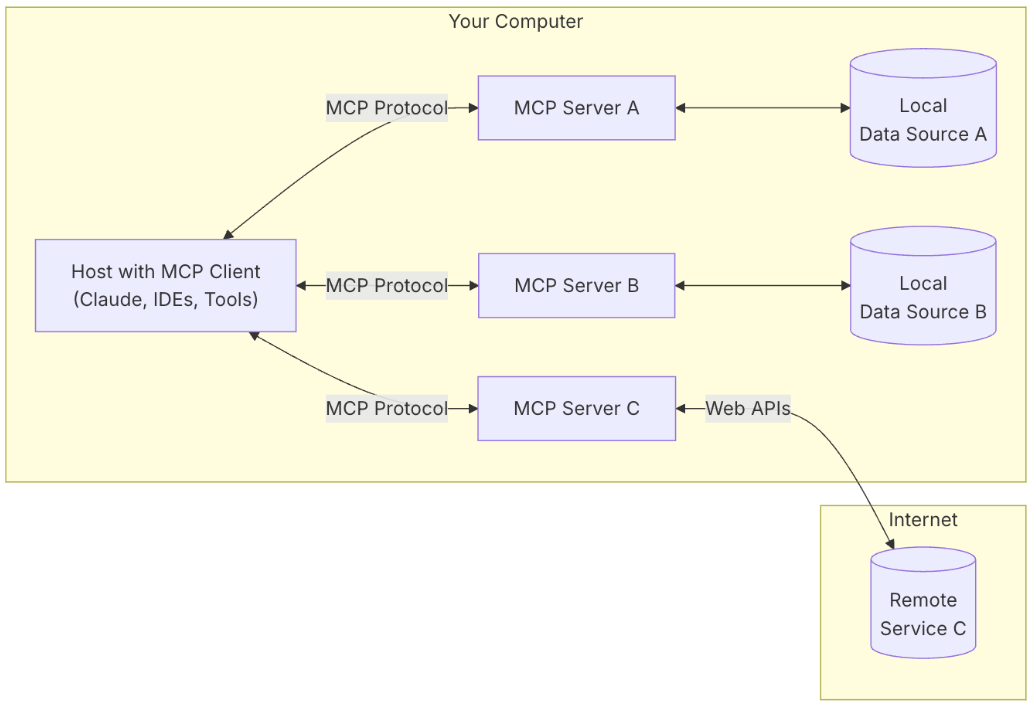
MCP (Model Context Protocol,模型上下文协议) 是由 Anthropic 公司(Claude 大模型的创造者)于 2024 年 11 月推出的一种开放标准协议。它旨在统一大型语言模型(LLM)与外部数据源和工具之间的通信方式,解决当前 AI 应用开发中的数据孤岛和碎片化集成问题。
1.2 MCP 的核心特点
-
标准化接口
- 类似于硬件领域的 USB-C 接口
- 提供统一的工具调用方式
- 简化 AI 模型与外部工具的交互
-
智能代理集成
- 支持探索式代码集成
- 通过建立通用标准,服务商可以基于协议推出自己的服务
- 开发者无需重复造轮子,可以快速构建强大的 AI 应用
-
多层次处理能力
- 可在不同应用/服务间保持上下文
- 增强整体自主执行任务的能力
- 支持复杂、多步对话和统一上下文的 Agent 构建
1.3 AI Agent 与 MCP 的关系
-
自主性增强
- AI Agent 可以自主运行并实现特定目标
- 不同于传统 AI 聊天机器人需要手动执行任务
- 能够分析具体情况,做出决策并采取行动
-
工具集成
- 通过 MCP 提供的功能描述理解更多上下文
- 在各种平台/服务中自动执行任务
- 提供标准化的工具调用接口
2. 快速开始
2.1 环境准备
go mod init your-project
go get github.com/mark3labs/mcp-go
2.2 基础代码实现
package main

import (
    "context"
    "fmt"
    "time"
    "github.com/mark3labs/mcp-go/mcp"
    "github.com/mark3labs/mcp-go/server"
)

func main() {
    // 创建 MCP Server
    s := server.NewMCPServer("MCPdemo", "v1.0.0")

    // 注册时间查询工具
    timetool := mcp.NewTool("current_time",
        mcp.WithDescription("Get current time with timezone, Asia/Shanghai is default"),
        mcp.WithString("timezone", mcp.Required(), mcp.Description("current time timezone")))
    s.AddTool(timetool, currentTimeHandler)

    // 注册天气查询工具
    weathertool := mcp.NewTool("current_weather",
        mcp.WithDescription("Get current weather with city name, 北京 is default, 需要输入中文"),
        mcp.WithString("city", mcp.Required(), mcp.Description("city name")))
    s.AddTool(weathertool, currentWeatherHandler)

    // 启动服务
    if err := server.ServeStdio(s); err != nil {
        fmt.Printf("serve stdio with error: %v", err)
    }
}

func currentTimeHandler(ctx context.Context, request mcp.CallToolRequest) (*mcp.CallToolResult, error) {
    timezone, ok := request.Params.Arguments["timezone"].(string)
    if !ok {
        return mcp.NewToolResultError("timezone must be a string"), nil
    }
    loc, err := time.LoadLocation(timezone)
    if err != nil {
        return mcp.NewToolResultError(fmt.Sprintf("parse timezone with error: %v", err)), nil
    }
    return mcp.NewToolResultText(fmt.Sprintf(`current time is %s`, time.Now().In(loc))), nil
}

func currentWeatherHandler(ctx context.Context, request mcp.CallToolRequest) (*mcp.CallToolResult, error) {
    city, ok := request.Params.Arguments["city"].(string)
    if !ok {
        return mcp.NewToolResultError("city must be a string"), nil
    }
    return mcp.NewToolResultText(fmt.Sprintf(`current weather in %s is sunny`, city)), nil
}
3. 技术实现要点
3.1 权限问题处理
问题描述:遇到 “spawn EACCES” 错误
解决方案:
# 检查目录权限
ls -la /path/to/your/project

# 修改权限
chmod 755 /path/to/your/project
chmod +x /path/to/your/executable

# 修改所有权
sudo chown -R your-user:your-group /path/to/your/project
3.2 工具注册规范
最佳实践:
- 工具名称要具有描述性
- 必须提供清晰的参数描述
- 错误处理要完善
func currentTimeHandler(ctx context.Context, request mcp.CallToolRequest) (*mcp.CallToolResult, error) {
    timezone, ok := request.Params.Arguments["timezone"].(string)
    if !ok {
        return mcp.NewToolResultError("timezone must be a string"), nil
    }
    loc, err := time.LoadLocation(timezone)
    if err != nil {
        return mcp.NewToolResultError(fmt.Sprintf("parse timezone with error: %v", err)), nil
    }
    return mcp.NewToolResultText(fmt.Sprintf(`current time is %s`, time.Now().In(loc))), nil
}
4. 配置与部署
4.1 配置入口
在 Cline 界面中,通过以下步骤进行 MCP 服务配置:
- 点击右上角"+"号
- 在弹出的 4 个小方块按钮中选择"Configure MCP Servers"
- 进入配置文件编辑界面
4.2 配置文件结构
{
  "mcpServers": {
    "helight-mcpServers": {           // MCP 服务名称
      "command": "/path/to/your/mcp-server",  // 服务执行路径
      "args": [],                     // 启动参数(可选)
      "env": {},                      // 环境变量(可选)
      "disabled": false,              // 是否禁用服务
      "autoApprove": [               // 自动审批工具列表
        "current_weather",            // 天气查询工具
        "current_time"               // 时间查询工具
      ]
    }
  }
}
注意事项:
1、本地要编译成可执行文件,然后配置到 command 路径 (例如:/Users/xxxx/GolandProjects/mcp-demo/main)
2、配置文件中,command 路径需要使用绝对路径 ,+ 可执行文件 权限的问题 (chmod 755 /path/to/your/executable)
4.3 部署注意事项
- 本地编译可执行文件
- 配置绝对路径
- 设置正确的文件权限
5. 结果展示
采用 vscode+cline 进行集成本地的 mcp 服务
5.1 获得天气
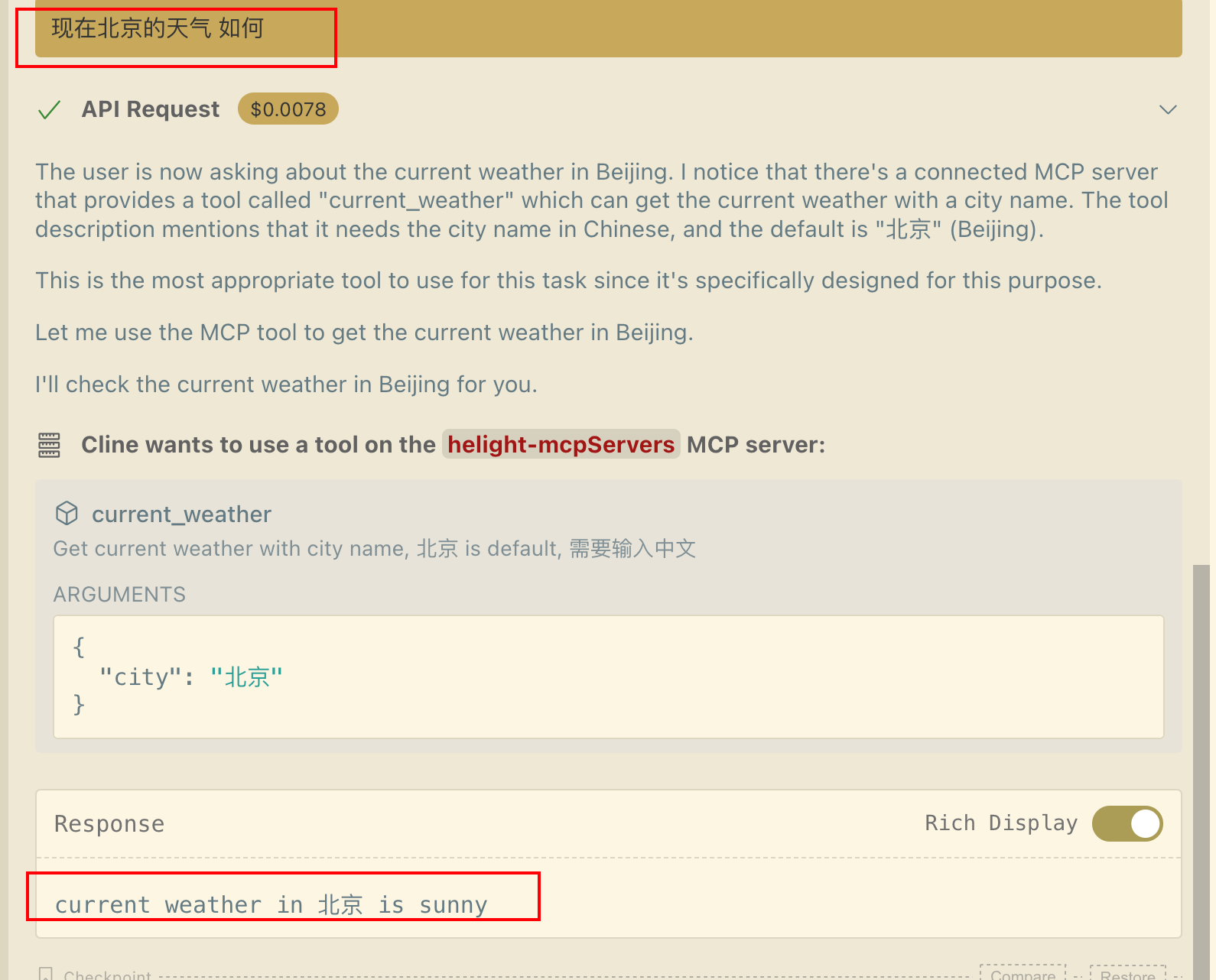
调用大模型的时候 ,提示
The user is now asking about the current weather in Beijing. I notice that there’s a connected MCP server that provides a tool called “current_weather” which can get the current weather with a city name. The tool description mentions that it needs the city name in Chinese, and the default is “北京” (Beijing). This is the most appropriate tool to use for this task since it’s specifically designed for this purpose. Let me use the MCP tool to get the current weather in Beijing. I’ll check the current weather in Beijing for you.
说明llm 加载了 mcp 的 tools ,发现这个 tools 的描述可以解决用户提出来的问题,就开始使用。
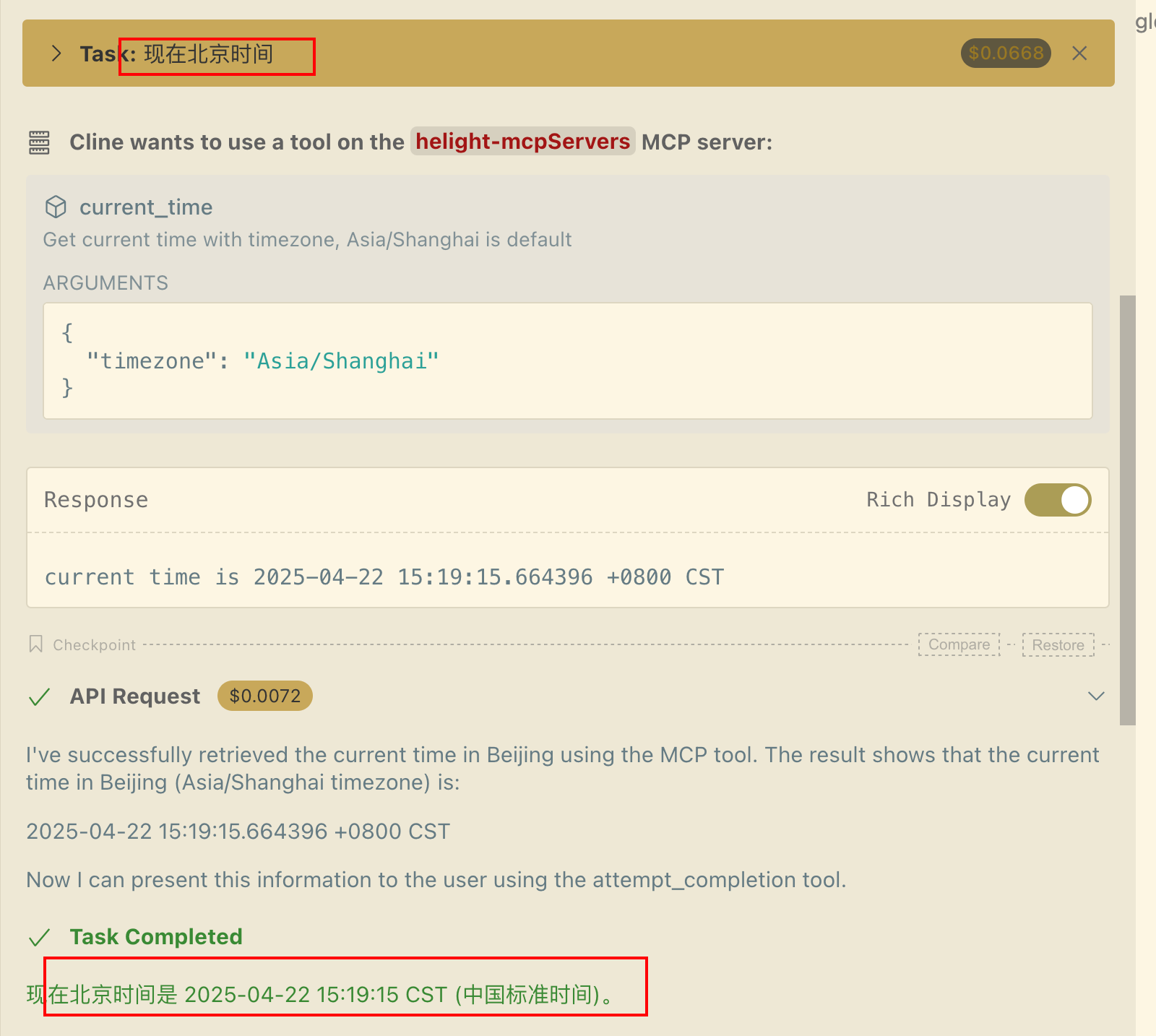
5.2 获得北京时间
6. 思考
6.1 技术趋势
- 1、MCP 作为大模型、内容信息和工具之间的胶水层,代表了 AI 应用的新趋势。它不是在做大模型本身,而是在构建一个智能的中间层,实现了一种全新的思考模式。
- 2、基于大厂有数据合规 和安全隐私等问题 ,不太会大面积数据开放,只能在 mcp 中进行数据处理和调用 ,然后对外开发能力,感觉大厂在 mcp 方向上面会持续进行发力。
- 3、mcp 与 rag 场景的区别 : mcp 在标准化的能力更好的解决信息准确性的问题,但是还有有很多比如说文档内容,视频内容这些场景,rag 相关的场景使用更适合处理还未标准化的内容。至少在短期时间来看,mcp 与 rag 技术还不能相互取代对方,会并驾齐驱。
写了 demo , 难道你不好奇,底层是怎么运行的呢?请参考:
MCP Server架构设计详解:一文掌握框架核心
参考资料
本文首发于 CSDN,转载请注明出处。

中国智能体开发者社区,聚焦智能体与大模型开发,提供前沿资讯、实用工具链、开源项目及行业案例。通过技术沙龙、开发者大赛等活动,促进经验交流与协作,助力开发者快速构建创新智能应用。
更多推荐


 34
34 0
0- 0


 已为社区贡献2条内容

所有评论(0)