【大模型LLM第十五篇】Agent学习之huggingface smolagents
name工具名字description工具描述Input types 输入参数类型和说明output type输出类型写一个模型下载的tool@tool"""Args:"""一定要存在 类型的 定义以及 注释,注释中要有 Args主要用继承的方式比如创建 VLLM模型, 继承模型 + 重新实现 “call"""import gcself,**kwargs,**kwargs,messages,els
前言

huggingface给出的快速构建agent的框架:https://github.com/huggingface/smolagents
用几行代码运行强大的Agents
- 简单:代理逻辑大约需要 1,000 行代码, ref:https://github.com/huggingface/smolagents/blob/main/src/smolagents/agents.py
- 提供了CodeAgents:这个agent不是专门帮你写代码的agent,是以写代码和运行代码的形式来达到目的
- Huggingface hub的集成:可以把写的tool进行push or pull
- 支持模型:OpenAI、Anthropic 和许多其他模型的任何模型,也可以是本地的transformers或ollama模型
- 支持tools:使用LangChain 、 Anthropic 的 MCP的工具,甚至可以使用Hub Space作为工具
文档:https://huggingface.co/docs/smolagents/index
一、支持的模型
1.1 Hugging Face
from smolagents import HfApiModel

model = HfApiModel(
    model_id="deepseek-ai/DeepSeek-R1",
    provider="together",
)
1.2 LiteLLMModel
from smolagents import LiteLLMModel

model = LiteLLMModel(
    model_id="anthropic/claude-3-5-sonnet-latest",
    temperature=0.2,
    api_key=os.environ["ANTHROPIC_API_KEY"]
)
1.3 OpenAI
import osfrom smolagents import OpenAIServerModel

model = OpenAIServerModel(
    model_id="deepseek-ai/DeepSeek-R1",
    api_base="https://api.together.xyz/v1/", # Leave this blank to query OpenAI servers.api_key=os.environ["TOGETHER_API_KEY"], # Switch to the API key for the server you're targeting.
)
1.4 本地transformers
from smolagents import TransformersModel

model = TransformersModel(
    model_id="Qwen/Qwen2.5-Coder-32B-Instruct",
    max_new_tokens=4096,
    device_map="auto"
)
1.5 Azure Model
import osfrom smolagents import AzureOpenAIServerModel


model = AzureOpenAIServerModel(
    model_id = os.environ.get("AZURE_OPENAI_MODEL"),
    azure_endpoint=os.environ.get("AZURE_OPENAI_ENDPOINT"),
    api_key=os.environ.get("AZURE_OPENAI_API_KEY"),
    api_version=os.environ.get("OPENAI_API_VERSION")
)
二、框架
2.1 运行方式
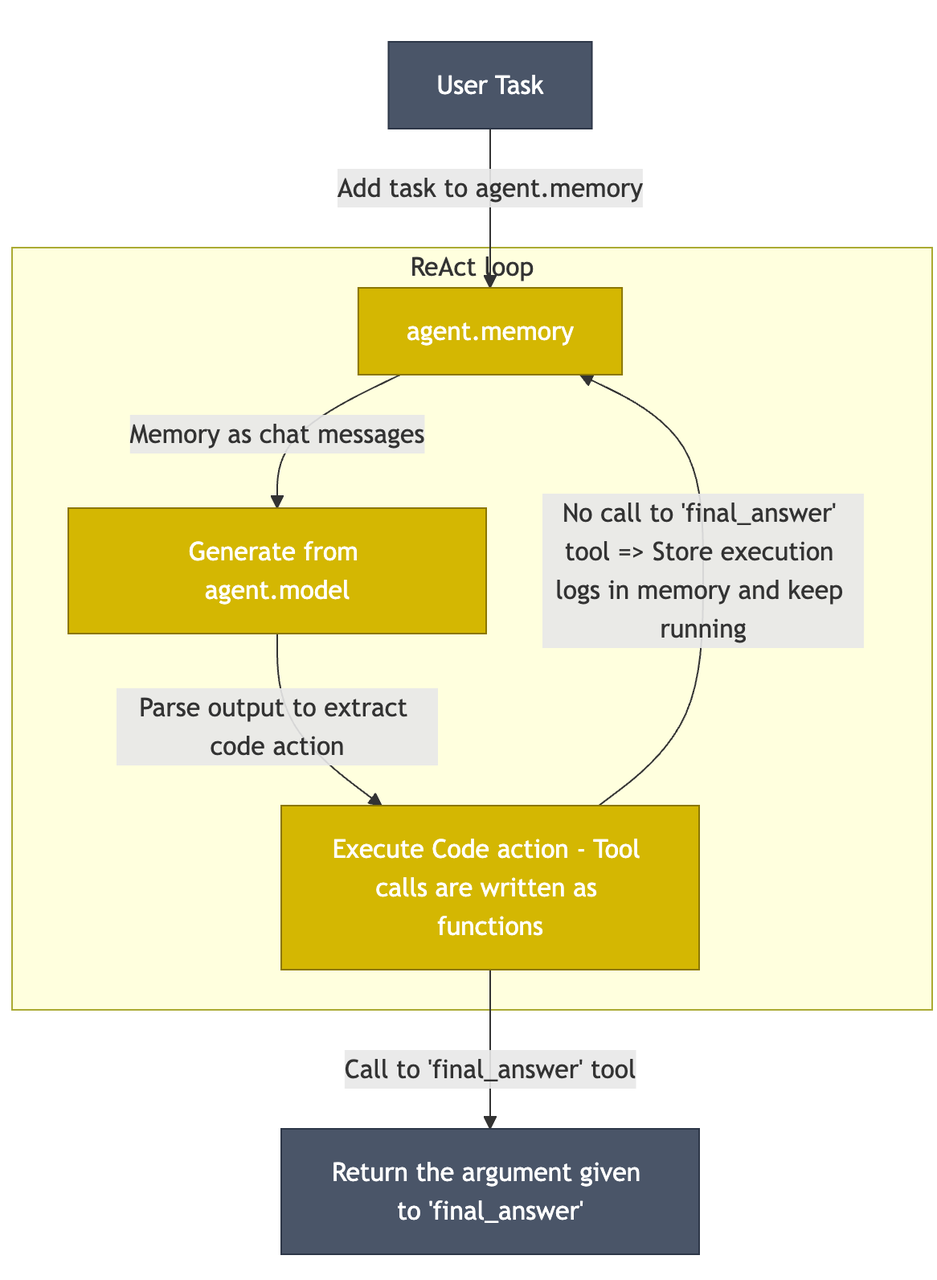
loop的过程基本上没什么其他的不一样的地方,也存在memory,以及ReAct Agent框架, 唯一不一样的地方,就是模型输出extract code action,并进行编写代码和执行代码来完成目的
2.2 构建Agent
无非以下几部分: model,tool,memory,history等,最简单的就只需要model和tool
model就不赘述了,上面支持的模型说过了, tool的定义和langchain的方法基本上一样的方式,有两种方法
- 直接装饰器
- 做继承
langchain的tool的使用方式可以看:https://zhuanlan.zhihu.com/p/714150769
2.2.1 tool的定义
- name 工具名字
- description 工具描述
- Input types 输入参数类型和说明
- output type 输出类型
写一个模型下载的tool
from smolagents import tool

@tool
def model_download_tool(task: str) -> str:
    """
    This is a tool that returns the most downloaded model of a given task on the Hugging Face Hub.
    It returns the name of the checkpoint.

    Args:
        task: The task for which to get the download count.
    """
    most_downloaded_model = next(iter(list_models(filter=task, sort="downloads", direction=-1)))
    return most_downloaded_model.id
一定要存在 类型的 定义以及 注释,注释中要有 Args
主要用继承的方式
from smolagents import Tool

class ModelDownloadTool(Tool):
    name = "model_download_tool"
    description = "This is a tool that returns the most downloaded model of a given task on the Hugging Face Hub. It returns the name of the checkpoint."
    inputs = {"task": {"type": "string", "description": "The task for which to get the download count."}}
    output_type = "string"def forward(self, task: str) -> str:
        most_downloaded_model = next(iter(list_models(filter=task, sort="downloads", direction=-1)))
        return most_downloaded_model.id
2.2.2 可以借鉴的tool
已经有三个写好的默认tool
- DuckDuckGo 网络搜索:使用 DuckDuckGo 浏览器执行网络搜索。
- Python code interpreter
- Transcriber:基于 Whisper-Turbo 将音频转录为文本
这三个tool可以借鉴, 最近默认的tool还在添加,包含常见的google search等等
"PythonInterpreterTool",
"FinalAnswerTool",
"UserInputTool",
"DuckDuckGoSearchTool",
"GoogleSearchTool",
"VisitWebpageTool",
"SpeechToTextTool",
链接:https://github.com/huggingface/smolagents/blob/main/src/smolagents/default_tools.py
2.2.3 Agent例子
https://github.com/huggingface/smolagents/tree/main/examples
例如 用户问问题,执行SQL得到结果
from sqlalchemy import (
    Column,
    Float,
    Integer,
    MetaData,
    String,
    Table,
    create_engine,
    insert,
    inspect,
    text,
)


engine = create_engine("sqlite:///:memory:")
metadata_obj = MetaData()

# create city SQL table
table_name = "receipts"
receipts = Table(
    table_name,
    metadata_obj,
    Column("receipt_id", Integer, primary_key=True),
    Column("customer_name", String(16), primary_key=True),
    Column("price", Float),
    Column("tip", Float),
)
metadata_obj.create_all(engine)

rows = [
    {"receipt_id": 1, "customer_name": "Alan Payne", "price": 12.06, "tip": 1.20},
    {"receipt_id": 2, "customer_name": "Alex Mason", "price": 23.86, "tip": 0.24},
    {"receipt_id": 3, "customer_name": "Woodrow Wilson", "price": 53.43, "tip": 5.43},
    {"receipt_id": 4, "customer_name": "Margaret James", "price": 21.11, "tip": 1.00},
]
for row in rows:
    stmt = insert(receipts).values(**row)
    with engine.begin() as connection:
        cursor = connection.execute(stmt)

inspector = inspect(engine)
columns_info = [(col["name"], col["type"]) for col in inspector.get_columns("receipts")]

table_description = "Columns:\n" + "\n".join([f"  - {name}: {col_type}" for name, col_type in columns_info])
print(table_description)

from smolagents import tool


@tool
def sql_engine(query: str) -> str:
    """
    Allows you to perform SQL queries on the table. Returns a string representation of the result.
    The table is named 'receipts'. Its description is as follows:
        Columns:
        - receipt_id: INTEGER
        - customer_name: VARCHAR(16)
        - price: FLOAT
        - tip: FLOAT

    Args:
        query: The query to perform. This should be correct SQL.
    """
    output = ""
    with engine.connect() as con:
        rows = con.execute(text(query))
        for row in rows:
            output += "\n" + str(row)
    return output


from smolagents import CodeAgent, HfApiModel


agent = CodeAgent(
    tools=[sql_engine],
    model=HfApiModel(model_id="meta-llama/Meta-Llama-3.1-8B-Instruct"),
)
agent.run("Can you give me the name of the client who got the most expensive receipt?")
2.3 自定义模型
比如创建 VLLM模型, 继承模型 + 重新实现 “call”
class VLLMModel(Model):
    """Model to use [vLLM](https://docs.vllm.ai/) for fast LLM inference and serving.

    Parameters:
        model_id (`str`):
            The Hugging Face model ID to be used for inference.
            This can be a path or model identifier from the Hugging Face model hub.
    """

    def __init__(self, model_id, **kwargs):
        if not _is_package_available("vllm"):
            raise ModuleNotFoundError("Please install 'vllm' extra to use VLLMModel: `pip install 'smolagents[vllm]'`")

        from vllm import LLM
        from vllm.transformers_utils.tokenizer import get_tokenizer

        super().__init__(**kwargs)

        self.model_id = model_id
        self.model = LLM(model=model_id)
        self.tokenizer = get_tokenizer(model_id)
        self._is_vlm = False  # VLLMModel does not support vision models yet.

    def cleanup(self):
        import gc

        import torch
        from vllm.distributed.parallel_state import destroy_distributed_environment, destroy_model_parallel

        destroy_model_parallel()
        if self.model is not None:
            # taken from https://github.com/vllm-project/vllm/issues/1908#issuecomment-2076870351
            del self.model.llm_engine.model_executor.driver_worker
        self.model = None
        gc.collect()
        destroy_distributed_environment()
        torch.cuda.empty_cache()

    def __call__(
        self,
        messages: List[Dict[str, str]],
        stop_sequences: Optional[List[str]] = None,
        grammar: Optional[str] = None,
        tools_to_call_from: Optional[List[Tool]] = None,
        **kwargs,
    ) -> ChatMessage:
        from vllm import SamplingParams

        completion_kwargs = self._prepare_completion_kwargs(
            messages=messages,
            flatten_messages_as_text=(not self._is_vlm),
            stop_sequences=stop_sequences,
            grammar=grammar,
            tools_to_call_from=tools_to_call_from,
            **kwargs,
        )
        messages = completion_kwargs.pop("messages")
        prepared_stop_sequences = completion_kwargs.pop("stop", [])
        tools = completion_kwargs.pop("tools", None)
        completion_kwargs.pop("tool_choice", None)

        if tools_to_call_from is not None:
            prompt = self.tokenizer.apply_chat_template(
                messages,
                tools=tools,
                add_generation_prompt=True,
                tokenize=False,
            )
        else:
            prompt = self.tokenizer.apply_chat_template(
                messages,
                tokenize=False,
            )

        sampling_params = SamplingParams(
            n=kwargs.get("n", 1),
            temperature=kwargs.get("temperature", 0.0),
            max_tokens=kwargs.get("max_tokens", 2048),
            stop=prepared_stop_sequences,
        )

        out = self.model.generate(
            prompt,
            sampling_params=sampling_params,
        )
        output_text = out[0].outputs[0].text
        self.last_input_token_count = len(out[0].prompt_token_ids)
        self.last_output_token_count = len(out[0].outputs[0].token_ids)
        chat_message = ChatMessage(
            role=MessageRole.ASSISTANT,
            content=output_text,
            raw={"out": output_text, "completion_kwargs": completion_kwargs},
        )
        if tools_to_call_from:
            chat_message.tool_calls = [
                get_tool_call_from_text(output_text, self.tool_name_key, self.tool_arguments_key)
            ]
        return chat_message
2.4 如何构建更好的Agent
2.4.1 差的tool定义例子
import datetime
from smolagents import tool

def get_weather_report_at_coordinates(coordinates, date_time):
    # Dummy function, returns a list of [temperature in °C, risk of rain on a scale 0-1, wave height in m]
    return [28.0, 0.35, 0.85]

def convert_location_to_coordinates(location):
    # Returns dummy coordinates
    return [3.3, -42.0]

@tool
def get_weather_api(location: str, date_time: str) -> str:
    """
    Returns the weather report.

    Args:
        location: the name of the place that you want the weather for.
        date_time: the date and time for which you want the report.
    """
    lon, lat = convert_location_to_coordinates(location)
    date_time = datetime.strptime(date_time)
    return str(get_weather_report_at_coordinates((lon, lat), date_time))
2.4.2 好的tool定义例子
@tool
def get_weather_api(location: str, date_time: str) -> str:
    """
    Returns the weather report.

    Args:
        location: the name of the place that you want the weather for. Should be a place name, followed by possibly a city name, then a country, like "Anchor Point, Taghazout, Morocco".
        date_time: the date and time for which you want the report, formatted as '%m/%d/%y %H:%M:%S'.
    """
    lon, lat = convert_location_to_coordinates(location)
    try:
        date_time = datetime.strptime(date_time)
    except Exception as e:
        raise ValueError("Conversion of `date_time` to datetime format failed, make sure to provide a string in format '%m/%d/%y %H:%M:%S'. Full trace:" + str(e))
    temperature_celsius, risk_of_rain, wave_height = get_weather_report_at_coordinates((lon, lat), date_time)
    return f"Weather report for {location}, {date_time}: Temperature will be {temperature_celsius}°C, risk of rain is {risk_of_rain*100:.0f}%, wave height is {wave_height}m."
- 对于输入格式更加的明确且细致
- 对于外部包运用,加入了exception捕获
- 输出加了很多语义的表达,更好让大模型理解
2.4.3 可以来控制思考的轮数
连续思考几轮,不进行tool的使用
from smolagents import load_tool, CodeAgent, HfApiModel, DuckDuckGoSearchTool
from dotenv import load_dotenv

load_dotenv()

# Import tool from Hub
image_generation_tool = load_tool("m-ric/text-to-image", trust_remote_code=True)

search_tool = DuckDuckGoSearchTool()

agent = CodeAgent(
    tools=[search_tool, image_generation_tool],
    model=HfApiModel(model_id="Qwen/Qwen2.5-72B-Instruct"),
    planning_interval=3 # This is where you activate planning!
)

# Run it!
result = agent.run(
    "How long would a cheetah at full speed take to run the length of Pont Alexandre III?",
)
2.4.4 其他
其他的一些方式,主要是教你怎么debug你的agent,有一些启发,可以看看:https://huggingface.co/docs/smolagents/tutorials/building_good_agents
其中的sys prompt用的是模版的写法,可以看:https://zhuanlan.zhihu.com/p/710177783
三、和GradioUI适配
from smolagents import CodeAgent, GradioUI, HfApiModel


agent = CodeAgent(
    tools=[],
    model=HfApiModel(),
    max_steps=4,
    verbosity_level=1,
    name="example_agent",
    description="This is an example agent that has no tools and uses only code.",
)

GradioUI(agent, file_upload_folder="./data").launch()

火山引擎开发者社区是火山引擎打造的AI技术生态平台,聚焦Agent与大模型开发,提供豆包系列模型(图像/视频/视觉)、智能分析与会话工具,并配套评测集、动手实验室及行业案例库。社区通过技术沙龙、挑战赛等活动促进开发者成长,新用户可领50万Tokens权益,助力构建智能应用。
更多推荐
 3
3 0
0- 0


 已为社区贡献25条内容

所有评论(0)