智能体Agent深度解析:基于Function Calling的工具调用全指南!
前言
AI智能体是指具备一定自主性、能感知环境并通过智能决策执行特定任务的软件或硬件实体。它结合了人工智能技术(如机器学习、自然语言处理、计算机视觉等),能够独立或协作完成目标。基于大语言模型(LLM)的Function Calling可以令智能体实现有效的工具使用和与外部API的交互。
并非所有的LLM模型都支持Function Calling。支持Function Calling的模型(如gpt-4,qwen-plus等)能够检测何时需要调用函数,并输出调用函数的函数名和所需参数的JSON格式结构化数据。
Function Calling提高了输出稳定性,并简化了提示工程的复杂程度。对于不支持Function Calling的模型,可通过ReACT的相对较为复杂的提示词工程,要求模型返回特定格式的响应,以便区分不同的阶段(思考、行动、观察)。
Function Calling主要有两个用途:
-
获取数据:例如根据关键字从知识库检索内容、通过特定API接口获取业务数据
-
执行行动:例如通过API接口修改业务状态数据、执行预定业务操作
本文包含如下内容:
-
详细介绍Function Calling工具调用流程和涉及的交互消息
-
手搓Agent代码实现Function Calling工具调用
Function Calling工具调用流程和交互消息
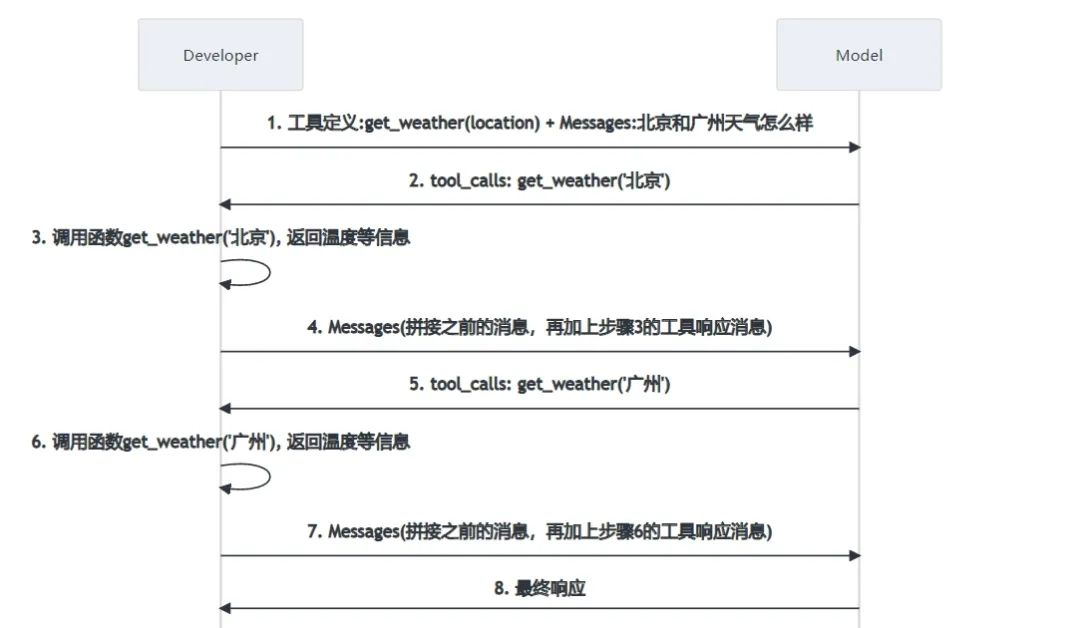
我们以查询北京和广州天气为例,LLM采用通义千问qwen-plus。查询天气的流程如下图:
1. 发起查询请求
向LLM发起查询时,messages列表只有一条消息(role为user, content为用户查询内容)。另外,还需要带上tools定义。
tools定义包含如下内容:
-
name: 函数名
-
description: 函数描述
-
parameters: 参数定义
本例中,定义了函数get_weather(location)。
我们用curl发起POST请求,body的JSON结构可参考https://platform.openai.com/docs/api-reference/chat/create
#!/bin/bash

export OPENAI_API_BASE="https://dashscope.aliyuncs.com/compatible-mode/v1"
export OPENAI_API_KEY="sk-xxx"# 替换为你的key

curl ${OPENAI_API_BASE}/chat/completions \
-H"Content-Type: application/json" \
-H"Authorization: Bearer $OPENAI_API_KEY" \
-d'{
  "model": "qwen-plus",
  "messages": [
    {
      "role": "user",
      "content": "北京和广州天气怎么样"
    }
  ],
  "tools": [
    {
      "type": "function",
      "function": {
        "name": "get_weather",
        "description": "Get weather",
        "parameters": {
          "type": "object",
          "properties": {
            "location": {
              "type": "string",
              "description": "location"
            }
          },
          "required": ["location"]
        }
      }
    }
  ],
  "tool_choice": "auto"
}'
2. LLM返回tool_calls获取北京天气
LLM经过推理,发现需要调用函数获取北京天气,回复的消息带上tool_calls信息。
本例中,需要调用函数get_weather,参数名为location, 参数值为北京。
完整的JSON响应如下:
{
"choices": [
{
"message": {
"content": "",
"role": "assistant",
"tool_calls": [
{
"index": 0,
"id": "call_3ee91e7e0e0b420d811165",
"type": "function",
"function": {
"name": "get_weather",
"arguments": "{\"location\": \"北京\"}"
}
}
]
},
"finish_reason": "tool_calls",
"index": 0,
"logprobs": null
}
],
"object": "chat.completion",
"usage": {
"prompt_tokens": 166,
"completion_tokens": 17,
"total_tokens": 183,
"prompt_tokens_details": {
"cached_tokens": 0
}
},
"created": 1745131660,
"system_fingerprint": null,
"model": "qwen-plus",
"id": "chatcmpl-7c4fc4c8-92fa-90cc-aaf6-f673d7ab4220"
}
3. 处理函数调用获取北京天气
解析处理LLM的tool_calls获得函数名和参数列表,调用相应的API接口获得结果。
例如:通过http://weather.cma.cn/api/now/54511可获得北京的天气情况。
完整的JSON响应如下:
{
"msg": "success",
"code": 0,
"data": {
"location": {
"id": "54511",
"name": "北京",
"path": "中国, 北京, 北京"
},
"now": {
"precipitation": 0.0,
"temperature": 24.3,
"pressure": 1007.0,
"humidity": 35.0,
"windDirection": "西南风",
"windDirectionDegree": 207.0,
"windSpeed": 2.7,
"windScale": "微风"
},
"alarm": [],
"lastUpdate": "2025/04/20 14:25"
}
}
4. 把上下文信息以及函数调用结果发给LLM
发给LLM的messages列表有3条messages:
-
第1条role为
user,是用户的输入 -
第2条role为
assistant,是LLM的tool_calls响应get_weather('北京') -
第3条role为
tool,是工具调用get_weather('北京')的结果
#!/bin/bash

export OPENAI_API_BASE="https://dashscope.aliyuncs.com/compatible-mode/v1"
export OPENAI_API_KEY="sk-xxx"# 替换为你的key

curl ${OPENAI_API_BASE}/chat/completions \
-H"Content-Type: application/json" \
-H"Authorization: Bearer $OPENAI_API_KEY" \
-d'{
  "model": "qwen-plus",
  "messages": [
    {
      "role": "user",
      "content": "北京和广州天气怎么样"
    },
    {
      "role": "assistant",
      "tool_calls": [
        {
          "id": "call_3ee91e7e0e0b420d811165",
          "type": "function",
          "function": {
            "name": "get_weather",
            "arguments": "{\"location\": \"北京\"}"
          }
        }
      ]
    },
    {
      "role": "tool",
      "content": "{\"msg\":\"success\",\"code\":0,\"data\":{\"location\":{\"id\":\"54511\",\"name\":\"北京\",\"path\":\"中国, 北京, 北京\"},\"now\":{\"precipitation\":0.0,\"temperature\":24.3,\"pressure\":1007.0,\"humidity\":35.0,\"windDirection\":\"西南风\",\"windDirectionDegree\":207.0,\"windSpeed\":2.7,\"windScale\":\"微风\"},\"alarm\":[],\"lastUpdate\":\"2025/04/20 14:25\"}}",
      "tool_call_id": "call_3ee91e7e0e0b420d811165"
    }
  ],
  "tools": [
    {
      "type": "function",
      "function": {
        "name": "get_weather",
        "description": "Get weather",
        "parameters": {
          "type": "object",
          "properties": {
            "location": {
              "type": "string",
              "description": "location"
            }
          },
          "required": [
            "location"
          ]
        }
      }
    }
  ],
  "tool_choice": "auto"
}'
5. LLM返回tool_calls获取广州天气
LLM经过推理,发现需要调用函数获取广州天气,回复的消息带上tool_calls信息。
本例中,需要调用函数get_weather,参数名为location, 参数值为广州。
完整的JSON响应如下:
{
"choices": [
{
"message": {
"content": "",
"role": "assistant",
"tool_calls": [
{
"index": 0,
"id": "call_4a920a1bb9d54f8894c1ac",
"type": "function",
"function": {
"name": "get_weather",
"arguments": "{\"location\": \"广州\"}"
}
}
]
},
"finish_reason": "tool_calls",
"index": 0,
"logprobs": null
}
],
"object": "chat.completion",
"usage": {
"prompt_tokens": 312,
"completion_tokens": 19,
"total_tokens": 331,
"prompt_tokens_details": {
"cached_tokens": 0
}
},
"created": 1745132731,
"system_fingerprint": null,
"model": "qwen-plus",
"id": "chatcmpl-5e002b5b-7220-927e-9637-554355f80658"
}
6. 处理函数调用获取广州天气
解析处理LLM的tool_calls获得函数名和参数列表,调用相应的API接口获得结果。
例如:通过http://weather.cma.cn/api/now/59287可获得广州的天气情况。
完整的JSON响应如下:
{
"msg": "success",
"code": 0,
"data": {
"location": {
"id": "59287",
"name": "广州",
"path": "中国, 广东, 广州"
},
"now": {
"precipitation": 0.0,
"temperature": 30.1,
"pressure": 1002.0,
"humidity": 64.0,
"windDirection": "东南风",
"windDirectionDegree": 167.0,
"windSpeed": 2.4,
"windScale": "微风"
},
"alarm": [],
"lastUpdate": "2025/04/20 14:25"
}
}
7. 把上下文信息以及函数调用结果发给LLM
发给LLM的messages列表有5条messages:
-
第1条role为
user,是用户的输入 -
第2条role为
assistant,是LLM的tool_calls响应get_weather('北京') -
第3条role为
tool,是工具调用get_weather('北京')的结果 -
第4条role为
assistant,是LLM的tool_calls响应get_weather('广州') -
第5条role为
tool,是工具调用get_weather('广州')的结果
#!/bin/bash

export OPENAI_API_BASE="https://dashscope.aliyuncs.com/compatible-mode/v1"
export OPENAI_API_KEY="sk-xxx"# 替换为你的key

curl ${OPENAI_API_BASE}/chat/completions \
-H"Content-Type: application/json" \
-H"Authorization: Bearer $OPENAI_API_KEY" \
-d'{
  "model": "qwen-plus",
  "messages": [
    {
      "role": "user",
      "content": "北京和广州天气怎么样"
    },
    {
      "role": "assistant",
      "tool_calls": [
        {
          "id": "call_3ee91e7e0e0b420d811165",
          "type": "function",
          "function": {
            "name": "get_weather",
            "arguments": "{\"location\": \"北京\"}"
          }
        }
      ]
    },
    {
      "role": "tool",
      "content": "{\"msg\":\"success\",\"code\":0,\"data\":{\"location\":{\"id\":\"54511\",\"name\":\"北京\",\"path\":\"中国, 北京, 北京\"},\"now\":{\"precipitation\":0.0,\"temperature\":24.3,\"pressure\":1007.0,\"humidity\":35.0,\"windDirection\":\"西南风\",\"windDirectionDegree\":207.0,\"windSpeed\":2.7,\"windScale\":\"微风\"},\"alarm\":[],\"lastUpdate\":\"2025/04/20 14:25\"}}",
      "tool_call_id": "call_3ee91e7e0e0b420d811165"
    },
    {
      "role": "assistant",
      "tool_calls": [
        {
          "id": "call_4a920a1bb9d54f8894c1ac",
          "type": "function",
          "function": {
            "name": "get_weather",
            "arguments": "{\"location\": \"广州\"}"
          }
        }
      ]
    },
    {
      "role": "tool",
      "content": "{\"msg\":\"success\",\"code\":0,\"data\":{\"location\":{\"id\":\"59287\",\"name\":\"广州\",\"path\":\"中国, 广东, 广州\"},\"now\":{\"precipitation\":0.0,\"temperature\":30.1,\"pressure\":1002.0,\"humidity\":64.0,\"windDirection\":\"东南风\",\"windDirectionDegree\":167.0,\"windSpeed\":2.4,\"windScale\":\"微风\"},\"alarm\":[],\"lastUpdate\":\"2025/04/20 14:25\"}}",
      "tool_call_id": "call_4a920a1bb9d54f8894c1ac"
    }
  ],
  "tools": [
    {
      "type": "function",
      "function": {
        "name": "get_weather",
        "description": "Get weather",
        "parameters": {
          "type": "object",
          "properties": {
            "location": {
              "type": "string",
              "description": "location"
            }
          },
          "required": [
            "location"
          ]
        }
      }
    }
  ],
  "tool_choice": "auto"
}'
8. LLM生成最终回复
LLM生成最终的回复:
北京的当前天气状况如下:
- 温度:24.3℃
- 湿度:35%
- 风向:西南风
- 风速:微风

广州的当前天气状况如下:
- 温度:30.1℃
- 湿度:64%
- 风向:东南风
- 风速:微风

以上信息均来自最近更新,希望对你有帮助!
完整的JSON响应如下:
{
"choices": [
{
"message": {
"content": "北京的当前天气状况如下:\n- 温度:24.3℃\n- 湿度:35%\n- 风向:西南风\n- 风速:微风\n\n广州的当前天气状况如下:\n- 温度:30.1℃\n- 湿度:64%\n- 风向:东南风\n- 风速:微风 \n\n以上信息均来自最近更新,希望对你有帮助!",
"role": "assistant"
},
"finish_reason": "stop",
"index": 0,
"logprobs": null
}
],
"object": "chat.completion",
"usage": {
"prompt_tokens": 460,
"completion_tokens": 105,
"total_tokens": 565,
"prompt_tokens_details": {
"cached_tokens": 0
}
},
"created": 1745133460,
"system_fingerprint": null,
"model": "qwen-plus",
"id": "chatcmpl-fd1edc89-3ddb-9e27-9029-d2be2c81f3c1"
}
手搓Agent代码实现Function Calling工具调用
1. 创建python环境
uv init agent
cd agent
uv venv
.venv\Scripts\activate

uv add openai requests python-dotenv
2. 设置API Key
创建.env,.env内容如下(注意修改OPENAI_API_KEY为您的key)
OPENAI_API_KEY=your_api_key_here
OPENAI_BASE_URL=https://dashscope.aliyuncs.com/compatible-mode/v1
把.env添加到.gitignore
3. 实现Agent代码
基于openai sdk实现agent的主体代码逻辑是:在允许的迭代次数范围内,循环处理,发起chat completions直至没有tool_calls, 迭代结束,输出结果。
伪代码:
maxIter = 5 # 最大迭代次数
for iterSeq in range(1, maxIter+1):
构造chat completion请求(带tools列表和tool_choice)
迭代次数达到最大值,tool_choice设置为none(不再调用工具)
否则tool_choice设置为auto(根据需要调用工具)
获取chat completion结果
如果chat completion结果带有tool_calls
解析并调用相应函数
添加消息到消息列表,继续迭代
否则,表明无需调用工具,迭代结束,输出结果
完整的main.py代码如下:
import json
import os
import requests
import urllib.parse
from typing import Iterable
from openai import OpenAI
from openai.types.chat.chat_completion_message_param import ChatCompletionMessageParam
from openai.types.chat.chat_completion_message_tool_call import (
ChatCompletionMessageToolCall,
)
from openai.types.chat.chat_completion_user_message_param import (
ChatCompletionUserMessageParam,
)
from openai.types.chat.chat_completion_tool_message_param import (
ChatCompletionToolMessageParam,
)
from openai.types.chat.chat_completion_assistant_message_param import (
ChatCompletionAssistantMessageParam,
)
# 加载环境变量
from dotenv import load_dotenv
load_dotenv()
api_key = os.getenv("OPENAI_API_KEY")
base_url = os.getenv("OPENAI_API_BASE")
model = "qwen-plus"
client = OpenAI(api_key=api_key, base_url=base_url)
# 工具定义
tools = [
{
"type": "function",
"function": {
"name": "get_weather",
"description": "Get weather",
"parameters": {
"type": "object",
"properties": {
"location": {"type": "string", "description": "location"}
},
"required": ["location"],
},
},
}
]
# 实现获取天气
def get_weather(location: str) -> str:
url = "http://weather.cma.cn/api/autocomplete?q=" + urllib.parse.quote(location)
response = requests.get(url)
data = response.json()
if data["code"] != 0:
return "没找到该位置的信息"
location_code = ""
for item in data["data"]:
str_array = item.split("|")
if (
str_array[1] == location
or str_array[1] + "市" == location
or str_array[2] == location
):
location_code = str_array[0]
break
if location_code == "":
return "没找到该位置的信息"
url = f"http://weather.cma.cn/api/now/{location_code}"
return requests.get(url).text
# 实现工具调用
def invoke_tool(
tool_call: ChatCompletionMessageToolCall,
) -> ChatCompletionToolMessageParam:
result = ChatCompletionToolMessageParam(role="tool", tool_call_id=tool_call.id)
if tool_call.function.name == "get_weather":
args = json.loads(tool_call.function.arguments)
result["content"] = get_weather(args["location"])
else:
result["content"] = "函数未定义"
return result
def main():
query = "北京和广州天气怎么样"
messages: Iterable[ChatCompletionMessageParam] = list()
messages.append(ChatCompletionUserMessageParam(role="user", content=query))
maxIter = 5 # 最大迭代次数
for iterSeq in range(1, maxIter+1):
print(f">> iterSeq:{iterSeq}")
print(f">>> messages: {messages}")
# 当迭代次数达到最大值,不再调用工具
toolChoice = "auto" if iterSeq < maxIter else "none"
# 向LLM发起请求
chat_completion = client.chat.completions.create(
messages=messages,
model=model,
tools=tools,
tool_choice=toolChoice
)
tool_calls = chat_completion.choices[0].message.tool_calls
content = chat_completion.choices[0].message.content
if isinstance(tool_calls, list):
# LLM的响应信息有tool_calls信息
messages.append(
ChatCompletionAssistantMessageParam(
role="assistant", tool_calls=tool_calls, content=""
)
)
for tool_call in tool_calls:
print(f">>> tool_call: {tool_call}")
result = invoke_tool(tool_call)
print(f">>> tool_call result: {result}")
messages.append(result)
else:
# LLM的响应信息没有tool_calls信息,迭代结束,获取响应文本
print(f">>> final result: \n{content}")
return
main()
运行代码:uv run .\main.py
输出日志如下:
>> iterSeq:1
>>> messages: [{'role': 'user', 'content': '北京和广州天气怎么样'}]
>>> tool_call: ChatCompletionMessageToolCall(id='call_db29421754a8447590d99d', function=Function(arguments='{"location": "北京"}', name='get_weather'), type='function', index=0)
>>> tool_call result: {'role': 'tool', 'tool_call_id': 'call_db29421754a8447590d99d', 'content': '{"msg":"success","code":0,"data":{"location":{"id":"54511","name":"北京","path":"中国, 北京, 北京"},"now":{"precipitation":0.0,"temperature":24.5,"pressure":1006.0,"humidity":34.0,"windDirection":"西南风","windDirectionDegree":191.0,"windSpeed":2.8,"windScale":"微风"},"alarm":[],"lastUpdate":"2025/04/20 15:35"}}'}
>> iterSeq:2
>>> messages: [{'role': 'user', 'content': '北京和广州天气怎么样'}, {'role': 'assistant', 'tool_calls': [ChatCompletionMessageToolCall(id='call_db29421754a8447590d99d', function=Function(arguments='{"location": "北京"}', name='get_weather'), type='function', index=0)], 'content': ''}, {'role': 'tool', 'tool_call_id': 'call_db29421754a8447590d99d', 'content': '{"msg":"success","code":0,"data":{"location":{"id":"54511","name":"北京","path":"中国, 北京, 北京"},"now":{"precipitation":0.0,"temperature":24.5,"pressure":1006.0,"humidity":34.0,"windDirection":"西南风","windDirectionDegree":191.0,"windSpeed":2.8,"windScale":"微风"},"alarm":[],"lastUpdate":"2025/04/20 15:35"}}'}]
>>> tool_call: ChatCompletionMessageToolCall(id='call_ae1c03437392444c869cbf', function=Function(arguments='{"location": "广州"}', name='get_weather'), type='function', index=0)
>>> tool_call result: {'role': 'tool', 'tool_call_id': 'call_ae1c03437392444c869cbf', 'content': '{"msg":"success","code":0,"data":{"location":{"id":"59287","name":"广州","path":"中国, 广东, 广州"},"now":{"precipitation":0.0,"temperature":30.4,"pressure":1001.0,"humidity":64.0,"windDirection":"东南风","windDirectionDegree":165.0,"windSpeed":2.2,"windScale":"微风"},"alarm":[],"lastUpdate":"2025/04/20 15:35"}}'}
>> iterSeq:3
>>> messages: [{'role': 'user', 'content': '北京和广州天气怎么样'}, {'role': 'assistant', 'tool_calls': [ChatCompletionMessageToolCall(id='call_db29421754a8447590d99d', function=Function(arguments='{"location": "北京"}', name='get_weather'), type='function', index=0)], 'content': ''}, {'role': 'tool', 'tool_call_id': 'call_db29421754a8447590d99d', 'content': '{"msg":"success","code":0,"data":{"location":{"id":"54511","name":"北京","path":"中国, 北京, 北京"},"now":{"precipitation":0.0,"temperature":24.5,"pressure":1006.0,"humidity":34.0,"windDirection":"西南风","windDirectionDegree":191.0,"windSpeed":2.8,"windScale":"微风"},"alarm":[],"lastUpdate":"2025/04/20 15:35"}}'}, {'role': 'assistant', 'tool_calls': [ChatCompletionMessageToolCall(id='call_ae1c03437392444c869cbf', function=Function(arguments='{"location": "广州"}', name='get_weather'), type='function', index=0)], 'content': ''}, {'role': 'tool', 'tool_call_id': 'call_ae1c03437392444c869cbf', 'content': '{"msg":"success","code":0,"data":{"location":{"id":"59287","name":"广州","path":"中国, 广东, 广州"},"now":{"precipitation":0.0,"temperature":30.4,"pressure":1001.0,"humidity":64.0,"windDirection":"东南风","windDirectionDegree":165.0,"windSpeed":2.2,"windScale":"微风"},"alarm":[],"lastUpdate":"2025/04/20 15:35"}}'}]
>>> final result:
北京的当前天气状况如下:
- 温度:24.5°C
- 湿度:34%
- 风向:西南风
- 风速:微风 (2.8 m/s)
- 最后更新时间:2025/04/20 15:35

广州的当前天气状况如下:
- 温度:30.4°C
- 湿度:64%
- 风向:东南风
- 风速:微风 (2.2 m/s)
- 最后更新时间:2025/04/20 15:35
END

一、大模型风口已至:月薪30K+的AI岗正在批量诞生
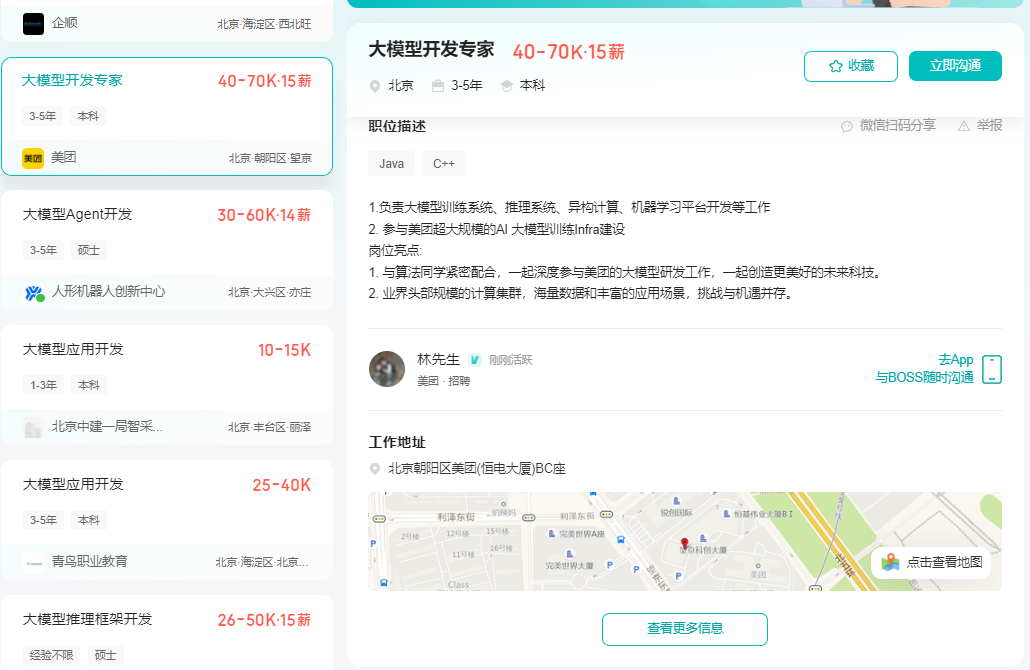
2025年大模型应用呈现爆发式增长,根据工信部最新数据:
国内大模型相关岗位缺口达47万
初级工程师平均薪资28K(数据来源:BOSS直聘报告)
70%企业存在"能用模型不会调优"的痛点
真实案例:某二本机械专业学员,通过4个月系统学习,成功拿到某AI医疗公司大模型优化岗offer,薪资直接翻3倍!

二、如何学习大模型 AI ?
🔥AI取代的不是人类,而是不会用AI的人!麦肯锡最新报告显示:掌握AI工具的从业者生产效率提升47%,薪资溢价达34%!🚀
由于新岗位的生产效率,要优于被取代岗位的生产效率,所以实际上整个社会的生产效率是提升的。
但是具体到个人,只能说是:
“最先掌握AI的人,将会比较晚掌握AI的人有竞争优势”。
这句话,放在计算机、互联网、移动互联网的开局时期,都是一样的道理。
我在一线互联网企业工作十余年里,指导过不少同行后辈。帮助很多人得到了学习和成长。
我意识到有很多经验和知识值得分享给大家,也可以通过我们的能力和经验解答大家在人工智能学习中的很多困惑,所以在工作繁忙的情况下还是坚持各种整理和分享。但苦于知识传播途径有限,很多互联网行业朋友无法获得正确的资料得到学习提升,故此将并将重要的AI大模型资料包括AI大模型入门学习思维导图、精品AI大模型学习书籍手册、视频教程、实战学习等录播视频免费分享出来。
1️⃣ 提示词工程:把ChatGPT从玩具变成生产工具
2️⃣ RAG系统:让大模型精准输出行业知识
3️⃣ 智能体开发:用AutoGPT打造24小时数字员工
📦熬了三个大夜整理的《AI进化工具包》送你:
✔️ 大厂内部LLM落地手册(含58个真实案例)
✔️ 提示词设计模板库(覆盖12大应用场景)
✔️ 私藏学习路径图(0基础到项目实战仅需90天)

第一阶段(10天):初阶应用
该阶段让大家对大模型 AI有一个最前沿的认识,对大模型 AI 的理解超过 95% 的人,可以在相关讨论时发表高级、不跟风、又接地气的见解,别人只会和 AI 聊天,而你能调教 AI,并能用代码将大模型和业务衔接。
* 大模型 AI 能干什么?
* 大模型是怎样获得「智能」的?
* 用好 AI 的核心心法
* 大模型应用业务架构
* 大模型应用技术架构
* 代码示例:向 GPT-3.5 灌入新知识
* 提示工程的意义和核心思想
* Prompt 典型构成
* 指令调优方法论
* 思维链和思维树
* Prompt 攻击和防范
* …
第二阶段(30天):高阶应用
该阶段我们正式进入大模型 AI 进阶实战学习,学会构造私有知识库,扩展 AI 的能力。快速开发一个完整的基于 agent 对话机器人。掌握功能最强的大模型开发框架,抓住最新的技术进展,适合 Python 和 JavaScript 程序员。
* 为什么要做 RAG
* 搭建一个简单的 ChatPDF
* 检索的基础概念
* 什么是向量表示(Embeddings)
* 向量数据库与向量检索
* 基于向量检索的 RAG
* 搭建 RAG 系统的扩展知识
* 混合检索与 RAG-Fusion 简介
* 向量模型本地部署
* …
第三阶段(30天):模型训练
恭喜你,如果学到这里,你基本可以找到一份大模型 AI相关的工作,自己也能训练 GPT 了!通过微调,训练自己的垂直大模型,能独立训练开源多模态大模型,掌握更多技术方案。
到此为止,大概2个月的时间。你已经成为了一名“AI小子”。那么你还想往下探索吗?
* 为什么要做 RAG
* 什么是模型
* 什么是模型训练
* 求解器 & 损失函数简介
* 小实验2:手写一个简单的神经网络并训练它
* 什么是训练/预训练/微调/轻量化微调
* Transformer结构简介
* 轻量化微调
* 实验数据集的构建
* …
第四阶段(20天):商业闭环
对全球大模型从性能、吞吐量、成本等方面有一定的认知,可以在云端和本地等多种环境下部署大模型,找到适合自己的项目/创业方向,做一名被 AI 武装的产品经理。
* 硬件选型
* 带你了解全球大模型
* 使用国产大模型服务
* 搭建 OpenAI 代理
* 热身:基于阿里云 PAI 部署 Stable Diffusion
* 在本地计算机运行大模型
* 大模型的私有化部署
* 基于 vLLM 部署大模型
* 案例:如何优雅地在阿里云私有部署开源大模型
* 部署一套开源 LLM 项目
* 内容安全
* 互联网信息服务算法备案
* …
学习是一个过程,只要学习就会有挑战。天道酬勤,你越努力,就会成为越优秀的自己。
如果你能在15天内完成所有的任务,那你堪称天才。然而,如果你能完成 60-70% 的内容,你就已经开始具备成为一名大模型 AI 的正确特征了。
这份完整版的大模型 AI 学习资料已经上传CSDN,朋友们如果需要可以微信扫描下方CSDN官方认证二维码免费领取【保证100%免费】


中国智能体开发者社区,聚焦智能体与大模型开发,提供前沿资讯、实用工具链、开源项目及行业案例。通过技术沙龙、开发者大赛等活动,促进经验交流与协作,助力开发者快速构建创新智能应用。
更多推荐
 23
23 0
0- 0


 已为社区贡献540条内容

所有评论(0)