基于深度学习的车辆类型识别检测系统(最新web界面+YOLOv8/YOLOv10/YOLOv11/YOLOv12+DeepSeek智能分析 +前后端分离)
本文详细阐述了一个集成了先进深度学习目标检测算法与现代化Web交互界面的智能车辆类型识别检测系统的设计与实现。该系统以多版本YOLO系列模型(包括最新的YOLOv8, YOLOv10, YOLOv11, YOLOv12)为核心检测引擎,构建了一个功能完备、前后端分离的Web应用平台。系统不仅实现了对图片、视频及摄像头实时流的精准车辆检测与12类精细车型分类,还创新性地整合了DeepSeek大语言模
摘要
本文详细阐述了一个集成了先进深度学习目标检测算法与现代化Web交互界面的智能车辆类型识别检测系统的设计与实现。该系统以多版本YOLO系列模型(包括最新的YOLOv8, YOLOv10, YOLOv11, YOLOv12)为核心检测引擎,构建了一个功能完备、前后端分离的Web应用平台。系统不仅实现了对图片、视频及摄像头实时流的精准车辆检测与12类精细车型分类,还创新性地整合了DeepSeek大语言模型的AI智能分析功能,为检测结果提供语义化描述与深入洞察。后端采用稳健的MySQL数据库对用户信息、检测记录及模型元数据进行统一管理,并提供了完整的用户权限体系与数据可视化看板。实验表明,该系统在自构建的包含12类车辆、总计超过4000张图像的数据集上表现优异,具备高准确率、高实时性与良好的用户交互体验,可广泛应用于智慧交通、安防监控、车辆普查及智能停车场管理等场景。
关键词: 车辆检测;车型识别;YOLO系列;深度学习;Web应用;前后端分离;大语言模型;数据可视化
目录
项目源码+数据集下载链接
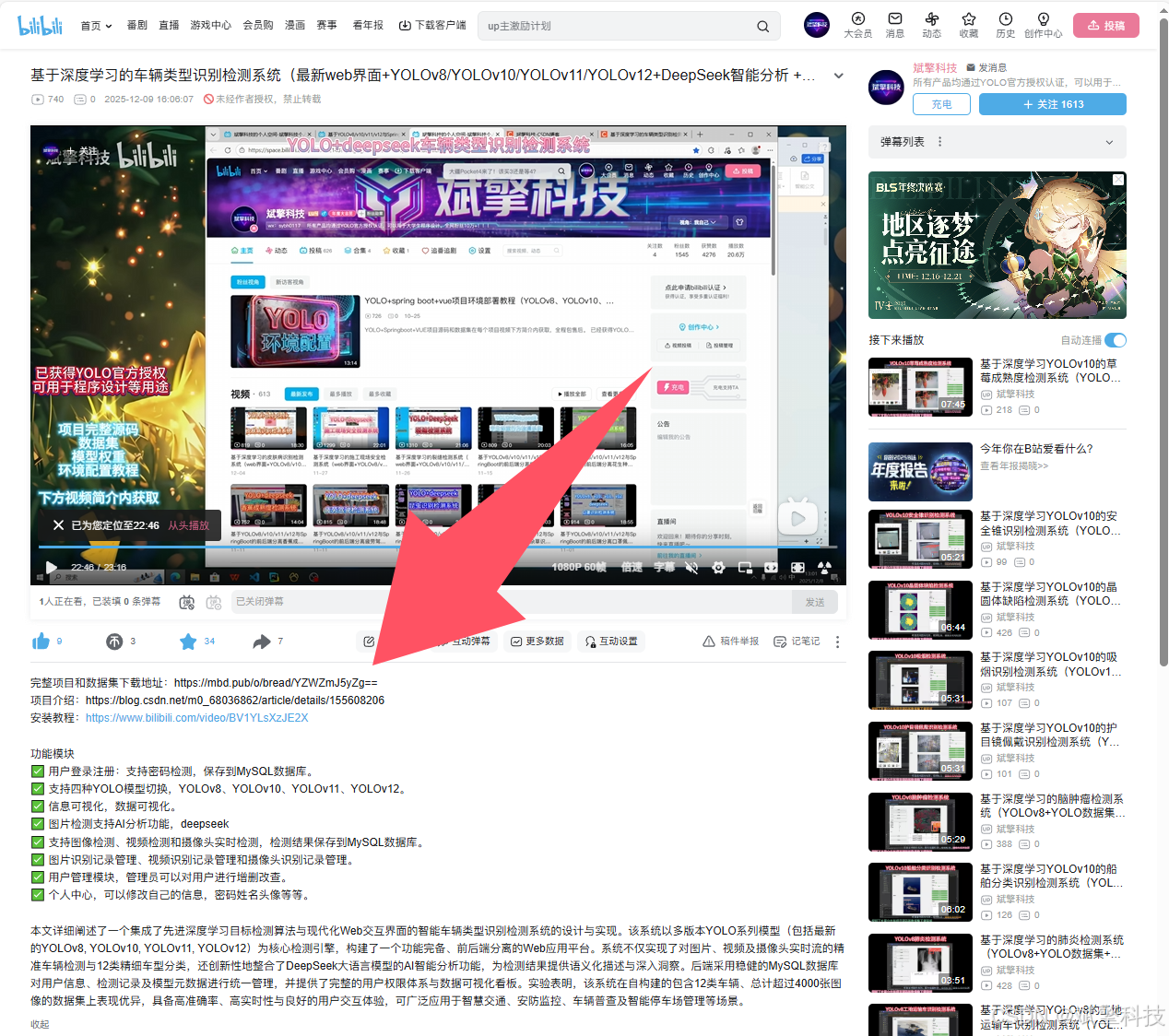
完整代码在哔哩哔哩视频下方简介内获取:
基于深度学习的车辆类型识别检测系统(最新web界面+YOLOv8/YOLOv10/YOLOv11/YOLOv12+DeepSeek智能分析 +前后端分离)_哔哩哔哩_bilibili
基于深度学习的车辆类型识别检测系统(最新web界面+YOLOv8/YOLOv10/YOLOv11/YOLOv12+DeepSeek智能分析 +前后端分离)_哔哩哔哩_bilibili https://www.bilibili.com/video/BV1yA2QBNEWc/?vd_source=549d0b4e2b8999929a61a037fcce3b0fhttps://www.bilibili.com/video/BV1yA2QBNEWc
引言
在当今智慧城市与智能交通系统(ITS)迅猛发展的浪潮下,对道路场景中车辆的自动化、智能化感知与理解变得至关重要。精确的车辆类型识别不仅是交通流量统计、违章行为监控、道路规划的基础,也是自动驾驶、智能安防等前沿领域的关键技术环节。传统的车辆识别方法多依赖于手工特征提取与浅层机器学习模型,在复杂多变的真实场景中面临着鲁棒性差、泛化能力不足的挑战。
随着深度学习,特别是卷积神经网络(CNN)与单阶段目标检测算法的突破性进展,车辆检测与识别的精度和速度得到了革命性提升。其中,YOLO(You Only Look Once)系列模型以其卓越的“速度-精度”平衡,成为实时目标检测领域的标杆。从YOLOv8到最新发布的YOLOv12,每一代都在网络结构、损失函数和训练策略上进行了优化,为高精度车辆识别提供了多样化的强大工具。
然而,一个先进的算法模型要转化为实际生产力,离不开易用、稳定且功能丰富的应用系统。目前,许多研究止步于模型性能的比拼,缺乏一个将最新算法集成、并提供数据管理、用户交互和智能分析的端到端解决方案。为此,本项目设计并实现了一个基于深度学习的车辆类型识别检测系统。该系统不仅无缝整合了YOLOv8至YOLOv12等多个前沿检测模型供用户灵活切换,还通过现代化的Web界面提供了从数据上传、模型推理、结果保存到智能分析的完整工作流。特别引入的DeepSeek大模型分析模块,赋予了系统超越传统框选分类的“认知”能力。整个系统采用前后端分离架构,确保了可维护性、可扩展性与高性能,旨在为研究人员、工程人员及决策者提供一个一站式、工业级的车辆识别分析平台。
背景
-
技术背景:
-
目标检测发展:从R-CNN系列的两阶段检测到以YOLO、SSD为代表的单阶段检测,目标检测技术不断向更实时、更轻量、更准确的方向演进。YOLO系列作为单阶段检测的领导者,其v8及以后的版本由Ultralytics等社区积极维护,在开源生态和易用性上极具优势。YOLOv10在效率和精度上进一步权衡,YOLOv11/v12等则持续探索新的网络设计和优化策略。
-
大模型与AIGC的兴起:以DeepSeek为代表的大语言模型具备强大的自然语言理解和生成能力。将其与CV任务结合,可以将视觉检测结果转化为丰富的文本报告,实现“视觉-语言”的跨模态交互,极大地提升了系统的解释性和实用性。
-
Web技术栈:前后端分离架构(如Vue.js前端 +spring boot 后端)已成为现代Web应用开发的主流范式。它允许前后端独立开发、部署和扩展,结合RESTful API,能够构建出响应迅速、用户体验良好的复杂应用。
-
-
应用需求背景:
-
交通管理:需要对特定路段的车流构成(如货车比例、公交车频次)进行长期监测。
-
安防与执法:在卡口或重点区域自动识别可疑车辆类型(如大型货车禁行)。
-
商业智能:停车场需要统计不同车型的数量以优化车位管理;汽车零售商可能关注特定车型的市场出现率。
-
学术研究:需要一个便捷的平台来对比不同目标检测模型在特定车辆数据集上的性能。
-
现有的开源工具或商业软件往往难以同时满足算法前沿性、功能完整性、部署灵活性及二次开发友好性的需求。本系统正是为了填补这一空白而生。
数据集介绍
一个高质量、标注精细的数据集是训练高性能车辆识别模型的基础。本项目构建/采用了一个专注于多种车辆类型的数据集。
-
类别设计:数据集共包含 12个精细的车辆类别,打破了传统的“轿车、卡车、巴士”的粗分类方式,特别对商用车辆进行了细致的尺寸和功能划分。具体类别如下:
['big bus', 'big truck', 'bus-l-', 'bus-s-', 'car', 'mid truck', 'small bus', 'small truck', 'truck-l-', 'truck-m-', 'truck-s-', 'truck-xl-']-
设计逻辑:这种分类方式具有极高的实用价值。例如,区分
small truck(小型货车)与truck-xl-(特大型卡车)对于道路承重评估、桥梁限高管理、物流调度等场景至关重要。
-
-
数据规模与划分:数据集总计包含 4,058张 高质量的真实道路场景图像。
-
训练集:2,634张,用于模型权重的主训练,使模型学习车辆特征。
-
验证集:966张,在训练过程中用于调整超参数、监控模型是否过拟合,并进行初步的模型选择。
-
测试集:458张,作为最终的“考场”,用于客观、公正地评估模型泛化到未知数据上的最终性能。所有评估指标(如mAP@0.5)均基于测试集得出。
-
系统功能模块详解
本系统采用模块化设计,主要分为以下核心功能模块:
-
🔐 用户认证与管理模块
-
用户登录/注册:提供安全的注册与登录接口,支持用户名/密码验证。注册时对密码强度进行检测,所有凭证存储于MySQL数据库。
-
个人中心:登录用户可随时修改个人信息,包括昵称、头像、密码等。
-
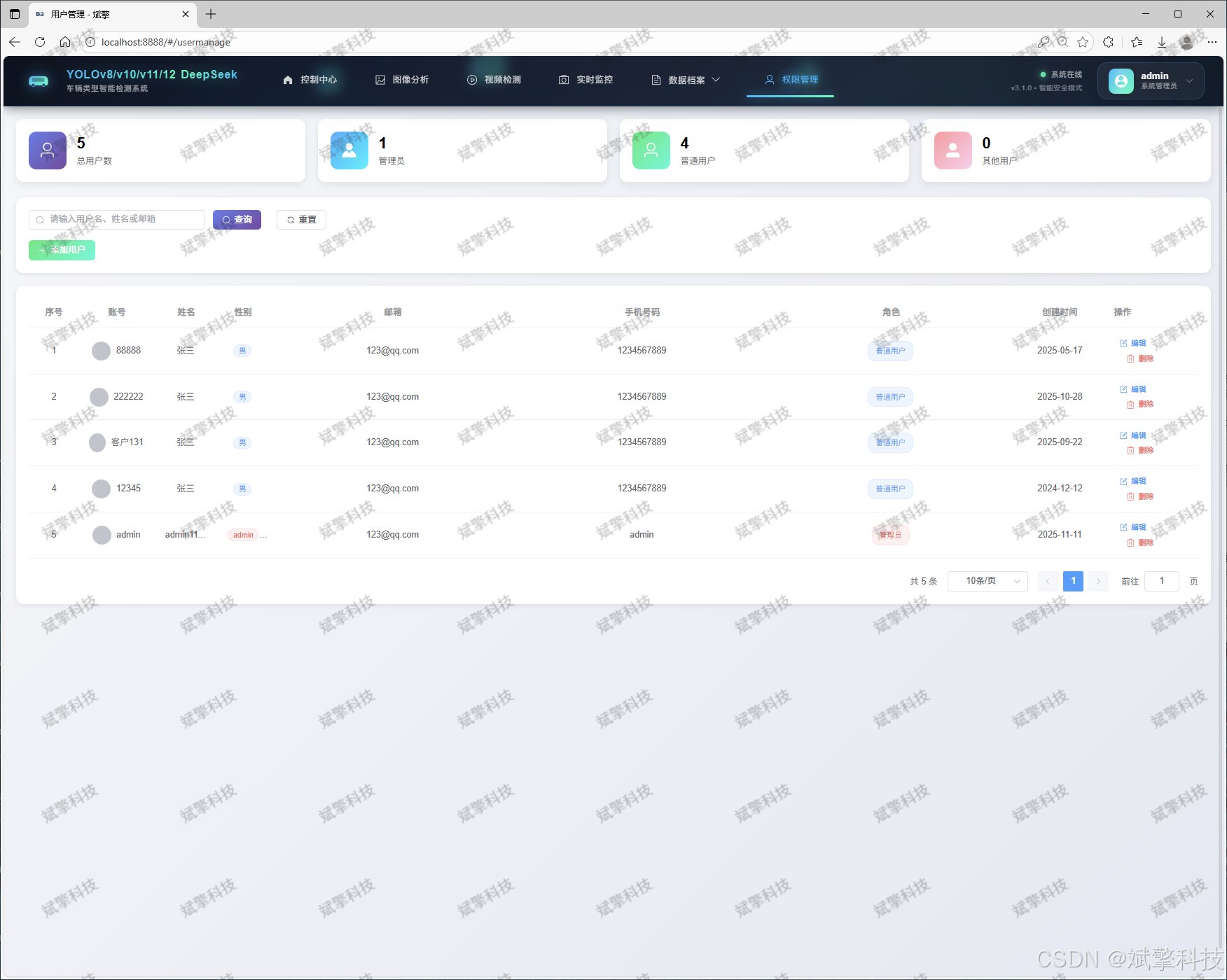
管理员后台:具备管理员权限的用户可访问专用后台,对系统所有用户进行增、删、改、查操作,实现灵活的权限与人员管理。
-
-
🤖 核心检测与模型管理模块
-
多模型切换:系统后台集成了 YOLOv8, YOLOv10, YOLOv11, YOLOv12 四个版本的预训练或精调模型。用户可通过Web界面一键切换,实时比较不同模型在相同输入上的表现差异。
-
多源输入支持:
-
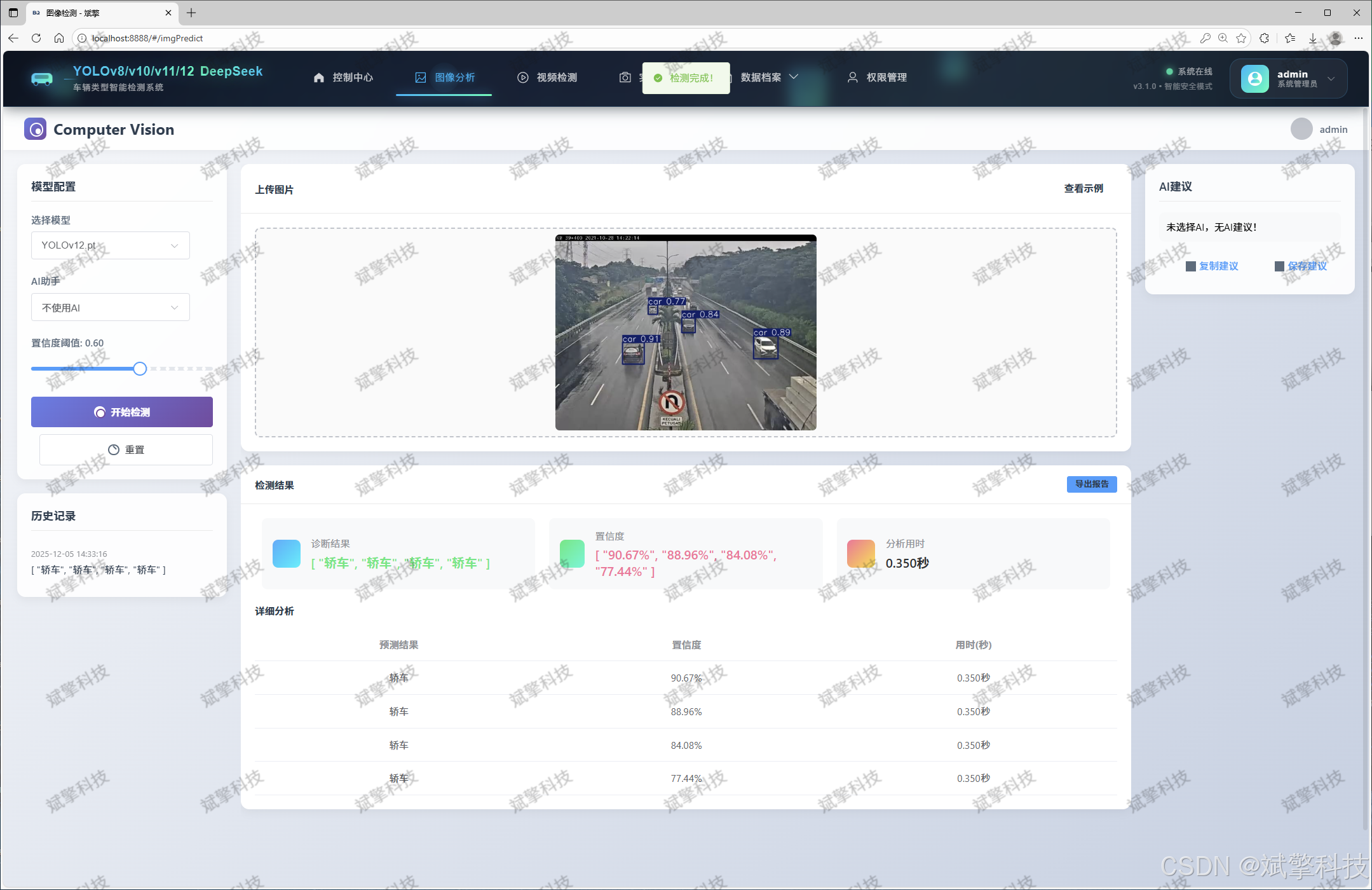
图像检测:上传单张或多张图片,系统返回带有检测框(标注车型类别及置信度)的结果图。
-
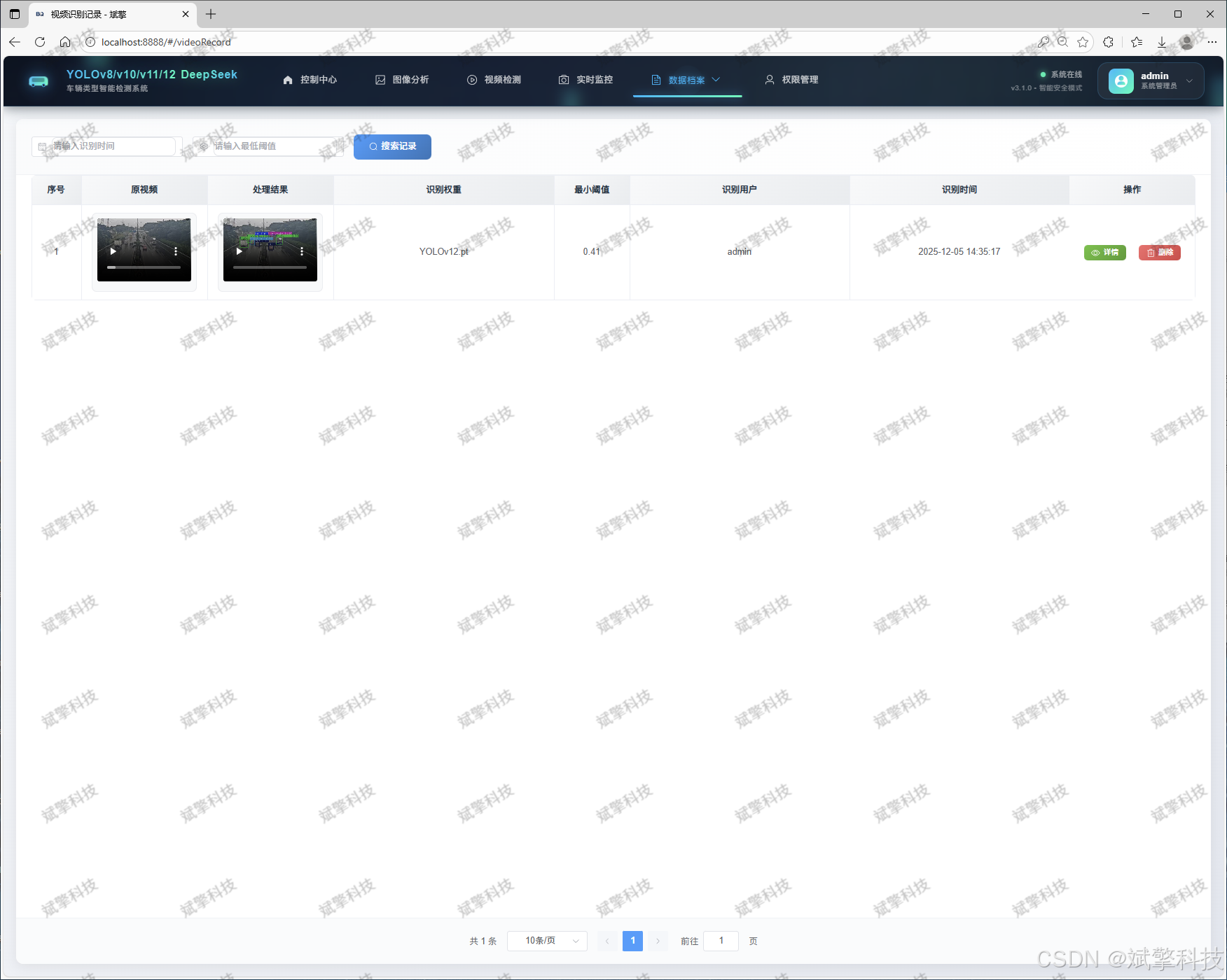
视频检测:上传视频文件,系统进行逐帧分析,并生成带有检测结果的输出视频。
-
实时摄像头检测:连接本地摄像头,实现实时视频流的车辆识别与显示,满足监控场景需求。
-
-
-
💾 数据存储与记录管理模块
-
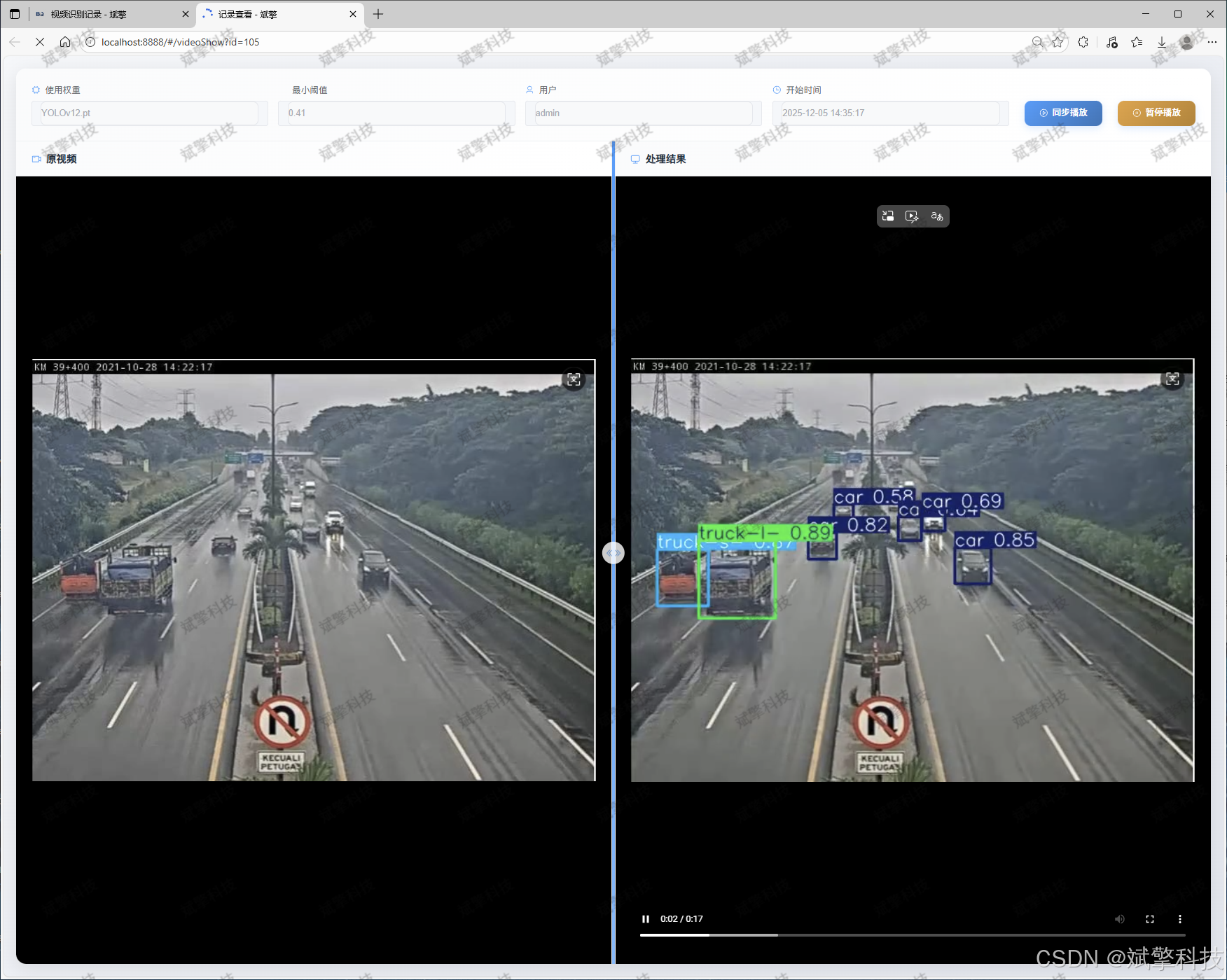
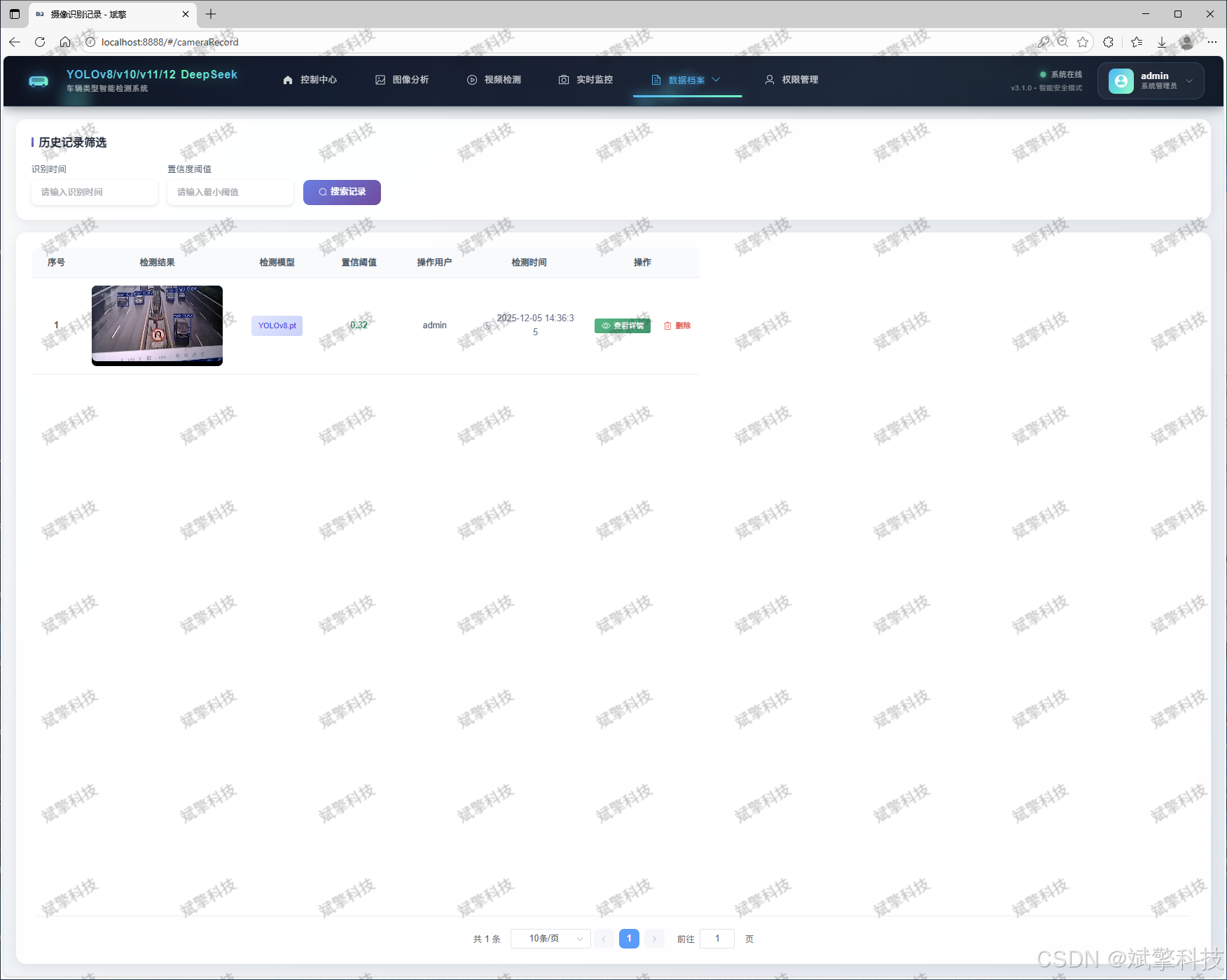
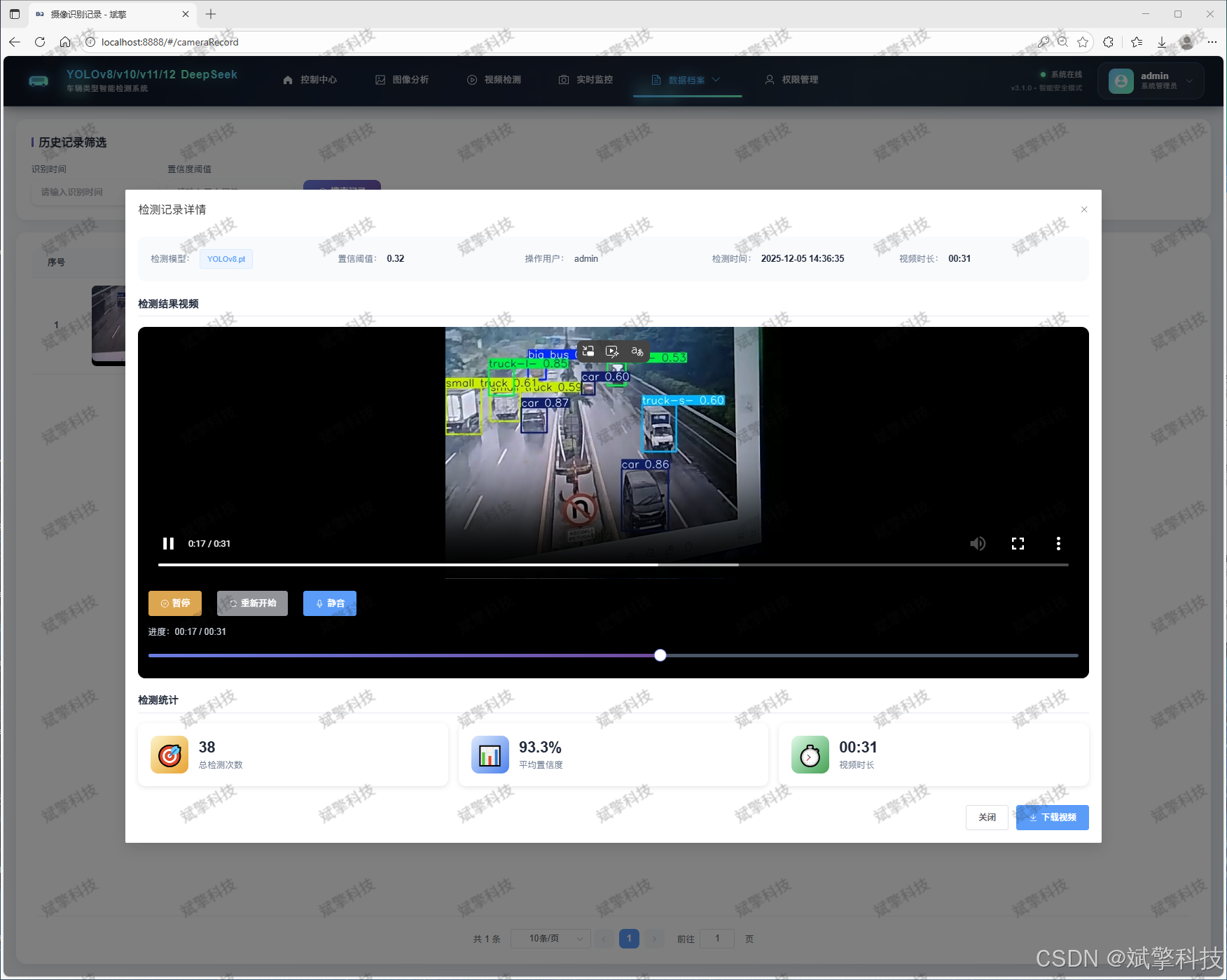
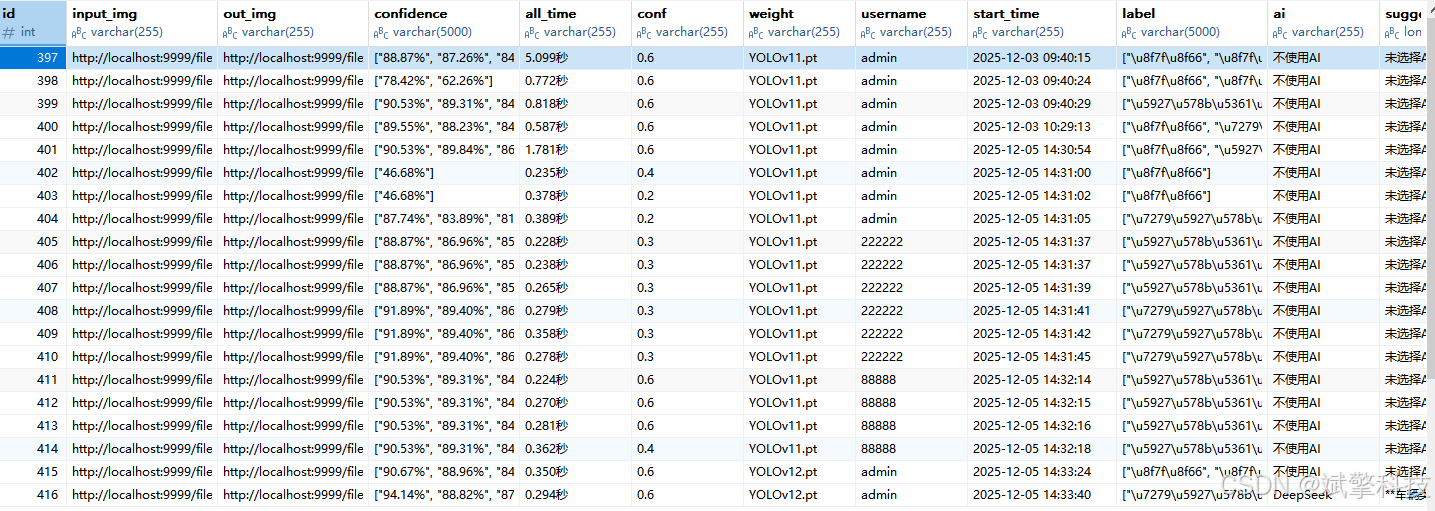
检测记录持久化:所有检测任务(图片、视频、实时)的元数据和结果摘要(如时间、使用的模型、检测到的车型数量统计)都会自动保存至MySQL数据库。
-
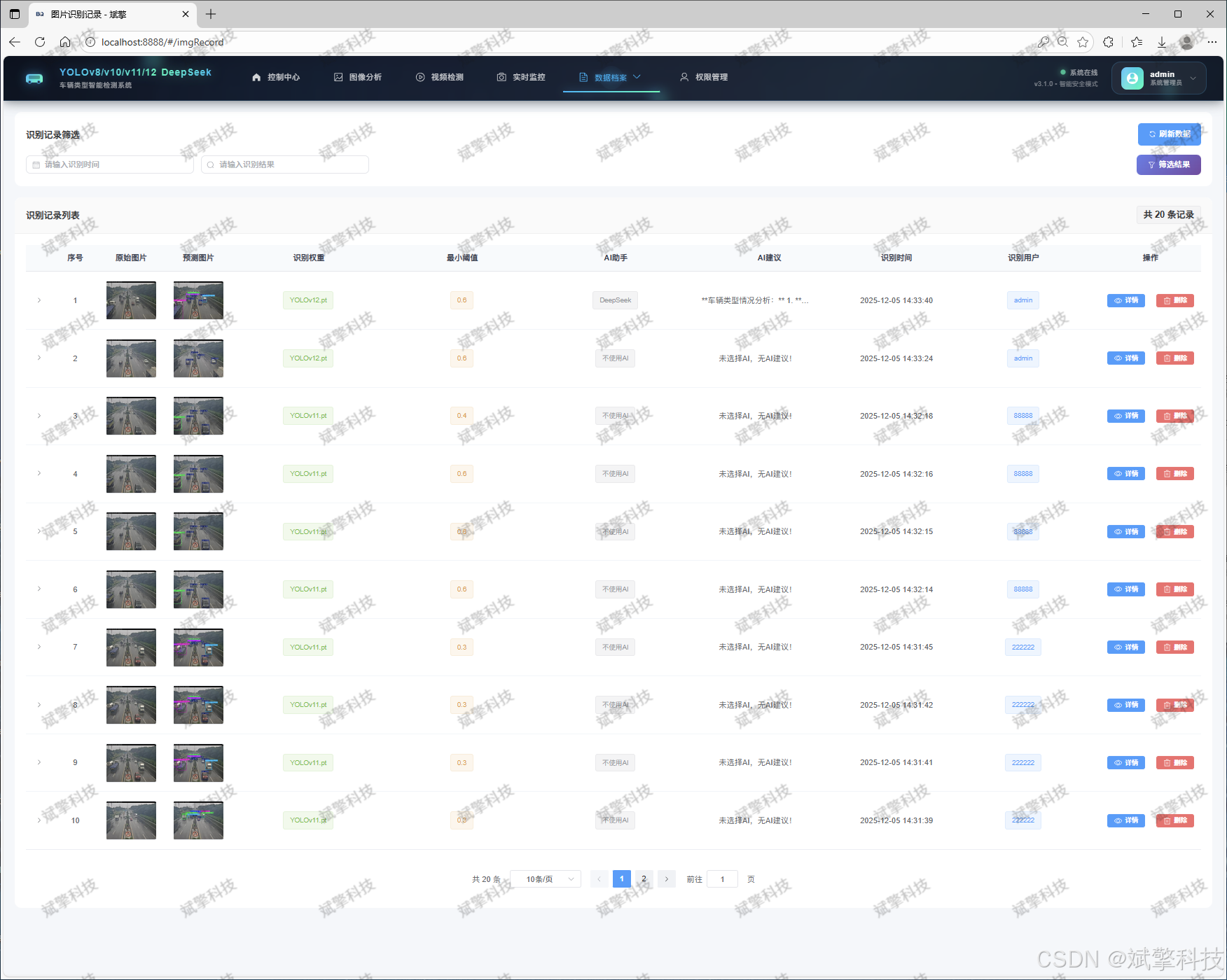
历史记录管理:提供三个独立的查询页面:
-
图片识别记录管理
-
视频识别记录管理
-
摄像头识别记录管理
用户可以查看、检索和删除历史记录,方便进行工作回溯与数据管理。
-
-
-
🧠 DeepSeek智能分析模块(AI分析功能)
-
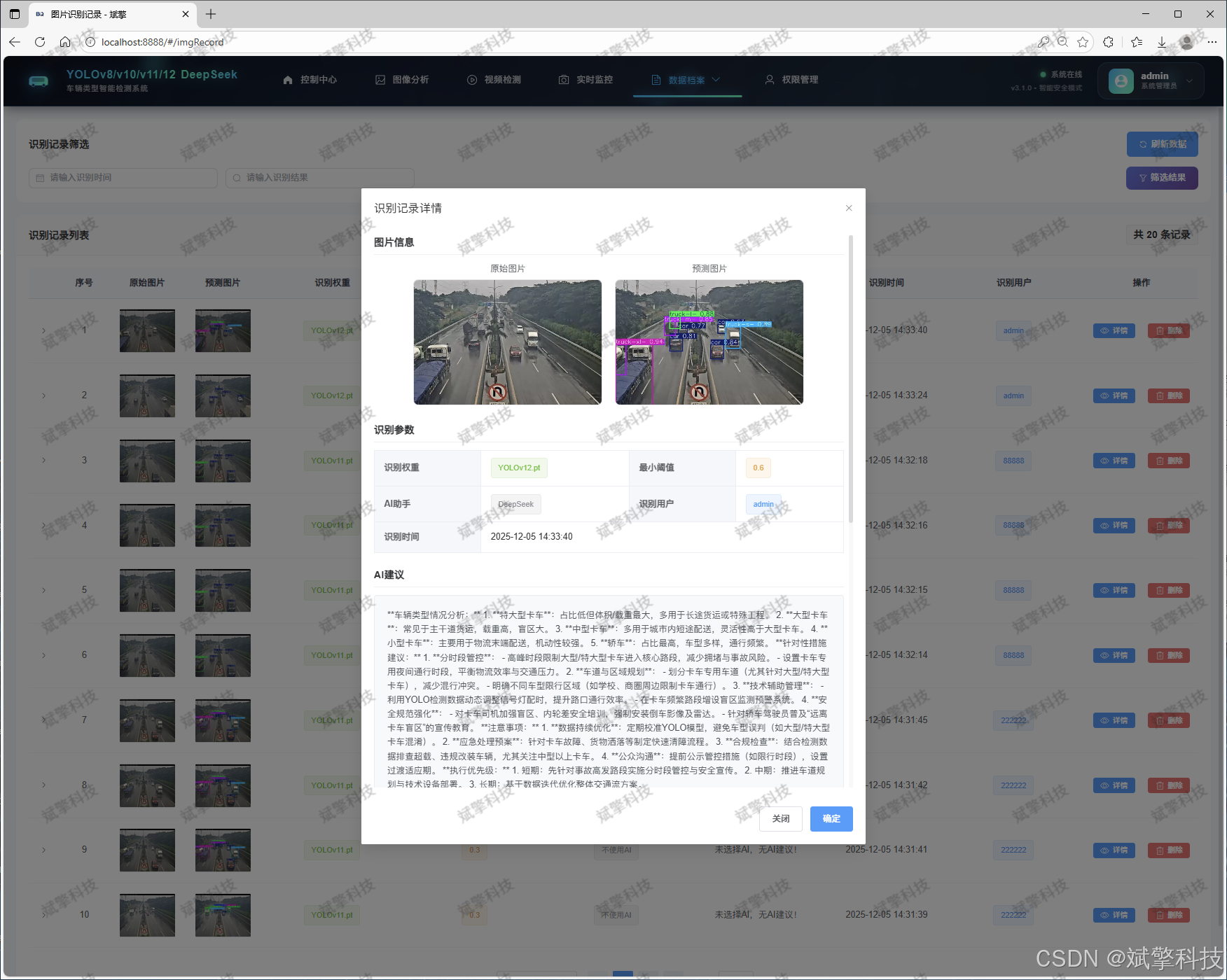
此为本系统的特色功能。在完成图片检测后,用户可点击“AI分析”按钮。
-
系统会将检测结果(如框的位置、类别、数量)组织成结构化信息,发送给DeepSeek大语言模型API。
-
DeepSeek模型将基于这些信息,生成一段自然语言描述的分析报告。
-
-
📊 信息与数据可视化模块
-
系统提供丰富的可视化仪表板,将数据库中的统计数据转化为直观图表。
-
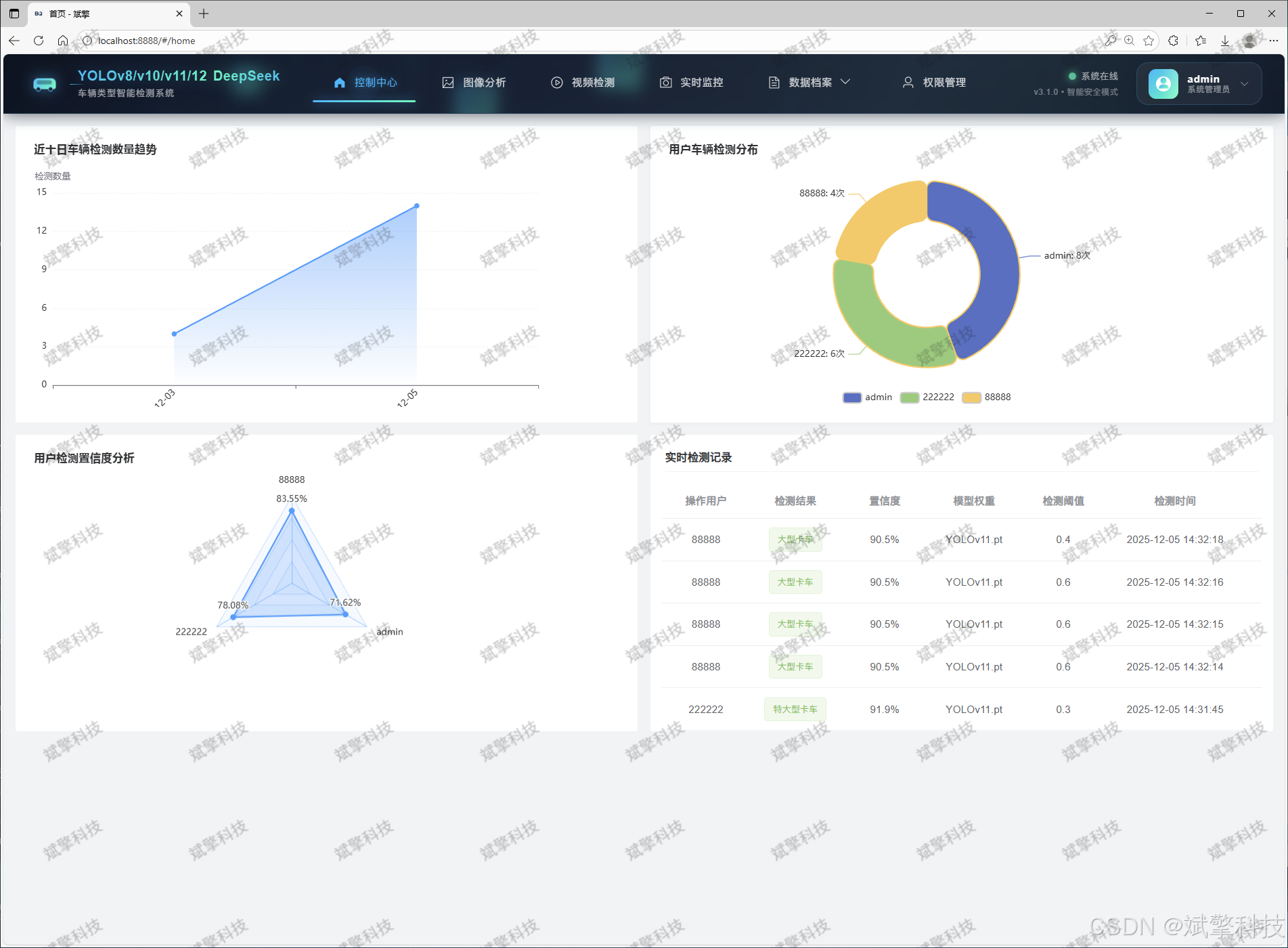
全局数据看板:展示系统总检测次数、各车型被检测到的总频次排行、不同模型的使用频率等。
-
用户个人统计:展示用户个人的检测历史趋势、常用车型分布等。
-
可视化采用ECharts等现代图表库实现,支持交互式探索。
-
-
🛠 系统架构与技术栈
-
前端:采用Vue.js框架,构建响应式、组件化的用户界面,提供流畅的操作体验。
-
深度学习框架:基于PyTorch和Ultralytics YOLO库进行模型加载和推理。
-
数据库:使用MySQL进行结构化数据存储。
-
AI服务集成:通过HTTP API调用DeepSeek大模型服务。
-
功能模块
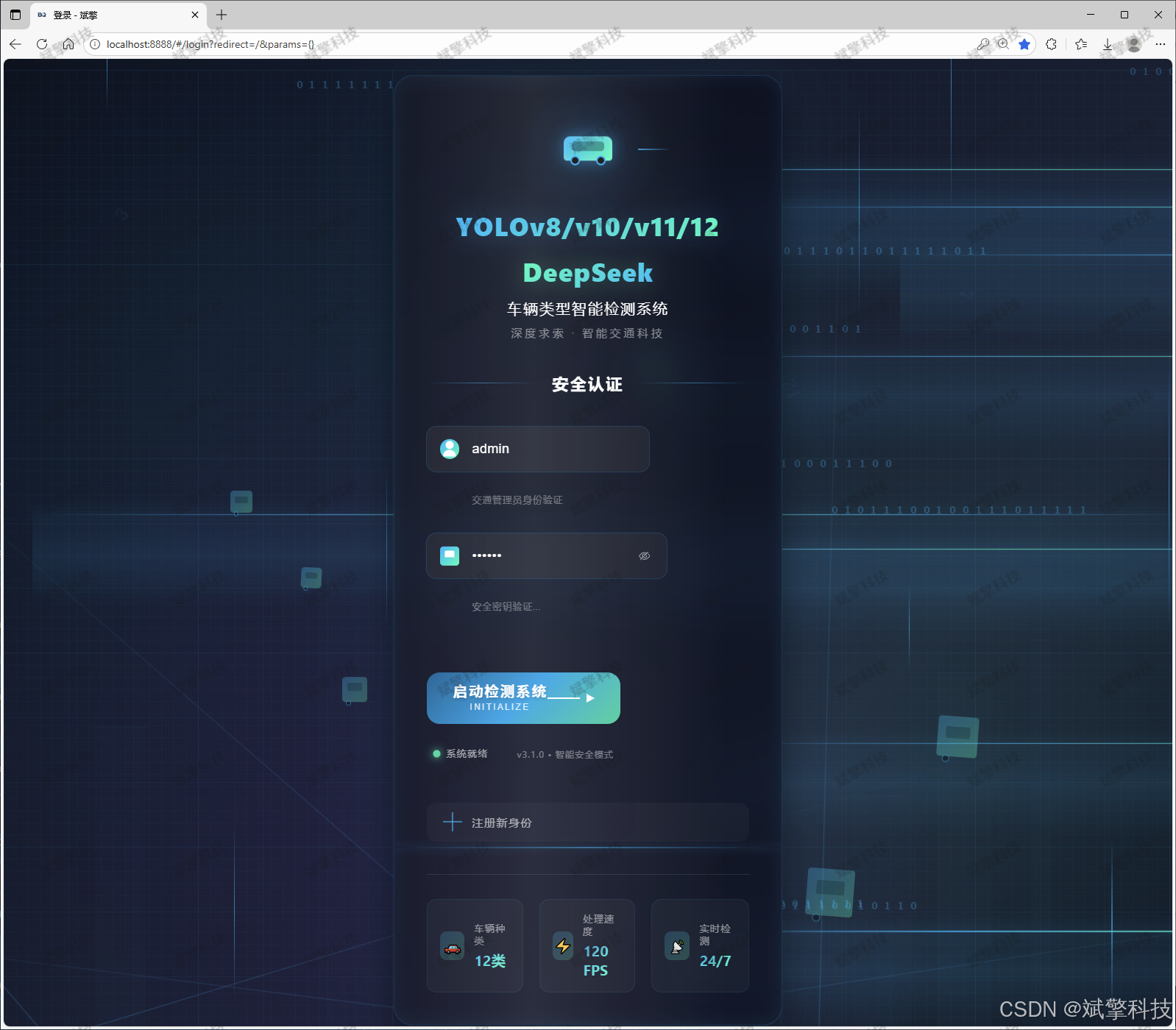
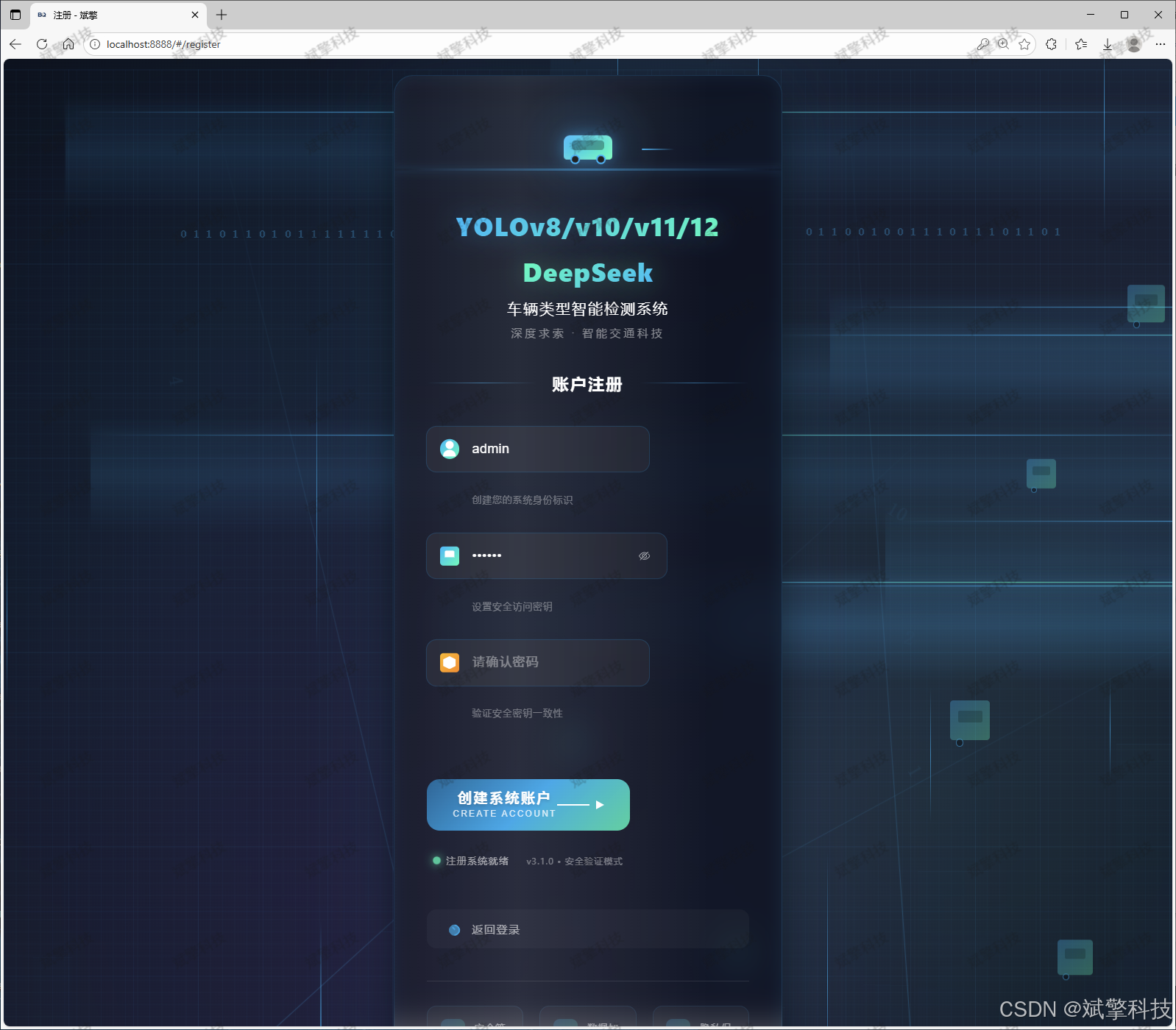
✅ 用户登录注册:支持密码检测,保存到MySQL数据库。
✅ 支持四种YOLO模型切换,YOLOv8、YOLOv10、YOLOv11、YOLOv12。
✅ 信息可视化,数据可视化。
✅ 图片检测支持AI分析功能,deepseek
✅ 支持图像检测、视频检测和摄像头实时检测,检测结果保存到MySQL数据库。
✅ 图片识别记录管理、视频识别记录管理和摄像头识别记录管理。
✅ 用户管理模块,管理员可以对用户进行增删改查。
✅ 个人中心,可以修改自己的信息,密码姓名头像等等。
登录注册模块
可视化模块
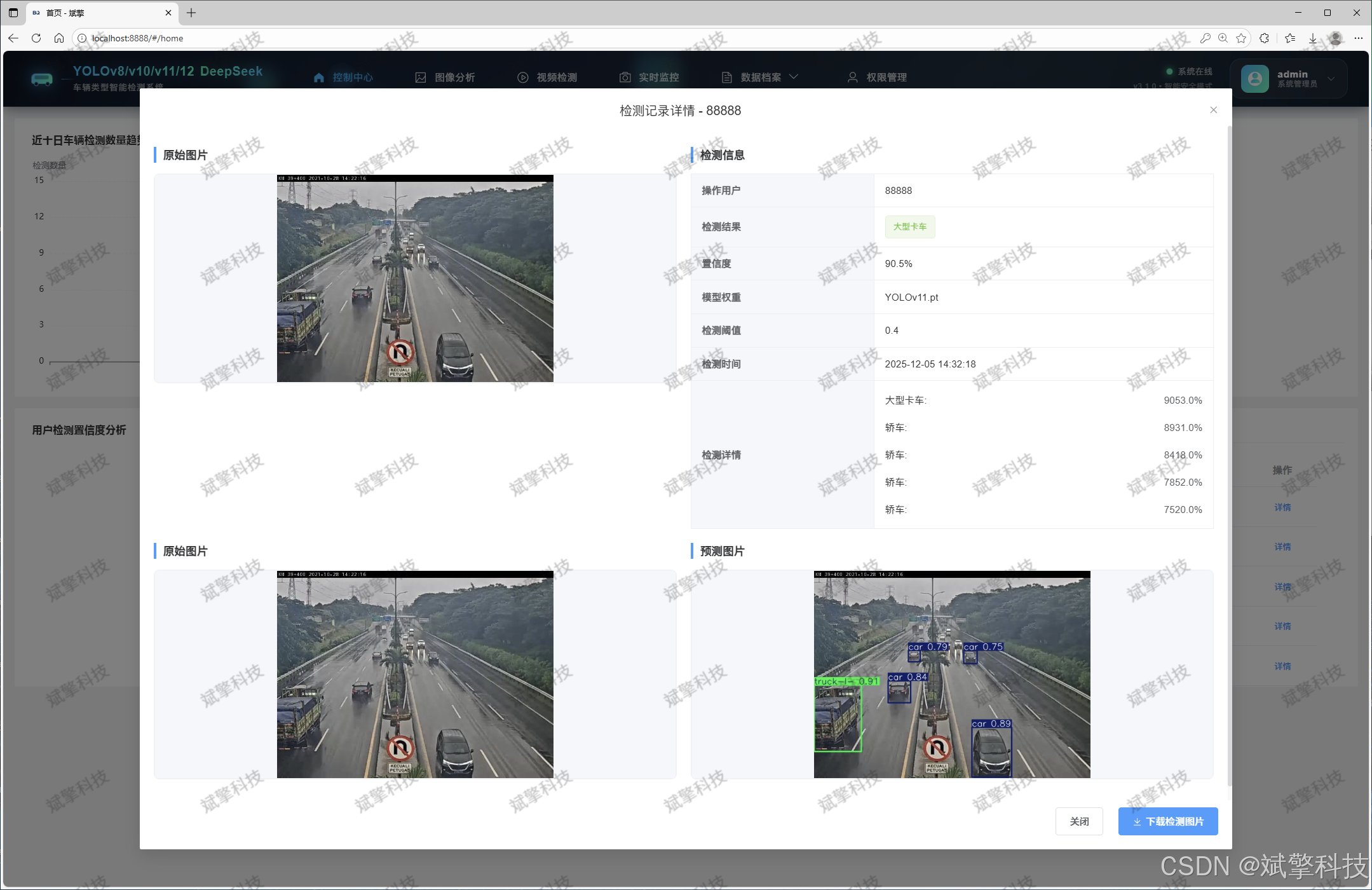
图像检测模块
-
YOLO模型集成 (v8/v10/v11/v12)
-
DeepSeek多模态分析
-
支持格式:JPG/PNG/MP4/RTSP
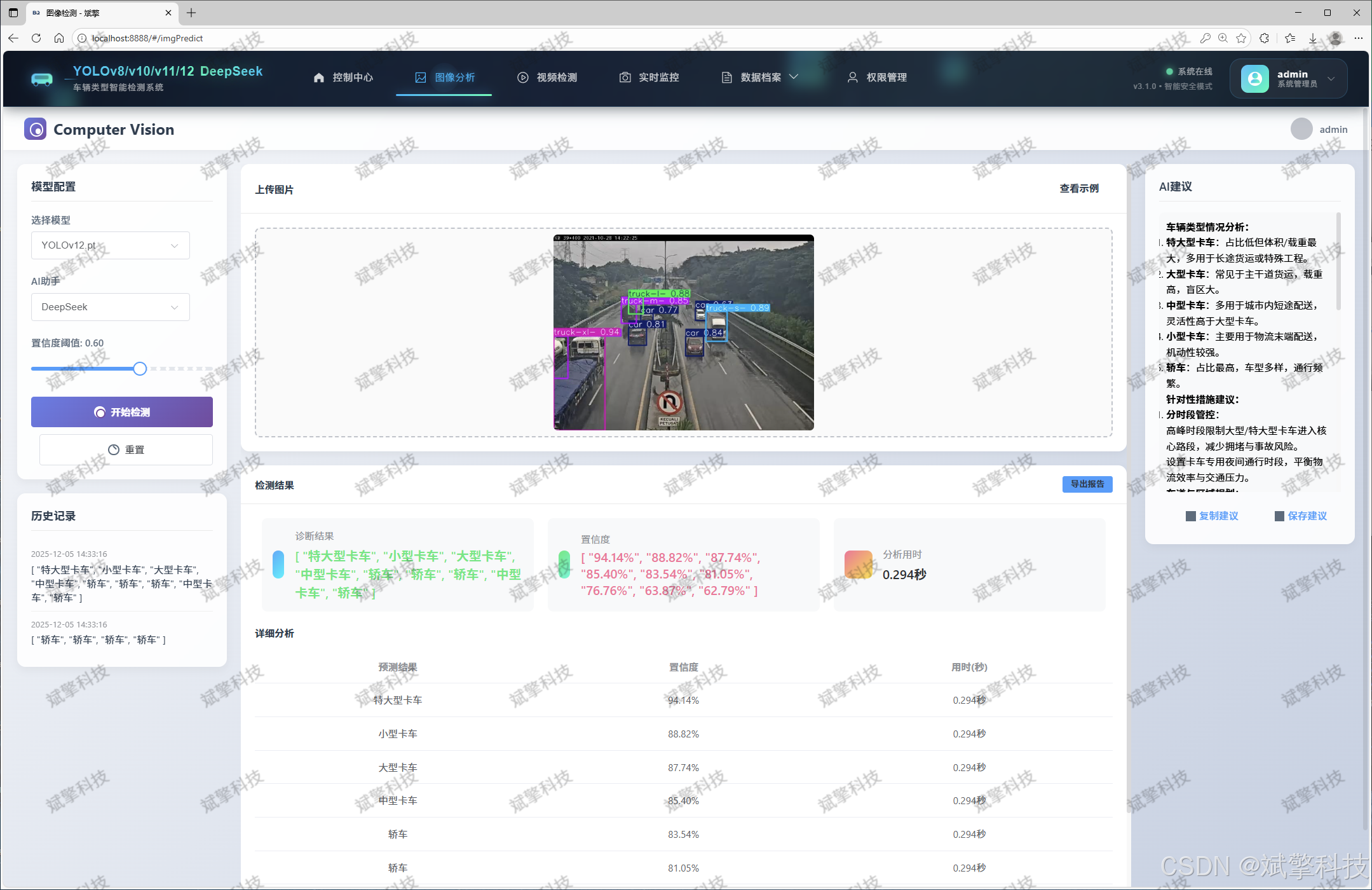
视频检测模块
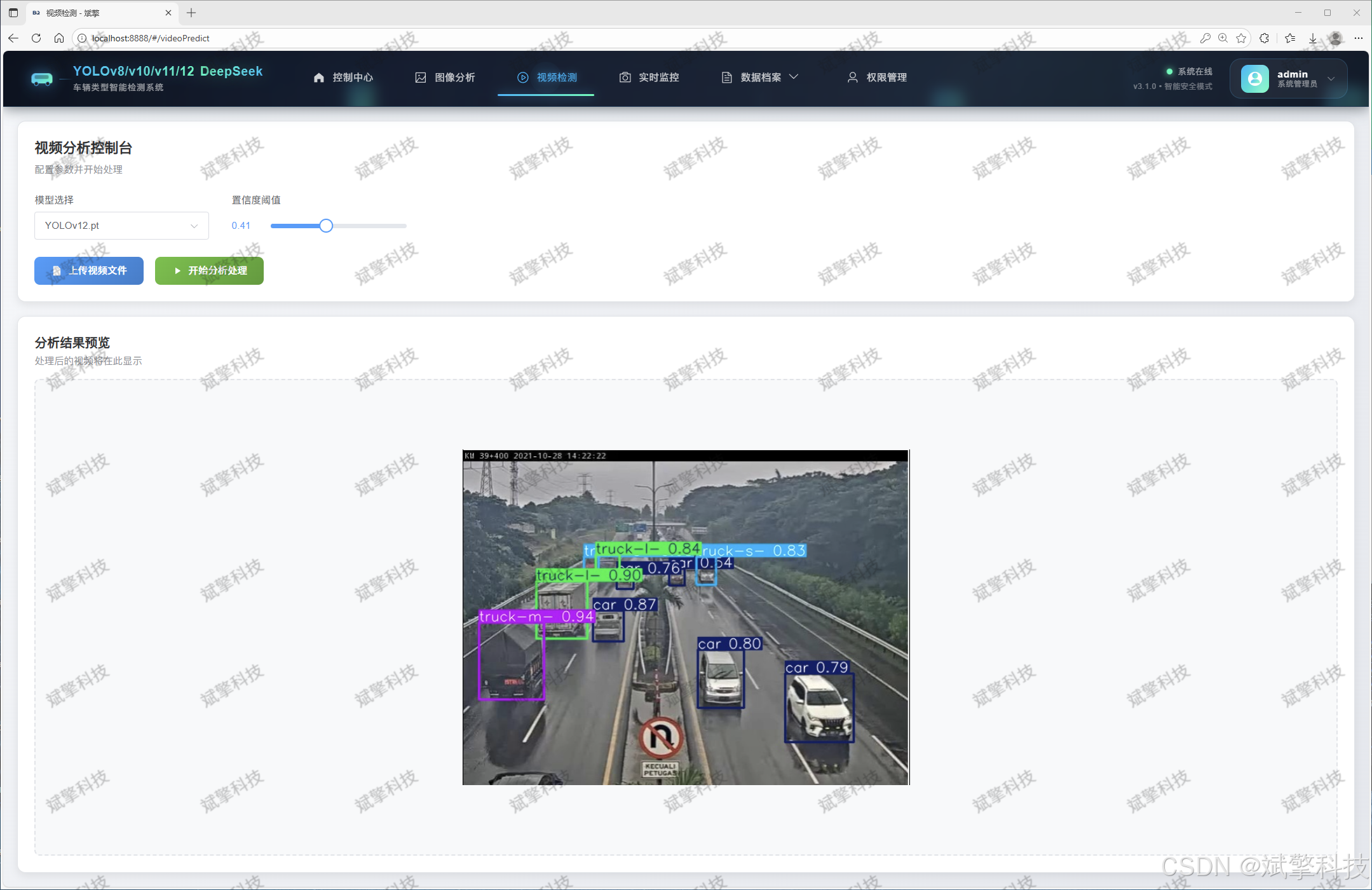
实时检测模块
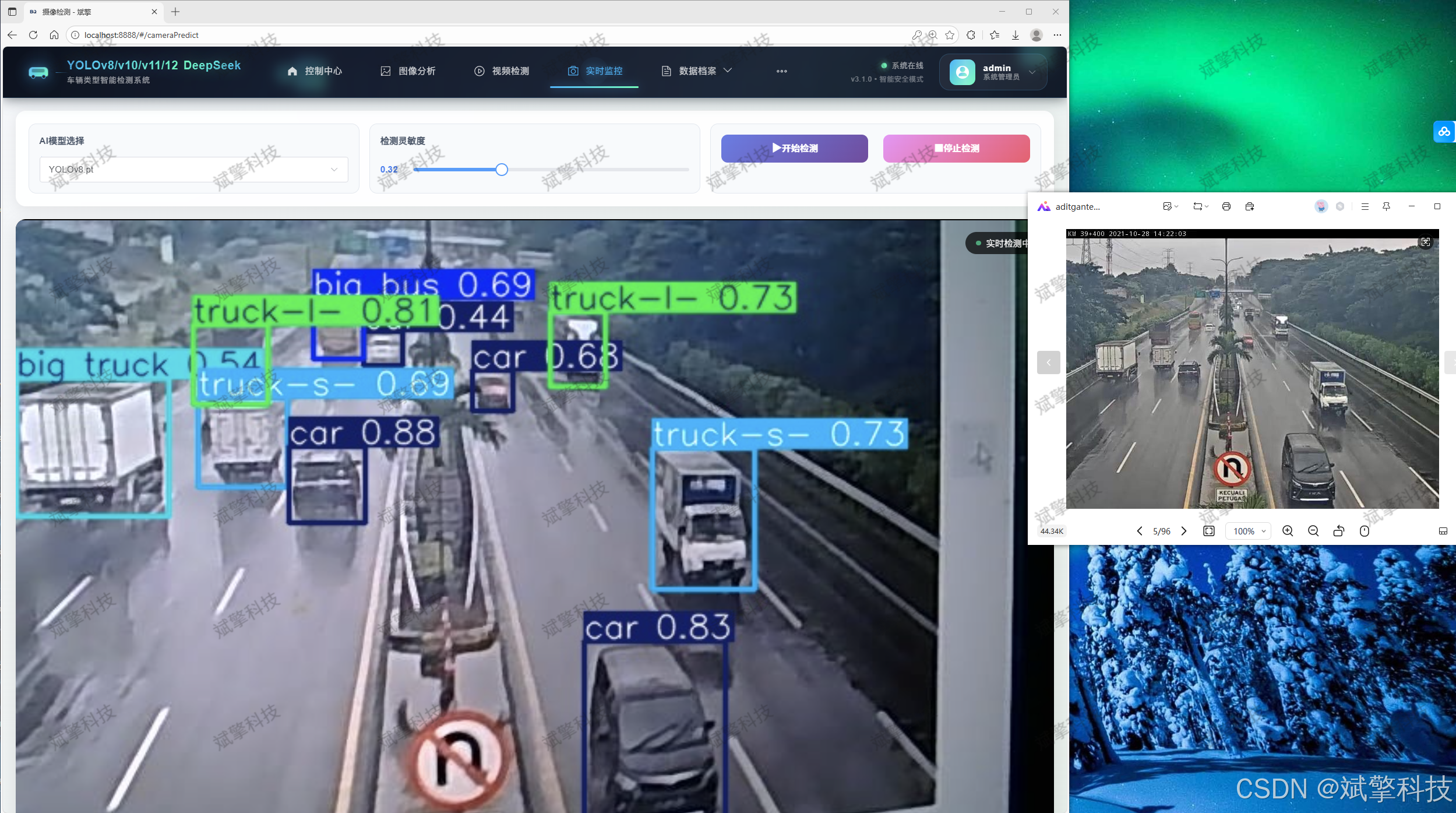
图片识别记录管理
视频识别记录管理
摄像头识别记录管理
用户管理模块
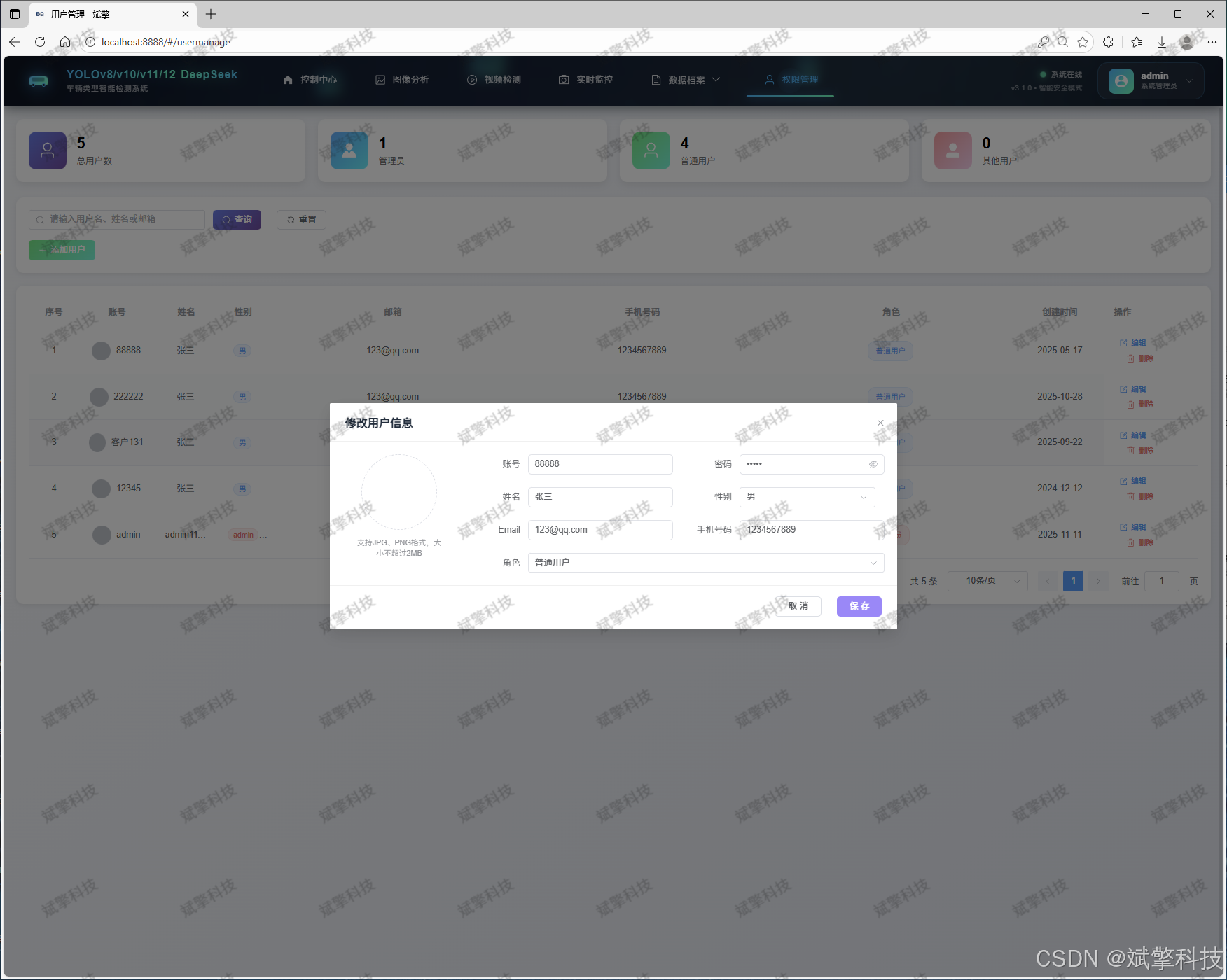
数据管理模块(MySQL表设计)
-
users- 用户信息表

-
imgrecords- 图片检测记录表
-
videorecords- 视频检测记录表

-
camerarecords- 摄像头检测记录表

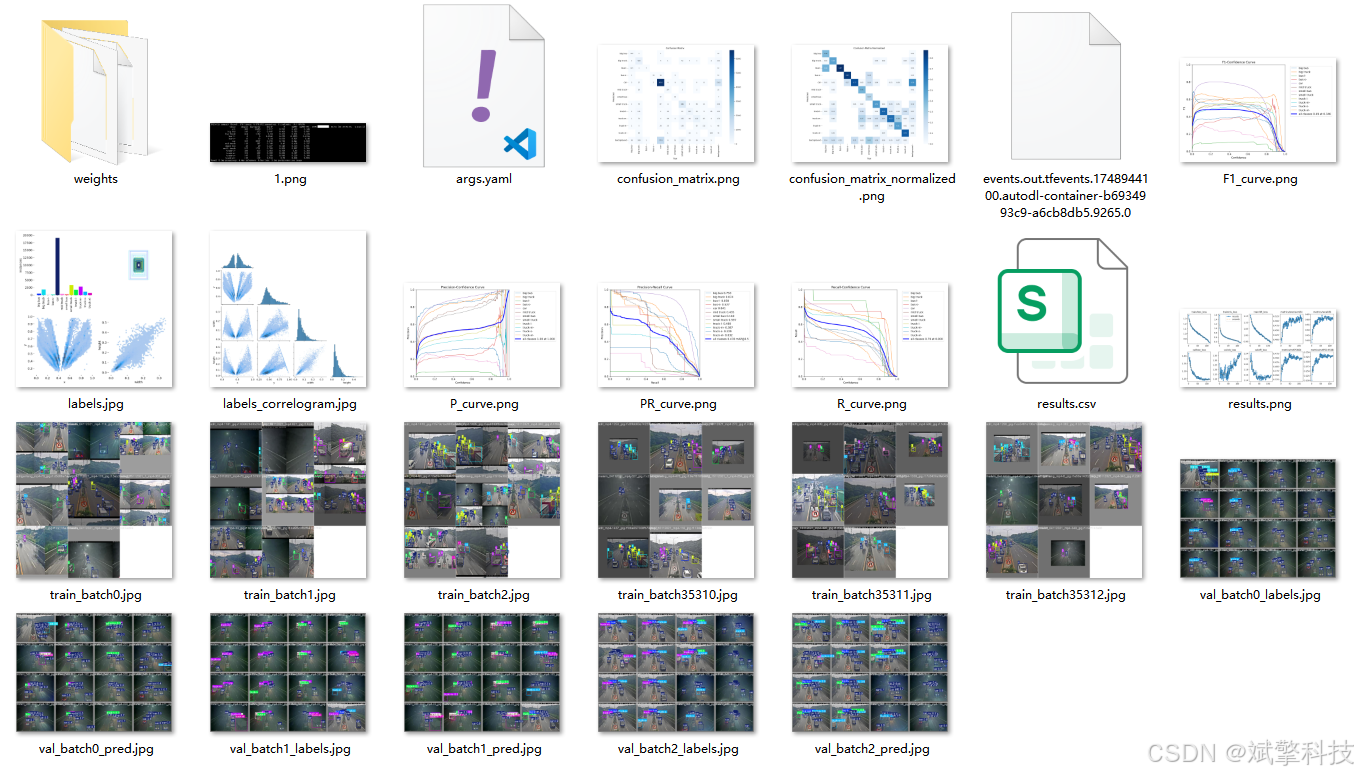
模型训练结果
#coding:utf-8
#根据实际情况更换模型
# yolon.yaml (nano):轻量化模型,适合嵌入式设备,速度快但精度略低。
# yolos.yaml (small):小模型,适合实时任务。
# yolom.yaml (medium):中等大小模型,兼顾速度和精度。
# yolob.yaml (base):基本版模型,适合大部分应用场景。
# yolol.yaml (large):大型模型,适合对精度要求高的任务。

from ultralytics import YOLO

model_path = 'pt/yolo12s.pt'
data_path = 'data.yaml'

if __name__ == '__main__':
    model = YOLO(model_path)
    results = model.train(data=data_path,
                          epochs=500,
                          batch=64,
                          device='0',
                          workers=0,
                          project='runs',
                          name='exp',
                          )
YOLOv8
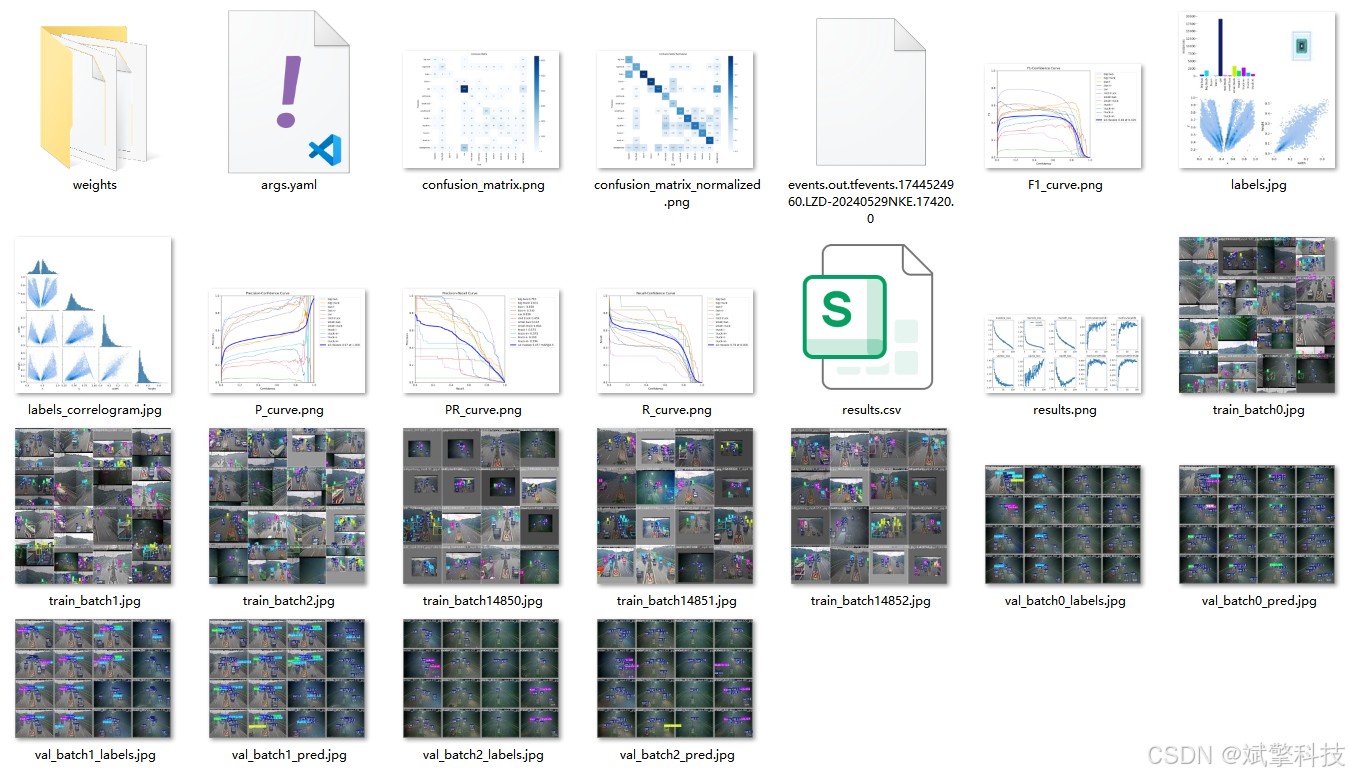
YOLOv10
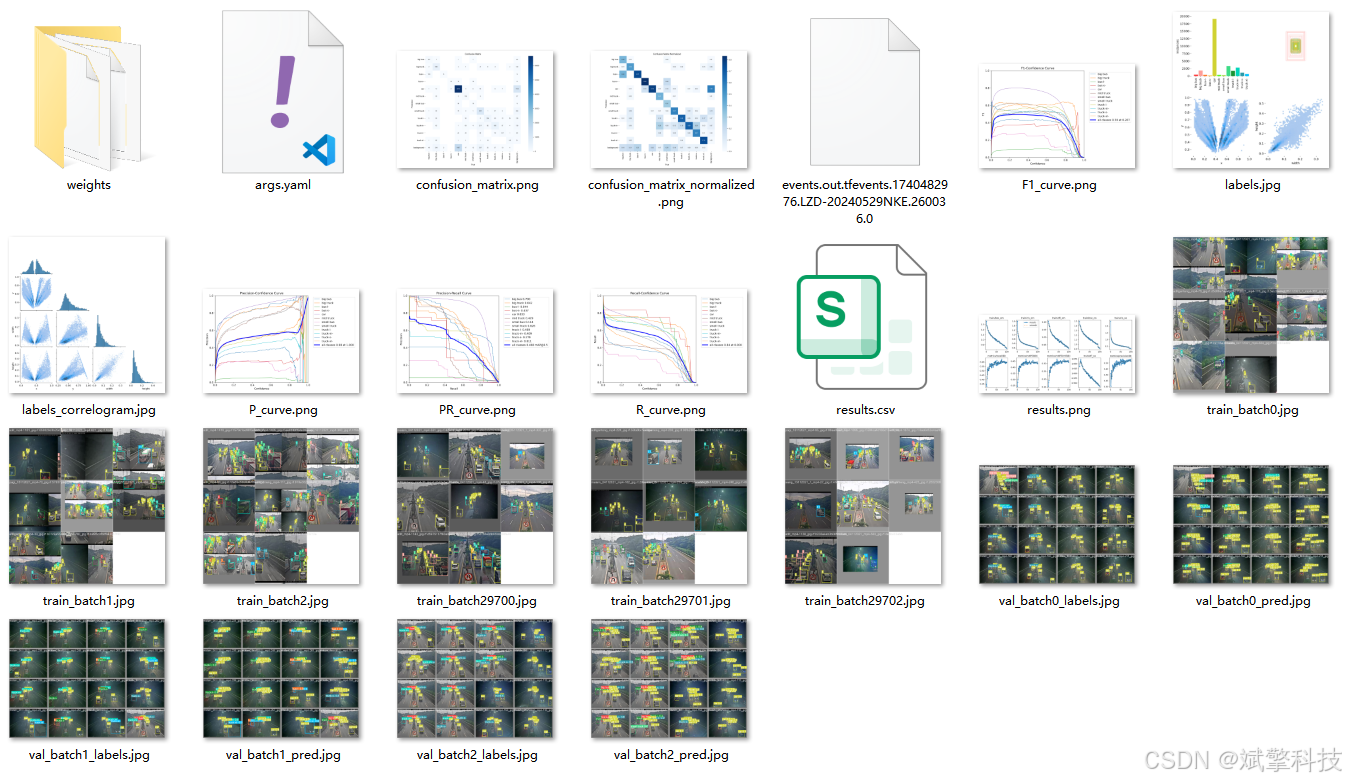
YOLOv11
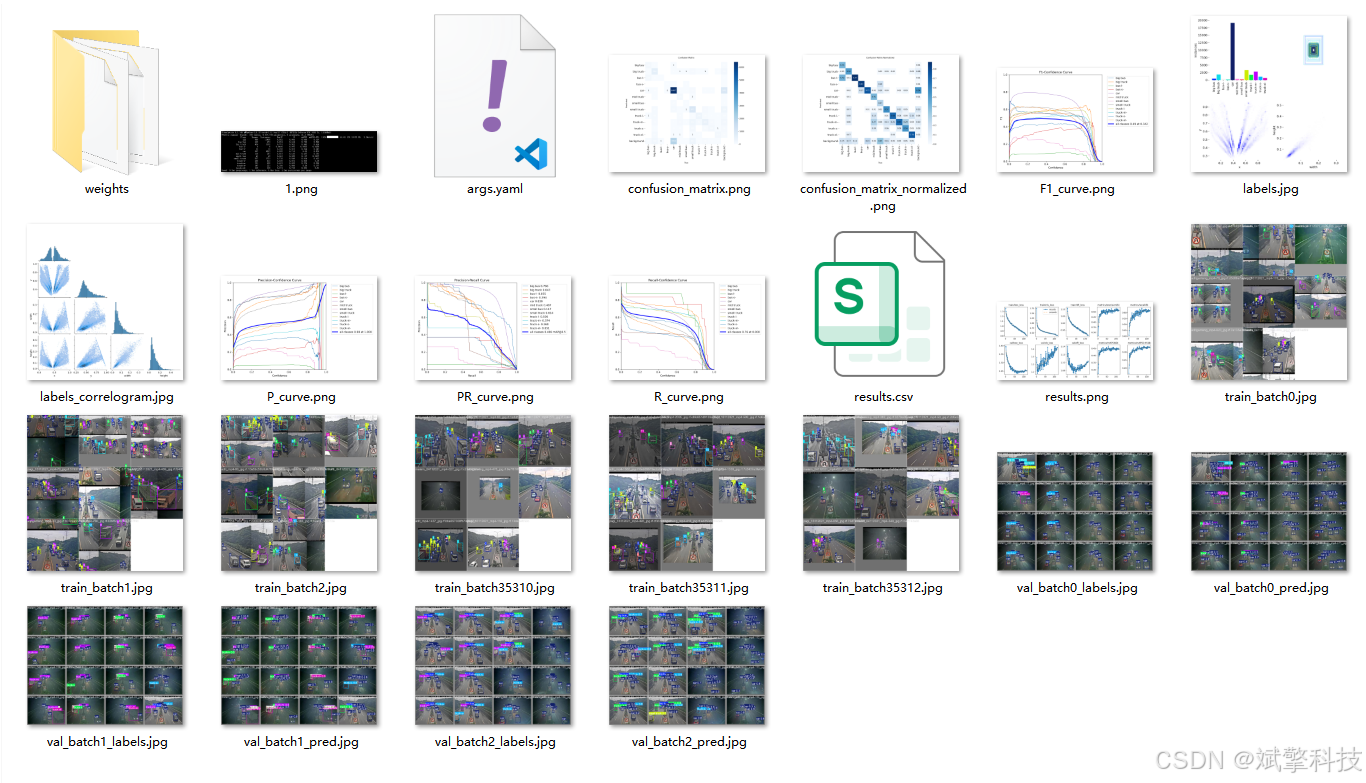
YOLOv12
前端代码展示
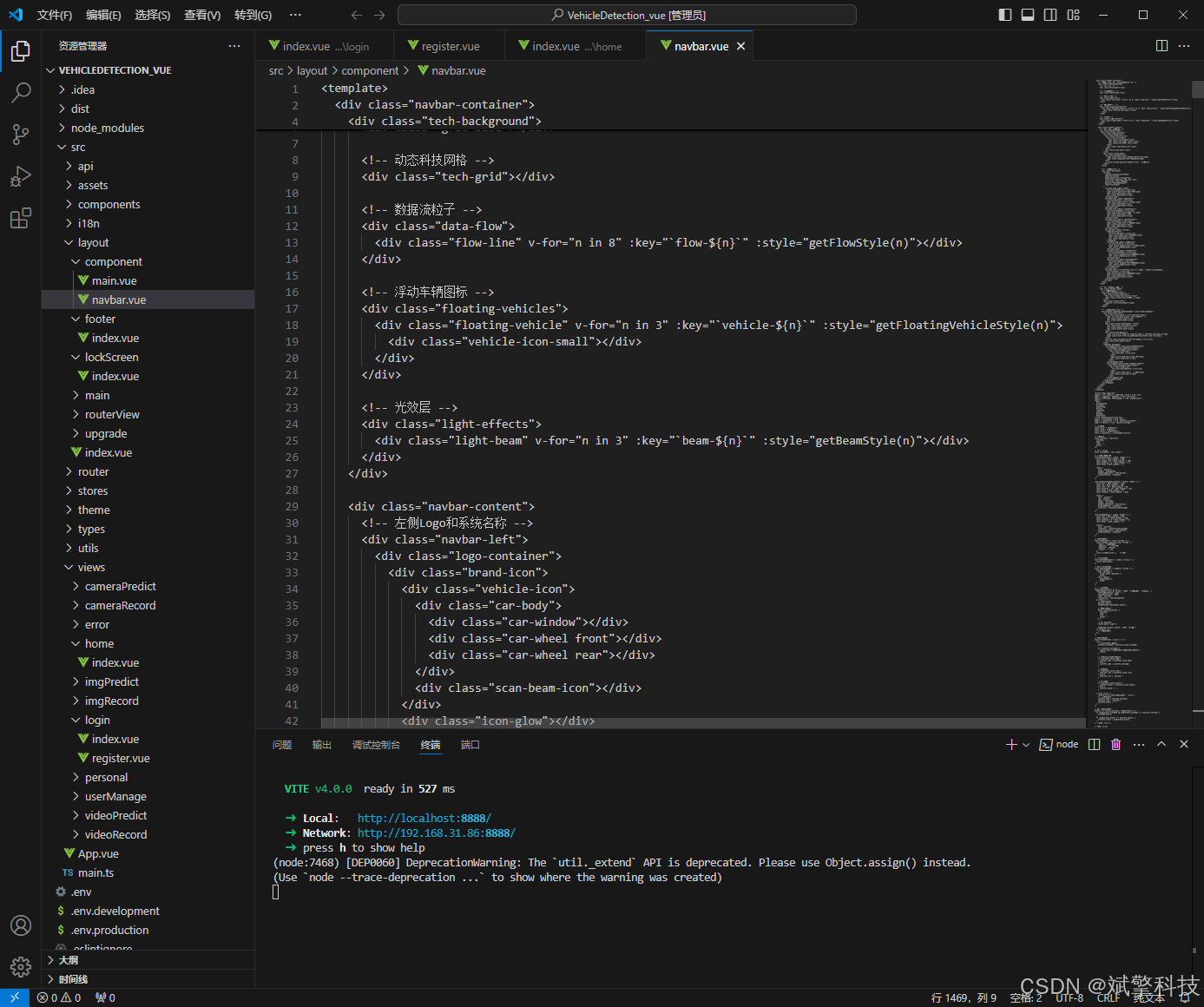
部分代码
<template>
<div class="navbar-container">
<!-- 科技感动态背景 - 与登录页面保持一致 -->
<div class="tech-background">
<!-- 网格基底 -->
<div class="grid-base"></div>
<!-- 动态科技网格 -->
<div class="tech-grid"></div>
<!-- 数据流粒子 -->
<div class="data-flow">
<div class="flow-line" v-for="n in 8" :key="`flow-${n}`" :style="getFlowStyle(n)"></div>
</div>
<!-- 浮动车辆图标 -->
<div class="floating-vehicles">
<div class="floating-vehicle" v-for="n in 3" :key="`vehicle-${n}`" :style="getFloatingVehicleStyle(n)">
<div class="vehicle-icon-small"></div>
</div>
</div>
<!-- 光效层 -->
<div class="light-effects">
<div class="light-beam" v-for="n in 3" :key="`beam-${n}`" :style="getBeamStyle(n)"></div>
</div>
</div>
<div class="navbar-content">
<!-- 左侧Logo和系统名称 -->
<div class="navbar-left">
<div class="logo-container">
<div class="brand-icon">
<div class="vehicle-icon">
<div class="car-body">
<div class="car-window"></div>
<div class="car-wheel front"></div>
<div class="car-wheel rear"></div>
</div>
<div class="scan-beam-icon"></div>
</div>
<div class="icon-glow"></div>
</div>
<div class="system-name">
<h2 class="system-title">
<span class="yolo-text">YOLOv8/v10/v11/12</span>
<span class="deepseek-text">DeepSeek</span>
</h2>
<p class="system-subtitle">车辆类型智能检测系统</p>
</div>
</div>
<!-- 主要功能菜单 -->
<div class="main-menu">
<el-menu
:default-active="activeMenu"
mode="horizontal"
background-color="transparent"
text-color="rgba(255, 255, 255, 0.8)"
active-text-color="#00b8ff"
@select="handleMenuSelect"
class="tech-menu"
>
<el-menu-item index="/home">
<el-icon><HomeFilled /></el-icon>
<span class="menu-text">控制中心</span>
<div class="menu-glow"></div>
<div class="menu-pulse"></div>
</el-menu-item>
<el-menu-item index="/imgPredict">
<el-icon><Picture /></el-icon>
<span class="menu-text">图像分析</span>
<div class="menu-glow"></div>
<div class="menu-pulse"></div>
</el-menu-item>
<el-menu-item index="/videoPredict">
<el-icon><VideoPlay /></el-icon>
<span class="menu-text">视频检测</span>
<div class="menu-glow"></div>
<div class="menu-pulse"></div>
</el-menu-item>
<el-menu-item index="/cameraPredict">
<el-icon><Camera /></el-icon>
<span class="menu-text">实时监控</span>
<div class="menu-glow"></div>
<div class="menu-pulse"></div>
</el-menu-item>
<el-sub-menu index="records">
<template #title>
<el-icon><Document /></el-icon>
<span class="menu-text">数据档案</span>
<div class="menu-glow"></div>
<div class="menu-pulse"></div>
</template>
<el-menu-item index="/imgRecord">
<el-icon><Picture /></el-icon>
<span class="submenu-text">图像记录</span>
<div class="submenu-glow"></div>
</el-menu-item>
<el-menu-item index="/videoRecord">
<el-icon><VideoPlay /></el-icon>
<span class="submenu-text">视频记录</span>
<div class="submenu-glow"></div>
</el-menu-item>
<el-menu-item index="/cameraRecord">
<el-icon><Camera /></el-icon>
<span class="submenu-text">监控记录</span>
<div class="submenu-glow"></div>
</el-menu-item>
</el-sub-menu>
<el-menu-item v-if="userInfo.role === 'admin'" index="/usermanage">
<el-icon><User /></el-icon>
<span class="menu-text">权限管理</span>
<div class="menu-glow"></div>
<div class="menu-pulse"></div>
</el-menu-item>
</el-menu>
</div>
</div>
<!-- 右侧用户信息和功能 -->
<div class="navbar-right">
<!-- 系统状态指示器 -->
<div class="system-status">
<div class="status-indicator">
<div class="status-dot active"></div>
<span class="status-text">系统在线</span>
</div>
<div class="status-info">
<span>v3.1.0 • 智能安全模式</span>
</div>
</div>
<!-- 用户信息下拉菜单 -->
<el-dropdown @command="handleCommand" class="tech-dropdown">
<div class="user-info">
<div class="user-avatar" v-if="userInfo.avatar">
<img :src="userInfo.avatar" alt="用户头像" />
<div class="avatar-scan"></div>
<div class="avatar-glow"></div>
</div>
<div class="avatar-placeholder" v-else>
<div class="user-icon-small"></div>
<div class="avatar-scan"></div>
<div class="avatar-glow"></div>
</div>
<div class="user-details">
<span class="user-name">{{ userInfo.name || userInfo.username }}</span>
<span class="user-role">{{ getRoleText(userInfo.role) }}</span>
</div>
<el-icon class="dropdown-arrow"><ArrowDown /></el-icon>
<div class="user-glow"></div>
</div>
<template #dropdown>
<el-dropdown-menu class="tech-dropdown-menu">
<el-dropdown-item command="personal">
<div class="dropdown-item-content">
<div class="item-icon">
<el-icon><User /></el-icon>
</div>
<span class="item-text">个人中心</span>
<div class="item-trail"></div>
</div>
</el-dropdown-item>
<el-dropdown-item divided command="logout">
<div class="dropdown-item-content">
<div class="item-icon">
<el-icon><SwitchButton /></el-icon>
</div>
<span class="item-text">退出系统</span>
<div class="item-trail"></div>
</div>
</el-dropdown-item>
</el-dropdown-menu>
</template>
</el-dropdown>
</div>
</div>
</div>
</template>
<script setup lang="ts">
import { ref, reactive, onMounted, watch } from 'vue';
import { useRouter, useRoute } from 'vue-router';
import { ElMessage, ElMessageBox } from 'element-plus';
import {
User,
SwitchButton,
ArrowDown,
HomeFilled,
Picture,
VideoPlay,
Camera,
Document,
UserFilled
} from '@element-plus/icons-vue';
import { storeToRefs } from 'pinia';
import { useUserInfo } from '/@/stores/userInfo';
import { Session } from '/@/utils/storage';
// 定义变量
const router = useRouter();
const route = useRoute();
const stores = useUserInfo();
const { userInfos } = storeToRefs(stores);
// 用户信息
const userInfo = reactive({
username: '',
name: '',
role: '',
avatar: ''
});
// 当前激活菜单
const activeMenu = ref('/home');
// 动态样式生成函数
const getFlowStyle = (index: number) => {
const left = Math.random() * 100;
const height = 50 + Math.random() * 100;
const duration = 2 + Math.random() * 3;
const delay = Math.random() * 2;
return {
left: `${left}%`,
height: `${height}px`,
animationDuration: `${duration}s`,
animationDelay: `${delay}s`
};
};
const getFloatingVehicleStyle = (index: number) => {
const left = Math.random() * 100;
const top = Math.random() * 100;
const size = 20 + Math.random() * 40;
const duration = 10 + Math.random() * 20;
const delay = Math.random() * 5;
const rotation = Math.random() * 360;
return {
left: `${left}%`,
top: `${top}%`,
width: `${size}px`,
height: `${size}px`,
animationDuration: `${duration}s`,
animationDelay: `${delay}s`,
transform: `rotate(${rotation}deg)`
};
};
const getBeamStyle = (index: number) => {
const left = Math.random() * 100;
const rotation = Math.random() * 360;
const duration = 8 + Math.random() * 8;
const delay = Math.random() * 5;
return {
left: `${left}%`,
transform: `rotate(${rotation}deg)`,
animationDuration: `${duration}s`,
animationDelay: `${delay}s`
};
};
// 获取角色文本
const getRoleText = (role: string) => {
const roleMap: Record<string, string> = {
'admin': '系统管理员',
'engineer': '检测工程师',
'operator': '操作员',
'viewer': '观察员'
};
return roleMap[role] || '检测用户';
};
// 菜单选择处理
const handleMenuSelect = (index: string) => {
router.push(index);
};
// 下拉菜单命令处理
const handleCommand = (command: string) => {
switch (command) {
case 'personal':
router.push('/personal');
break;
case 'logout':
handleLogout();
break;
}
};
// 退出登录处理
const handleLogout = () => {
ElMessageBox.confirm('确定要退出车辆检测系统吗?', '安全提示', {
confirmButtonText: '确认退出',
cancelButtonText: '取消',
type: 'warning',
customClass: 'tech-message-box'
}).then(() => {
// 清除登录信息
Session.clear();
localStorage.removeItem('token');
// 重置用户信息
Object.assign(userInfo, {
username: '',
name: '',
role: '',
avatar: ''
});
// 跳转到登录页
router.push('/login');
ElMessage.success('已安全退出车辆检测系统');
}).catch(() => {
// 用户取消操作
});
};
// 获取用户信息
const fetchUserInfo = async () => {
try {
// 从store获取基础信息
userInfo.username = userInfos.value.userName;
if (!userInfo.username) {
console.warn('用户名不存在,无法获取用户信息');
return;
}
// 直接从store获取用户信息
if (userInfos.value.name) {
userInfo.name = userInfos.value.name;
} else {
userInfo.name = userInfo.username;
}
// 角色处理
if (userInfos.value.role) {
userInfo.role = userInfos.value.role;
} else {
userInfo.role = 'operator';
}
// 头像处理
if (userInfos.value.avatar) {
userInfo.avatar = userInfos.value.avatar;
} else {
userInfo.avatar = '';
}
} catch (error) {
console.error('获取用户信息失败:', error);
// 使用默认信息
userInfo.name = userInfo.username;
userInfo.role = 'operator';
userInfo.avatar = '';
}
};
// 监听用户信息变化
watch(() => stores.userInfos, (newUserInfo) => {
if (newUserInfo.userName && newUserInfo.userName !== userInfo.username) {
fetchUserInfo();
}
if (newUserInfo.avatar !== userInfo.avatar) {
userInfo.avatar = newUserInfo.avatar;
}
}, { deep: true });
// 更新激活菜单
const updateActiveMenu = () => {
activeMenu.value = route.path;
};
// 页面加载时
onMounted(() => {
// 获取用户信息
fetchUserInfo();
// 设置当前激活菜单
updateActiveMenu();
// 监听路由变化
router.afterEach(updateActiveMenu);
});
</script>
<style scoped lang="scss">
.navbar-container {
position: relative;
height: 80px;
width: 100%;
overflow: hidden;
z-index: 100;
background: linear-gradient(135deg, #0a0e1a 0%, #131a2b 30%, #1a2438 70%, #0f1525 100%);
border-bottom: 1px solid rgba(0, 184, 255, 0.2);
box-shadow:
0 2px 20px rgba(0, 0, 0, 0.5),
0 0 30px rgba(0, 184, 255, 0.1);
/* 科技背景 - 与登录页面保持一致 */
.tech-background {
position: absolute;
top: 0;
left: 0;
width: 100%;
height: 100%;
z-index: 1;
overflow: hidden;
.grid-base {
position: absolute;
top: 0;
left: 0;
width: 100%;
height: 100%;
background-image:
linear-gradient(rgba(0, 184, 255, 0.05) 1px, transparent 1px),
linear-gradient(90deg, rgba(0, 184, 255, 0.05) 1px, transparent 1px),
linear-gradient(rgba(0, 184, 255, 0.03) 1px, transparent 1px),
linear-gradient(90deg, rgba(0, 184, 255, 0.03) 1px, transparent 1px);
background-size: 40px 40px, 40px 40px, 10px 10px, 10px 10px;
animation: gridMove 20s linear infinite;
}
.tech-grid {
position: absolute;
top: 0;
left: 0;
width: 100%;
height: 100%;
background:
radial-gradient(circle at 20% 30%, rgba(0, 184, 255, 0.1) 0%, transparent 50%),
radial-gradient(circle at 80% 70%, rgba(0, 255, 184, 0.1) 0%, transparent 50%);
animation: gridPulse 10s ease-in-out infinite alternate;
}
.data-flow {
position: absolute;
top: 0;
left: 0;
width: 100%;
height: 100%;
.flow-line {
position: absolute;
width: 1px;
background: linear-gradient(
to bottom,
transparent,
rgba(0, 184, 255, 0.4),
transparent
);
animation: flowFall linear infinite;
}
}
.floating-vehicles {
position: absolute;
top: 0;
left: 0;
width: 100%;
height: 100%;
pointer-events: none;
.floating-vehicle {
position: absolute;
animation: floatVehicle ease-in-out infinite alternate;
}
.vehicle-icon-small {
width: 100%;
height: 100%;
background: linear-gradient(135deg, rgba(0, 184, 255, 0.3), rgba(0, 255, 184, 0.3));
border-radius: 4px;
position: relative;
}
.vehicle-icon-small::before {
content: '';
position: absolute;
top: 25%;
left: 20%;
width: 60%;
height: 30%;
background: rgba(0, 0, 0, 0.2);
border-radius: 2px;
}
.vehicle-icon-small::after {
content: '';
position: absolute;
bottom: -15%;
left: 15%;
width: 15%;
height: 15%;
background: rgba(0, 0, 0, 0.3);
border-radius: 50%;
border: 1px solid rgba(0, 184, 255, 0.5);
}
.vehicle-icon-small::after {
content: '';
position: absolute;
bottom: -15%;
right: 15%;
width: 15%;
height: 15%;
background: rgba(0, 0, 0, 0.3);
border-radius: 50%;
border: 1px solid rgba(0, 184, 255, 0.5);
}
}
.light-effects {
position: absolute;
top: 0;
left: 0;
width: 100%;
height: 100%;
.light-beam {
position: absolute;
top: 0;
width: 1px;
height: 200%;
background: linear-gradient(
to bottom,
transparent,
rgba(0, 184, 255, 0.2),
transparent
);
filter: blur(0.5px);
animation: beamRotate linear infinite;
transform-origin: center center;
}
}
}
.navbar-content {
position: relative;
z-index: 2;
display: flex;
justify-content: space-between;
align-items: center;
height: 100%;
padding: 0 30px;
backdrop-filter: blur(10px);
.navbar-left {
display: flex;
align-items: center;
flex: 1;
.logo-container {
display: flex;
align-items: center;
margin-right: 40px;
position: relative;
.brand-icon {
position: relative;
width: 50px;
height: 50px;
margin-right: 20px;
.vehicle-icon {
width: 100%;
height: 100%;
position: relative;
z-index: 2;
.car-body {
position: absolute;
top: 50%;
left: 50%;
transform: translate(-50%, -50%);
width: 30px;
height: 15px;
background: linear-gradient(135deg, #00b8ff, #00ffb8);
border-radius: 6px 6px 3px 3px;
animation: carFloat 3s ease-in-out infinite alternate;
box-shadow:
0 0 15px rgba(0, 184, 255, 0.4),
inset 0 0 8px rgba(255, 255, 255, 0.2);
}
.car-window {
position: absolute;
top: 3px;
left: 5px;
width: 20px;
height: 6px;
background: rgba(0, 0, 0, 0.3);
border-radius: 2px;
}
.car-wheel {
position: absolute;
width: 6px;
height: 6px;
border-radius: 50%;
background: #222;
border: 1px solid #00b8ff;
bottom: -3px;
animation: wheelRotate 2s linear infinite;
}
.car-wheel.front {
left: 4px;
}
.car-wheel.rear {
right: 4px;
}
.scan-beam-icon {
position: absolute;
top: 50%;
left: 100%;
width: 20px;
height: 1px;
background: linear-gradient(90deg, #00b8ff, transparent);
animation: scanBeam 2s ease-in-out infinite;
}
}
.icon-glow {
position: absolute;
top: 50%;
left: 50%;
transform: translate(-50%, -50%);
width: 70px;
height: 70px;
background: radial-gradient(circle, rgba(0, 184, 255, 0.2) 0%, transparent 70%);
z-index: 1;
animation: glowPulse 4s ease-in-out infinite alternate;
}
}
.system-name {
.system-title {
display: flex;
align-items: center;
gap: 8px;
margin-bottom: 4px;
font-size: 18px;
font-weight: 700;
.yolo-text {
background: linear-gradient(135deg, #00b8ff, #00ffb8);
-webkit-background-clip: text;
-webkit-text-fill-color: transparent;
text-shadow: 0 0 20px rgba(0, 184, 255, 0.3);
letter-spacing: 0.5px;
}
.deepseek-text {
background: linear-gradient(135deg, #00ffb8, #00b8ff);
-webkit-background-clip: text;
-webkit-text-fill-color: transparent;
text-shadow: 0 0 20px rgba(0, 255, 184, 0.3);
letter-spacing: 0.5px;
}
}
.system-subtitle {
font-size: 12px;
color: rgba(255, 255, 255, 0.6);
margin: 0;
letter-spacing: 1px;
font-weight: 400;
}
}
}
.main-menu {
flex: 1;
.tech-menu {
border: none;
background: transparent;
:deep(.el-menu-item) {
position: relative;
height: 80px;
line-height: 80px;
border-bottom: 3px solid transparent;
transition: all 0.3s ease;
padding: 0 24px !important;
margin: 0 4px;
color: rgba(255, 255, 255, 0.8) !important;
border-radius: 8px 8px 0 0;
.menu-glow {
position: absolute;
bottom: -3px;
left: 50%;
width: 0;
height: 3px;
background: linear-gradient(90deg, #00b8ff, #00ffb8);
transform: translateX(-50%);
transition: width 0.3s ease;
border-radius: 3px;
}
.menu-pulse {
position: absolute;
top: 50%;
left: 50%;
width: 0;
height: 0;
background: radial-gradient(circle, rgba(0, 184, 255, 0.3), transparent);
border-radius: 50%;
transform: translate(-50%, -50%);
transition: all 0.3s ease;
opacity: 0;
}
.menu-text {
position: relative;
z-index: 1;
font-weight: 500;
letter-spacing: 0.5px;
font-size: 14px;
color: rgba(255, 255, 255, 0.8);
}
.el-icon {
margin-right: 8px;
font-size: 18px;
color: rgba(255, 255, 255, 0.8);
}
&:hover {
background: rgba(255, 255, 255, 0.05);
.menu-glow {
width: 80%;
box-shadow: 0 0 10px rgba(0, 184, 255, 0.5);
}
.menu-pulse {
width: 60px;
height: 60px;
opacity: 0.3;
}
.menu-text,
.el-icon {
color: #ffffff;
}
}
&.is-active {
background: rgba(0, 184, 255, 0.1);
color: #ffffff !important;
.menu-glow {
width: 100%;
box-shadow: 0 0 15px rgba(0, 184, 255, 0.7);
}
.menu-pulse {
width: 40px;
height: 40px;
opacity: 0.5;
animation: pulse 2s ease-in-out infinite;
}
.menu-text,
.el-icon {
color: #00b8ff;
text-shadow: 0 0 10px rgba(0, 184, 255, 0.5);
}
}
}
:deep(.el-sub-menu) {
.el-sub-menu__title {
position: relative;
height: 80px;
line-height: 80px;
border-bottom: 3px solid transparent;
transition: all 0.3s ease;
padding: 0 24px !important;
margin: 0 4px;
color: rgba(255, 255, 255, 0.8) !important;
border-radius: 8px 8px 0 0;
.menu-glow {
position: absolute;
bottom: -3px;
left: 50%;
width: 0;
height: 3px;
background: linear-gradient(90deg, #00b8ff, #00ffb8);
transform: translateX(-50%);
transition: width 0.3s ease;
border-radius: 3px;
}
.menu-pulse {
position: absolute;
top: 50%;
left: 50%;
width: 0;
height: 0;
background: radial-gradient(circle, rgba(0, 184, 255, 0.3), transparent);
border-radius: 50%;
transform: translate(-50%, -50%);
transition: all 0.3s ease;
opacity: 0;
}
.menu-text {
position: relative;
z-index: 1;
font-weight: 500;
letter-spacing: 0.5px;
font-size: 14px;
color: rgba(255, 255, 255, 0.8);
}
.el-icon {
margin-right: 8px;
font-size: 18px;
color: rgba(255, 255, 255, 0.8);
}
&:hover {
background: rgba(255, 255, 255, 0.05);
.menu-glow {
width: 80%;
box-shadow: 0 0 10px rgba(0, 184, 255, 0.5);
}
.menu-pulse {
width: 60px;
height: 60px;
opacity: 0.3;
}
.menu-text,
.el-icon {
color: #ffffff;
}
}
}
&.is-active .el-sub-menu__title {
background: rgba(0, 184, 255, 0.1);
color: #ffffff !important;
.menu-glow {
width: 100%;
box-shadow: 0 0 15px rgba(0, 184, 255, 0.7);
}
.menu-pulse {
width: 40px;
height: 40px;
opacity: 0.5;
animation: pulse 2s ease-in-out infinite;
}
.menu-text,
.el-icon {
color: #00b8ff;
text-shadow: 0 0 10px rgba(0, 184, 255, 0.5);
}
}
}
}
}
}
.navbar-right {
display: flex;
align-items: center;
gap: 24px;
.system-status {
display: flex;
flex-direction: column;
align-items: flex-end;
gap: 4px;
.status-indicator {
display: flex;
align-items: center;
gap: 8px;
.status-dot {
width: 8px;
height: 8px;
border-radius: 50%;
background: rgba(255, 255, 255, 0.3);
position: relative;
&.active {
background: #00ffb8;
box-shadow: 0 0 10px #00ffb8;
animation: statusPulse 2s ease-in-out infinite;
}
}
.status-text {
color: rgba(255, 255, 255, 0.6);
font-size: 12px;
font-weight: 500;
letter-spacing: 0.5px;
}
}
.status-info {
span {
color: rgba(255, 255, 255, 0.4);
font-size: 11px;
font-weight: 400;
letter-spacing: 0.5px;
}
}
}
.tech-dropdown {
cursor: pointer;
position: relative;
.user-info {
display: flex;
align-items: center;
gap: 12px;
padding: 8px 16px;
border-radius: 16px;
transition: all 0.3s ease;
background: rgba(255, 255, 255, 0.05);
border: 1px solid rgba(0, 184, 255, 0.2);
position: relative;
overflow: hidden;
&:hover {
background: rgba(0, 184, 255, 0.1);
border-color: rgba(0, 184, 255, 0.4);
transform: translateY(-2px);
box-shadow:
0 5px 20px rgba(0, 184, 255, 0.3),
0 0 30px rgba(0, 255, 184, 0.1);
.user-glow {
opacity: 0.6;
}
.dropdown-arrow {
transform: rotate(180deg);
}
}
.user-avatar, .avatar-placeholder {
position: relative;
width: 40px;
height: 40px;
border-radius: 10px;
overflow: hidden;
background: linear-gradient(135deg, #00b8ff, #00ffb8);
display: flex;
align-items: center;
justify-content: center;
z-index: 2;
img {
width: 100%;
height: 100%;
object-fit: cover;
}
.user-icon-small {
width: 20px;
height: 20px;
background: white;
border-radius: 50%;
position: relative;
}
.user-icon-small::after {
content: '';
position: absolute;
top: 30%;
left: 50%;
transform: translate(-50%, -50%);
width: 8px;
height: 8px;
background: linear-gradient(135deg, #00b8ff, #00ffb8);
border-radius: 50%;
}
.user-icon-small::before {
content: '';
position: absolute;
top: 70%;
left: 50%;
transform: translate(-50%, -50%);
width: 12px;
height: 6px;
background: linear-gradient(135deg, #00b8ff, #00ffb8);
border-radius: 6px 6px 0 0;
}
.avatar-scan {
position: absolute;
top: 0;
left: -100%;
width: 100%;
height: 100%;
background: linear-gradient(90deg,
transparent,
rgba(255, 255, 255, 0.2),
transparent
);
animation: avatarScan 3s linear infinite;
z-index: 1;
}
.avatar-glow {
position: absolute;
top: 0;
left: 0;
width: 100%;
height: 100%;
background: linear-gradient(135deg, rgba(0, 184, 255, 0.3), rgba(0, 255, 184, 0.3));
opacity: 0;
transition: opacity 0.3s ease;
z-index: 1;
}
}
&:hover .avatar-glow {
opacity: 1;
}
.user-details {
display: flex;
flex-direction: column;
gap: 2px;
z-index: 2;
.user-name {
color: white;
font-size: 14px;
font-weight: 600;
letter-spacing: 0.5px;
}
.user-role {
color: rgba(255, 255, 255, 0.5);
font-size: 11px;
font-weight: 400;
letter-spacing: 0.5px;
}
}
.dropdown-arrow {
color: rgba(255, 255, 255, 0.5);
font-size: 14px;
transition: transform 0.3s ease;
z-index: 2;
}
.user-glow {
position: absolute;
top: 0;
left: 0;
width: 100%;
height: 100%;
background: linear-gradient(135deg,
rgba(0, 184, 255, 0.1) 0%,
rgba(0, 255, 184, 0.1) 50%,
rgba(0, 184, 255, 0.1) 100%);
opacity: 0;
transition: opacity 0.3s ease;
border-radius: 16px;
}
}
}
}
}
}
// 下拉菜单样式
:deep(.tech-dropdown-menu) {
background: rgba(10, 15, 30, 0.95) !important;
backdrop-filter: blur(20px);
border: 1px solid rgba(0, 184, 255, 0.3) !important;
border-radius: 16px !important;
box-shadow:
0 15px 35px rgba(0, 0, 0, 0.5),
0 0 60px rgba(0, 184, 255, 0.2),
inset 0 0 20px rgba(0, 184, 255, 0.1) !important;
padding: 8px !important;
.el-dropdown-menu__item {
color: rgba(255, 255, 255, 0.8) !important;
padding: 0 !important;
margin: 4px 0;
border-radius: 12px !important;
overflow: hidden;
transition: all 0.3s ease;
position: relative;
.dropdown-item-content {
display: flex;
align-items: center;
gap: 12px;
padding: 12px 20px;
position: relative;
z-index: 2;
.item-icon {
width: 20px;
height: 20px;
display: flex;
align-items: center;
justify-content: center;
.el-icon {
color: #00b8ff;
font-size: 16px;
}
}
.item-text {
font-size: 13px;
font-weight: 500;
letter-spacing: 0.5px;
color: rgba(255, 255, 255, 0.8);
}
.item-trail {
position: absolute;
bottom: 0;
left: 0;
width: 0;
height: 1px;
background: linear-gradient(90deg, #00b8ff, #00ffb8);
transition: width 0.3s ease;
}
}
&:hover {
background: rgba(0, 184, 255, 0.15) !important;
transform: translateX(4px);
.dropdown-item-content {
.item-text {
color: #ffffff;
}
.item-trail {
width: 100%;
}
}
}
}
.el-dropdown-menu__item--divided {
margin-top: 8px;
padding-top: 8px !important;
border-top: 1px solid rgba(255, 255, 255, 0.1) !important;
}
}
// 子菜单样式修复
:deep(.el-sub-menu .el-menu) {
background: rgba(10, 15, 30, 0.95) !important;
backdrop-filter: blur(20px);
border: 1px solid rgba(0, 184, 255, 0.3) !important;
border-radius: 12px !important;
box-shadow:
0 10px 30px rgba(0, 0, 0, 0.4),
0 0 40px rgba(0, 184, 255, 0.1) !important;
padding: 8px !important;
.el-menu-item {
color: rgba(255, 255, 255, 0.8) !important;
border-radius: 8px !important;
margin: 2px 0;
transition: all 0.3s ease;
position: relative;
.el-icon {
color: rgba(255, 255, 255, 0.8) !important;
}
.submenu-text {
font-size: 13px;
font-weight: 500;
letter-spacing: 0.5px;
}
.submenu-glow {
position: absolute;
bottom: 0;
left: 0;
width: 0;
height: 1px;
background: linear-gradient(90deg, #00b8ff, #00ffb8);
transition: width 0.3s ease;
}
&:hover {
background: rgba(0, 184, 255, 0.15) !important;
color: #ffffff !important;
.el-icon {
color: #ffffff !important;
}
.submenu-glow {
width: 100%;
}
}
&.is-active {
background: rgba(0, 184, 255, 0.2) !important;
color: #00b8ff !important;
.el-icon {
color: #00b8ff !important;
}
.submenu-glow {
width: 100%;
height: 2px;
box-shadow: 0 0 10px rgba(0, 184, 255, 0.5);
}
}
}
}
// 动画定义
@keyframes gridMove {
from { transform: translateY(0); }
to { transform: translateY(40px); }
}
@keyframes gridPulse {
0%, 100% { opacity: 0.3; }
50% { opacity: 0.6; }
}
@keyframes flowFall {
0% {
top: -100px;
opacity: 0;
}
10% {
opacity: 0.6;
}
90% {
opacity: 0.6;
}
100% {
top: 100%;
opacity: 0;
}
}
@keyframes floatVehicle {
0% {
transform: translateY(0) rotate(0deg);
}
100% {
transform: translateY(-30px) rotate(5deg);
}
}
@keyframes beamRotate {
from { transform: rotate(0deg); }
to { transform: rotate(360deg); }
}
@keyframes carFloat {
0% { transform: translate(-50%, -50%); }
100% { transform: translate(-50%, -55%); }
}
@keyframes wheelRotate {
from { transform: rotate(0deg); }
to { transform: rotate(360deg); }
}
@keyframes scanBeam {
0%, 100% { transform: translateX(0); opacity: 0.5; }
50% { transform: translateX(10px); opacity: 1; }
}
@keyframes glowPulse {
0% { opacity: 0.3; transform: translate(-50%, -50%) scale(1); }
100% { opacity: 0.6; transform: translate(-50%, -50%) scale(1.1); }
}
@keyframes statusPulse {
0%, 100% { opacity: 1; transform: scale(1); }
50% { opacity: 0.7; transform: scale(1.2); }
}
@keyframes pulse {
0%, 100% {
transform: translate(-50%, -50%) scale(1);
opacity: 0.5;
}
50% {
transform: translate(-50%, -50%) scale(1.2);
opacity: 0.3;
}
}
@keyframes avatarScan {
0% { left: -100%; }
100% { left: 100%; }
}
// 响应式设计
@media (max-width: 1200px) {
.navbar-container {
.navbar-content {
.navbar-left {
.main-menu {
:deep(.tech-menu) {
.el-menu-item,
.el-sub-menu .el-sub-menu__title {
padding: 0 18px !important;
.menu-text {
font-size: 13px;
}
}
}
}
}
}
}
}
@media (max-width: 992px) {
.navbar-container {
.navbar-content {
.navbar-left {
.logo-container {
margin-right: 20px;
.system-name {
.system-title {
font-size: 16px;
flex-wrap: wrap;
gap: 4px;
}
.system-subtitle {
display: none;
}
}
}
.main-menu {
:deep(.tech-menu) {
.el-menu-item,
.el-sub-menu .el-sub-menu__title {
padding: 0 12px !important;
span:not(.el-icon) {
display: none;
}
.el-icon {
margin-right: 0;
font-size: 16px;
}
}
}
}
}
.navbar-right {
.system-status {
display: none;
}
.tech-dropdown {
.user-info {
.user-details {
display: none;
}
}
}
}
}
}
}
@media (max-width: 768px) {
.navbar-container {
height: auto;
min-height: 70px;
.navbar-content {
flex-direction: column;
padding: 10px 20px;
.navbar-left {
width: 100%;
justify-content: space-between;
margin-bottom: 10px;
.logo-container {
.brand-icon {
width: 40px;
height: 40px;
margin-right: 12px;
}
.system-name {
.system-title {
font-size: 15px;
}
}
}
.main-menu {
flex: none;
:deep(.tech-menu) {
.el-menu-item,
.el-sub-menu .el-sub-menu__title {
height: 60px;
line-height: 60px;
padding: 0 8px !important;
}
}
}
}
.navbar-right {
width: 100%;
justify-content: space-between;
.system-status {
display: flex;
.status-indicator .status-text {
display: none;
}
}
.tech-dropdown {
.user-info {
padding: 6px 12px;
}
}
}
}
}
}
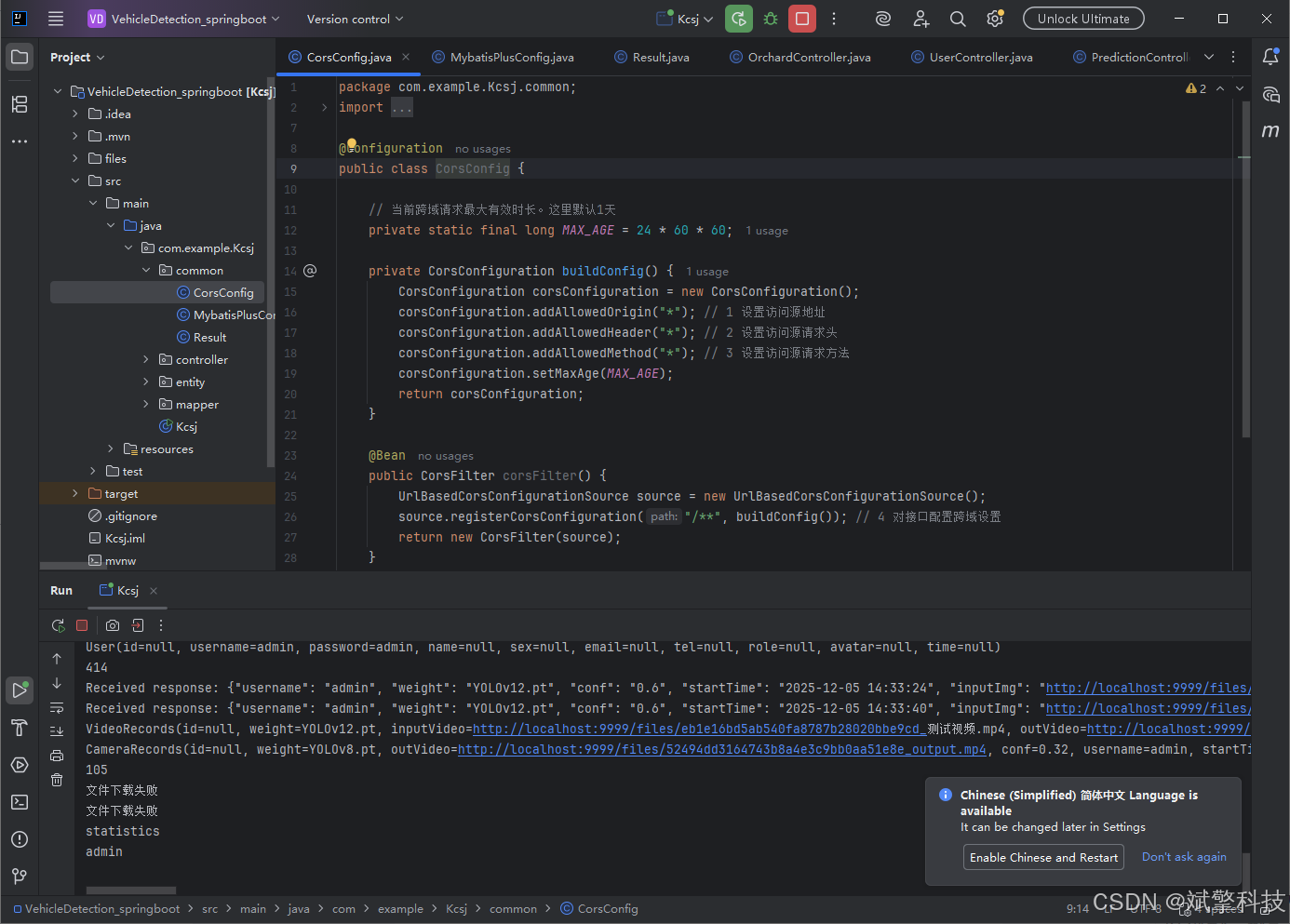
</style>后端代码展示
项目源码+数据集下载链接
完整代码在哔哩哔哩视频下方简介内获取:
基于深度学习的车辆类型识别检测系统(最新web界面+YOLOv8/YOLOv10/YOLOv11/YOLOv12+DeepSeek智能分析 +前后端分离)_哔哩哔哩_bilibili
基于深度学习的车辆类型识别检测系统(最新web界面+YOLOv8/YOLOv10/YOLOv11/YOLOv12+DeepSeek智能分析 +前后端分离)_哔哩哔哩_bilibilihttps://www.bilibili.com/video/BV1yA2QBNEWc/?vd_source=549d0b4e2b8999929a61a037fcce3b0fhttps://www.bilibili.com/video/BV1yA2QBNEWc
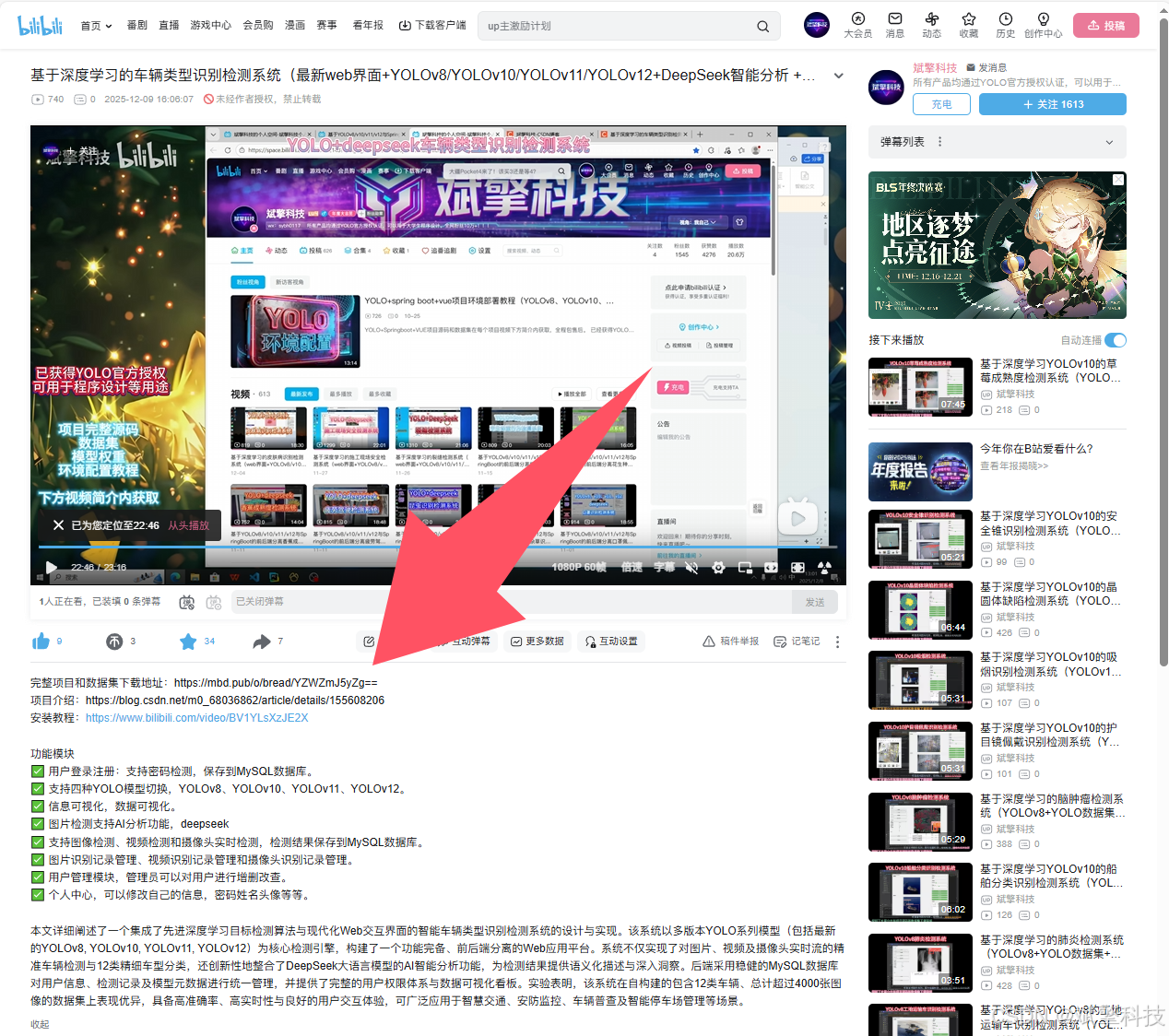
项目安装教程
https://www.bilibili.com/video/BV1YLsXzJE2X/?spm_id_from=333.1387.homepage.video_card.click

火山引擎开发者社区是火山引擎打造的AI技术生态平台,聚焦Agent与大模型开发,提供豆包系列模型(图像/视频/视觉)、智能分析与会话工具,并配套评测集、动手实验室及行业案例库。社区通过技术沙龙、挑战赛等活动促进开发者成长,新用户可领50万Tokens权益,助力构建智能应用。
更多推荐
 13
13 0
0- 0



 已为社区贡献36条内容

所有评论(0)