从零构建大模型智能体:OpenAI Function Calling 实战全流程详解
本文通过完整实战示例深入讲解 OpenAI Function Calling,展示大模型如何自动选择并调用工具,打通 AI 与真实业务系统的数据与能力,实现更智能的应用构建。
引言
随着大模型能力的不断增强,仅依靠自然语言对话已难以满足真实业务场景的需求。模型不仅需要“会说话”,还需要能够访问外部数据、调用业务能力,并参与实际流程执行。为此,OpenAI 提供了 Function Calling(工具调用)机制,使模型能够在对话过程中主动选择并调用开发者定义的函数,从而实现与外部系统的深度集成。
Function Calling 本质上为大模型打开了一扇“连接现实世界”的大门:模型可以根据用户意图,结构化地生成函数调用参数,由应用程序执行真实逻辑后再将结果反馈给模型,最终生成面向用户的自然语言回复。这种模式极大地降低了 AI 与业务系统集成的复杂度,也成为构建 AI Agent、智能助手和自动化流程的核心能力之一。
本文将基于 OpenAI 官方文档与示例,系统性地介绍 Function Calling 的基本概念、工作流程以及完整的调用链路,并通过一个天气查询的实战示例,演示从工具定义、模型触发函数调用,到函数执行结果回传并生成最终回答的完整过程。希望通过这篇文章,帮助你快速理解并在实际项目中正确、稳定地使用 Function Calling 能力。
Function calling
Function calling(tool caling)为模型提供访问新功能和数据的权限,使其能够遵循指令并响应提示。
Function calling为OpenAI模型提供了一种强大且灵活的方式,可以与外部系统对接并访问器训练数据以外的数据(调用工具)。本节来展示它的工作原理。
工具-我们赋予模型的功能
工具(Tool)就是我们告诉模型它可以访问的额外功能,当模型根据提示词生成响应时,它可能会决定需要调用工具提供的数据或功能以遵循提示的指示。
当我想模型发送带有提示的API请求时,可以包含一个工具列表,让模型在处理时考虑使用这些工具,就和上篇文章一样。我们以获取某地天气情况的工具get_weather为例,它可能会带有location参数。
工具调用-模型请求使用工具的指令
工具调用(function call)是指模型在分析提示词后,如果认为为了遵循提示中的指令,需要调研我们为其提供的某个工具,则会返回的一种特殊响应。
如果模型接收到一个类似"what is the weather in Paris?" 的API请求,它可能会使用get_weather工具进行工具调用,其中Paris作为location的参数。
工作调用输出-我们为模型生成的输出
工作调用输出指的是工具使用模型的工具调用输入生成的响应,工具调用输出可以是结构化的JSON或纯文本,并包含对特定模型工具调用的引用(call_id)。为了完成我们的天气示例:
- 模型可以访问
get_weather工具,参数为location。 - 在接收到类似"what is the weather in Paris?" 这样的提示后,模型会返回一个包含
location参数且值为Paris的工具调用。 - 工具调用的输出可能返回一个JSON对象、图像内容或文件内容。
然后我们将所有工具定义、原始提示、模型的工具调用以及工具调用输出再次发送给模型,最终获得类似:
The weather in Paris today is 25C.
函数与工具
- 函数是一种特定类似的工具,由JSON模式(schema)定义。函数定义允许模型将数据传递给你的应用程序,你的代码可以访问模型建议的数据或采取相应的操作。
- 除了函数工具外, 还有自定义工具,它们可以与自由文本输入和输出配合使用。
- 此外,还有OpenAI平台内建的工具。
Function calling流程
Function calling是通过OpenAI API在应用程序和模型之间进行的多轮对话,其流程包含五个高层次步骤:
- 向模型发起它可调用的工具的请求
- 从模型接收工具调用
- 在应用程序端使用工具调用的输入执行代码
- 使用工具调用的输出向模型发起第二次请求
- 接收来自模型的最终响应(或更多工具调用)
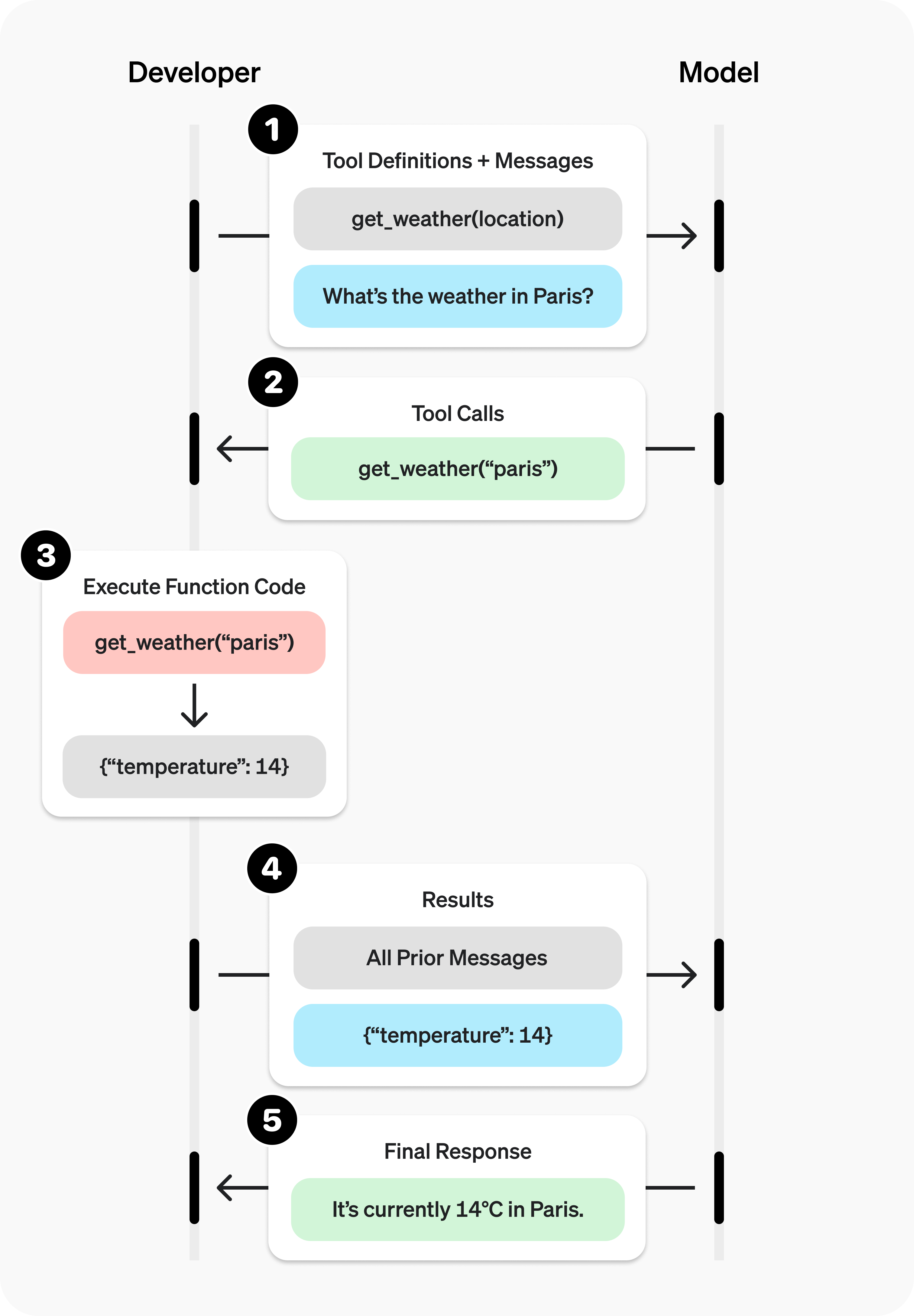
(工具调用流程,图片来自于参考1)
函数工具示例
我们还是以获取天气为例,看一个工具调用流程的例子。
from openai import OpenAI
import json
import os

os.environ["OPENAI_API_KEY"] = "sk-xx"
os.environ["OPENAI_BASE_URL"] = "xx"

model_id = "gpt-4o-mini"

client = OpenAI()

# 定义一个辅助函数
def chat_completion_request(messages, tools=None, tool_choice="auto"):
    try:
        response = client.chat.completions.create(
            model=model_id,
            messages=messages,
            tools=tools,
            tool_choice=tool_choice,
        )
        return response
    except Exception as e:
        print(f"Exception: {e}")
        return e

# 1. 为模型定义一个可调用工具列表
# OpenAI支持的工具定义Schema
tools = [
    {
        "type": "function",
        "function": {
            "name": "get_current_weather",
            "description": "获取当前天气",
            "parameters": {
                "type": "object",
                "properties": {
                    "location": {
                        "type": "string",
                        "description": "城市,例如:深圳、北京",
                    }
                },
                "required": ["location"]
            },
        }
    },
    {
        "type": "function",
        "function": {
            "name": "get_n_day_weather_forecast",
            "description": "获取N天的天气预报",
            "parameters": {
                "type": "object",
                "properties": {
                    "location": {
                        "type": "string",
                        "description": "城市,例如:深圳、北京",
                    },
                    "num_days": {
                        "type": "integer",
                        "description": "要预报的天数",
                    }
                },
                "required": ["location", "num_days"]
            },
        }
    },
]
定义两个模拟函数(也可以接入真实的查询天气API):
import random
from datetime import datetime, timedelta

def get_current_weather(location: str) -> dict:
    """
    模拟获取当前天气
    """
    # 随机生成温度
    temp = round(random.uniform(10, 30), 1)

    # 随机生成天气描述
    conditions = ["晴天", "多云", "小雨", "大雨", "雷阵雨", "阴天"]
    condition = random.choice(conditions)

    return {
        "location": location,
        "temperature": temp,
        "condition": condition,
        "unit": "摄氏度",
        "time": datetime.now().strftime("%Y-%m-%d %H:%M:%S")
    }

def get_n_day_weather_forecast(location: str, num_days: int) -> dict:
    """
    模拟获取N天的天气预报
    """
    forecast = []
    conditions = ["晴天", "多云", "小雨", "大雨", "雷阵雨", "阴天"]

    for i in range(num_days):
        temp = round(random.uniform(10, 30), 1)


        day_forecast = {
            "date": (datetime.now() + timedelta(days=i)).strftime("%Y-%m-%d"),
            "temperature": temp,
            "unit": "摄氏度",
            "condition": random.choice(conditions)
        }
        forecast.append(day_forecast)

    return {
        "location": location,
        "forecast": forecast
    }

# 测试
print(get_current_weather("北京"))
print(get_n_day_weather_forecast("北京", 5))
{'location': '北京', 'temperature': 11.2, 'condition': '大雨', 'unit': '摄氏度', 'time': '2025-12-13 09:50:29'}
{'location': '北京', 'forecast': [{'date': '2025-12-13', 'temperature': 15.6, 'unit': '摄氏度', 'condition': '雷阵雨'}, {'date': '2025-12-14', 'temperature': 25.6, 'unit': '摄氏度', 'condition': '晴天'}, {'date': '2025-12-15', 'temperature': 28.3, 'unit': '摄氏度', 'condition': '阴天'}, {'date': '2025-12-16', 'temperature': 24.7, 'unit': '摄氏度', 'condition': '晴天'}, {'date': '2025-12-17', 'temperature': 15.5, 'unit': '摄氏度', 'condition': '雷阵雨'}]}
注册工具:
TOOLS = {
    "get_current_weather": get_current_weather,
    "get_n_day_weather_forecast": get_n_day_weather_forecast
}
messages = []
messages.append({"role": "system", "content": "当用户的问题需要使用工具时,请调用对应的工具,而不是直接回答"})
messages.append({"role": "user", "content": "未来5天深圳的天气会怎么样?"})

# 将定义好的工具传递给模型
chat_response = chat_completion_request(
    messages, tools=tools
)

result = chat_response.choices[0].message
print(result)
ChatCompletionMessage(content=None, refusal=None, role='assistant', annotations=[], audio=None, function_call=None, tool_calls=[ChatCompletionMessageFunctionToolCall(id='call_h68QzRexg3U1r4rSuDYRclUu', function=Function(arguments='{"location":"深圳","num_days":5}', name='get_n_day_weather_forecast'), type='function')])
这里构造一个系统消息,然后用户咨询未来五天的天气情况,把消息类别和定义好的工具传递给模型,这里tool_choice取的默认值auto,它的取值含义:
auto: 默认值,可以由模型自行决定调用零个、一个或多个函数。none:禁止调用函数。- 调用指定函数:
{"type": "function", "function": {"name": "my_function"}}。 required:必须调用一个或多个函数。
接下来是很重要的一步:
# 3. 增加工具调用消息(注意格式)
messages.append({
    "role": "assistant",
    "content": None,
    "tool_calls":  [
        {
            "c": call.id,
            "type": "function",
            "function": {
                "name": call.function.name,
                "arguments": call.function.arguments
            }

        } for call in result.tool_calls]
})
我们必须增加工具调用消息到列表中,这里传入的id后面工具调用结果消息会用到,必须保持一致:
for item in result.tool_calls:
    if item.type == "function":
        func = TOOLS[item.function.name]
        # 4. 执行函数
        func_result = func(**json.loads(item.function.arguments))
        # 5. 告诉模型函数调用结果
        messages.append({
            "role": "tool",
            "tool_call_id": item.id,
            "content": str(func_result)
        })

print(messages)
messages = [
    {
        "role": "system",
        "content": "当用户的问题需要使用工具时,请调用对应的工具,而不是直接回答"
    },
    {
        "role": "user",
        "content": "未来5天深圳的天气会怎么样?"
    },
    {
        "role": "assistant",
        "content": None,
        "tool_calls": [
            {
                "id": "call_h68QzRexg3U1r4rSuDYRclUu",
                "type": "function",
                "function": {
                    "name": "get_n_day_weather_forecast",
                    "arguments": "{'location':'深圳','num_days':5}"
                }
            }
        ]
    },
    {
        "role": "tool",
        "tool_call_id": "call_h68QzRexg3U1r4rSuDYRclUu",
        "content": "{'location': '深圳', 'forecast': [{'date': '2025-12-13', 'temperature': 14.2, 'unit': '摄氏度', 'condition': '多云'}, {'date': '2025-12-14', 'temperature': 19.2, 'unit': '摄氏度', 'condition': '大雨'}, {'date': '2025-12-15', 'temperature': 19.5, 'unit': '摄氏度', 'condition': '晴天'}, {'date': '2025-12-16', 'temperature': 22.5, 'unit': '摄氏度', 'condition': '雷阵雨'}, {'date': '2025-12-17', 'temperature': 27.3, 'unit': '摄氏度', 'condition': '雷阵雨'}]}"
    }
]
整个消息列表如上所示,注意这里的assistant消息包含了工具调用,我们就应该把工具调用结果通过tool消息附加进去,并且tool_call_id需保持一致。
最后再次传递给大模型,让模型给出最终回答:
chat_completion_request(messages, tools)
ChatCompletion(id='chatcmpl-Cm9B8aWEcZYi5OBoXnTL7temNyD53', choices=[Choice(finish_reason='stop', index=0, logprobs=None, message=ChatCompletionMessage(content='未来5天深圳的天气预报如下:\n\n- **12月13日**:多云,温度14.2°C\n- **12月14日**:大雨,温度19.2°C\n- **12月15日**:晴天,温度19.5°C\n- **12月16日**:雷阵雨,温度22.5°C\n- **12月17日**:雷阵雨,温度27.3°C\n\n请注意天气变化,出行时合理安排!', refusal=None, role='assistant', annotations=[], audio=None, function_call=None, tool_calls=None))], created=1765591062, model='gpt-4o-mini-2024-07-18', object='chat.completion', service_tier=None, system_fingerprint='fp_efad92c60b', usage=CompletionUsage(completion_tokens=115, prompt_tokens=341, total_tokens=456, completion_tokens_details=CompletionTokensDetails(accepted_prediction_tokens=0, audio_tokens=0, reasoning_tokens=0, rejected_prediction_tokens=0), prompt_tokens_details=PromptTokensDetails(audio_tokens=0, cached_tokens=0)))
(渲染后的结果如下:)
未来5天深圳的天气预报如下:
- 12月13日:多云,温度14.2°C
- 12月14日:大雨,温度19.2°C
- 12月15日:晴天,温度19.5°C
- 12月16日:雷阵雨,温度22.5°C
- 12月17日:雷阵雨,温度27.3°C
请注意天气变化,出行时合理安排!
参考

火山引擎开发者社区是火山引擎打造的AI技术生态平台,聚焦Agent与大模型开发,提供豆包系列模型(图像/视频/视觉)、智能分析与会话工具,并配套评测集、动手实验室及行业案例库。社区通过技术沙龙、挑战赛等活动促进开发者成长,新用户可领50万Tokens权益,助力构建智能应用。
更多推荐
 7
7 0
0- 0


 已为社区贡献10条内容

所有评论(0)