solidworks vba在选中面中间自动打两个螺丝孔
·
自己用的提高画图效率小工具,做的时候发现比想象的难,问deepseek的时候他经常杜撰一个方法糊弄我,豆包还不如deep。
记录一下踩的坑,下面贴出代码有类似需求的老哥改一下画线那里就能用了
我的solidworks版本是2024,没装低版本,没有测试,低版本慎用
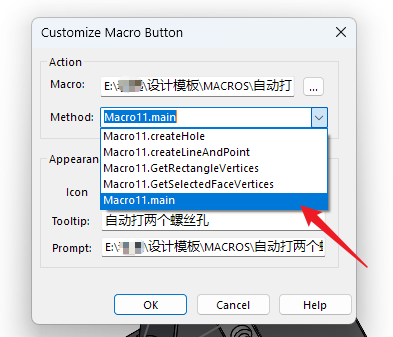
设置宏按钮的时候这里要选择main,不然程序不会从main函数开始运行
## 思路总结
1.获取用户当前已经选中的面
2.算出这个面在模型坐标系里的中心点三维坐标(读八个点坐标,循环对比消去重复的,用剩下的四个点算)
3.创建异形孔特征,进入异形孔草图(这时之前的选中会丢失,只好用selectbyid2,不然不用算模型坐标系坐标)
4.用之前算出的中心点坐标放入selectbyid2参数来重新选中要打孔的面
5.用转换实体引用画出面的四条边,跟2同样的方法算出草图坐标系里的四顶点坐标,边长和中心点坐标(模型坐标系的xyz和草图坐标系xy没有方法能对应,这里还得重算草图坐标系)
6.撤销掉刚才画出的四个线,根据算出来的坐标重新画构造线和点
7.退出草图,完成打孔,程序结束
Option Explicit

    Dim boolstatus As Boolean
    Dim swApp As SldWorks.SldWorks
    Dim swModel As SldWorks.ModelDoc2
    Dim swSelMgr As SldWorks.SelectionMgr
    Dim swFace As SldWorks.Face2
    Dim swLoop As SldWorks.Loop2
    Dim swEdge As SldWorks.Edge
    Dim swVertex As SldWorks.Vertex
    Dim vPoints() As Variant
    Dim i As Integer
    Dim msg As String
    Dim uniquePoints As Collection
    Dim pointKey As String
    Dim tolerance As Double
    Dim x(1 To 4) As Variant
    Dim y(1 To 4) As Variant
    Dim z(1 To 4) As Variant
    Dim skSegment As Object
    Dim swHoleFeature As Feature
    Dim cpx As Double
    Dim cpy As Double
    Dim cpz As Double
    Dim vpx As Double
    Dim vpy As Double
    Dim vpz As Double
    Dim xLength As Double
    Dim yLength As Double
    Dim zLength As Double
    Dim myDisplayDim As Object
    Dim swSketch As SldWorks.Sketch
    Dim swSketchSegments As Variant
    Dim swSegment As SldWorks.SketchSegment
    Dim points As Collection
    Dim pointStr As String
    Dim a
    Const swCommands_NormalTo As Long = 169

Sub main()

    Set swApp = Application.SldWorks
    Set swModel = swApp.ActiveDoc

    '关掉添加尺寸时的修改对话框,不然后面添加尺寸时会弹一个框出来,点了勾之后才能继续
    swApp.SetUserPreferenceToggle swUserPreferenceToggle_e.swInputDimValOnCreate, False


        ' 检查文档和选择状态
    If swModel Is Nothing Then
        MsgBox "请打开模型文档!", vbExclamation
        End
    End If
   '找出这个面在模型坐标系里的坐标
    GetSelectedFaceVertices

    createHole

    swModel.ClearSelection2 True

    '打开添加尺寸时的修改对话框
    swApp.SetUserPreferenceToggle swUserPreferenceToggle_e.swInputDimValOnCreate, True

End Sub
Sub GetSelectedFaceVertices()
    '算出当前选择的面的中心坐标,用来在后面进入异形孔向导草图时重新选中这个面
    Set swSelMgr = swModel.SelectionManager
    If swSelMgr.GetSelectedObjectCount2(-1) < 1 Then
        MsgBox "请先选择一个面!", vbExclamation
        'Exit Sub
        End
    End If

    ' 检查选择对象是否为面
    If swSelMgr.GetSelectedObjectType3(1, -1) <> swSelectType_e.swSelFACES Then
        MsgBox "请选择有效的面!", vbExclamation
        End
    End If

   '正视于这个面
   swModel.Extension.RunCommand swCommands_NormalTo, ""

    ' 获取选中的面
    Set swFace = swSelMgr.GetSelectedObject6(1, -1)

    ' 获取面的外环(更简单的方法)
    Dim loopType As Long
    Set swLoop = swFace.GetFirstLoop
    If swLoop Is Nothing Then
        MsgBox "无法获取面的边界环!", vbExclamation
        End
    End If

    ' 存储顶点坐标的数组
    ReDim vPoints(0 To 3, 0 To 2) ' 4个顶点,每个有XYZ坐标

    ' 收集唯一顶点
    Set uniquePoints = New Collection
    tolerance = 0.0001 ' 坐标比较容差

    ' 方法1:使用面的所有边(更可靠)
    Dim vEdges As Variant
    vEdges = swFace.GetEdges

    If Not IsEmpty(vEdges) Then
        For i = 0 To UBound(vEdges)
            Set swEdge = vEdges(i)

            ' 获取起点顶点
            Set swVertex = swEdge.GetStartVertex
            If Not swVertex Is Nothing Then
                Dim vCoord As Variant
                vCoord = swVertex.GetPoint

                ' 检查是否已存在(避免重复)
                pointKey = Format(vCoord(0), "0.0000") & "|" & _
                          Format(vCoord(1), "0.0000") & "|" & _
                          Format(vCoord(2), "0.0000")

                On Error Resume Next ' 忽略已存在错误
                uniquePoints.Add vCoord, pointKey
                On Error GoTo 0
            End If

            ' 获取终点顶点
            Set swVertex = swEdge.GetEndVertex
            If Not swVertex Is Nothing Then
                vCoord = swVertex.GetPoint
                pointKey = Format(vCoord(0), "0.0000") & "|" & _
                          Format(vCoord(1), "0.0000") & "|" & _
                          Format(vCoord(2), "0.0000")

                On Error Resume Next
                uniquePoints.Add vCoord, pointKey
                On Error GoTo 0
            End If
        Next i
    Else
        MsgBox "无法获取面的边!", vbExclamation
        Exit Sub
    End If

    ' 检查顶点数量
    If uniquePoints.Count < 4 Then
        MsgBox "所选面顶点数不足4个!实际顶点数: " & uniquePoints.Count, vbExclamation
        Exit Sub
    End If

    ' 存储前4个唯一顶点
    For i = 1 To 4
        If i <= uniquePoints.Count Then
            vCoord = uniquePoints(i)
            vPoints(i - 1, 0) = vCoord(0)
            vPoints(i - 1, 1) = vCoord(1)
            vPoints(i - 1, 2) = vCoord(2)
        End If
    Next i
    Dim vx(1 To 4) As Variant
    Dim vy(1 To 4) As Variant
    Dim vz(1 To 4) As Variant

    ' 显示顶点坐标
    msg = "面顶点坐标:" & vbCrLf & vbCrLf

    For i = 0 To 3
        msg = msg & "顶点 " & i + 1 & ":" & vbCrLf
        msg = msg & "X: " & Format(vPoints(i, 0), "0.000") & vbCrLf
        msg = msg & "Y: " & Format(vPoints(i, 1), "0.000") & vbCrLf
        msg = msg & "Z: " & Format(vPoints(i, 2), "0.000") & vbCrLf & vbCrLf
        'Debug.Print vPoints(i, 0); vPoints(i, 1); vPoints(i, 2)
        vx(i + 1) = vPoints(i, 0)
        vy(i + 1) = vPoints(i, 1)
        vz(i + 1) = vPoints(i, 2)
        'Debug.Print x(i + 1); y(i + 1); z(i + 1)
    Next i

    vpx = (vx(1) + vx(2) + vx(3) + vx(4)) / 4
    vpy = (vy(1) + vy(2) + vy(3) + vy(4)) / 4
    vpz = (vz(1) + vz(2) + vz(3) + vz(4)) / 4
    Debug.Print vpx; vpy; vpz

    'MsgBox msg, vbInformation, "顶点坐标"
End Sub

Sub createHole()

  Set swHoleFeature = swModel.FeatureManager.HoleWizard5(4, 13, 359, "M4", 0, 0.0033, 0.0115, 0, -1, -1, -1, -1, -1, -1, 1, -1, -1, -1, -1, -1, "2B", False, True, True, True, True, False)
 'Set swHoleFeature = swModel.FeatureManager.HoleWizard5(4, 13, 359, "M5", 0, 0.0042, 0.0140, 0, 0, 0, 0, 0, 2, 1, 0, 0, 0, -1, -1, -1, "2B", False, True, True, True, True, False)


Dim swSketchFeature As Feature
Set swSketchFeature = swHoleFeature.GetFirstSubFeature

swSketchFeature.Select2 False, 0
'createLineAndPoint
swModel.EditSketch
GetRectangleVertices
'下面一堆代码是录出来的不知道什么作用,但是能把自动生成的一个点消除
Dim swSelectionManager As SelectionMgr
Set swSelectionManager = swModel.SelectionManager
Dim swSketch As Sketch
Set swSketch = swSketchFeature.GetSpecificFeature2()
Dim swSketchPointArray As Variant
swSketchPointArray = swSketch.GetSketchPoints2()
Dim swMaxPointNumber As Long
swMaxPointNumber = UBound(swSketchPointArray)
Dim swSketchPoint As Object
Dim swCurrentPointNumber As Long
For swCurrentPointNumber = 0 To swMaxPointNumber Step 1
   Set swSketchPoint = swSketchPointArray(swCurrentPointNumber)
   boolstatus = swSelectionManager.AddSelectionListObject(swSketchPoint, Nothing)
   swModel.EditDelete
Next swCurrentPointNumber
'打点划线
    createLineAndPoint
swModel.SketchManager.InsertSketch True
End Sub

  Sub createLineAndPoint()


    If yLength < xLength Then 'y是短边

        If (x(3) - x(1)) > 0 Then
        a = 2
        Else
        a = -2
        End If

    Set skSegment = swModel.SketchManager.CreatePoint(x(1) + 0.01 * a, cpy, 0#)

        swModel.EditUndo2 1 '这里需要把打的第一个点撤销重打,不然没有螺纹线,FUCK,可能这就是天才吧
    Set skSegment = swModel.SketchManager.CreatePoint(x(1) + 0.01 * a, cpy, 0#)
    Set skSegment = swModel.SketchManager.CreatePoint(x(3) - 0.01 * a, cpy, 0#)

    Set skSegment = swModel.SketchManager.CreateCenterLine(x(1), cpy, 0#, x(1) + 0.01 * a, cpy, 0#)
    Set skSegment = swModel.SketchManager.CreateCenterLine(x(1) + 0.01 * a, cpy, 0#, x(3) - 0.01 * a, cpy, 0#)

    Set myDisplayDim = swModel.AddDimension2(cpx, cpy + 0.01, 0#)  '给上面画的这条线添加尺寸

    Set skSegment = swModel.SketchManager.CreateCenterLine(x(3) - 0.01 * a, cpy, 0#, x(3), cpy, 0#)
    Set skSegment = swModel.SketchManager.CreateCenterLine(cpx, cpy, 0#, cpx, cpy + yLength / 2, 0#)

    Else 'x是短边

      If (y(3) - y(1)) > 0 Then
        a = -2
        Else
        a = 2
        End If
    Set skSegment = swModel.SketchManager.CreatePoint(cpx, y(1) - 0.01 * a, 0#)

        swModel.EditUndo2 1 '一样撤销一下
    Set skSegment = swModel.SketchManager.CreatePoint(cpx, y(1) - 0.01 * a, 0#)
    Set skSegment = swModel.SketchManager.CreatePoint(cpx, y(3) + 0.01 * a, 0#)

    Set skSegment = swModel.SketchManager.CreateCenterLine(cpx, y(1), 0#, cpx, y(1) - 0.01 * a, 0#)
    Set skSegment = swModel.SketchManager.CreateCenterLine(cpx, y(1) - 0.01 * a, 0#, cpx, y(3) + 0.01 * a, 0#)

    Set myDisplayDim = swModel.AddDimension2(cpx + 0.01, cpy, 0#)  '给上面画的这条线添加尺寸

    Set skSegment = swModel.SketchManager.CreateCenterLine(cpx, y(3) + 0.01 * a, 0#, cpx, y(3), 0#)
    Set skSegment = swModel.SketchManager.CreateCenterLine(cpx, cpy, 0#, cpx + xLength / 2, cpy, 0#)

    End If


End Sub

Sub GetRectangleVertices() '在草图里用实体引用的方法画出矩形面的轮廓线,然后读对角点坐标
'草图坐标系只有xy,而且这个xy和模型坐标系里的xyz的其中两个轴没有对应关系,甚至同一个基准面有时新建拉伸草图的坐标系和异形孔向导草图的坐标系居然y轴是反的,吐血
    Dim i As Integer
    Dim cc As Callout

    swModel.ClearSelection2 True
    boolstatus = swModel.Extension.SelectByID2("", 2, vpx, vpy, vpz, False, 4, cc, 0)

    Set swSelMgr = swModel.SelectionManager

    If swSelMgr.GetSelectedObjectCount2(-1) < 1 Then
        MsgBox "面不是矩形,复选失败!", vbExclamation
        swModel.EditUndo2 1
        swModel.EditSketch
        'swModel.SketchManager.InsertSketch True

        'Exit Sub
        End
    End If

    ' 检查选择对象是否为面
    If swSelMgr.GetSelectedObjectType3(1, -1) <> swSelectType_e.swSelFACES Then
        MsgBox "请选择有效的面!", vbExclamation
        End
    End If

    ' 获取选中的面
    Set swFace = swSelMgr.GetSelectedObject6(1, -1)


    ' 检查当前是否在草图编辑模式
    If swModel.SketchManager.ActiveSketch Is Nothing Then
        MsgBox "未进入草图编辑模式"
        End
    End If

    boolstatus = swModel.SketchManager.SketchUseEdge3(False, False)

    ' 获取当前草图
    Set swSketch = swModel.SketchManager.ActiveSketch

    ' 获取草图中的所有线段
    swSketchSegments = swSketch.GetSketchSegments()

    ' 创建集合来存储所有点
    Set points = New Collection

    ' 遍历所有线段,收集端点
    For i = 0 To UBound(swSketchSegments)
        Set swSegment = swSketchSegments(i)

        ' 检查是否是线段
        If swSegment.GetType() = swSketchLINE Then
            Dim swLine As SldWorks.SketchLine
            Set swLine = swSegment

            ' 获取线段的起点和终点
            Dim startPoint As Variant
            Dim endPoint As Variant

            ' 正确的方法获取点坐标
            startPoint = swLine.GetStartPoint()
            endPoint = swLine.GetEndPoint()

            ' 添加起点到集合(如果不存在)
            AddUniquePoint points, startPoint

            ' 添加终点到集合(如果不存在)
            AddUniquePoint points, endPoint
        End If
    Next i

    ' 检查是否找到了4个点(矩形的四个顶点)
    If points.Count <> 4 Then
        MsgBox "草图中没有找到矩形或线段数量不正确。找到的点数: " & points.Count
        swModel.EditUndo2 1
        swModel.SketchManager.InsertSketch True
        End
    End If

    ' 构建输出字符串
    pointStr = "矩形顶点坐标:" & vbCrLf & vbCrLf

    Debug.Print points.Count

    For i = 1 To points.Count
        Dim point As Variant
        point = points(i)
        pointStr = pointStr & "顶点 " & i & ": (" & Format(point(0), "0.00") & ", " & _
                  Format(point(1), "0.00") & ", " & Format(point(2), "0.00") & ")" & vbCrLf

        x(i) = point(0)
        y(i) = point(1)
        z(i) = point(2)

    Next i

    yLength = Abs(y(3) - y(1))
    xLength = Abs(x(3) - x(1))


    cpx = (x(1) + x(3)) / 2
    cpy = (y(1) + y(3)) / 2

    Debug.Print x(1); x(3)

    'Debug.Print yLength; xLength

    ' 显示结果
    'MsgBox pointStr
    swModel.EditUndo2 1
    'swModel.SketchManager.InsertSketch True

End Sub

' 辅助函数:向集合中添加唯一的点
Sub AddUniquePoint(points As Collection, point As Variant)
    Dim i As Integer
    Dim exists As Boolean
    exists = False

    ' 检查点是否已存在于集合中
    For i = 1 To points.Count
        Dim existingPoint As Variant
        existingPoint = points(i)

        ' 比较点的坐标(考虑浮点精度)
        If Abs(existingPoint(0) - point(0)) < 0.0001 And _
           Abs(existingPoint(1) - point(1)) < 0.0001 And _
           Abs(existingPoint(2) - point(2)) < 0.0001 Then
            exists = True
            Exit For
        End If
    Next i

    ' 如果点不存在,则添加到集合
    If Not exists Then
        points.Add point
    End If
End Sub

中国智能体开发者社区,聚焦智能体与大模型开发,提供前沿资讯、实用工具链、开源项目及行业案例。通过技术沙龙、开发者大赛等活动,促进经验交流与协作,助力开发者快速构建创新智能应用。
更多推荐


 2
2 0
0- 0


 已为社区贡献1条内容

所有评论(0)