openvpn
要求服务器日志记录客户端登录时间、用户名,格式如“2022-08-10: 08:10:30 Successful authentication: username="vpnuser1"”;创建用户 vpnuser1,密码为 123456,使用用户名密码认证,要求只能与 InsideCli 客户端网段通信,允许访问 StorageSrv 主机上的 SAMBA 服务;服务器证书生成 Common Na
题目要求
服务器RouterSrv上的工作任务
OPENVPN
要求服务器日志记录客户端登录时间、用户名,格式如“2022-08-10: 08:10:30 Successful authentication: username="vpnuser1"”;
日志文件存放至/var/log/openvpn.log 中;
创建用户 vpnuser1,密码为 123456,使用用户名密码认证,要求只能与 InsideCli 客户端网段通信,允许访问 StorageSrv 主机上的 SAMBA 服务;
VPN 地址范围为 172.16.0.0/24,OPENVPN 使用 tcp 1194 端口号进行工作。
实验:
注意点:server和client必须是同步的时间
导包
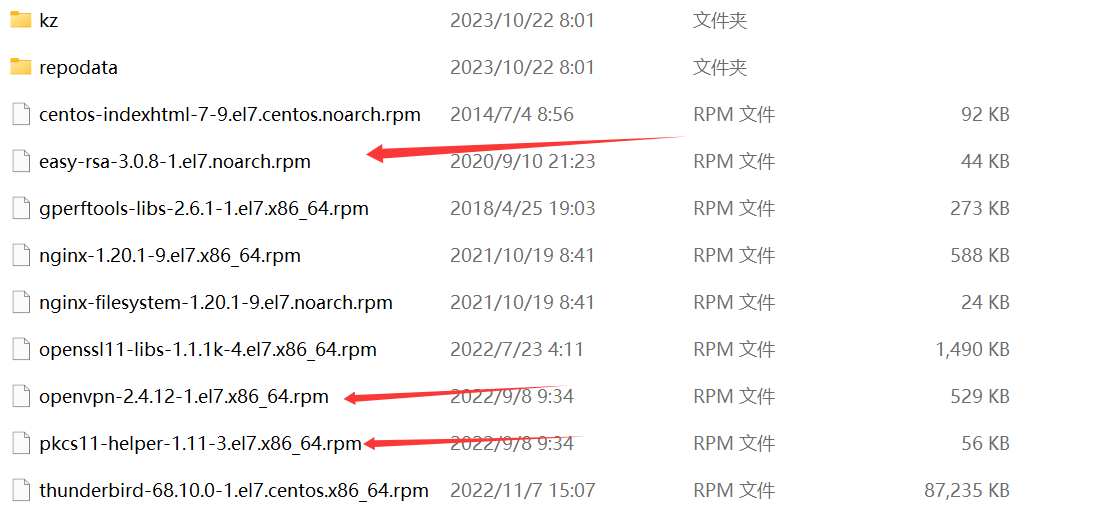
下载服务
[root@routserv /]# yum install openvpn easy-rsa -y
将easyRsa(证书制作工具)复制到/etc/openvpn
[root@routesrv ~]# cp -rf /usr/share/easy-rsa/3/* /etc/openvpn/
创建证书文件(注意所有证书没有密码)
初始化,程序将自动创建pki目录:
[root@routesrv ~]# cd /etc/openvpn/
[root@routesrv openvpn]# ./easyrsa init-pki
init-pki complete; you may now create a CA or requests.
Your newly created PKI dir is: /etc/openvpn/pki
[root@routesrv openvpn]#
生成根证书 nopass表示不对ca加密:(直接回车)
[root@routesrv openvpn]# ./easyrsa build-ca nopass
Using SSL: openssl OpenSSL 1.0.2k-fips 26 Jan 2017
Generating RSA private key, 2048 bit long modulus
............................................+++
.....................+++
e is 65537 (0x10001)
You are about to be asked to enter information that will be incorporated into your certificate request.
What you are about to enter is what is called a Distinguished Name or a DN.
There are quite a few fields but you can leave some blank
For some fields there will be a default value,
If you enter '.', the field will be left blank.
----- Common Name (eg: your user, host, or server name) [Easy-RSA CA]:
CA creation complete and you may now import and sign cert requests.
Your new CA certificate file for publishing is at:
/etc/openvpn/pki/ca.crt
服务器证书生成 Common Name直接回车使用默认名称:server
[root@routesrv openvpn]# ./easyrsa gen-req server nopass
Using SSL: openssl OpenSSL 1.0.2k-fips 26 Jan 2017 Generating a 2048 bit RSA private key
...............+++
.......................................+++
writing new private key to '/etc/openvpn/pki/easy-rsa-15746.IHk5zU/tmp.1tZRyT'
-----
You are about to be asked to enter information that will be incorporated
into your certificate request.
What you are about to enter is what is called a Distinguished Name or a DN.
There are quite a few fields but you can leave some blank
For some fields there will be a default value,
If you enter '.', the field will be left blank.
-----
Common Name (eg: your user, host, or server name) [server]:
Keypair and certificate request completed. Your files are:
req: /etc/openvpn/pki/reqs/server.req
key: /etc/openvpn/pki/private/server.key
[root@routesrv openvpn]#
签署服务器证书:(输入yes)
[root@routesrv openvpn]# ./easyrsa sign-req server server
Using SSL: openssl OpenSSL 1.0.2k-fips 26 Jan 2017
You are about to sign the following certificate.
Please check over the details shown below for accuracy. Note that this request
has not been cryptographically verified. Please be sure it came from a trusted
source or that you have verified the request checksum with the sender.
Request subject, to be signed as a server certificate for 825 days:
subject= commonName = server
Type the word 'yes' to continue, or any other input to abort.
Confirm request details: yes
Using configuration from /etc/openvpn/pki/easy-rsa-15773.OwXZdU/tmp.K05m4j Check that the request matches the signature
Signature ok
The Subject's Distinguished Name is as follows
commonName :ASN.1 12:'server'
Certificate is to be certified until Feb 13 06:07:59 2026 GMT (825 days)
Write out databasewith 1 new entries
Data Base Updated
Certificate created at: /etc/openvpn/pki/issued/server.crt
[root@routesrv openvpn]#
生成dh.pem:
[root@routesrv openvpn]# ./easyrsa gen-dh
Using SSL: openssl OpenSSL 1.0.2k-fips 26 Jan 2017
Generating DH parameters, 2048 bit long safe prime, generator 2
this is going to take a long time
.........+............+....+.........................................................................................................................................+................++*++*
DH parameters of size 2048 created at /etc/openvpn/pki/dh.pem
[root@routesrv openvpn]#
tls密钥生成:
[root@routesrv openvpn]# openvpn --genkey --secret ta.key
客户端证书生成:
[root@routesrv openvpn]# ./easyrsa gen-req client nopass
Using SSL: openssl OpenSSL 1.0.2k-fips 26 Jan 2017
Generating a 2048 bit RSA private key
.+++ ....................................................................+++
writing new private key to '/etc/openvpn/pki/easy-rsa-15860.KisxJN/tmp.UdLmjk'
-----
You are about to be asked to enter information that will be incorporated
into your certificate request.
What you are about to enter is what is called a Distinguished Name or a DN.
There are quite a few fields but you can leave some blank
For some fields there will be a default value,
If you enter '.', the field will be left blank.
-----
Common Name (eg: your user, host, or server name) [client]:
Keypair and certificate request completed. Your files are:
req: /etc/openvpn/pki/reqs/client.req
key: /etc/openvpn/pki/private/client.key
[root@routesrv openvpn]#
配置服务器端(server)
复制模板文件:
[root@routesrv openvpn]# cp /usr/share/doc/openvpn-2.4.11/sample/sample-config-files/server.conf /etc/openvpn/
[root@routesrv openvpn]# ll
总用量 104
drwxr-x---. 2 root openvpn 6 4月 21 2021 client
-rwxr-xr-x. 1 root root 76946 11月 11 14:04 easyrsa
-rw-r--r--. 1 root root 4616 11月 11 14:04 openssl-easyrsa.cnf
drwx------. 8 root root 4096 11月 11 14:10 pki
drwxr-x---. 2 root openvpn 6 4月 21 2021 server
-rw-r--r--. 1 root root 10784 11月 11 14:12 server.conf
-rw-------. 1 root root 636 11月 11 14:09 ta.key
drwxr-xr-x. 2 root root 122 11月 11 14:04 x509-types
[root@routesrv openvpn]#
编辑服务器文件:
[root@routesrv openvpn]# vim server.conf
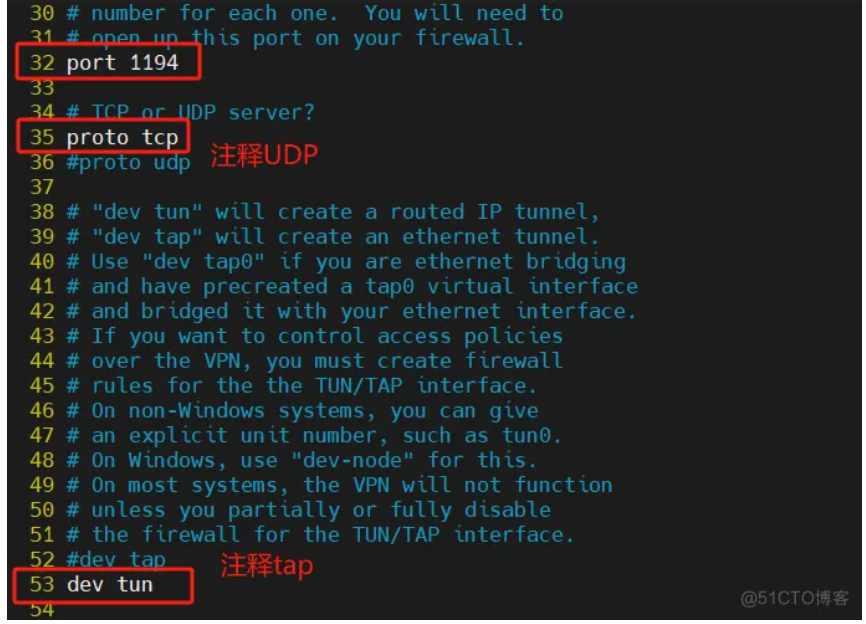
port 1194 # 32行
proto tcp # 35行
dev tun # 53行
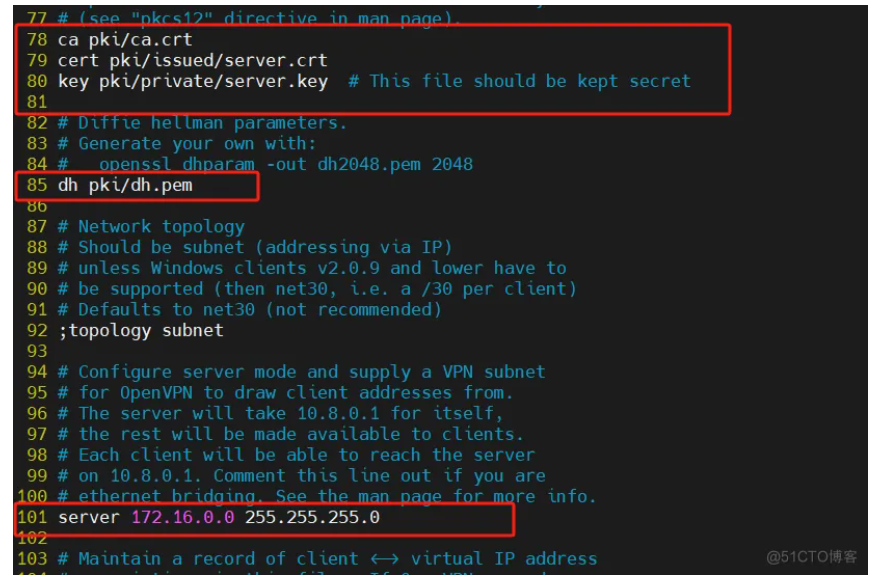
ca pki/ca.crt # 78行
cert pki/issued/server.crt # 79行
key pki/private/server.key # 80行
dh pki/dh.pem # 85行
server 172.16.0.0 255.255.255.0 # 101行
#tls-auth ta.key 0 # This file is secret # 244行进行注释
#explicit-exit-notify 1 # 315行进行注释
# 末尾添加
script-security 3
auth-user-pass-verify /etc/openvpn/auth.sh via-env
username-as-common-name
client-cert-not-required
配置用户认证加日志:
[root@routesrv openvpn]# vim auth.sh
#!/bin/sh
PASSFILE="/etc/openvpn/user"
LOG_FILE="/var/log/openvpn.log"
TIME_STAMP=`date "+%Y-%m-%d %T"`
if [ ! -r "${PASSFILE}" ]; then
echo "${TIME_STAMP}: Could not open password file \"${PASSFILE}\" for reading." >> ${LOG_FILE}
exit 1
Fi
CORRECT_PASSWORD=`awk '!/^;/&&!/^#/&&$1=="'${username}'"{print $2;exit}' ${PASSFILE}`
if [ "${CORRECT_PASSWORD}" = "" ]; then
echo "${TIME_STAMP}: User does not exist: username=\"${username}\", password=\"${password}\"." >> ${LOG_FILE}
exit 1
fi
if [ "${password}" = "${CORRECT_PASSWORD}" ]; then
echo "${TIME_STAMP}: Successful authentication: username=\"${username}\"." >> ${LOG_FILE}
exit 0
fi
echo "${TIME_STAMP}: Incorrect password: username=\"${username}\", password=\"${password}\"." >> ${LOG_FILE}
exit 1
[root@routserv openvpn]# chmod +x /etc/openvpn/auth.sh
[root@routserv openvpn]# vim user
vpnuser1 123456
启动服务:
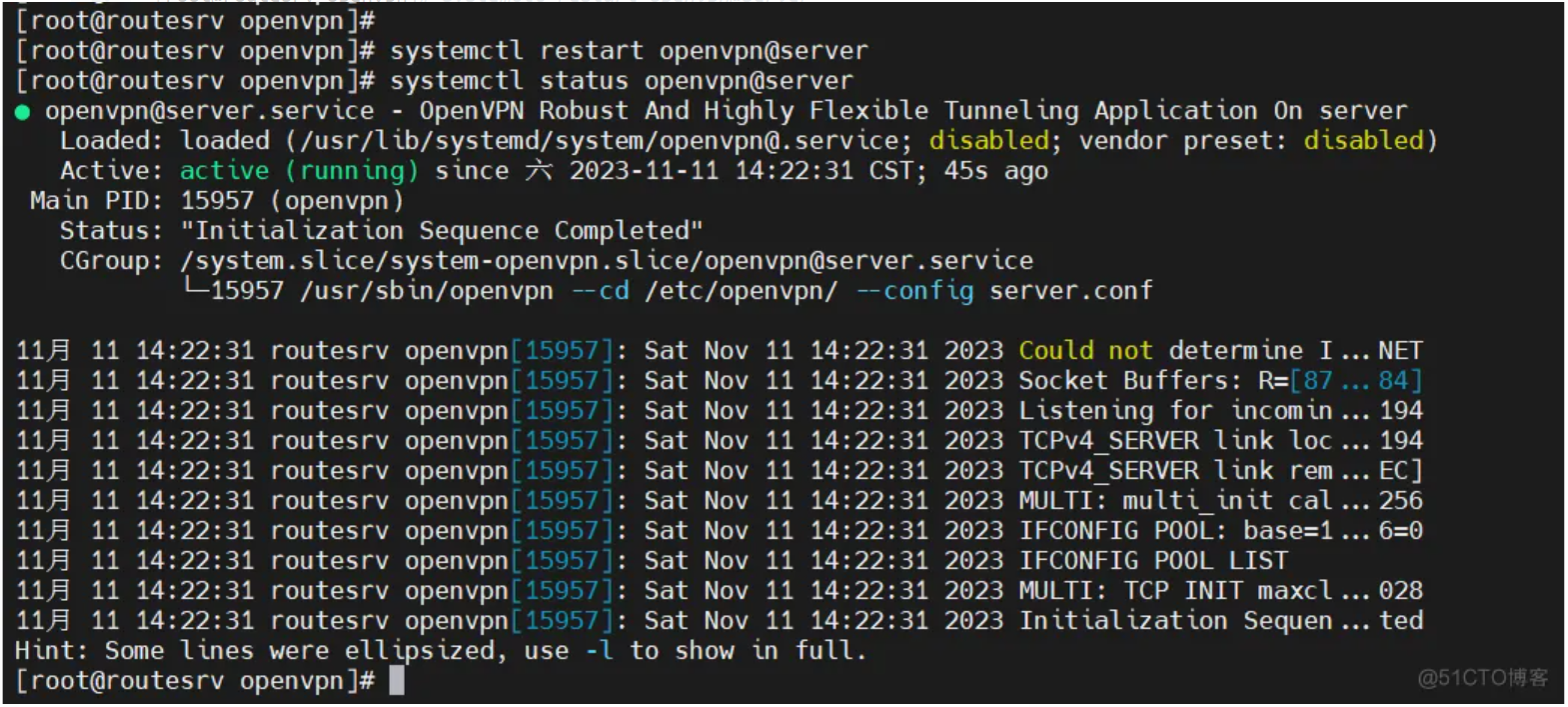
[root@routesrv openvpn]# systemctl restart openvpn@server
查看服务器状态:
[root@routesrv openvpn]# systemctl status openvpn@server

火山引擎开发者社区是火山引擎打造的AI技术生态平台,聚焦Agent与大模型开发,提供豆包系列模型(图像/视频/视觉)、智能分析与会话工具,并配套评测集、动手实验室及行业案例库。社区通过技术沙龙、挑战赛等活动促进开发者成长,新用户可领50万Tokens权益,助力构建智能应用。
更多推荐
 7
7 0
0- 0


 已为社区贡献2条内容

所有评论(0)