AI写代码也有卡壳的时候
摘要 大模型生成的Mermaid流程图常出现语法错误,主要表现为流式内容不全、节点定义不规范、连接线错误和子图问题,导致渲染失败。通过分析Mermaid源码发现,可通过设置suppressErrorRendering参数来抑制错误信息的显示,从而解决渲染异常问题。该参数位于Mermaid配置接口中,可与其他渲染参数如主题、布局算法等一同配置使用。
问题原因
随着大模型能力的不断提升,它们不仅能生成高质量文本,还能自动创建流程图等可视化内容,显著提升了工作效率。然而在实际应用中,有时会出现Mermaid语法格式错误的情况,导致页面显示异常,如下图所示: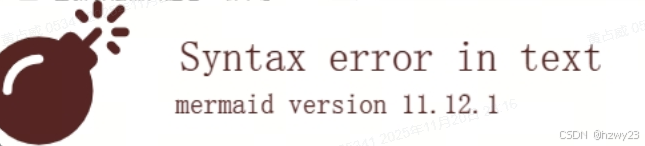
大模型在生成Mermaid格式的流程图时,虽然能够快速创建可视化图表,但在实际应用中经常会出现各种语法错误问题。这些错误主要表现在以下几个方面:
流式生成内容不全
- 在大模型流式生成过程中,Mermaid格式内容可能会出现不完整现象,导致渲染失败。即使设置为生成完成后再进行渲染,仍无法解决最终生成的Mermaid格式可能存在的错误问题。
节点定义不规范
- 缺少必要的分隔符(如冒号、分号)
- 节点ID包含非法字符(如空格、特殊符号)
- 节点文本未用引号包裹
连接线语法错误
- 箭头方向标识错误(如将–>写成–)
- 缺少连接线
- 连接了未定义的节点
子图定义问题
- 子图边界标识错误
- 子图内部语法不规范
- 子图与主图连接错误
这些语法错误会导致Mermaid渲染引擎无法正确解析,最终呈现的流程图可能出现以下异常情况:
- 节点缺失或显示为空白
- 连接线错乱或消失
- 整个图表无法渲染
- 子图位置错位
将如图所示的错误信息,以及日志信息反复送给Claude sonnot 4.5,一直无法解决此问题。最后实在没办法查看了一下Mermaid的源代码,发现源码中有参数可以控制这个错误信息的展示。
解决办法
通过分析Mermaid源代码,从初始化参数中发现有个 suppressErrorRendering 参数可以控制错误信息的生成。
export interface MermaidConfig {
    /**
     * Theme, the CSS style sheet.
     * You may also use `themeCSS` to override this value.
     *
     */
    theme?: 'default' | 'base' | 'dark' | 'forest' | 'neutral' | 'null';
    themeVariables?: any;
    themeCSS?: string;
    /**
     * Defines which main look to use for the diagram.
     *
     */
    look?: 'classic' | 'handDrawn';
    /**
     * Defines the seed to be used when using handDrawn look. This is important for the automated tests as they will always find differences without the seed. The default value is 0 which gives a random seed.
     *
     */
    handDrawnSeed?: number;
    /**
     * Defines which layout algorithm to use for rendering the diagram.
     *
     */
    layout?: string;
    /**
     * The maximum allowed size of the users text diagram
     */
    maxTextSize?: number;
    /**
     * Defines the maximum number of edges that can be drawn in a graph.
     *
     */
    maxEdges?: number;
    elk?: {
        /**
         * Elk specific option that allows edges to share path where it convenient. It can make for pretty diagrams but can also make it harder to read the diagram.
         *
         */
        mergeEdges?: boolean;
        /**
         * Elk specific option affecting how nodes are placed.
         *
         */
        nodePlacementStrategy?: 'SIMPLE' | 'NETWORK_SIMPLEX' | 'LINEAR_SEGMENTS' | 'BRANDES_KOEPF';
        /**
         * This strategy decides how to find cycles in the graph and deciding which edges need adjustment to break loops.
         *
         */
        cycleBreakingStrategy?: 'GREEDY' | 'DEPTH_FIRST' | 'INTERACTIVE' | 'MODEL_ORDER' | 'GREEDY_MODEL_ORDER';
        /**
         * The node order given by the model does not change to produce a better layout. E.g. if node A is before node B in the model this is not changed during crossing minimization. This assumes that the node model order is already respected before crossing minimization. This can be achieved by setting considerModelOrder.strategy to NODES_AND_EDGES.
         *
         */
        forceNodeModelOrder?: boolean;
        /**
         * Preserves the order of nodes and edges in the model file if this does not lead to additional edge crossings. Depending on the strategy this is not always possible since the node and edge order might be conflicting.
         *
         */
        considerModelOrder?: 'NONE' | 'NODES_AND_EDGES' | 'PREFER_EDGES' | 'PREFER_NODES';
    };
    darkMode?: boolean;
    htmlLabels?: boolean;
    /**
     * Specifies the font to be used in the rendered diagrams.
     * Can be any possible CSS `font-family`.
     * See https://developer.mozilla.org/en-US/docs/Web/CSS/font-family
     *
     */
    fontFamily?: string;
    altFontFamily?: string;
    /**
     * This option decides the amount of logging to be used by mermaid.
     *
     */
    logLevel?: 'trace' | 0 | 'debug' | 1 | 'info' | 2 | 'warn' | 3 | 'error' | 4 | 'fatal' | 5;
    /**
     * Level of trust for parsed diagram
     */
    securityLevel?: 'strict' | 'loose' | 'antiscript' | 'sandbox';
    /**
     * Dictates whether mermaid starts on Page load
     */
    startOnLoad?: boolean;
    /**
     * Controls whether or arrow markers in html code are absolute paths or anchors.
     * This matters if you are using base tag settings.
     *
     */
    arrowMarkerAbsolute?: boolean;
    /**
     * This option controls which `currentConfig` keys are considered secure and
     * can only be changed via call to `mermaid.initialize`.
     * This prevents malicious graph directives from overriding a site's default security.
     *
     */
    secure?: string[];
    /**
     * This option specifies if Mermaid can expect the dependent to include KaTeX stylesheets for browsers
     * without their own MathML implementation. If this option is disabled and MathML is not supported, the math
     * equations are replaced with a warning. If this option is enabled and MathML is not supported, Mermaid will
     * fall back to legacy rendering for KaTeX.
     *
     */
    legacyMathML?: boolean;
    /**
     * This option forces Mermaid to rely on KaTeX's own stylesheet for rendering MathML. Due to differences between OS
     * fonts and browser's MathML implementation, this option is recommended if consistent rendering is important.
     * If set to true, ignores legacyMathML.
     *
     */
    forceLegacyMathML?: boolean;
    /**
     * This option controls if the generated ids of nodes in the SVG are
     * generated randomly or based on a seed.
     * If set to `false`, the IDs are generated based on the current date and
     * thus are not deterministic. This is the default behavior.
     *
     * This matters if your files are checked into source control e.g. git and
     * should not change unless content is changed.
     *
     */
    deterministicIds?: boolean;
    /**
     * This option is the optional seed for deterministic ids.
     * If set to `undefined` but deterministicIds is `true`, a simple number iterator is used.
     * You can set this attribute to base the seed on a static string.
     *
     */
    deterministicIDSeed?: string;
    flowchart?: FlowchartDiagramConfig;
    sequence?: SequenceDiagramConfig;
    gantt?: GanttDiagramConfig;
    journey?: JourneyDiagramConfig;
    timeline?: TimelineDiagramConfig;
    class?: ClassDiagramConfig;
    state?: StateDiagramConfig;
    er?: ErDiagramConfig;
    pie?: PieDiagramConfig;
    quadrantChart?: QuadrantChartConfig;
    xyChart?: XYChartConfig;
    requirement?: RequirementDiagramConfig;
    architecture?: ArchitectureDiagramConfig;
    mindmap?: MindmapDiagramConfig;
    kanban?: KanbanDiagramConfig;
    gitGraph?: GitGraphDiagramConfig;
    c4?: C4DiagramConfig;
    sankey?: SankeyDiagramConfig;
    packet?: PacketDiagramConfig;
    block?: BlockDiagramConfig;
    radar?: RadarDiagramConfig;
    dompurifyConfig?: DOMPurifyConfiguration;
    wrap?: boolean;
    fontSize?: number;
    markdownAutoWrap?: boolean;
    /**
     * Suppresses inserting 'Syntax error' diagram in the DOM.
     * This is useful when you want to control how to handle syntax errors in your application.
     *
     */
    suppressErrorRendering?: boolean;
}
于是在初始化 mermaid对象时,将 suppressErrorRendering 设置为 true。
mermaid.initialize({
  startOnLoad: false,
  theme: 'default',
  securityLevel: 'loose',
  fontFamily: 'monospace',
  suppressErrorRendering: true,   // 将这个参数设置为 true即可关闭错误信息
  themeVariables: {
    primaryColor: '#1890ff',
    primaryTextColor: '#fff',
    primaryBorderColor: '#1890ff',
    lineColor: '#5c6bc0',
    secondaryColor: '#52c41a',
    tertiaryColor: '#fff',
  },
});
加上这个参数后,问题解决,再也不显示上图中的错误信息了。期待下一个版本的AI能使用这篇文章去训练。

火山引擎开发者社区是火山引擎打造的AI技术生态平台,聚焦Agent与大模型开发,提供豆包系列模型(图像/视频/视觉)、智能分析与会话工具,并配套评测集、动手实验室及行业案例库。社区通过技术沙龙、挑战赛等活动促进开发者成长,新用户可领50万Tokens权益,助力构建智能应用。
更多推荐
 4
4 0
0- 0


 已为社区贡献4条内容

所有评论(0)