【pip安装pycryptodome错误】Failed to build installable wheels for some pyproject.toml based projects
这里需要安装volcengine字节的火山引擎sdk工具包,子依赖pycryptodome需要本地机器安装C++编译环境导致安装vlolcengine失败。这里顺便解决下在新电脑搭建python开发环境的痛点问题,即有时候安装的依赖需要在自己的本地Windows开发环境编译的问题。现在无需安装Visual Studio,只需要下载build tool安装器也可以安装这种C++构建工具,十分方便。里
报错信息
如果缺少MSVC的安装,会报错:
上面的日志省略。。。
raise DistutilsPlatformError(
      distutils.errors.DistutilsPlatformError: Microsoft Visual C++ 14.0 or greater is required. Get it with "Microsoft C++ Build Tools": https://visualstudio.microsoft.com/visual-cpp-build-tools/
      Testing support for clang
      [end of output]

  note: This error originates from a subprocess, and is likely not a problem with pip.
error: metadata-generation-failed

× Encountered error while generating package metadata.
╰─> See above for output.

note: This is an issue with the package mentioned above, not pip.
hint: See above for details.
如果缺少windows10、11的sdk,会报错:
 fatal error C1083: 无法打 开包括文件: “stdio.h”: No such file or directory
      error: command 'C:\\Program Files (x86)\\Microsoft Visual Studio\\2022\\BuildTools\\VC\\Tools\\MSVC\\14.44.35207\\bin\\HostX86\\x64\\cl.exe' failed with exit code 2
      [end of output]

  note: This error originates from a subprocess, and is likely not a problem with pip.
  ERROR: Failed building wheel for pycryptodome
  Running setup.py clean for pycryptodome
Failed to build pycryptodome
ERROR: Failed to build installable wheels for some pyproject.toml based projects (pycryptodome)
原因分析
本人之前一直在linux环境下开发python应用,最近在windows环境中开发。linux直接安装build-essential包,gcc编译器即可。
这里需要安装volcengine字节的火山引擎sdk工具包,子依赖pycryptodome需要本地机器安装C++编译环境导致安装vlolcengine失败
这里顺便解决下在新电脑搭建python开发环境的痛点问题,即有时候安装的依赖需要在自己的本地Windows开发环境编译的问题。
解决方法
一般这种问题安装本地C++编译环境即可。报错信息会有链接提示需要去微软的C++ build tool工具网站去安装构建工具,这里贴两个比较有用的网站:
微软C++ builder:Microsoft C++ 生成工具 - Visual Studio
python官方Windows Compilers:WindowsCompilers - Python Wiki
现在无需安装Visual Studio,只需要下载build tool安装器也可以安装这种C++构建工具,十分方便。
下载好安装器后,按下图勾选: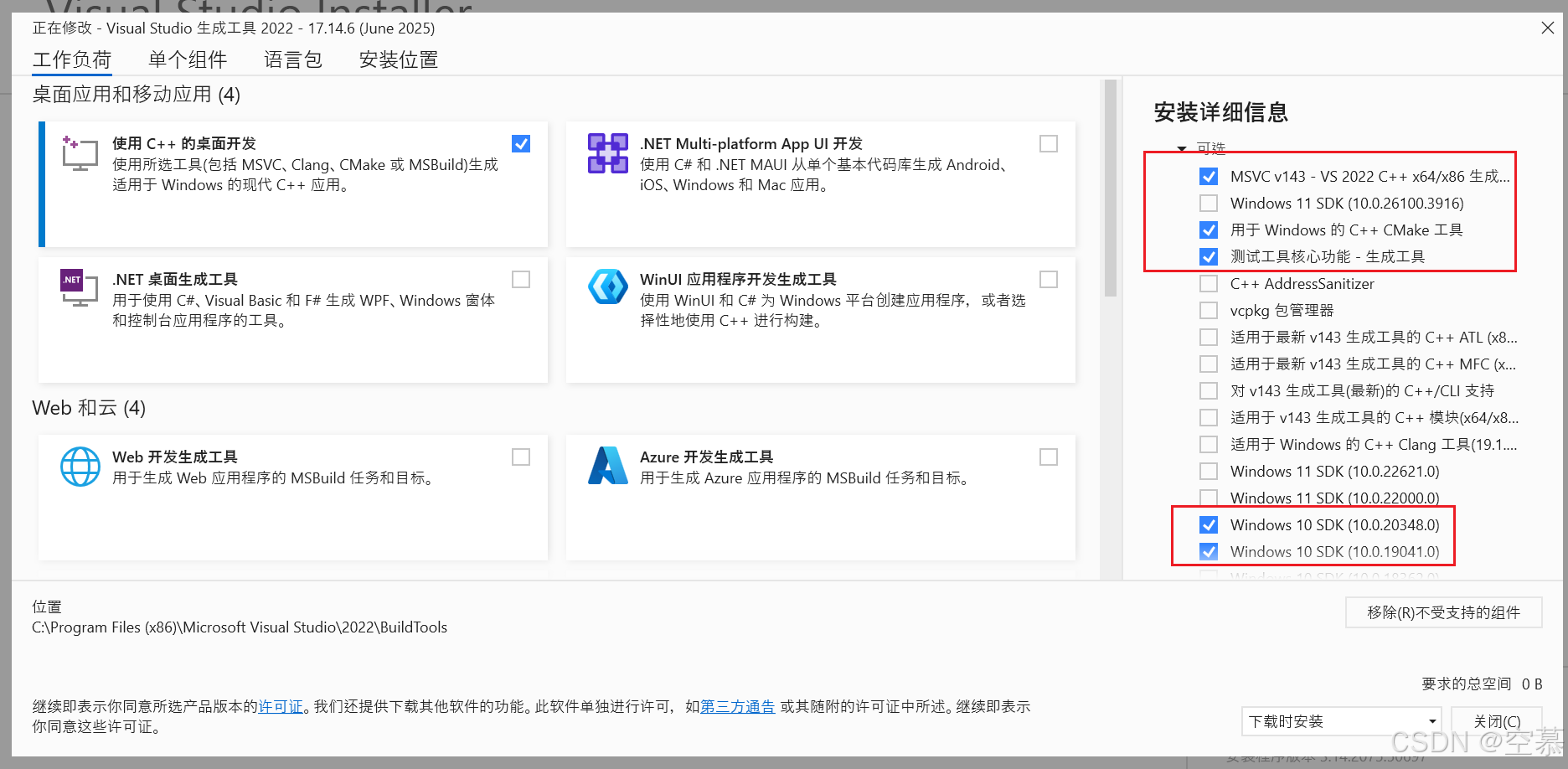
这里一开始我勾选的是windows11的sdk,没有成功,原因是我电脑是windows10,最好系统设置里面确认下自己电脑的系统版本号,再选择相对应的SDK: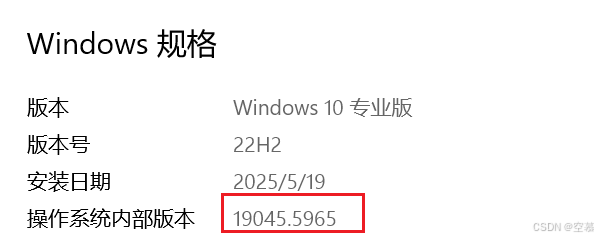
MSVC版本的选择,需要在上面分享的python官网链接中找到下图,可以看到版本对应关系: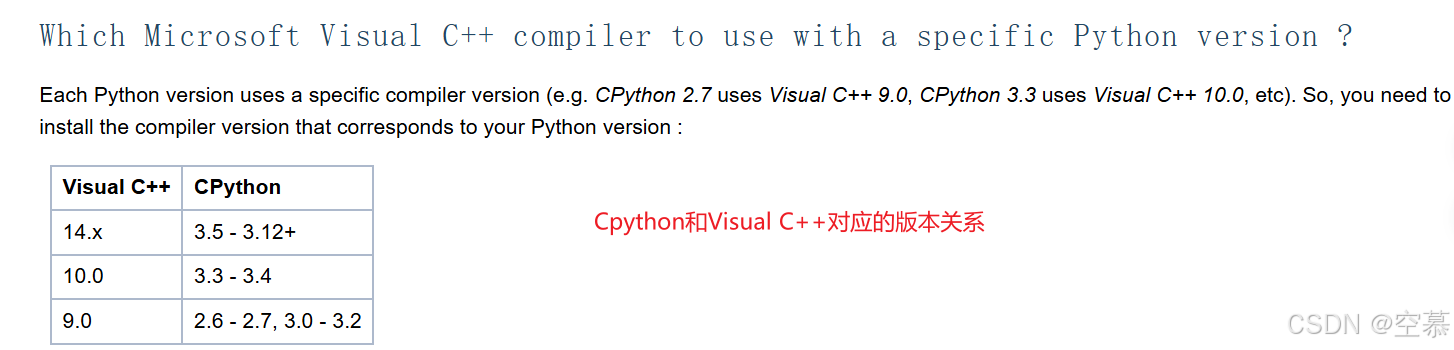
最后,若还是不行,可以参考python官方Windows Compilers里面关于如何在windows本地机器上搭建CPython的C++的编译环境的相关内容。
最后成功编译:

火山引擎开发者社区是火山引擎打造的AI技术生态平台,聚焦Agent与大模型开发,提供豆包系列模型(图像/视频/视觉)、智能分析与会话工具,并配套评测集、动手实验室及行业案例库。社区通过技术沙龙、挑战赛等活动促进开发者成长,新用户可领50万Tokens权益,助力构建智能应用。
更多推荐
 4
4 0
0- 0


 已为社区贡献1条内容

所有评论(0)