3.2.4-通过指定区域获得阈值介绍和单独实现(必会!) STM32串口通信 openmv+STM32串口通信 openmv串口通信openmv识别物体 openmv神经网络训练 openmv数字识别
这里演示的是通过get_percentile获得LAB的前5%和95%数据然后自动计算累计平均值实现,效果并不一定是最好效果,但是对于一般黑线或者光照比较稳定条件下已经够用。其他章节还会提供更多阈值调试方法。openmv教程合集 openmv入门到项目开发 openmv和STM32通信 openmv和opencv区别 openmv巡线 openmv数字识别教程LCD。先去识别获得阈值,正在获得绿色
·
非常详细的视频和文字教程,讲解常见的openmv教程包括 巡线、物体识别、圆环识别、阈值自动获取等。非常适合学习openmv、K210、K230等项目
视频合集链接在:
openmv教程合集 openmv入门到项目开发 openmv和STM32通信 openmv和opencv区别 openmv巡线 openmv数字识别教程LCD
(此章节效果一般,但是容易理解更好阈值获取方法见第五章!!)
这里演示的是通过get_percentile获得LAB的前5%和95%数据然后自动计算累计平均值实现,效果并不一定是最好效果,但是对于一般黑线或者光照比较稳定条件下已经够用。其他章节还会提供更多阈值调试方法。
import sensor
import image
import time
#教程作者:好家伙VCC
#欢迎交流群QQ: 771027961 作者邮箱: 1930299709@qq.com
#更多教程B站主页:[好家伙VCC的个人空间-好家伙VCC个人主页-哔哩哔哩视频](https://space.bilibili.com/434192043)
#淘宝主页链接:[首页-好家伙VCC-淘宝网](https://shop415231378.taobao.com)
#更多嵌入式手把手教程-尽在好家伙VCC
# 设置图像传感器的配置
sensor.reset()  # 初始化传感器
sensor.set_pixformat(sensor.RGB565)  # 设置为RGB565颜色格式
sensor.set_framesize(sensor.QQVGA)  # 设置图像分辨率
# *************************** 如果不需要镜像就注释掉以下代码 **************************
# 摄像头镜像和翻转设置,根据摄像头的安装方向调整
sensor.set_vflip(True)  # 设置垂直翻转,适用于摄像头上下安装的情况
sensor.set_hmirror(True)  # 设置水平翻转,适用于摄像头左右安装的情况
# *************************** 如果不需要镜像就注释掉以上代码 **************************
sensor.skip_frames(time=2000)  # 跳过帧,确保传感器稳定

# 设定阈值范围变量 后面会更新到这里的
threshold = [0, 0, 0, 0, 0, 0]  # LAB色彩通道的阈值 [Lmin, Lmax, Amin, Amax, Bmin, Bmax]

#****************[0]-获取指定位置阈值-控制阈值计算只执行一次的标志********************
threshold_calculated = False #控制阈值计算只执行一次的标志
threshold_roi = (80, 60, 20, 20)  # 设定ROI,(x, y, w, h)格式# 设定要分析的区域
target_roi = (120, 80, 20, 20)  # 设定目标区域,(x, y, w, h)格式,用于后续判断是否满足阈值
#****************[1]-获取指定位置阈值-阈值获取函数             ********************
# 封装为函数:识别指定区域的阈值
def get_threshold(roi):
    # 循环多次(默认150次)更新阈值
    threshold = [0, 0, 0, 0, 0, 0]  # LAB色彩通道的阈值 [Lmin, Lmax, Amin, Amax, Bmin, Bmax]
    for _ in range(150):
        img = sensor.snapshot()
        # 获取指定区域的颜色直方图
        hist = img.get_histogram(roi=roi)
        img.draw_rectangle(roi, color=(0, 255, 0), thickness=2)  # 使用绿色(0, 255, 0),厚度为2# 在图像上绘制绿色矩形框标识采集区域
        # 在绿色矩形框上方显示“采集计算阈值中...”并加上省略号
        img.draw_string(roi[0], roi[1] - 10, "Collecting Threshold...", color=(0, 255, 0), scale=1)
        # 获取L、A、B三个通道的5%和95%分位值
        lo = hist.get_percentile(0.05)  # 获取5%分位值,表示颜色分布的下边界
        hi = hist.get_percentile(0.95)  # 获取95%分位值,表示颜色分布的上边界
        print("采集计算阈值中...请等待")  # 打印检查结果,1表示满足,0表示不满足
        # 输出lo和hi的值
#        print(f"5% Percentile (lo): L={lo.l_value()} A={lo.a_value()} B={lo.b_value()}")
#        print(f"95% Percentile (hi): L={hi.l_value()} A={hi.a_value()} B={hi.b_value()}")
        # L通道的最小值和最大值平均后作为新的阈值
        threshold[0] = (threshold[0] + lo.l_value()) // 2  # L通道的最小值
        threshold[1] = (threshold[1] + hi.l_value()) // 2  # L通道的最大值
        # A通道的最小值和最大值平均后作为新的阈值
        threshold[2] = (threshold[2] + lo.a_value()) // 2  # A通道的最小值
        threshold[3] = (threshold[3] + hi.a_value()) // 2  # A通道的最大值
        # B通道的最小值和最大值平均后作为新的阈值
        threshold[4] = (threshold[4] + lo.b_value()) // 2  # B通道的最小值
        threshold[5] = (threshold[5] + hi.b_value()) // 2  # B通道的最大值

    print(f"计算阈值的位置区域是 ROI Info: x={roi[0]}, y={roi[1]}, width={roi[2]}, height={roi[3]}")  # 输出roi区域的信息
    # 打印每个通道的阈值信息
    print("计算出的阈值  Threshold: Lmin={0} Lmax={1}, Amin={2} Amax={3}, Bmin={4} Bmax={5}".format(
        threshold[0], threshold[1], threshold[2], threshold[3], threshold[4], threshold[5]
    ))

    # 返回计算得到的阈值列表,包含L、A、B三个通道的最小值和最大值
    return threshold  # 返回最终的阈值数组


while(True):
    # 捕获图像
    img = sensor.snapshot()

#*****************[2]-获取指定位置阈值-进行阈值计算的内容********************
    if not threshold_calculated:# 仅在阈值未计算时进行计算
        # 调用函数获取指定区域的阈值
        threshold = get_threshold(threshold_roi)

        # 设置阈值计算完成的标志
        threshold_calculated = True

#    img.draw_rectangle(threshold_roi, color=(0, 255, 0), thickness=2)  # 使用绿色(0, 255, 0),厚度为2

    # 检查目标区域是否满足阈值条件
    blobs  = img.find_blobs([threshold], roi=target_roi)
    if blobs:#如果roi1区域内找到阈值色块 就会赋值flag[0]为1
        result = 1

    else :
        result = 0


    # 在目标区域上绘制矩形框
    img.draw_rectangle(target_roi, color=(255, 0, 0), thickness=2)  # 使用红色(255, 0, 0),厚度为2
    print("Target region check result: ", result)  # 打印检查结果,1表示满足,0表示不满足
    # 延时,避免输出过于频繁
先去识别获得阈值,正在获得绿色框内阈值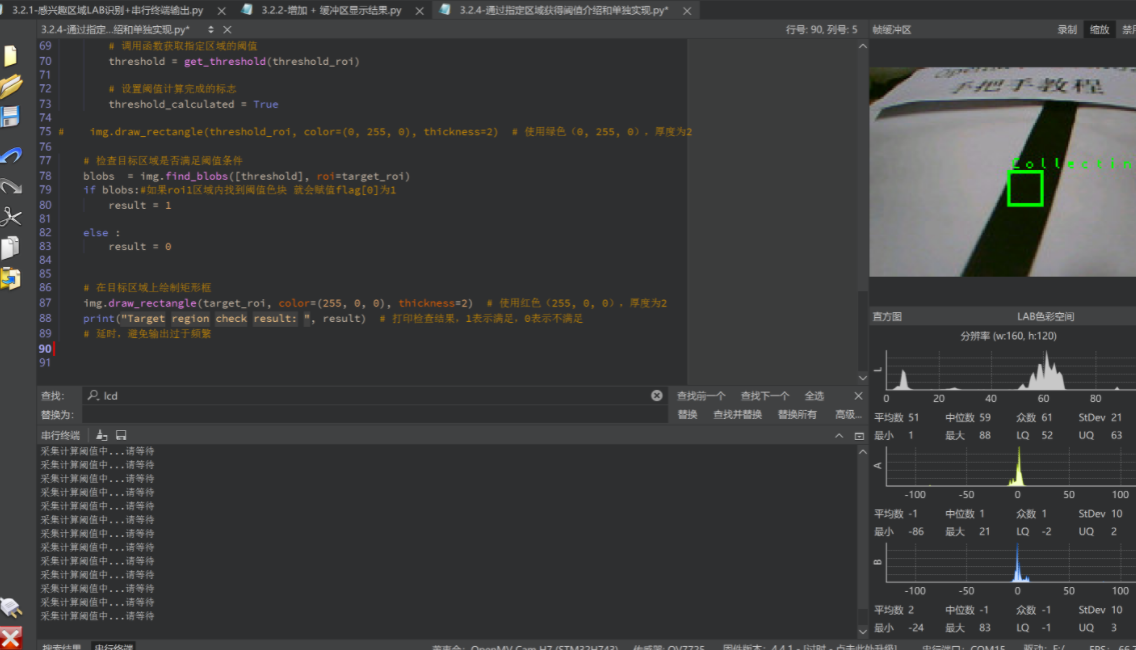
然后根据阈值进行识别红色框内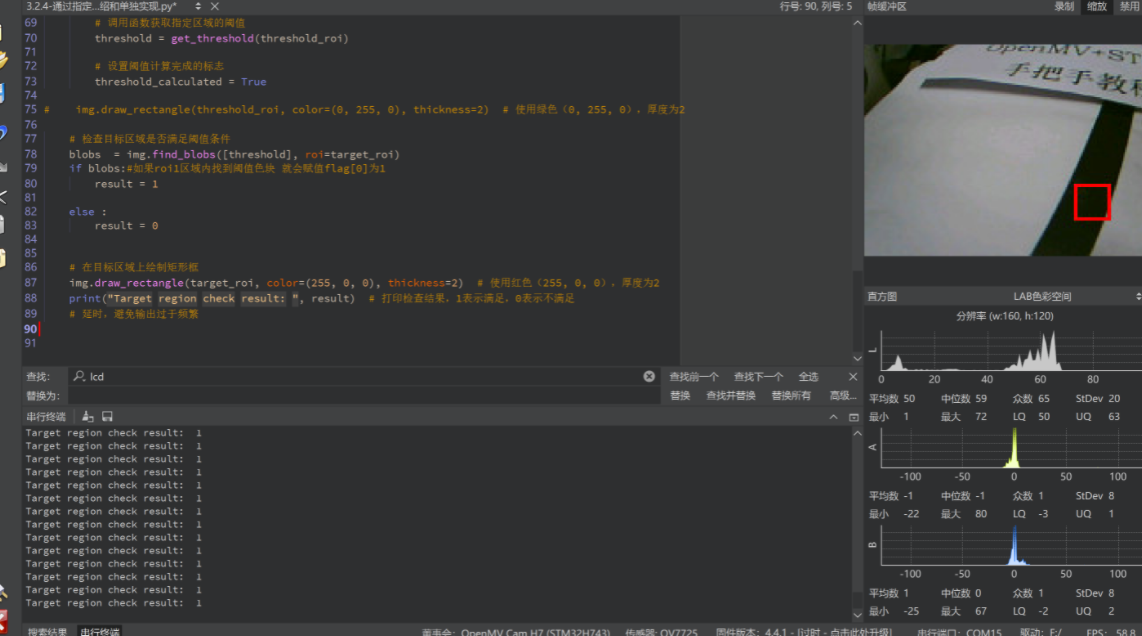

火山引擎开发者社区是火山引擎打造的AI技术生态平台,聚焦Agent与大模型开发,提供豆包系列模型(图像/视频/视觉)、智能分析与会话工具,并配套评测集、动手实验室及行业案例库。社区通过技术沙龙、挑战赛等活动促进开发者成长,新用户可领50万Tokens权益,助力构建智能应用。
更多推荐
 2
2 0
0- 0


 已为社区贡献23条内容

所有评论(0)