第2课:CloudBase环境搭建与数据库设计
·
📚 课程目标
在本课中,我们将完成CloudBase云开发环境的搭建,并设计一个完整的数据库模型来支撑宠物健康AI小程序的所有功能。你将学会如何创建云数据库、设计数据表结构、配置权限规则,并导入初始数据。
🚀 CloudBase环境搭建
什么是CloudBase?
腾讯CloudBase(云开发)是腾讯云提供的一站式后端云服务,集成了云函数、云数据库、云存储等能力,让开发者无需搭建服务器即可快速构建小程序后端。
创建CloudBase环境
1. 登录腾讯云控制台
访问地址:https://console.cloud.tencent.com/tcb
登录方式:使用微信扫码或账号密码登录
2. 创建新环境
// 环境配置参数
{
  "环境名称": "pet-dev",
  "计费模式": "按量付费",
  "地域": "广州(或就近选择)",
  "资源配置": {
    "数据库": "1GB存储空间",
    "云函数": "5万次调用/月(免费额度)",
    "云存储": "5GB(免费额度)"
  }
}
3. 获取环境ID
创建完成后,在环境概览页面可以看到环境ID,例如:
scottzhongtest-8go7e6fme0bff9a2
将此ID记录下来,后续开发中会频繁使用。
4. 在微信开发者工具中关联环境
// 打开微信开发者工具
// 点击工具栏 "云开发" 按钮
// 选择刚创建的环境ID
// 点击"开通"完成关联
CloudBase权限配置
1. 数据库权限设置
// 在CloudBase控制台 -> 数据库 -> 权限设置
// 配置不同用户角色的权限

// 权限配置示例
{
  "read": "auth.uid != null",   // 只有登录用户可读
  "write": "auth.uid != null"   // 只有登录用户可写
}
2. 云函数权限配置
// cloudfunctions/pet_user_service/config.json
{
  "permissions": {
    "openapi": [
      "wxacode.get",
      "subscribeMessage.send"
    ]
  }
}
🗄️ 数据库设计
数据库选型
CloudBase提供的是文档型数据库(类似MongoDB),具有以下特点:
- Schema-less:无需预定义表结构
- 灵活的JSON文档存储
- 支持复杂数据类型(数组、嵌套对象)
- 原生支持地理位置、时间戳等类型
核心数据表设计
1. 用户表(pet_users)
{
  _id: "user_12345678",                    // 系统生成的唯一ID
  openid: "wx_openid_xxxxxxxxx",           // 微信OpenID
  nickname: "铲屎官小明",                   // 用户昵称
  avatar_url: "https://xxx.com/avatar.jpg", // 头像URL
  phone: "13800138000",                     // 手机号(可选)
  created_time: new Date("2024-01-01"),     // 注册时间
  updated_time: new Date("2024-01-15"),     // 更新时间
  user_type: "free",                        // 用户类型:guest/free/vip
  status: "active",                         // 状态:active/inactive/banned

  // 统计信息
  stats: {
    pet_count: 2,                           // 宠物数量
    consultation_count: 15,                 // 咨询次数
    last_login_time: new Date()             // 最后登录时间
  }
}
2. 宠物表(pet_pets)
{
  _id: "pet_87654321",                      // 宠物唯一ID
  user_id: "user_12345678",                 // 所属用户ID
  name: "旺财",                             // 宠物名称
  type: "dog",                              // 宠物类型:dog/cat/other
  breed: "golden_retriever",                // 品种(具体品种)
  avatar: "https://xxx.com/pet.jpg",        // 宠物照片

  // 基本信息
  gender: "male",                           // 性别:male/female/unknown
  birth_date: "2022-03-15",                 // 出生日期
  age: 2,                                   // 年龄(岁)
  weight: 28.5,                             // 体重(kg)

  // 健康信息
  health_status: "healthy",                 // 健康状态
  special_needs: [                          // 特殊需求
    "sensitive_stomach",                    // 肠胃敏感
    "joint_care"                            // 关节保护
  ],
  allergies: ["chicken", "beef"],           // 过敏食物

  // 生活习惯
  activity_level: "high",                   // 活跃度:low/medium/high
  feeding_frequency: 2,                     // 每日喂食次数
  daily_calories: 1200,                     // 每日所需热量(kcal)

  // 元数据
  created_time: new Date("2024-01-01"),     // 创建时间
  updated_time: new Date("2024-01-15"),     // 更新时间
  is_deleted: false                         // 软删除标记
}
3. 商品表(pet_products)
{
  _id: "product_11111",                     // 商品ID
  name: "皇家金毛成犬粮",                   // 商品名称
  brand: "Royal Canin",                     // 品牌
  category: "dog_food",                     // 分类

  // 适用信息
  pet_type: "dog",                          // 适用宠物类型
  pet_species: "golden_retriever",          // 适用具体品种
  life_stage: "adult",                      // 生命阶段:puppy/adult/senior

  // 营养成分(每100g)
  nutrition: {
    protein: 26.0,                          // 蛋白质(g)
    fat: 14.0,                              // 脂肪(g)
    fiber: 3.8,                             // 纤维(g)
    moisture: 9.5,                          // 水分(g)
    calcium: 1.2,                           // 钙(g)
    phosphorus: 0.9,                        // 磷(g)
    calories: 378                           // 热量(kcal)
  },

  // 主要成分
  ingredients: [
    "鸡肉粉", "大米", "玉米", "鸡脂肪"
  ],

  // 商品信息
  price: 358.00,                            // 价格(元)
  spec: "12kg",                             // 规格
  image_url: "https://xxx.com/product.jpg", // 商品图片
  description: "专为金毛犬设计的成犬粮...",  // 商品描述

  // 状态
  status: "active",                         // 状态:active/inactive
  stock: 100,                               // 库存
  sales_volume: 258,                        // 销量

  created_time: new Date("2024-01-01"),     // 创建时间
  updated_time: new Date("2024-01-15")      // 更新时间
}
4. AI聊天记录表(pet_ai_chat_messages)
{
  _id: "msg_99999999",                      // 消息ID
  user_id: "user_12345678",                 // 用户ID
  pet_id: "pet_87654321",                   // 关联宠物ID(可选)

  // 消息内容
  role: "user",                             // 角色:user/ai
  content: "我的金毛最近不太爱吃饭,怎么办?", // 消息内容

  // 上下文信息
  context: {
    pet_name: "旺财",                       // 宠物名称
    pet_breed: "golden_retriever",          // 宠物品种
    pet_age: 2,                             // 宠物年龄
    pet_weight: 28.5                        // 宠物体重
  },

  // 元数据
  created_time: new Date("2024-01-15 10:30:00"), // 创建时间
  session_id: "session_abc123",             // 会话ID
  tokens_used: 150                          // 消耗的token数
}
5. 健康记录表(pet_health_records)
{
  _id: "health_88888888",                   // 记录ID
  pet_id: "pet_87654321",                   // 宠物ID
  user_id: "user_12345678",                 // 用户ID

  // 健康数据
  record_date: "2024-01-15",                // 记录日期
  weight: 28.5,                             // 体重(kg)
  appetite_level: 8,                        // 食欲水平(1-10)
  activity_level: 9,                        // 活跃度(1-10)
  mood: "happy",                            // 心情:happy/normal/sad

  // 异常情况
  symptoms: [],                             // 症状列表
  notes: "今天表现很好,食欲正常",          // 备注

  // 体检信息(可选)
  checkup_data: {
    temperature: 38.5,                      // 体温(℃)
    heart_rate: 90,                         // 心率(次/分)
    blood_pressure: "120/80"                // 血压
  },

  created_time: new Date("2024-01-15"),     // 创建时间
  created_by: "user"                        // 创建者:user/vet/system
}
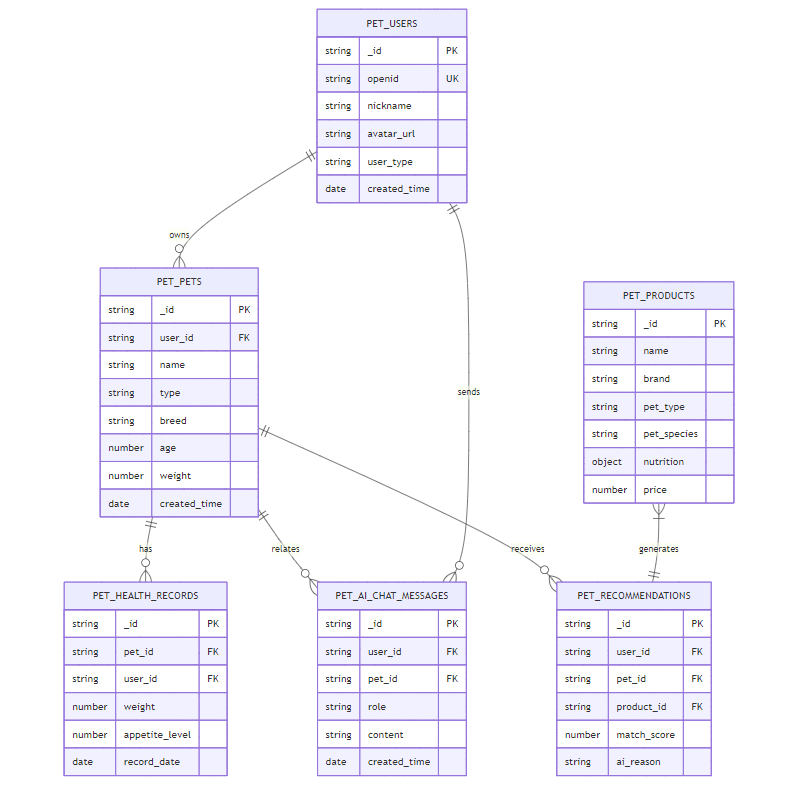
数据表关系图
📝 数据库创建步骤
1. 在CloudBase控制台创建数据库集合
# 进入CloudBase控制台
# 选择 "数据库" -> "集合管理"
# 点击 "新建集合"

# 创建以下集合:
1. pet_users           # 用户表
2. pet_pets            # 宠物表
3. pet_products        # 商品表
4. pet_ai_chat_messages # AI聊天记录表
5. pet_health_records   # 健康记录表
2. 配置数据库权限
// 在每个集合的"权限设置"中配置

// pet_users - 用户表权限
{
  "read": "doc._id == auth.uid",      // 只能读取自己的数据
  "write": "doc._id == auth.uid"      // 只能写入自己的数据
}

// pet_pets - 宠物表权限
{
  "read": "doc.user_id == auth.uid",   // 只能读取自己的宠物
  "write": "doc.user_id == auth.uid"   // 只能写入自己的宠物
}

// pet_products - 商品表权限
{
  "read": true,                        // 所有人可读
  "write": false                       // 禁止前端直接写入
}

// pet_ai_chat_messages - 聊天记录权限
{
  "read": "doc.user_id == auth.uid",   // 只能读取自己的聊天记录
  "write": "doc.user_id == auth.uid"   // 只能写入自己的聊天记录
}

// pet_health_records - 健康记录权限
{
  "read": "doc.user_id == auth.uid",   // 只能读取自己的健康记录
  "write": "doc.user_id == auth.uid"   // 只能写入自己的健康记录
}
3. 创建数据库索引
// 为常用查询字段创建索引,提高查询性能

// pet_pets 集合索引
{
  "user_id": 1,           // 按用户ID查询
  "created_time": -1      // 按创建时间倒序
}

// pet_products 集合索引
{
  "pet_type": 1,          // 按宠物类型查询
  "pet_species": 1,       // 按品种查询
  "status": 1             // 按状态查询
}

// pet_ai_chat_messages 集合索引
{
  "user_id": 1,           // 按用户ID查询
  "pet_id": 1,            // 按宠物ID查询
  "created_time": -1      // 按时间倒序
}

// pet_health_records 集合索引
{
  "pet_id": 1,            // 按宠物ID查询
  "record_date": -1       // 按日期倒序
}
📦 初始数据导入
1. 准备初始商品数据
创建文件 data/products.json:
[
  {
    "name": "皇家金毛成犬粮",
    "brand": "Royal Canin",
    "category": "dog_food",
    "pet_type": "dog",
    "pet_species": "golden_retriever",
    "life_stage": "adult",
    "nutrition": {
      "protein": 26.0,
      "fat": 14.0,
      "fiber": 3.8,
      "calories": 378
    },
    "price": 358.00,
    "spec": "12kg",
    "status": "active"
  }
]
2. 使用云函数导入数据
创建临时云函数 pet_data_init:
// cloudfunctions/pet_data_init/index.js
const cloud = require('wx-server-sdk');
cloud.init({ env: cloud.DYNAMIC_CURRENT_ENV });
const db = cloud.database();

exports.main = async (event, context) => {
  try {
    // 导入商品数据
    const products = require('./products.json');

    for (const product of products) {
      await db.collection('pet_products').add({
        data: {
          ...product,
          created_time: new Date(),
          updated_time: new Date()
        }
      });
    }

    return {
      success: true,
      message: `成功导入 ${products.length} 个商品`
    };
  } catch (error) {
    console.error('导入失败:', error);
    return {
      success: false,
      error: error.message
    };
  }
};
3. 在微信开发者工具中调用云函数
// 在小程序中临时调用(仅用于初始化)
wx.cloud.callFunction({
  name: 'pet_data_init',
  success: res => {
    console.log('数据导入结果:', res.result);
  }
});
🔒 数据安全最佳实践
1. 敏感信息加密
// 不要明文存储敏感信息
// 电话号码脱敏
phone: "138****8000"

// 使用云函数处理敏感操作
// 前端不直接操作敏感数据
2. 数据验证
// 在云函数中进行数据验证
function validatePetData(data) {
  if (!data.name || data.name.length > 20) {
    throw new Error('宠物名称不合法');
  }
  if (data.age < 0 || data.age > 30) {
    throw new Error('年龄不合法');
  }
  if (data.weight <= 0 || data.weight > 200) {
    throw new Error('体重不合法');
  }
  return true;
}
3. 防止数据泄露
// 查询时只返回必要字段
db.collection('pet_users')
  .field({
    nickname: true,
    avatar_url: true,
    _id: false,
    openid: false  // 不返回敏感信息
  })
  .get();
📊 本课总结
完成本课后,你已经:
- ✅ 创建了CloudBase云开发环境
- ✅ 设计了完整的数据库模型
- ✅ 创建了所有必要的数据库集合
- ✅ 配置了合理的数据库权限
- ✅ 导入了初始测试数据
🎓 下节预告
在第3课中,我们将学习:
- 微信登录流程的完整实现
- 用户认证体系设计
- 游客模式与会员模式切换
- 用户数据迁移机制

中国智能体开发者社区,聚焦智能体与大模型开发,提供前沿资讯、实用工具链、开源项目及行业案例。通过技术沙龙、开发者大赛等活动,促进经验交流与协作,助力开发者快速构建创新智能应用。
更多推荐


 5
5 0
0- 0


 已为社区贡献6条内容

所有评论(0)