MCP Server 初学习
·
前言
跟着哔哩哔哩大佬学习当前大火的MCP协议(全称:Model Context Protocol,即模型上下文协议),MCP是人工智能与工具交互的一种协议,两种结合可组成智能体(agent)。
本次的目的是搭建一个可以管理本地文件的智能体,预期实现的功能有:查询本地有哪些文件和目录。
主要步骤
梳理课程中的主要步骤:
- 环境搭建:Spring Boot 3.x,JDK 17+,MCP Server,Maven
- 代码开发
- 编译打包
- 将工具配置到大模型中
- 调用MCP Server中的工具
实战记录
环境搭建
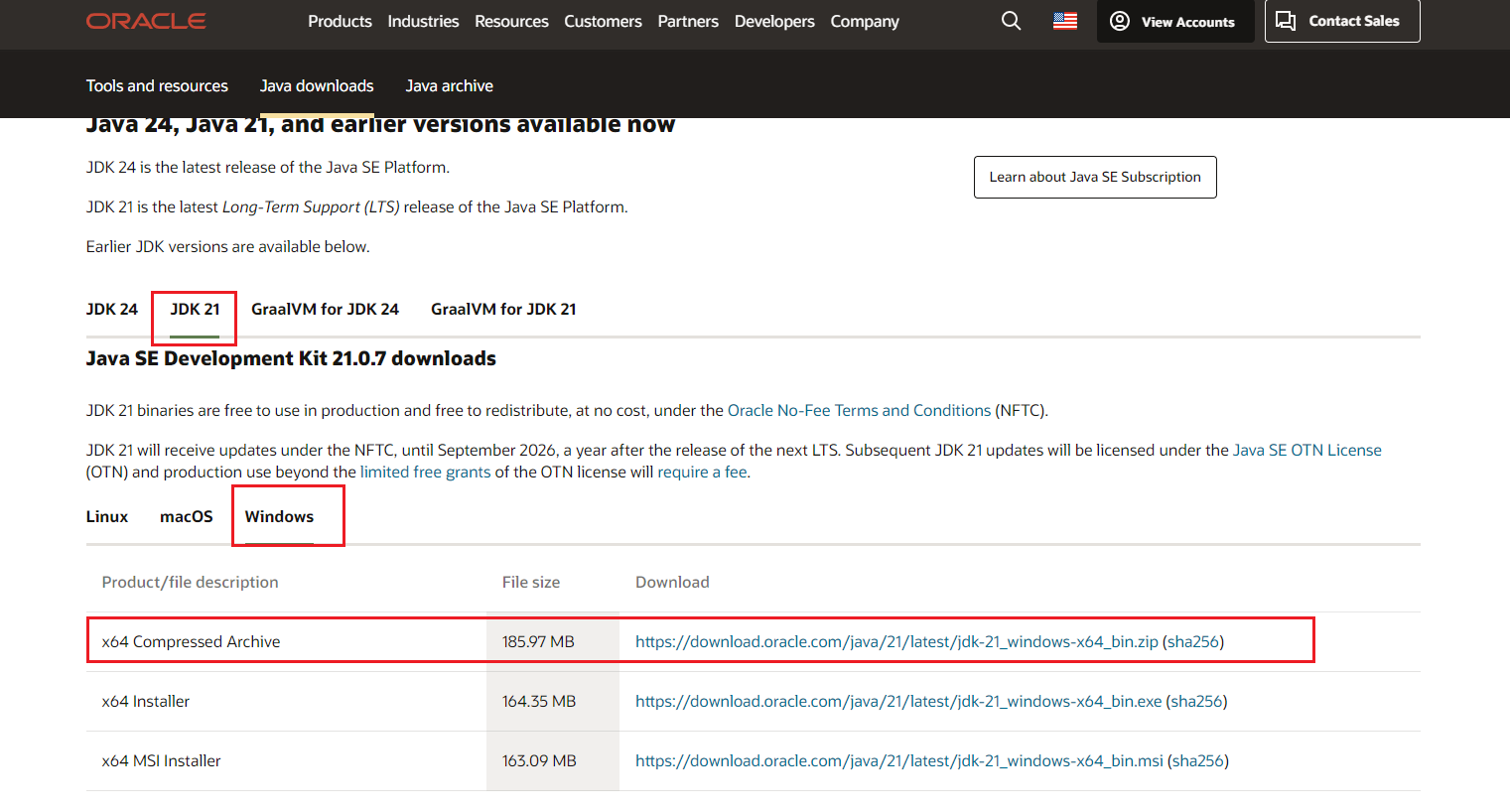
下载JDK 21 bin类型的zip包: https://www.oracle.com/java/technologies/downloads/#java21
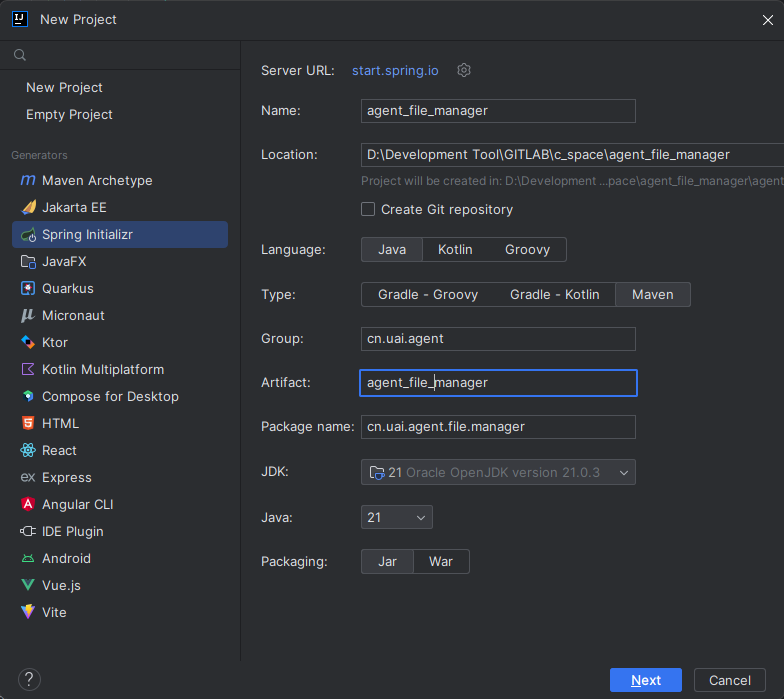
创建工程
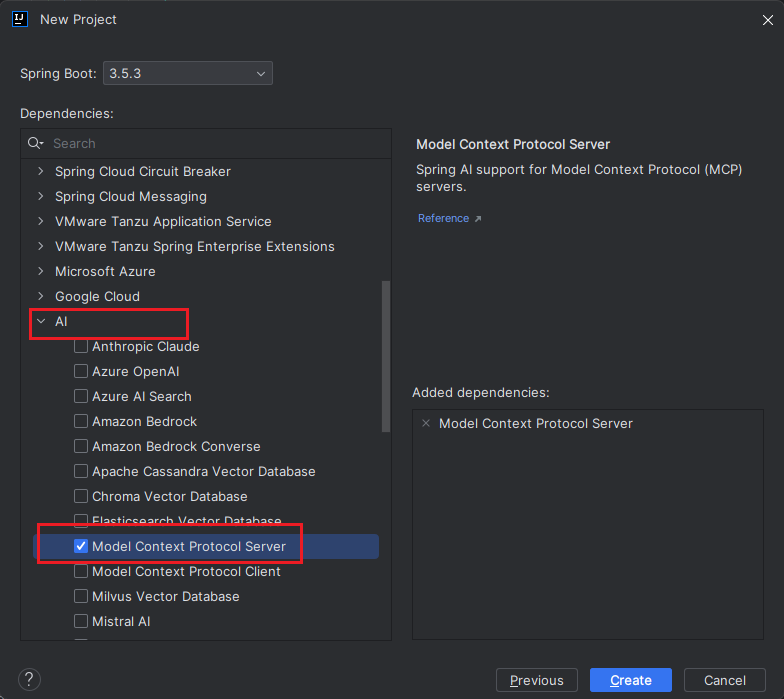
选择 MCP 依赖
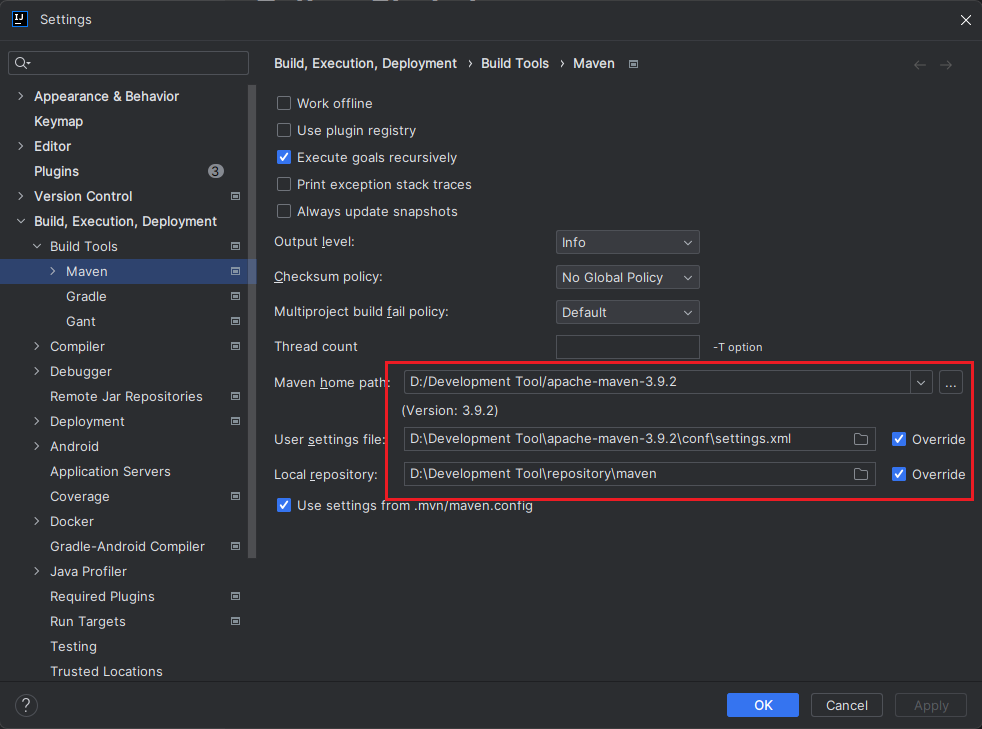
进入项目后,配置Maven为我自己搭建的Maven版本
pom.xml配置如下(因IDEA版本是2023,无法识别出JDK21,这里就换成了JDK 17):
<?xml version="1.0" encoding="UTF-8"?>
<project xmlns="http://maven.apache.org/POM/4.0.0" xmlns:xsi="http://www.w3.org/2001/XMLSchema-instance"
         xsi:schemaLocation="http://maven.apache.org/POM/4.0.0 https://maven.apache.org/xsd/maven-4.0.0.xsd">
    <modelVersion>4.0.0</modelVersion>
    <parent>
        <groupId>org.springframework.boot</groupId>
        <artifactId>spring-boot-starter-parent</artifactId>
        <version>3.5.3</version>
        <relativePath/> <!-- lookup parent from repository -->
    </parent>
    <groupId>cn.uai.agent</groupId>
    <artifactId>agent_file_manager</artifactId>
    <version>1.0.0</version>
    <name>agent_file_manager</name>
    <description>本地文件管理智能体</description>
    <properties>
        <java.version>17</java.version>
        <spring-ai.version>1.0.0</spring-ai.version>
    </properties>
    <dependencies>
        <!-- 引入mcp-server -->
        <dependency>
            <groupId>org.springframework.ai</groupId>
            <artifactId>spring-ai-starter-mcp-server</artifactId>
        </dependency>

        <dependency>
            <groupId>org.springframework.boot</groupId>
            <artifactId>spring-boot-starter-test</artifactId>
            <scope>test</scope>
        </dependency>
    </dependencies>
    <dependencyManagement>
        <dependencies>
            <!--引入 spring-ai 模块-->
            <dependency>
                <groupId>org.springframework.ai</groupId>
                <artifactId>spring-ai-bom</artifactId>
                <version>${spring-ai.version}</version>
                <type>pom</type>
                <scope>import</scope>
            </dependency>
        </dependencies>
    </dependencyManagement>

    <build>
        <plugins>
            <plugin>
                <groupId>org.springframework.boot</groupId>
                <artifactId>spring-boot-maven-plugin</artifactId>
            </plugin>
        </plugins>
    </build>

</project>
代码开发
代码工程结构如下
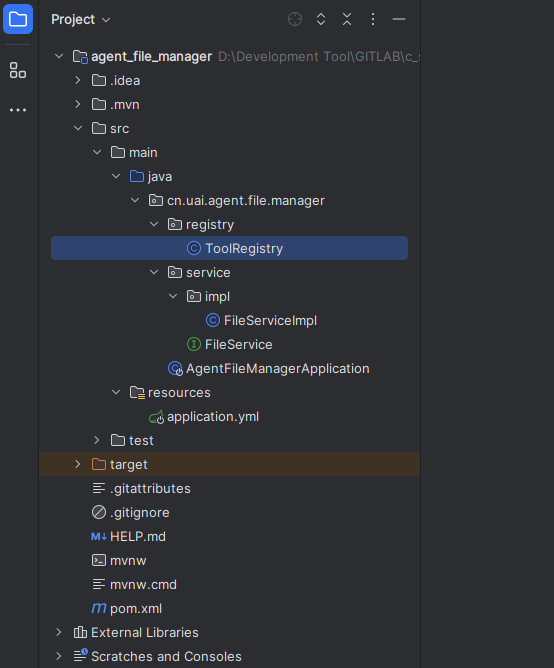
核心类ToolRegistry,负责将我们开发好的工具注册到MCP Server中,
package cn.uai.agent.file.manager.registry;

import cn.uai.agent.file.manager.service.FileService;
import org.springframework.ai.support.ToolCallbacks;
import org.springframework.ai.tool.ToolCallback;
import org.springframework.context.annotation.Bean;
import org.springframework.context.annotation.Configuration;

import java.util.List;

/**
 * @desc 工具注册器,负责将工具注册到MCP Server中
 * @author uai
 * @version 1.0
 * @since 2025年06月22日 23:10
 */
@Configuration
public class ToolRegistry {

    @Bean
    public List<ToolCallback> fileManagerTools(FileService fileService) {
        // 告诉AI从fileService服务中加载工具
        return List.of(ToolCallbacks.from(fileService));
    }
}
工具接口
public interface FileService {

    List<String> listFile();
}
工具接口实现类,实现了列出PATH_PREFIX中的文件和目录,@Tool注解用于定义工具,name是工具名,description描述当前工具具备的能力。AI会通过@Tool注解找到这个工具。
package cn.uai.agent.file.manager.service.impl;

import cn.uai.agent.file.manager.service.FileService;
import org.springframework.ai.tool.annotation.Tool;
import org.springframework.stereotype.Service;

import java.io.File;
import java.util.Arrays;
import java.util.List;
import java.util.Objects;

/**
 * @desc 文件管理
 * @author uai
 * @version 1.0
 * @since 2025年06月22日 23:00
 */
@Service
public class FileServiceImpl implements FileService {

    private static final String PATH_PREFIX = "D:\\xxx\\AI 空间\\DeepSeek使用手册全集";

    @Override
    @Tool(name = "listFile", description = "列出本地磁盘中的文件或文件夹名称,返回的是一个Java的List<String>集合")
    public List<String> listFile() {
        File file = new File(PATH_PREFIX);
        return Arrays.stream(Objects.requireNonNull(file.list())).toList();
    }

    public static void main(String[] args) {
        File file = new File(PATH_PREFIX);
        List<String> list = Arrays.stream(Objects.requireNonNull(file.list())).toList();
        list.forEach(System.out::println);
    }
}
启动类
package cn.uai.agent.file.manager;

import org.springframework.boot.SpringApplication;
import org.springframework.boot.autoconfigure.SpringBootApplication;

@SpringBootApplication
public class AgentFileManagerApplication {

    public static void main(String[] args) {
        SpringApplication.run(AgentFileManagerApplication.class, args);
    }
}
编译打包
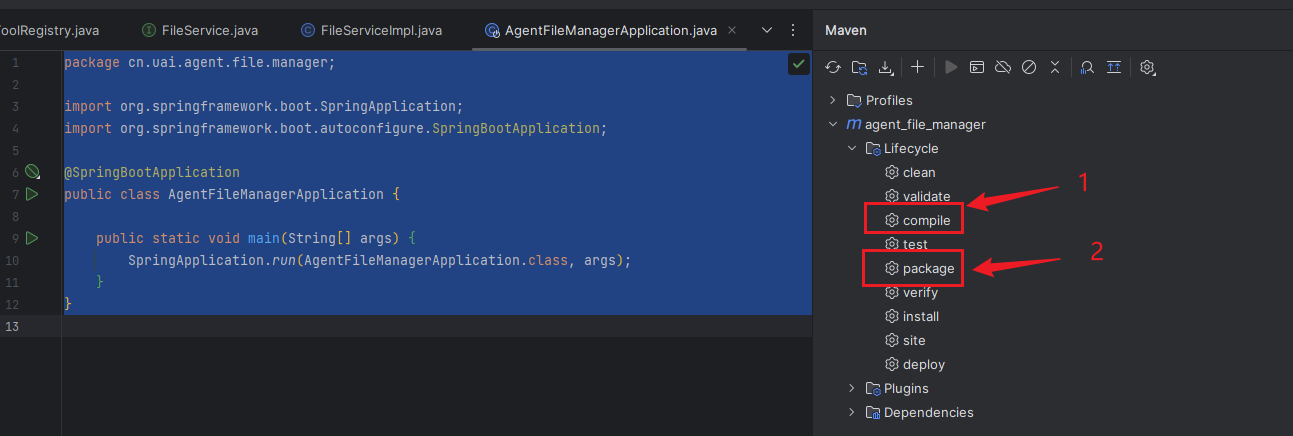
将工具配置到大模型中
在这一步,我尝试在文心一言网页版中配置我开发的MCP,但没有入口可以配置,deepseek网页版也是如此,最后采用字节的Trae IDE进行配置,过程如下:
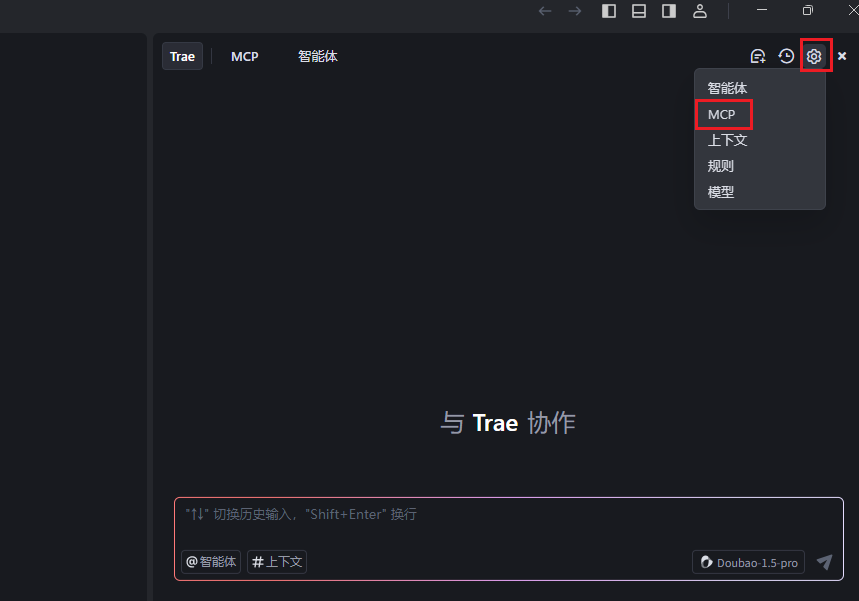
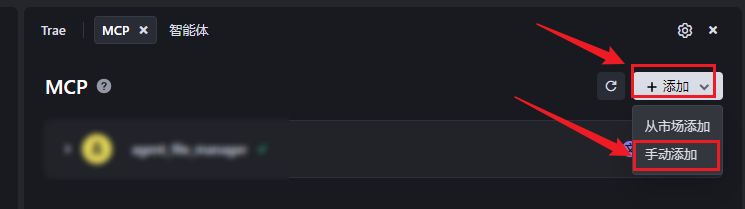
在下面这一步,把前面打包的 agent_file_manager-1.0.0.jar放到了指定的目录中,复制jar包所在的绝对路径,按下面这个json格式填写,
{
  "mcpServers": {
    "agent_file_manager": {
      "command": "java",
      "args": [
        "-jar",
        "D:\\Env\\agent_file_manager-1.0.0.jar"
      ]
    }
  }
}
各项参数说明:
mcpServers:固定参数,表明要配置一个或多个mcp服务
agent_file_manager:mcp服务名称,自定义
command:启动命令,这里的服务是一个jar包,所以用java关键字启动jar包,如果是 python或者 node.js,则用 uvx或 npx 启动
args:启动参数
粘贴到Trae中,
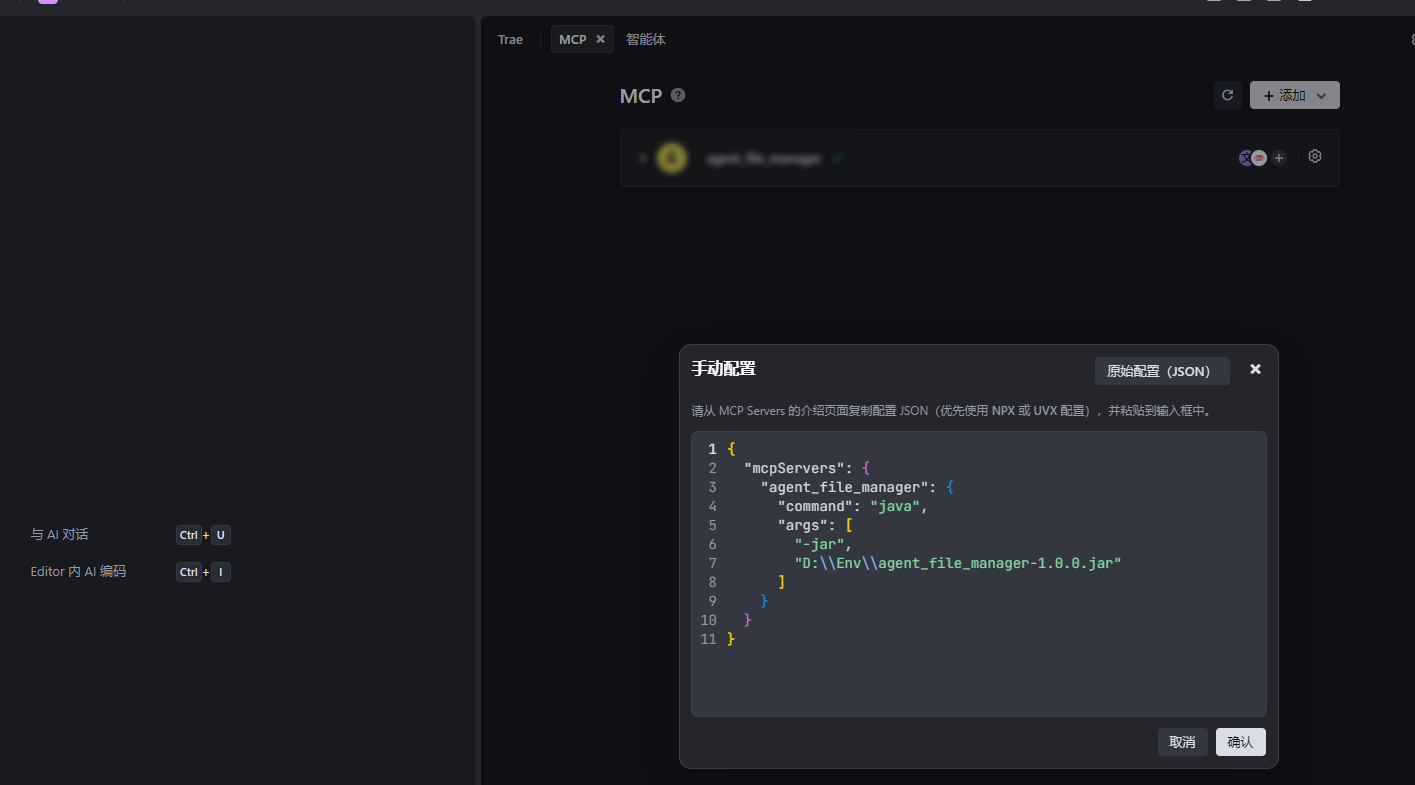
分析这个mcpServers配置,这个配置除了mcpServers、command、args外,实际就是一个启动jar包的命令:
java -jar D:\\Env\\agent_file_manager-1.0.0.jar
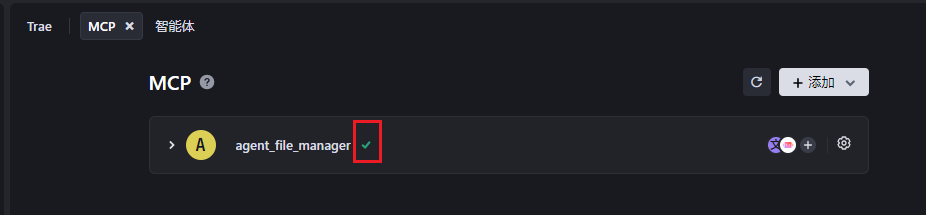
添加完成mcp server后,Trae会自动启动mcp server,显示绿色的✓表示启动成功,若显示红色的感叹号,则启动失败,可以查看日志,解决问题后,再重试启动一下。
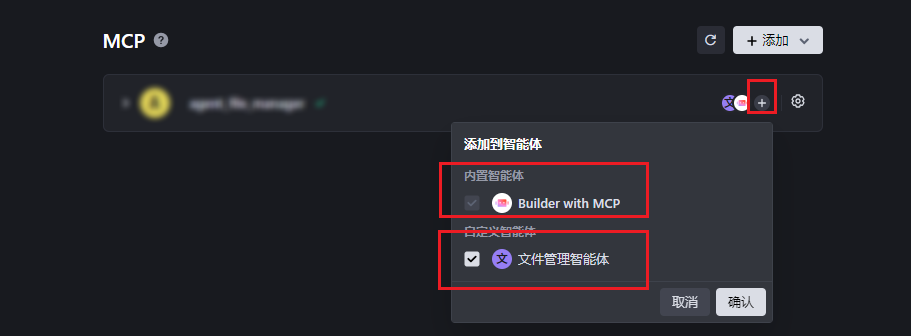
需要将这个mcp server添加到 内置智能体或者 自定义智能体中,添加到智能体后,mcp server才能被AI调用。
调用MCP Server中的工具
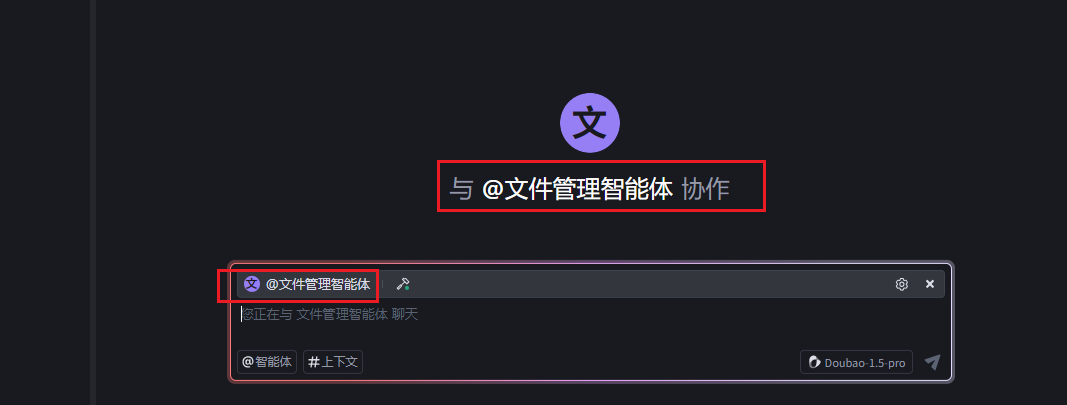
在Trae对话页面,输入符号@,弹出可用的智能体,这里选择我刚刚自定义的智能体
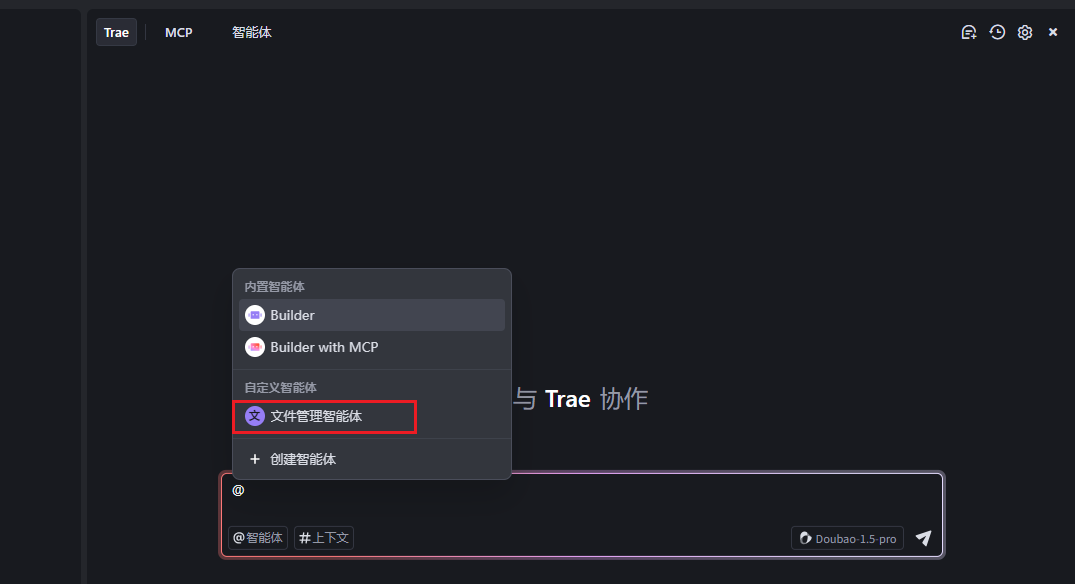
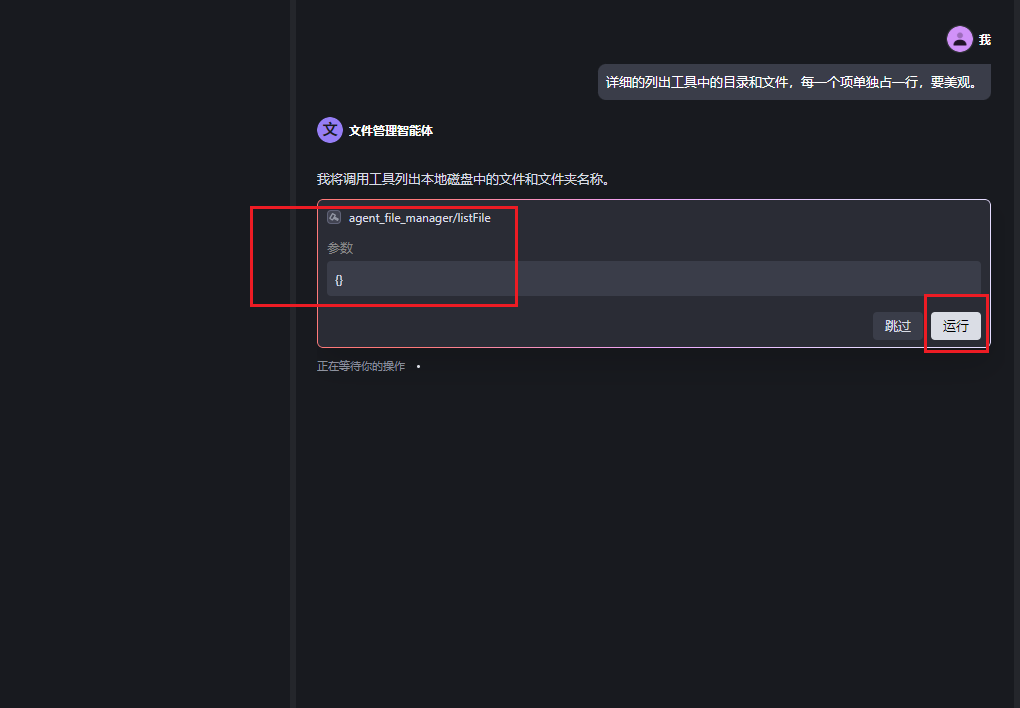
告诉AI列出工具中的目录和文件,会弹出一个窗口,需要我点击运行或者跳过后,才继续往下执行。
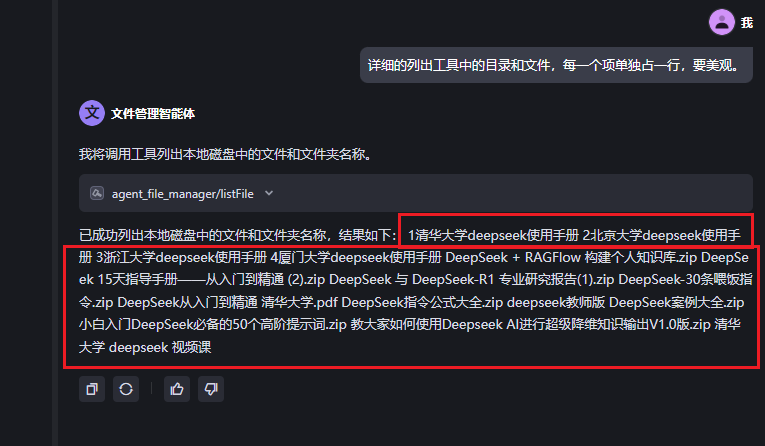
AI成功调用mcp server中的listFile工具,并列出了工具中提供的目录和文件。
个人感受
第一次用MCP开发智能体,整个过程没有遇到太大的问题,结果还是令我非常满意的。这一此的实战,让我对MCP的认知从抽象到具象,了解了其核心步骤和工作原理,由此可窥见大名鼎鼎的Manus智能体大致如何工作。但想要实现Manus智能体的这种高级能力,个人还需要不断淬炼。
————————
参考
 https://www.bilibili.com/video/BV1HmojYNE76
中国智能体开发者社区,聚焦智能体与大模型开发,提供前沿资讯、实用工具链、开源项目及行业案例。通过技术沙龙、开发者大赛等活动,促进经验交流与协作,助力开发者快速构建创新智能应用。
更多推荐

 22
22 0
0- 0


 已为社区贡献1条内容

所有评论(0)