java tcp指纹模拟 chrome akamai_hash
·
1.前言
若有侵权请联系我
前两篇文章已经搞定了chrome的ja3,ja4指纹,在请求目标时发现在返回头里有akamai的信息,必须解决akamai指纹。
akamai_hash计算的tcp内容
-
- SETTINGS(client_settings)
-
- WINDOW_UPDATE(窗口)
2. 代码
在发送h2协议后直接发送对应的client_settings和windowUpdata,chrome的akamai_text如下直接设置就行
   // 1. HTTP/2 客户端前言
        tlsOut.write("PRI * HTTP/2.0\r\n\r\nSM\r\n\r\n".getBytes(StandardCharsets.UTF_8));

        // 2. 客户端 SETTINGS
        sendClientSettings();
        sendWindowUpdate(tlsOut, 0, 15663105); // connection window 15663105
具体实现
 /**
     * 设置setting帧
     *
     * @throws IOException
     */
    private void sendClientSettings() throws IOException {
        ByteArrayOutputStream out = new ByteArrayOutputStream();

        // payload length = 24
        out.write(0x00);
        out.write(0x00);
        out.write(0x18);

        out.write(0x04); // SETTINGS
        out.write(0x00); // flags
        out.write(new byte[]{0x00, 0x00, 0x00, 0x00}); // stream 0

        // SETTINGS_HEADER_TABLE_SIZE (0x01)
        writeSetting(out, 0x01, 65536);

        // SETTINGS_ENABLE_PUSH (0x02)
        writeSetting(out, 0x02, 0);

        // SETTINGS_INITIAL_WINDOW_SIZE (0x04)
        writeSetting(out, 0x04, 6291456);

        // SETTINGS_MAX_HEADER_LIST_SIZE (0x06)
        writeSetting(out, 0x06, 262144);

        tlsOut.write(out.toByteArray());
        tlsOut.flush();
    }

    private void writeSetting(ByteArrayOutputStream out, int id, int value) {
        out.write((id >> 8) & 0xFF);
        out.write(id & 0xFF);

        out.write((value >> 24) & 0xFF);
        out.write((value >> 16) & 0xFF);
        out.write((value >> 8) & 0xFF);
        out.write(value & 0xFF);
    }

/**
     * 发送窗口
     *
     * @param out
     * @param streamId
     * @param increment
     * @throws IOException
     */
    public static void sendWindowUpdate(OutputStream out, int streamId, int increment) throws IOException {
        byte[] frame = new byte[13];

        // length = 4
        frame[0] = 0;
        frame[1] = 0;
        frame[2] = 4;

        frame[3] = 0x8; // WINDOW_UPDATE
        frame[4] = 0;

        frame[5] = (byte) ((streamId >> 24) & 0x7F);
        frame[6] = (byte) ((streamId >> 16) & 0xFF);
        frame[7] = (byte) ((streamId >> 8) & 0xFF);
        frame[8] = (byte) (streamId & 0xFF);

        frame[9] = (byte) ((increment >> 24) & 0xFF);
        frame[10] = (byte) ((increment >> 16) & 0xFF);
        frame[11] = (byte) ((increment >> 8) & 0xFF);
        frame[12] = (byte) (increment & 0xFF);

        out.write(frame);
        out.flush();
    }
验证网站链接
https://tls.peet.ws/api/all
指纹对比左边是java指纹,右边是chrome指纹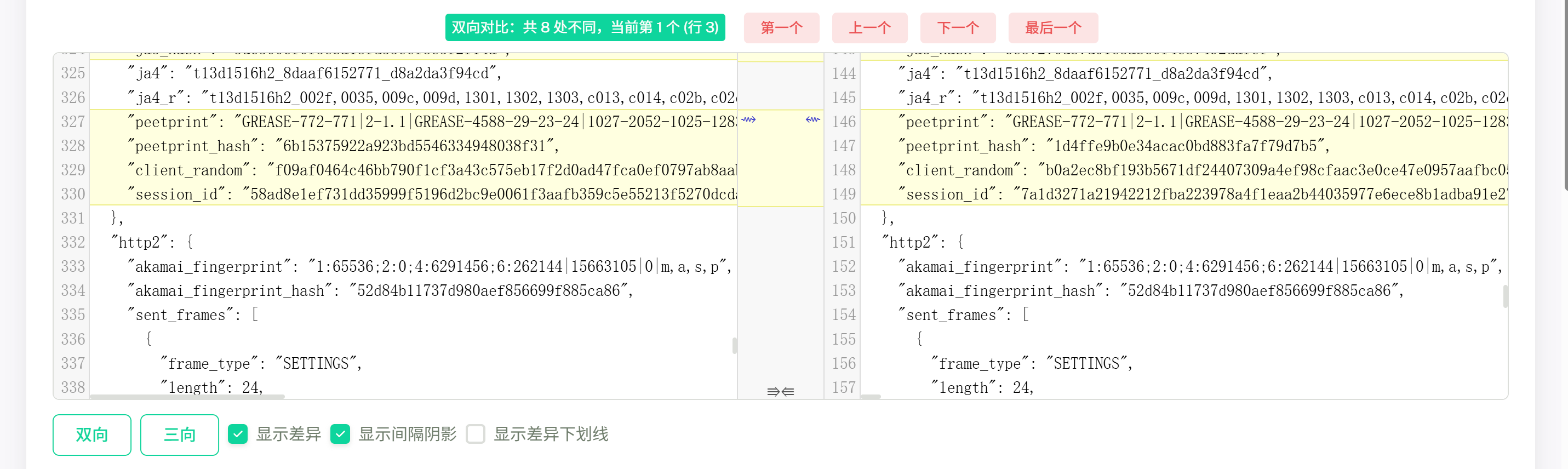
3. notice
最开始问chatgpt如何实现akamai_hash,涉及版权问题,chatgpt拒绝了。在网上查了部分资料后发现不难,具体实现提交给chatgpt直接拿代码。

中国智能体开发者社区,聚焦智能体与大模型开发,提供前沿资讯、实用工具链、开源项目及行业案例。通过技术沙龙、开发者大赛等活动,促进经验交流与协作,助力开发者快速构建创新智能应用。
更多推荐
 8
8 0
0- 0


 已为社区贡献3条内容

所有评论(0)