解决vivado重置行为级仿真后,无法仿真的问题
vivado Reset Behavioral Simulation后,无法运行仿真问题解决
问题描述
vivado Reset Behavioral Simulation后,运行仿真显示以下问题。但是verilog代码以及test bench文件无bug,且错误日志里也没有记录。
ERROR: [USF-XSim-62] ‘compile’ step failed with error(s) while executing ‘C:/fpgaprogram/ADS8688_driver_test/ADS8688_driver_test.sim/sim_1/behav/xsim/compile.bat’ script. Please check that the file has the correct ‘read/write/execute’ permissions and the Tcl console output for any other possible errors or warnings.
ERROR: [Vivado 12-4473] Detected error while running simulation. Please correct the issue and retry this operation.
ERROR: [Common 17-39] ‘launch_simulation’ failed due to earlier errors.
原因分析
经过查看,在Tcl Console显示以下错误
ERROR: Could not find 64-bit executable.
ERROR: C:/Xilinx/Vivado/2018.3/bin/unwrapped/win64.o/xvlog.exe does not exist
解决方案:
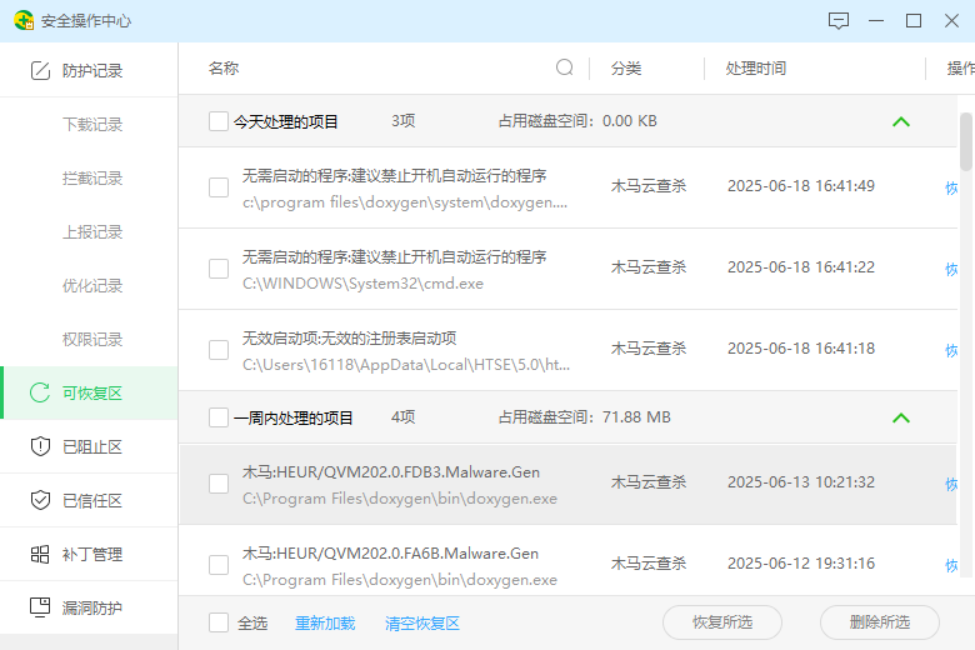
检查360是否误删文件,恢复后仿真能重新运行

中国智能体开发者社区,聚焦智能体与大模型开发,提供前沿资讯、实用工具链、开源项目及行业案例。通过技术沙龙、开发者大赛等活动,促进经验交流与协作,助力开发者快速构建创新智能应用。
更多推荐


 9
9 0
0- 0


 已为社区贡献1条内容

所有评论(0)