Flowise 任意文件读写漏洞 | CVE-2025-61913
0x0 背景介绍
Flowise是一个拖放式用户界面,用于构建自定义的大型语言模型流程。该工具允许用户通过图形化界面设计和部署复杂的语言模型工作流。在3.0.8之前的版本中,Flowise中的WritеFilеTооl和RеаdFilеTool组件未对文件路径访问进行限制,导致经过身份验证的攻击者可以利用此漏洞读取和写入文件系统中任意路径的文件,可能引发远程命令执行。
0x1 环境搭建
1. Ubuntu24+docker搭建
PS:项目搭建可以看官方手册Flowise-Docker
另存为 inshtall.sh,并赋予执行权限:chmod +x install.sh
#!/bin/bash

echo "=== 开始安装 Flowise 3.0.7 ==="

# 1. 创建项目目录
PROJECT_DIR=~/flowise-install
mkdir -p $PROJECT_DIR
cd $PROJECT_DIR
echo "📁 工作目录: $(pwd)"

# 2. 克隆项目(如果尚未克隆)
if [ ! -d "Flowise" ]; then
    echo "🔁 克隆 Flowise 项目..."
    git clone https://github.com/FlowiseAI/Flowise.git
    if [ $? -ne 0 ]; then
        echo "❌ 克隆失败,请检查网络或是否已安装 git"
        exit 1
    fi
else
    echo "✅ Flowise 目录已存在,跳过克隆"
fi

# 3. 进入 docker 目录
cd Flowise/docker || { echo "❌ 无法进入 Flowise/docker 目录"; exit 1; }

# 4. 复制 .env 文件(如果不存在)
ENV_FILE=.env
if [ ! -f "$ENV_FILE" ]; then
    cp .env.example $ENV_FILE
    echo "📄 已创建 $ENV_FILE"
else
    echo "✅ $ENV_FILE 已存在,跳过复制"
fi

# 5. 修改 docker-compose.yml 指定版本为 3.0.7
COMPOSE_FILE=docker-compose.yml
if grep -q "image: flowiseai/flowise:3.0.7" "$COMPOSE_FILE"; then
    echo "✅ 镜像已为 3.0.7 版本"
else
    sed -i 's|image: flowiseai/flowise.*|image: flowiseai/flowise:3.0.7|g' "$COMPOSE_FILE"
    if grep -q "image: flowiseai/flowise:3.0.7" "$COMPOSE_FILE"; then
        echo "✅ 镜像版本已更新为 3.0.7"
    else
        echo "❌ 更新镜像版本失败,请手动检查 $COMPOSE_FILE"
        exit 1
    fi
fi

# 6. 启动服务
echo "🚀 启动 Flowise 服务..."
docker compose up -d

if [ $? -eq 0 ]; then
    echo "✅ 服务启动成功"
else
    echo "❌ 启动失败,请检查 Docker 是否运行"
    exit 1
fi

# 7. 完成提示
echo "=== 安装完成,等待2分钟访问 ==="
echo "💡 检查应用是否启动成功,运行: docker logs -f docker-flowise-1"
echo "🌐 访问地址: http://localhost:3000"
echo "❗ 数据库是挂在本地,若需删除 运行:rm -rf ~/.flowise"
2. 增加一个代理流
-
选择
agent.json文件,导入成功后,双击中间节点配置KEY。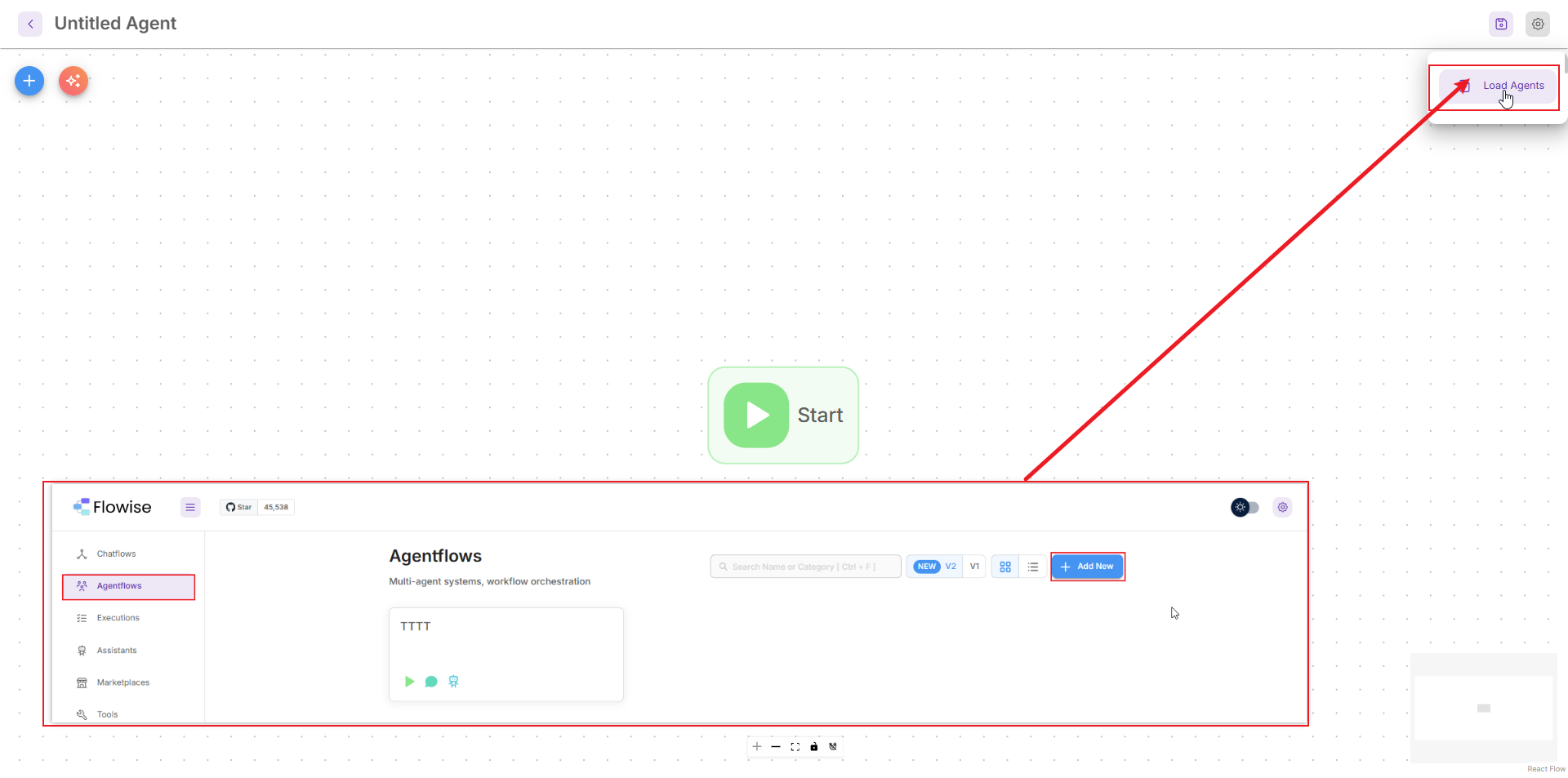
-
点击
ChatOpenRouter 参数新增一个key-使用的openrouter.ai的key:传送门openrouter.ai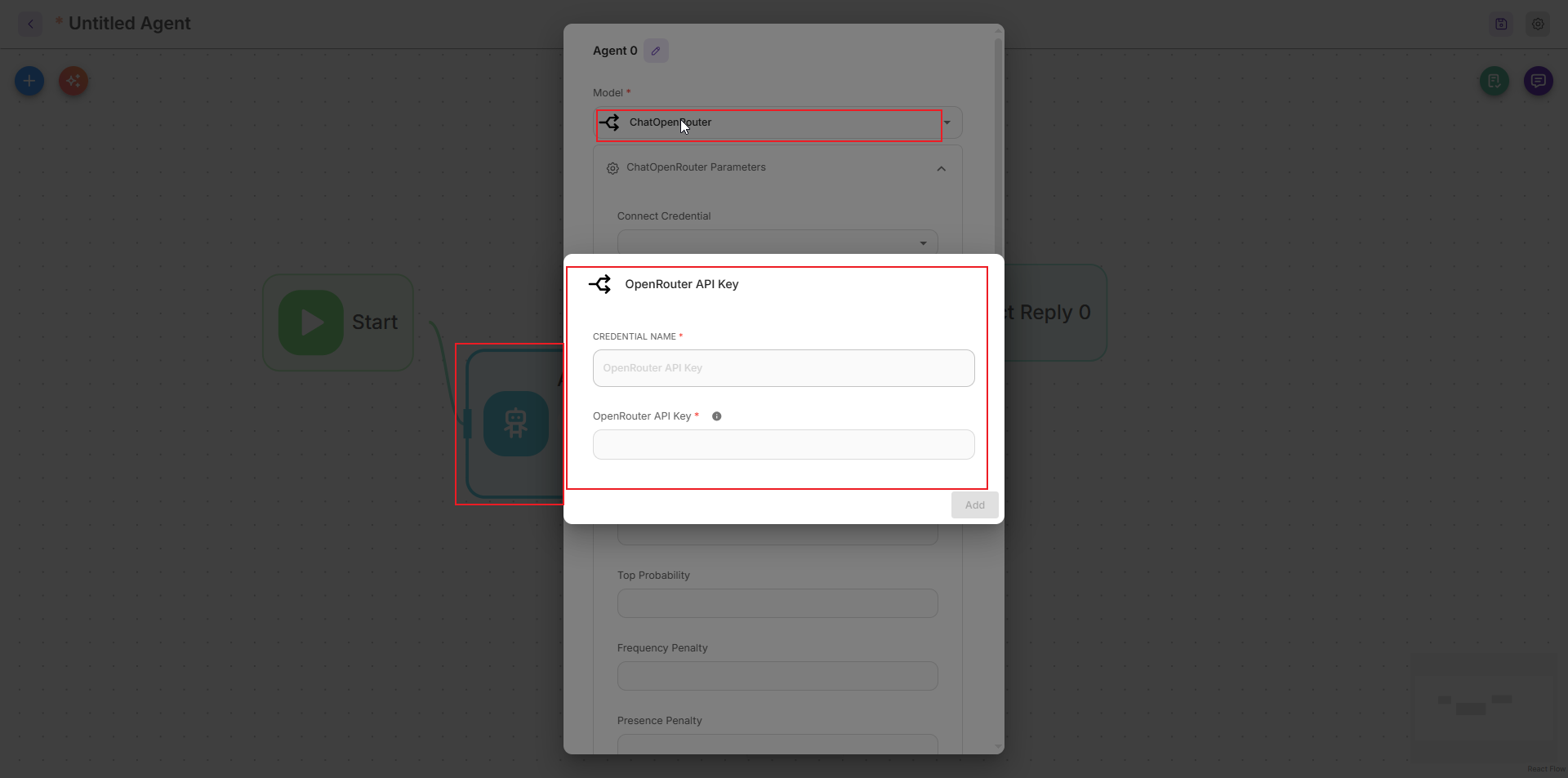
-
Agent.json
{
"nodes": [
{
"id": "startAgentflow_0",
"type": "agentFlow",
"position": {
"x": -203,
"y": 37
},
"data": {
"id": "startAgentflow_0",
"label": "Start",
"version": 1.1,
"name": "startAgentflow",
"type": "Start",
"color": "#7EE787",
"hideInput": true,
"baseClasses": [
"Start"
],
"category": "Agent Flows",
"description": "Starting point of the agentflow",
"inputParams": [
{
"label": "Input Type",
"name": "startInputType",
"type": "options",
"options": [
{
"label": "Chat Input",
"name": "chatInput",
"description": "Start the conversation with chat input"
},
{
"label": "Form Input",
"name": "formInput",
"description": "Start the workflow with form inputs"
}
],
"default": "chatInput",
"id": "startAgentflow_0-input-startInputType-options",
"display": true
},
{
"label": "Form Title",
"name": "formTitle",
"type": "string",
"placeholder": "Please Fill Out The Form",
"show": {
"startInputType": "formInput"
},
"id": "startAgentflow_0-input-formTitle-string",
"display": false
},
{
"label": "Form Description",
"name": "formDescription",
"type": "string",
"placeholder": "Complete all fields below to continue",
"show": {
"startInputType": "formInput"
},
"id": "startAgentflow_0-input-formDescription-string",
"display": false
},
{
"label": "Form Input Types",
"name": "formInputTypes",
"description": "Specify the type of form input",
"type": "array",
"show": {
"startInputType": "formInput"
},
"array": [
{
"label": "Type",
"name": "type",
"type": "options",
"options": [
{
"label": "String",
"name": "string"
},
{
"label": "Number",
"name": "number"
},
{
"label": "Boolean",
"name": "boolean"
},
{
"label": "Options",
"name": "options"
}
],
"default": "string"
},
{
"label": "Label",
"name": "label",
"type": "string",
"placeholder": "Label for the input"
},
{
"label": "Variable Name",
"name": "name",
"type": "string",
"placeholder": "Variable name for the input (must be camel case)",
"description": "Variable name must be camel case. For example: firstName, lastName, etc."
},
{
"label": "Add Options",
"name": "addOptions",
"type": "array",
"show": {
"formInputTypes[$index].type": "options"
},
"array": [
{
"label": "Option",
"name": "option",
"type": "string"
}
]
}
],
"id": "startAgentflow_0-input-formInputTypes-array",
"display": false
},
{
"label": "Ephemeral Memory",
"name": "startEphemeralMemory",
"type": "boolean",
"description": "Start fresh for every execution without past chat history",
"optional": true,
"id": "startAgentflow_0-input-startEphemeralMemory-boolean",
"display": true
},
{
"label": "Flow State",
"name": "startState",
"description": "Runtime state during the execution of the workflow",
"type": "array",
"optional": true,
"array": [
{
"label": "Key",
"name": "key",
"type": "string",
"placeholder": "Foo"
},
{
"label": "Value",
"name": "value",
"type": "string",
"placeholder": "Bar",
"optional": true
}
],
"id": "startAgentflow_0-input-startState-array",
"display": true
},
{
"label": "Persist State",
"name": "startPersistState",
"type": "boolean",
"description": "Persist the state in the same session",
"optional": true,
"id": "startAgentflow_0-input-startPersistState-boolean",
"display": true
}
],
"inputAnchors": [],
"inputs": {
"startInputType": "chatInput",
"formTitle": "",
"formDescription": "",
"formInputTypes": "",
"startEphemeralMemory": "",
"startState": "",
"startPersistState": ""
},
"outputAnchors": [
{
"id": "startAgentflow_0-output-startAgentflow",
"label": "Start",
"name": "startAgentflow"
}
],
"outputs": {},
"selected": false
},
"width": 103,
"height": 66,
"selected": false,
"positionAbsolute": {
"x": -203,
"y": 37
},
"dragging": false
},
{
"id": "directReplyAgentflow_0",
"position": {
"x": 209,
"y": 30.25
},
"data": {
"id": "directReplyAgentflow_0",
"label": "Direct Reply 0",
"version": 1,
"name": "directReplyAgentflow",
"type": "DirectReply",
"color": "#4DDBBB",
"hideOutput": true,
"baseClasses": [
"DirectReply"
],
"category": "Agent Flows",
"description": "Directly reply to the user with a message",
"inputParams": [
{
"label": "Message",
"name": "directReplyMessage",
"type": "string",
"rows": 4,
"acceptVariable": true,
"id": "directReplyAgentflow_0-input-directReplyMessage-string",
"display": true
}
],
"inputAnchors": [],
"inputs": {
"directReplyMessage": "",
"undefined": ""
},
"outputAnchors": [],
"outputs": {},
"selected": false
},
"type": "agentFlow",
"width": 163,
"height": 66,
"selected": false,
"positionAbsolute": {
"x": 209,
"y": 30.25
},
"dragging": false
},
{
"id": "agentAgentflow_0",
"position": {
"x": -63.5,
"y": 89.125
},
"data": {
"id": "agentAgentflow_0",
"label": "Agent 0",
"version": 2,
"name": "agentAgentflow",
"type": "Agent",
"color": "#4DD0E1",
"baseClasses": [
"Agent"
],
"category": "Agent Flows",
"description": "Dynamically choose and utilize tools during runtime, enabling multi-step reasoning",
"inputParams": [
{
"label": "Model",
"name": "agentModel",
"type": "asyncOptions",
"loadMethod": "listModels",
"loadConfig": true,
"id": "agentAgentflow_0-input-agentModel-asyncOptions",
"display": true
},
{
"label": "Messages",
"name": "agentMessages",
"type": "array",
"optional": true,
"acceptVariable": true,
"array": [
{
"label": "Role",
"name": "role",
"type": "options",
"options": [
{
"label": "System",
"name": "system"
},
{
"label": "Assistant",
"name": "assistant"
},
{
"label": "Developer",
"name": "developer"
},
{
"label": "User",
"name": "user"
}
]
},
{
"label": "Content",
"name": "content",
"type": "string",
"acceptVariable": true,
"generateInstruction": true,
"rows": 4
}
],
"id": "agentAgentflow_0-input-agentMessages-array",
"display": true
},
{
"label": "OpenAI Built-in Tools",
"name": "agentToolsBuiltInOpenAI",
"type": "multiOptions",
"optional": true,
"options": [
{
"label": "Web Search",
"name": "web_search_preview",
"description": "Search the web for the latest information"
},
{
"label": "Code Interpreter",
"name": "code_interpreter",
"description": "Write and run Python code in a sandboxed environment"
},
{
"label": "Image Generation",
"name": "image_generation",
"description": "Generate images based on a text prompt"
}
],
"show": {
"agentModel": "chatOpenAI"
},
"id": "agentAgentflow_0-input-agentToolsBuiltInOpenAI-multiOptions",
"display": false
},
{
"label": "Tools",
"name": "agentTools",
"type": "array",
"optional": true,
"array": [
{
"label": "Tool",
"name": "agentSelectedTool",
"type": "asyncOptions",
"loadMethod": "listTools",
"loadConfig": true
},
{
"label": "Require Human Input",
"name": "agentSelectedToolRequiresHumanInput",
"type": "boolean",
"optional": true
}
],
"id": "agentAgentflow_0-input-agentTools-array",
"display": true
},
{
"label": "Knowledge (Document Stores)",
"name": "agentKnowledgeDocumentStores",
"type": "array",
"description": "Give your agent context about different document sources. Document stores must be upserted in advance.",
"array": [
{
"label": "Document Store",
"name": "documentStore",
"type": "asyncOptions",
"loadMethod": "listStores"
},
{
"label": "Describe Knowledge",
"name": "docStoreDescription",
"type": "string",
"generateDocStoreDescription": true,
"placeholder": "Describe what the knowledge base is about, this is useful for the AI to know when and how to search for correct information",
"rows": 4
},
{
"label": "Return Source Documents",
"name": "returnSourceDocuments",
"type": "boolean",
"optional": true
}
],
"optional": true,
"id": "agentAgentflow_0-input-agentKnowledgeDocumentStores-array",
"display": true
},
{
"label": "Knowledge (Vector Embeddings)",
"name": "agentKnowledgeVSEmbeddings",
"type": "array",
"description": "Give your agent context about different document sources from existing vector stores and embeddings",
"array": [
{
"label": "Vector Store",
"name": "vectorStore",
"type": "asyncOptions",
"loadMethod": "listVectorStores",
"loadConfig": true
},
{
"label": "Embedding Model",
"name": "embeddingModel",
"type": "asyncOptions",
"loadMethod": "listEmbeddings",
"loadConfig": true
},
{
"label": "Knowledge Name",
"name": "knowledgeName",
"type": "string",
"placeholder": "A short name for the knowledge base, this is useful for the AI to know when and how to search for correct information"
},
{
"label": "Describe Knowledge",
"name": "knowledgeDescription",
"type": "string",
"placeholder": "Describe what the knowledge base is about, this is useful for the AI to know when and how to search for correct information",
"rows": 4
},
{
"label": "Return Source Documents",
"name": "returnSourceDocuments",
"type": "boolean",
"optional": true
}
],
"optional": true,
"id": "agentAgentflow_0-input-agentKnowledgeVSEmbeddings-array",
"display": true
},
{
"label": "Enable Memory",
"name": "agentEnableMemory",
"type": "boolean",
"description": "Enable memory for the conversation thread",
"default": true,
"optional": true,
"id": "agentAgentflow_0-input-agentEnableMemory-boolean",
"display": true
},
{
"label": "Memory Type",
"name": "agentMemoryType",
"type": "options",
"options": [
{
"label": "All Messages",
"name": "allMessages",
"description": "Retrieve all messages from the conversation"
},
{
"label": "Window Size",
"name": "windowSize",
"description": "Uses a fixed window size to surface the last N messages"
},
{
"label": "Conversation Summary",
"name": "conversationSummary",
"description": "Summarizes the whole conversation"
},
{
"label": "Conversation Summary Buffer",
"name": "conversationSummaryBuffer",
"description": "Summarize conversations once token limit is reached. Default to 2000"
}
],
"optional": true,
"default": "allMessages",
"show": {
"agentEnableMemory": true
},
"id": "agentAgentflow_0-input-agentMemoryType-options",
"display": false
},
{
"label": "Window Size",
"name": "agentMemoryWindowSize",
"type": "number",
"default": "20",
"description": "Uses a fixed window size to surface the last N messages",
"show": {
"agentMemoryType": "windowSize"
},
"id": "agentAgentflow_0-input-agentMemoryWindowSize-number",
"display": false
},
{
"label": "Max Token Limit",
"name": "agentMemoryMaxTokenLimit",
"type": "number",
"default": "2000",
"description": "Summarize conversations once token limit is reached. Default to 2000",
"show": {
"agentMemoryType": "conversationSummaryBuffer"
},
"id": "agentAgentflow_0-input-agentMemoryMaxTokenLimit-number",
"display": false
},
{
"label": "Input Message",
"name": "agentUserMessage",
"type": "string",
"description": "Add an input message as user message at the end of the conversation",
"rows": 4,
"optional": true,
"acceptVariable": true,
"show": {
"agentEnableMemory": true
},
"id": "agentAgentflow_0-input-agentUserMessage-string",
"display": false
},
{
"label": "Return Response As",
"name": "agentReturnResponseAs",
"type": "options",
"options": [
{
"label": "User Message",
"name": "userMessage"
},
{
"label": "Assistant Message",
"name": "assistantMessage"
}
],
"default": "userMessage",
"id": "agentAgentflow_0-input-agentReturnResponseAs-options",
"display": true
},
{
"label": "Update Flow State",
"name": "agentUpdateState",
"description": "Update runtime state during the execution of the workflow",
"type": "array",
"optional": true,
"acceptVariable": true,
"array": [
{
"label": "Key",
"name": "key",
"type": "asyncOptions",
"loadMethod": "listRuntimeStateKeys",
"freeSolo": true
},
{
"label": "Value",
"name": "value",
"type": "string",
"acceptVariable": true,
"acceptNodeOutputAsVariable": true
}
],
"id": "agentAgentflow_0-input-agentUpdateState-array",
"display": true
}
],
"inputAnchors": [],
"inputs": {
"agentModel": "chatOpenRouter",
"agentMessages": [
{
"role": "",
"content": "<p><span class=\"variable\" data-type=\"mention\" data-id=\"question\" data-label=\"question\">{{ question }}</span> </p>"
}
],
"agentTools": [
{
"agentSelectedTool": "readFile",
"agentSelectedToolRequiresHumanInput": "",
"agentSelectedToolConfig": {
"basePath": "/",
"agentSelectedTool": "readFile"
}
},
{
"agentSelectedTool": "writeFile",
"agentSelectedToolRequiresHumanInput": "",
"agentSelectedToolConfig": {
"basePath": "/",
"agentSelectedTool": "writeFile"
}
}
],
"agentKnowledgeDocumentStores": "",
"agentKnowledgeVSEmbeddings": "",
"agentEnableMemory": false,
"agentReturnResponseAs": "userMessage",
"agentUpdateState": "",
"undefined": "",
"agentModelConfig": {
"cache": "",
"modelName": "qwen/qwen3-30b-a3b",
"temperature": 0.9,
"streaming": true,
"maxTokens": "",
"topP": "",
"frequencyPenalty": "",
"presencePenalty": "",
"timeout": "",
"basepath": "https://openrouter.ai/api/v1",
"baseOptions": "",
"agentModel": "chatOpenRouter"
}
},
"outputAnchors": [
{
"id": "agentAgentflow_0-output-agentAgentflow",
"label": "Agent",
"name": "agentAgentflow"
}
],
"outputs": {},
"selected": false
},
"type": "agentFlow",
"width": 232,
"height": 100,
"selected": false,
"positionAbsolute": {
"x": -63.5,
"y": 89.125
},
"dragging": false
}
],
"edges": [
{
"source": "startAgentflow_0",
"sourceHandle": "startAgentflow_0-output-startAgentflow",
"target": "agentAgentflow_0",
"targetHandle": "agentAgentflow_0",
"data": {
"sourceColor": "#7EE787",
"targetColor": "#4DD0E1",
"isHumanInput": false
},
"type": "agentFlow",
"id": "startAgentflow_0-startAgentflow_0-output-startAgentflow-agentAgentflow_0-agentAgentflow_0"
},
{
"source": "agentAgentflow_0",
"sourceHandle": "agentAgentflow_0-output-agentAgentflow",
"target": "directReplyAgentflow_0",
"targetHandle": "directReplyAgentflow_0",
"data": {
"sourceColor": "#4DD0E1",
"targetColor": "#4DDBBB",
"isHumanInput": false
},
"type": "agentFlow",
"id": "agentAgentflow_0-agentAgentflow_0-output-agentAgentflow-directReplyAgentflow_0-directReplyAgentflow_0"
}
]
}
0x2 漏洞复现
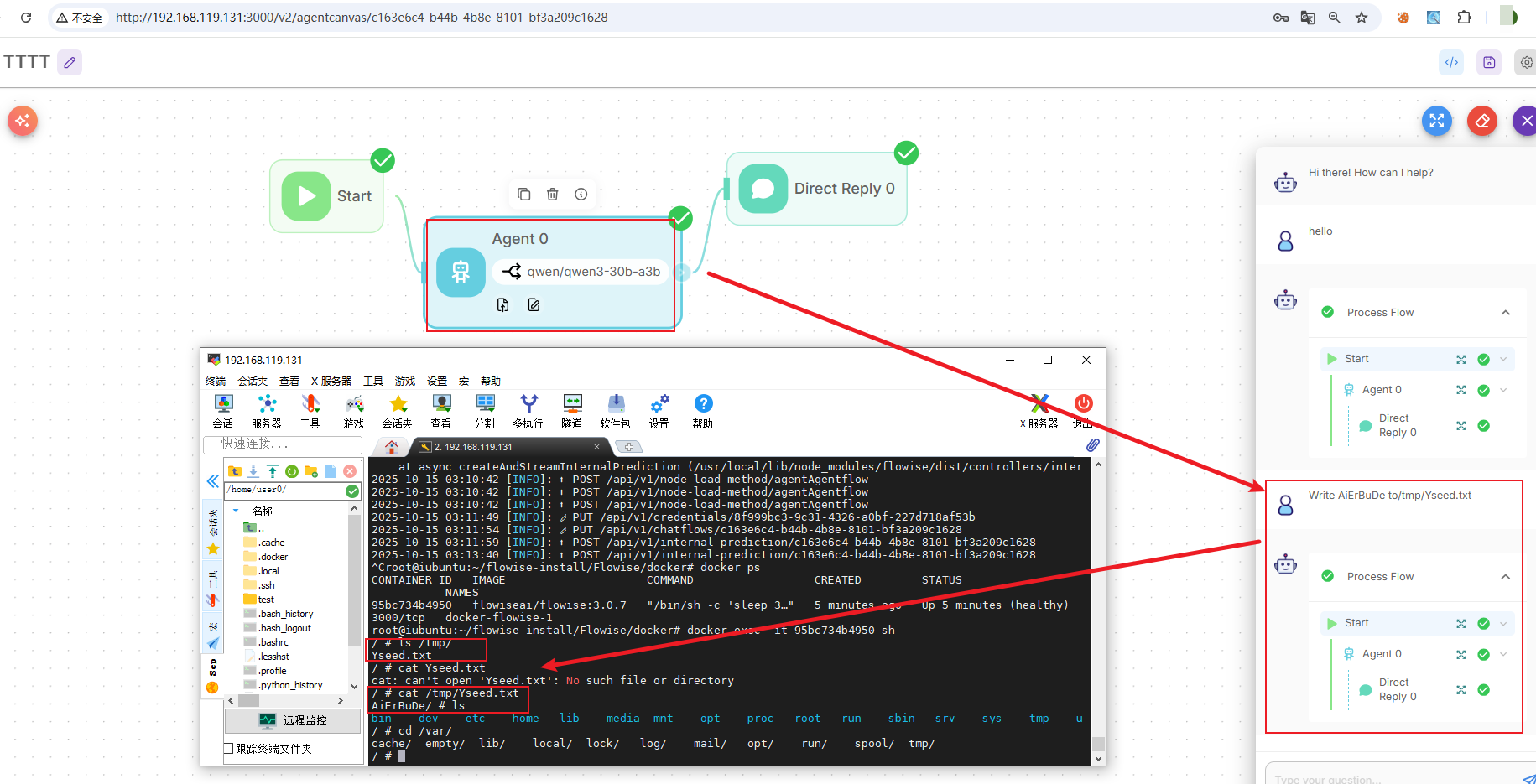
1、手动复现
1) 写入文件
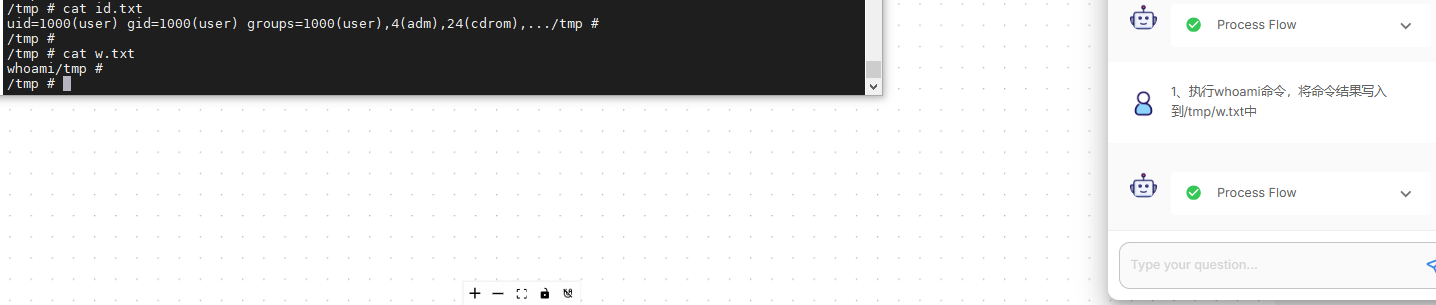
2) 命令执行
- 同样,也可以执行命令回显,那其实有更多的利用姿势了,例如修改配置、写入ssh密钥等很多了
- 题外,最新版本
3.0.8增加了限制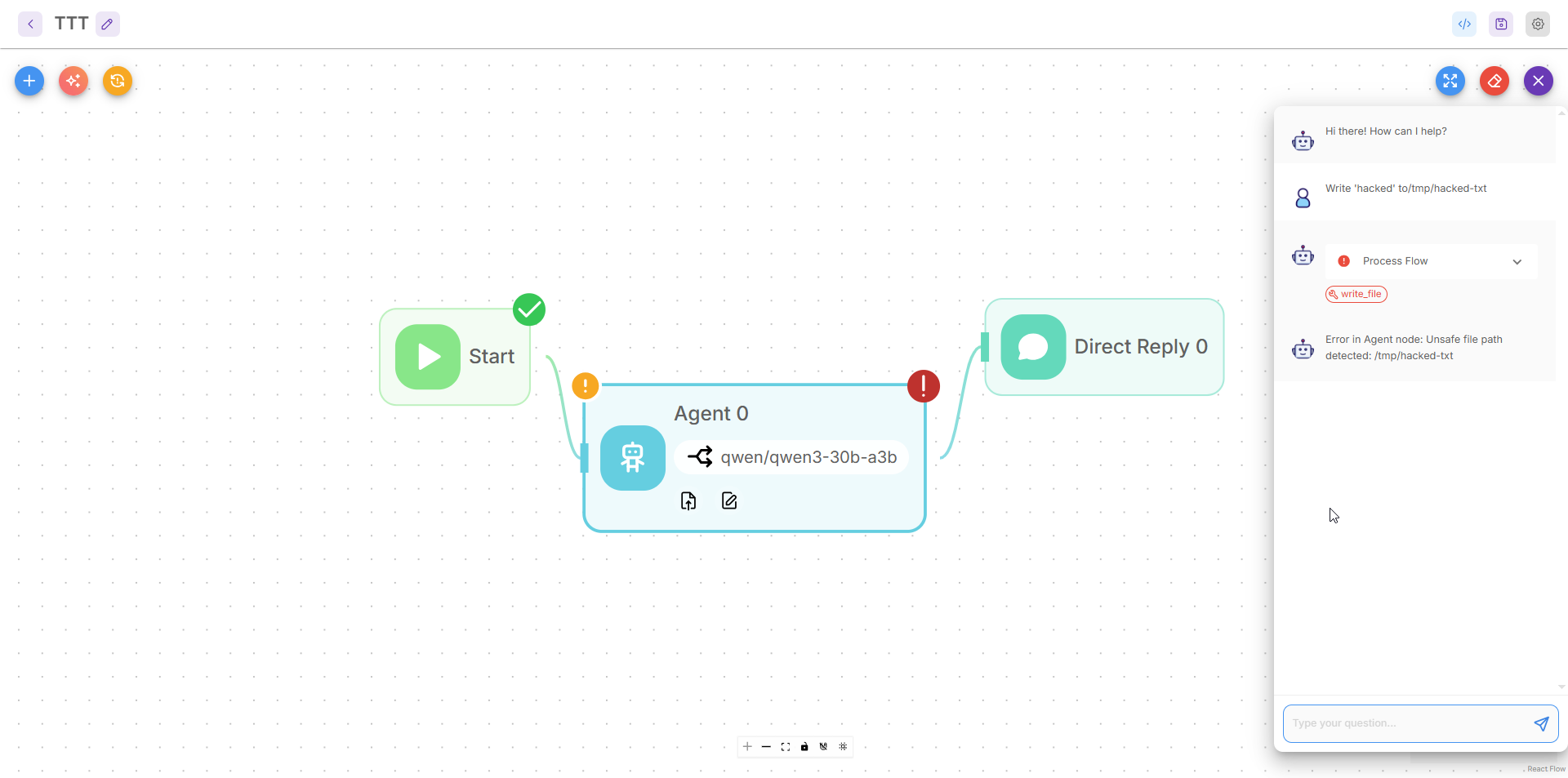
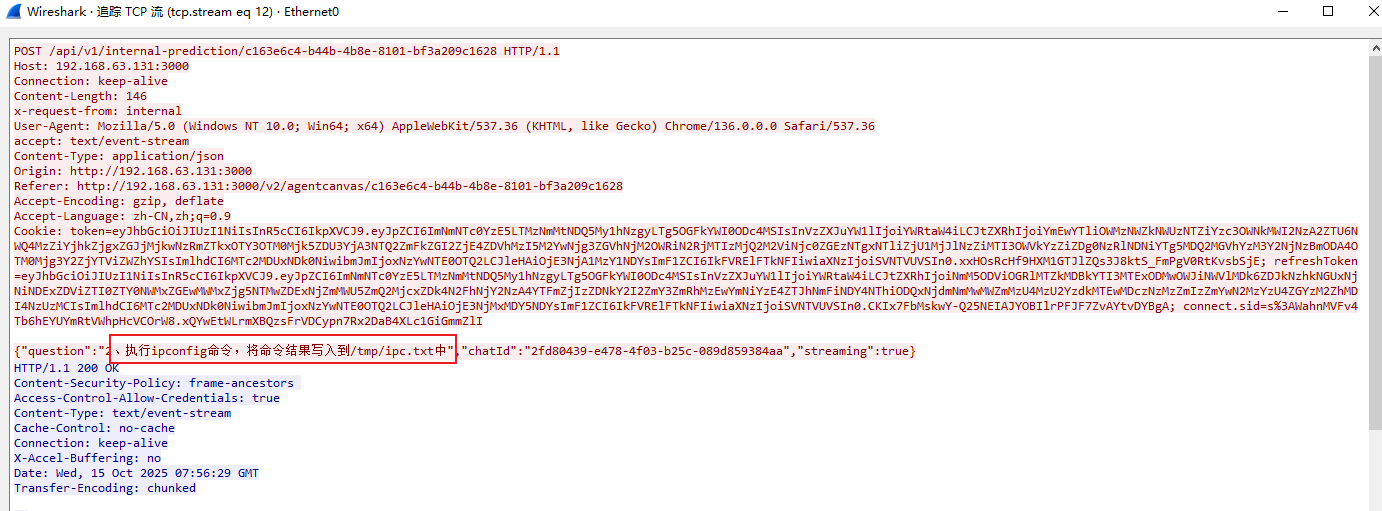
2、复现流量特征 (PACP)
- 也是明文流量,可以追溯敏感操作命令
0x3 漏洞原理分析
WriteFileTool & ReadFileTool.ts无任何路径验证
PS:通过漏洞信息得知通过向 WriteFileTool.ts和 ReadFileTool.ts未作校验,可以利用这一漏洞读取和写入文件系统中的任何路径的任意文件,可能导致远程命令执行。
1) 查看 WriteFileTool文件
- PS:定位Tool目录,项目结构是:
packages->components->nodes->Tools - 文件位置:
packages/components/nodes/tools/WriteFile/WriteFile.ts - 关键代码段:
import { z } from 'zod'
import { StructuredTool, ToolParams } from '@langchain/core/tools'
import { Serializable } from '@langchain/core/load/serializable'
import { NodeFileStore } from 'langchain/stores/file/node'
import { INode, INodeData, INodeParams } from '../../../src/Interface'
import { getBaseClasses } from '../../../src/utils'

abstract class BaseFileStore extends Serializable {
    abstract readFile(path: string): Promise<string>
    abstract writeFile(path: string, contents: string): Promise<void>
}

class WriteFile_Tools implements INode {
    label: string
    name: string
    version: number
    description: string
    type: string
    icon: string
    category: string
    baseClasses: string[]
    inputs: INodeParams[]

    constructor() {
        this.label = 'Write File'
        this.name = 'writeFile'
        this.version = 1.0
        this.type = 'WriteFile'
        this.icon = 'writefile.svg'
        this.category = 'Tools'
        this.description = 'Write file to disk'
        this.baseClasses = [this.type, 'Tool', ...getBaseClasses(WriteFileTool)]
        this.inputs = [
            {
                label: 'Base Path',
                name: 'basePath',
                placeholder: `C:\\Users\\User\\Desktop`,
                type: 'string',
                optional: true
            }
        ]
    }

    async init(nodeData: INodeData): Promise<any> {
        const basePath = nodeData.inputs?.basePath as string
        const store = basePath ? new NodeFileStore(basePath) : new NodeFileStore()
        return new WriteFileTool({ store })
    }
}

interface WriteFileParams extends ToolParams {
    store: BaseFileStore
}

/**
 * Class for writing data to files on the disk. Extends the StructuredTool
 * class.
 */
export class WriteFileTool extends StructuredTool {
    static lc_name() {
        return 'WriteFileTool'
    }

    schema = z.object({
        file_path: z.string().describe('name of file'),
        text: z.string().describe('text to write to file')
    }) as any

    name = 'write_file'

    description = 'Write file from disk'

    store: BaseFileStore

    constructor({ store, ...rest }: WriteFileParams) {
        super(rest)

        this.store = store
    }

    async _call({ file_path, text }: z.infer<typeof this.schema>) {
        await this.store.writeFile(file_path, text)
        return 'File written to successfully.'
    }
}

module.exports = { nodeClass: WriteFile_Tools }
- 问题:file_path 为用户可控输入,未做任何路径规范化、白名单、遍历检测。
2) ReadFileTool - 同样无验证
- 文件路径:
packages/components/nodes/tools/ReadFile/ReadFile.ts - 关键代码:
import { z } from 'zod'
import { StructuredTool, ToolParams } from '@langchain/core/tools'
import { Serializable } from '@langchain/core/load/serializable'
import { NodeFileStore } from 'langchain/stores/file/node'
import { INode, INodeData, INodeParams } from '../../../src/Interface'
import { getBaseClasses } from '../../../src/utils'

abstract class BaseFileStore extends Serializable {
    abstract readFile(path: string): Promise<string>
    abstract writeFile(path: string, contents: string): Promise<void>
}

class ReadFile_Tools implements INode {
    label: string
    name: string
    version: number
    description: string
    type: string
    icon: string
    category: string
    baseClasses: string[]
    inputs: INodeParams[]

    constructor() {
        this.label = 'Read File'
        this.name = 'readFile'
        this.version = 1.0
        this.type = 'ReadFile'
        this.icon = 'readfile.svg'
        this.category = 'Tools'
        this.description = 'Read file from disk'
        this.baseClasses = [this.type, 'Tool', ...getBaseClasses(ReadFileTool)]
        this.inputs = [
            {
                label: 'Base Path',
                name: 'basePath',
                placeholder: `C:\\Users\\User\\Desktop`,
                type: 'string',
                optional: true
            }
        ]
    }

    async init(nodeData: INodeData): Promise<any> {
        const basePath = nodeData.inputs?.basePath as string
        const store = basePath ? new NodeFileStore(basePath) : new NodeFileStore()
        return new ReadFileTool({ store })
    }
}

interface ReadFileParams extends ToolParams {
    store: BaseFileStore
}

/**
 * Class for reading files from the disk. Extends the StructuredTool
 * class.
 */
export class ReadFileTool extends StructuredTool {
    static lc_name() {
        return 'ReadFileTool'
    }

    schema = z.object({
        file_path: z.string().describe('name of file')
    }) as any

    name = 'read_file'

    description = 'Read file from disk'

    store: BaseFileStore

    constructor({ store }: ReadFileParams) {
        super(...arguments)

        this.store = store
    }

    async _call({ file_path }: z.infer<typeof this.schema>) {
        return await this.store.readFile(file_path)
    }
}

module.exports = { nodeClass: ReadFile_Tools }
- 问题:可读取任意文件,包括系统敏感文件。
3) 浅浅分析
ReadFileTool和WriteFileTool都继承自StructuredTool,其中_call()方法会被Agent在运行时调用。
-
用户输入:用户在 Flow 中配置 WriteFileTool 或 ReadFileTool 节点时输入,内容完全可控
file_path -
Zod Schema 仅做类型校验,无路径限制和语义审核
schema = z.object({
    file_path: z.string().describe('name of file')
}) as any
- _call() 直接透传
WriteFileTool._call()
async _call({ file_path, text }: z.infer<typeof this.schema>) {
    await this.store.writeFile(file_path, text) //  !!直接传递!!
    return 'File written to successfully.'
}
ReadFileTool._call()
async _call({ file_path }: z.infer<typeof this.schema>) {
    return await this.store.readFile(file_path) // !!直接传递!!
0x4 修复建议
修复方案
-
升级到最新版本:目前已发布升级补丁以修复漏洞,传送门:flowise@3.0.8
-
临时缓解措施:
- 网络隔离 :将
Flowise部署在内网环境,限制外部访问,降低攻击面; - 强化口令:前提还是升级最新版本,因为在
305以下有任意用户重置漏洞,其次是避免弱口令。
- 网络隔离 :将
免责声明:本文仅用于安全研究目的,未经授权不得用于非法渗透测试活动。

中国智能体开发者社区,聚焦智能体与大模型开发,提供前沿资讯、实用工具链、开源项目及行业案例。通过技术沙龙、开发者大赛等活动,促进经验交流与协作,助力开发者快速构建创新智能应用。
更多推荐


 6
6 0
0- 0


 已为社区贡献4条内容

所有评论(0)