怎么使用webrtc(ZLMRTCClient.js)视频播放器进行播放
·
1.public中新加两个文件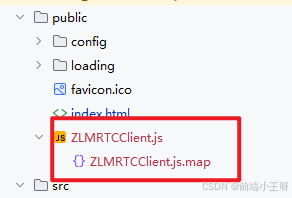
在public中引入文件
<script type="text/javascript" src="<%= BASE_URL %>ZLMRTCClient.js?v=<%= new Date().getTime() %>"></script>
2.创建组件webrtc-player.vue
<template>
  <!-- webrtc播放器 -->
  <video
    :id="videoId"
    ref="jswebrtc"
    :controls="controls"
    style="width: 100%; height: 100%; object-fit: fill"
    muted
  ></video>
</template>

<script>
export default {
  name: 'WebrtcPlayer',
  props: {
    videoId: {
      type: String,
      default: 'jswebrtc'
    },
    videoSrc: {
      type: String,
      default: ''
    },
    controls: {
      type: Boolean,
      default: true
    }
  },
  data() {
    return {
      player: null
    }
  },
  mounted() {
    this.$watch(
      'videoSrc',
      () => {
        console.log('videoSrc', this.videoSrc)
        if (this.videoSrc) {
          this.initVideo(this.videoSrc)
        } else {
          this.stop()
        }
      },
      { immediate: true, deep: true }
    )
  },
  beforeUnmount() {
    if (this.player) {
      // 关闭流
      this.player.pc.close()
      this.player = null
    }
  },
  methods: {
    initVideo(url) {
      console.log('播放器', this.player)
      // 关闭流
      if (this.player) {
        this.player.pc.close()
        this.player = null
      }

      const videoDom = document.getElementById(this.videoId)

      this.player = new ZLMRTCClient.Endpoint({
        element: videoDom, // video 标签
        debug: true, // 是否打印日志
        zlmsdpUrl: url, // 流地址
        simulcast: true,
        useCamera: true,
        audioEnable: true,
        videoEnable: true,
        recvOnly: true,
        resolution: {
          w: 600,
          h: 340
        },
        usedatachannel: true
      })

      this.player.on(ZLMRTCClient.Events.WEBRTC_ICE_CANDIDATE_ERROR, function (e) {
        // ICE 协商出错
        console.log('ICE 协商出错')
      })

      this.player.on(ZLMRTCClient.Events.WEBRTC_ON_REMOTE_STREAMS, function (e) {
        // 获取到了远端流,可以播放
        console.log('播放成功', e.streams)
        videoDom.addEventListener('canplay', function (e) {
          videoDom.play()
        })
      })
      this.player.on(ZLMRTCClient.Events.WEBRTC_OFFER_ANWSER_EXCHANGE_FAILED, function (e) {
        // offer anwser 交换失败
        console.log('offer anwser 交换失败', e)
        // this.player.destroy();
        // this.player = null
      })

      this.player.on(ZLMRTCClient.Events.WEBRTC_ON_LOCAL_STREAM, function (s) {
        // 获取到了本地流
        console.log('offer anwser 交换失败', e)
      })

      this.player.on(ZLMRTCClient.Events.CAPTURE_STREAM_FAILED, function (s) {
        // 获取本地流失败
        console.log('获取本地流失败')
      })

      this.player.on(ZLMRTCClient.Events.WEBRTC_ON_CONNECTION_STATE_CHANGE, function (state) {
        // RTC 状态变化 ,详情参考 https://developer.mozilla.org/en-US/docs/Web/API/RTCPeerConnection/connectionState
        console.log('当前状态==>', state)
      })

      this.player.on(ZLMRTCClient.Events.WEBRTC_ON_DATA_CHANNEL_OPEN, function (event) {
        console.log('rtc datachannel 打开 :', event)
      })

      this.player.on(ZLMRTCClient.Events.WEBRTC_ON_DATA_CHANNEL_MSG, function (event) {
        console.log('rtc datachannel 消息 :', event.data)
      })
      this.player.on(ZLMRTCClient.Events.WEBRTC_ON_DATA_CHANNEL_ERR, function (event) {
        console.log('rtc datachannel 错误 :', event)
      })
      this.player.on(ZLMRTCClient.Events.WEBRTC_ON_DATA_CHANNEL_CLOSE, function (event) {
        console.log('rtc datachannel 关闭 :', event)
      })
    },
    stop() {
      const videoDom = document.getElementById(this.videoId)
      videoDom.pause()
      // 关闭流
      this.player.pc.close()
      this.player = null
    }
  }
}
</script>

<style></style>
3.页面中使用
<WebrtcPlayer
        :videoSrc="videoSrc"
        :videoId="'videoId' + indexL"
        ref="videoWindow"
        :key="indexL"
      >
      </WebrtcPlayer>
import WebrtcPlayer from './component/webrtc-player.vue'

中国智能体开发者社区,聚焦智能体与大模型开发,提供前沿资讯、实用工具链、开源项目及行业案例。通过技术沙龙、开发者大赛等活动,促进经验交流与协作,助力开发者快速构建创新智能应用。
更多推荐

 1
1 0
0- 0


 已为社区贡献1条内容

所有评论(0)