GME-Qwen2-VL-7B:揭秘多模态语义检索的创新方案
一、GME-Qwen2-VL-7B 模型
GME-Qwen2VL 系列是统一的多模态Embedding模型,基于Qwen2-VL 训练,支持动态分辨率。模型支持三种类型的输入:文本、图像、图像-文本对,所有输入类型都可以生成通用的向量表示,并具有优秀的检索性能。使知识向量化不再局限于文本。基于该模型可以实现 文搜文、文搜图,图搜文,图搜图 等丰富的场景。
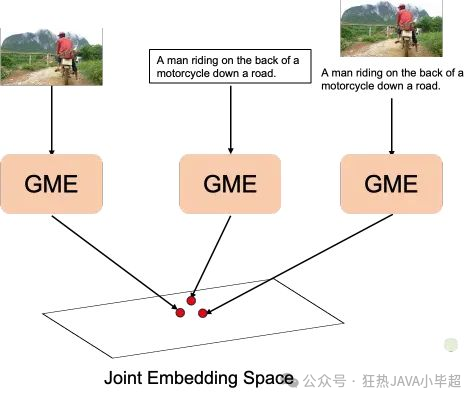
GME-Qwen2-VL-7B ModelScope 地址:
https://modelscope.cn/models/iic/gme-Qwen2-VL-7B-Instruct
本文基于 GME-Qwen2-VL-7B 模型,本地化部署,并实现 文搜图 案例,效果如下所示:
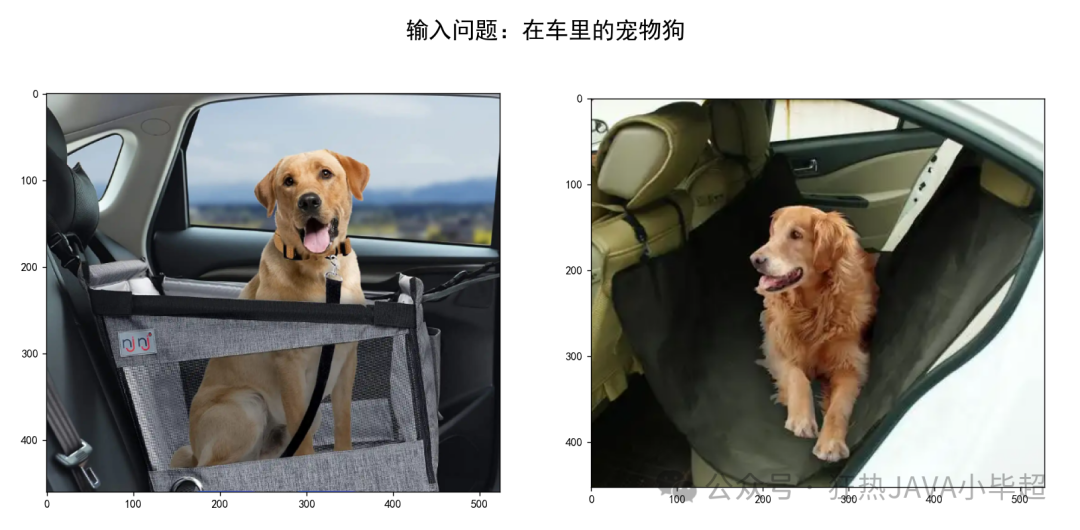
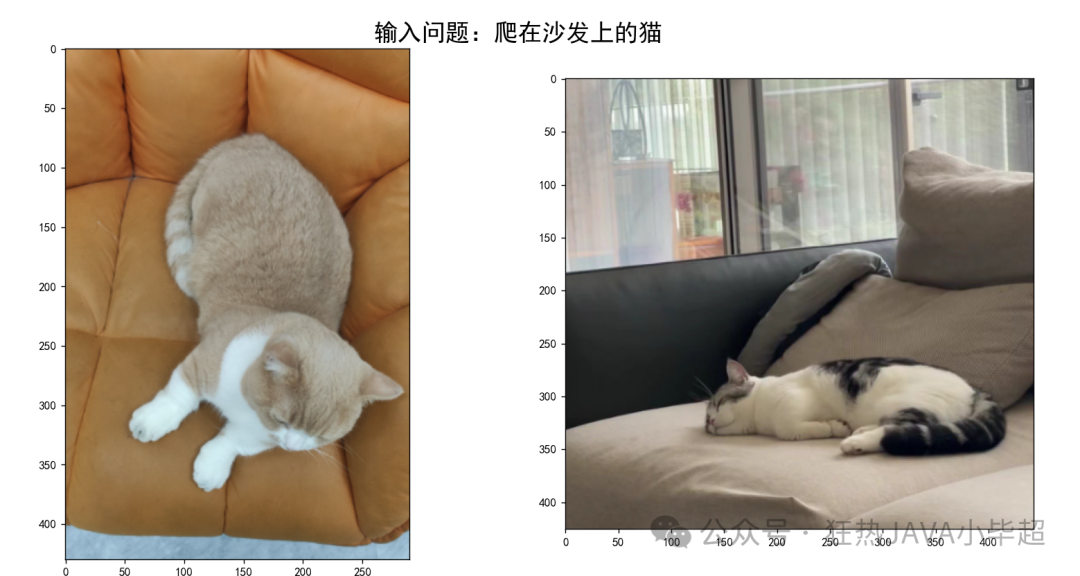
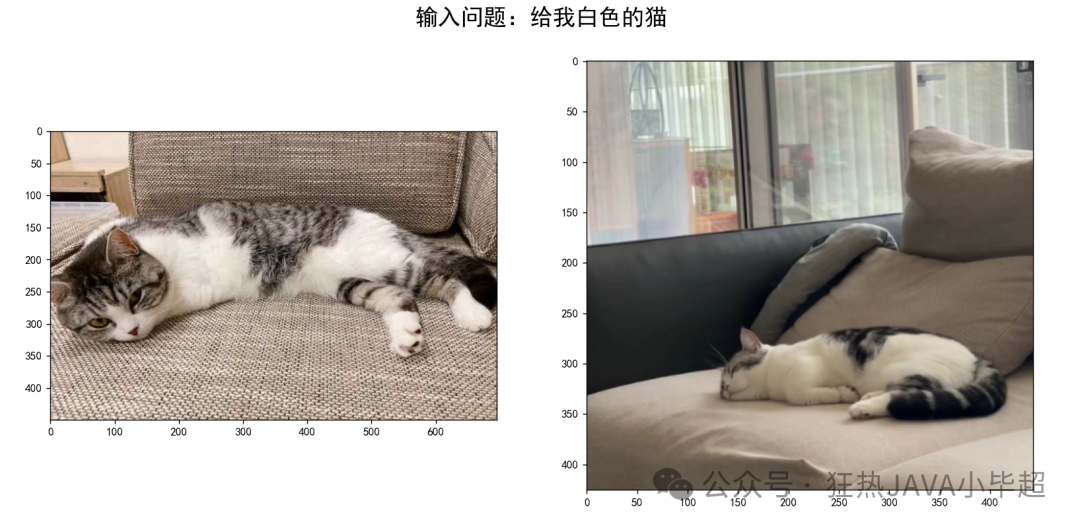
二、GME-Qwen2-VL-7B 部署
下载模型:
modelscope download --model="iic/gme-Qwen2-VL-7B-Instruct" --local_dir gme-Qwen2-VL-7B-Instruct然后将下载后 gme_inference.py 和下面的服务代码放在一起:
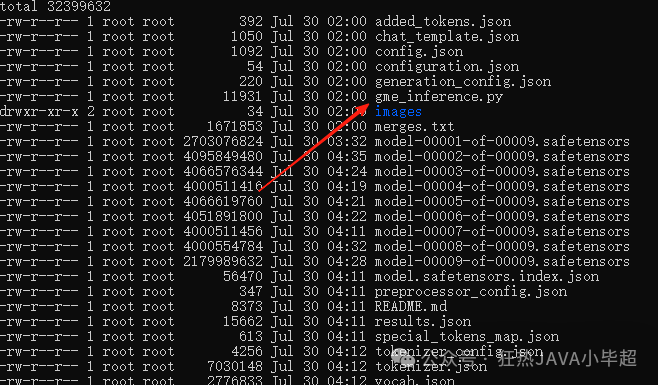
读取模型,并启动api服务:
import time
from fastapi import FastAPI, Request
from fastapi.middleware.cors import CORSMiddleware
import uvicorn, json
from gme_inference import GmeQwen2VL
import torch
import base64
from io import BytesIO
from PIL import Image

app = FastAPI()

app.add_middleware(
    CORSMiddleware,
    allow_origins=["*"],
    allow_credentials=True,
    allow_methods=["*"],
    allow_headers=["*"],
)

model_path = "gme-Qwen2-VL-7B-Instruct"
gme = GmeQwen2VL(model_path=model_path, device="cuda:0")


def base64_to_image(image_base64: str):
    image_data = base64.b64decode(image_base64)
    image_file = BytesIO(image_data)
    image = Image.open(image_file)
    return image


@app.post("/v1/embeddings")
async def embeddings(request: Request):
    global model, tokenizer
    json_post_raw = await request.json()
    json_post = json.dumps(json_post_raw)
    messages = json.loads(json_post)
    texts = messages.get('texts')
    images = messages.get('images')
    if not texts and not images:
        return {
            "code": 400,
            "message": "texts 和 images 至少传一个!",
        }
    t = time.time()
    if images:
        images = [base64_to_image(b) for b in images if b]
    if texts and images:
        embeds = gme.get_fused_embeddings(texts=texts, images=images).tolist()
    elif texts:
        embeds = gme.get_text_embeddings(texts=texts).tolist()
    else:
        embeds = gme.get_image_embeddings(images=images).tolist()
    use_time = time.time() - t
    if torch.backends.mps.is_available():
        torch.mps.empty_cache()
    return {
        "code": 200,
        "message": "success",
        "data": embeds,
        "use_time": use_time
    }


if __name__ == '__main__':
    uvicorn.run(app, host='0.0.0.0', port=8848, workers=1)

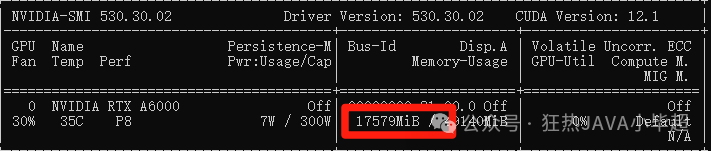
启动后大概占用 17.5G 显存。
三、API 调用示例
import base64
import requests


def encode_image(image_path):
    with open(image_path, "rb") as image_file:
        return base64.b64encode(image_file.read()).decode('utf-8')


def embeds(texts: [] = None, images: [] = None):
    if not texts and not images:
        raise Exception("embed content is empty!")
    if images:
        images = [encode_image(p) for p in images if p]
    response = requests.post(
        "http://127.0.0.1:8848/v1/embeddings",
        json={
            "texts": texts,
            "images": images
        }
    )
    return response.json()["data"]


def main():
    texts = ["你好呀! 小毕超"]
    images = ["img/1.png"]
    print(embeds(texts=texts, images=images))

if __name__ == '__main__':
    main()
调用结果:
向量维度为 3584 维。

四、实现 文搜图 案例
这里我准备了一些 猫、狗的图片:
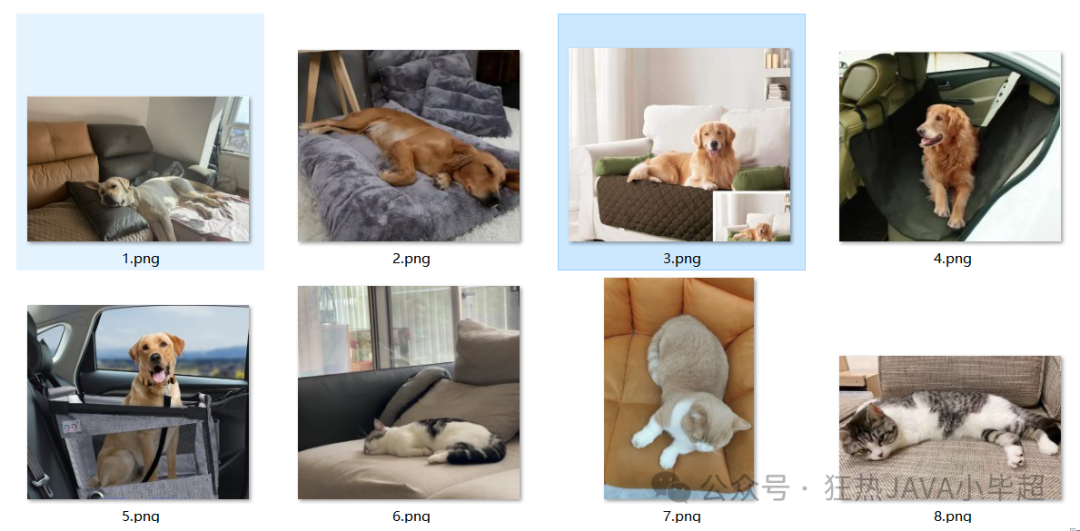
通过 GME-Qwen2-VL-7B 模型向量化并持久化到 Milvus 向量库中 。
import json
import os
import base64
import requests
from pymilvus import MilvusClient, DataType

client = MilvusClient("http://127.0.0.1:19530")
collection_name = "gme_vl_test"

def create_collection():
    client.drop_collection(collection_name=collection_name)
    schema = MilvusClient.create_schema(
        auto_id=False,
        enable_dynamic_field=False,
    )
    schema.add_field(field_name="id", datatype=DataType.VARCHAR, is_primary=True, max_length=255)
    schema.add_field(field_name="vector", datatype=DataType.FLOAT_VECTOR, dim=3584)
    schema.add_field(field_name="content", datatype=DataType.VARCHAR, max_length=5000)
    schema.verify()
    index_params = client.prepare_index_params()
    index_params.add_index(
        field_name="vector",
        index_type="IVF_FLAT",
        metric_type="L2",
        params={"nlist": 1024}
    )
    # 创建 collection
    client.create_collection(
        collection_name=collection_name,
        schema=schema,
        index_params=index_params
    )

def encode_image(image_path):
    with open(image_path, "rb") as image_file:
        return base64.b64encode(image_file.read()).decode('utf-8')

def embeds(texts: [] = None, images: [] = None):
    if not texts and not images:
        raise Exception("embed content is empty!")
    if images:
        images = [encode_image(p) for p in images if p]
    response = requests.post(
        "http://127.0.0.1:8848/v1/embeddings",
        json={
            "texts": texts,
            "images": images
        }
    )
    return response.json()["data"]


def to_milvus():
    for index, img in enumerate(os.listdir("img")):
        img_path = os.path.join("img", img)
        embed = embeds(images=[img_path])
        content = {
            "type": "img",
            "content": img
        }
        client.upsert(
            collection_name=collection_name,
            data={
                "id": str(index),
                "vector": embed[0],
                "content": json.dumps(content, ensure_ascii=False)
            }
        )
        print("save ----> ", img_path)

def main():
    ## 创建collection
    create_collection()
    ## 向量持久化
    to_milvus()

if __name__ == '__main__':
    main()
通过文本进行图像召回检索:
import base64
import requests
from pymilvus import MilvusClient
import matplotlib.pyplot as plt
from PIL import Image

plt.rcParams['font.sans-serif'] = ['SimHei']
client = MilvusClient("http://127.0.0.1:19530")
collection_name = "gme_vl_test"

def encode_image(image_path):
    with open(image_path, "rb") as image_file:
        return base64.b64encode(image_file.read()).decode('utf-8')


def embeds(texts: [] = None, images: [] = None):
    if not texts and not images:
        raise Exception("embed content is empty!")
    if images:
        images = [encode_image(p) for p in images if p]
    response = requests.post(
        "http://127.0.0.1:8848/v1/embeddings",
        json={
            "texts": texts,
            "images": images
        }
    )
    return response.json()["data"]


def main():
    while True:
        question = input("请输入:")
        if not question:
            pass
        if question == "q":
            break
        vec = embeds(texts=[question])
        res = client.search(collection_name, data=vec, limit=2, output_fields=["content"])
        plt.figure()
        plt.axis('off')
        plt.title(f"输入问题:{question}", fontsize=20, fontweight='bold')
        for index, item in enumerate(res[0]):
            img_name = item["entity"]["content"]
            plt.subplot(1, 2, index + 1)
            image = Image.open(f"img/{img_name}")
            plt.imshow(image)
        plt.show()


if __name__ == '__main__':
    main()
运行后,在控制台输入问题:
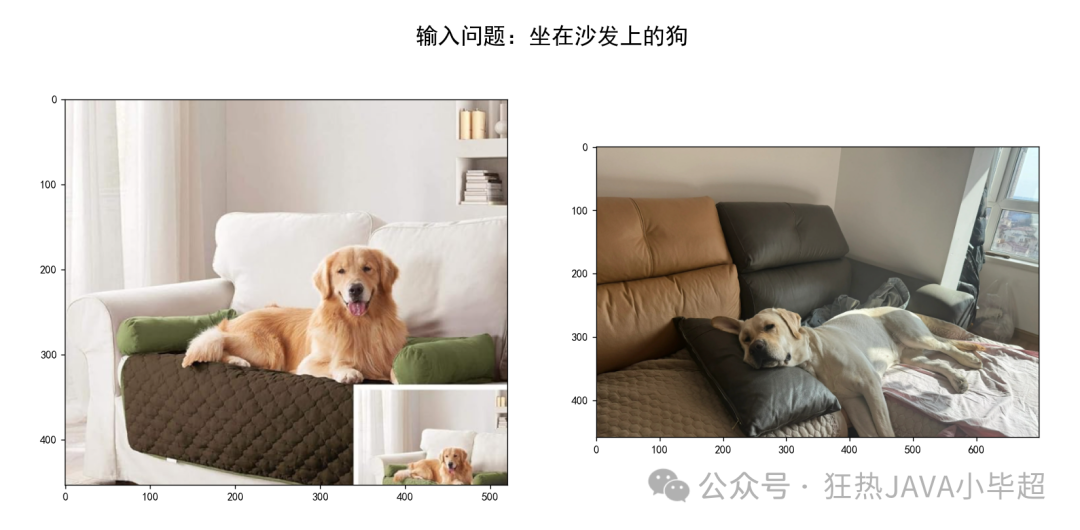
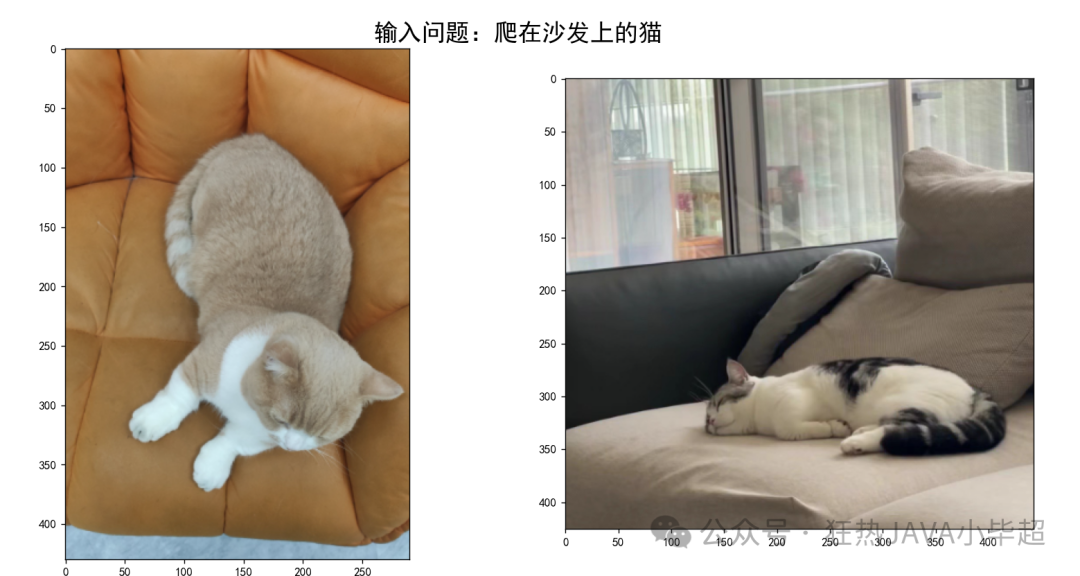
如何学习AI大模型?
我在一线互联网企业工作十余年里,指导过不少同行后辈。帮助很多人得到了学习和成长。
我意识到有很多经验和知识值得分享给大家,也可以通过我们的能力和经验解答大家在人工智能学习中的很多困惑,所以在工作繁忙的情况下还是坚持各种整理和分享。但苦于知识传播途径有限,很多互联网行业朋友无法获得正确的资料得到学习提升,故此将并将重要的AI大模型资料包括AI大模型入门学习思维导图、精品AI大模型学习书籍手册、视频教程、实战学习等录播视频免费分享出来。
这份《LLM项目+学习笔记+电子书籍+学习视频》已经整理好,还有完整版的大模型 AI 学习资料,朋友们如果需要可以微信扫描下方二维码免费领取【保证100%免费】👇👇


第一阶段: 从大模型系统设计入手,讲解大模型的主要方法;
第二阶段: 在通过大模型提示词工程从Prompts角度入手更好发挥模型的作用;
第三阶段: 大模型平台应用开发借助阿里云PAI平台构建电商领域虚拟试衣系统;
第四阶段: 大模型知识库应用开发以LangChain框架为例,构建物流行业咨询智能问答系统;
第五阶段: 大模型微调开发借助以大健康、新零售、新媒体领域构建适合当前领域大模型;
第六阶段: 以SD多模态大模型为主,搭建了文生图小程序案例;
第七阶段: 以大模型平台应用与开发为主,通过星火大模型,文心大模型等成熟大模型构建大模型行业应用。

👉学会后的收获:👈
• 基于大模型全栈工程实现(前端、后端、产品经理、设计、数据分析等),通过这门课可获得不同能力;
• 能够利用大模型解决相关实际项目需求: 大数据时代,越来越多的企业和机构需要处理海量数据,利用大模型技术可以更好地处理这些数据,提高数据分析和决策的准确性。因此,掌握大模型应用开发技能,可以让程序员更好地应对实际项目需求;
• 基于大模型和企业数据AI应用开发,实现大模型理论、掌握GPU算力、硬件、LangChain开发框架和项目实战技能, 学会Fine-tuning垂直训练大模型(数据准备、数据蒸馏、大模型部署)一站式掌握;
• 能够完成时下热门大模型垂直领域模型训练能力,提高程序员的编码能力: 大模型应用开发需要掌握机器学习算法、深度学习框架等技术,这些技术的掌握可以提高程序员的编码能力和分析能力,让程序员更加熟练地编写高质量的代码。

1.AI大模型学习路线图
2.100套AI大模型商业化落地方案
3.100集大模型视频教程
4.200本大模型PDF书籍
5.LLM面试题合集
6.AI产品经理资源合集
👉获取方式:
😝有需要的小伙伴,可以保存图片到wx扫描二v码免费领取【保证100%免费】🆓


中国智能体开发者社区,聚焦智能体与大模型开发,提供前沿资讯、实用工具链、开源项目及行业案例。通过技术沙龙、开发者大赛等活动,促进经验交流与协作,助力开发者快速构建创新智能应用。
更多推荐

 12
12 0
0- 0


 已为社区贡献759条内容

所有评论(0)