Chroma安装教程
这里讲述的是windows环境。
·
Chroma
这里讲述的是windows环境
下载Chroma安装包
下载地址:https://github.com/chroma-core/chroma/releases

运行
chroma-windows.exe run --port 8000
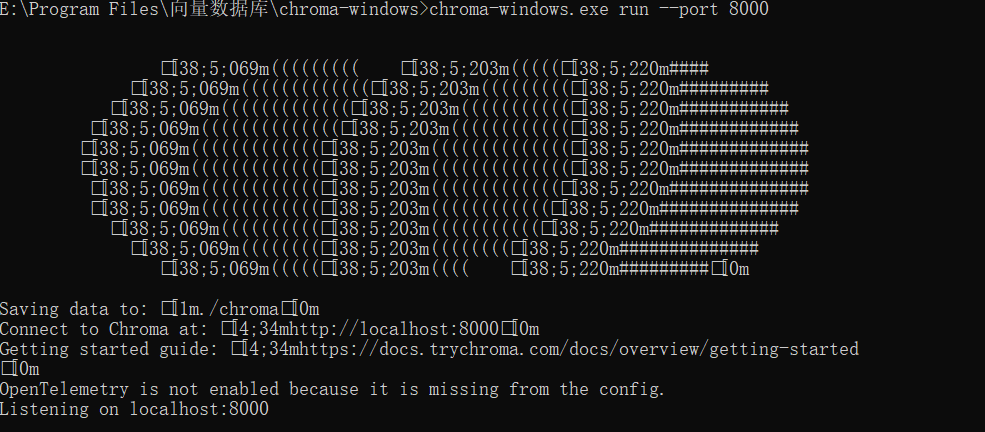
通过心跳检测访问是否正常
http://localhost:8000/api/v2/heartbeat
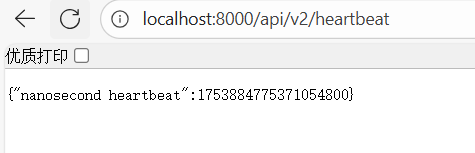
快速使用
python安装chromadb
python -m pip install chromadb

python代码
import chromadb
from chromadb.config import Settings

# 连接到已经启动的 Chroma 服务
client = chromadb.HttpClient(
    host="localhost",
    port=8000,
    settings=Settings(allow_reset=True)
)

# 创建一个名为"my_test"的集合
collection = client.create_collection(name="my_test")

# 向集合中添加3条简单数据
collection.add(
    documents=[
        "苹果是一种水果,红色或绿色,味道甜",
        "小狗喜欢啃骨头,很活泼",
        "计算机需要用电才能工作"
    ],
    ids=["1", "2", "3"]  # 给每条数据起个编号
)

# 搜索与"哪种水果是甜的?"最像的内容
results = collection.query(
    query_texts=["哪种水果是甜的?"],
    n_results=1  # 只返回最像的1条
)

# 打印结果
print("找到的答案:", results["documents"][0][0])
结果:
第一次加载会下载all-MiniLM-L6-v2模型


火山引擎开发者社区是火山引擎打造的AI技术生态平台,聚焦Agent与大模型开发,提供豆包系列模型(图像/视频/视觉)、智能分析与会话工具,并配套评测集、动手实验室及行业案例库。社区通过技术沙龙、挑战赛等活动促进开发者成长,新用户可领50万Tokens权益,助力构建智能应用。
更多推荐
 9
9 0
0- 0


 已为社区贡献4条内容

所有评论(0)