页面接入deepseek代码,点击即可对话
页面接入deepseek api接口,支持上下文对话,直接点开页面就能使用;简单、快捷、方便。
·
页面调用deepseek接口,需要自己去deepseek官网,注册获取apiKey;
并且保证deepseek账号有钱,才能调用;
支持上下文对话;支持v2和r1模型调用。
使用方法:
1、在左面创建一个.html格式文件
2、将下面带啊复制到新建的文件中
3、可以直降将新建文件拖拽到浏览器中,或者左键文件,使用浏览器打开;
4、页面如下,输入apiKey,就可以发起提问。
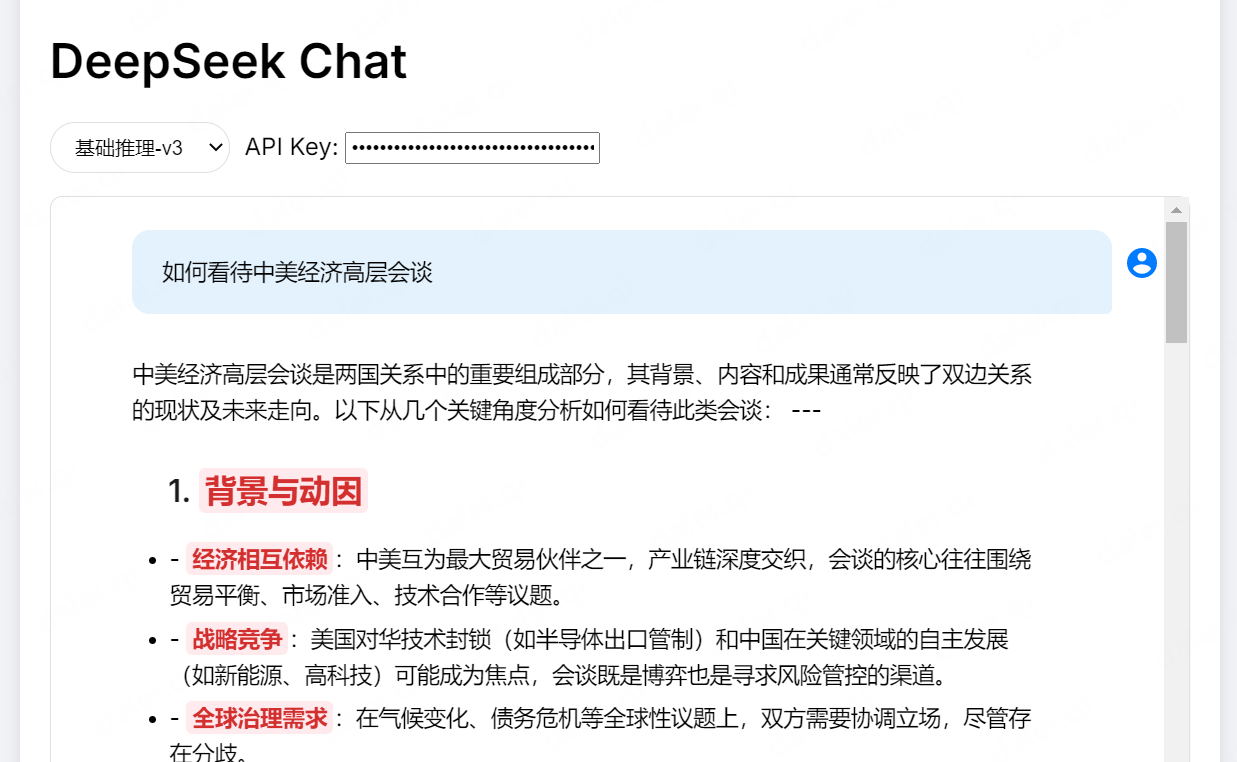
代码如下:
<!DOCTYPE html>
<html lang="zh-CN">
<head>
<!-- 新增官网同款字体 -->
<link href="https://fonts.googleapis.com/css2?family=Inter:wght@400;500;600&display=swap" rel="stylesheet">
<!-- 在<head>中添加语法高亮库 -->
<link href="https://cdnjs.cloudflare.com/ajax/libs/prism/1.24.1/themes/prism-tomorrow.min.css" rel="stylesheet" />
<script src="https://cdnjs.cloudflare.com/ajax/libs/prism/1.24.1/prism.min.js"></script>
<script src="https://cdnjs.cloudflare.com/ajax/libs/prism/1.24.1/components/prism-javascript.min.js"></script>
<script src="https://cdnjs.cloudflare.com/ajax/libs/prism/1.24.1/components/prism-python.min.js"></script>
<script src="https://cdnjs.cloudflare.com/ajax/libs/prism/1.24.1/components/prism-java.min.js"></script> <meta charset="UTF-8">
<title>DeepSeek Chat</title>
<style>
body {
font-family: Arial, sans-serif;
max-width: 800px;
margin: 0 auto;
padding: 20px;
background: #f0f2f5;
}
#chat-container {
background: white;
border-radius: 10px;
box-shadow: 0 2px 10px rgba(0,0,0,0.1);
padding: 20px;
}
/* 标题样式 */
.content-heading {
color: #1a1a1a;
margin: 1.2em 0 0.8em;
font-weight: 600;
position: relative;
padding-left: 24px;
}
h1.content-heading { font-size: 1.8em; }
h2.content-heading { font-size: 1.6em; }
h3.content-heading { font-size: 1.4em; }
.content-heading::before {
content: '';
position: absolute;
left: 0;
color: #0878FF;
font-weight: 700;
}
/* 强调样式 */
strong {
color: #d32f2f;
font-weight: 600;
padding: 2px 4px;
background: #ffebee;
border-radius: 4px;
}
em {
color: #0878FF;
font-style: normal;
border-bottom: 2px dashed rgba(8,120,255,0.3);
}
/* 列表样式 */
.custom-list {
margin: 12px 0;
padding-left: 28px;
list-style: none;
}
.star-list::before {
content: "✦"; /* 使用星形符号替代默认圆点 */
color: #0878FF;
margin-right: 8px;
font-size: 0.9em;
}
#chat-history {
height: 500px;
overflow-y: auto;
margin-bottom: 20px;
padding: 10px;
border: 1px solid #e0e0e0;
border-radius: 8px;
}
/* 官网风格消息气泡 */
.message {
margin: 12px 24px;
padding: 16px 20px;
border-radius: 12px;
line-height: 1.6;
font-size: 15px;
max-width: 85%;
position: relative;
transition: transform 0.2s ease;
}
.user-message {
background: #e3f2fd;
margin-left: auto;
border-bottom-right-radius: 4px;
}
.bot-message {
background: #f5f5f5;
margin-right: auto;
}
/* 添加角色图标 */
.user-message::before,
.bot-message::before {
content: '';
width: 24px;
height: 24px;
position: absolute;
background-size: contain;
top: 10px;
}
.user-message::before {
background-image: url('data:image/svg+xml;utf8,<svg xmlns="http://www.w3.org/2000/svg" viewBox="0 0 24 24" fill="%23007bff"><path d="M12 2C6.48 2 2 6.48 2 12s4.48 10 10 10 10-4.48 10-10S17.52 2 12 2zm0 3c1.66 0 3 1.34 3 3s-1.34 3-3 3-3-1.34-3-3 1.34-3 3-3zm0 14.2c-2.5 0-4.71-1.28-6-3.22.03-1.99 4-3.08 6-3.08 1.99 0 5.97 1.09 6 3.08-1.29 1.94-3.5 3.22-6 3.22z"/></svg>');
right: -32px;
}
.bot-message::before {
background-image: url('data:image/svg+xml;utf8,<svg xmlns="http://www.w3.org/2000/svg" viewBox="0 0 24 24" fill="%235a5a5a"><path d="M19 2H5c-1.1 0-2 .9-2 2v14c0 1.1.9 2 2 2h4l3 3 3-3h4c1.1 0 2-.9 2-2V4c0-1.1-.9-2-2-2zm-6 16h-2v-2h2v2zm2.07-7.75-.9.92C13.45 11.9 13 12.5 13 14h-2v-.5c0-1.1.45-2.1 1.17-2.83l1.24-1.26c.37-.36.59-.86.59-1.41 0-1.1-.9-2-2-2s-2 .9-2 2H8c0-2.21 1.79-4 4-4s4 1.79 4 4c0 .88-.36 1.68-.93 2.25z"/></svg>');
left: -32px;
}
@keyframes messageAppear {
0% { opacity: 0; transform: translateY(20px); }
100% { opacity: 1; transform: translateY(0); }
}
/* 代码块样式 */
pre {
background: #1e1e1e;
color: #d4d4d4;
padding: 15px;
border-radius: 8px;
overflow-x: auto;
tab-size: 4;
font-family: 'Consolas', monospace;
margin: 10px 0;
}
/* XML标签高亮 */
.xml-tag { color: #569cd6; }
.xml-attr { color: #9cdcfe; }
.xml-value { color: #ce9178; }
/* 链接样式 */
a {
color: #007bff;
text-decoration: none;
border-bottom: 1px solid rgba(0,123,255,0.3);
}
a:hover {
color: #0056b3;
border-bottom-color: currentColor;
}
/* 表格样式 */
table {
border-collapse: collapse;
margin: 16px 0;
}
td {
padding: 8px 12px;
border: 1px solid #e0e0e0;
}
/* 列表样式 */
ul, ol {
margin: 10px 0;
padding-left: 25px;
}
li {
margin: 5px 0;
}
#input-area {
display: flex;
gap: 10px;
}
#user-input {
flex: 1;
padding: 12px;
border: 1px solid #e0e0e0;
border-radius: 25px;
outline: none;
}
button {
padding: 12px 24px;
background: #007bff;
color: white;
border: none;
border-radius: 25px;
cursor: pointer;
transition: background 0.3s;
}
button:hover {
background: #0056b3;
}
button:disabled {
background: #cccccc;
cursor: not-allowed;
}
.loading {
color: #666;
font-style: italic;
}
/* 新增模型选择样式 */
#model-selector {
margin-bottom: 15px;
display: flex;
gap: 10px;
align-items: center;
}
#model-list {
padding: 8px 12px;
border-radius: 20px;
border: 1px solid #e0e0e0;
background: white;
}
#custom-model-input {
display: none;
padding: 8px 12px;
border-radius: 20px;
border: 1px solid #e0e0e0;
width: 200px;
}
.custom-model-visible {
display: inline-block !important;
}
/* 增强代码块样式 */
pre[class*="language-"] {
border-radius: 12px;
margin: 1em 0;
padding: 1.5em 2em;
overflow: auto;
position: relative;
background: #2d2d2d;
font-family: 'Fira Code', Consolas, Monaco, 'Andale Mono', 'Ubuntu Mono', monospace;
font-size: 0.95em;
line-height: 1.5;
}
/* 行号样式 */
pre[class*="language-"].line-numbers {
padding-left: 3.8em;
counter-reset: linenumber;
}
pre[class*="language-"].line-numbers > code {
position: relative;
white-space: pre-wrap;
}
.line-numbers .line-numbers-rows {
position: absolute;
pointer-events: none;
top: 1em;
left: -3.8em;
width: 3em; /* 行号宽度 */
letter-spacing: -1px;
border-right: 1px solid #999;
user-select: none;
}
.line-numbers-rows > span {
display: block;
counter-increment: linenumber;
}
.line-numbers-rows > span:before {
content: counter(linenumber);
color: #666;
display: block;
padding-right: 0.8em;
text-align: right;
}
/* 代码抬头框 */
.md-code-block-banner-wrap{
background-color: #fff;
position: -webkit-sticky;
position: sticky;
top: 0;
}
.code-block {
max-height: 600px;
overflow: auto;
position: relative;
}
/* 代码类型提示标签 */
.code-language-tag {
position: absolute;
top: 0;
right: 0;
background: rgba(255,255,255,0.1);
color: #999;
padding: 0.2em 1em;
font-size: 0.8em;
border-bottom-left-radius: 8px;
}
/* 复制按钮样式 */
.copy-code-btn {
opacity: 1; /* 始终显示 */
top: 8px;
right: 8px;
padding: 6px 10px;
background: rgba(40, 167, 69, 0.9);
border: none;
transition: all 0.2s ease;
}
.copy-code-btn:hover {
background: #28a745;
transform: scale(1.05);
}
.copy-code-btn svg {
width: 14px;
height: 14px;
}
/* 新增成功提示样式 */
.copy-success-tag {
position: absolute;
background: #28a745;
color: white;
padding: 6px 12px;
border-radius: 4px;
font-size: 0.9em;
animation: fadeOut 1.5s ease forwards;
z-index: 1000;
}
@keyframes fadeOut {
0% { opacity: 1; }
100% { opacity: 0; }
}
/* 代码标题栏样式 */
.code-header {
display: flex;
justify-content: space-between;
align-items: center;
padding: 8px 12px;
background: rgba(0,0,0,0.1);
background-color: #fff;
border-radius: 8px 8px 0 0;
}
.code-header {
background: white;
border-bottom: 1px solid var(--ds-border);
padding: 8px 12px;
}
.code-language {
color: #999;
font-size: 0.85em;
text-transform: uppercase;
}
pre[class*="language-"]:hover .copy-code-btn {
opacity: 1;
}
/* 复制成功提示 */
.copy-success {
position: fixed;
top: 20px;
right: 20px;
background: #4CAF50;
color: white;
padding: 12px 24px;
border-radius: 8px;
box-shadow: 0 4px 12px rgba(0,0,0,0.15);
animation: slideIn 0.3s ease-out;
z-index: 1000;
}
@keyframes slideIn {
from { transform: translateX(100%); }
to { transform: translateX(0); }
}
.md-code-block-banner {
padding: 8px 16px;
color: #fff;
font-size: var(--ds-md-code-block-font-size);
line-height: var(--ds-md-code-block-font-size);
border-top-left-radius: 8px;
border-top-right-radius: 8px;
background: #50505a;
justify-content: space-between;
display: flex;
}
.md-code-block-banner-wrap {
background-color: #fff;
position: -webkit-sticky;
position: sticky;
top: 0;
}
Style Attribute {
--ds-md-zoom: 1.143;
}
body, page, .ds-theme {
--ds-font-size-m: 14px;
}
.md-code-block {
--ds-md-code-block-font-size: calc(var(--ds-md-zoom)*var(--ds-font-size-xsp));
border-radius: calc(var(--ds-md-zoom)*10px);
font-size: var(--ds-md-code-block-font-size);
line-height: calc(var(--ds-md-code-block-font-size)*1.6);
color: #fff;
background: #181d28;
}
/*.md-code-block-infostring {*/
/* position: absolute;*/
/* top: -12px;*/
/* right: 10px;*/
/* z-index: 1; !* 确保悬浮于代码块上方 *!*/
/*}*/
.md-code-block-infostring {
font-size: 0.85em; /* 字号小于主代码内容 */
color: #f0f0f0; /* 中性灰文字色 */
display: inline-block; /* 行内块布局 */
/*margin: 0 0 8px 0; !* 下边距隔离代码块 *!*/
margin-right: auto;
}
.md-code-block-infostring-right {
position: absolute;
top: -12px;
right: 10px;
z-index: 1; /* 确保悬浮于代码块上方 */
}
/*.md-code-block-action {*/
/* align-items: center;*/
/* display: flex;*/
/*}*/
.ds-markdown-code-copy-button {
background-color: rgba(var(--ds-rgba-transparent));
color: inherit;
cursor: pointer;
border: none;
margin: 0;
padding: 0;
}
body, page {
--ds-rgba-transparent: 255 255 255/0;
font-family: Inter,system-ui,-apple-system,BlinkMacSystemFont,Segoe UI,Roboto,Noto Sans,Ubuntu,Cantarell,Helvetica Neue,Oxygen,Open Sans,sans-serif;
}
/* 容器样式:ml-citation{ref="1,2" data="citationList"} */
.md-code-block-action {
position: relative;
background: #F8F9FA;
border-radius: 6px;
margin: 16px 0;
border: 1px solid #EAECEF;
}
/* 代码块样式:ml-citation{ref="3,6" data="citationList"} */
pre code {
display: block;
padding: 20px;
font-family: 'JetBrains Mono', monospace;
font-size: 14px;
color: #24292E;
overflow-x: auto;
}
/* 复制按钮样式:ml-citation{ref="2,4" data="citationList"} */
.ds-markdown-code-copy-button {
position: absolute;
top: 12px;
right: 12px;
padding: 6px 12px;
background: rgba(255, 255, 255, 0.1);
border: 1px solid rgba(255, 255, 255, 0.2);
border-radius: 6px;
color: #e0e0e0;
cursor: pointer;
transition: all 0.2s ease;
backdrop-filter: blur(4px);
display: flex;
align-items: center;
gap: 6px;
font-size: 0.85em;
}
/* 悬停交互:ml-citation{ref="4,5" data="citationList"} */
/* ========= 复制按钮核心样式 ========= */
.ds-markdown-code-copy-button {
position: absolute;
top: 12px;
right: 12px;
padding: 5px 10px;
background: rgba(255, 255, 255, 0.9);
border: 1px solid #EBEDF0;
border-radius: 4px;
cursor: pointer;
transition: all 0.2s cubic-bezier(0.645, 0.045, 0.355, 1);
display: flex;
align-items: center;
gap: 6px;
font-family: -apple-system, system-ui, Segoe UI, Roboto, Ubuntu, Cantarell, Noto Sans, sans-serif;
font-size: 12px;
color: #606266;
box-shadow: 0 2px 4px rgba(0, 0, 0, 0.04);
opacity: 0;
transform: translateY(2px);
}
/* 悬停状态 */
.ds-markdown-code-copy-button:hover {
background: #FFFFFF;
border-color: #C0C4CC;
color: #0878FF;
box-shadow: 0 2px 8px rgba(0, 0, 0, 0.08);
transform: translateY(0);
}
/* 显示规则 */
.md-code-block:hover .ds-markdown-code-copy-button {
opacity: 1;
}
/* 图标动画 */
.ds-markdown-code-copy-button svg {
width: 14px;
height: 14px;
transition: fill 0.2s;
}
.ds-markdown-code-copy-button:hover svg {
fill: #0878FF;
}
/* ========= 成功提示样式 ========= */
.copy-success-tag {
position: fixed;
top: 24px;
right: 24px;
background: rgba(0, 0, 0, 0.8);
color: #FFFFFF;
padding: 8px 16px;
border-radius: 4px;
font-size: 12px;
display: flex;
align-items: center;
gap: 8px;
box-shadow: 0 4px 12px rgba(0, 0, 0, 0.15);
animation: dsSlideIn 0.3s cubic-bezier(0.4, 0, 0.2, 1);
z-index: 9999;
}
@keyframes dsSlideIn {
from {
opacity: 0;
transform: translateY(-10px);
}
to {
opacity: 1;
transform: translateY(0);
}
}
/* ========= 深色模式适配 ========= */
.dark .ds-markdown-code-copy-button {
background: rgba(255, 255, 255, 0.1);
border-color: rgba(255, 255, 255, 0.12);
color: rgba(255, 255, 255, 0.8);
box-shadow: 0 2px 4px rgba(0, 0, 0, 0.08);
}
.dark .ds-markdown-code-copy-button:hover {
background: rgba(255, 255, 255, 0.15);
color: #4D8EFF;
}
.dark .copy-success-tag {
background: rgba(255, 255, 255, 0.9);
color: #1A1A1A;
box-shadow: 0 4px 12px rgba(0, 0, 0, 0.1);
}
</style>
</head>
<body>
<div id="chat-container">
<h1>DeepSeek Chat</h1>
<!-- 模型选择区域 -->
<div id="model-selector">
<select id="model-list">
<option value="deepseek-chat">基础推理-v3</option>
<option value="deepseek-reasoner">深度思考-r1</option>
<option value="custom">自定义模型</option>
</select>
<input type="text" id="custom-model-input" placeholder="输入模型名称">
<div id="api-key-container" >
<label for="api-key-input">API Key:</label>
<input type="password" id="api-key-input" placeholder="输入你的API Key">
</div>
<div id="api-key-error" style="color: red; display: none;">API Key不能为空</div>
</div>
<div id="chat-history"></div>
<div id="input-area">
<input type="text" id="user-input" placeholder="输入消息...">
<button onclick="sendMessage()" id="send-btn">发送</button>
</div>
<script>
const API_URL = 'https://api.deepseek.com/v1/chat/completions';
let apiKey = localStorage.getItem('apiKey') || '';
// 初始化模型设置
let currentModel = localStorage.getItem('selectedModel') || 'deepseek-chat';
let conversationHistory = [];
let isGenerating = false;
// 初始化页面时恢复模型设置
document.addEventListener('DOMContentLoaded', () => {
const modelSelector = document.getElementById('model-list');
const customInput = document.getElementById('custom-model-input');
// 恢复保存的模型设置
if (currentModel.startsWith('custom:')) {
modelSelector.value = 'custom';
customInput.value = currentModel.replace('custom:', '');
customInput.classList.add('custom-model-visible');
} else {
modelSelector.value = currentModel;
}
// 模型选择事件监听
modelSelector.addEventListener('change', (e) => {
if (e.target.value === 'custom') {
customInput.classList.add('custom-model-visible');
customInput.focus();
} else {
customInput.classList.remove('custom-model-visible');
currentModel = e.target.value;
localStorage.setItem('selectedModel', currentModel);
}
});
// 自定义模型输入监听
customInput.addEventListener('input', (e) => {
currentModel = `custom:${e.target.value}`;
localStorage.setItem('selectedModel', currentModel);
});
// 恢复保存的API Key设置
const apiKeyInput = document.getElementById('api-key-input');
apiKeyInput.value = apiKey;
// API Key输入监听
apiKeyInput.addEventListener('input', (e) => {
const value = e.target.value.trim();
const errorElement = document.getElementById('api-key-error');
if (!value) {
errorElement.style.display = 'block';
} else {
errorElement.style.display = 'none';
}
apiKey = value;
localStorage.setItem('apiKey', apiKey);
});
apiKeyInput.addEventListener('blur', () => {
if (!apiKey.trim()) {
document.getElementById('api-key-error').style.display = 'block';
}
});
});
// 消息处理函数保持不变,修改sendMessage函数:
async function sendMessage() {
if (isGenerating) return;
const trimmedKey = apiKey.trim();
if (!trimmedKey) {
alert('API Key为必填项,请先配置'); // 或调用错误提示元素显示
return;
}
const userInput = document.getElementById('user-input');
const message = userInput.value.trim();
if (!message) return;
// 获取当前选择的模型
const activeModel = currentModel.startsWith('custom:')
? currentModel.split(':')[1]
: currentModel;
// 禁用输入和按钮
userInput.value = '';
const sendBtn = document.getElementById('send-btn');
sendBtn.disabled = true;
isGenerating = true;
try {
// 添加用户消息
addMessage('user', message);
conversationHistory.push({ role: 'user', content: message });
// 添加加载状态
const loadingDiv = document.createElement('div');
loadingDiv.className = 'message bot-message loading';
loadingDiv.textContent = '思考中...';
document.getElementById('chat-history').appendChild(loadingDiv);
// 调用API
const response = await fetch(API_URL, {
method: 'POST',
headers: {
'Content-Type': 'application/json',
'Authorization': `Bearer ${apiKey}`
},
body: JSON.stringify({
model: activeModel,
messages: conversationHistory,
temperature: 0.7
})
});
if (!response.ok) throw new Error(`HTTP错误 ${response.status}`);
const data = await response.json();
const reply = data.choices[0].message.content;
// 移除加载状态
document.getElementById('chat-history').removeChild(loadingDiv);
// 添加助理消息
addMessage('assistant', reply);
conversationHistory.push({ role: 'assistant', content: reply });
} catch (error) {
console.error('请求失败:', error);
addMessage('assistant', `请求失败: ${error.message}`);
} finally {
sendBtn.disabled = false;
isGenerating = false;
}
}
// 添加格式化处理函数
function formatContent(content) {
// XML格式化
content = formatXML(content);
// 处理井号标题
content = content.replace(/^#+\s+(.*$)/gm, (match, text) => {
const level = match.match(/^#+/)[0].length;
return `<h${level} class="content-heading">${text}</h${level}>`;
});
// 处理星号强调
content = content.replace(/\*{2}(.*?)\*{2}/g, '<strong>$1</strong>'); // 双星号转粗体
content = content.replace(/\*{1}(.*?)\*{1}/g, '<em>$1</em>'); // 单星号转斜体
// 处理无序列表
content = content.replace(/^\*\s+(.*$)/gm, '<li class="star-list">$1</li>');
content = content.replace(/(<li.*?<\/li>)/gs, '<ul class="custom-list">$1</ul>');
// 处理代码块中的符号(避免转换)
content = content.replace(/<pre>.*?<\/pre>/gs, (code) => {
return code.replace(/\*/g, '※').replace(/#/g, '#'); // 使用全角符号替代
});
// 处理嵌套强调
content = content.replace(/\*{3}(.*?)\*{3}/g, '<strong><em>$1</em></strong>');
// 处理表格符号
content = content.replace(/^\|(.+)\|$/gm, (match, cells) => {
const cols = cells.split('|').map(c => `<td>${c.trim()}</td>`).join('');
return `<tr>${cols}</tr>`;
});
// 代码块处理
content = content.replace(/<code>([\s\S]*?)<\/code>/g, (match, code) => {
return `<pre>${code.trim()}</pre>`;
});
// 链接自动识别
content = content.replace(/(https?:\/\/[^\s]+)/g, '<a href="$1" target="_blank">$1</a>');
// 列表自动识别
content = content.replace(/^(\s*-\s+.*)$/gm, '<ul><li>$1</li></ul>')
.replace(/<\/ul>\n<ul>/g, '');
// 自动检测代码块(支持多种格式)
content = content.replace(/(```[\s\S]*?```)/g, (match) => {
const langMatch = match.match(/```(\w+)?/);
const language = langMatch && langMatch[1] ? langMatch[1] : 'text';
const codeContent = match.replace(/```[\s\S]*?\n/, '').replace(/```$/, '');
return `
<div class="md-code-block">
<div class="md-code-block-banner-wrap">
<div class="md-code-block-banner">
<span class="md-code-block-infostring">${language}</span>
<button class="ds-markdown-code-copy-button" onclick="copyCode(this)">
<svg viewBox="0 0 24 24" fill="none" stroke="currentColor" stroke-width="2" stroke-linecap="round" stroke-linejoin="round">
<rect x="9" y="9" width="13" height="13" rx="2" ry="2"></rect>
<path d="M5 15H4a2 2 0 0 1-2-2V4a2 2 0 0 1 2-2h9a2 2 0 0 1 2 2v1"></path>
</svg>
<span>复制</span>
</button>
</div>
</div>
<pre ><code class="language-${language}">${escapeHtml(codeContent)}</code></pre>
</div>
`;
});
return content;
}
// 复制功能实现
function copyCode(button) {
const codeBlock = button.closest('.md-code-block');
const codeElement = codeBlock.querySelector('code');
const language = codeBlock.querySelector('.md-code-block-infostring').textContent;
// 获取原始代码内容(自动处理转义字符)
const rawCode = codeElement.textContent;
// 添加语言标识(可选)
const codeWithLang = language !== 'text' ? `// ${language}\n${rawCode}` : rawCode;
navigator.clipboard.writeText(codeWithLang).then(() => {
showAdvancedCopySuccess(codeBlock);
}).catch(err => {
console.error('复制失败:', err);
fallbackCopy(codeWithLang);
});
}
// 显示成功提示
function showCopySuccess() {
const existing = document.querySelector('.copy-success');
if (existing) existing.remove();
const div = document.createElement('div');
div.className = 'copy-success';
div.textContent = '✓ 已复制到剪贴板';
document.body.appendChild(div);
setTimeout(() => div.remove(), 2000);
}
// 兼容性备用方案
function fallbackCopy(text) {
const textarea = document.createElement('textarea');
textarea.value = text;
textarea.style.position = 'fixed';
document.body.appendChild(textarea);
textarea.select();
textarea.style.top = `${rect.top + window.scrollY + 10}px`;
textarea.style.left = `${rect.left + window.scrollX + 10}%`;
try {
document.execCommand('copy');
showCopySuccess();
} catch (err) {
alert('复制失败,请手动选择内容复制');
} finally {
document.body.removeChild(textarea);
}
}
// HTML转义函数
function escapeHtml(unsafe) {
return unsafe
.replace(/&/g, "&")
.replace(/</g, "<")
.replace(/>/g, ">")
.replace(/"/g, """)
.replace(/'/g, "'");
}
// 增强的XML格式化函数
function formatXML(xml) {
// 添加语法高亮
return xml
.replace(/</g, '<')
.replace(/>/g, '>')
.replace(/(<\/([\w-]+)>)/g, '<span class="xml-tag">$1</span>')
.replace(/(<([\w-]+))/g, '<span class="xml-tag">$1</span>')
.replace(/([\w-]+)=/g, '<span class="xml-attr">$1</span>=')
.replace(/("([^"]*)")/g, '<span class="xml-value">$1</span>');
}
function addMessage(role, content) {
const historyDiv = document.getElementById('chat-history');
const messageDiv = document.createElement('div');
messageDiv.className = `message ${role}-message`;
messageDiv.innerHTML = formatContent(content);
// 恢复代码块中的符号
messageDiv.querySelectorAll('pre').forEach(pre => {
pre.innerHTML = restoreSymbols(pre.innerHTML);
});
// 初始化Prism高亮
const preElements = messageDiv.querySelectorAll('pre[class*="language-"]');
preElements.forEach(pre => {
Prism.highlightElement(pre.querySelector('code'));
});
historyDiv.appendChild(messageDiv);
historyDiv.scrollTop = historyDiv.scrollHeight;
}
// 在代码块中恢复原始符号
function restoreSymbols(codeBlock) {
return codeBlock.replace(/※/g, '*').replace(/#/g, '#');
}
// 切换模型时清空历史
document.getElementById('model-list').addEventListener('change', () => {
if (confirm('切换模型将清空对话历史,是否继续?')) {
conversationHistory = [];
document.getElementById('chat-history').innerHTML = '';
}
});
// 优化成功提示
function showAdvancedCopySuccess(codeBlock) {
const successTag = document.createElement('div');
successTag.className = 'copy-success-tag';
successTag.textContent = '✓ 已复制';
const rect = codeBlock.getBoundingClientRect();
// successTag.style.top = `${rect.top + window.scrollY + 10}px`;
// successTag.style.left = `${rect.right + window.scrollX }%`;
// 定位到可视区域顶部居中
successTag.style.position = 'fixed';
successTag.style.top = '20px';
successTag.style.left = '50%';
successTag.style.transform = 'translateX(-50%)';
console.info("scoll"+(rect.top + window.scrollY + 10));
console.info("scoll ${rect.top + window.scrollY + 10}"+(rect.right + window.scrollX ));
document.body.appendChild(successTag);
setTimeout(() => successTag.remove(), 1000);
}
// 支持回车发送
document.getElementById('user-input').addEventListener('keypress', (e) => {
if (e.key === 'Enter' && !isGenerating) {
sendMessage();
}
});
// 增强版复制功能
function copyCode(button) {
const codeBlock = button.closest('.md-code-block');
const codeContent = codeBlock.querySelector('code').innerText;
const language = codeBlock.querySelector('.md-code-block-infostring').innerText;
// 生成带语言标识的代码
const formattedCode = language ? `// ${language}\n${codeContent}` : codeContent;
navigator.clipboard.writeText(formattedCode).then(() => {
showOfficialStyleSuccess();
}).catch(err => {
console.error('复制失败:', err);
fallbackCopy(formattedCode);
});
}
// 官方风格成功提示
function showOfficialStyleSuccess() {
const existing = document.querySelector('.copy-success-tag');
if (existing) existing.remove();
const div = document.createElement('div');
div.className = 'copy-success-tag';
div.innerHTML = `
<svg viewBox="0 0 24 24" width="16" height="16" fill="#52c41a">
<path d="M9 16.17L4.83 12l-1.42 1.41L9 19 21 7l-1.41-1.41z"></path>
</svg>
已复制到剪贴板
`;
document.body.appendChild(div);
setTimeout(() => div.remove(), 2000);
}
// 备用复制方案
function fallbackCopy(text) {
const textarea = document.createElement('textarea');
textarea.value = text;
textarea.style.position = 'fixed';
document.body.appendChild(textarea);
textarea.select();
try {
document.execCommand('copy');
showOfficialStyleSuccess();
} catch (err) {
alert('复制失败,请手动选择内容复制');
} finally {
document.body.removeChild(textarea);
}
}
</script>
</div>
</body>
</html>
中国智能体开发者社区,聚焦智能体与大模型开发,提供前沿资讯、实用工具链、开源项目及行业案例。通过技术沙龙、开发者大赛等活动,促进经验交流与协作,助力开发者快速构建创新智能应用。
更多推荐
 2
2 0
0- 0


 已为社区贡献2条内容

所有评论(0)