Vue3中父子组件传值
·
父组件向子组件传值
在开发中有些功能是通用的,而且逻辑大致相同,像这种东西可以封成一个组件,比较常用的就是函数封装,组件封装,组件封装是需要引入到页面使用的,所以通常它会有一些自己的方法,父子组件可以通过一些值来进行关联,这种方式也就是我们所说的组件传值,vue3的组件传值其实就是组件传值加上了数据类型约束,并没有什么区别。
这里主要介绍vue3组件传值,以批量导入excel文件进行添加和修改功能为例子,父子组件主要用到defineProps和defineEmits来实现组件传值。
父组件向子组件传值:props
这里通过import 自定义组件名 from 子组件路径 来引入组件,在页面中使用<组件名></组件名>即可
1. 子组件定义 props
<template>
  <div class="batch-add">
    <div>上传前请先按Excel模板中的格式编辑内容</div>
    <div class="template-down" @click="downloadExcelTemplate">
      下载Excel模板
    </div>
  </div>
  <div class="upload-div">
    <el-upload
        drag
        action="#"
        :http-request="customUpload"
        :auto-upload="true"
        ref="upload"
        :limit="1"
    >
      <el-icon class="el-icon--upload">
        <upload-filled/>
      </el-icon>
      <div class="el-upload__text"><em>点击上传</em>,或将文件拖拽到此处</div>
    </el-upload>
  </div>
  <div class="tip-div">
    导入规则 <br/>
    1、请先下载模板,在模板中按字段填写信息,然后上传该文件。 <br/>
    2、导入未完成之前,请勿关闭页面,否则可能数据错误。 <br/>
    3、限制导入5000条记录,超出部分请分多次导入。
  </div>
</template>

<script setup>
import {defineProps} from 'vue'
import {useRouter} from "vue-router";
import {importAddAndUpdateExcel} from "@/api/file/file";

const {proxy} = getCurrentInstance();
const router = useRouter();

const props = defineProps({
  excelTemplateUrl: {
    type: String,
    require: true
  },
  excelUploadUrl: {
    type: String,
    require: true
  },
  templateName: {
    type: String,
    default: '导入模板',
    require: true
  },
})


function downloadExcelTemplate() {
  proxy.download(
      props.excelTemplateUrl,
      {},
      props.templateName + `_${new Date().getTime()}.xlsx`
  );
}

// 上传添加excel文件
function customUpload(options) {
  const formData = new FormData();
  formData.append("file", options.file); //这里的 'file' 是后端接收文件的字段名
  importAddAndUpdateExcel(formData, props.excelUploadUrl).then((response) => {
    if (response.code === 200) {
      proxy.$modal.confirm(response.msg, '导入成功').then(function () {
        router.push({
          path: "/system/log",
          query: {time: Date.now()},
        });
      });
    } else {
      proxy.$modal.msgError("上传失败");
    }
  });
}
</script>

<style scoped>
.batch-add {
  display: flex;
  background-color: #f6f7fb;
}

.div-image {
  margin-left: 20px;
}

.template-down {
  margin-left: 8px;
  cursor: pointer;
}

.upload-div {
  margin-top: 12px;
}

.tip-div {
  margin-top: 20px;
}
</style>
2.子组件向父组件传值:emit 事件
在这里插入代码片
<template>
  <el-form :model="exportParams" ref="exportRef" :rules="exportRules" label-width="80px">
    <el-form-item label="操作名称" prop="exportName">
      <el-input v-model="exportParams.exportName" placeholder="请输入操作名称" maxlength="30"/>
    </el-form-item>
  </el-form>
  <div class="dialog-footer">
    <div class="dialog-footer-export">
      <el-button @click="exportCancel">取 消</el-button>
      <el-button type="primary" @click="submitExportForm">保 存</el-button>
    </div>
  </div>
</template>

<script setup>
import {defineProps, defineEmits} from 'vue'
import {useRouter} from "vue-router";
import {exportExport} from "@/api/file/file";

const {proxy} = getCurrentInstance();
const router = useRouter();

const data = reactive({
  exportParams: {
    exportName: undefined
  },
  exportRules: {
    exportName: [{required: true, message: "操作名称不能为空", trigger: "blur"}]
  },
});

const {exportParams, exportRules} = toRefs(data);

const emit = defineEmits(['closeExport']);
const props = defineProps({
  queryParams: {
    type: Object,
    default: () => {
    },
    require: true
  },
  excelDownloadUrl: {
    type: String,
    require: true
  }
})


/** 重置导出按钮操作 */
function exportCancel() {
  emit('closeExport', false);
  exportParams.value.exportName = undefined;
};

/** 提交按钮 */
function submitExportForm() {
  proxy.$refs["exportRef"].validate(valid => {
    if (valid) {
      props.queryParams.exportName = exportParams.value.exportName;
      exportExport(props.queryParams, props.excelDownloadUrl).then(res => {
        if (res.code == 200) {
          emit('closeExport', false);
          exportParams.value.exportName = undefined;
          proxy.$modal.confirm(res.msg, '导出成功').then(function () {
            router.push({
              path: "/system/log",
              query: {time: Date.now()},
            });
          });
        }
      });
    }
  });
};

</script>

<style scoped>
.dialog-footer-export {
  margin-left: 75%;
}
</style>
父组件
<template>
  <div class="app-container">
    <div class="query-form">
      <el-form
          :model="queryParams"
          ref="queryRef"
          :inline="true"
          v-show="showSearch"
          label-width="68px"
      >
        <el-form-item label="药品名称" prop="drugName">
          <el-input
              v-model="queryParams.drugName"
              placeholder="请输入药品名称"
              @keyup.enter="handleQuery"
          />
        </el-form-item>
        <el-form-item label="upc编码" prop="upc">
          <el-input
              v-model="queryParams.upc"
              placeholder="请输入upc编码"
              @keyup.enter="handleQuery"
          />
        </el-form-item>
        <el-form-item label="药品状态" prop="classifyCode">
          <el-select
              v-model="queryParams.status"
              placeholder="状态"
              style="width: 200px"
          >
            <el-option label="启用" value="1"/>
            <el-option label="禁用" value="2"/>
          </el-select>
        </el-form-item>
        <el-form-item label="药品分类" prop="classifyCode">
          <el-select
              v-model="queryParams.classifyCode"
              placeholder="请选择一级分类"
              style="width: 200px"
              @change="findSecondClassify"
          >
            <el-option
                v-for="item in firstClassifyList"
                :key="item.id"
                :label="item.classifyName"
                :value="item.id"
            />
          </el-select>
        </el-form-item>
        <el-form-item label-width="0px" prop="secondClassifyCode">
          <el-select
              v-model="queryParams.secondClassifyCode"
              placeholder="请选择二级分类"
              style="width: 200px"
              @change="findThreeClassify"
          >
            <el-option
                v-for="item in secondClassifyList"
                :key="item.id"
                :label="item.classifyName"
                :value="item.id"
            />
          </el-select>
        </el-form-item>

        <el-form-item label-width="0px" prop="threeClassifyCode">
          <el-select
              v-model="queryParams.threeClassifyCode"
              placeholder="请选择三级分类"
              style="width: 200px"
          >
            <el-option
                v-for="item in threeClassifyList"
                :key="item.id"
                :label="item.classifyName"
                :value="item.id"
            />
          </el-select>
        </el-form-item>

        <el-form-item>
          <el-button type="primary" @click="handleQuery"
          >查询
          </el-button
          >
          <el-button @click="resetQuery">重置</el-button>
        </el-form-item>
      </el-form>
    </div>
    <div class="div-container">
      <el-row :gutter="10" class="mb8">
        <el-col :span="1.5">
          <el-button
              type="primary"
              icon="Plus"
              @click="handleAdd"
              v-hasPermi="['drug:management:add']"
          >新增
          </el-button
          >
        </el-col>
        <el-col :span="1.5">
          <el-popover
              :width="100"
              trigger="click"
              v-hasPermi="['drug:management:edit']"
          >
            <template #reference>
              <el-button>批量操作</el-button>
            </template>
            <div class="batch-div" @click="batchAdd">批量添加药品</div>
            <div class="batch-div" @click="batchEdit">批量编辑药品</div>
          </el-popover>
        </el-col>
        <el-col :span="1.5">
          <el-button
              @click="handleExport"
              v-hasPermi="['drug:management:export']"
          >导出
          </el-button
          >
        </el-col>
        <right-toolbar
            v-model:showSearch="showSearch"
            @queryTable="getList"
        ></right-toolbar>
      </el-row>

      <el-table
          v-loading="loading"
          :data="managementList"
          @selection-change="handleSelectionChange"
      >
        <el-table-column type="selection" width="55" align="left"/>
        <el-table-column
            label="药品缩略图"
            align="left"
            prop="thumbnailImage"
            width="100"
        >
          <template #default="scope">
            <image-preview
                :src="scope.row.thumbnailImage"
                :width="50"
                :height="50"
            />
          </template>
        </el-table-column>
        <el-table-column label="药品名称" align="left" prop="drugName"/>
        <el-table-column label="规格" align="left" prop="specs"/>
        <el-table-column label="upc编码" align="left" prop="upc"/>
        <el-table-column label="药品分类" align="left" prop="classifyName">
          <template #default="scope">
            <div>
              {{ scope.row.classifyName }}>{{ scope.row.secondClassifyName }}>{{
                scope.row.threeClassifyName
              }}
            </div>
          </template>
        </el-table-column>
        <el-table-column label="状态" align="left" prop="status">
          <template #default="scope">
            <el-switch
                @change="handleUpdateStatus(scope.row)"
                v-model="scope.row.status"
                active-value="1"
                inactive-value="2"
            />
          </template>
        </el-table-column>
        <el-table-column
            label="操作"
            align="left"
            width="300"
            class-name="small-padding fixed-width"
        >
          <template #default="scope">
            <el-button
                link
                type="primary"
                @click="handleDetails(scope.row)"
                v-hasPermi="['drug:management:query']"
            >详情
            </el-button
            >
            <el-button
                link
                type="primary"
                @click="handleUpdate(scope.row)"
                v-hasPermi="['drug:management:edit']"
            >编辑
            </el-button
            >
            <el-button
                link
                type="primary"
                @click="handleDelete(scope.row)"
                v-hasPermi="['drug:management:remove']"
            >删除
            </el-button
            >
            <el-button
                link
                type="primary"
                @click="handleCopy(scope.row)"
                v-hasPermi="['drug:management:copy']"
            >复制链接
            </el-button
            >
          </template>
        </el-table-column>
      </el-table>

      <pagination
          v-show="total > 0"
          :total="total"
          v-model:page="queryParams.pageNum"
          v-model:limit="queryParams.pageSize"
          @pagination="getList"
      />
    </div>

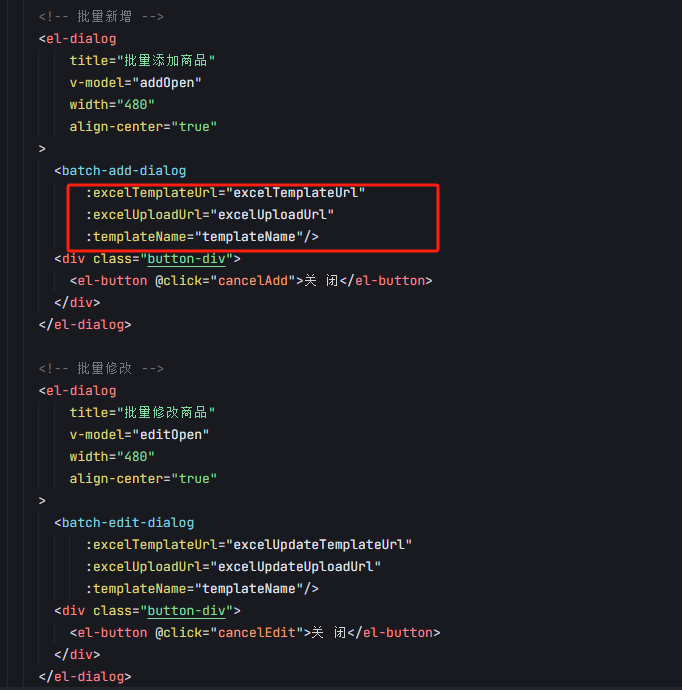
    <!-- 批量新增 -->
    <el-dialog
        title="批量添加商品"
        v-model="addOpen"
        width="480"
        align-center="true"
    >
      <batch-add-dialog
          :excelTemplateUrl="excelTemplateUrl"
          :excelUploadUrl="excelUploadUrl"
          :templateName="templateName"/>
      <div class="button-div">
        <el-button @click="cancelAdd">关 闭</el-button>
      </div>
    </el-dialog>

    <!-- 批量修改 -->
    <el-dialog
        title="批量修改商品"
        v-model="editOpen"
        width="480"
        align-center="true"
    >
      <batch-edit-dialog
          :excelTemplateUrl="excelUpdateTemplateUrl"
          :excelUploadUrl="excelUpdateUploadUrl"
          :templateName="templateName"/>
      <div class="button-div">
        <el-button @click="cancelEdit">关 闭</el-button>
      </div>
    </el-dialog>

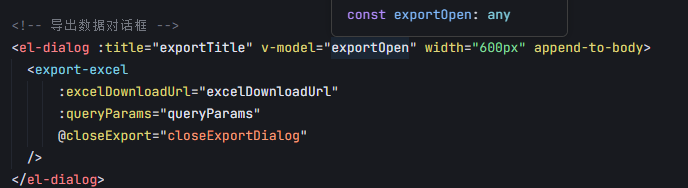
    <!-- 导出数据对话框 -->
    <el-dialog :title="exportTitle" v-model="exportOpen" width="600px" append-to-body>
      <export-excel
          :excelDownloadUrl="excelDownloadUrl"
          :queryParams="queryParams"
          @closeExport="closeExportDialog"
      />
    </el-dialog>
  </div>
</template>

<script setup name="Management">
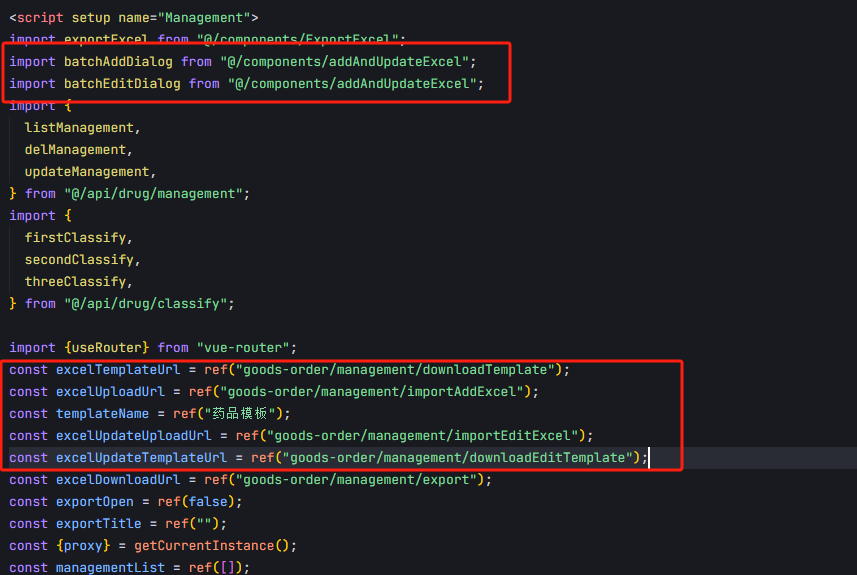
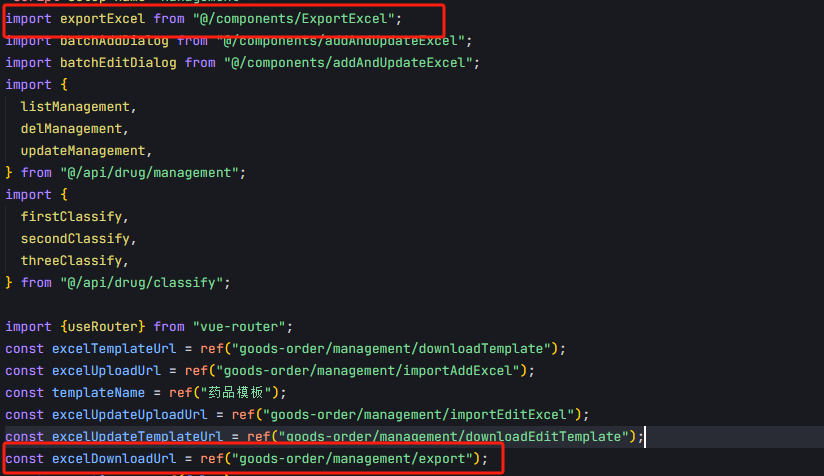
import exportExcel from "@/components/ExportExcel";
import batchAddDialog from "@/components/addAndUpdateExcel";
import batchEditDialog from "@/components/addAndUpdateExcel";
import {
  listManagement,
  delManagement,
  updateManagement,
} from "@/api/drug/management";
import {
  firstClassify,
  secondClassify,
  threeClassify,
} from "@/api/drug/classify";

import {useRouter} from "vue-router";
const excelDownloadUrl = ref("goods-order/management/export");
const exportOpen = ref(false);
const exportTitle = ref("");
const {proxy} = getCurrentInstance();
const managementList = ref([]);
const firstClassifyList = ref([]);
const secondClassifyList = ref([]);
const threeClassifyList = ref([]);
const loading = ref(true);
const showSearch = ref(true);
const ids = ref([]);
const single = ref(true);
const editOpen = ref(false);
const addOpen = ref(false);
const multiple = ref(true);
const total = ref(0);
const excelTemplateUrl = ref("goods-order/management/downloadTemplate");
const excelUploadUrl = ref("goods-order/management/importAddExcel");
const templateName = ref("药品模板");
const excelUpdateUploadUrl = ref("goods-order/management/importEditExcel");
const excelUpdateTemplateUrl = ref("goods-order/management/downloadEditTemplate");
const data = reactive({
  queryParams: {
    pageNum: 1,
    pageSize: 10,
    classifyCode: null,
    secondClassifyCode: null,
    threeClassifyCode: null,
    drugName: null,
    status: null,
    upc: null,
    ids: undefined,
  },
  rules: {},
});
const router = useRouter();
const {queryParams, rules} = toRefs(data);


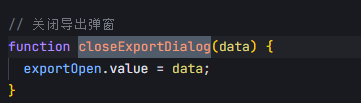
// 关闭导出弹窗
function closeExportDialog(data) {
  exportOpen.value = data;
}
/** 导出按钮操作 */
function handleExport() {
  queryParams.value.ids = ids.value;
  exportTitle.value = "导出操作数据";
  exportOpen.value = true;
};

/** 查询药品管理列表 */
function getList() {
  loading.value = true;
  listManagement(queryParams.value).then((response) => {
    managementList.value = response.rows;
    total.value = response.total;
    loading.value = false;
  });
}

/** 搜索按钮操作 */
function handleQuery() {
  queryParams.value.pageNum = 1;
  getList();
}

/** 重置按钮操作 */
function resetQuery() {
  proxy.resetForm("queryRef");
  queryParams.value.status = null;
  handleQuery();
}

// 多选框选中数据
function handleSelectionChange(selection) {
  ids.value = selection.map((item) => item.id);
  single.value = selection.length != 1;
  multiple.value = !selection.length;
}

/** 新增按钮操作 */
function handleAdd() {
  router.push({
    path: "/drug/management-update/update",
    query: {time: Date.now()},
  });
}

/** 修改按钮操作 */
function handleUpdate(row) {
  const _id = row.id;
  router.push({
    path: "/drug/management-update/update",
    query: {id: _id, time: Date.now()},
  });
}

/** 详情 */
function handleDetails(row) {
  const _id = row.id;
  router.push({
    path: "/drug/management-details/details",
    query: {id: _id, time: Date.now()},
  });
}

/** 修改状态*/
function handleUpdateStatus(row) {
  updateManagement(row).then((response) => {
    if (response.data && response.data == 405) {
      proxy.$modal.msgError(response.msg);
      row.status = "1";
    } else {
      proxy.$modal.msgSuccess("修改成功");
      getList();
    }
  });
}

/** 删除按钮操作 */
function handleDelete(row) {
  const _ids = row.id || ids.value;
  proxy.$modal
      .confirm('是否确认删除药品管理编号为"' + _ids + '"的数据项?')
      .then(function () {
        return delManagement(_ids);
      })
      .then(() => {
        getList();
        proxy.$modal.msgSuccess("删除成功");
      })
      .catch(() => {
      });
}


/** 查询一级分类 */
function findFirstClassify() {
  firstClassify().then((response) => {
    firstClassifyList.value = response.data;
  });
}

/** 查询二级级分类 */
function findSecondClassify(id) {
  queryParams.value.secondClassifyCode = undefined,
      queryParams.value.threeClassifyCode = undefined,
      secondClassify(id).then((response) => {
        secondClassifyList.value = response.data;
      });
}

/** 查询三级级分类 */
function findThreeClassify(id) {
  queryParams.value.threeClassifyCode = undefined,
      threeClassify(id).then((response) => {
        threeClassifyList.value = response.data;
      });
}

getList();
findFirstClassify();

//复制链接
function handleCopy(row) {
  try {
    const textToCopy = ref("goods-order/management/getInfo");
    navigator.clipboard.writeText(textToCopy.value + "/" + row.id);
    proxy.$modal.msgSuccess("复制成功");
  } catch (err) {
    proxy.$modal.msgError("复制失败", err);
  }
}

//批量添加药品
function batchAdd() {
  addOpen.value = true;
}

//批量修改药品
function batchEdit() {
  editOpen.value = true;
}

function cancelAdd() {
  addOpen.value = false;
}

function cancelEdit() {
  editOpen.value = false;
}
</script>

<style scoped>
.batch-div {
  padding: 6px;
  width: 100%;
  height: 30px;
  cursor: pointer;
}

.button-div {
  float: right;
}
</style>
父传子
子传父

中国智能体开发者社区,聚焦智能体与大模型开发,提供前沿资讯、实用工具链、开源项目及行业案例。通过技术沙龙、开发者大赛等活动,促进经验交流与协作,助力开发者快速构建创新智能应用。
更多推荐

 5
5 0
0- 0


 已为社区贡献3条内容

所有评论(0)