SAM3-构建自己的预标注平台,开箱即用
·
1、算法简介
SAM 3 是一个统一的基础模型,用于图像和视频中的提示分割。它可以通过文本或视觉提示(如点、方框和遮罩)来检测、分割和跟踪物体。
git:https://github.com/facebookresearch/sam3

模型权重:https://www.modelscope.cn/models/facebook/sam3  #魔塔社区开源
2、开箱即用指南
git clone https://github.com/facebookresearch/sam3.git
cd sam3
新建推理文件:
import torch
from PIL import Image
from sam3.model_builder import build_sam3_image_model
from sam3.model.sam3_image_processor import Sam3Processor
import time
import numpy as np
import matplotlib as plt
import os

# Load the model
model_path = "sam3/sam3.pt" #这里需要注意
model = build_sam3_image_model(checkpoint_path = model_path) #这里的加载权重方式
processor = Sam3Processor(model)
# Load an image
start_time = time.time()
image = Image.open("0a4058b394f64f78964855617304aed2.jpg").convert("RGB")   # 修改为测试图像
inference_state = processor.set_image(image)
# Prompt the model with text
output = processor.set_text_prompt(state=inference_state, prompt="tongue")   # 修改文本提示词,想要分割的目标

# Get the masks, bounding boxes, and scores
masks, boxes, scores = output["masks"], output["boxes"], output["scores"]
print(f"Found {len(masks)} objects")
3、创新之处
SAM 1和SAM 2实现了通过点、框等视觉提示来分割单个物体的能力,也就是我们常说的“万物可点”。在实际应用中,我们常常有这样的需求:“帮我把这张图里所有的猫都圈出来”,或者“把视频里所有戴着安全帽的工人都跟踪起来”。
引入了一个任务范式——Promptable Concept Segmentation (PCS),将分割能力从“单个实例”提升到了“所有概念实例”的维度。允许用户通过简单的名词短语(如“红色苹果”或“条纹猫”)或图像范例,甚至两者结合,指定一个视觉概念,模型便能自动检测、分割并跟踪所有匹配的物体实例。
4、SAM3进行分割后,转化为labelme的json文件
import torch
import numpy as np
import os
import json
import cv2
from PIL import Image
from sam3.model_builder import build_sam3_image_model
from sam3.model.sam3_image_processor import Sam3Processor

# Function to convert masks to LabelMe format
def mask_to_labelme_json(image_path, masks, boxes, scores, output_json_path, image_id):
    # Create the base JSON structure
    labelme_data = {
        "version": "4.5.6",
        "flags": {},
        "shapes": [],
        "imagePath": os.path.basename(image_path),
        "imageData": None,  # Optional: can include base64 encoded image if needed
        "imageHeight": masks.shape[1],
        "imageWidth": masks.shape[2],
        "imageId": image_id
    }

    # Convert each mask to a polygon shape
    for i, mask in enumerate(masks):
        if scores[i] < 0.5:  # Filter out low-confidence masks
            continue

        # Convert mask to binary and move to CPU before converting to numpy
        mask = mask.cpu().numpy().astype(np.uint8) * 255  # Convert to binary mask

        # Remove the first dimension, ensuring it's 2D (height, width)
        mask = mask.squeeze(0)  # Converts shape from (1, height, width) to (height, width)

        # Ensure mask is binary
        _, mask = cv2.threshold(mask, 127, 255, cv2.THRESH_BINARY)

        # Find contours
        contours, _ = cv2.findContours(mask, cv2.RETR_EXTERNAL, cv2.CHAIN_APPROX_SIMPLE)

        for contour in contours:
            # Append shape to labelme data (contour points in x, y pairs)
            points = contour.reshape(-1, 2).tolist()
            shape = {
                "label": f"object_{i}",
                "points": points,
                "group_id": None,
                "shape_type": "polygon",
                "flags": {}
            }
            labelme_data["shapes"].append(shape)

    # Save JSON to file
    with open(output_json_path, 'w') as f:
        json.dump(labelme_data, f, indent=4)

# Load the model
model_path = "sam3/sam3.pt"
model = build_sam3_image_model(checkpoint_path=model_path)
processor = Sam3Processor(model)

# Create output folder for the JSON files
output_dir = "imgs/"
os.makedirs(output_dir, exist_ok=True)

# Process multiple images
image_folder = "imgs/"
image_paths = [os.path.join(image_folder, f) for f in os.listdir(image_folder) if f.endswith('.JPG')]

# For each image
for image_id, image_path in enumerate(image_paths):
    print(f"Processing image {image_id + 1}/{len(image_paths)}: {image_path}")

    # Load an image
    image = Image.open(image_path).convert("RGB")
    inference_state = processor.set_image(image)

    # Prompt the model with text
    output = processor.set_text_prompt(state=inference_state, prompt="毛孔")

    # Get the masks, bounding boxes, and scores
    masks, boxes, scores = output["masks"], output["boxes"], output["scores"]
    print(f"Found {len(masks)} objects")

    # Generate LabelMe JSON
    json_output_path = os.path.join(output_dir, f"{os.path.basename(image_path).split('.')[0]}.json")
    mask_to_labelme_json(image_path, masks, boxes, scores, json_output_path, image_id)
    print(f"Saved JSON to {json_output_path}")

print("All images processed.")
效果展示: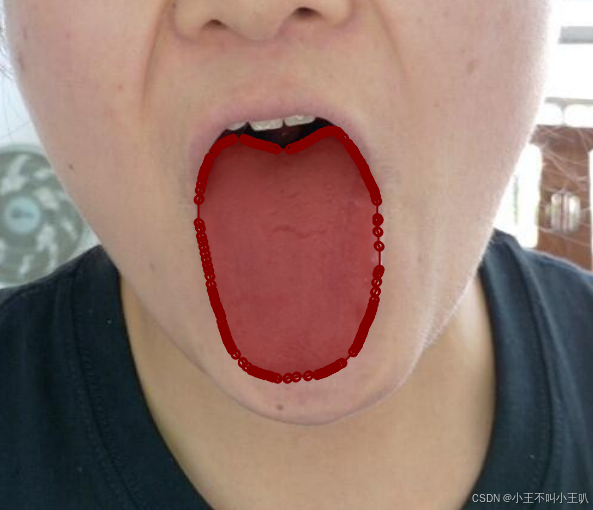

中国智能体开发者社区,聚焦智能体与大模型开发,提供前沿资讯、实用工具链、开源项目及行业案例。通过技术沙龙、开发者大赛等活动,促进经验交流与协作,助力开发者快速构建创新智能应用。
更多推荐

 6
6 0
0- 0


 已为社区贡献1条内容

所有评论(0)