websocket连接测试工具网页版
【代码】websocket连接测试工具网页版。
·
复制粘贴即可使用
网页预览图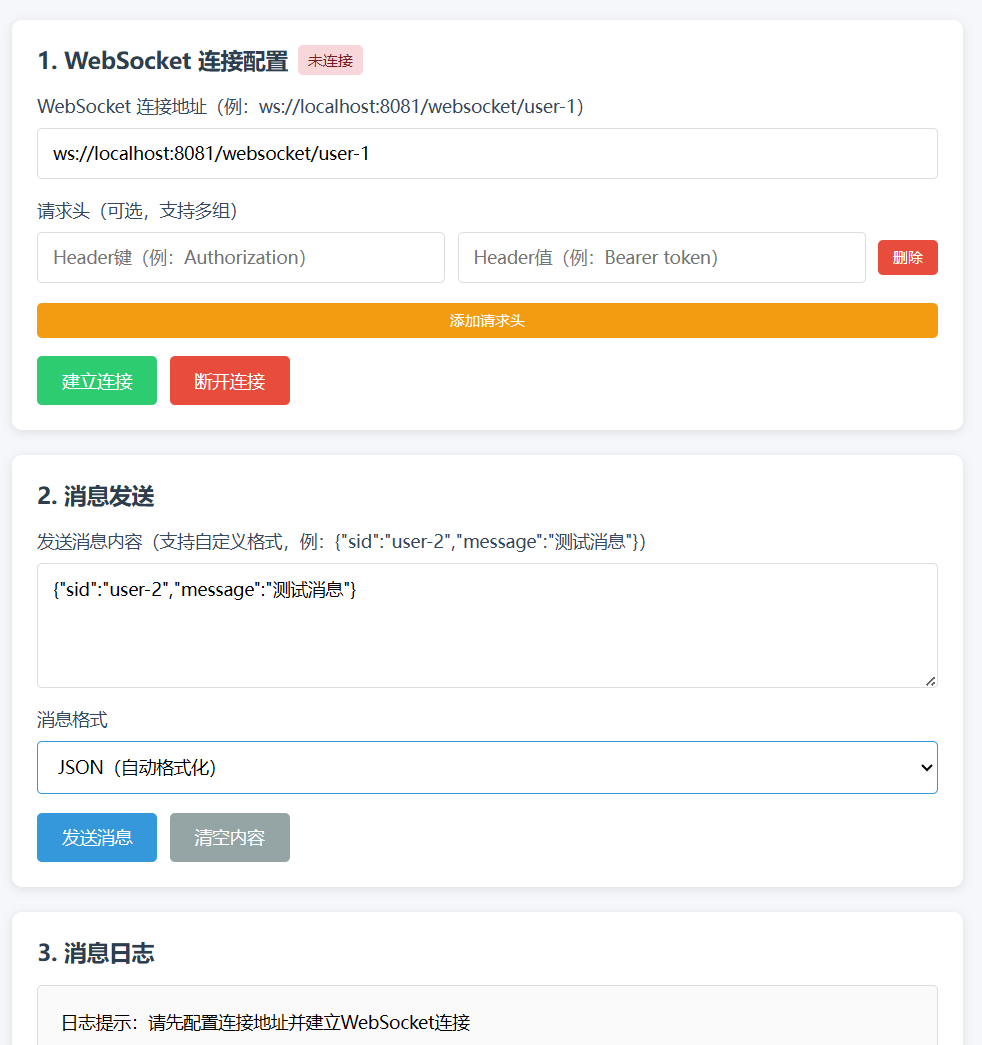
<!DOCTYPE html>
<html lang="zh-CN">
<head>
    <meta charset="UTF-8">
    <meta name="viewport" content="width=device-width, initial-scale=1.0">
    <title>WebSocket 自定义测试工具</title>
    <style>
        * {
            margin: 0;
            padding: 0;
            box-sizing: border-box;
            font-family: "Microsoft YaHei", sans-serif;
        }
        body {
            padding: 20px;
            background-color: #f5f7fa;
        }
        .container {
            max-width: 1200px;
            margin: 0 auto;
            gap: 20px;
            display: flex;
            flex-direction: column;
        }
        .card {
            background: white;
            padding: 20px;
            border-radius: 8px;
            box-shadow: 0 2px 8px rgba(0,0,0,0.1);
        }
        .card-title {
            font-size: 18px;
            font-weight: 600;
            margin-bottom: 15px;
            color: #2c3e50;
            display: flex;
            align-items: center;
            gap: 8px;
        }
        .form-group {
            margin-bottom: 15px;
            display: flex;
            flex-direction: column;
            gap: 8px;
        }
        .form-group label {
            font-size: 14px;
            color: #34495e;
            font-weight: 500;
        }
        .form-group input, .form-group textarea, .form-group select {
            padding: 10px 12px;
            border: 1px solid #ddd;
            border-radius: 4px;
            font-size: 14px;
            transition: border 0.3s;
        }
        .form-group input:focus, .form-group textarea:focus, .form-group select:focus {
            outline: none;
            border-color: #3498db;
        }
        .form-group textarea {
            min-height: 100px;
            resize: vertical;
        }
        .btn-group {
            display: flex;
            gap: 10px;
            margin-top: 10px;
        }
        .btn {
            padding: 10px 20px;
            border: none;
            border-radius: 4px;
            font-size: 14px;
            font-weight: 500;
            cursor: pointer;
            transition: background 0.3s;
        }
        .btn-connect {
            background-color: #2ecc71;
            color: white;
        }
        .btn-connect:disabled {
            background-color: #bdc3c7;
            cursor: not-allowed;
        }
        .btn-disconnect {
            background-color: #e74c3c;
            color: white;
        }
        .btn-send {
            background-color: #3498db;
            color: white;
        }
        .btn-clear {
            background-color: #95a5a6;
            color: white;
        }
        .status {
            display: inline-block;
            padding: 4px 8px;
            border-radius: 4px;
            font-size: 12px;
            font-weight: 500;
        }
        .status-disconnected {
            background-color: #f8d7da;
            color: #721c24;
        }
        .status-connected {
            background-color: #d4edda;
            color: #155724;
        }
        .message-log {
            width: 100%;
            height: 300px;
            border: 1px solid #ddd;
            border-radius: 4px;
            padding: 10px;
            overflow-y: auto;
            background-color: #fafafa;
            font-size: 14px;
            line-height: 1.5;
        }
        .message {
            margin-bottom: 10px;
            padding: 8px;
            border-radius: 4px;
        }
        .message-receive {
            background-color: #e3f2fd;
            border-left: 3px solid #2196f3;
        }
        .message-send {
            background-color: #e8f5e9;
            border-right: 3px solid #4caf50;
            text-align: right;
        }
        .message-time {
            font-size: 12px;
            color: #7f8c8d;
            margin-bottom: 4px;
        }
        .header-item {
            display: flex;
            gap: 10px;
            align-items: center;
            margin-bottom: 8px;
        }
        .header-item input {
            flex: 1;
        }
        .btn-add-header {
            background-color: #f39c12;
            color: white;
            padding: 6px 12px;
            font-size: 12px;
        }
        .btn-remove-header {
            background-color: #e74c3c;
            color: white;
            padding: 6px 12px;
            font-size: 12px;
        }
    </style>
</head>
<body>
    <div class="container">
        <!-- 连接配置区 -->
        <div class="card">
            <div class="card-title">
                1. WebSocket 连接配置
                <span id="connectionStatus" class="status status-disconnected">未连接</span>
            </div>
            <div class="form-group">
                <label for="wsUrl">WebSocket 连接地址(例:ws://localhost:8081/websocket/user-1)</label>
                <input type="text" id="wsUrl" placeholder="请输入WebSocket连接地址" value="ws://localhost:8081/websocket/user-1">
            </div>
            <div class="form-group">
                <label>请求头(可选,支持多组)</label>
                <div id="headerList">
                    <div class="header-item">
                        <input type="text" placeholder="Header键(例:Authorization)" class="header-key">
                        <input type="text" placeholder="Header值(例:Bearer token)" class="header-value">
                        <button class="btn btn-remove-header" onclick="removeHeader(this)">删除</button>
                    </div>
                </div>
                <button class="btn btn-add-header" onclick="addHeader()">添加请求头</button>
            </div>
            <div class="btn-group">
                <button class="btn btn-connect" id="connectBtn" onclick="connectWebSocket()">建立连接</button>
                <button class="btn btn-disconnect" id="disconnectBtn" onclick="disconnectWebSocket()" disabled>断开连接</button>
            </div>
        </div>

        <!-- 消息发送区 -->
        <div class="card">
            <div class="card-title">2. 消息发送</div>
            <div class="form-group">
                <label for="sendMessage">发送消息内容(支持自定义格式,例:{"sid":"user-2","message":"测试消息"})</label>
                <textarea id="sendMessage" placeholder="请输入要发送的消息" value='{"sid":"user-2","message":"测试消息"}'>{"sid":"user-2","message":"测试消息"}</textarea>
            </div>
            <div class="form-group">
                <label for="messageType">消息格式</label>
                <select id="messageType" onchange="formatMessage()">
                    <option value="json">JSON(自动格式化)</option>
                    <option value="text">纯文本</option>
                </select>
            </div>
            <div class="btn-group">
                <button class="btn btn-send" id="sendBtn" onclick="sendMessage()" disabled>发送消息</button>
                <button class="btn btn-clear" onclick="clearSendMessage()">清空内容</button>
            </div>
        </div>

        <!-- 消息日志区 -->
        <div class="card">
            <div class="card-title">3. 消息日志</div>
            <div class="message-log" id="messageLog">
                <div class="message">日志提示:请先配置连接地址并建立WebSocket连接</div>
            </div>
            <div class="btn-group" style="margin-top: 10px;">
                <button class="btn btn-clear" onclick="clearMessageLog()">清空日志</button>
            </div>
        </div>
    </div>

    <script>
        let websocket = null;
        const wsUrlInput = document.getElementById('wsUrl');
        const connectBtn = document.getElementById('connectBtn');
        const disconnectBtn = document.getElementById('disconnectBtn');
        const sendBtn = document.getElementById('sendBtn');
        const connectionStatus = document.getElementById('connectionStatus');
        const messageLog = document.getElementById('messageLog');
        const sendMessageInput = document.getElementById('sendMessage');
        const messageTypeSelect = document.getElementById('messageType');

        // 添加请求头
        function addHeader() {
            const headerList = document.getElementById('headerList');
            const headerItem = document.createElement('div');
            headerItem.className = 'header-item';
            headerItem.innerHTML = `
                <input type="text" placeholder="Header键(例:Authorization)" class="header-key">
                <input type="text" placeholder="Header值(例:Bearer token)" class="header-value">
                <button class="btn btn-remove-header" onclick="removeHeader(this)">删除</button>
            `;
            headerList.appendChild(headerItem);
        }

        // 删除请求头
        function removeHeader(btn) {
            const headerItem = btn.parentElement;
            if (document.querySelectorAll('.header-item').length > 1) {
                headerItem.parentElement.removeChild(headerItem);
            } else {
                showLog('至少保留一组请求头(可留空)', 'system');
            }
        }

        // 格式化消息(JSON格式时自动美化)
        function formatMessage() {
            const message = sendMessageInput.value.trim();
            const type = messageTypeSelect.value;
            if (type === 'json') {
                try {
                    const jsonObj = JSON.parse(message || '{}');
                    sendMessageInput.value = JSON.stringify(jsonObj, null, 2);
                } catch (e) {
                    showLog('JSON格式错误,无法自动格式化', 'system');
                }
            }
        }

        // 建立WebSocket连接
        function connectWebSocket() {
            const wsUrl = wsUrlInput.value.trim();
            if (!wsUrl) {
                showLog('请先输入WebSocket连接地址', 'system');
                return;
            }

            // 关闭已有连接
            if (websocket) {
                websocket.close();
            }

            try {
                // 构建带请求头的WebSocket连接
                const headers = {};
                document.querySelectorAll('.header-item').forEach(item => {
                    const key = item.querySelector('.header-key').value.trim();
                    const value = item.querySelector('.header-value').value.trim();
                    if (key) {
                        headers[key] = value;
                    }
                });

                // 处理请求头(WebSocket标准不直接支持,此处用自定义方式传递,实际需服务端配合)
                let finalUrl = wsUrl;
                if (Object.keys(headers).length > 0) {
                    // 方式1:通过URL参数传递(简单场景)
                    const urlParams = new URLSearchParams();
                    Object.entries(headers).forEach(([key, value]) => {
                        urlParams.append(`header_${key}`, value);
                    });
                    finalUrl += (wsUrl.includes('?') ? '&' : '?') + urlParams.toString();

                    // 方式2:若服务端支持,可通过WebSocket的protocols参数传递(需服务端解析)
                    // const protocols = Object.entries(headers).map(([k, v]) => `${k}=${v}`);
                    // websocket = new WebSocket(finalUrl, protocols);
                }

                // 创建WebSocket实例
                websocket = new WebSocket(finalUrl);

                // 连接成功回调
                websocket.onopen = function() {
                    connectionStatus.className = 'status status-connected';
                    connectionStatus.textContent = '已连接';
                    connectBtn.disabled = true;
                    disconnectBtn.disabled = false;
                    sendBtn.disabled = false;
                    showLog(`成功连接到:${wsUrl}`, 'system');
                };

                // 接收消息回调
                websocket.onmessage = function(event) {
                    showLog(`收到消息:${event.data}`, 'receive');
                };

                // 连接关闭回调
                websocket.onclose = function(event) {
                    connectionStatus.className = 'status status-disconnected';
                    connectionStatus.textContent = '未连接';
                    connectBtn.disabled = false;
                    disconnectBtn.disabled = true;
                    sendBtn.disabled = true;
                    showLog(`连接已断开,代码:${event.code},原因:${event.reason}`, 'system');
                };

                // 连接错误回调
                websocket.onerror = function(error) {
                    showLog(`连接错误:${error.message || '未知错误'}`, 'system');
                };
            } catch (error) {
                showLog(`创建连接失败:${error.message}`, 'system');
            }
        }

        // 断开WebSocket连接
        function disconnectWebSocket() {
            if (websocket) {
                websocket.close();
                websocket = null;
            }
        }

        // 发送消息
        function sendMessage() {
            const message = sendMessageInput.value.trim();
            if (!message) {
                showLog('请先输入要发送的消息', 'system');
                return;
            }

            if (!websocket || websocket.readyState !== WebSocket.OPEN) {
                showLog('WebSocket未连接,无法发送消息', 'system');
                return;
            }

            try {
                // 按选择的格式处理消息
                let sendData = message;
                if (messageTypeSelect.value === 'json') {
                    JSON.parse(message); // 验证JSON格式
                }
                websocket.send(sendData);
                showLog(`发送消息:${sendData}`, 'send');
            } catch (error) {
                showLog(`发送失败:${error.message}(若为JSON格式,请检查语法)`, 'system');
            }
        }

        // 显示日志
        function showLog(content, type = 'system') {
            const now = new Date();
            const timeStr = `${now.getHours().toString().padStart(2, '0')}:${now.getMinutes().toString().padStart(2, '0')}:${now.getSeconds().toString().padStart(2, '0')}`;

            const messageItem = document.createElement('div');
            messageItem.className = `message message-${type}`;
            messageItem.innerHTML = `<div class="message-time">${timeStr}</div><div class="message-content">${content}</div>`;

            messageLog.appendChild(messageItem);
            // 滚动到最新日志
            messageLog.scrollTop = messageLog.scrollHeight;
        }

        // 清空发送内容
        function clearSendMessage() {
            sendMessageInput.value = '';
        }

        // 清空日志
        function clearMessageLog() {
            messageLog.innerHTML = '<div class="message">日志已清空</div>';
        }

        // 页面关闭前断开连接
        window.onbeforeunload = function() {
            if (websocket && websocket.readyState === WebSocket.OPEN) {
                websocket.close();
            }
        };
    </script>
</body>
</html>
火山引擎开发者社区是火山引擎打造的AI技术生态平台,聚焦Agent与大模型开发,提供豆包系列模型(图像/视频/视觉)、智能分析与会话工具,并配套评测集、动手实验室及行业案例库。社区通过技术沙龙、挑战赛等活动促进开发者成长,新用户可领50万Tokens权益,助力构建智能应用。
更多推荐
 2
2 0
0- 0


 已为社区贡献1条内容

所有评论(0)